
ithtelab/workbuddy-manager
ithtelab/workbuddy-manager has 2,409 GitHub stars and 498 forks. GitHot measured +25 stars in 24 hours and +282 in 7 days. Last checked 2026-11-05 01:09 UTC. Last push 2026-10-29.
腾讯 CodeBuddy 账号池管理控制台,内置 OpenAI 兼容反代网关:扫码批量纳管账号、定时签到与保活、密钥分组分发、IP 与模型白名单、调用日志与用量统计;支持带签名校验的一键更新。
Measured star growth
- in 24h
- +25
- in 7 days
- +282
- in 15 days
- Collecting history
- in 1 month
- Collecting history
Net star changes over overlapping periods, not daily totals. Missing measurements are left blank. Stars measure attention, not software quality.
README.en.md
OriginalWorkBuddy Manager
Management console for Tencent CodeBuddy account pools · OpenAI-compatible gateway
A web console for workbuddy2api: QR onboarding, scheduled check-in and keep-alive, per-group key distribution, IP and model allowlists, request logs and usage stats; the upstream source ships inside the release package (MIT) — see the deployment guide for migration.








English · 简体中文 | Documented and discussed in the LINUX DO community
⚠️ Intended use: this project is only for managing accounts that you or your family members have voluntarily authorized. Bulk registration, account trading, registration-on-behalf, SMS-code farming, account theft, bypassing platform risk controls, resale, or any for-profit use are prohibited. By using this project you agree to the full disclaimer.

Sponsor: ProxyLane residential proxies in 195 countries, 95%+ of IPs rated low risk by Scamalytics. Put the country, city and a session name in the WB_HTTP_PROXY username: each instance gets one residential IP for up to 72 hours, and a replacement IP stays in the same city.
New customers get 30% off the first purchase with code WORKBUDDY30.
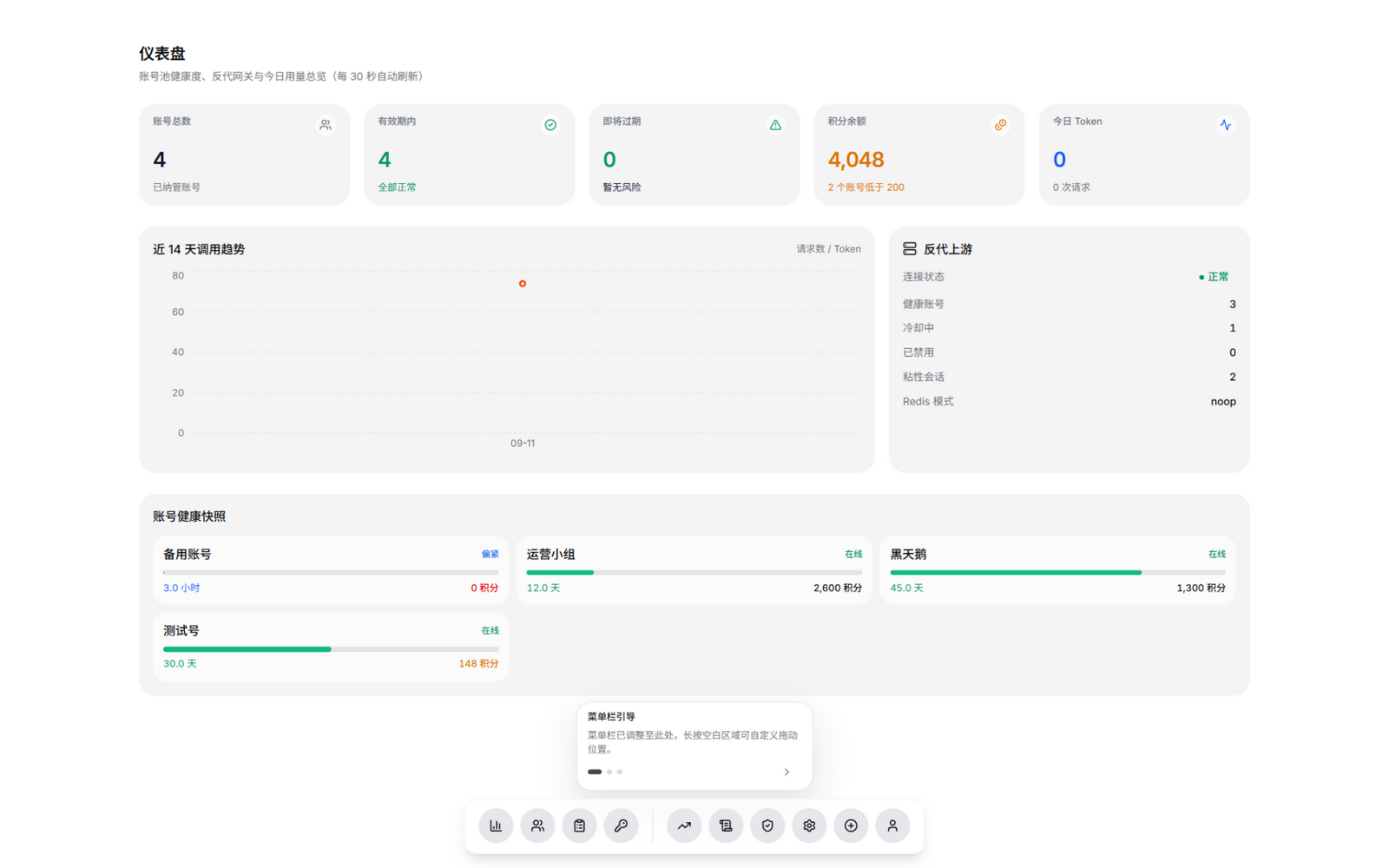
Interface preview
Repository: github.com/ithtelab/workbuddy-manager — we just passed 2k stars; thank you to everyone who starred, filed an issue or sent a PR. If this project is useful to you, a star is a real show of support.
What is this
workbuddy2api (its original repository has been deleted by its author) wraps a Tencent CodeBuddy
account pool into an OpenAI-compatible API (written in Go). Its capabilities are complete,
but they are command-line only: adding an account means running a script, checking status
means curl /status, and handing out API keys has no interface at all.
This project fills that gap — a web console you can safely run on the public internet:
| What you used to do | What you do now |
|---|---|
Run login.sh on the server to scan a QR code |
Click "Add account", scan, and it is checked in and managed automatically |
curl /status to see which account is down |
Dashboard shows health, cooldown and token expiry in real time |
Hand-edit config.json for check-in / concurrency |
Visual settings with toggles and number inputs |
| Every downstream client shares one global key | Issue multiple keys, each with its own quota, IP and model allowlist |
| No idea who consumed how much | Every call is logged: model, tokens, latency, source IP |
| No IP protection at all | Inbound allow/deny lists plus per-key IP limits and allowlists |
Not a single line of workbuddy2api is modified. Account rotation, concurrency and circuit breaking stay its job; this project is a separate console and gateway.
How this relates to workbuddy2api: this project is the visual companion to it — it makes a capable upstream gateway visible and manageable. The two fit together naturally:
- The upstream provides the capabilities, the panel presents them: account scheduling, token refresh and circuit breaking are workbuddy2api's job; the panel visualises those capabilities and adds the operational side — key distribution, IP control, usage stats
- We learn from each other and evolve together: when the upstream gains a capability this project follows, and operational needs discovered on the panel side feed back to the upstream. The upstream lists this project among its "community front-end panels", and we hope to make that ecosystem better together
- The upstream stays focused on its core: the panel does not ask the upstream to change code for it, so the upstream can stay lean
Contributions are welcome: both panel and upstream-source issues and ideas belong in this repository — the original upstream repo is gone, and its source is now maintained here.
Highlights
Accounts
- QR onboarding — WeChat / QQ scan-to-authorize, then daily check-in, auth file write and upstream reload
- Token monitoring — expiry bars with warnings, one-click renewal, connectivity probe, manual check-in
- Account groups — several pools side by side; lists, check-in and keys stay per-group
- Credits & expiry — live balance, graded colouring, countdown for soon-to-expire credits
- Task history — check-in / travel / activity / keep-alive results and credit flow, paged
Gateway (/v1)
- OpenAI compatible — standard SDKs connect directly; streaming and non-streaming
- Key distribution — per-key realm, expiry, IP count, IP / model allowlists and quota
- Model aliases — map the names your downstream uses onto the real models
- Model centre — every usable model on one page: context, max output, thinking tiers
- Full audit trail — key, IP, model, status, TTFB, billing and cache hits per call
Visual settings
- Scheduled tasks — check-in / travel / activity / keep-alive, each with its own switch and time
- Multiple upstreams — configure several instances, each with its own address and
api_key - Security — inbound IP allow / deny lists (CIDR), audit log, separate session and API tokens
- Updates & backup — one-click update (checksum-verified), off-site PostgreSQL backup
- Five locales — Simplified / Traditional Chinese, English, Japanese, Korean
The exhaustive list (with detail per item) lives in the full feature list.
Screenshots
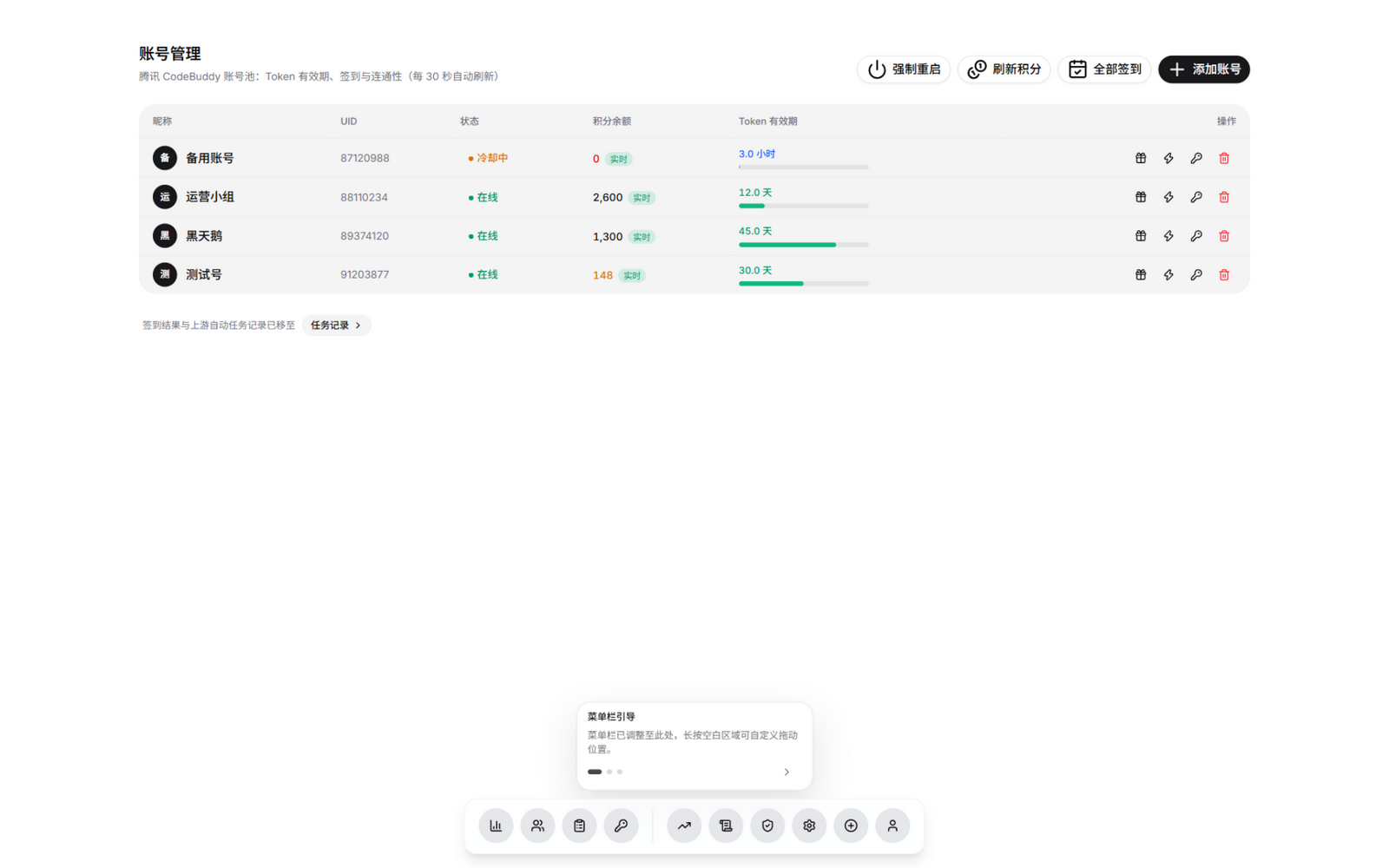
Accounts: group switcher, availability tiers, credits and expiry
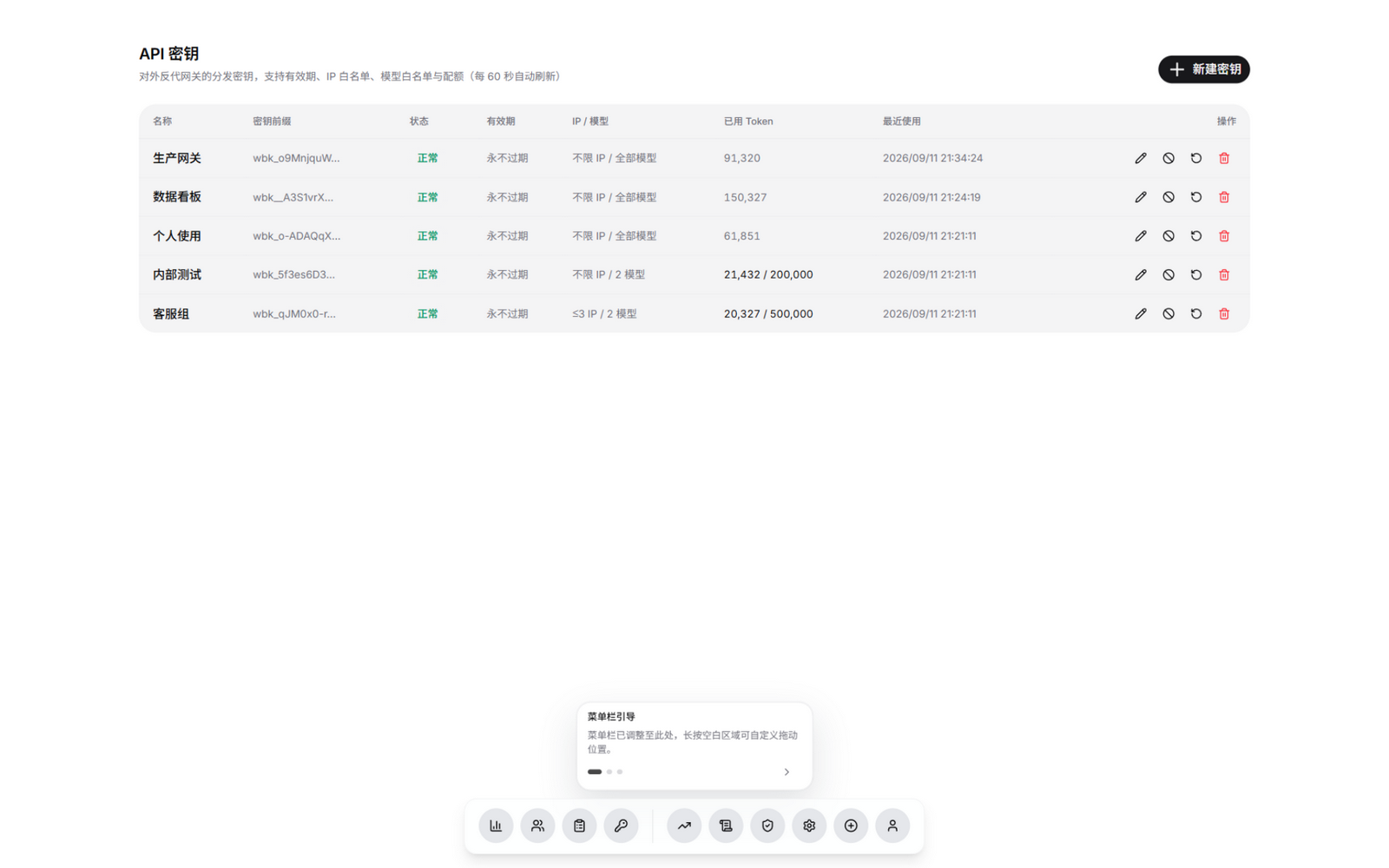
Keys: realm, quota, IP and model allowlists
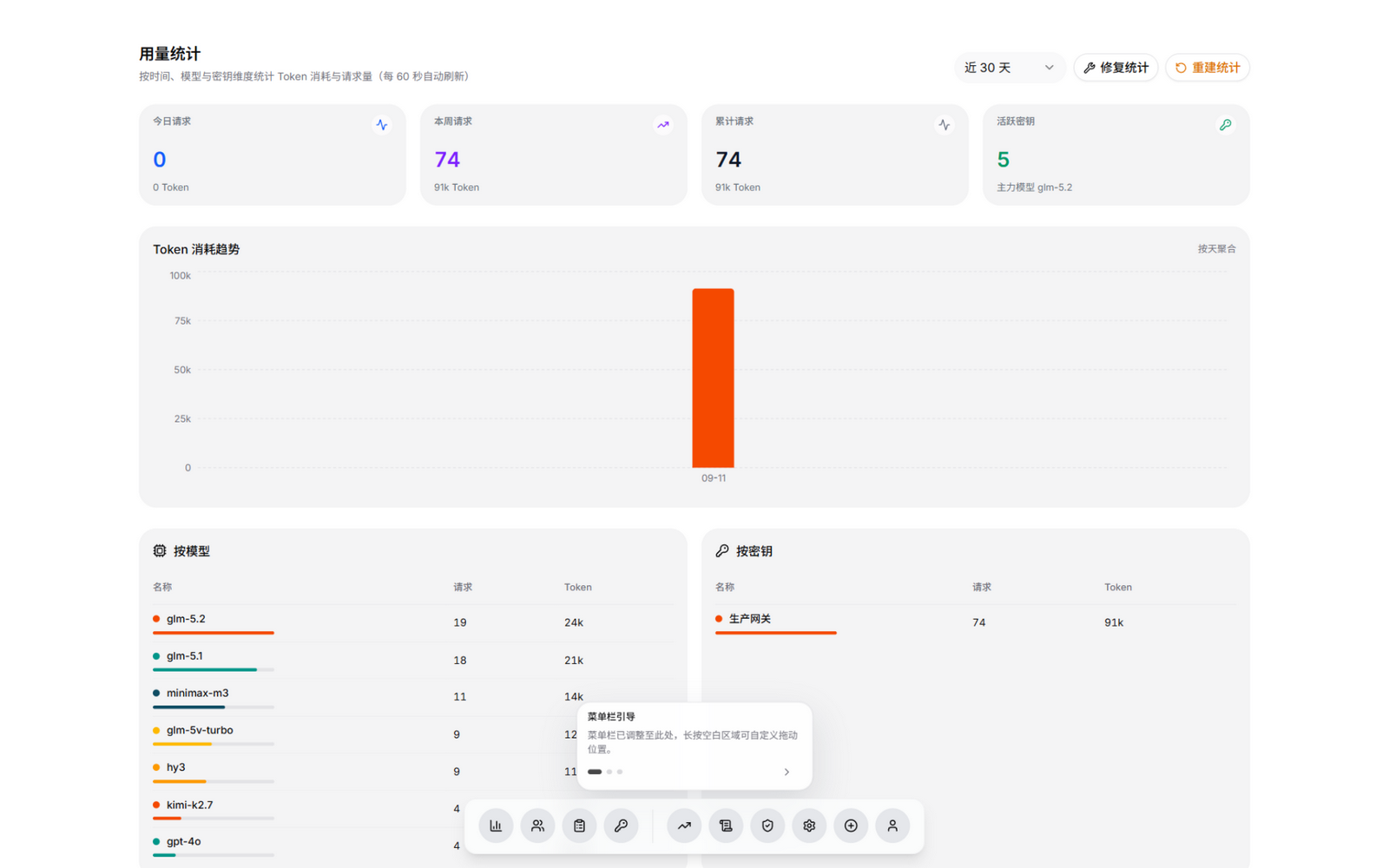
Usage: daily / hourly, failures and latency
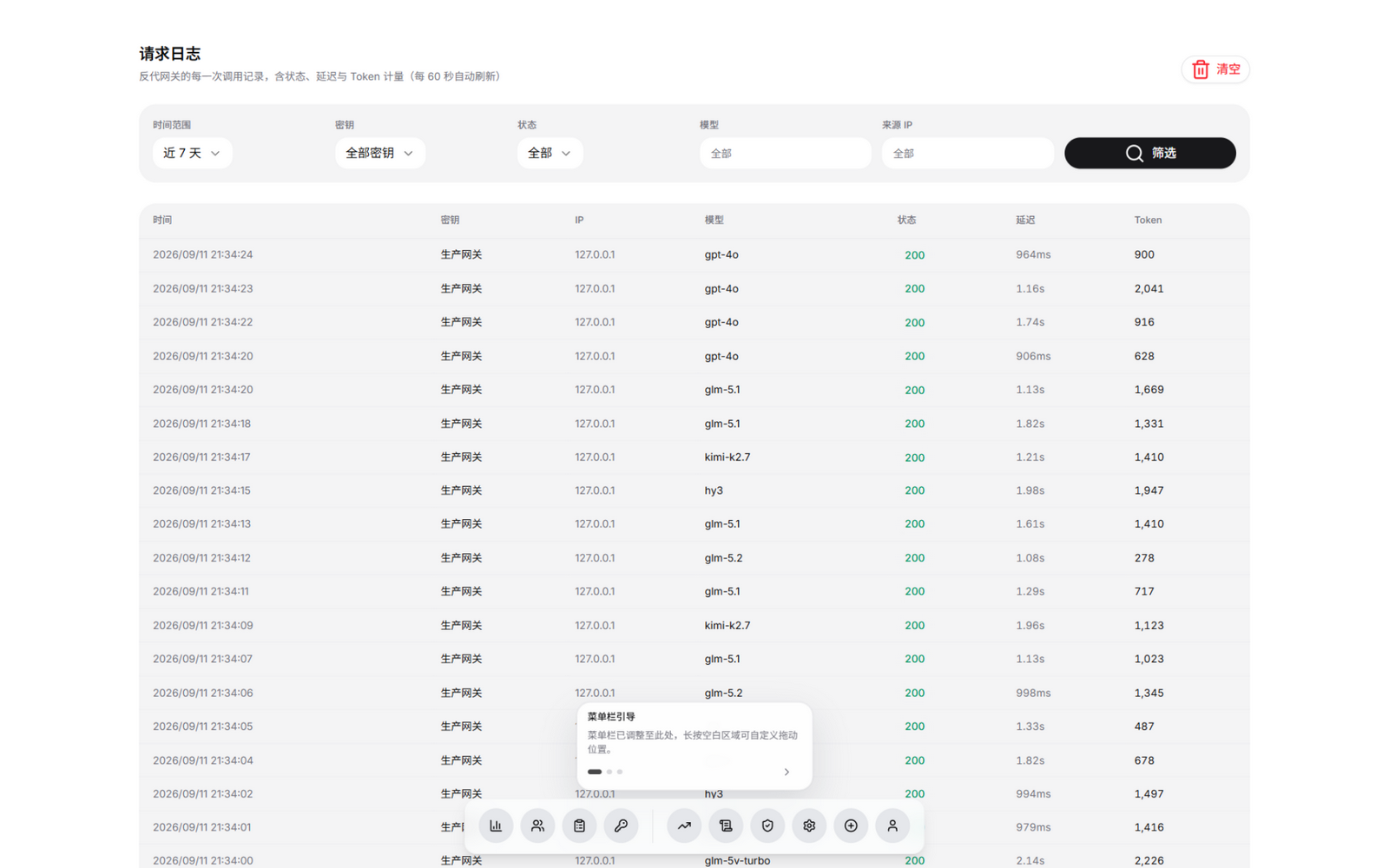
Request logs: model, status, TTFB and billing per call
More screenshots: full gallery.
Official download source
We recommend downloading from this repository's Releases. Official packages ship with a sha256 digest and .sig signature, and the updater verifies both. Packages obtained elsewhere cannot be verified through that chain, so judge the source yourself — and never disable the digest or signature checks (WB_SKIP_SIGNATURE=1, etc.) to install one.
This project is open source under the MIT licence, and anyone may use, modify and redistribute it within that licence. Builds from other sources existing is expected; treat this repository's release notes and checksums as the reference.
Quick start
You need a server that can run Docker (1 vCPU / 1 GB is enough). Pick one:
① Docker (run the container yourself)
docker run -d --name workbuddy-manager -p 7864:7864 -v /opt/workbuddy-manager/data:/app/data ghcr.io/ithtelab/workbuddy-manager:latest
② One-shot installer (dependencies, package, systemd)
bash <(curl -fsSL https://raw.githubusercontent.com/ithtelab/workbuddy-manager/main/deploy/install.sh)
Then open http://<your-server>:7864; the initial admin password is printed in the first
startup log.
The upstream source ships inside the release package, so a fresh install just works. Reverse proxy / HTTPS, port hardening, Windows (no Docker) and local development are covered in the deployment guide and development notes.
Usage
Three steps in daily use: onboard accounts → hand out keys → point your downstream at
/v1. How each step works, client snippets (OpenAI SDK, cc-switch, …) and the FAQ live
in the usage guide.
API reference
| Method | Path | Auth | Description |
|---|---|---|---|
POST |
/v1/chat/completions |
gateway key | OpenAI-compatible chat (streaming / non-streaming) |
POST |
/v2/chat/completions |
gateway key | Same as above (v2 path) |
POST |
/v1/responses /responses |
gateway key | OpenAI Responses API compatible (streaming / non-streaming) |
POST |
/v1/messages |
gateway key | Anthropic Messages API compatible (Claude Code, etc.) |
POST |
/v1/messages/count_tokens |
gateway key | Rough input-token estimate (by character count) |
GET |
/v1/models |
gateway key | Model list |
GET |
/v1/usage |
gateway key | Self-check for one key: used / remaining quota, expiry, model scope (reads panel records; makes no call) |
GET |
/healthz |
none | Liveness probe (includes upstream connectivity) |
GET |
/api/me |
session | Current user |
POST |
/api/login /api/logout |
none | Sign in / out |
GET |
/api/accounts |
session | Account list |
GET |
/api/accounts/credits-snapshot |
session / read-only token | Read-only snapshot of recorded credits (dashboards / reconciliation; never queries upstream) |
POST |
/api/auth/start /api/auth/poll |
admin | QR authorisation flow |
POST |
/api/accounts/{file}/checkin /test /refresh |
admin | Check-in / probe / refresh |
DELETE |
/api/accounts/{file} |
admin | Delete an account |
GET/POST/PATCH/DELETE |
/api/keys[/{id}] |
session / admin | Key management (handed to downstream callers) |
GET/POST/PATCH/DELETE |
/api/upstreams[/{id}] |
session (admin) | Multiple upstream endpoints (a key bound to one = account-pool group); POST /api/upstreams/{id}/probe checks connectivity |
GET/POST/PATCH/DELETE |
/api/tokens[/{id}] |
session (admin) | Admin API tokens (for scripts / CI, see docs/api-tokens.md) |
GET |
/api/logs /api/stats/* |
session | Logs and usage |
GET/POST/DELETE |
/api/security/* |
session / admin | IP rules and audit |
GET/POST |
/api/settings/* |
session / admin | Upstream config, model mapping |
GET/POST |
/api/settings/pg-sync* |
session (admin) | PostgreSQL off-site backup: config / test / migrate / restore |
Admin API details are available at /docs (Swagger UI) when enabled.
Security
- Keys are shown once and stored as hashes; account credentials never reach the browser
- Inbound IP allow / deny lists (CIDR) plus per-key IP and model allowlists
- Every sensitive action is audited (who, when, what)
- One-click updates verify the published SHA-256 and file size before installing
Threat model and hardening notes: security notes and the security audit report.
Known limitations
- No outbound IP pool: only inbound IP control is implemented. Binding a dedicated egress IP / proxy per Tencent account would require proxy-pool support in the upstream Go service and is out of scope here.
- Request and response bodies are not stored — only metadata (model, status, tokens, latency, source), to protect privacy.
- Usage is aggregated per day × key × model; hourly granularity would require extending the
usage_dailytable.
More docs
- Usage guide — the three steps and client integrations
- Full feature list — every feature in detail
- Screenshot gallery — all screenshots
- Development & architecture — local dev, architecture, layout
- Security notes — threat model and hardening
- Deployment guide — reverse proxy, HTTPS, Windows, updates
- Account proxy routes — per-account egress
- API tokens — read-only tokens and scopes
- Page watchdog — upstream page change detection, LLM triage, email / QQ alerts
- QQ notifications & open API — AstrBot integration, UMO, bot control boundaries
Changelog & feedback
- Changelog: CHANGELOG.md — additions, fixes and changes per version
- Releases: Releases — each
version ships a deployable
.tar.gz/.zip(with the built frontend); unpack and runsudo bash deploy/install.sh - Feedback: report a bug · request a feature
Please include the version and error logs, and remove any keys or tokens first. For issues with the upstream workbuddy2api itself, use this repository — the upstream source ships with our releases.
Release process
Maintainers only need to push a tag:
git tag v1.0.1 && git push origin v1.0.1
CI builds the frontend, packages the artifacts, extracts the matching CHANGELOG section as release notes, and creates a Release with the archives attached.
Related projects
- sanguine886/workbuddy-sdk (Go, MIT) —
a community-maintained Go client library covering both of this project's API surfaces:
the control plane
/api/*(accounts, keys, stats, logs, security, settings, users, updates) and the data plane/v1/*(Chat Completions / Responses / Anthropic Messages / Models). Handy for Go tooling —go getit instead of wiring HTTP and session auth by hand.
A community project with no code dependency on this repository; please report issues to its tracker.
Credits
- LINUX DO — the community where this project is published and discussed
- linux-do/cdk (MIT) — design tokens and floating dock component; this project's UI follows its visual language
- Sliverkiss/workbuddy2api — the account pool and OpenAI-compatible proxy underneath (MIT; its source is distributed with this project's releases)
- lbjlaq/Antigravity-Manager — feature reference for the console
Intended use & disclaimer
This project exists to help individuals manage accounts they or their family members have voluntarily authorized. It is not designed for bulk operations or commercial gain.
Permitted use:
- Managing Tencent CodeBuddy accounts that you own or that your family members have explicitly authorized you to manage;
- Learning, research and personal use on your own devices or private network.
Prohibited use:
- Bulk registration, registration-on-behalf, SMS-code farming, or buying, selling, renting or trading accounts;
- Account theft, credential stuffing, or bypassing identity verification, risk controls, regional restrictions or other platform security mechanisms;
- Charging for, reselling, lead-generating with, or otherwise monetizing this project or any derived service;
- Any use that violates Tencent's terms of service, applicable laws, or the rights of others.
You are responsible for confirming that your account authorization and use are lawful. Any account ban, data loss, service interruption or legal liability caused by abuse, misuse or violation of these boundaries is the user's responsibility; the authors and contributors are not responsible for your actions and provide no warranty of any kind.
This project is not affiliated with or endorsed by Tencent or CodeBuddy. Related trademarks belong to their respective owners. The project is provided "as is" under the MIT license.
License
Explore related projects
freeCodeCamp/freeCodeCamp
freeCodeCamp.org's open-source codebase and curriculum. Learn math, programming, and computer science for free.
458,552 starsdonnemartin/system-design-primer
Learn how to design large-scale systems. Prep for the system design interview. Includes Anki flashcards.
376,823 starsreact/react
The library for web and native user interfaces.
251,964 starsvuejs/vue
This is the repo for Vue 2. For Vue 3, go to https://github.com/vuejs/core
212,489 stars