
invertibleMatrix/filament
About
Any model. Any agent. One memory. An agent harness for developers: your own agent on any model, the coding agents on your computer, and one memory they share.
AIMeasured star growth
- in 24h
- +1
- in 7 days
- Collecting history
- in 15 days
- Collecting history
- in 1 month
- Collecting history
Net star changes over overlapping periods, not daily totals. Missing measurements are left blank. Stars measure attention, not software quality.
README.md
Original
Filament
Any model. Any agent. One memory.
Download · Features · Guide · Changelog
Filament is an open-source agent harness for developers: a desktop app for Windows, macOS and Linux, and a server for Linux. Its own coding agent runs on any model you have a key or a plan for. Claude Code, Codex and Cursor run inside it on the plans you already pay for. All of them share one memory and one plan of the work.
One request, three agents at once. Filament's real interface, playing a scripted demo on a sample project, sped up.
Watch the three-minute tour, with sound: one prompt becomes a plan, the plan runs on agents across your machines, and the work comes back checked.
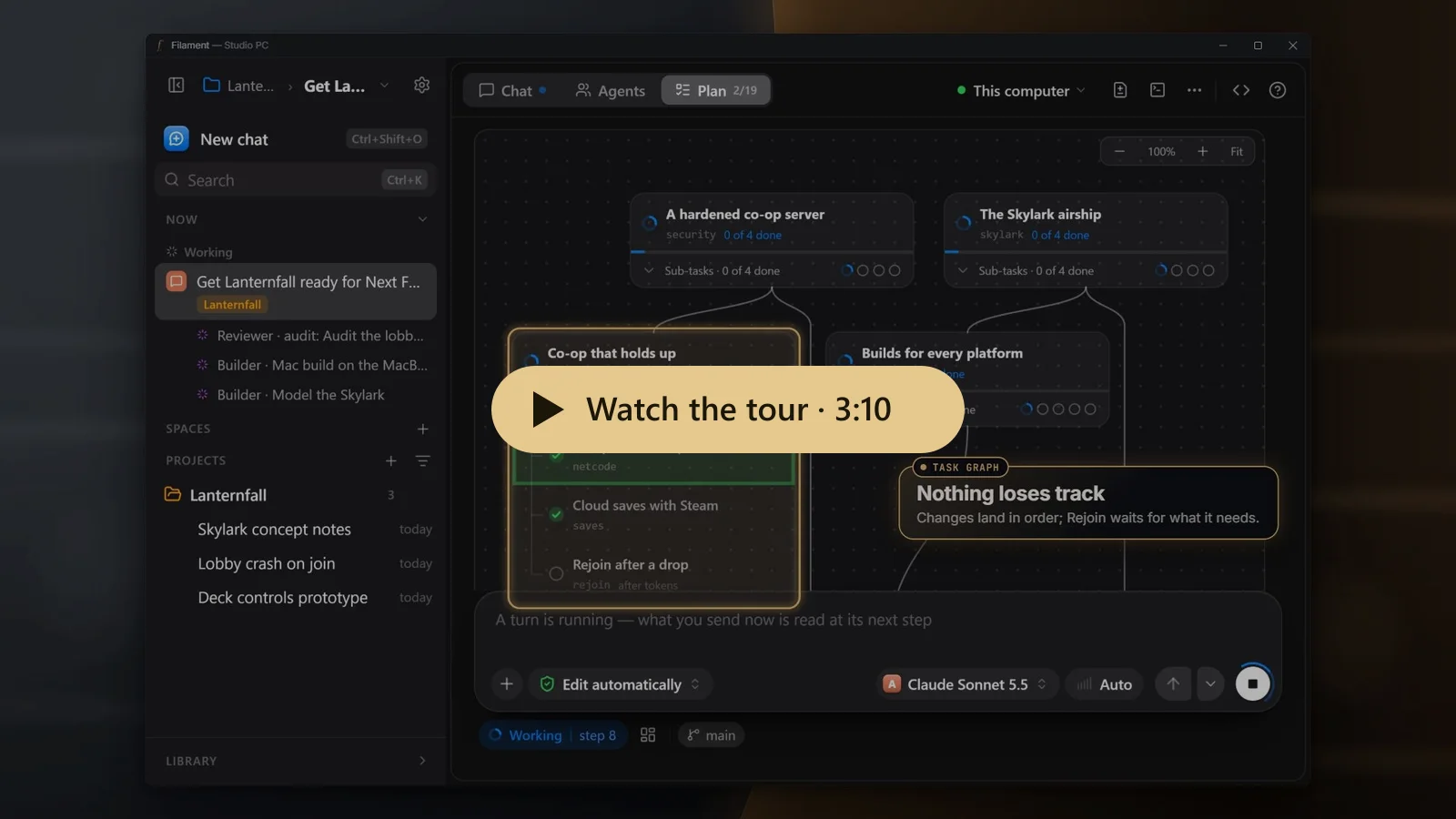
Filament is three things, in the order you will meet them:
- The harness: Filament's own coding agent, in its own window or the browser. Any model works in your project folder with file, shell and web tools, plans big work as a task graph, and sends helpers off to build it in parallel.
- Memory: one memory shared by every model and agent, on from the first start. What one session established, the next one knows, whichever model or agent asks.
- A local API for your other tools: one address on your computer for any Anthropic- or OpenAI-format client, with every provider and coding agent you have connected behind it.
Several agents on one project, without collisions
Ask for something big and your agent lays it out as a task graph. The pieces that don't touch each other go to helpers at once, each in its own git worktree: Claude Code, Codex, or Filament's own agent on any model. Each piece lands as it finishes, once its check passes, and the work that needs it starts then.
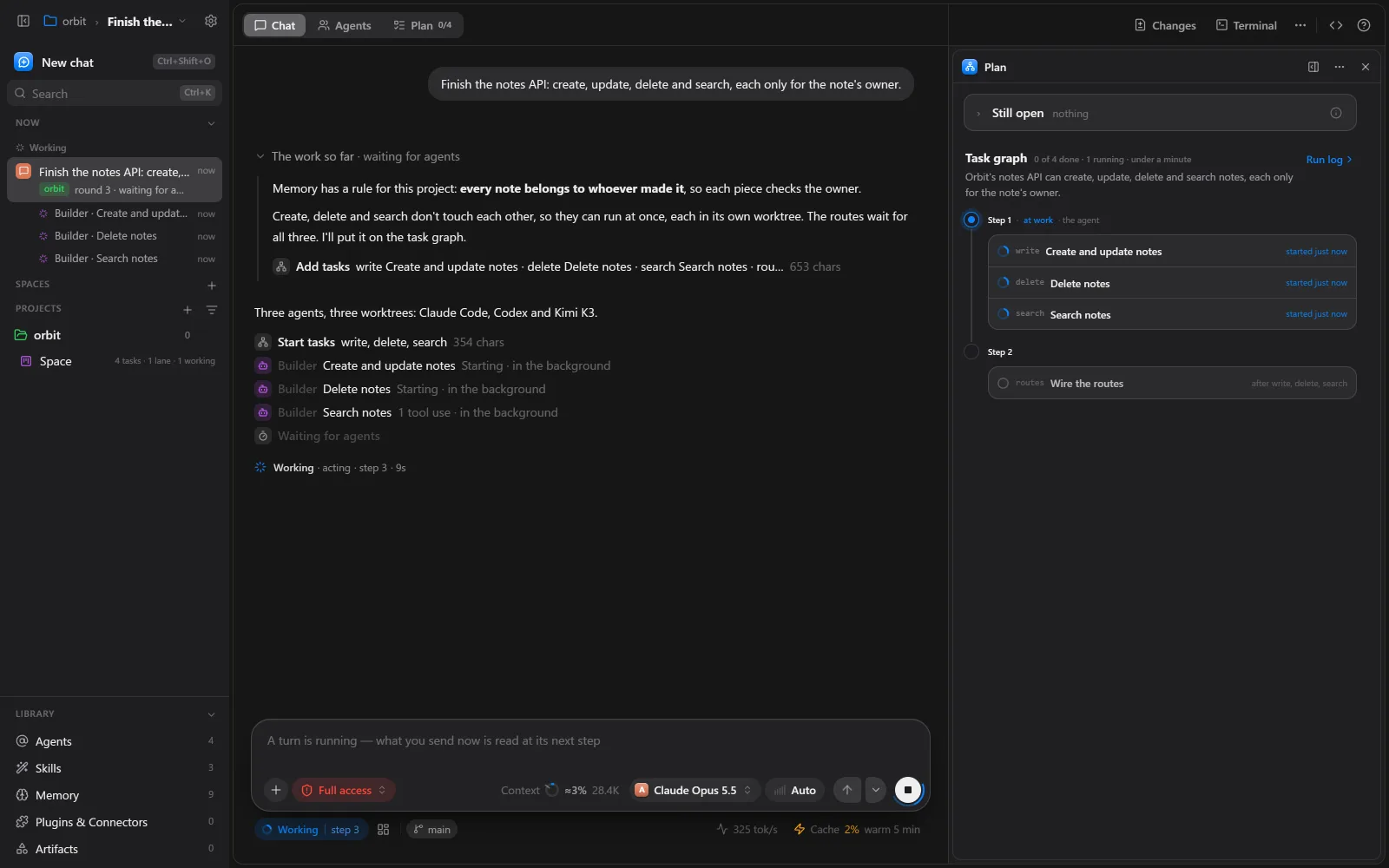
In my own runs, splitting a task across parallel worktrees made it about twice as fast, the time shared among the agents working at once. It used about 40% fewer tokens, even with several agents, when the models were used in Filament, either on an API key or through coding agents. The work came back about twice as good, too: thanks to the task graph and memory, every agent knows what it is doing.
— invertibleMatrix, who makes Filament (from my own use, not a published benchmark)
Claude Code, Codex, Cursor, Antigravity, Devin and Any ACP Agent inside Filament with any number of accounts signed in at the same time.
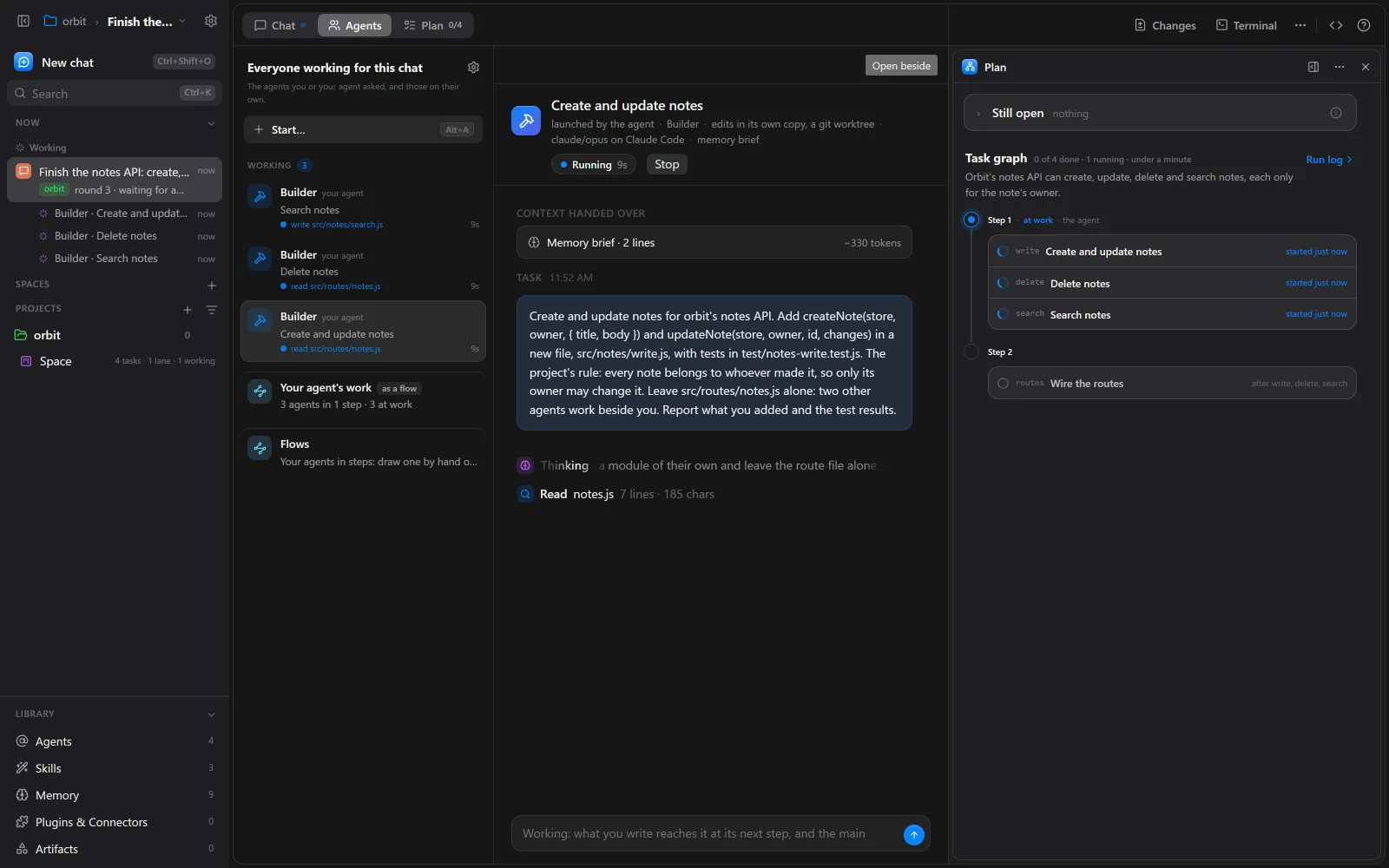
The coding agents you already use run inside Filament on your own plans, beside any other model. Each one gets the project's memory as its brief, works in its own worktree, and shows its work live in the Agents tab.
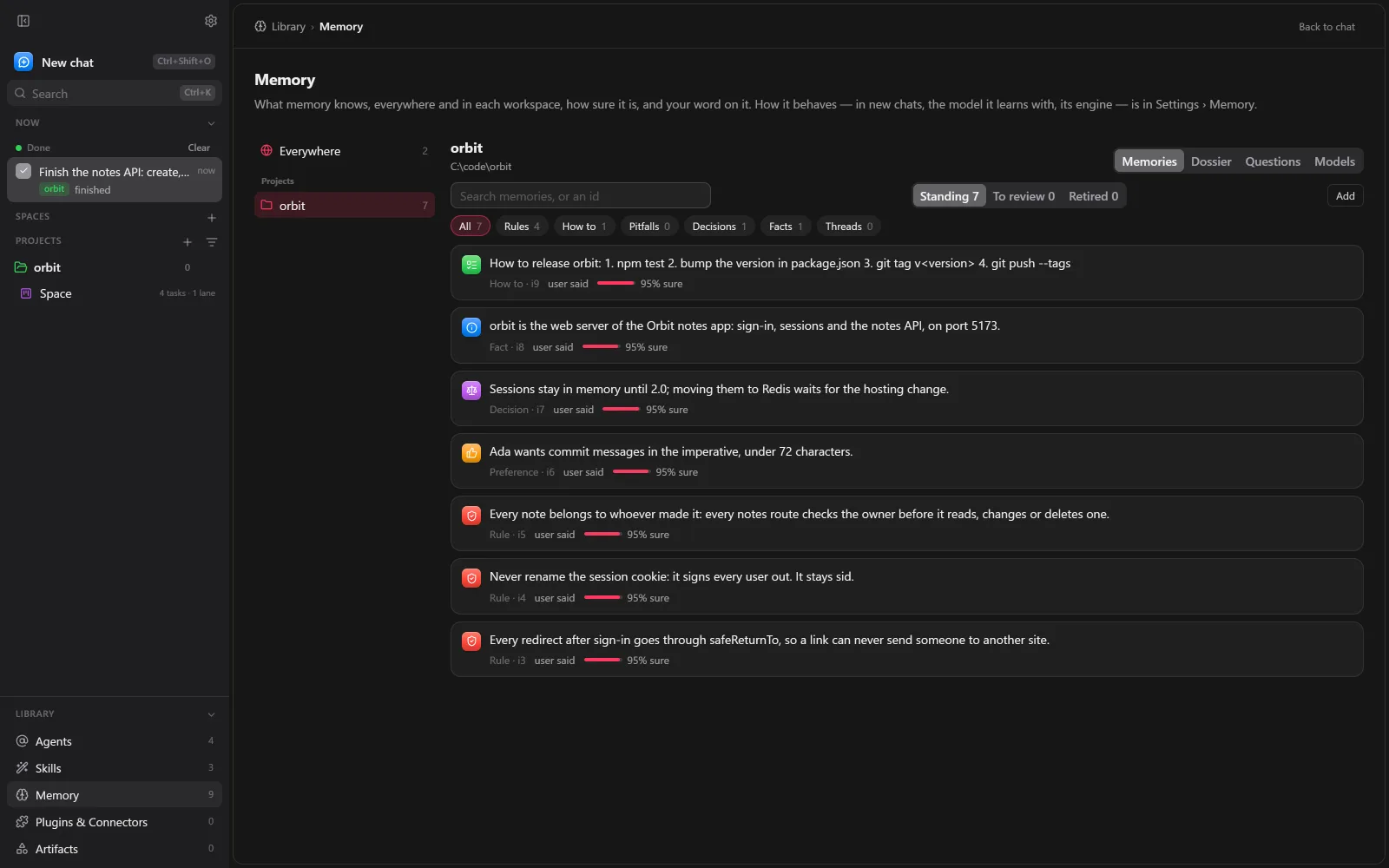
A memory that steers every agent
Every model and agent starts out knowing your rules, your projects and what past sessions found, so you never repeat them. In the demo above, the project's rule that every note belongs to whoever made it reached all three helpers' briefs. You can confirm, correct or retire anything memory holds. It stays on your machine, encrypted.
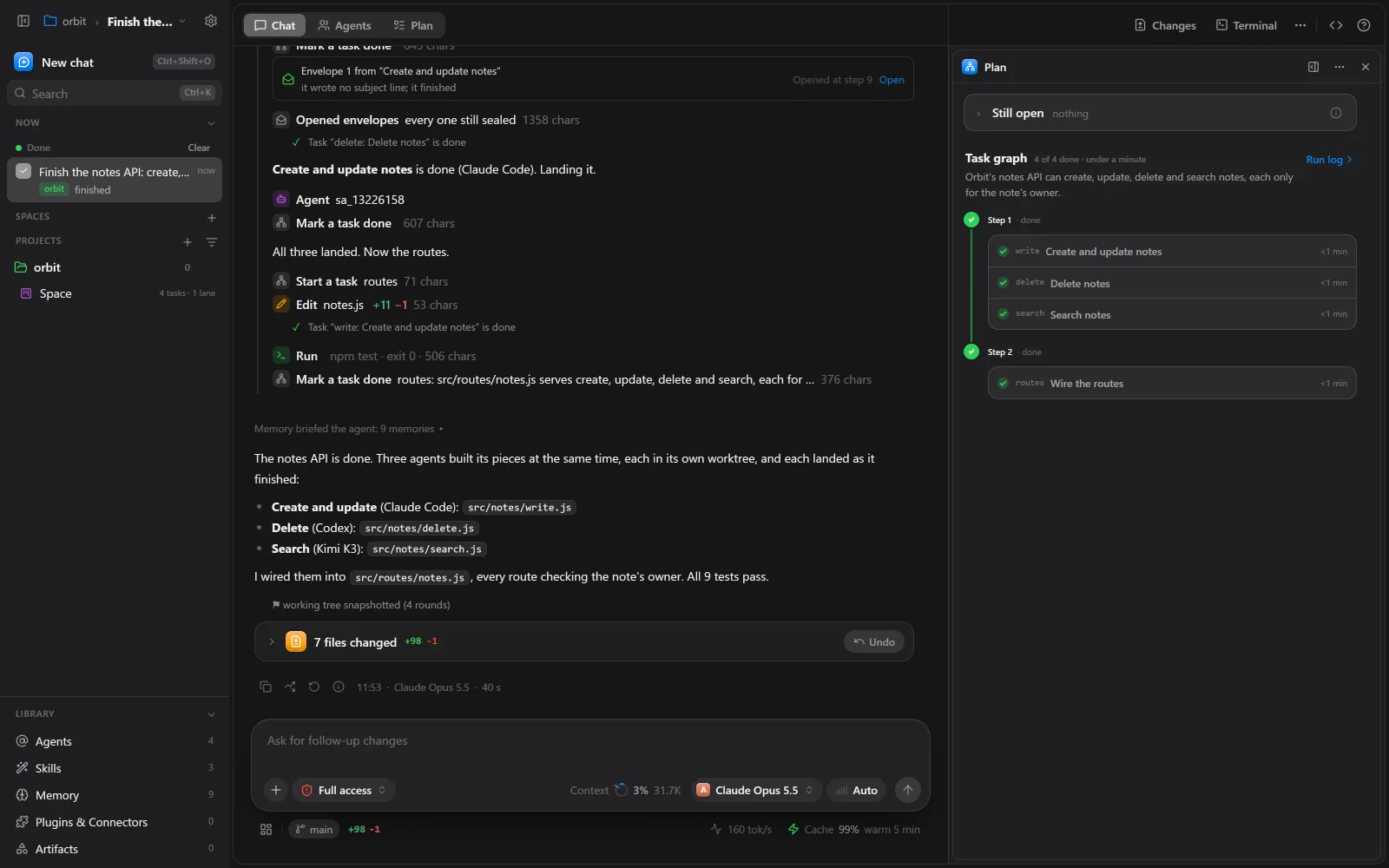
Every change in view, and a way back
The plan ticks off each task as it lands. When the turn ends, every file it changed is in one card, each edit as a diff, with Undo.
About 99% read from the provider's cache
Filament's own agent loop keeps the start of every request the same, byte for byte: the system prompt, the tools and the conversation so far. So the provider reads almost all of each request from its prompt cache. In the maker's own use from 7 to 21 November 2026, 98.87% of the input tokens were read from the cache, over 4,491 model calls and 704.8M input tokens. The Overview shows the cache, the context window and the turn as they happen.
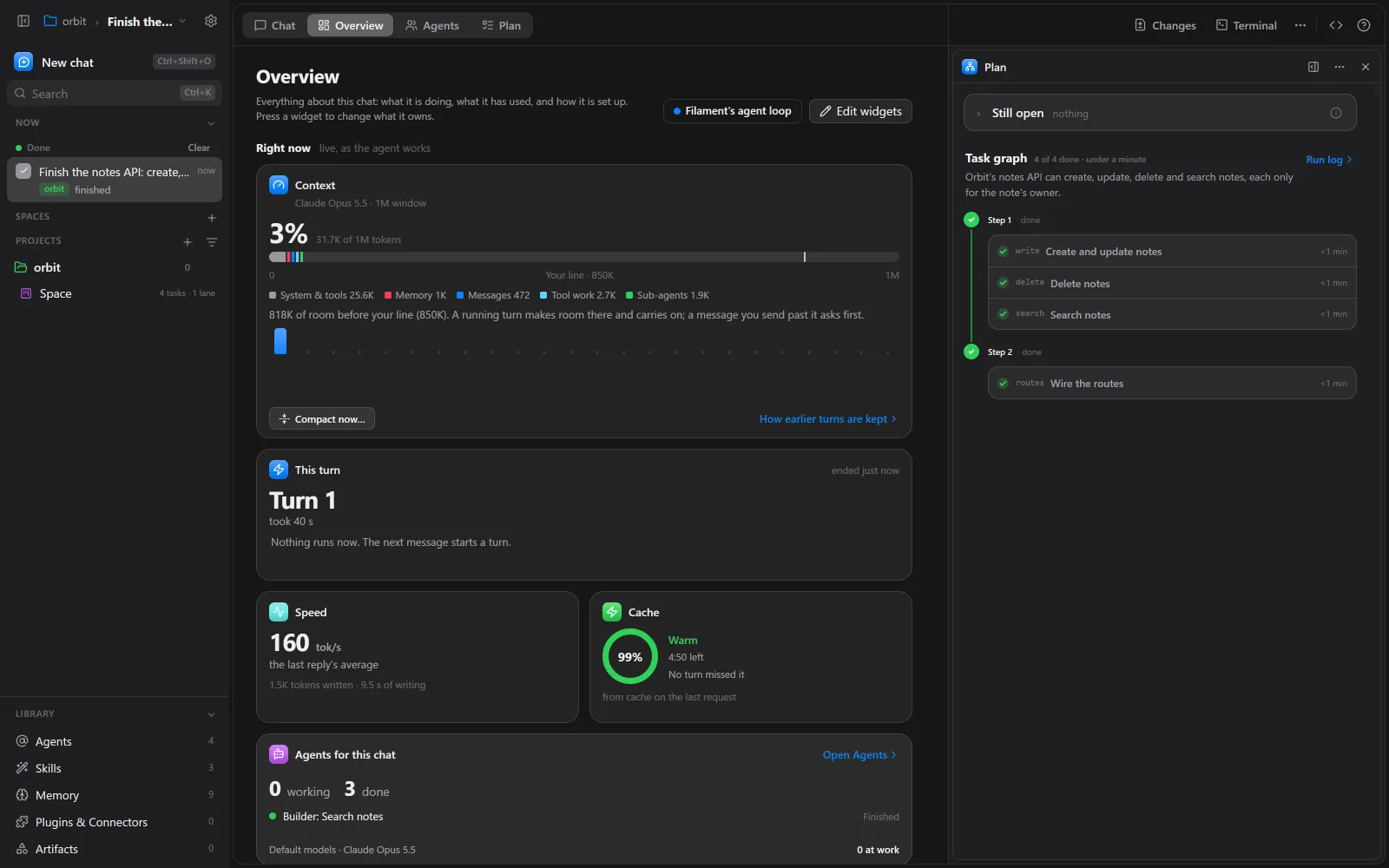
The Overview, in the demo above.
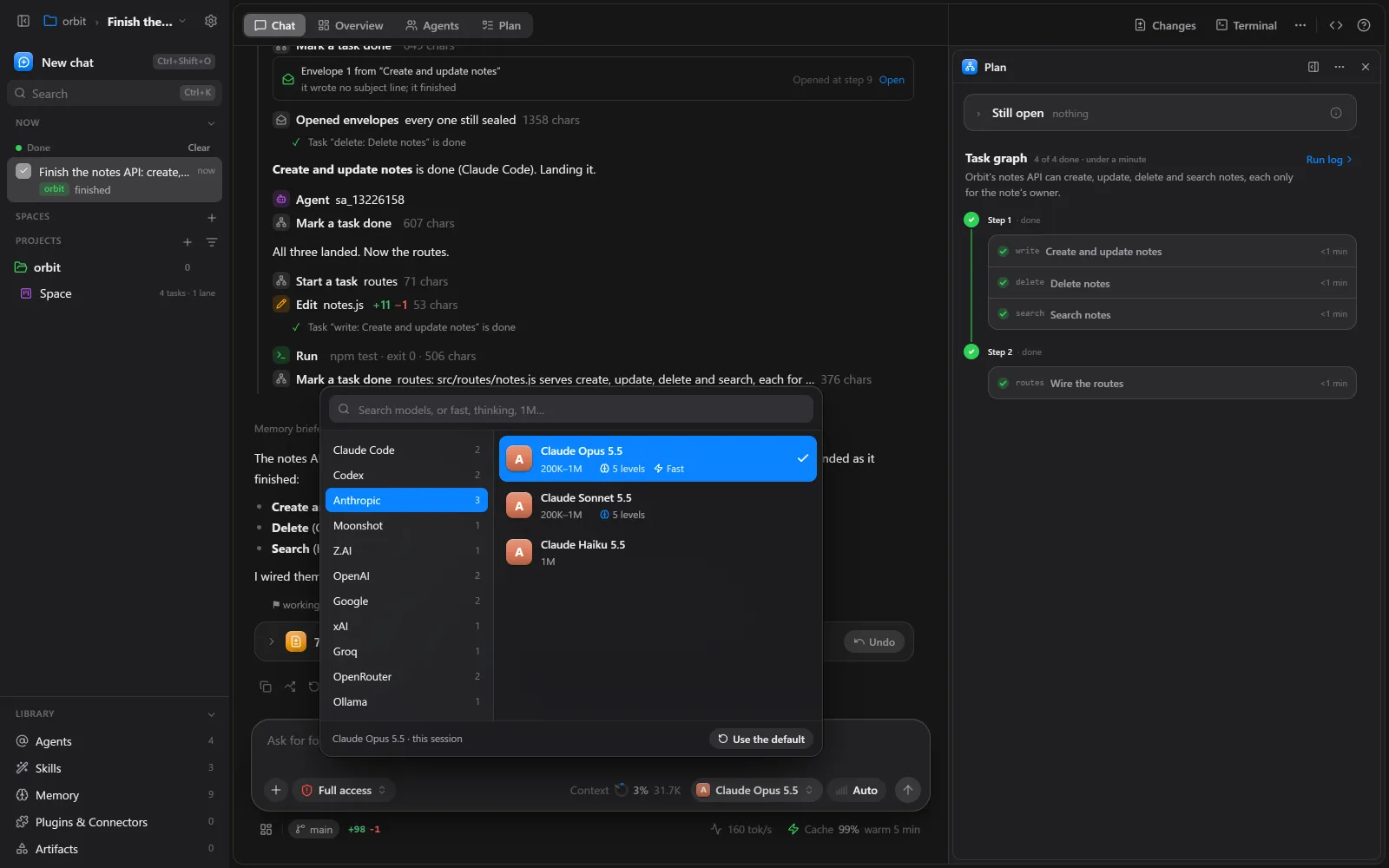
Every model you pay for. Every agent you use.
The picker puts Claude Code and Codex beside every provider you have connected: Anthropic, OpenAI, Google, Moonshot, Z.AI, xAI, Groq, OpenRouter, or a model on your own GPU through Ollama. Turn failover on, and when a provider is busy or refuses, the turn goes on with the next model on your list.
And a lot more
- See inside every turn: the context window as it fills, whether the cache is warm, and exactly what your next message will send.
- The agent's browser: it opens your app, clicks through it and checks its work while you watch. Take over any time.
- Steer mid-turn: correct the agent while it works, without stopping it.
- Teams and flows: hand big work to a team, or chain agents and your own review into a flow on its own branch.
- A Space for each project: each chat's lane and branch, a warning when two touch the same file, and a board the agents keep up to date.
- Bring your old chats: import your Claude Code, Codex and Cursor history, and go on with any of it on any model.
- All your machines: send a helper to your Mac or your Linux server from the same window.
- One address for your other tools: Claude Code, Codex or any SDK pointed at Filament reaches every model you have connected, in the Anthropic and OpenAI formats, on one port.
Every feature, with its page in the guide: filamentdev.com/features.
Your data stays yours
- Your keys, code and chats stay on your computer, except what goes to the providers and coding agents you choose. Filament has no account and no trackers.
- No personal data. Official builds send anonymous usage counts (which features are used, which models and
providers), say so before the first one is sent, and stop at one switch.
filamentdev.com/telemetry lists every field;
src/services/telemetry.jsis the code that sends them. - Builds you make yourself send nothing, unless you turn the counts on.
- Locked down by default: Filament listens on
127.0.0.1only, keeps its secrets encrypted at rest, and fences agents to their folders. SECURITY.md says how to report a problem.
Download
The installers for Windows, macOS (Apple Silicon) and Linux are at filamentdev.com/download. On a Linux server:
curl -fsSL https://filamentdev.com/install.sh | sh
Memory's engine (about 500 MB, open source and local) installs itself at the first start, offline, from the copy that came with Filament. Until it is in, memory works from its archive alone.
Run it from source
Requires Node.js 22.13 or newer.
git clone https://github.com/invertibleMatrix/filament.git && cd filament
npm install --omit=dev
node bin/filament.js --open
A checkout keeps a data folder and port of its own (Filament-dev, or filament-dev on macOS and Linux, and port
20301), so it never touches an installed Filament. At the first start, --open opens Get started in your browser,
which connects your first model: a provider's key, a subscription you already pay for, or a coding agent on this
machine. Then open the harness at http://127.0.0.1:20301/ui/harness.html, or point any tool at Filament:
| setting | value |
|---|---|
| base URL (Anthropic or OpenAI format) | http://127.0.0.1:20301/v1 (an installed Filament: port 20300) |
| API key | the inbound key, on the console's Home page and in the lines Filament prints as it starts |
| model | any route name, such as claude-opus-5, or a coding agent, such as cursor/composer-2.5 |
To build the desktop app yourself, see docs/releasing.md.
Documentation
- docs/GUIDE.md: the complete guide to everything Filament offers, page by page. Also inside the app, under Help.
- docs/COMMANDS.md: everything you can type into a chat.
- docs/CONTEXT.md: how earlier turns reach the model, and how a chat makes room.
- docs/memory-guide.md: how memory works, step by step.
- docs/PARAMETERS.md: every setting, with its default and what it does.
- docs/ARCHITECTURE.md: the map of the code, with a module map for each area.
Development
npm install          # with the development tools (TypeScript, Electron)
npm test             # unit and integration tests (fake providers, agents and memory engine; no network)
npm run typecheck    # tsc over the JSDoc types
npm run docs         # regenerate the generated docs
npm run desktop      # the desktop app over the checkout (Electron)
The code is plain ES modules with JSDoc types and no build step. docs/ARCHITECTURE.md says what every file does.
Contributing
Bug reports, ideas and pull requests are welcome: CONTRIBUTING.md says how. Please report security problems privately, as SECURITY.md describes.
Supporting Filament
Filament is free, and stays free. If it helps your work, you can leave a tip on Ko-fi. A star, a bug report or a pull request (CONTRIBUTING.md) helps just as much. filamentdev.com/sponsor lists every way.
License
Filament is open source under the Apache License 2.0 (see also NOTICE): you may use it, change it and share it, under the licence's terms. The licence does not cover the name Filament or its logo (its section 6), so please give a changed version you share a name of its own. The official builds at filamentdev.com come with their own terms.
Third-party code included in Filament keeps its own licence: THIRD_PARTY_NOTICES.md.
Explore related projects
Loading…