
ingres-si/ingressi
ingres-si/ingressi has 249 GitHub stars and 36 forks. GitHot measured 0 stars in 24 hours. Last checked 2026-11-15 23:31 UTC. Last push 2026-11-14.
What you can do
- Proxy hosts: reverse proxies with custom headers, several upstreams, load balancing (8 policies), active and passive health checks, retries, path-based routes, redirects and rewrites
- L4 proxy hosts: TCP/UDP stream proxying with TLS SNI matching, proxy protocol (v1/v2), load balancing, health checks and geo blocking; a sidecar manages the Docker Compose ports
- Certificates: automatic HTTPS through ACME (Let's Encrypt, ZeroSSL), DNS-01 with 22 DNS providers, imported certificates, and an optional built-in CA for client certificates (mTLS) with role-based path rules
- Visibility: traffic analytics in ClickHouse, security events and an audit log of every change
Measured star growth
- in 24h
- 0
- in 7 days
- Update delayed
- in 15 days
- Update delayed
- in 1 month
- Update delayed
Net star changes over overlapping periods, not daily totals. Missing measurements are left blank. Stars measure attention, not software quality.
About
Self-hosted reverse proxy built on Caddy: proxy hosts, automatic HTTPS, TCP/UDP streams and traffic analytics, with an optional per-host WAF, sign-in and access rules.
Web & AppsREADME.md
OriginalIngressi
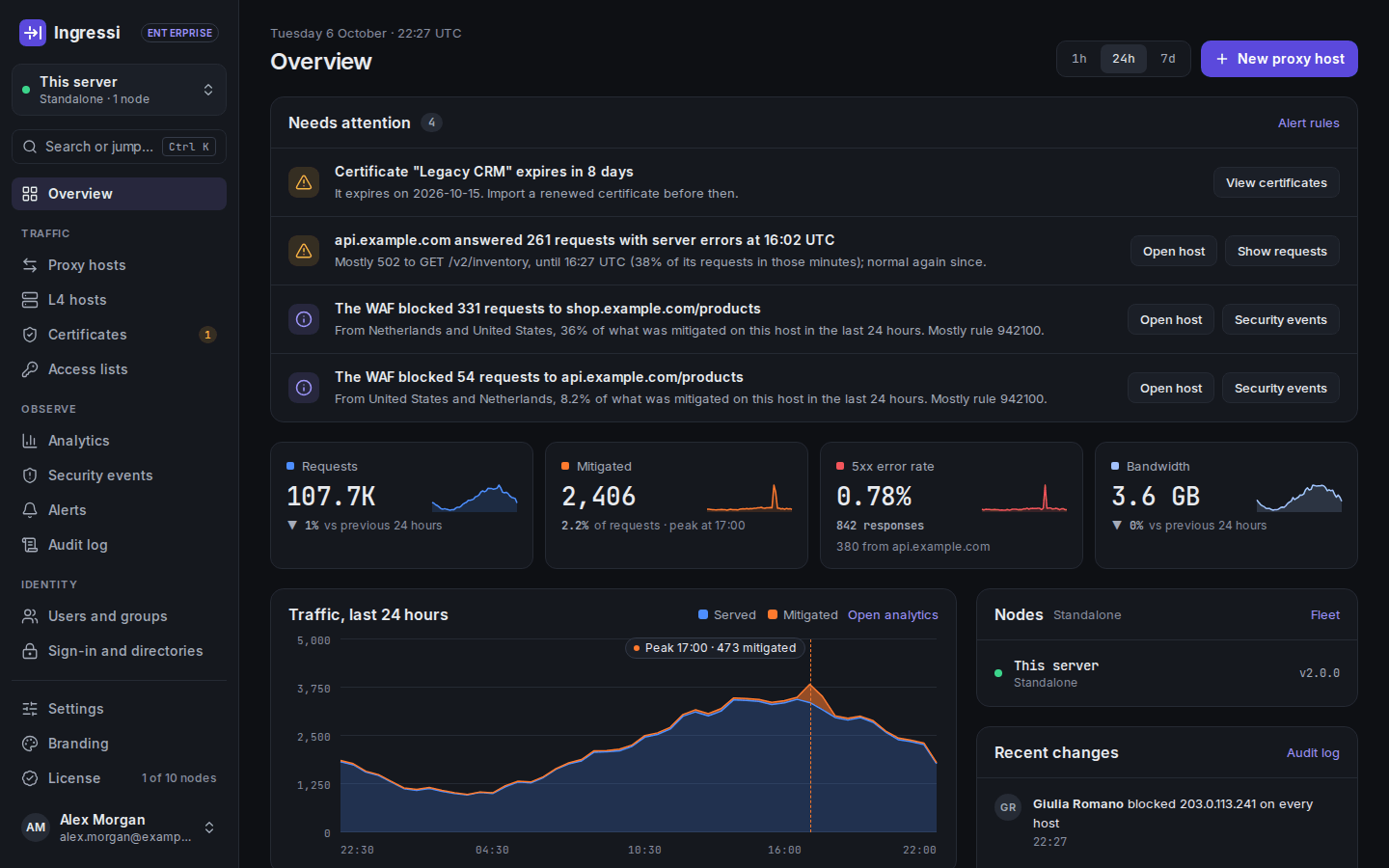
Self-hosted reverse proxy built on Caddy: proxy hosts with automatic HTTPS, load balancing, TCP/UDP streams and traffic analytics, configured from a web dashboard and REST API. Optional per host: a web application firewall, access rules, rate limiting and a sign-in portal. Formerly Caddy Proxy Manager.



Report a bug • Request a feature • Discussions • Sponsor
Quick start
git clone https://github.com/ingres-si/ingressi.git
cd ingressi
cp .env.example .env
# Fill in SESSION_SECRET, ADMIN_PASSWORD and CLICKHOUSE_PASSWORD
# (generate the secrets with: openssl rand -base64 32)
docker compose up -d
SESSION_SECRET needs at least 32 characters. ADMIN_PASSWORD needs at least 12, with upper- and lowercase letters, a number and a special character. With other values the web container stops at start-up and restarts; docker compose logs web says which value to change, and docker compose up -d --force-recreate web applies the corrected .env.
Sign in at http://localhost:3000/login with ADMIN_USERNAME (admin in .env.example) and ADMIN_PASSWORD.
Data persists in Docker volumes (caddy-manager-data, caddy-data, caddy-config, caddy-logs, geoip-data, clickhouse-data, acme-ca). The environment variables are listed in the configuration reference; before going to production, read Security.
Upgrading from Caddy Proxy Manager
Caddy Proxy Manager is now Ingressi. The old header, cookie and database names keep working; upgrading-to-ingressi.md lists every rename and what to change. Before any upgrade, read the upgrade notes of every version since yours, then run docker compose pull && docker compose up -d.
Features
- Proxy hosts: reverse proxies with custom headers, several upstreams, load balancing (8 policies), active and passive health checks, retries, path-based routes, redirects and rewrites
- L4 proxy hosts: TCP/UDP stream proxying with TLS SNI matching, proxy protocol (v1/v2), load balancing, health checks and geo blocking; a sidecar manages the Docker Compose ports
- Certificates: automatic HTTPS through ACME (Let's Encrypt, ZeroSSL), DNS-01 with 22 DNS providers, imported certificates, and an optional built-in CA for client certificates (mTLS) with role-based path rules
- Visibility: traffic analytics in ClickHouse, security events and an audit log of every change
- Optional protections, per host (off until an administrator turns them on): a web application firewall (Coraza with the OWASP Core Rule Set, per-host modes, rule exclusions and custom SecLang rules), access lists (address, country, continent and AS number rules, and basic auth), geo blocking and rate limiting
- Users and sign-in: dashboard accounts and groups, OAuth2/OIDC sign-in to the dashboard, multi-factor authentication and passkeys, and an optional sign-in portal in front of proxied apps, which reuses dashboard sign-ins from your identity provider and passes the user's identity to the app in headers (or Authentik and other forward-auth servers instead)
- Instance sync: a master copies its own configuration to replicas, with secrets sealed to each replica's own key
- REST API under
/api/v1/with API tokens and an OpenAPI reference at/api-docs, and a command palette (Ctrl+K / ⌘K) - Dark mode and a responsive interface for phones
Ingressi also includes alerting, configuration history and rollback, SAML and LDAP sign-in, enforced SSO, SCIM provisioning, custom roles, change approvals, access reviews, compliance reports, audit streaming, scheduled backups, fleet management, high availability, white-label branding, an AI analyst and API monetization. Their code is in ee/; ee/docs/ describes each one.
Documentation
- Installing and running: Configuration reference, Security, Upgrade notes, Upgrading from Caddy Proxy Manager, Setup checklist, PostgreSQL, Instance sync, Fleet management, High availability, Scheduled backups, Air-gapped installs
- Dashboard: Overview, Needs attention, Search and the command palette, Settings, Profile, sessions and API tokens, Audit log, Charts, Alerting, Configuration history, Change approvals, White-label
- Hosts and certificates: Proxy hosts, Proxy host editor, L4 proxy hosts, Host tags, Certificates, Default response, Upstream DNS pinning, API monetization
- Optional protections: Web application firewall, Security events, Access lists, Geo blocking, Rate limiting
- Users and sign-in: Forward auth portal, OAuth and OpenID Connect sign-in, Users and groups, Sign-in and directories, Multi-factor authentication, SAML single sign-on, LDAP / Active Directory, Enforced SSO, SCIM provisioning, Custom roles, Access reviews
- Analytics: Traffic analytics, AI analyst, Analytics questions
- Audit and compliance: Audit streaming and export, Compliance reports
PostgreSQL and high availability
- PostgreSQL: SQLite is the default; a
postgres://URL inDATABASE_URLruns Ingressi on PostgreSQL, and an existing install can be copied over (postgresql.md). - High availability: shared certificate storage for Caddy nodes, a dashboard cluster with failover, shared state and PostgreSQL replicas (high-availability.md).
Security
Report vulnerabilities through GitHub private vulnerability reporting, not in a public issue. SECURITY.md has the disclosure policy and how to verify release images; documentation/security.md covers running Ingressi in production.
Support the project
Ingressi is free, every feature included. It used to have paid editions; the EU's Cyber Resilience Act made selling it as a one-person project not worth it. If Ingressi is useful to you, please consider sponsoring it on GitHub or on Ko-fi.
Contributing
Bugs and feature requests go to GitHub Issues, questions and ideas to GitHub Discussions. Pull requests are welcome: fork the repository, work on a branch and open a pull request against develop.
- Follow the existing code style (TypeScript, Prettier).
- Add tests for new behaviour.
bun run test:allruns the typecheck, lint, the PostgreSQL schema check, and the unit and integration tests on SQLite and then on PostgreSQL (TEST_DATABASE_URL, a disposable server; seescripts/test-all.sh). Every test file that uses the database runs on both;src/lib/db/README.mdexplains how. - Update the documentation for user-facing changes.
License
Everything under ee/ is under the Elastic License 2.0: you may use, self-host and modify it, but you may not offer it to others as a hosted or managed service. Everything else is under the MIT License.
Next.js only finds pages and API routes under app/, so each page or route implemented in ee/ keeps a file there that only re-exports it. These routing files are MIT and contain no code under the Elastic License 2.0. ee/README.md lists every ee/ module and the files that route to it.
Caddy is a trademark of its respective owner. Ingressi is an independent project and is not affiliated with or endorsed by the Caddy project.
Acknowledgments
- Caddy, the web server Ingressi is built on
- Nginx Proxy Manager, which inspired the project
- Next.js, shadcn/ui and Drizzle ORM