
ingestbot/randomizer
ingestbot/randomizer has 33 GitHub stars and 1 forks. GitHot measured 0 stars in 24 hours and 0 in 7 days. Last checked 2026-11-09 17:39 UTC. Last push 2026-10-21.
Gluetun VPN Randomizer
Measured star growth
- in 24h
- 0
- in 7 days
- 0
- in 15 days
- Collecting history
- in 1 month
- Collecting history
Net star changes over overlapping periods, not daily totals. Missing measurements are left blank. Stars measure attention, not software quality.
README.md
Original
Randomizer
A Gluetun VPN Randomizer


Gluetun VPN Randomizer
Gluetun VPN Randomizer is a Python application and Docker container developed for the purpose of rotating VPN gateways from one or more VPN providers. This will change your outbound IP address and optionally your VPN provider on a random basis within a given time period (eg, every 2-4 hours).
Some familiarity with Docker, VPN (Wireguard), and Python may be helpful.
Requirements and Dependencies
VPN Service (see Notes for options)
Additional Requirements and Dependencies noted in
requirements.txt
Quick Start
For both systemd and Docker
- Get a functional
docker-compose.yml
working with Gluetun (see the provided example).
- eg,
/usr/local/docker/gluetun/docker-compose.yml
- eg,
- Modify the provided env.example and copy to the
Gluetun path as
.env. This provides values to theenvironment:parameters in docker-compose.yml.- eg,
/usr/local/docker/gluetun/.env
- eg,
- Create a
gluetun_configdirectory. This should be the same path defined involumes:- eg,
/usr/local/docker/gluetun/gluetun_config
- eg,
- If multiple providers are being used, extensions of
.envfiles must be named after supported Gluetun providers- eg,
.env.ivpn,.env.mullvad, etc.
- eg,
Docker
- See docker-compose.yml
- Modify
randomizeroptions (see Options below) - Set
RANDOMIZER_CONFIGto location ofrandomizer.yml - Bind mount files must be readable by user
randomizer/1000
systemd
- Copy randomizer to a desired location and make it executable
/usr/local/bin/randomizerchmod 750 /usr/local/bin/randomizer
- Modify
randomizeroptions (see Options below) - To run as a systemd service, use the provided systemd unit file
randomizer.service
/etc/systemd/system/randomizer.servicesystemctl daemon-reloadsystemctl status|stop|start randomizer
- Test/Verify Connection:
docker logs gluetuncurl -x localhost:8008 ipinfo.io
Options
Options are defined in a separate YML configuration file (see
randomizer.yml. The location of this file is defined in
randomizer by the main parameter config. For the Docker
container, see RANDOMIZER_CONFIG
(docker-compose.yml
is_docker_container: Set to True if using Docker containerhostname: Set to localhost if using systemd. Set to Docker host if container.debug: Increases verbosity of logging and frequency of rotation (see also Logging section andttime_min,ttime_max)shuffle_vpn_provider: True to support multiple VPN providers. False if single. Multiple VPN providers require multiple.env.*filesmqtt_enable: True to support MQTT.influxdb_enable: True to support InfluxDB.container_name: This name should matchcontainer_namegiven indocker-compose.yml
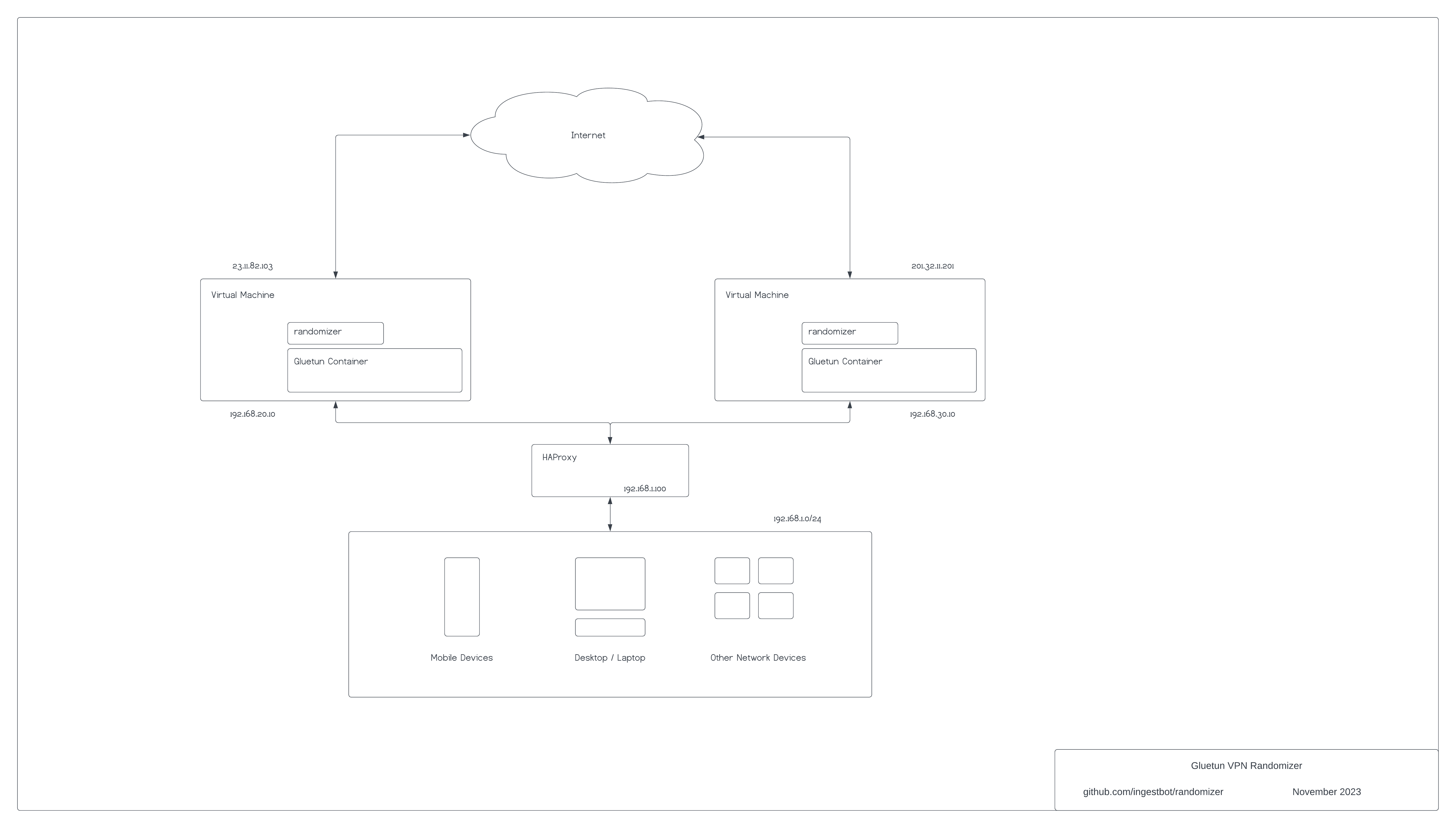
Example Architecture
This is one of many examples of using multiple VPN instances in a given environment.
- LAN: 192.168.1.0/24
- Consists of a mix of mobile devices, desktops/laptops, and virtual machines
- All devices in this network use an HTTP/HTTPS proxy of the assigned fronted in HAProxy (eg, 192.168.1.100:8118)
- HAProxy: 192.168.1.100
- Acts as load balancer and distribution to multiple Gluetun VPN instances
- In this example port 8118 is the listening HTTP/HTTPS proxy
- See the configuration example haproxy.cfg
- Virtual Machines: 192.168.20.10, 192.168.30.10
- Separate subnets of 192.168.20/24 and 192.168.30/24 are optional
- Each virtual machine contains a running randomizer and Docker container(s)
- Outbound IP addresses 23.11.82.103, 201.32.11.201 are randomly assigned based on VPN provider(s) configured in gluetun and frequency of rotation
DNS
Unbound
An example of using Gluetun with Unbound is shown in unbound
Blocky
An example of using Gluetun with Blocky is shown in blocky
Notes
- VPN Service: Temporary VPN service can be obtained via https://freevpn.us. See docker-compose.freevpn.us.yml for details.
- Currently, randomizer is biased towards Wireguard. OpenVPN may be supported in the future, particularly if there is a demand for it.
- If multiple VPN instances are being used, it's highly recommended to use MQTT. This prevents conflicting gateways from being used.
- Docker Secrets will be adopted... soon!
- VPN Comparison Table
Explore related projects
trimstray/the-book-of-secret-knowledge
A collection of inspiring lists, manuals, cheatsheets, blogs, hacks, one-liners, cli/web tools and more.
257,160 starsHack-with-Github/Awesome-Hacking
A collection of various awesome lists for hackers, pentesters and security researchers
125,014 starsswisskyrepo/PayloadsAllTheThings
A list of useful payloads and bypass for Web Application Security and Pentest/CTF
82,508 starscaddyserver/caddy
Fast and extensible multi-platform HTTP/1-2-3 web server with automatic HTTPS
78,910 stars