
imac-wm/iMaC has 34 GitHub stars and 0 forks. GitHot measured 0 stars in 24 hours. Last checked 2026-11-09 09:19 UTC. Last push 2026-06-21.
iMac: Translating Actions into Motion and Contact Images for Embodied World Models
Measured star growth
- in 24h
- 0
- in 7 days
- Update delayed
- in 15 days
- Update delayed
- in 1 month
- Update delayed
Net star changes over overlapping periods, not daily totals. Missing measurements are left blank. Stars measure attention, not software quality.
README.md
OriginaliMac: Translating Actions into Motion and Contact Images for Embodied World Models
Project Page | Data
We present iMaC, an action-conditioned video generation model (world model) for embodied evaluation. We convert action controls into representative images for strong action following and dynamics modeling.
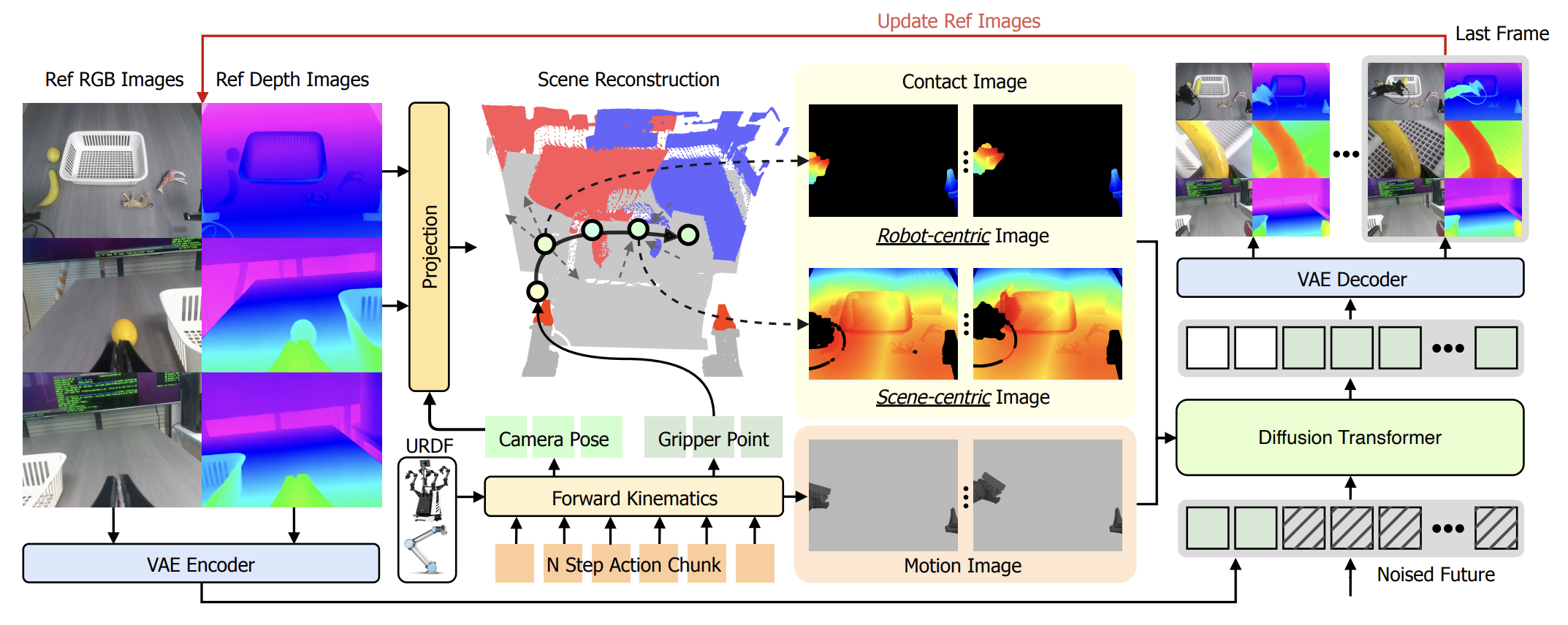
Demo
World model as evaluator:
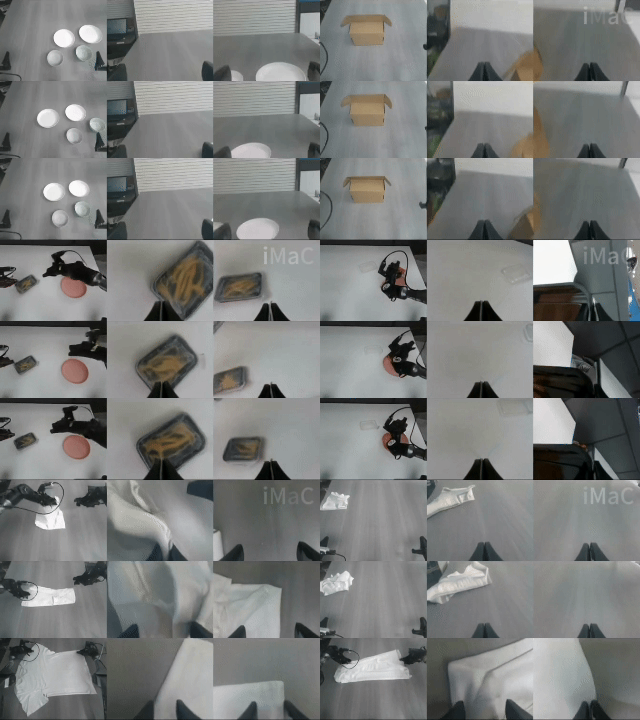
Repository Layout
This repository contains the training, preprocessing, and inference code for three iMaC workflows:
- RND-mix stage-one training and evaluation.
- RND-mix stage-two training and evaluation with replay and 3D conditions.
- WorldArena preprocessing, 3D-condition training, and validation inference.
This README is the reproducible entry point for running the released code.
This project has been tested on A800 GPUs with 80GB VRAM, using PyTorch 2.7.1+cu126.
iMac/
  configs/       Training configurations
  models/        Wan transformer variants
  pipelines/     Diffusion inference pipelines
  trainer/       RND-mix and WorldArena trainers
  transforms/    Dataset transforms
scripts/
  launch_train.py
  inference_rnd_mix_stage_one.py
  inference_rnd_mix_stage_two.py
  inference_worldarena_val.py
  process_depth_da3_worldarena.py
  process_depth_da3_worldarena_testdata.py
  process_3d_condition.py
  process_3d_condition_worldarena_testdata.py
  process_depth_DA3.py
third_party/
  giga-train/
  giga-datasets/
  giga-models/
Installation
The code targets Python 3.11 and CUDA-capable PyTorch.
conda create -n giga_torch python=3.11.10
conda activate giga_torch

pip install -e third_party/giga-train
pip install -e third_party/giga-datasets
pip install -e third_party/giga-models
Install the remaining runtime dependencies used by your workflow, including PyTorch, Diffusers, Accelerate, Decord, OpenCV, ImageIO, HDF5, Blosc, SciPy, Trimesh, Robotics Toolbox, and the depth_anything_3 package.
For online RND evaluation, install RobotWin 2.0 separately and configure the
simulator assets required by simulator/script/run_simulator_server.py.
Path Configuration
No user-specific absolute path is required by the released configs. Set paths with environment variables:
export CVPR2026_WM_DATA_DIR=/path/to/CVPR-2026-WorldModel-Track-Dataset
export CVPR2026_WM_MODEL_CACHE=/path/to/pretrained_models
export CVPR2026_WM_OUTPUT_DIR=/path/to/outputs

export DA3_MODEL_PATH=/path/to/DA3/model
export PIPER_URDF_PATH=/path/to/piper.urdf
export PIPER_GRIPPER_MESH_DIR=/path/to/piper/meshes
Optional variables:
| Variable | Purpose | Default |
|---|---|---|
CVPR2026_WM_PROMPT_EMBEDDING |
Prompt embedding used by WorldArena | asserts/default_prompt_embeds.pth |
RND_MIX_STAGE_ONE_OUTPUT_DIR |
Stage-one experiment directory | $CVPR2026_WM_OUTPUT_DIR/rnd_mix_stage_one_alltask |
RND_MIX_STAGE_TWO_OUTPUT_DIR |
Stage-two experiment directory | $CVPR2026_WM_OUTPUT_DIR/rnd_mix_stage_two_alltask |
RND_MIX_STAGE_ONE_CHECKPOINT |
Stage-one transformer used to initialize stage two | no default; required for stage two |
WORLDARENA_DATA_DIR |
WorldArena root containing train/ and val/ |
data/WorldArena |
WORLDARENA_OUTPUT_DIR |
WorldArena experiment directory | $CVPR2026_WM_OUTPUT_DIR/worldarena_3d |
WORLDARENA_URDF_PATH |
WorldArena robot URDF | falls back to PIPER_URDF_PATH |
WORLDARENA_GRIPPER_MESH_DIR |
WorldArena robot meshes | falls back to PIPER_GRIPPER_MESH_DIR |
TORCH_MP_SHARING_STRATEGY |
PyTorch multiprocessing sharing mode | file_descriptor |
See .env.example for a complete template. Model paths in
iMac/model_config.py are resolved under
CVPR2026_WM_MODEL_CACHE.
Download the configured pretrained models with:
python scripts/download_pretrained_models.py
python scripts/download_gigabrain_policy.py
Dataset Preparation
CVPR World Model Dataset
Download the dataset and pack the training split:
python scripts/pack_training_data.py \
  --data_dir "$CVPR2026_WM_DATA_DIR" \
  --task all
Next, generate depth map labels using DA3:
  python scripts/process_depth_DA3.py \
    --dataset_path /path/to/task1/train /path/to/task2/train \
    --da3_model_path /path/to/DA3/model \
    --gpu_ids 0 1 2 3
The dataset structure will be:
CVPR2026_WM_DATA_DIR/
├── task1/
│   ├── evaluator
│   │   ├── episode_0
│   │   ├── episode_1
│   │   ├── ...
│   ├── train
│   │   ├── depth
│   │   ├── labels
│   │   ├── metas
│   │   ├── simulator
│   │   ├── trajectories
│   │   ├── videos
│   │   ├── config.json
│   ├── video_quality
│   │   ├── episode_0
│   │   ├── episode_1
│   │   ├── ...
RND-mix expects three synchronized RGB videos, three DA3 metric-depth videos,
simulator replay videos, and qpos. DA3 depth videos are uint16 millimeters;
the transform converts them back to meters before normalization.
The RND-mix configs use:
num_frames = sub_frames * rollout + 1 = 8 * 4 + 1 = 33
depth range = [0.08, 1.2] meters
depth RGB encoding = vision_banana
WorldArena
The packed WorldArena samples used for training and validation must contain:
gt_video_path
condition_video_path
scene_3d_condition_path
replay_3d_condition_path
task_name
episode_name
Generate the reference depth:
python scripts/process_depth_da3_worldarena.py \
  --data_root_path "$WORLDARENA_DATA_DIR/train" \
  --device cuda:0 \
  --da3_model_path "$DA3_MODEL_PATH" \
  --urdf_path "$WORLDARENA_URDF_PATH" \
  --gripper_mesh_dir "$WORLDARENA_GRIPPER_MESH_DIR" \
  --only_ref_frame
Generate replay and scene 3D-condition videos:
python scripts/process_3d_condition.py \
  --data_root "$WORLDARENA_DATA_DIR/train" \
  --robot_type agilex \
  --urdf "$WORLDARENA_URDF_PATH" \
  --mesh_dir "$WORLDARENA_GRIPPER_MESH_DIR"
Repeat both commands for val/ when validation samples have not been
preprocessed.
RND-Mix Stage One
Stage one trains on vertically stacked RGB and metric-depth frames. Replay images are the only condition branch.
Train
# The current version requires 8 GPUs, each with more than 70GB of VRAM.
python scripts/launch_train.py --preset baseline_rnd_mix_stage_one_alltask
The main config is:
iMac/configs/
  baseline_wm_rnd_mix_stage_one_alltask.py
Offline Test
python scripts/inference_rnd_mix_stage_one.py \
  --transformer_model_path /path/to/stage_one/checkpoint/transformer \
  --device_list 0 \
  --mode offline \
  --task task1 \
  --data_dir "$CVPR2026_WM_DATA_DIR" \
  --output_dir "$CVPR2026_WM_OUTPUT_DIR/rnd_mix_stage_one_eval"
The inference defaults match the released training config:
vision_banana, depth range [0.08, 1.2], and square-root normalization.
RND-Mix Stage Two
Stage two initializes from stage one and adds replay_3d_condition and
scene_3d_condition. The replay image branch remains active.
Train
export RND_MIX_STAGE_ONE_CHECKPOINT=/path/to/stage_one/checkpoint/transformer

# The current version requires 8 GPUs, each with more than 70GB of VRAM.
python scripts/launch_train.py --preset baseline_rnd_mix_stage_two_alltask
The main config is:
iMac/configs/
  baseline_wm_rnd_mix_stage_two_alltask.py
Stage-two 3D-condition generation needs the Piper URDF and mesh paths even when DA3 loading is disabled, because robot forward kinematics is still used.
Offline Test
python scripts/inference_rnd_mix_stage_two.py \
  --transformer_model_path /path/to/stage_two/checkpoint/transformer \
  --device_list 0 \
  --mode offline \
  --task task1 \
  --data_dir "$CVPR2026_WM_DATA_DIR" \
  --output_dir "$CVPR2026_WM_OUTPUT_DIR/rnd_mix_stage_two_eval" \
  --da3_model_path "$DA3_MODEL_PATH" \
  --da3_urdf_path "$PIPER_URDF_PATH" \
  --da3_gripper_mesh_dir "$PIPER_GRIPPER_MESH_DIR"
Use --max_episodes N for a smoke test. Existing non-empty episode videos are
skipped by default; pass --no-skip_existing to regenerate them.
Online Test
Start the simulator server:
python simulator/script/run_simulator_server.py \
  --host_port 9151 \
  --save_tag sim9151
Then run:
python scripts/inference_rnd_mix_stage_two.py \
  --transformer_model_path /path/to/stage_two/checkpoint/transformer \
  --device_list 0 \
  --mode online \
  --task task1 \
  --policy_ckpt_dir /path/to/policy \
  --policy_norm_stats_path /path/to/policy/norm_stat_gigabrain.json \
  --simulator_ip 127.0.0.1 \
  --simulator_port 9151 \
  --output_dir "$CVPR2026_WM_OUTPUT_DIR/rnd_mix_stage_two_online"
WorldArena 3D
The released configuration is:
iMac/configs/0501_worldarena_3d_r1c120.py
It trains WorldArena3DTrainer with replay-image, scene-3D, and replay-3D
conditions.
Train
python scripts/launch_train.py --preset worldarena_3d
Validation Inference
python scripts/inference_worldarena_val.py \
  --transformer_model_path /path/to/worldarena/checkpoint/transformer \
  --config_path iMac.configs.0501_worldarena_3d_r1c120.config \
  --dataset_dir "$WORLDARENA_DATA_DIR/val" \
  --save_dir "$CVPR2026_WM_OUTPUT_DIR/worldarena_val" \
  --gpu_ids 0
Use --episodes 40,41,49 to evaluate selected episodes.
Test-Set Inference
For the official test layout with first_frame/fixed_scene_task/*.png, use
the testdata preprocessors:
python scripts/process_depth_da3_worldarena_testdata.py \
  --data_root_path /path/to/worldarena_test \
  --device cuda:0 \
  --da3_model_path "$DA3_MODEL_PATH" \
  --urdf_path "$WORLDARENA_URDF_PATH" \
  --gripper_mesh_dir "$WORLDARENA_GRIPPER_MESH_DIR"

python scripts/process_3d_condition_worldarena_testdata.py \
  --data_root /path/to/worldarena_test \
  --robot_type agilex \
  --urdf "$WORLDARENA_URDF_PATH" \
  --mesh_dir "$WORLDARENA_GRIPPER_MESH_DIR"
Then run:
python scripts/inference_worldarena_test.py \
  --transformer_model_path /path/to/worldarena/checkpoint/transformer \
  --config_path iMac.configs.0501_worldarena_3d_r1c120.config \
  --dataset_paths /path/to/worldarena_test \
  --save_dir "$CVPR2026_WM_OUTPUT_DIR/worldarena_test" \
  --gpu_ids 0
Validation
The repository has no root unit-test suite. Before a full training run:
python -m compileall \
  iMac \
  scripts \
  scripts/process_depth_da3_worldarena.py \
  scripts/process_3d_condition.py

python scripts/launch_train.py --help
python scripts/inference_rnd_mix_stage_one.py --help
python scripts/inference_rnd_mix_stage_two.py --help
python scripts/inference_worldarena_val.py --help
For config changes, verify that:
num_frames = sub_frames * rollout + 1.- Stage-two depth encoding matches stage one.
RND_MIX_STAGE_ONE_CHECKPOINTresolves to a transformer directory.- WorldArena samples include all three condition paths.
- qpos samples stay aligned with video/depth samples.
Explore related projects
ytdl-org/youtube-dl
Command-line program to download videos from YouTube.com and other video sites
141,500 starsexcalidraw/excalidraw
Virtual whiteboard for sketching hand-drawn like diagrams
135,396 starsgodotengine/godot
Godot Engine – Multi-platform 2D and 3D game engine
119,840 starsmrdoob/three.js
JavaScript 3D Library.
117,983 stars