
iforge-go/iforge
iforge-go/iforge has 30 GitHub stars and 6 forks. GitHot measured 0 stars in 24 hours and +1 in 7 days. Last checked 2026-11-15 14:32 UTC. Last push 2026-11-02.
What you can do
- Code Hosting - Repository creation, import, Fork, branches and tags, file browsing, Diff, archive download, Git HTTP and SSH
- Collaboration & Review - Issues, comments, labels, milestones, merge requests, line-by-line comments, Approve / Request changes, branch protection
- Agile Management - Projects, Sprints, Epics, Stories, Tasks, Kanban boards, dependencies, work hours, status transitions, and activity logs
- AI Assistance - AI-driven task decomposition and user story generation, supporting custom model configuration for requirements analysis and work optimization
Measured star growth
- in 24h
- 0
- in 7 days
- +1
- in 15 days
- Update delayed
- in 1 month
- Update delayed
Net star changes over overlapping periods, not daily totals. Missing measurements are left blank. Stars measure attention, not software quality.
About
A self-hosted R&D collaboration platform connecting tasks, code, and delivery — stories, Git, MRs, CI/CD in one workflow.
Self-hostedREADME.md
OriginaliForge
A Self-Hosted R&D Collaboration Platform Connecting Tasks, Code, and Delivery


Live Demo · Quick Start · Core Features · Deployment · Architecture · Development
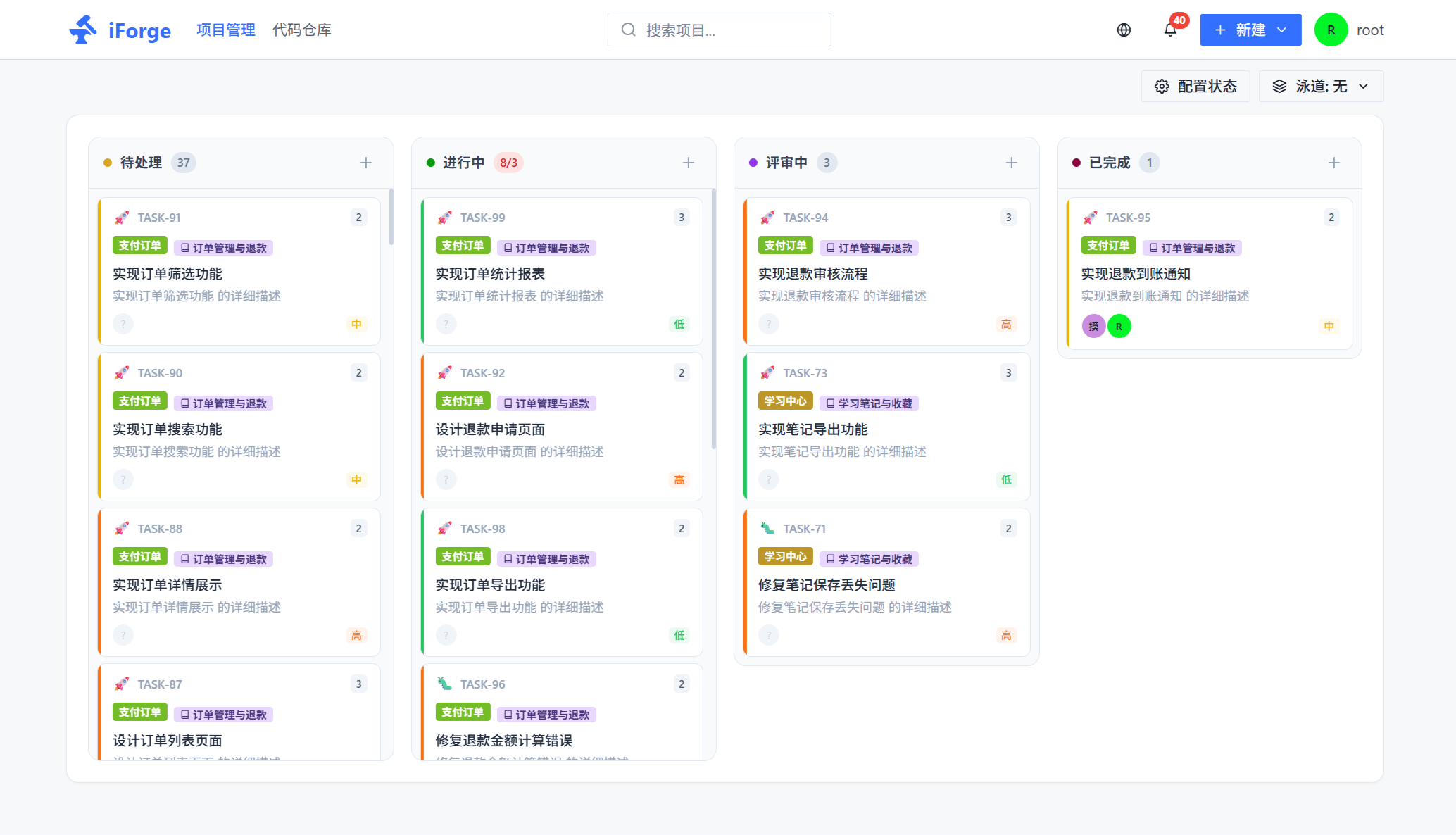
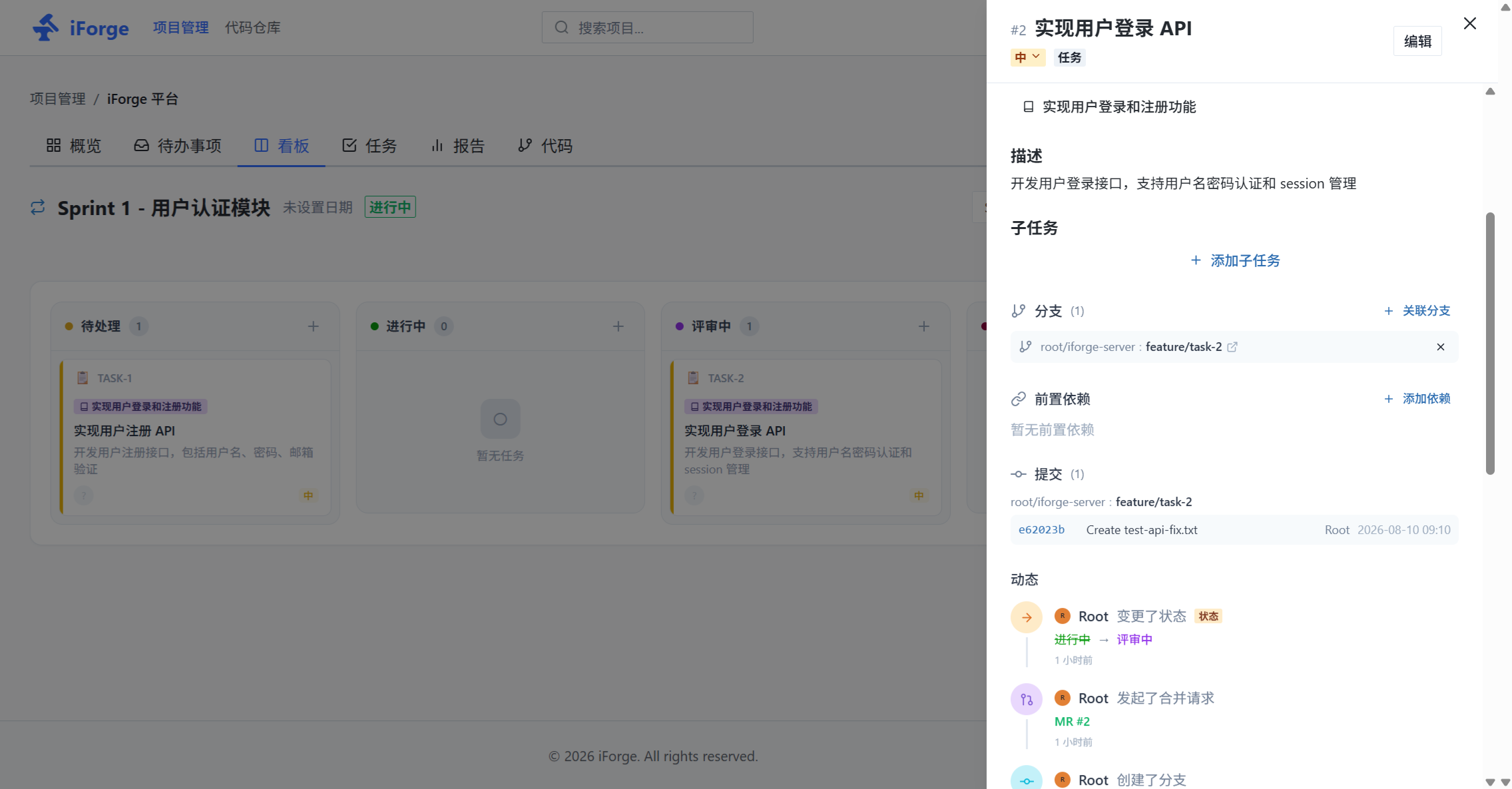
Live Demo
Visit https://demo.iforge-go.com to explore the full platform.
| Username | Password | Role |
|---|---|---|
| iforge | iforge | Regular user |
The demo site resets data daily at 3:00 AM (UTC+8).
What is iForge?
iForge is designed for teams who want to keep project management and code collaboration in the same workflow. It connects Stories / Tasks, Git branches, commits, Merge Requests (MRs), CI/CD, and Releases, making work items traceable from requirements to delivery.
Requirements → Stories / Tasks → Branches → Commits → MRs / Reviews → Pipeline → Releases
The platform is self-hosted, providing a web interface, Git HTTP/SSH protocols, and external Runner integration capabilities.
Core Features
| Domain | Capabilities |
|---|---|
| Code Hosting | Repository creation, import, Fork, branches and tags, file browsing, Diff, archive download, Git HTTP and SSH |
| Collaboration & Review | Issues, comments, labels, milestones, merge requests, line-by-line comments, Approve / Request changes, branch protection |
| Agile Management | Projects, Sprints, Epics, Stories, Tasks, Kanban boards, dependencies, work hours, status transitions, and activity logs |
| AI Assistance | AI-driven task decomposition and user story generation, supporting custom model configuration for requirements analysis and work optimization |
| Task-Driven Development | Create/associate branches from tasks, link commits and MRs to work items, with traceable delivery status |
| CI/CD | .iforge-ci.yml pipelines, DAG dependencies, logs, artifacts, environments, deployments, scheduled tasks, and external Runners |
| Notifications & Integrations | WebSocket real-time notifications, Webhooks, plugin events, email notifications, LDAP / OIDC authentication options |
| Platform Management | Organizations and members, access tokens, SSH/GPG Keys, auditing, system settings, and AI model configuration |
Quick Start
The simplest way to try it locally is with Docker Compose. SQLite is used by default, suitable for local development and feature exploration.
git clone https://github.com/iforge-go/iforge.git
cd iforge

cp .env.example .env
docker compose up -d --build
After startup, visit http://localhost:3000 and complete the administrator initialization on first use.
Common commands:
docker compose logs -f
docker compose down
Git HTTP is mapped to host port 8080 by default, and SSH to port 22. If there are port conflicts, adjust IFORGE_HTTP_PORT and IFORGE_SSH_PORT in .env.
Production Deployment
Database Selection
| Scenario | Recommendation |
|---|---|
| Local development, demos, single-user | SQLite |
| Existing production environment | MySQL 8.0+ |
| New production environment, complex queries, or future multi-instance planning | PostgreSQL 16+ |
MySQL 8 is a supported production database; there's no need to migrate immediately for performance reasons. SQLite is not suitable for multi-instance or high-concurrency write scenarios.
Starting MySQL production configuration:
# Set strong passwords, fixed session secret, and specify database driver in .env
IFORGE_DB_DRIVER=mysql
MYSQL_ROOT_PASSWORD=<strong-password>
MYSQL_PASSWORD=<strong-password>
IFORGE_SESSION_SECRET=<random-secret>

docker compose --profile mysql up -d --build
Starting PostgreSQL:
IFORGE_DB_DRIVER=postgres
POSTGRES_PASSWORD=<strong-password>
IFORGE_SESSION_SECRET=<random-secret>

docker compose --profile postgres up -d --build
Additional steps for production environments:
- Set a fixed high-entropy value for
IFORGE_SESSION_SECRET; multiple replicas must share the same secret. - Restrict
IFORGE_CORS_ORIGINSto the actual frontend domain. - Do not expose database ports directly to the public internet; provide HTTPS through a reverse proxy.
- Perform regular backups and recovery drills for
data/(repositories, logs, and SQLite data) or external databases. - When using external Runners, set
IFORGE_DISABLE_BUILTIN_EXECUTOR=trueand restrict Runner permissions and network access.
Connection Pool
Each iForge service instance uses up to 30 active and 10 idle database connections by default for MySQL/PostgreSQL. You can adjust this via .env:
IFORGE_DB_MAX_IDLE_CONNS=10
IFORGE_DB_MAX_OPEN_CONNS=30
IFORGE_DB_CONN_MAX_LIFETIME_SECONDS=1800
IFORGE_DB_CONN_MAX_IDLE_TIME_SECONDS=300
Connection limits should be planned based on the number of application instances and the database's max_connections to avoid exceeding the database's capacity when summing all instance limits.
Architecture
┌─────────────────────────────────────────────────────────────────┐
│                        Nginx Reverse Proxy                     │
│              iforge-nginx (unified management in separate repo) │
│                                                                  │
│   iforge-go.com ──────► iforge-site (documentation site)        │
│   www.iforge-go.com ──► iforge-site (documentation site)        │
│   demo.iforge-go.com ─┬─► iforge-web (frontend)                 │
│                       └─► iforge-server (backend)               │
└─────────────────────────────────────────────────────────────────┘
                              │
┌─────────────────────────────┼───────────────────────────────────┐
│                        iForge Platform                          │
│                                                                  │
│  ┌───────────────┐       HTTP / WebSocket       ┌──────────────┐│
│  │ Next.js Web   │ ───────────────────────────► │ Go + Fiber   ││
│  │ Next.js 16    │                               │ Server       ││
│  └───────────────┘                               │ API·Git·SSH  ││
│                                                  └──────┬───────┘│
│                                                         │        │
│                                                 ┌───────▼──────┐│
│                                                 │  Database    ││
│                                                 │  SQLite /    ││
│                                                 │  MySQL /     ││
│                                                 │  PostgreSQL  ││
│                                                 └──────────────┘│
│                                                         │        │
│                                                 ┌───────▼──────┐│
│                                                 │ CI/CD Runner ││
│                                                 └──────────────┘│
└──────────────────────────────────────────────────────────────────┘
The backend uses a layered directory structure: handler handles HTTP requests, service contains business logic, model describes data models, git encapsulates Git operations, event / subscriber handles domain events, and container manages dependency injection. The frontend uses Next.js App Router, React, and Chakra UI.
Related Repositories
| Repository | Description |
|---|---|
| iforge | Main platform (server + web) |
| iforge-site | Official documentation site (Docusaurus) |
| iforge-runner | CI/CD executor (deployed independently) |
| iforge-nginx | Nginx reverse proxy configuration (unified domain routing management) |
Current Deployment Boundaries
The current version is suitable for single-instance self-hosting. WebSocket connections, domain events, and built-in CI scheduling run primarily in-process; for multi-instance high availability, you should first plan shared Git storage, cross-node message distribution, distributed locks, and external Runners.
Local Development
Dependencies
- Go 1.26+
- Node.js 18+
- Git 2.30+
- Docker 20.10+ (recommended, for local dependencies and CI/CD)
Starting the Backend
cd server
go run ./cmd/server
The backend listens on port 8081 by default. If using MySQL or PostgreSQL, please configure server/config.yaml or the corresponding IFORGE_* environment variables first; refer to server/config.prod.mysql.yaml and server/config.prod.pg.yaml.
Starting the Frontend
cd web
npm install
npm run dev
The frontend listens on http://localhost:3001 by default.
Configuration Reference
| Variable | Description | Default |
|---|---|---|
IFORGE_HOME |
Data directory | ./data |
IFORGE_HTTP_PORT |
Backend HTTP / Git HTTP port | 8081 |
IFORGE_SSH_PORT |
Git SSH port | 2022 |
IFORGE_DB_DRIVER |
sqlite, mysql, or postgres |
sqlite (Compose) |
IFORGE_SESSION_SECRET |
Session signing secret | Generated on first startup |
IFORGE_CORS_ORIGINS |
Allowed frontend origins | * |
IFORGE_DISABLE_BUILTIN_EXECUTOR |
Disable built-in CI executor | false |
See .env.example for a complete example; backend file configuration see server/config.example.yaml.
Project Structure
iforge/
├── server/                 Go/Fiber backend and Git service
│   ├── cmd/server/         Service entry point
│   └── internal/           Domain modules, routing, services, and infrastructure
├── web/                    Next.js frontend
├── plugins/                Plugin examples
├── docker-compose.yml      Local and containerized deployment (supports SQLite/MySQL/PostgreSQL)
├── .env.example            Environment variable example
└── deploy/                 Deployment configuration (moved to separate repository iforge-nginx)
Contributing
Issues, documentation improvements, and Pull Requests are welcome. Please try to complete relevant tests and formatting before submitting:
cd server && go test ./...
cd web && npm run lint && npm run build
Please explain the purpose of the change, verification method, and whether it involves database migration or deployment configuration in your PR.
License
This project is released under the Apache License 2.0 with additional conditions. Please read the full license text before use.