
iCookCloud/wecom-inbox
iCookCloud/wecom-inbox has 66 GitHub stars and 0 forks. GitHot measured 0 stars in 24 hours. Last checked 2026-11-15 06:48 UTC. Last push 2026-10-24.
Measured star growth
- in 24h
- 0
- in 7 days
- Collecting history
- in 15 days
- Collecting history
- in 1 month
- Collecting history
Net star changes over overlapping periods, not daily totals. Missing measurements are left blank. Stars measure attention, not software quality.
About
Self-hosted inbox for WeCom bots and WeChat customer service: durable files, searchable records, and independent Agent integrations.
Self-hostedREADME.md
OriginalWeCom Inbox
Receive once. Keep the original. Choose what happens next.
A self-hosted business inbox for messages and files delivered to a WeCom smart bot or a WeChat customer-service account. Search your records, download originals, export JSON/CSV, and connect independent processing services. No AI account or agent framework is required.
中文说明 · API and integrations · Deployment and recovery · Implementation and verification
New to the project? The Chinese guide provides separate paths for an existing Bot, trying the inbox without a Bot, and creating a new Bot. These are configurations of the same application. Without a Bot or customer-service connection, imported records remain usable, but live intake and replies are unavailable.
v0.1.0 — initial open-source release. This is an independent community project, not an official Tencent product. Automated regression checks and Linux/macOS build checks are available. Real WeCom bot acceptance covers direct chats, group @-mentions, quoted files and media. Live customer-service acceptance, reconnect checks and independent first-time onboarding remain pending; see verification scope. Publishing this version does not turn unrun checks into passed checks.
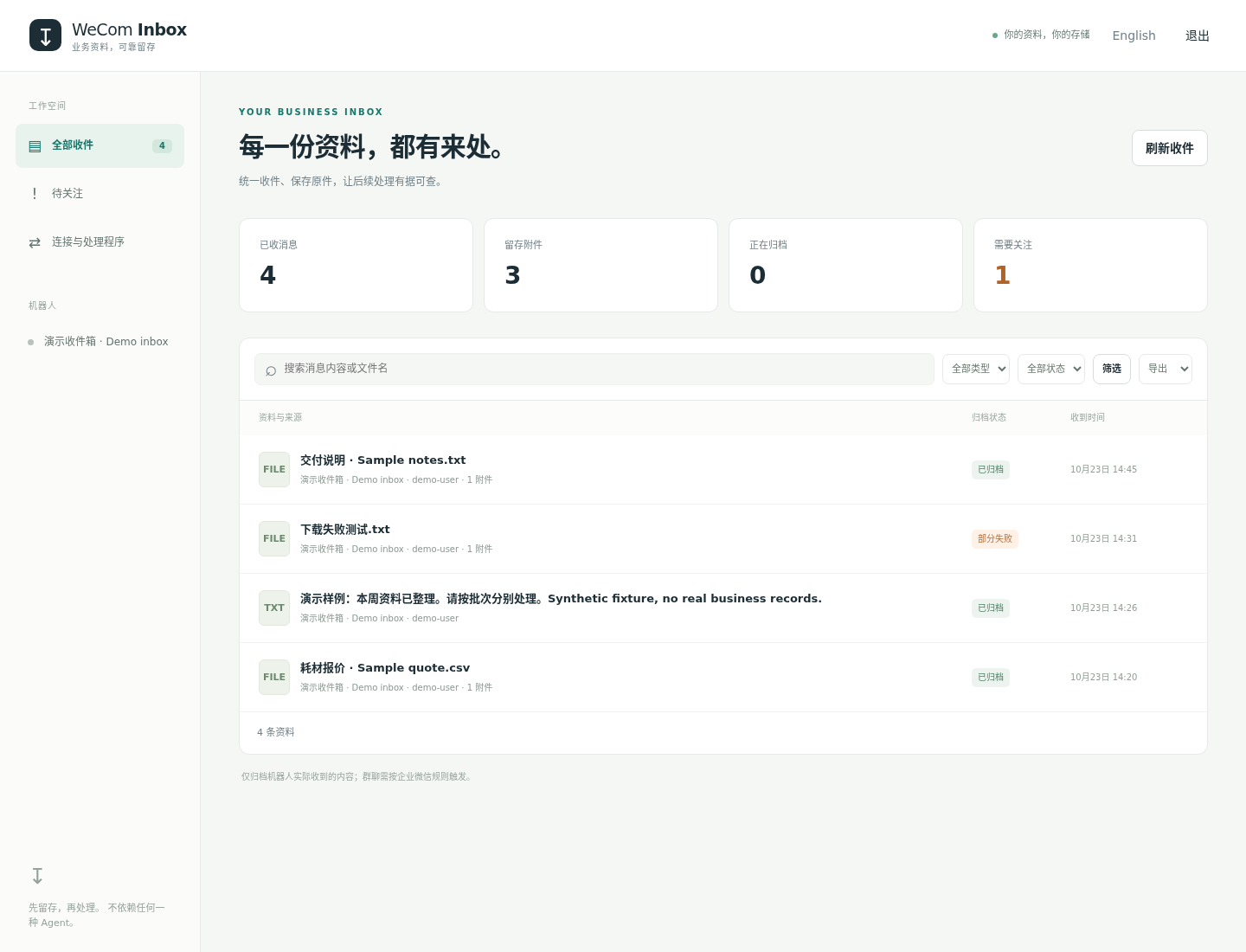
Web inbox with explicitly synthetic test fixtures; no customer data.
Receive from ordinary WeChat
Connect an enterprise-managed WeChat customer-service account to let users open its official contact link and send records from ordinary WeChat without @-mentions or an AI account. This is a direct customer-service conversation, not access to other WeChat groups.
See the complete Chinese setup guide and deployment configuration. The standalone kf.weixin.qq.com API is a different interface and is not supported by this connector. Use a custom application authorized by WeCom's customer-service configuration, not a smart-bot secret.
Intake supports durable encrypted notifications, per-account cursors, deduplication, original media (including voice), merged-record extraction, scoped queries/Webhooks and optional text replies. Structured cards retain platform-supplied fields; unsupported records remain visibly failed with encrypted raw evidence. Human-servicer records do not trigger automated consumers or replies.
Customer-service replies are limited to 2048 bytes. Tencent restricts replies by session state, a 48-hour window and a five-message allowance following customer input. Receipts default off to conserve that allowance. A successful send API response is shown as accepted, not confirmed delivery; later failure events update the result. Live WeChat account acceptance is not yet complete.
What it does
- Multiple WeCom Bots and WeChat customer-service accounts with explicit access scopes and independent intake.
- Durable intake before attachment download; encrypted temporary download credentials.
- Original attachments with SHA-256 integrity checks, separate records for multiple and quoted files, and crash recovery.
- English/Chinese web inbox, filename/body search, filters, stable pagination, downloads and JSON/CSV export.
- Scoped consumer tokens; signed webhooks with independent retries, failed-event replay and idempotent result recording.
- Optional acknowledged replies to the source conversation. Uncertain sends remain visible and are not blindly retried.
- Read-only import of legacy JSONL records, consistent offline backup and restore to a new directory.
The gateway stores the records; your scripts, document tools or agents decide how to process them. An acknowledged webhook and a completed business task are separate states.
Quick start: download and run
No Go installation is needed when using a prebuilt executable. Download the file matching your machine from v0.1.0 releases, along with SHA256SUMS:
| Machine | Download |
|---|---|
| Linux x86-64 / amd64 | wecom-inbox-linux-amd64 |
| Linux ARM64 | wecom-inbox-linux-arm64 |
| macOS Apple Silicon (M-series) | wecom-inbox-darwin-arm64 |
Keep the executable in a dedicated directory, compare its SHA-256 with the published checksums, then run the following. This example uses Linux amd64; substitute your downloaded filename on other machines.
chmod +x ./wecom-inbox-linux-amd64
./wecom-inbox-linux-amd64 init
./wecom-inbox-linux-amd64 check
./wecom-inbox-linux-amd64 serve
Open http://127.0.0.1:8787 and sign in using admin_token from the newly generated private config.toml. init refuses to overwrite existing configuration. The initial inbox is empty and makes no Bot or customer-service connections.
Choose an intake path:
- Ordinary WeChat: follow WeChat customer-service setup. It needs an authorized enterprise-managed customer-service account and an HTTPS callback; no smart bot is required.
- WeCom internal chats: follow existing-Bot setup, or create a Bot. Use an explicit user/chat allowlist and only one gateway connection per Bot.
- No account yet: browse the empty inbox or use the offline demo. Demo fixtures are in the source repository.
Copy relevant settings from config.example.toml into your private config while keeping the generated random admin token. Valid edits reload automatically; changing the data directory or listening address requires restart. See deployment for systemd, HTTPS, the optional checksum-verifying installer and backups. Windows and Intel Mac executables are not distributed in this release.
Build from source
Contributors can build with Go 1.26.4 or later:
git clone https://github.com/iCookCloud/wecom-inbox.git
cd wecom-inbox
make build
./wecom-inbox init
./wecom-inbox serve
The remaining command examples use the locally built name wecom-inbox; substitute the downloaded executable's name when using a prebuilt release.
Try it without an AI or WeCom account
The fixture below is explicitly synthetic and includes one intentionally missing attachment:
./wecom-inbox import --file tests/fixtures/legacy/messages.jsonl \
  --media-root tests/fixtures/legacy
# Reports 4 imported records and 1 failed attachment; exit 1 is intentional.
./wecom-inbox serve
This exercises the real database, archive and web UI. It does not prove real WeCom transport behavior. Do not import test fixtures into your production inbox.
Connect a plain program
Configure a [[consumers]] entry with its own token and Bot scopes. Set a URL and signing secret for push delivery, or omit them for a pull-only integration. allow_reply defaults to false. The administrator identity admin is reserved.
# INBOX_TOKEN is a scoped consumer token, not the administrator token.
curl -H "Authorization: Bearer $INBOX_TOKEN" \
  'http://127.0.0.1:8787/v1/messages?q=quote'
The standard-library Python example verifies webhook signatures, downloads and checks archived files, and records results without calling a model. Agent-specific adapters use the same API; no core changes or access to Bot secrets are required. No proprietary Agent adapter is claimed as tested in this release.
Run and maintain
config.toml: Bot/customer-service credentials and consumer configuration; private file, never committed.data/inbox.db: archive, pending work, delivery state and results.data/encryption.key: key for pending media credentials; back it up with the database.data/files/: original file bytes and recovery manifests; not automatically deleted.
The executable uses a data-directory lock. Offline maintenance commands require the server to be stopped; use HTTP queries and exports while it is running. Keep the original legacy gateway configuration and data until migration has been verified; this release is not a drop-in replacement for its Bot-management CLI.
See deployment and recovery for TLS, systemd, backup, restore, import and operational limits. Archived records are not encrypted at rest; use host/disk protections appropriate to your data.
Development
make test
make check                 # go vet and race-enabled regression tests
node --check web/app.js
make release VERSION=v0.1.0
Tests live under tests/ and use synthetic data and local test transports. CI builds without CGO. Source browsing, test outcomes and live-platform acceptance are reported separately in the plan.
License
MIT. See LICENSE, third-party notices, contribution guide and security notes.