
iBz-04/Seeker
iBz-04/Seeker has 28 GitHub stars and 3 forks. GitHot measured 0 stars in 24 hours. Last checked 2026-11-15 12:06 UTC. Last push 2026-10-18.
Measured star growth
- in 24h
- 0
- in 7 days
- Collecting history
- in 15 days
- Collecting history
- in 1 month
- Collecting history
Net star changes over overlapping periods, not daily totals. Missing measurements are left blank. Stars measure attention, not software quality.
About
Configurable deep research engine
AIREADME.md
OriginalSeeker
Seeker is a deep research assistant that turns a rough prompt into a structured answer or a long-form report. It uses iterative search, follow-up questions, and document generation to produce work that is meant to be read, downloaded, and reused.
What it does
- Runs a research loop over web sources and LLM synthesis.
- Asks clarification questions when a report needs more context.
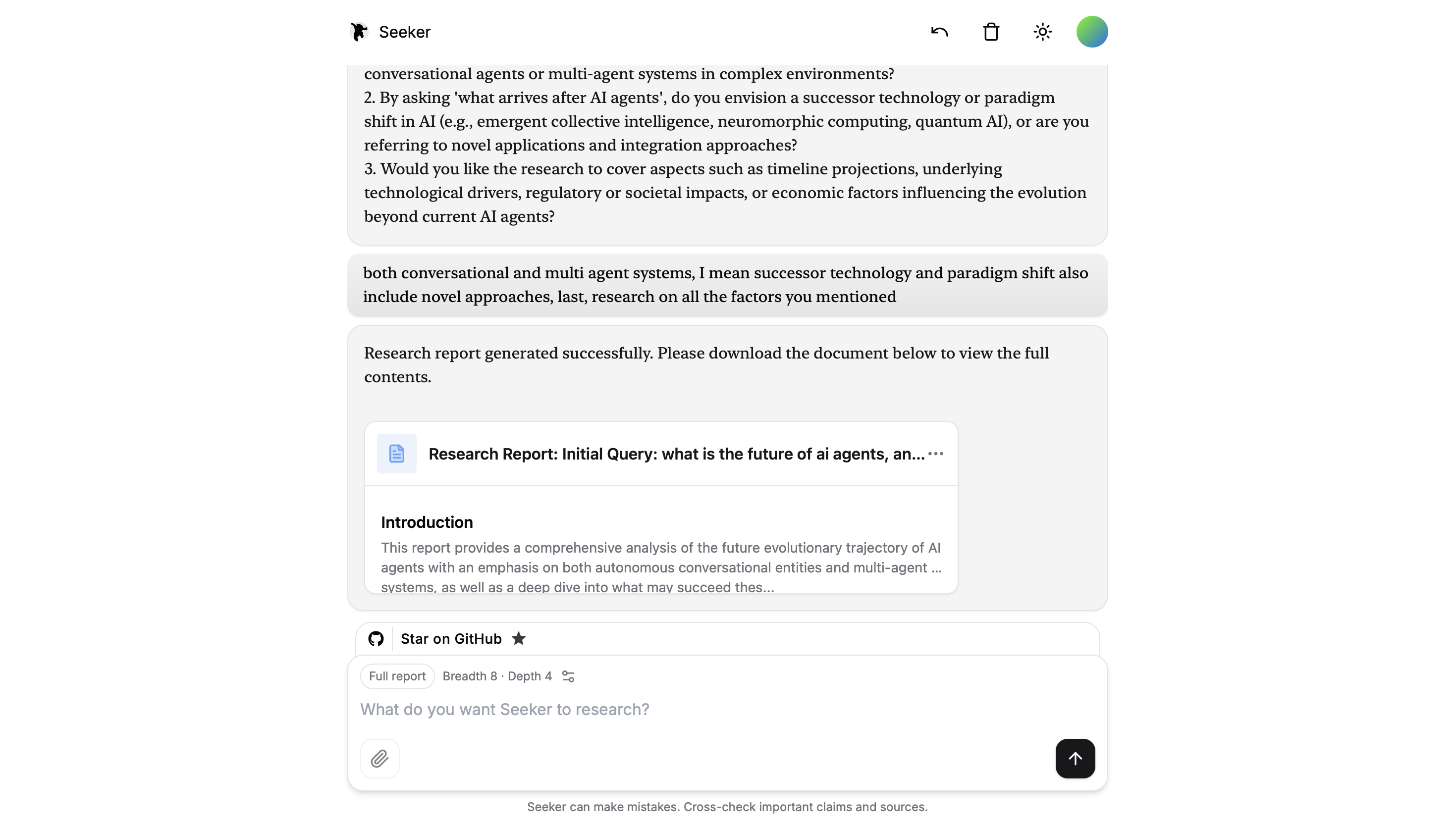
- Produces either a short answer or a detailed report.
- Exports reports as both Markdown and
.docxfiles. - Surfaces report download actions in the frontend instead of dumping the whole document in chat.
Preview
Repository layout
src/- backend research engine, CLI, and API server.frontend/- Next.js app for the chat UI.render.yaml- Render deployment blueprint for the backend.docker-compose.yml- local container setup for the backend.
Quick start
Prerequisites
- Node.js 22.x
- pnpm
- An API key for an LLM provider
Install
pnpm install
cd frontend && pnpm install
Configure environment
Create a .env.local file at the repo root for the backend. The frontend reads SEEKER_BACKEND_URL when it is not running against the local API.
Typical backend variables:
OPENAI_KEY="your_openai_key"
# or
FIREWORKS_API_KEY="your_fireworks_key"

CONTEXT_SIZE=8000
OPENAI_ENDPOINT="https://api.openai.com/v1"
FIREWORKS_MODEL="your-model-name"
Web search
With no search configuration, the research loop uses Parallel Search MCP at https://search.parallel.ai/mcp. Search runs in Fast mode without an account or API key. Source excerpts feed the research synthesis and their URLs appear in the report's sources. These are focused excerpts, rather than Firecrawl's full-page markdown scraping. The anonymous service has usage limits; search failures are logged and can leave a run without sources.
Existing FIRECRAWL_KEY, FIRECRAWL_API_KEY, or FIRECRAWL_BASE_URL settings keep Firecrawl selected, including self-hosted endpoints. To choose explicitly, set one of:
SEARCH_PROVIDER="parallel"  # Anonymous MCP, even if Firecrawl is configured
# SEARCH_PROVIDER="firecrawl"  # Uses your Firecrawl key and/or endpoint
# SEARCH_PROVIDER="none"  # Disable web search
Explicit choices take precedence. A provider error never switches to another provider. none skips web research; answer/report generation still uses your LLM. Both the CLI and API use these backend settings. Parallel requests have a 15-second deadline covering connection, discovery, and search; the integration uses the MCP SDK's Streamable HTTP transport.
To keep Firecrawl explicitly:
SEARCH_PROVIDER="firecrawl"
FIRECRAWL_KEY="your_firecrawl_key"
# FIRECRAWL_BASE_URL="http://localhost:3002"  # Optional self-hosted server
Run the search integration tests with pnpm exec tsx --test src/search.test.ts. They use scripted model replies and local search fixtures, with no paid inference.
Run locally
Backend only
pnpm api:dev
CLI mode
pnpm cli
Frontend
cd frontend
pnpm dev
If the frontend is deployed separately, point it at the backend with:
SEEKER_BACKEND_URL="https://your-render-service.onrender.com/api/research"
Output modes
answer- concise response for direct questions.report- long-form report with sources and download options.
When report mode finishes, the UI shows a compact report card with download actions for the .md and .docx files.
Downloadable reports
Report generation saves two files on the backend:
- Markdown source for easy editing and reuse.
- Word document for direct sharing.
The files are returned to the frontend as part of the research response and can be downloaded from the UI. They are not meant to be treated as permanent storage.
Deployment
Backend on Render
The repo includes render.yaml for a Render web service.
Suggested settings if you configure Render manually:
- Runtime: Node
- Build command:
pnpm install --frozen-lockfile - Start command:
node index.js - Health check path:
/healthz
Set the required environment variables in Render, then verify:
curl https://your-render-service.onrender.com/healthz
Frontend hosting
Deploy the frontend separately and set SEEKER_BACKEND_URL to the Render backend URL.
Notes
- Breadth is limited to
1-10. - Depth is limited to
1-5. - The frontend proxies backend requests so the app can work with a remote Render deployment without exposing backend internals.