
hyzyn/dsh-plugin-kit
hyzyn/dsh-plugin-kit has 67 GitHub stars and 8 forks. GitHot measured 0 stars in 24 hours and +3 in 7 days. Last checked 2026-11-15 14:31 UTC. Last push 2026-11-05.
Measured star growth
- in 24h
- 0
- in 7 days
- +3
- in 15 days
- Update delayed
- in 1 month
- Update delayed
Net star changes over overlapping periods, not daily totals. Missing measurements are left blank. Stars measure attention, not software quality.
About
Plugin family for the DeepSeek Harness (DSH) Web GUI: a pnpm monorepo with a plugin template, dev kit, and one-command all-in-one bundle — Codegraph, env & secrets, MCP config, profiles, prompts, RSS digest, global search, and terminal panel.
Developer ToolsREADME.en.md
Originaldsh-plugin-kit · DSH Plugin Family
中文 | English





A plugin family for the DeepSeek Harness (DSH) Web GUI
Log query · Environment · MCP servers · Prompt · Profile · RSS · Global search · Codegraph · Terminal panel · Container panel · Scaffolding
dsh plugin --profile web add @hyzyn/dsh-all
installs the whole family · restart dsh web to take effect · only want a few? → install on demand
What it is · Packages · Quick start · Writing a new plugin · Documentation map · Contributing
Just landed · log query (@hyzyn/dsh-loglens)
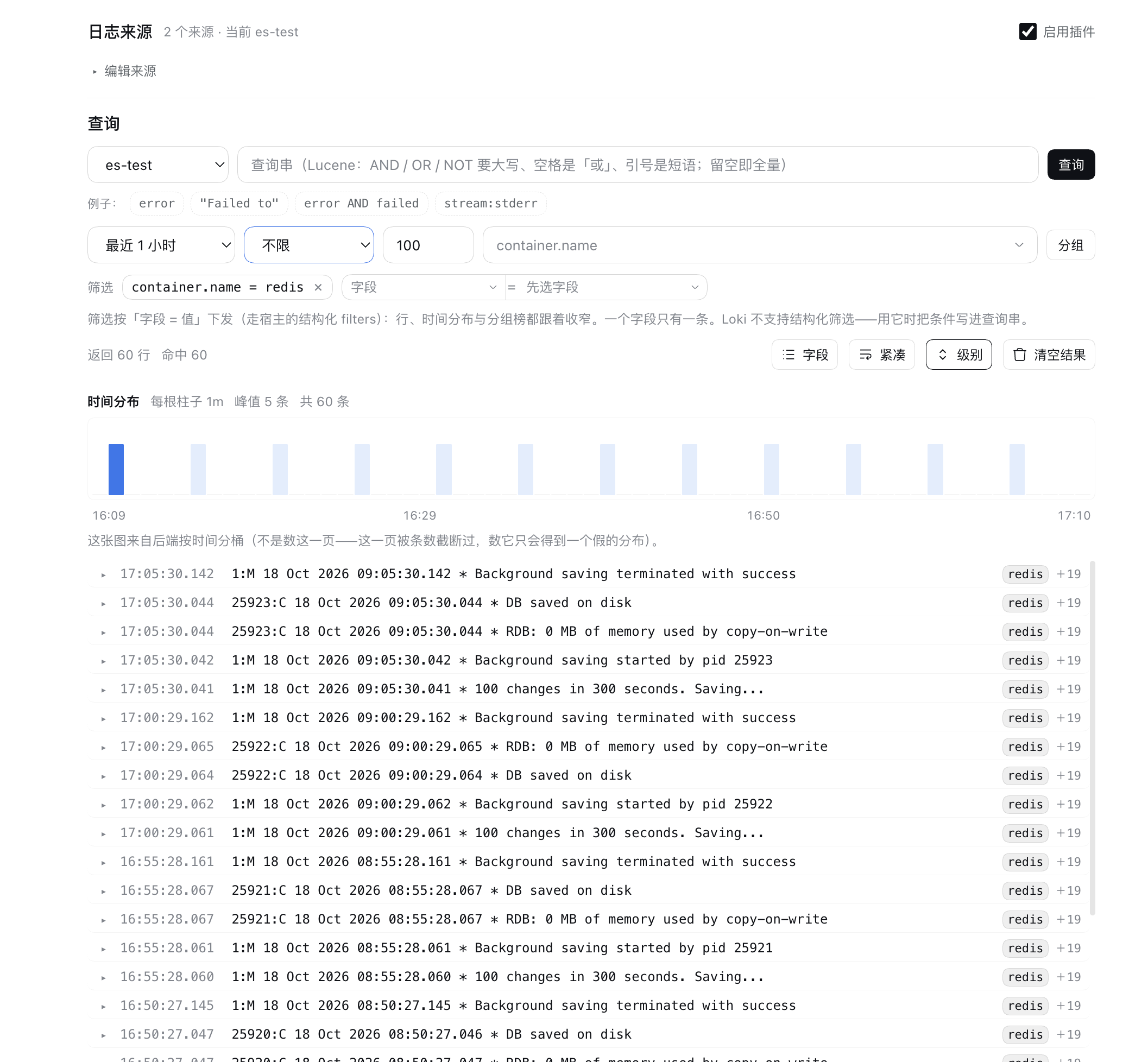
Search Elasticsearch / OpenSearch logs without leaving the card: one shared source list, direct queries,
volume over time and drill-down by field. On the agent side it registers the loglens_* read-only tools
(loglens_sources / loglens_search / loglens_fields / loglens_facets / loglens_context).
Docker container logs need no second stack: they are a collection source reusing the existing docker_logs.
- One query surface: several sources are switched and searched inside the same card; the query string gets clickable examples and placeholders in each source's own dialect
- Drill down from the result: click a bar in the volume chart to zoom to that window (reversible); the group-by board answers "which service is erroring", and clicking a value turns it into a filter
- Both consumers share one layer: the panel and the agent tools go through the same normalization and clamping, so
loglens_searchreturns the shape the panel shows - Read-only, and fenced: all four routes sit behind the hardened loopback gate (every action but the on/off switch also needs the same-origin proof); egress is decided on the resolved IP (link-local / cloud-metadata addresses refused), never follows redirects, and is capped in size and time
dsh plugin --profile web add @hyzyn/dsh-loglens
Full usage, configuration shape and contracts → packages/loglens/README.md.
What it is
dsh-plugin-kit is a general-purpose plugin collection for the DeepSeek Harness (DSH) Web GUI. Every plugin mounts through the official profile mechanism — DSH itself is never patched — and you can install them one by one or all at once with the aggregate package.
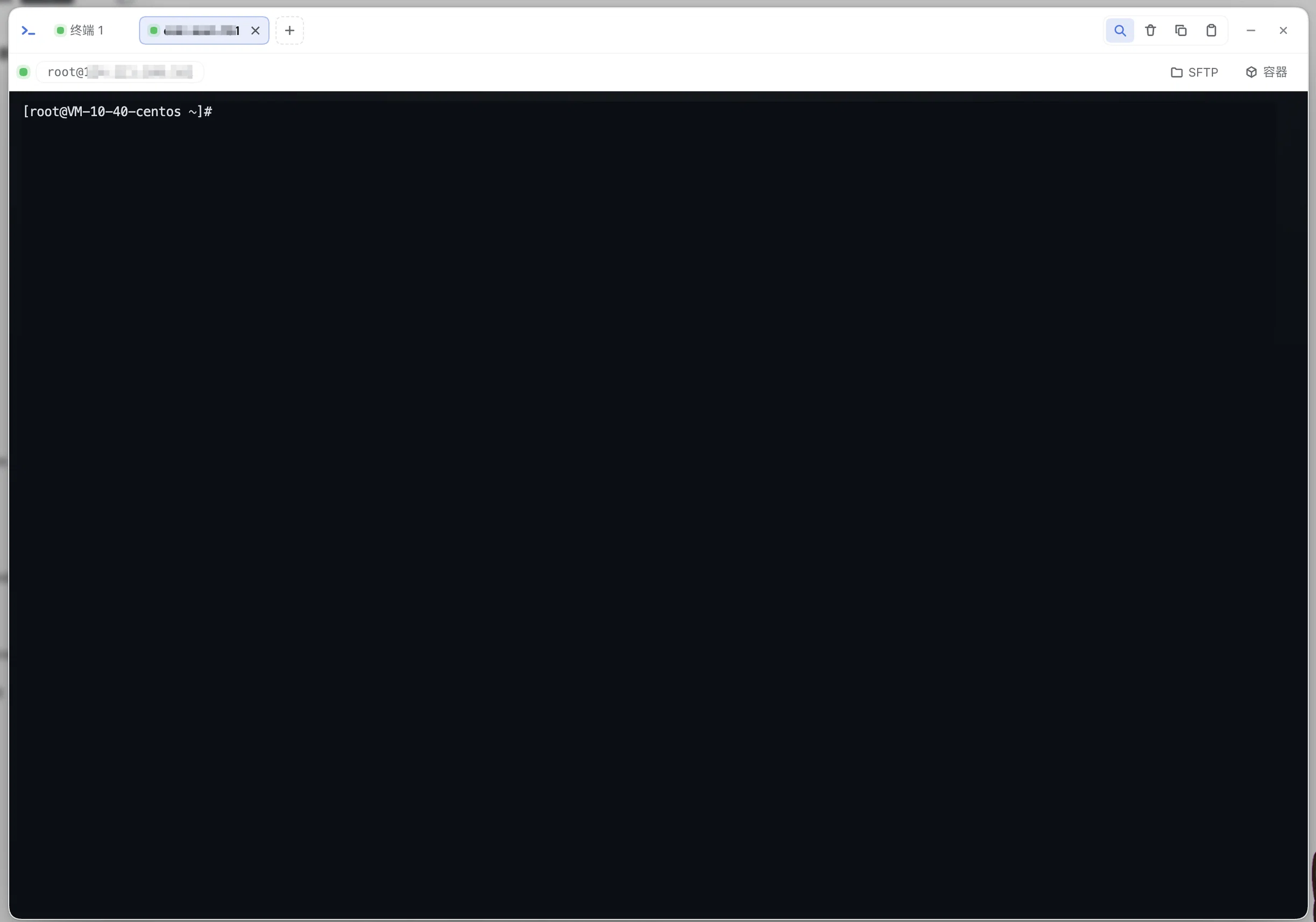 |
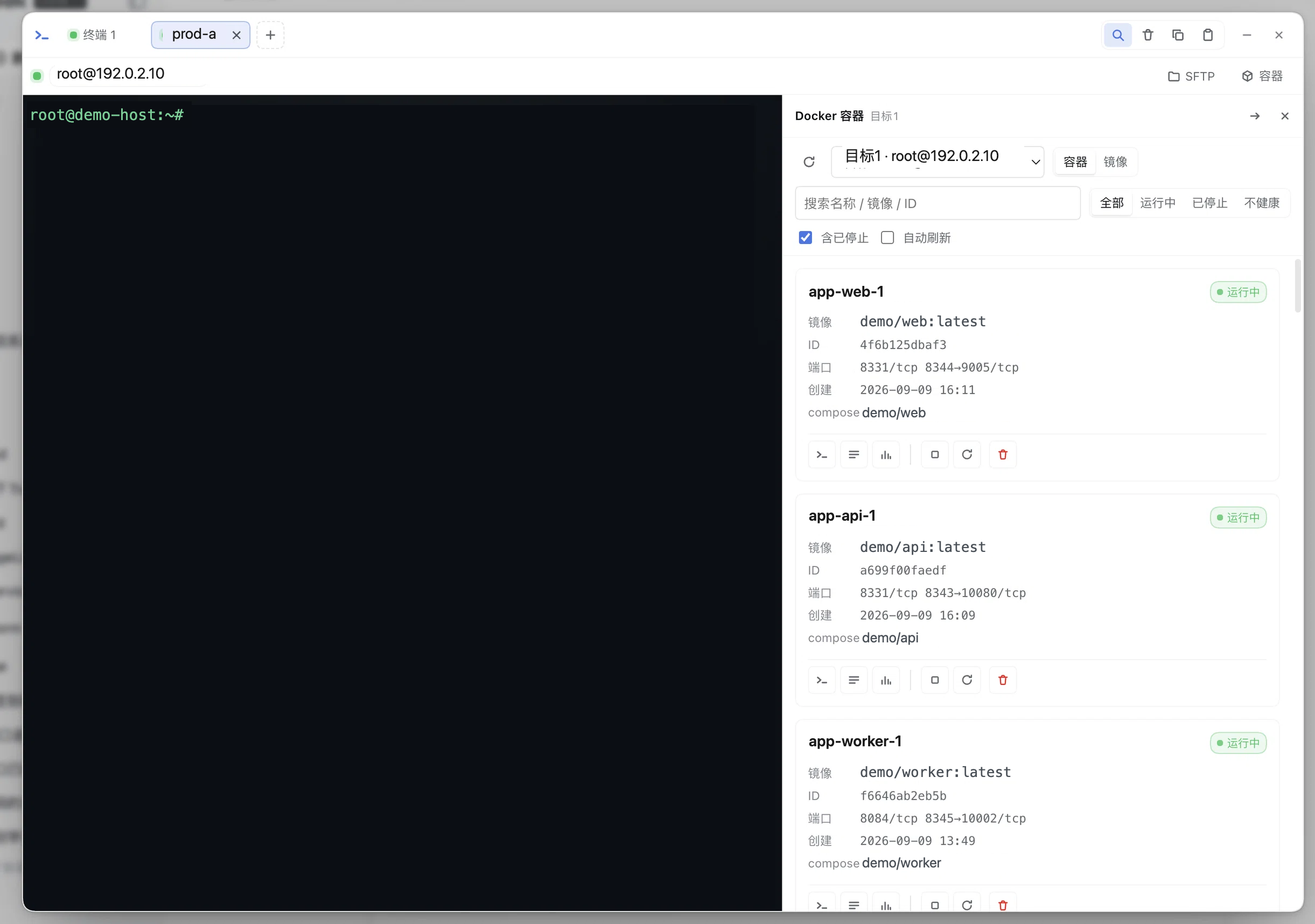 |
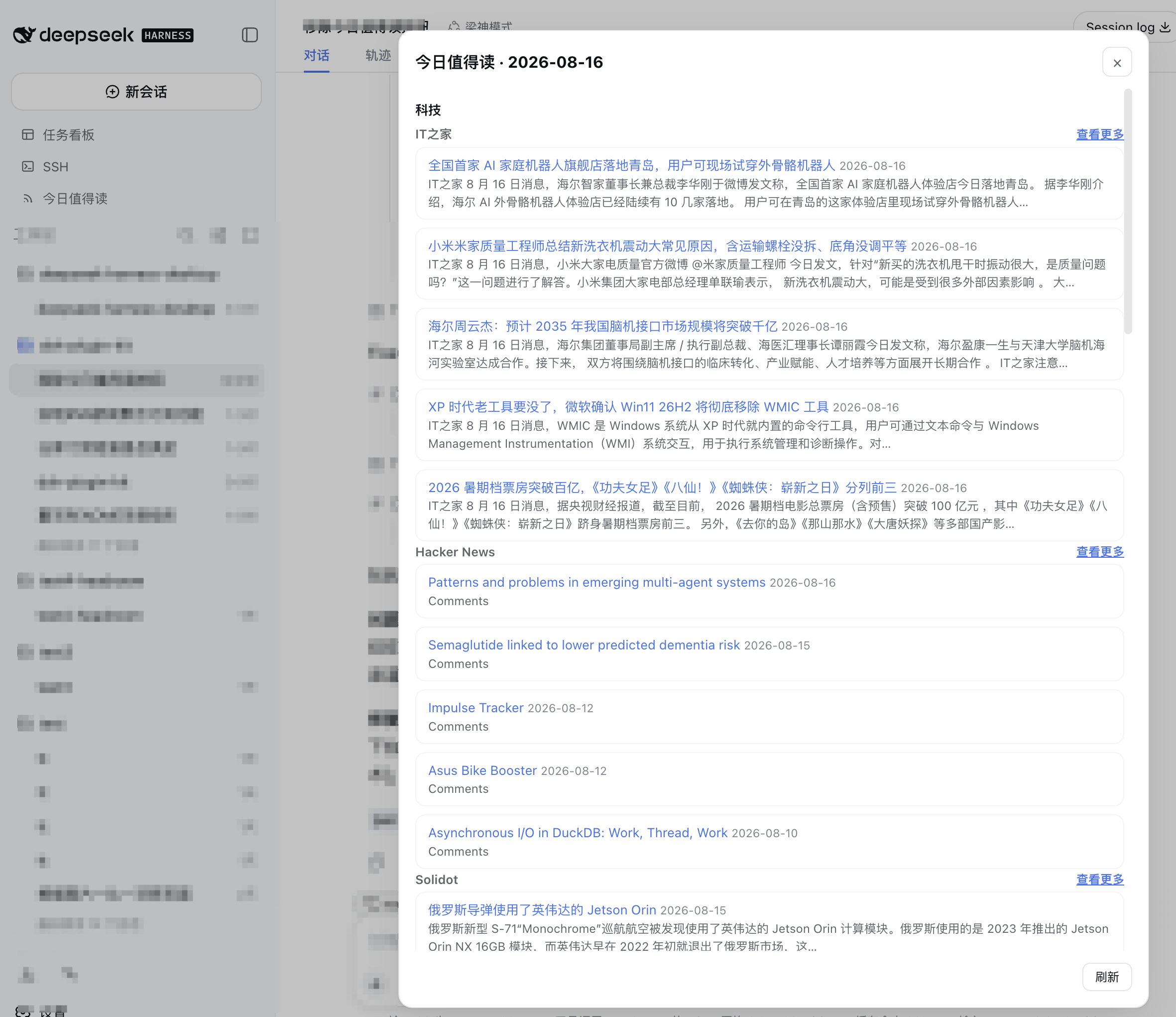 |
 |
Grouped configuration → panels → development:
| Capability | Plain dsh web |
dsh-plugin-kit |
|---|---|---|
| MCP servers | edit the patch file / CLI | visual card + connection test + hot reload after saving |
| Environment variables | edit env.yml by hand / CLI |
Web GUI card, written into process.env on save |
| Prompt management | hand-edited config | visual editing + versioning / A/B testing / export & share |
| Profile management | CLI | visual create / copy / rename / delete |
| RSS aggregation | none | multi-source subscriptions + a daily “Today’s Worth Reading” + optional AI summaries (follows the host’s default model, zero config) |
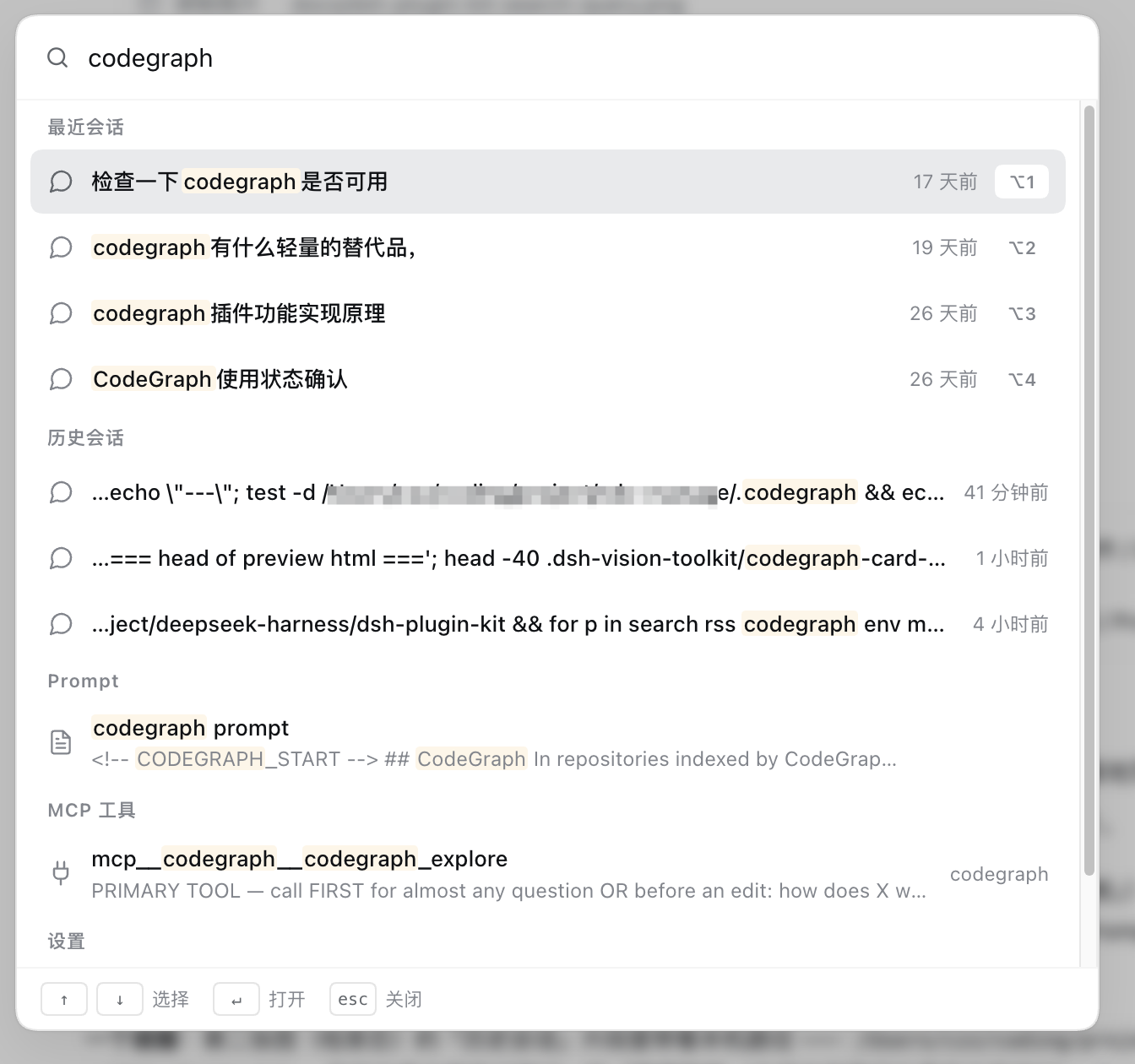
| Global search | session titles / content only | one full-text search in the sidebar over past sessions, Prompts, MCP tools and settings panels |
| Terminal panel | none | real xterm.js multi-tab PTY + native SSH (connection book / host-key pinning / auto reconnect) + SFTP dual-pane transfer; registers tty_* / sftp_* tools |
| Docker container panel | none | containers / images / Compose / live logs and stats / multi-target overview; read-only by default, mutations and exec behind explicit switches; registers docker_* tools |
| Log query | none | New: Elasticsearch / OpenSearch normalized into one query surface (Docker goes through the existing docker_logs; the Loki adapter is in the tree but not offered by the UI in this version); query straight from the card + time distribution + group-by board; registers loglens_* tools (all read tier) |
| Codegraph integration | none | code graph card: index status / symbol search / call chain / impact / one-click sync-index |
| Plugin development | boilerplate by hand | pnpm create-plugin scaffolding + the @hyzyn/dsh-kit shared library |
Each plugin’s full feature set, screenshots and caveats live in its own README (table below). This file only covers what it is and what to install.
Packages
1 shared library + 11 feature plugins + 1 aggregate package. How they relate, their dependency direction and how they cooperate: docs/architecture.md (Chinese).
| Package | What it does | Docs |
|---|---|---|
@hyzyn/dsh-kit |
Library (not a plugin): shared host-half utilities — HTTP loopback fence, managed blocks, !!js expressions, service access |
README · DEFECTS |
@hyzyn/dsh-env |
Environment variables / secrets management | README |
@hyzyn/dsh-mcp |
MCP server configuration card, hot-reloaded on save | README |
@hyzyn/dsh-prompt |
systemPrompt editing / versions / A-B testing | README |
@hyzyn/dsh-profile |
Graphical management of ~/.dsh/profiles |
README |
@hyzyn/dsh-kit-settings |
Adds a “Plugin configuration” row next to “General settings” | README |
@hyzyn/dsh-rss |
RSS aggregation → a daily digest | README |
@hyzyn/dsh-search |
Sidebar global search (⌘ / Ctrl + K) | README |
@hyzyn/dsh-codegraph |
Code graph card + MCP management + adoption measurement | README · DEFECTS · ROADMAP |
@hyzyn/dsh-tty |
Terminal panel: PTY / SSH / SFTP / tunnels | README · DEFECTS · ROADMAP |
@hyzyn/dsh-docker |
Docker container panel (local / SSH), read-only by default | README · DEFECTS · ROADMAP |
@hyzyn/dsh-loglens |
New: log query — normalized query front-end over Elasticsearch / OpenSearch / Docker + loglens_* tools (read-only; no write operations) |
README · DEFECTS · ROADMAP |
@hyzyn/dsh-all |
Aggregate package: one bundle patch that mounts the 11 plugins above | README |
Quick start
System requirements
- DeepSeek-Harness installed and
dsh webstarts normally. Thirteen DSH cohorts are currently supported:0.1.7-rc.2,0.2.0-rc.1,0.2.0-rc.2,0.2.1-alpha.1,0.2.1-alpha.2,0.2.1-alpha.5,0.2.1-rc.1,0.2.1-rc.2,0.2.1-rc.3,0.2.1-rc.4,0.2.1-rc.5,0.2.2-alpha.3and0.2.2-rc.1;0.1.6-alpha.2and earlier are no longer supported (the newest eight cohorts are explicit declarations, but not all are zero-difference:0.2.2-alpha.3removed one theme token, and the rss / search sidebar hover was adapted with it;0.2.1-alpha.5carried real host behaviour changes in the evaluator,engines.dsh, credentials and the macOS picker; the other six are zero-difference — this round’s0.2.2-rc.1differs only in the version string of four client bundles. The per-item evidence is in the cohort notes at the top ofscripts/check-dsh-peers.mjs). - Compatibility is guaranteed by the
@deepseek-ai/dshrange each installable plugin declares inpeerDependencies, which DSH checks once before install and once at startup. What a rejection looks like and how to admit a combination temporarily → docs/troubleshooting.md § Compatibility. - No extra requirements for npm installs; building from this repository’s sources requires
Node.js >= 22.19 and pnpm 10 (below that,
pnpm installfails outright rather than merely warning — see docs/conventions.md § Environment floor). On the npm side it is only anEBADENGINEnotice and does not block installation. The host declares its own Node floor:0.2.2-alpha.3requires Node >= 24.9 (the CI mount lane already runs Node 24), while this repository’s development floor remains22.19— older cohorts keep working on Node 22.
Install from npm
Installing only what you need is the recommended path — one package per line below, install just
the ones you want. Starting with the three configuration cards (env / mcp / prompt, none of
which register tools) is the cheapest way in:
dsh plugin --profile web add @hyzyn/dsh-env          # env vars / secrets
dsh plugin --profile web add @hyzyn/dsh-mcp          # MCP servers
dsh plugin --profile web add @hyzyn/dsh-prompt       # systemPrompt
dsh plugin --profile web add @hyzyn/dsh-profile      # profiles
dsh plugin --profile web add @hyzyn/dsh-kit-settings # the "Plugin configuration" settings row
dsh plugin --profile web add @hyzyn/dsh-rss          # RSS digest
dsh plugin --profile web add @hyzyn/dsh-search       # ⌘/Ctrl+K global search
dsh plugin --profile web add @hyzyn/dsh-codegraph    # code graph card
dsh plugin --profile web add @hyzyn/dsh-tty          # terminal panel (PTY / SSH / SFTP)
dsh plugin --profile web add @hyzyn/dsh-docker       # Docker container panel
dsh plugin --profile web add @hyzyn/dsh-loglens      # log query (ES / OpenSearch / Docker)
Package names, one-line descriptions and per-package docs are in the Packages table above.
One thing to know before you install: the packages differ in what they touch (details are in each package's README; the mechanism is in docs/architecture.md § 7):
| Install it | What it means |
|---|---|
| Registers tools — genuinely changes what the agent can do | tty (tty_* / sftp_* — a real shell / SFTP channel) · docker (docker_*) · loglens (loglens_*, all read tier: it only queries the log backends you configured) · codegraph (it hosts the codegraph MCP row for you, so mcp__codegraph__* lands in the model's toolbox) |
| Only appends a section to the systemPrompt | rss (the “Today's Worth Reading” section) · search (its capability announcement); what prompt does is edit the systemPrompt |
| Only touches your own configuration and UI | env (saving writes into the host's process.env — still your own configuration) · profile · kit-settings · mcp (a configuration entry point — it adds no tools itself, but the servers you type into it will) |
Installing everything at once is the aggregate package — its exposure is the union of each package's — if you don't know which plugin you need, don't start there:
dsh plugin --profile web add @hyzyn/dsh-all              # aggregate package
dsh plugin --profile web add @hyzyn/dsh-plugin-kit       # repo root bundle (mounts the whole family too)
Restart dsh web afterwards; all entries appearing on the plugin configuration page means it worked.
If a card does not appear, you probably forgot to restart. You can also use
dsh --profile web --dump-config to confirm the plugin configuration layer is mounted.
Uninstall: dsh plugin --profile web remove @hyzyn/dsh-all (or the matching subpackage), then restart.
Which configuration entry exists in which version: DSH ≥
0.1.6-alpha.2has two entries pointing at the same configuration — the sidebar “Plugins” → pick a plugin → its row’s “Configure” (the official two-pane page), and Settings → “Plugin configuration” (a row next to “General settings”, provided by@hyzyn/dsh-kit-settings). Client halves register all three slot generations (plugins.row.config,settings.kit.item,settings.plugin.item), so one build works on every generation. This configuration itself lives in the current profile's plugin entry (cordis.patch.ymluser layer), not in a globalsettings.yamlsection — see the glossary.
Install failures / missing cards / every plugin gone / HTTP 401 or 403 → docs/troubleshooting.md (Chinese).
Install from the GitHub repository (development / debugging)
The repository root is itself a DSH bundle
(package.json#dsh.bundle.patch, generated by pnpm aggregate):
git clone https://github.com/hyzyn/dsh-plugin-kit.git
cd dsh-plugin-kit
pnpm install
pnpm build

dsh plugin --profile web add link:$(pwd)   # the root bundle is equivalent to installing @hyzyn/dsh-all
dsh web
⚠️ If the web profile already has
@hyzyn/dsh-allor any@hyzyn/dsh-<pkg>installed, do not add the root bundle (orpackages/all) again — duplicate plugin rows cause aduplicate loader entry iderror at startup. For one subpackage only, replace the add step withdsh plugin --profile web add link:$(pwd)/packages/<name>.With the
dshfield on the root package, GitHub DSH marketplaces classify this repository as a DSH plugin (cordis-plugin) instead of flagging it as “non-plugin”.
Writing a new plugin
pnpm create-plugin <name> [id]
# e.g. pnpm create-plugin timer          → packages/timer (@hyzyn/dsh-timer, plugin id: timer)
# e.g. pnpm create-plugin pet-tracker pt → packages/pet-tracker (plugin id: pt)
The script copies the templates/hello template, substitutes the package name and plugin id, and
updates the aggregate package. Then edit packages/<name>/src/index.ts and build for local debugging:
pnpm --filter @hyzyn/dsh-<name> build
dsh plugin --profile web add link:$(pwd)/packages/<name>
Which docs a new package needs, how long they may be, and where its numbering starts →
docs/conventions.md (Chinese).
The anatomy of a plugin package (dsh.bundle.patch / cordis.patch.yml / src/index.ts /
dsh.client) → docs/conventions.md § Package anatomy.
Six rules that are easy to trip over (where a client half may derive its host address; extracting
pure logic into modules; scoping a document-level click delegate; theme variable names and values) →
docs/conventions.md § Client half.
Documentation map
| You want to know | Read |
|---|---|
| What this is, what to install | this file |
| New here and want the big picture (read in this order) | docs/architecture.md → docs/conventions.md → docs/agent-real-test.md |
| How the 13 packages cooperate, dependency direction, who writes which config file | docs/architecture.md |
| Naming / commits / doc layers / numbering / package anatomy | docs/conventions.md |
| Terminology (host half, managed block, TOFU, slot generations…) | docs/glossary.md |
| Install failures, missing cards, every plugin gone, HTTP 401/403, known limits | docs/troubleshooting.md |
| How to run real-machine tests, and what counts as passing | docs/agent-real-test.md |
| The full design and acceptance criteria of a cross-package plan (bastion / elevation / i18n…) | *-plan.md and i18n.md under docs/, routed by the conventions.md knowledge-ownership table |
| Windows 11 test environment setup | scripts/windows/README.md |
| Runtime linking between plugins and the host in a dev checkout | docs/link-dsh-runtime.md |
| Cross-package backlog | ROADMAP.md |
| Release process (incl. the cohort change list) | RELEASING.md |
| How one package is used | packages/<pkg>/README.md |
| What a defect number means | packages/<pkg>/DEFECTS.md |
The L0 documents under
docs/are currently Chinese-only. Package READMEs are bilingual (aREADME.en.mdnext toREADME.md) exceptkit,kit-settingsandall, which are Chinese-only.
Contributing
- Generate new plugins with the scaffolding:
pnpm create-plugin <name> [id]. - File issues through the templates (Bug report / Feature request; blank issues are disabled): the required environment / version / reproduction steps / self-check results map to the general sequence in docs/troubleshooting.md — only a complete report can be triaged in the first round. Format rules: docs/conventions.md § Issue.
- Commits follow Conventional Commits (e.g.
fix(mcp): …); user-visible changes should come with screenshots or verification evidence. - Run the gates before committing:
pnpm typecheck && pnpm build && pnpm test && pnpm aggregate. - After adding or removing a plugin, re-run
pnpm aggregateto regenerate thepackages/allmanifest. - Full conventions: docs/conventions.md.
License
Licensed under the Apache License 2.0.
Contributors
Like this project? Give it a star.