
hrtsegv/gitcs
hrtsegv/gitcs has 136 GitHub stars and 12 forks. GitHot measured 0 stars in 24 hours. Last checked 2026-11-16 18:54 UTC. Last push 2026-10-19.
Measured star growth
- in 24h
- 0
- in 7 days
- Collecting history
- in 15 days
- Collecting history
- in 1 month
- Collecting history
Net star changes over overlapping periods, not daily totals. Missing measurements are left blank. Stars measure attention, not software quality.
About
📈 Command line tool written in Go. It allows developers to scan their local Git repositories and generate a visual contributions graph.
Developer ToolsREADME.md
Originalgitcs

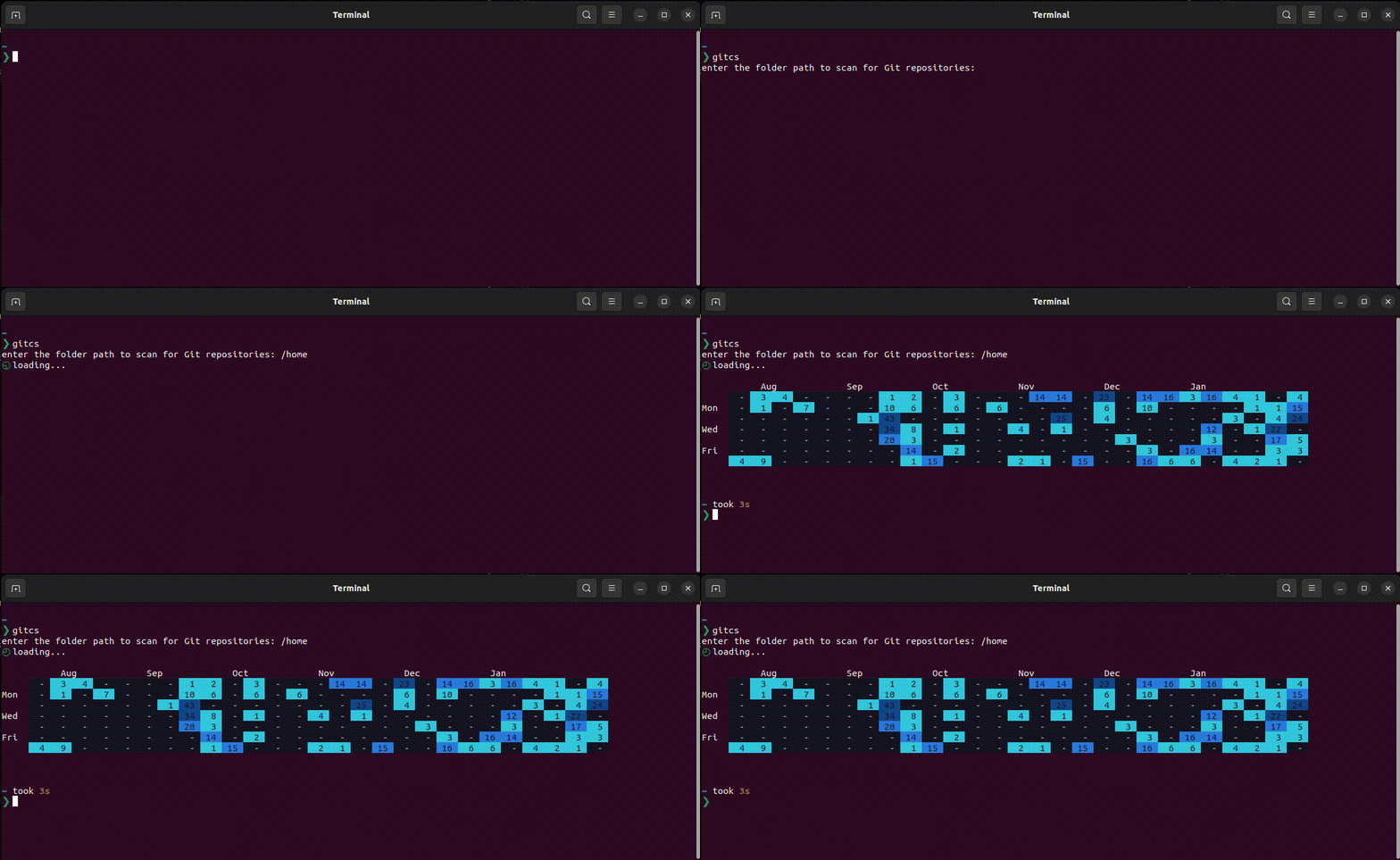
Git Commits Visualizer (gitcs shortly) is a command-line tool that allows developers to analyze their local Git repositories and generate a visual contributions graph. This tool proves valuable for developers working across multiple Git services like GitHub and GitLab (because there are already graphs provided online by each of them, but each has it's own data, this tool works locally, so no matter where you've pushed the project, commits will count), enabling them to visualize contributions seamlessly, even in offline or disconnected environments.
Installation
Ensure that you have Go installed on your machine before installing this tool. Execute the following command:
go install github.com/hrtsegv/gitcs@latest
Alternatively, if you don't have Go installed, download the latest release from this repository.
Usage
Run gitcs to scan the current directory and its subdirectories. By default, the
graph starts 182 days before today. To scan another directory, use -path.
gitcs
gitcs -path "/home/user/dev"
The author email defaults to the Git configuration for the scan directory,
including repository-local settings and global settings. Use -email to choose
an author, or repeat it to combine your personal and work identities.
gitcs -email "[email protected]" -path "/home/user/dev"
gitcs -email "[email protected]" -email "[email protected]" -path "/home/user/dev"
If you want to include commits from all authors (regardless of email), pass a wildcard:
gitcs -email "*" -path "/home/user/dev"
Choose an inclusive date range with -since and -until. Both flags use
YYYY-MM-DD; either can be supplied independently. The end date includes the
whole day. Dates use your local timezone unless you choose -timezone.
gitcs -since "2026-01-01" -until "2026-01-31" -timezone "Asia/Beirut" -path "/home/user/dev"
- If Git has no configured email, supply
-emailor use-email "*". - Reversed ranges are rejected. Future end dates are capped at today with a warning; future-dated commits are excluded.
- The calendar fits your terminal width and splits long ranges into blocks. Use
-width 80to choose a width explicitly. Piped output defaults to 80 columns. - Run
gitcs -helpfor all options.NO_COLOR=1disables colored output.
Interactive explorer
Open a contribution calendar, commit list, and full commit details in your terminal:
gitcs explore -path ~/dev
gitcs explore -path ~/dev -email '*' -since 2026-01-01
The explorer accepts the same author, date, timezone, branch, and width flags as the report. It starts on the latest date with matching commits. Repositories load in the background; progress and warnings stay visible while you browse.
| Key | Action |
|---|---|
Arrows or h/j/k/l |
Move through the calendar; left/right move a week, up/down a day |
Home / End |
First / last date, or first / last commit in the list |
PgUp / PgDown |
Move four weeks, or page through a list or details |
Enter / Esc |
Open commits, then details / go back |
p |
Open the selected commit's patch; Esc or p returns |
Tab / Shift+Tab |
Switch panes |
d |
Toggle the selected day / all dates |
/ |
Search loaded commit messages and hashes across all dates |
r |
Filter by repository |
w |
Inspect warnings and skipped repositories |
R |
Refresh the scan |
? |
Show help |
q / Ctrl+C |
Quit / cancel and quit |
Search updates the calendar and list together. Enter accepts a search; Esc
restores the previous search. On the calendar, Esc clears an accepted search.
Repository filtering still counts a shared commit once, and details show every
repository containing that commit.
The calendar shows exact daily counts using the report's heatmap scale. -
means zero; brackets mark the selected day. Total is the number of unique
commits loaded by the command-line filters. Matching appears when a repository
or search filter is active and counts those matches across all dates. The selected
day and list each show their own counts. Counts remain provisional while loading;
duplicate commits across repositories are counted once in both commands.
Wide terminals show the list and details side by side. Smaller terminals show
the active pane; resizing preserves your selection. The minimum size is 32
columns by 20 rows. Exact numbers and selection markers also work with
NO_COLOR=1. Quitting restores the terminal and cancels background work.
The explorer requires an interactive input and output terminal. Use
gitcs [flags] for printable or piped output. Filters apply to the history loaded by
the command-line options; change those options to include other authors or dates.
Details include the full message, hash, author, timestamps, and repository paths.
Press p to inspect a commit's changes in a full-screen patch viewer. Patches
load only when requested. Use up/down to scroll, left/right to pan long lines,
and PgUp/PgDown or Home/End to move through the diff. ? opens help;
closing help returns to the patch. Your date, commit selection, and detail
position are preserved when you return.
The patch viewer requires Git on PATH and uses local objects only. It disables
external diff commands, text conversion commands, and pagers. Merge commits show
changes against their first parent. If a shallow repository is missing that
parent, gitcs tries another repository containing the commit, then explains the
missing history if none can provide it. Empty commits show a no-changes message.
Patch output is limited to 1 MiB and visibly labeled when truncated. Esc
cancels a pending load; R in the viewer reloads the patch. A successful patch
is kept in memory while that commit remains selected, and a scan refresh clears
it. Added and removed lines use color when enabled, with their +/- markers
also visible with NO_COLOR=1.
How commits are counted
- Both filtering and daily totals use the author date, converted to the reporting timezone. Rebasing does not move a contribution to its committer date.
- By default, history includes all local branches plus HEAD, including a
detached HEAD. Remote-only branches, tag-only history, and stash-only history
are excluded. Use
-branch-scope headto count only commits reachable from HEAD. - A commit hash is counted once across branches, clones, and linked worktrees. Only locally available history is read; the tool never fetches from remotes.
- Normal repositories, linked worktrees, and initialized submodules are discovered
through their
.gitdirectory or file. Bare repositories are not discovered. Dependency directories such asnode_modulesare skipped, and directory symlinks are not followed during traversal. An explicitly supplied symlink root is resolved. - Unreadable repositories and subdirectories produce warnings. Valid repositories still contribute to a report labeled Partial results. If every discovered repository fails, the command exits with an error rather than reporting zero.
Earlier versions counted only HEAD history and counted repeated clones separately, so totals may change with these corrected counting rules.
Contributions
See TESTING.md for regression coverage, read-only checks against native Git on real repositories, and release build verification.
Contributions are welcome! If you would like to contribute to this project, please follow these steps:
1- Fork the repository.
2- Create a new branch for your feature or bug fix.
3- Make the necessary changes and commit them.
4- Push your changes to your fork.
5- Submit a pull request describing your changes.
License
This project is licensed under the MIT License. See the LICENSE file for details.