
howljs/react-native-calendar-kit
howljs/react-native-calendar-kit has 658 GitHub stars and 103 forks. GitHot measured 0 stars in 24 hours. Last checked 2026-11-15 23:49 UTC. Last push 2025-10-10.
Measured star growth
- in 24h
- 0
- in 7 days
- Update delayed
- in 15 days
- Update delayed
- in 1 month
- Update delayed
Net star changes over overlapping periods, not daily totals. Missing measurements are left blank. Stars measure attention, not software quality.
About
React Native Calendar Kit is a powerful and flexible calendar component for React Native applications. It provides a customizable and feature-rich calendar view with support for various functionalities
Developer ToolsREADME.md
Original📅 React Native Calendar Kit
The ultimate React Native calendar solution
React Native Calendar Kit is a modern, feature-rich calendar component. Whether you're building a scheduling app, event manager, or any time-based interface.
🚀 Production-ready • 🎨 Highly customizable • 🌍 Timezone aware

Demo:
iOS:
https://github.com/user-attachments/assets/9a099b37-6898-4e05-87d9-c8fd82e16c63
Android:
https://github.com/user-attachments/assets/3896a8c8-4cde-4f76-8621-168be4cba74b
✨ Features
📅 View Modes
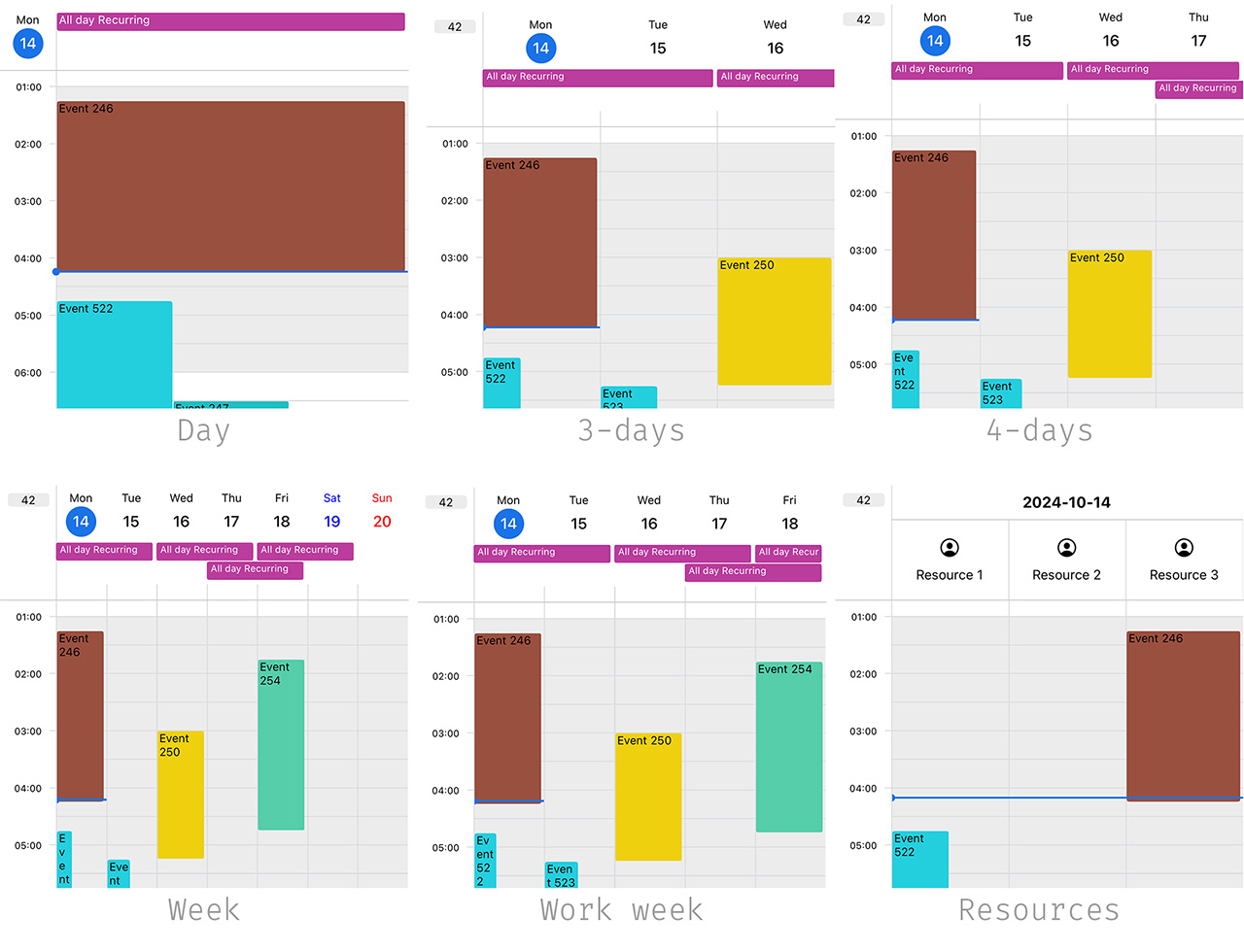
- 🌅 Multiple view types - Day, 3-days, week views with smooth transitions
- 🌍 All-day events - Perfect for holidays, meetings, and multi-day events
- 👥 Resource calendar - Display multiple resources (rooms, employees, equipment) side by side
🎯 Interactions
- ✋ Drag & drop - Intuitive event creation and editing
- 🔍 Pinch to zoom - Smooth gesture-based zoom controls
- 📲 Haptic feedback - Premium tactile responses for user actions
- ↔️ Horizontal scrolling - Swipe between different calendar views
⚙️ Customization
- 🎨 Theming system - Complete visual customization
- 📆 Flexible day view - Hide/show specific days of the week
- ⏰ Unavailable hours - Mark blocked time slots
- 🔄 Recurring events - Full support for repeating events
🚀 Performance
- ⚡ Optimized scrolling - Smooth day-by-day navigation
- 🌐 Timezone aware - Handle multiple timezones effortlessly
- 📊 Overlap handling - Smart event positioning and spacing
🚀 Quick Start
Get up and running in under 2 minutes:
import { CalendarBody, CalendarContainer, CalendarHeader } from '@howljs/calendar-kit';

const MyCalendar = () => (
  <CalendarContainer>
    <CalendarHeader />
    <CalendarBody />
  </CalendarContainer>
);
That's it! Your calendar is ready with all the features enabled.
📚 Resources
- 📖 Documentation - Complete guides and API reference
- 🔧 Example App - Live examples and implementation demos
- 💬 Discussions - Community support and feature requests
📦 Installation
Step 1: Install the package
npm install @howljs/calendar-kit
Step 2: Install peer dependencies
The calendar requires react-native-gesture-handler and react-native-reanimated for smooth interactions and animations.
✅ Already installed? You can skip this step if you have the latest versions.
🔸 For Expo projects
npx expo install react-native-gesture-handler react-native-reanimated
🔸 For bare React Native projects
npm install react-native-gesture-handler react-native-reanimated
📋 Follow setup guides: Reanimated • Gesture Handler
Step 3: Optional - Haptic Feedback
Enhance user experience with tactile feedback during drag operations.
🔸 For Expo projects
npx expo install expo-haptics
🔸 For bare React Native projects
npm install react-native-haptic-feedback
Then enable it in your calendar:
<CalendarContainer useHaptic={true}>
  {/* Your calendar content */}
</CalendarContainer>
Show your support ⭐
If this library helped you, please consider giving it a star on GitHub!