
howardpen9/kimi-code-mcp
howardpen9/kimi-code-mcp has 63 GitHub stars and 13 forks. GitHot measured 0 stars in 24 hours and 0 in 7 days. Last checked 2026-11-15 21:00 UTC. Last push 2026-11-02.
What you can do
- "Analyze this codebase's architecture" - Kimi reads the tree (default k3), Claude acts on the report
- "Scan for security vulnerabilities, then review Kimi's findings" - Kimi audits, Claude cross-examines — AI pair review
- "Map all dependencies of the auth module, then plan the refactoring" - Kimi builds the dependency graph, Claude plans the changes
- "Review the recent changes for regressions and edge cases" - Kimi reviews full context (not just the diff), Claude synthesizes
Measured star growth
- in 24h
- 0
- in 7 days
- 0
- in 15 days
- Update delayed
- in 1 month
- Update delayed
Net star changes over overlapping periods, not daily totals. Missing measurements are left blank. Stars measure attention, not software quality.
About
MCP server for Claude Code × Kimi Code CLI 2.4.1 — default model k3 (up to ~1M on eligible plans); kimi-for-coding = K2.8 Preview. Delegate bulk reads to Kimi, cut Claude-side tokens.
AIREADME.md
Originalkimi-code-mcp
English | 中文說明
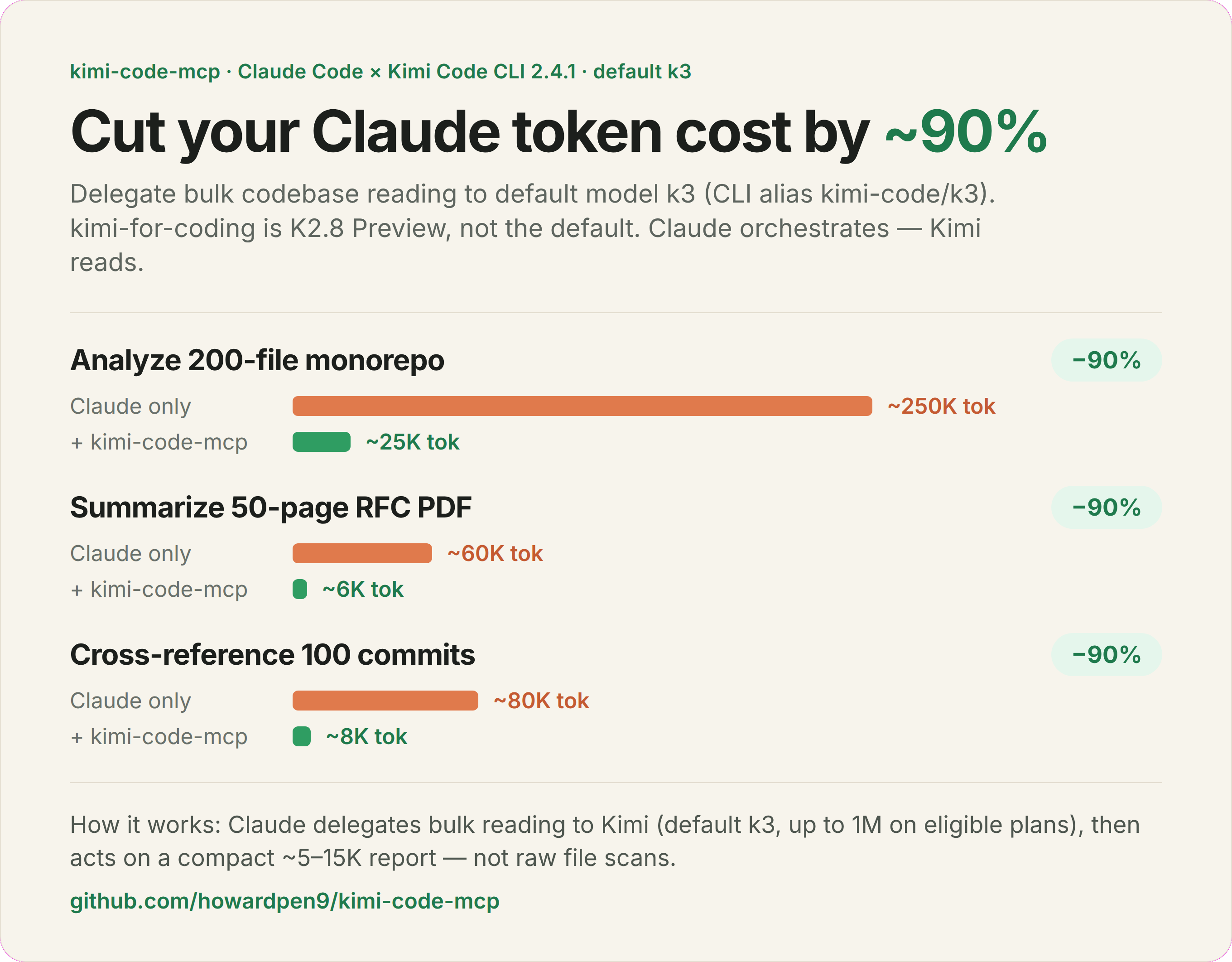
Illustrative estimates. The ~90% is Claude-side token reduction on analysis-heavy tasks — not total cost: Kimi's own subscription still applies. The monorepo row mirrors the example below; the PDF/commits rows are rough sketches. Default model on the graphic is
k3 (CLI 2.4.1); kimi-for-coding is K2.8 Preview.
Delegate codebase analysis from Claude to Kimi Code (default model k3, CLI alias kimi-code/k3) — cut Claude-side token cost ~90%.
| Task | Claude only | Claude + kimi-code-mcp | Claude-side savings |
|---|---|---|---|
| Analyze 200-file monorepo | ~250K tok | ~25K tok | ~90% |
| Summarize 50-page RFC PDF | ~60K tok | ~6K tok | ~90% (sketch) |
| Cross-reference 100 commits | ~80K tok | ~8K tok | ~90% (sketch) |
*Illustrative estimates — savings are on Claude tokens only and depend on the task; Kimi's subscription cost is separate. See Token Economics.
Quick start
# 1. Install the current Kimi Code CLI (macOS / Linux) and log in.
#    code.kimi.com/install.sh redirects to the archived Python kimi-cli. Do not use it.
curl -fsSL https://code.kimi.com/kimi-code/install.sh | bash
kimi login

# Node.js >= 22.19.0 alternative:
# npm install -g @moonshot-ai/kimi-code

# This server runs ~/.local/bin/kimi only. The installer puts the binary in
# ~/.kimi-code/bin and adds that directory to your shell rc.
mkdir -p "$HOME/.local/bin"
ln -sfn "$HOME/.kimi-code/bin/kimi" "$HOME/.local/bin/kimi"

# 2. Install this MCP server (Node.js >= 18)
npm install -g kimi-mcp-server
[!WARNING] On 2026-11-02 the npm registry only has
[email protected]. Gitmainis 0.5.0 and is not published, sonpm install -gdoes not yet default tok3or read~/.kimi-code/config.toml. Use Install from source until 0.5.0 is published if you need the behavior on this page.
Windows (PowerShell): irm https://code.kimi.com/kimi-code/install.ps1 | iex. The runner in this repo still expects the POSIX path ~/.local/bin/kimi, so link the installed kimi binary there the same way.
Project scope — commit .mcp.json at the repo root:
{
  "mcpServers": {
    "kimi-code": {
      "command": "npx",
      "args": ["-y", "kimi-mcp-server"]
    }
  }
}
User scope (all projects, stored in ~/.claude.json, not ~/.claude/mcp.json):
claude mcp add --scope user --transport stdio kimi-code -- npx -y kimi-mcp-server
Run /mcp in Claude Code to verify — you should see kimi-code with 8 tools.
The MCP defaults to k3 and passes -m kimi-code/k3 on CLI calls.
Override with the tool's model argument or KIMICODE_MODEL / KIMI_MODEL
(argument wins). On CLI 2.4.1, kimi provider list prints Default model: … when a default is set.
That value can differ from the MCP default. Switch inside the CLI with /model.
[!TIP] You don't need the CLI for the common case.
kimi_queryandkimi_verifycall the Kimi Code API directly — no CLI install orkimi loginrequired. Set$KIMICODE_API_KEY(see Kimi Code API Setup). Onlykimi_analyzeandkimi_resumespawn the CLI. See Two backends: API vs CLI.
How it works
- Claude calls the
kimi_analyzetool when a task needs bulk codebase reading. - MCP routes the request to Kimi Code (default
-m kimi-code/k3) — Kimi reads the codebase from disk. - The result is piped back as a structured response — Claude acts on it with precise, targeted edits.
┌──────────────┐  stdio/MCP   ┌──────────────┐  subprocess   ┌──────────────┐
│  Claude Code │ ◄──────────► │ kimi-code-mcp│ ────────────► │ Kimi CLI     │
│  (conductor) │              │ (MCP server) │               │ (k3)         │
└──────────────┘              └──────────────┘               └──────────────┘
Two backends: API vs CLI
The server reaches Kimi two different ways, and each tool uses the one that fits its job. Knowing which is which tells you what you need to set up.
| Backend | How it talks to Kimi | What it needs | Sees your codebase? |
|---|---|---|---|
| Direct API | HTTPS to api.kimi.com/coding/v1 (or KIMI_BASE_URL) |
An API key ($KIMICODE_API_KEY, or api_key in ~/.kimi/config.toml / ~/.kimi-code/config.toml) |
❌ No — you paste in the context |
| Local CLI | Spawns the kimi binary as a subprocess |
CLI installed and kimi login done |
✅ Yes — reads files from disk |
| Tool | Backend | Why |
|---|---|---|
kimi_query |
API (CLI only if no key configured) | Contextless Q&A — no codebase needed, so the API is simpler and has no login dependency |
kimi_verify |
API | You pass the code/diff/claim inline; Kimi judges it as an independent third party |
kimi_analyze |
CLI | Reads the codebase from disk. Context follows the model window |
kimi_resume |
CLI | Continues a stateful CLI session that holds prior codebase context |
kimi_list_sessions, kimi_cache_*, kimi_status |
local | Read local session/cache metadata |
[!IMPORTANT] Most users only need the API key. If you just want a second opinion / verification (
kimi_query,kimi_verify), set the API key and you're done — skip the CLI entirely. Install +kimi loginonly when you want Kimi to read your codebase viakimi_analyze/kimi_resume.
Run kimi_status any time to see which backends are live — it reports the API-configured state and the CLI install/auth state separately.
Guidelines for agents
If you are an AI agent (Claude Code, a subagent, etc.) deciding when to call these tools:
- Cross-check your own work before committing →
kimi_verify. Paste the actual diff/code/claim plus the surrounding context (goal, constraints, signatures). Kimi sees only thecontextstring — no repo, no session history. Vague context → useless review. - Quick model-agnostic programming question →
kimi_query. No codebase needed. Returns a different model's opinion. - Need to understand a large/unfamiliar codebase →
kimi_analyzewithwork_dir. Prefer this over reading 50 files yourself; it's ~10× cheaper in Claude tokens. Requires the CLI to be installed and logged in. - Drill deeper after an analyze →
kimi_resumewith the returnedsession_id(the CLI session keeps its context; the window is the model's, not a fixed 256K). - Don't know why a Kimi call failed →
kimi_statusfirst. "Not authenticated" on the CLI does not affectkimi_query/kimi_verify(those use the API). - Keep outputs lean. The tool default is
detail_level: normal. Passsummaryfor orientation; usedetailedonly when you need code snippets. Bigger output = more Claude tokens, defeating the purpose. - Skip Kimi for small/single-file work — Claude reading directly is faster under ~10 files.
MCP server that connects Kimi Code (default model k3) with Claude Code — letting Claude orchestrate while Kimi handles the heavy reading.

Kimi Code sits on the efficiency frontier — near-Claude intelligence at 10x lower cost. kimi.com/code
[!TIP] Stop paying Claude to read files. Kimi Code delivers frontier-class code intelligence at a fraction of the cost (see chart above). Delegate bulk codebase scanning to Kimi and let Claude focus on reasoning, decisions, and precise edits. One
kimi_analyzecall can replace 50+ file reads.
What is Kimi Code?
Kimi Code is Moonshot AI's coding agent (terminal, IDE, and Kimi Code CLI). The CLI is the TypeScript package @moonshot-ai/kimi-code. Public docs list CLI 2.4.1 (2026-10-30). It reads and edits code, runs shell commands, searches files, and fetches web pages.
Model ids below are from the Kimi Code model page and the alias prefix shipped in CLI 2.4.1 (kimi-code/<id> for the managed provider). Context is plan-dependent ("up to").
| Model ID | CLI alias | What it is | Context |
|---|---|---|---|
k3 |
kimi-code/k3 |
K3. This MCP's default. | up to 1,048,576 |
k3-256k |
kimi-code/k3-256k |
K3, 256K window | 262,144 |
k3.1-pro |
kimi-code/k3.1-pro |
K3.1 Pro (3T-class, thinking only) | up to 1,048,576 |
k3.1-pro-highspeed |
kimi-code/k3.1-pro-highspeed |
Same model, higher speed, about 2× quota | up to 1,048,576 |
kimi-for-coding |
kimi-code/kimi-for-coding |
K2.8 Preview | up to 1,048,576 |
kimi-for-coding-highspeed |
kimi-code/kimi-for-coding-highspeed |
K2.7 Code Highspeed | 262,144 |
This server rewrites only a short alias table before the call:
| You pass | API model |
CLI -m |
|---|---|---|
k3, kimi-code/k3, kimi-k3 |
k3 |
kimi-code/k3 |
kimi-for-coding, kimi-code/kimi-for-coding, k2.7 |
kimi-for-coding |
kimi-code/kimi-for-coding |
anything else (k3-256k, k3.1-pro, kimi-code/k3.1-pro, …) |
the string unchanged | the same string unchanged |
k2.7 is a leftover shortcut. It still sends kimi-for-coding (K2.8 Preview), not kimi-for-coding-highspeed. For any other id, the API wants the bare id and the CLI wants kimi-code/<id>. One model value cannot be both unless it is in the table above. Check kimi provider list or /model after login; a re-login can drop custom aliases.
[!WARNING] Kimi Code membership required. API tools (
kimi_query,kimi_verify) need an API key. Codebase tools (kimi_analyze,kimi_resume) need the CLI on~/.local/bin/kimiandkimi login. Plans and quotas: kimi.com/code.
Install from source
If you prefer to build locally instead of using the npm package:
git clone https://github.com/howardpen9/kimi-code-mcp.git
cd kimi-code-mcp && npm install && npm run build
{
  "mcpServers": {
    "kimi-code": {
      "command": "node",
      "args": ["/absolute/path/to/kimi-code-mcp/dist/index.js"]
    }
  }
}
Kimi Code API Setup
[!NOTE] Kimi Code and the Kimi Platform (Moonshot) are separate. Coding-plan ids (
k3,kimi-for-coding) are not platform ids (kimi-k3,kimi-k3.1-pro).kimi-k2-0905-previewis discontinued. Keys are not interchangeable.
CLI login and the direct API key are separate. kimi login does not give kimi_query / kimi_verify a key.
Option 1: OAuth login (CLI tools)
kimi login
This is the device-code flow (same credentials as /login in the TUI). The CLI writes config, sessions, and OAuth under ~/.kimi-code/ (KIMI_CODE_HOME overrides that directory). Legacy data may still sit in ~/.kimi. After login, kimi provider list prints Default model: when one is set. It may not be kimi-code/k3. The managed provider id is managed:kimi-code.
[!NOTE]
command not found: kimi? The current installer writes~/.kimi-code/bin/kimiand appends that directory to your shell rc. Open a new shell, orsourcethe rc file it printed. This MCP does not searchPATH. It only executes~/.local/bin/kimi:mkdir -p "$HOME/.local/bin" ln -sfn "$(command -v kimi)" "$HOME/.local/bin/kimi"Use that link after either the install script or
npm install -g @moonshot-ai/kimi-code.
Option 2: API key (direct API tools)
Create a key in the Kimi Code console. The MCP checks KIMICODE_API_KEY, then KIMI_CODE_API_KEY, then KIMI_API_KEY. KIMI_BASE_URL overrides the endpoint (default https://api.kimi.com/coding/v1; overseas coding host is https://api.kimi.ai/coding/v1).
# ~/.zshrc or ~/.bashrc — this process must see it (Claude's MCP env, not only an interactive shell)
export KIMICODE_API_KEY="sk-your-api-key"
# export KIMI_BASE_URL="https://api.kimi.ai/coding/v1"
The CLI does not read KIMICODE_API_KEY from the environment. For the CLI, use kimi login, or set api_key / api_key_env in ~/.kimi-code/config.toml. The MCP does not read api_key_env. It does expand ${VAR} inside a quoted api_key when it parses TOML.
Config search order: $KIMI_SHARE_DIR/config.toml (if set), ~/.kimi/config.toml, then ~/.kimi-code/config.toml. Only api_key and base_url under a [providers.*] table are used. default_model and the [models.*] table do not change the MCP's model.
If you keep the key in the file instead of the environment, the current CLI shape is:
default_model = "kimi-code/k3"

[providers."managed:kimi-code"]
type = "kimi"
base_url = "https://api.kimi.com/coding/v1"
api_key = "sk-your-api-key"
Do not paste that over a file kimi login already manages. An empty api_key = "" plus an oauth table is normal after login and is not a key this MCP can use. Prefer KIMICODE_API_KEY for the API tools.
Kimi Code vs Kimi Platform
| Kimi Code (this MCP) | Kimi Platform | |
|---|---|---|
| Endpoint | https://api.kimi.com/coding/v1 (overseas https://api.kimi.ai/coding/v1) |
Platform host, not the coding path |
| Model ids | k3, k3-256k, k3.1-pro, kimi-for-coding, … |
kimi-k3, kimi-k3.1-pro, … |
| Keys | Kimi Code console | platform.kimi.ai models |
What You Can Do
Just tell Claude what you need. It will delegate to Kimi automatically:
| Prompt | What happens |
|---|---|
| "Analyze this codebase's architecture" | Kimi reads the tree (default k3), Claude acts on the report |
| "Scan for security vulnerabilities, then review Kimi's findings" | Kimi audits, Claude cross-examines — AI pair review |
| "Map all dependencies of the auth module, then plan the refactoring" | Kimi builds the dependency graph, Claude plans the changes |
| "Review the recent changes for regressions and edge cases" | Kimi reviews full context (not just the diff), Claude synthesizes |
| "Resume the last Kimi session and ask about the API design" | kimi_resume continues that CLI session |
Why This Exists
Claude Code is powerful but expensive. Every file it reads costs tokens. Meanwhile, many tasks — pre-reviewing large codebases, scanning for patterns, generating audit reports — are high-certainty work that doesn't need Claude's full reasoning power.
[!IMPORTANT] The cost equation: Claude reads 50 files to understand your architecture = expensive. Kimi reads those files via
kimi_analyzeon the Kimi plan, not on Claude tokens. Claude then acts on the report. About 60-80% fewer Claude tokens on analysis-heavy tasks. The ~90% in the chart is an illustration, not a measured total.
How It Saves Tokens
                          ┌─────────────────────────────┐
                          │   You (the developer)       │
                          └──────────┬──────────────────┘
                                     │ prompt
                                     ▼
                          ┌─────────────────────────────┐
                          │   Claude Code (conductor)   │
                          │   - orchestrates workflow    │
                          │   - makes decisions          │
                          │   - writes & edits code      │
                          └──────┬──────────────┬───────┘
                      precise    │              │  delegate
                      edits      │              │  bulk reading
                      (tokens)   │              │  (Kimi plan)
                                 ▼              ▼
                          ┌──────────┐   ┌──────────────┐
                          │ your     │   │  Kimi Code   │
                          │ codebase │   │  - model k3  │
                          └──────────┘   │  - reads all │
                                         │  - reports   │
                                         └──────────────┘
- Claude receives your task → decides it needs codebase understanding
- Claude calls
kimi_analyzevia MCP → Kimi reads the codebase (subscription cost, not Claude tokens) - Kimi returns a structured analysis
- Claude acts on the analysis with precise, targeted edits
Result: Claude only spends tokens on decision-making and code writing, not on reading files.
Mutual Code Review with Kimi Code
The default model is k3 (K3). That is enough context for AI pair review:
- Kimi pre-reviews — one pass over the tree: security issues, anti-patterns, dead code, architectural problems
- Claude cross-examines — reviews Kimi's findings, challenges questionable items, adds its own insights
- Two perspectives — different models catch different things. What one misses, the other finds
Use Kimi as a Code Reviewer
Beyond ad-hoc analysis, you can use Kimi as a dedicated reviewer in your workflow:
PR Review Workflow
┌──────────────┐   diff    ┌──────────────┐  structured  ┌──────────────┐
│   Your PR    │ ────────► │  Kimi Code   │  findings    │  Claude Code │
│  (changes)   │           │  (reviewer)  │ ────────────►│  (decision)  │
└──────────────┘           └──────────────┘              └──────────────┘
Continuous Audit Pattern
| When | What | Why |
|---|---|---|
| Before merging | Kimi scans diff + affected modules | Catch regressions early |
| Weekly | Full codebase sweep | Accumulated tech debt |
| Pre-release | Security-focused audit | Ship with confidence |
Each review session can be resumed (kimi_resume) if you have its CLI session id. Context follows that session's model window.
What Kimi Reviews Well
| Review Type | Why Kimi Excels |
|---|---|
| Security audit | The model window covers the tree, not one file |
| Dead code detection | Can trace imports/exports across entire codebase |
| API consistency | Compares patterns across all endpoints simultaneously |
| Dependency analysis | Maps full dependency graph in one pass |
| Architecture review | Sees the forest and the trees at the same time |
Tools
| Tool | Description | Timeout |
|---|---|---|
kimi_analyze |
CLI — deep codebase analysis (architecture, audit, refactoring) | 10 min |
kimi_query |
API — quick programming questions, no codebase context (CLI only if no key configured) | 2 min |
kimi_verify |
API — independent third-party verification of code/diffs/claims; no CLI required, context-driven | 5 min |
kimi_list_sessions |
List legacy ~/.kimi/sessions metadata (not ~/.kimi-code) |
instant |
kimi_resume |
CLI — resume a session with -S <id> |
10 min |
kimi_status |
API key state, plus CLI version/auth from ~/.local/bin/kimi and ~/.kimi |
instant |
kimi_cache_status |
View session cache statistics and performance metrics | instant |
kimi_cache_invalidate |
Manually invalidate cached sessions (by dir or all) | instant |
Output Control Parameters
kimi_analyze and kimi_resume support these parameters to control output size:
| Parameter | Values | Default | Effect |
|---|---|---|---|
detail_level |
summary / normal / detailed |
normal |
Controls prompt-side verbosity instructions |
max_output_tokens |
number | 15000 |
Hard ceiling — output truncated at clean boundary if exceeded |
include_thinking |
boolean | false |
Include Kimi's internal reasoning chain (10-30K extra tokens) |
kimi_query also supports max_output_tokens and include_thinking.
Token Economics
[!NOTE] The savings come from compression ratio, not from free reading. Kimi's subscription cost still applies, but the key benefit is reducing expensive Claude Code token consumption.
                    Without kimi-code-mcp        With kimi-code-mcp (normal)
                    ─────────────────────        ───────────────────────────
Raw source:         50 files × ~4K = 200K        Kimi reads (subscription cost)
Claude reads:       200K tokens                  5-15K token report
Claude token cost:  $$$                          $
Compression ratio by detail_level:
| Level | Compression | Output Size | Equivalent Source | Best For |
|---|---|---|---|---|
summary |
40-100x | ~2-5K tokens | ~8-20K chars / ~200-500 lines of code | Quick orientation, file inventory |
normal |
15-40x | ~5-15K tokens | ~20-60K chars / ~500-1500 lines of code | Architecture review, dependency mapping |
detailed |
5-15x | ~15-40K tokens | ~60-160K chars / ~1500-4000 lines of code | Security audit with code snippets |
When savings happen:
- Large codebases (50+ files) — architecture understanding, cross-file scanning
- Security audits, dead code detection, API consistency checks
- Pre-review before targeted edits (scan first → edit specific files)
When to skip and let Claude read directly:
- Small codebases (<10 files) — direct reading is faster
- Single-file modifications — Claude's built-in file reading is sufficient
- When you need every line of code —
detailedoutput approaches raw reading cost
Implementation details
Under the hood:
- Claude Code calls an MCP tool (e.g.,
kimi_analyze) - This server spawns the
kimiCLI with the prompt and codebase path - Kimi reads files and analyzes the code (context is the model window; default
k3is up to 1M on eligible plans) - The result is parsed from Kimi's JSON output and returned to Claude Code
- Claude acts on the structured results — edits, plans, or further analysis
CLI Invocation Reference
The MCP server runs ~/.local/bin/kimi, reads kimi --help, and calls that binary in non-interactive mode.
The flags below match the Kimi Code CLI command reference through 2.4.1 (2026-10-30):
cd <path>
kimi -m kimi-code/k3 -p "<prompt>" --output-format stream-json
| Flag | Purpose |
|---|---|
-p / --prompt |
Run one prompt without the interactive shell |
-m <alias> |
Select the model explicitly (default: kimi-code/k3) |
--output-format stream-json |
Emit JSONL assistant/tool messages |
Working directory (cwd) |
Set the codebase root for the subprocess |
-S <id> |
Resume a specific session by ID |
Legacy CLI options --print, --final-message-only, and --no-thinking are sent
only when advertised by that binary's help. Kimi Code 2.x does not support these
flags or --work-dir; thinking=false is therefore only applied on supporting
legacy CLIs. Do not combine --plan with -p.
If Kimi reports Stored token ... was rejected; re-login required, run kimi login.
Local model catalog checks do not verify OAuth validity or remaining quota.
After re-login, custom aliases such as subscription-peer/kimi may disappear.
Check kimi provider list and update any explicit model, KIMICODE_MODEL, or
KIMI_MODEL override to an available alias. The MCP already defaults to the
official kimi-code/k3 alias; it does not require the helper's custom alias.
In-repo tests fixture the 2.1.1 JSONL shape (a minimal K3 prompt returned KIMI_OK after re-login). They were not re-run against the 2.4.1 binary for this doc update. Flag selection still comes from kimi --help, so --print, --final-message-only, and --no-thinking are sent only when that help text lists them.
kimi_status marks the CLI authenticated only when it finds tokens in $KIMI_SHARE_DIR or ~/.kimi/credentials/kimi-code.json (or a legacy ~/.kimi/kimi.json). CLI 2.x stores OAuth under ~/.kimi-code/credentials/ (KIMI_CODE_HOME). A working kimi login can still show "Not authenticated" there. That does not affect kimi_query / kimi_verify.
kimi_list_sessions reads $KIMI_SHARE_DIR/sessions or ~/.kimi/sessions (metadata.json). Current sessions live in ~/.kimi-code/sessions/<workDirKey>/<sessionId>/ and are not listed. kimi_resume still passes -S <id> through, so an id you already have from the CLI can be resumed.
[!NOTE] There is no
kimi analyzesubcommand. The MCP tool is namedkimi_analyze, but the underlying CLI uses the flags above. Use this syntax to call Kimi directly for debugging or scripting.
Advanced Setup
For development (auto-recompile on changes):
{
  "mcpServers": {
    "kimi-code": {
      "command": "npx",
      "args": ["tsx", "/absolute/path/to/kimi-code-mcp/src/index.ts"]
    }
  }
}
npm
Published as kimi-mcp-server on npm. The registry copy checked on 2026-11-02 is 0.3.0; this tree is 0.5.0.
npx kimi-mcp-server            # registry build, currently 0.3.0
npm install -g kimi-mcp-server
Project Structure
src/
├── index.ts           # MCP server setup, tool definitions, API-vs-CLI routing
├── kimi-api.ts        # Direct Kimi Code API client (kimi_query / kimi_verify)
├── kimi-runner.ts     # Spawns kimi CLI, parses output, handles timeouts
├── cache-manager.ts   # Session cache (warmup, reuse, invalidation)
└── session-reader.ts  # Legacy session metadata (~/.kimi/sessions, not ~/.kimi-code)
Contributing
See CONTRIBUTING.md for guidelines.
Changelog
See CHANGELOG.md for version history.
License
MIT