
honmashironeko/ProxyCat
honmashironeko/ProxyCat has 2,689 GitHub stars and 286 forks. GitHot measured +2 stars in 24 hours. Last checked 2026-11-08 19:09 UTC. Last push 2026-10-10.
一款部署于云端或本地的隧道代理池中间件,可将静态代理IP灵活运用成隧道IP,提供固定请求地址,一次部署终身使用
Measured star growth
- in 24h
- +2
- in 7 days
- Collecting history
- in 15 days
- Collecting history
- in 1 month
- Collecting history
Net star changes over overlapping periods, not daily totals. Missing measurements are left blank. Stars measure attention, not software quality.
README-EN.md
OriginalTable of Contents
- Project Background
- Key Features
- Screenshots
- Quick Deployment
- Documentation
- Disclaimer
- License
- Development Plan
- Special Thanks
- Sponsor
- Proxy Recommendations
Project Background
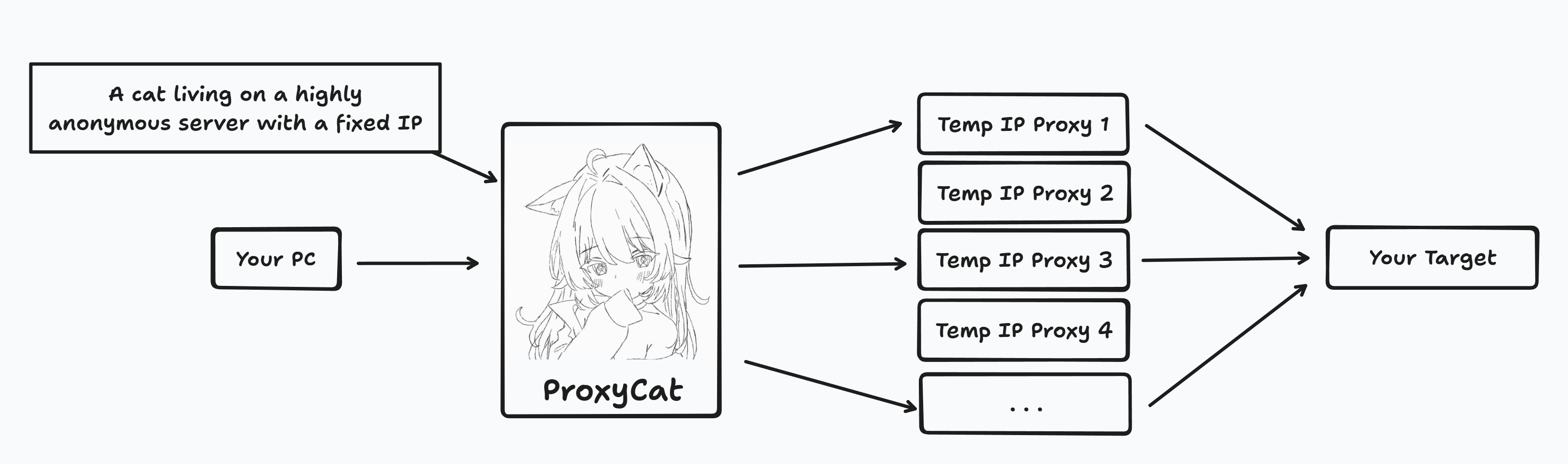
During penetration testing you often need to hide or change your IP address to get past security devices. But tunnel proxies on the market are expensive — typically ¥3-6 per day — which puts them out of reach for many. The author noticed instead that short-lived IPs offer outstanding value: a few cents each, averaging ¥0.03-0.4 per day.
And so ProxyCat was born! The tool turns short-lived IPs (valid for 1-60 minutes) into fixed IPs that other tools can use, giving you a proxy pool server that is deployed once and then works indefinitely.
Key Features
- Dual-protocol listening: a single port accepts both HTTP and SOCKS5 inbound requests; upstreams may be authenticated HTTP / HTTPS / SOCKS5 proxies. Details
- Three proxy sources:
localreads a local list,apifetches from an endpoint live,pooluses the built-in proxy pool directly — switching between them on the panel takes effect immediately. - Many exits serving at once: several upstream exits are kept in service simultaneously, and requests are spread by each exit's live load — so when an upstream rate-limits per exit IP, concurrency scales with the number of exits. Upstream Exits and Concurrency
- Retirement by failure share: an exit's health is judged by the failure share in its sliding window, not by a count of consecutive failures — which is what tells "one network hiccup" apart from "this exit is simply broken".
- Automatic expansion at peak: exits are added automatically when load climbs, and released in one step once the peak passes; growth and release look at two different numbers, so the exit count never oscillates.
- Built-in proxy pool: plugin-based collection, verify-before-storing, three validation intensities, health scoring, offline geolocation, automatic revalidation and cleanup. Built-in Proxy Pool
- Real usage feedback: bad exits found while forwarding flow back into the pool; once consecutive failures reach the threshold the entry is marked invalid, and a passing revalidation restores it automatically.
- Access control and outbound authentication: client IP whitelist / blacklist judged by priority, a bypass list that connects matching targets directly, and username / password authentication on the outbound side.
- Web management panel: four tabs — Proxy Config, Proxy Pool, Access Control and Logs — putting configuration, lists, logs and service start/stop on one screen. Panel and Operations
- Containerized deployment: one-command Docker build and start; the container runs as non-root, and the health check probes the actual panel port.
Screenshots
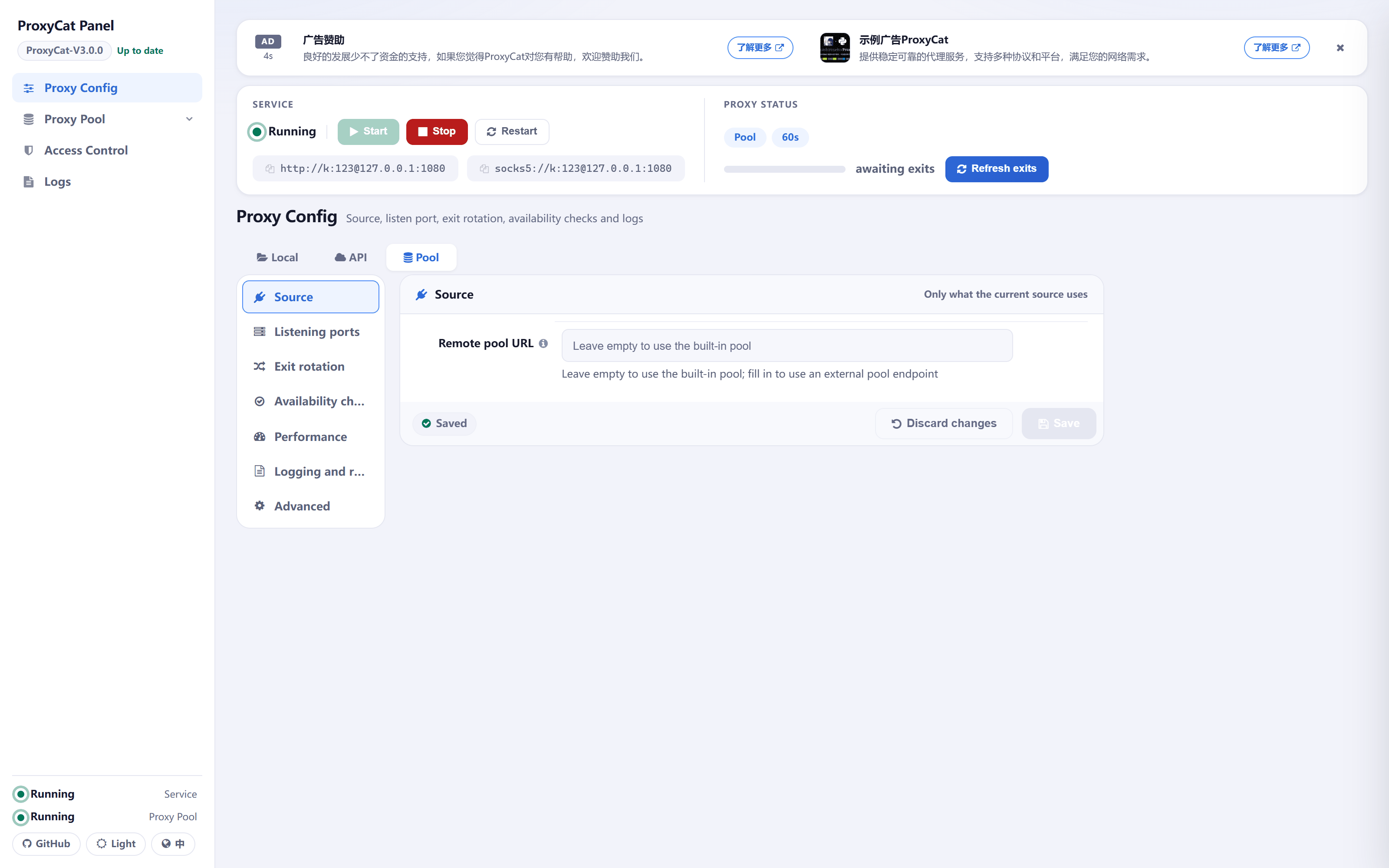
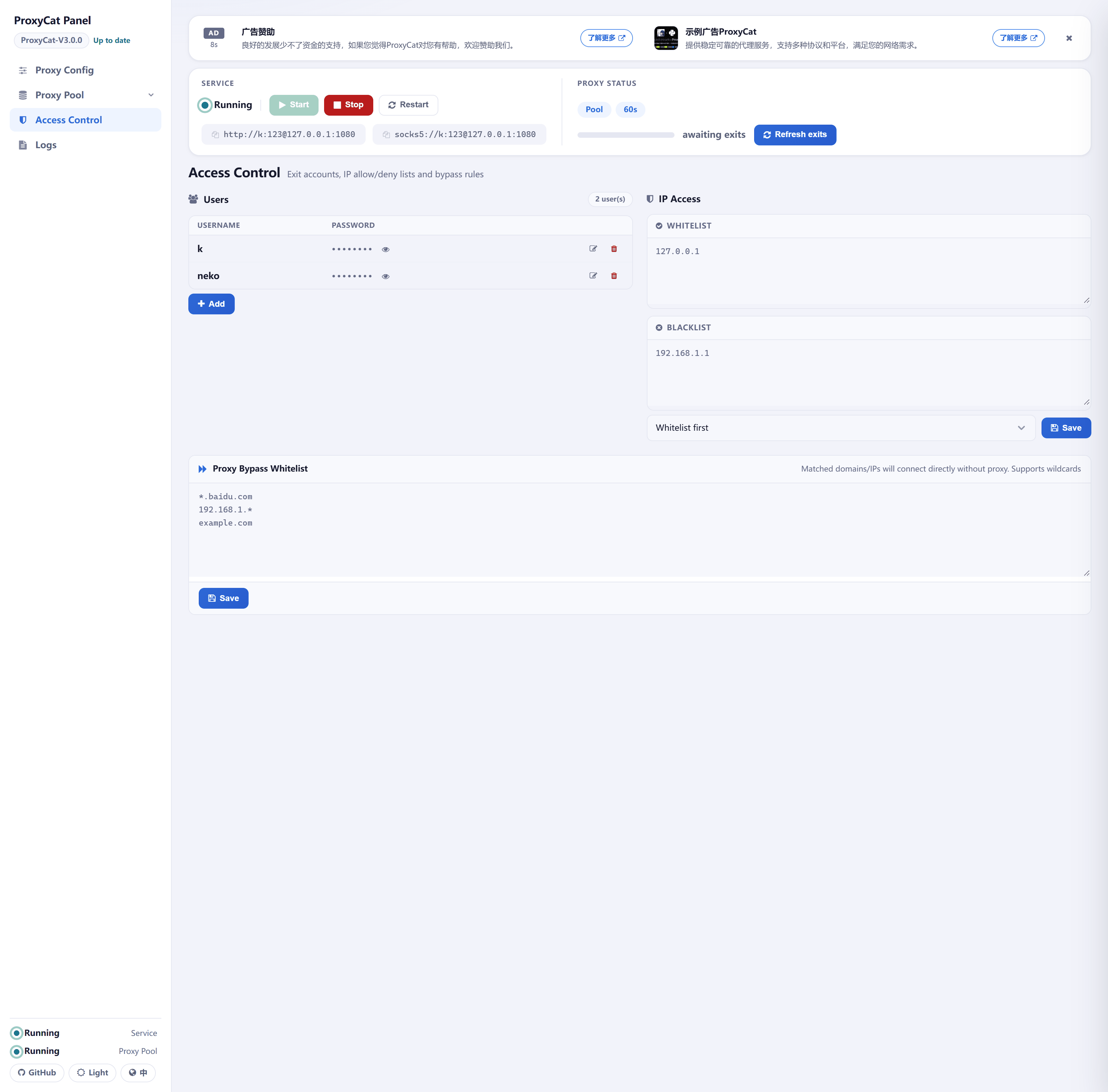
The panel is a single page with four tabs down the left side: Proxy Config, Proxy Pool, Access Control and Logs.
| Proxy Config · Source | Proxy Pool · Proxy Management |
|---|---|
 |
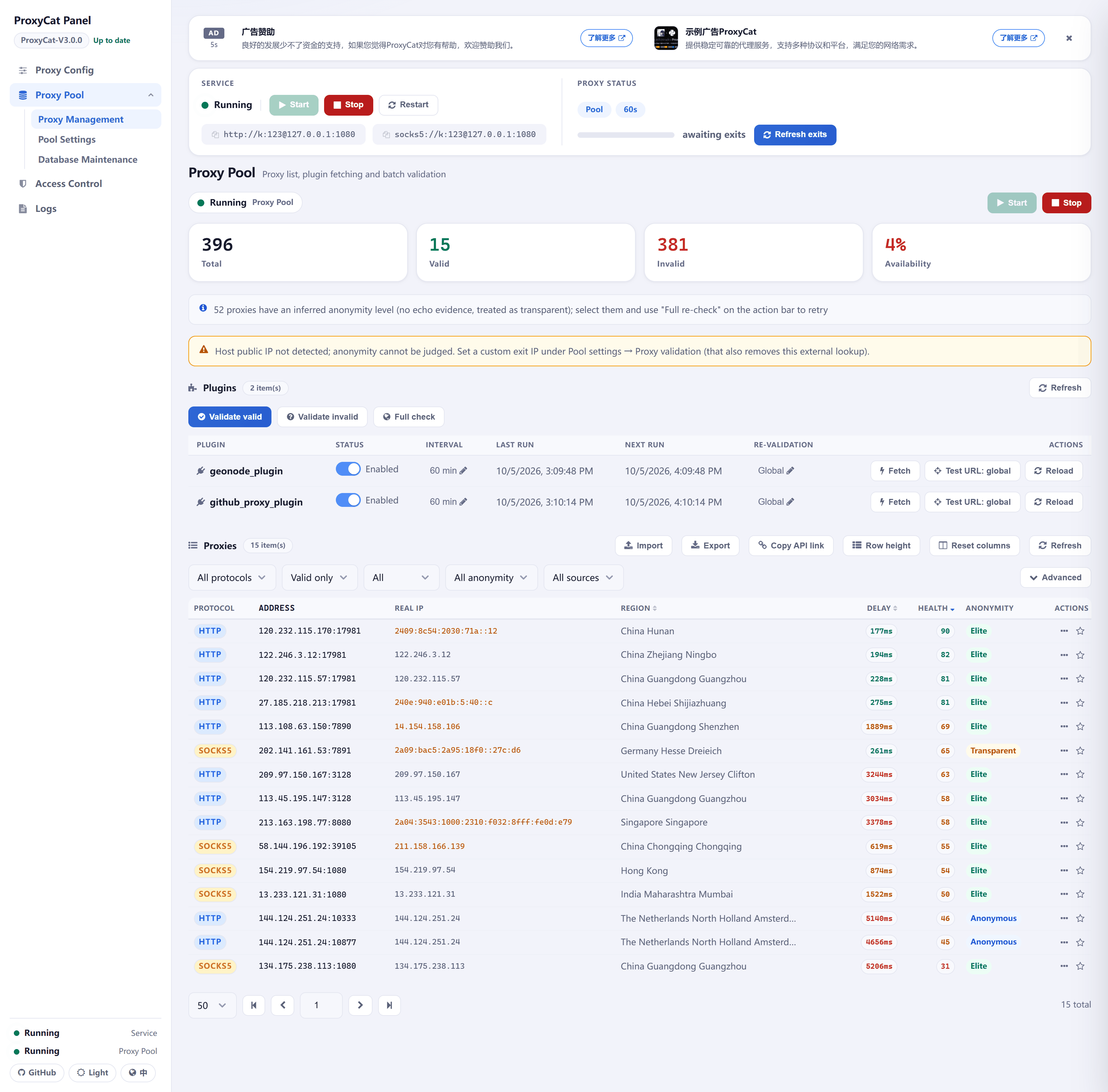 |
| Pick the proxy source (Local / API / Pool) and fill in whatever the current source needs — here, the remote pool URL for the built-in pool (leave it empty to use the in-process pool). | Every collected proxy at a glance: protocol, real IP, region, delay, health score and anonymity. |
| Access Control | Logs |
|---|---|
 |
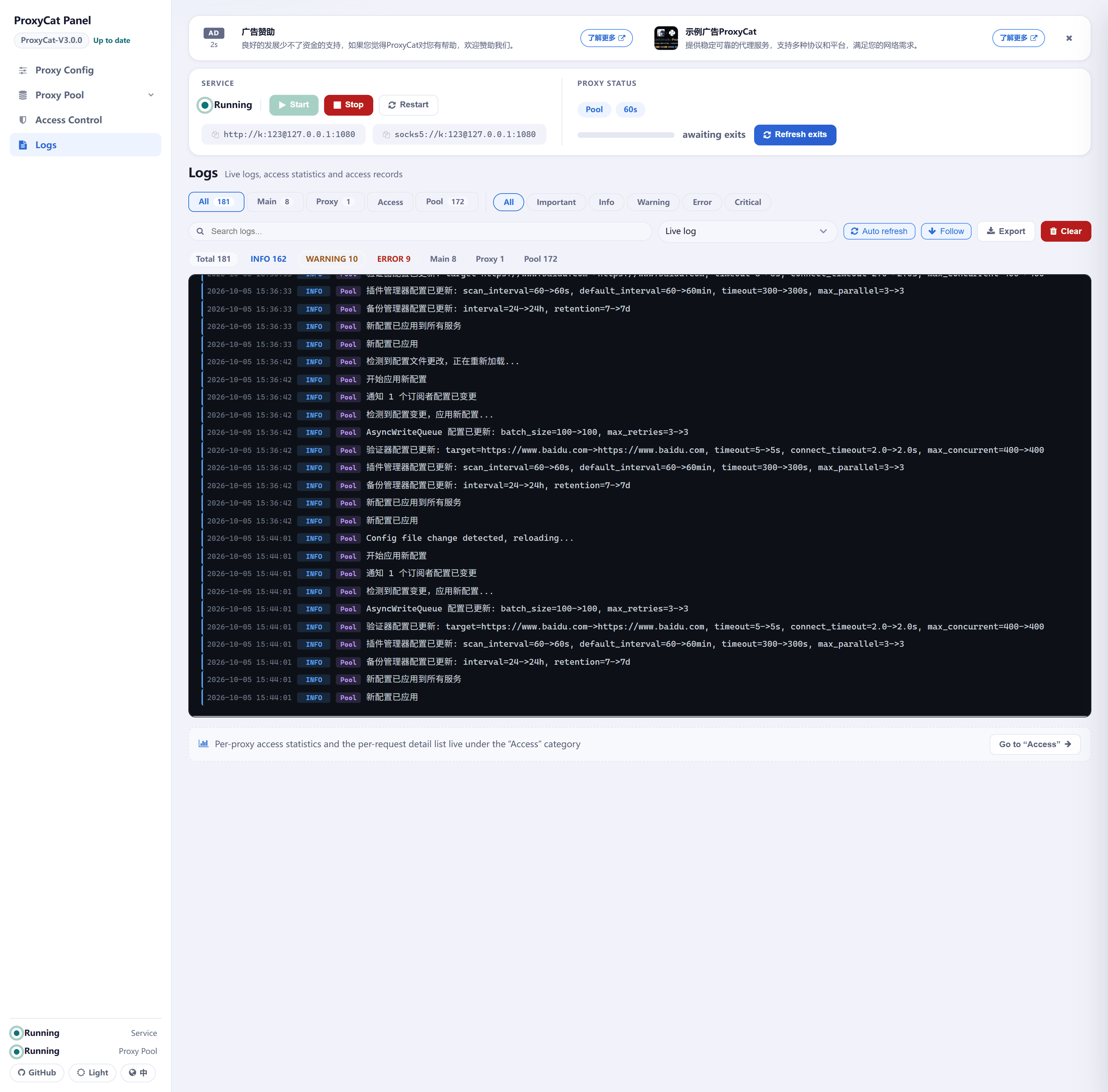 |
| Outbound authentication accounts, the IP whitelist / blacklist and the proxy bypass list all live here. | Live logs and past log files, plus access statistics and per-request detail. |
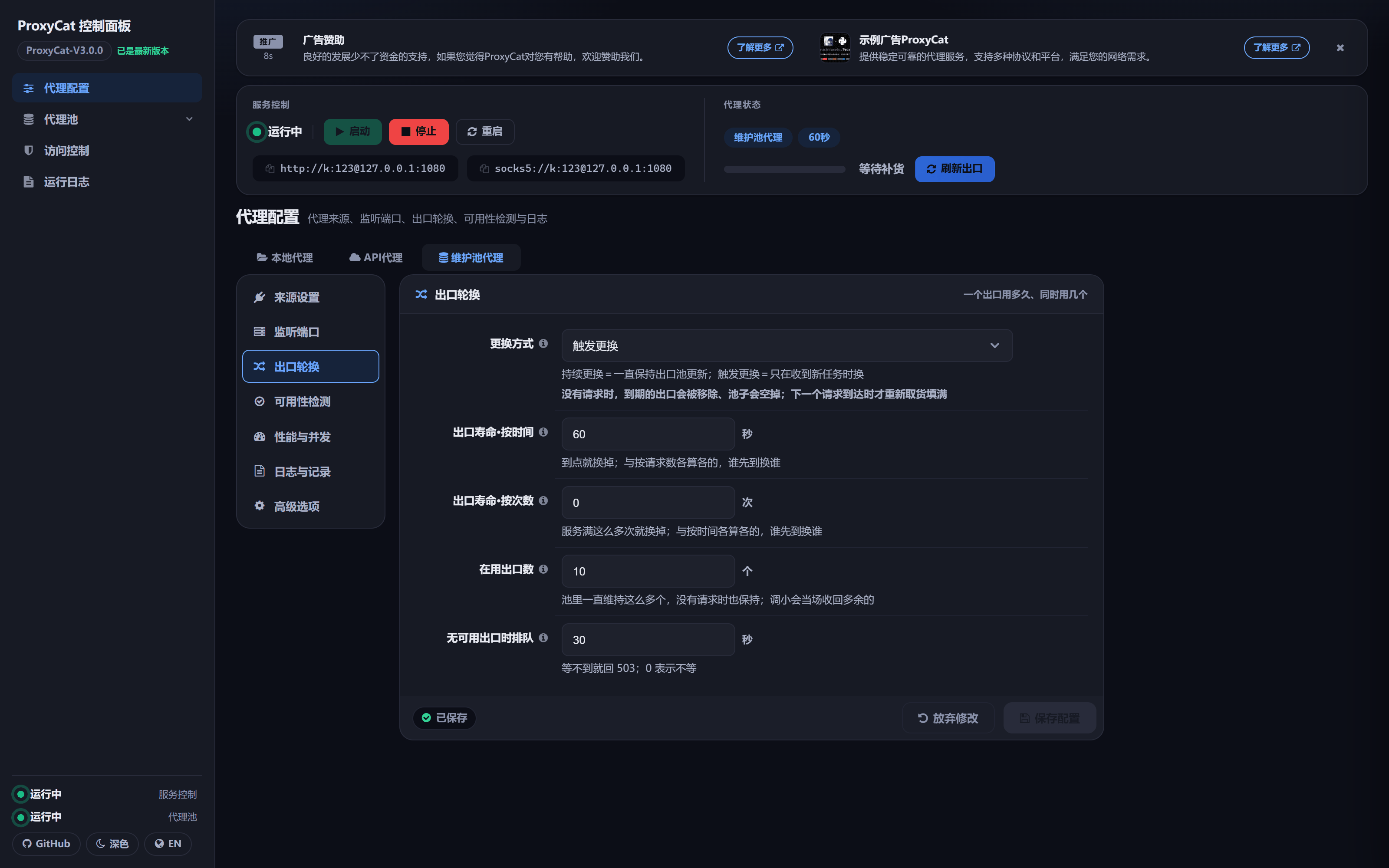
| Dark Theme · Exit Rotation | Dark Theme · Proxy Management |
|---|---|
 |
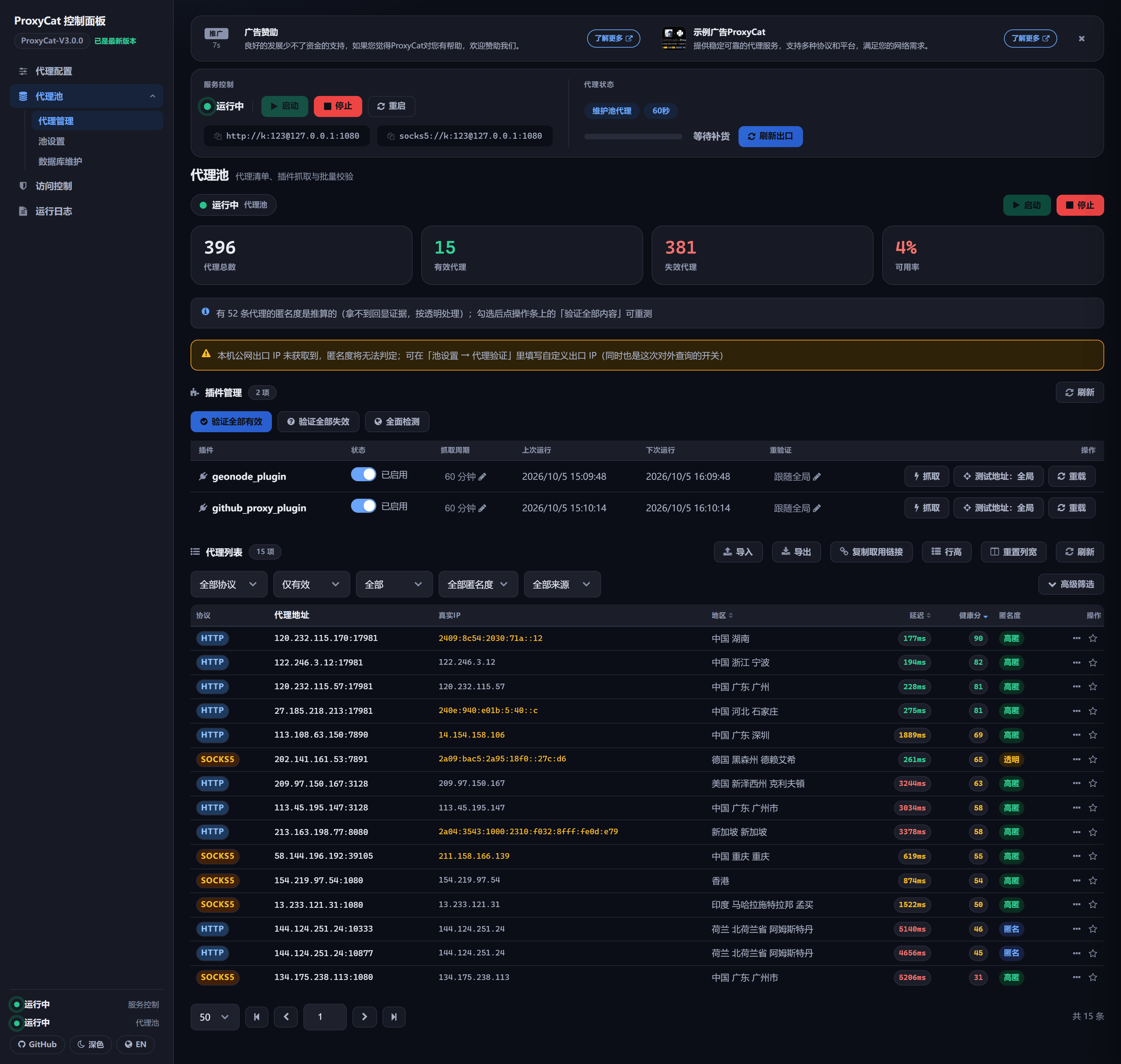 |
| The dark theme: the layout is identical to the light one. | The same Proxy Management view in dark mode, sharing data and server-side settings with the light one. |
The panel offers two themes, dark and light; until you switch manually it follows the system's dark preference. The interface also switches between Chinese and English — the language is a server-side setting, so one flip updates the whole site's copy and the headers of exported files together.
Quick Deployment
Docker (Recommended)
docker compose up -d --build
Compose builds the image and starts the container. Two ports are exposed:
| Port | Purpose |
|---|---|
1080 |
Proxy listening port (shared by HTTP and SOCKS5) |
5001 |
Web panel port |
Three directories are bind-mounted to the host so your data and configuration survive container recreation: config/, logs/ and modules/proxypool/data/.
Running from Source
Python 3.10 or later is required: the source makes heavy use of runtime-evaluated X | Y union type annotations, and 3.9 or earlier raises a TypeError at import time.
pip install -r requirements.txt

# On Windows the command is `python`
python3 app.py
app.py brings up the web panel and the outbound proxy service together. The config/config.ini shipped in this repo sets proxy_source_mode=pool (the program's built-in default is local), so starting from this configuration starts the built-in proxy pool automatically along with the service — exits are available right out of the box.
Verifying the Deployment
Two commands confirm the service is really working:
# 1. The panel is listening: expect 302 (redirect to /web)
curl -i http://127.0.0.1:5001/

# 2. The proxy is forwarding: expect 200, with the request actually going through an upstream.
#    The [Users] section of the shipped config has accounts, so requests must be authenticated;
#    without credentials you get a 407.
curl -x http://neko:[email protected]:1080 https://www.baidu.com -I
Must-Read for Your First Deployment
These four are all classic "symptom first, cause later" cases; the full explanations are in the operation manual's Four Things To Know Before Deploying:
- The panel won't open, and returns 401: with a token set you must pass
?token=to open it; the token shipped in this repo is public, so change[Server] tokeninconfig.inibefore exposing the panel — the change takes effect within about a second, and the old token stops working immediately. - The container is up but can't write configuration or logs: the container runs as a non-root user, so its UID/GID must match the owner of
config/,logs/andmodules/proxypool/data/on the host; if they differ, setPUID/PGIDin.env. - A restart loses the last batch of data: on shutdown the application drains its write queue, and
stop_grace_periodhas been raised to 60 seconds — Docker's 10-second defaultSIGKILLs it before the drain finishes, so please don't lower it. - The container turns unhealthy after changing
web_port: the health check reads the actualweb_portfromconfig.iniat probe time, so after changing it you must restart the process and update the port mapping indocker-compose.yml.
Network Behaviour
Besides forwarding client traffic, ProxyCat itself also makes outbound requests, many of them direct (sent from this machine's real IP) — for example the version check, the pool's host public-IP lookup, the GeoNode and GitHub scraping plugins and the offline geolocation-database update. These requests can all be turned off or pointed at addresses of your own (pointing version_check_url at an address of your own keeps the version check away from the built-in third-party mirror); for each one's trigger, destination and how to stop it, see Features. Traffic forwarded through a proxy is not on this list — that is the client's own traffic.
Documentation
The README keeps only the basic introduction and quick deployment; everything else lives in the documents below:
| Document | Contents |
|---|---|
| Features | Outbound proxy service, built-in proxy pool, panel and operations, upstream exits and concurrency, outbound network requests, performance benchmarks and project structure |
| Configuration | Every option in [Server] / [Users] / [api_credentials] / [Pool]: defaults, descriptions and how changes take effect |
| Operation Manual | Installation and deployment, entry points, a page-by-page tour of the panel, using the proxy pool, logs and access records, troubleshooting Q&A |
| Investigation Manual | How to diagnose and handle common errors |
| Changelog | What changed in every release |
| API Reference | Parameters, response examples and error codes for the panel's /api/* and the pool's /api/pool/* |
| Proxy Pool Module Docs | Implementation details: scrape plugin development, validation strategy, anonymity detection, geolocation resolution, automatic cleanup |
The Chinese documents are the same files without the -EN suffix (e.g. ProxyCat-Manual/Features.md); the Chinese entry point is README.md.
Disclaimer
- By downloading, installing, using, or modifying this tool and related code, you indicate your trust in this tool.
- We are not responsible for any form of loss or damage caused to yourself or others while using this tool.
- You are solely responsible for any illegal activities conducted while using this tool.
- Please carefully read and fully understand all terms, especially liability exemption clauses.
- You have no right to download, install, or use this tool unless you have read and accepted all terms.
- Your download, installation, and usage actions indicate your acceptance of this agreement.
License
This project is licensed under the GNU General Public License v2.0 (GPL-2.0); the full text is in LICENSE.
- It is a copyleft license: if you distribute a modified version or a derivative work, it must also be licensed under GPL-2.0 with source available.
- The software comes with no warranty — which is also why the disclaimer above reads the way it does.
Development Plan
- Add detailed logging to record all IP identities connecting to ProxyCat, supporting multiple users.
- Add Web UI for a more powerful and user-friendly interface.
- Built-in proxy pool: plugin-based collection, validation, scoring, geolocation and automatic cleanup.
- Develop babycat module that can run on any server or host to turn it into a proxy server.
- Add request blacklist/whitelist to specify URLs, IPs, or domains to be forcibly dropped or bypassed (the bypass list is already supported; the rest is pending).
- Package to PyPi for easier installation and use.
If you have good ideas or run into bugs during use, please contact the author through:
WeChat Official Account: 樱花庄的本间白猫 (Honma Shironeko of Sakurasou)
Special Thanks
In no particular order, thanks to all contributors who helped with this project:
- AabyssZG (曾哥)
- ProbiusOfficial (探姬)
- gh0stkey (EvilChen)
- huangzheng2016(HydrogenE7)
- chars6
- qianzai(千载)
- ziwindlu
- lalala-orz(啦啦啦)
Sponsor
Open source development isn't easy. If you find this tool helpful, consider sponsoring the author's development!
| Rank | ID | Amount (CNY) |
|---|---|---|
| 1 | 陆沉 | 1266.62 |
| 2 | 柯林斯.民间新秀 | 696 |
| 3 | 北 | 170 |
| Sponsor List | Every sponsorship is a motivation for the author! | (´∀`)♡ |

Proxy Recommendations
Explore related projects
trimstray/the-book-of-secret-knowledge
A collection of inspiring lists, manuals, cheatsheets, blogs, hacks, one-liners, cli/web tools and more.
256,961 starsHack-with-Github/Awesome-Hacking
A collection of various awesome lists for hackers, pentesters and security researchers
125,014 starsswisskyrepo/PayloadsAllTheThings
A list of useful payloads and bypass for Web Application Security and Pentest/CTF
82,475 starscaddyserver/caddy
Fast and extensible multi-platform HTTP/1-2-3 web server with automatic HTTPS
78,878 stars