
hkirat/notification-logger
hkirat/notification-logger has 1,041 GitHub stars and 69 forks. GitHot measured 0 in 7 days. Last checked 2026-11-11 02:13 UTC. Last push 2024-05-21.
Desktop notification for your console Logs
Measured star growth
- in 24h
- Update delayed
- in 7 days
- 0
- in 15 days
- Collecting history
- in 1 month
- Collecting history
Net star changes over overlapping periods, not daily totals. Missing measurements are left blank. Stars measure attention, not software quality.
README.md
OriginalNotification Logger 
Ever wondered why you have to open the console every time you want to want to log a variable?
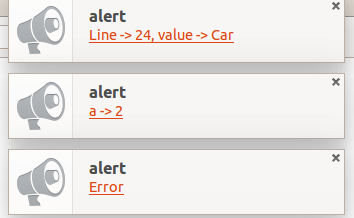
Notification Logger helps provide desktop notification for your console messages.
During development, You have to check the browser's inspector periodically to see what your console.log()'s are saying.
With notification-logger, you can develop and debug web apps and see console messages as Desktop Notifications.
And it only adds ~50 lines to your project.
Initial repo forked from chinchang's project screenlog.js. Check out his awesomeness over here
Screenshot
Installing
- Use
npmorgit cloneto download the module.npm install notification-loggergit clone https://github.com/hkirat/notification-logger.git
- include
notification-logger.jsornotification-logger.min.js - Initialise with
logger.init()
Methods
logger.init- Initialises the loggerlogger.log- Logs the message via a Desktop Notification onlyconsole.log- Logs the message via a Desktop Notification and in the browser consolelogger.destroy- Reverts console.log to original functionality
Browser Support
Works best on latest versions of Google Chrome, Firefox and Safari.
To Do
- Add Custom Icon to Notifications
- Unwrap Objects while Logging them as Desktop Notification
Credits
- Icons Made by http://www.flaticon.com/authors/roundicons.
Explore related projects
codecrafters-io/build-your-own-x
Master programming by recreating your favorite technologies from scratch.
561,733 starspublic-apis/public-apis
A collective list of free APIs
498,143 starsmorluto/rea
Reverse engineer anything with agents, from app behavior down to native binaries.
451,573 starsopenclaw/openclaw
The AI that really does things. Any OS. Any Platform. The lobster way. 🦞
394,331 stars