
hinesboy/mavonEditor
hinesboy/mavonEditor has 6,558 GitHub stars and 891 forks. GitHot measured 0 stars in 24 hours. Last checked 2026-11-08 14:01 UTC. Last push 2025-03-05.
mavonEditor - A markdown editor based on Vue that supports a variety of personalized features
Measured star growth
- in 24h
- 0
- in 7 days
- Collecting history
- in 15 days
- Collecting history
- in 1 month
- Collecting history
Net star changes over overlapping periods, not daily totals. Missing measurements are left blank. Stars measure attention, not software quality.
README-EN.md
OriginalmavonEditor
| Vue2 |  |
|---|---|
| Vue3 |  |
A markdown editor based on Vue
中文说明
Example Pictures
PC
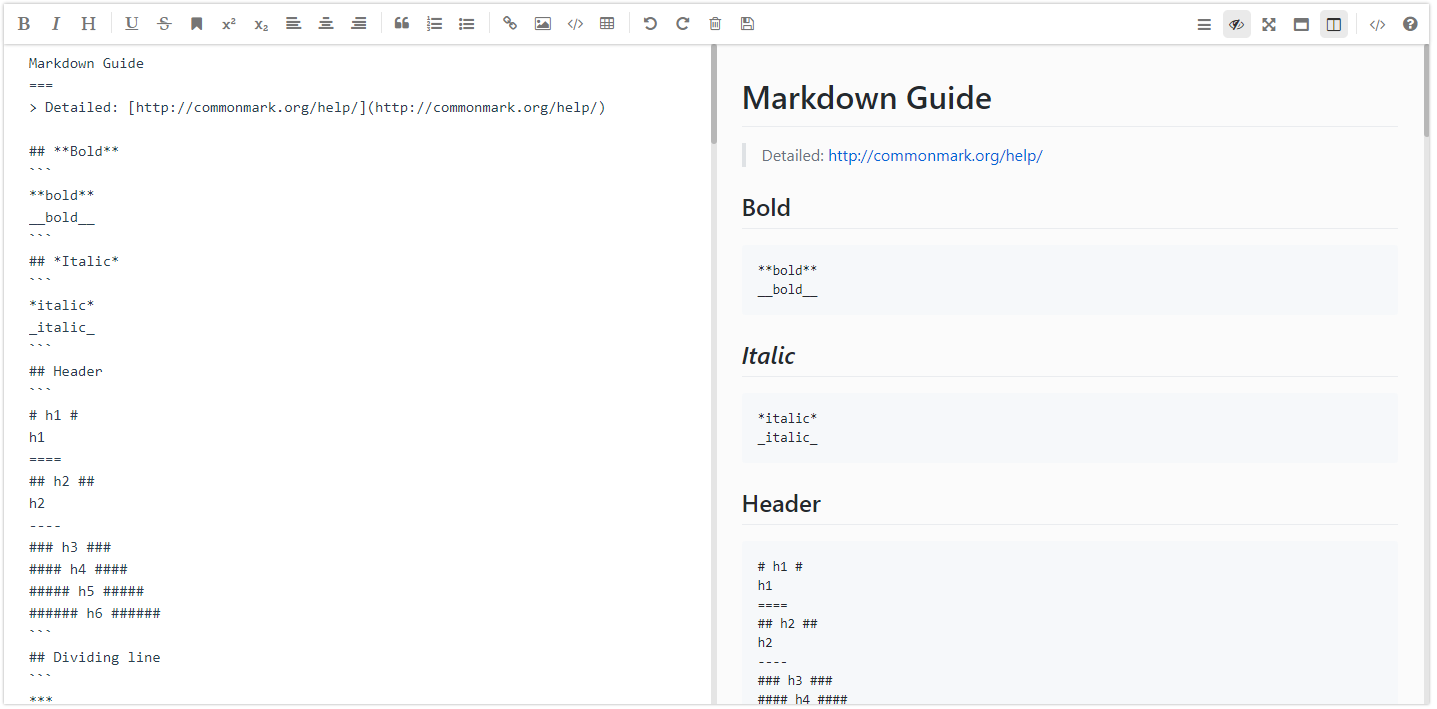
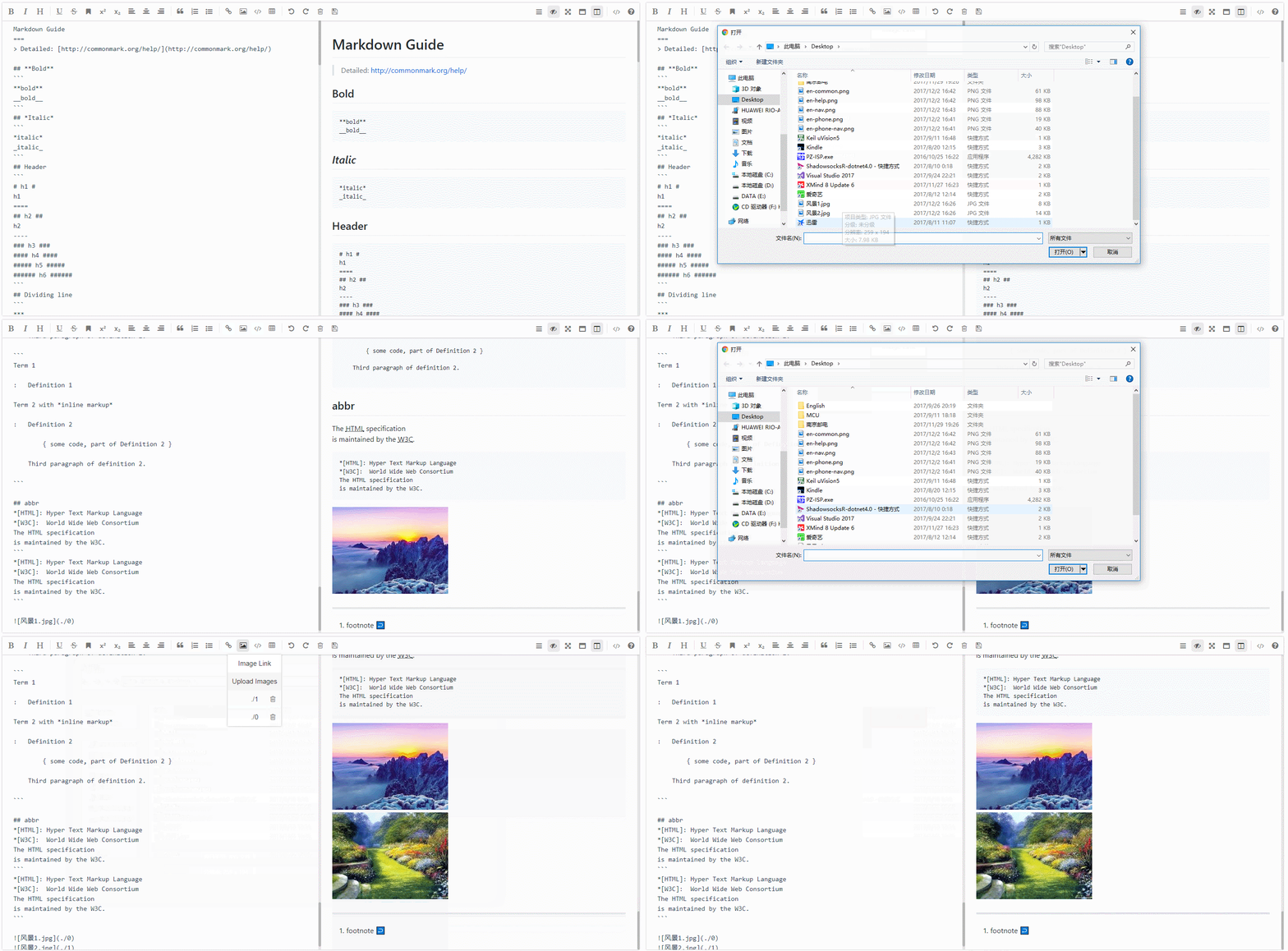
Use Setup
Install mavon-editor
$ npm install mavon-editor --save
Use
index.js:
    // Global Registration
    // import with ES6
    import Vue from 'vue'
    import mavonEditor from 'mavon-editor'
    import 'mavon-editor/dist/css/index.css'

    // use
    Vue.use(mavonEditor)
    new Vue({
        'el': '#main',
        data() {
            return { value: '' }
        }
    })
index.html
// The same below
<div id="main">
    <mavon-editor v-model="value"/>
</div>
Use in nuxt.js
new file: vue-mavon-editor.js
import Vue from 'vue';
import mavonEditor from 'mavon-editor';
import 'mavon-editor/dist/css/index.css';

Vue.use(mavonEditor);
nuxt.config.js
  plugins: [
  ...
    { src: '@/plugins/vue-mavon-editor', ssr: false }
  ],
page
<template>
  <div class="mavonEditor">
    <no-ssr>
      <mavon-editor :toolbars="markdownOption" v-model="handbook"/>
    </no-ssr>
  </div>
</template>
<script>
export default {
  data() {
    return {
      markdownOption: {
        bold: true,
        ... // more params
      },
      handbook: "#### how to use mavonEditor in nuxt.js"
    };
  }
};
</script>

<style scoped>
.mavonEditor {
  width: 100%;
  height: 100%;
}
</style>
API
props
| name | type | default value | describe |
|---|---|---|---|
| value | String | Initial value | |
| language | String | zh-CN | Language switch, zh-CN: Simplified Chinese, zh-TW: Traditional Chinese, en: English, fr: French, pt-BR: Brazilian Portuguese, ru: Russian, de: German, ja: Japanese |
| fontSize | String | 14px | font-size of edit area |
| scrollStyle | Boolean | true | Open the scroll bar style(Temp only support chrome) |
| boxShadow | Boolean | true | css: box-shadow of mavonEditor |
| subfield | Boolean | true | true: Double columns - Edit preview same screen , Single Columns - otherwise not |
| defaultOpen | String | Default display area in single columns (subfield=false). edit: default show edit area preview: default show preview area other = edit |
|
| placeholder | String | Begin editing... | The default prompt text when the textarea is empty |
| editable | Boolean | true | Edit switch |
| codeStyle | String | code-github | markdown Style: default github, option hljs color scheme |
| toolbarsFlag | Boolean | true | Show toolbars |
| navigation | Boolean | false | Show navigation |
| shortCut | Boolean | true | shortcut switch |
| ishljs | Boolean | true | highlight code switch |
| imageFilter | Function | null | Image file filter Function, params is a File Object, you should return Boolean about the test result |
| imageClick | function | null | Image Click Function |
| tabSize | Number | null | How many spaces equals one tab, default \t |
| html | Boolean | true | Enable HTML tags in source, for historical reasons this tag has always been true by default, but it is recommended to turn it off if you don't need this feature, as doing so it eliminates the security vulnerabilities altogether. |
| xssOptions | Object | {} | xss rules configuration, enabled by default, set to false to turn off, enabled will filter HTML tags, the default filter all HTML tag attributes, it is recommended to configure the whitelist on demand to reduce the possibility of being attacked. - custom rule reference: https://jsxss.com/zh/options.html - Demo: dev-demo |
| toolbars | Object | As in the following example | toolbars |
toolbars
The default toolbar properties are all true, You can customize the object to cover them.
 /*
    eg: {
      bold: true,
      italic: true,
      header: true,
    }
    At this point, the toolbar only displays the three function keys.
 */

toolbars: {
    bold: true,
    italic: true,
    header: true,
    underline: true,
    strikethrough: true,
    mark: true,
    superscript: true,
    subscript: true,
    quote: true,
    ol: true,
    ul: true,
    link: true,
    imagelink: true,
    code: true,
    table: true,
    fullscreen: true,
    readmodel: true,
    htmlcode: true,
    help: true,
    /* 1.3.5 */
    undo: true,
    redo: true,
    trash: true,
    save: true,
    /* 1.4.2 */
    navigation: true,
    /* 2.1.8 */
    alignleft: true,
    aligncenter: true,
    alignright: true,
    /* 2.2.1 */
    subfield: true,
    preview: true
  }
If you need to customize and add toolbar buttons, you can do the following:
<mavon-editor>
  <!-- Add a custom button in front of the left toolbar -->
  <template slot="left-toolbar-before">
    <button
      type="button"
      @click="$click('test')"
      class="op-icon fa fa-mavon-align-left"
      aria-hidden="true"
      title="custom"
    ></button>
  </template>
  <!-- Add a custom button after the left toolbar  -->
  <template slot="left-toolbar-after">
    <button
      type="button"
      @click="$click('test')"
      class="op-icon fa fa-mavon-align-left"
      aria-hidden="true"
      title="custom"
    ></button>
  </template>
  <!-- Add a custom button in front of the right toolbar  -->
  <template slot="right-toolbar-before">
    <button
      type="button"
      @click="$click('test')"
      class="op-icon fa fa-mavon-align-left"
      aria-hidden="true"
      title="custom"
    ></button>
  </template>
  <!-- Add a custom button behind the right toolbar  -->
  <template slot="right-toolbar-after">
    <button
      type="button"
      @click="$click('test')"
      class="op-icon fa fa-mavon-align-left"
      aria-hidden="true"
      title="custom"
    ></button>
  </template>
</mavon-editor>
events
| name | params | describe |
|---|---|---|
| change | String: value , String: reder | Edit area change callback event (render: Html source code) |
| save | String: value , String: reder | Ctrl+s and click save button |
| fullScreen | Boolean: status , String: value | Fullscreen editing toggle callback event(boolean: Fullscreen status) |
| readModel | Boolean: status , String: value | Reading mode toggle callback event(boolean: Reading mode status) |
| htmlCode | Boolean: status , String: value | Html code mode toggle callback event(boolean: status) |
| subfieldToggle | Boolean: status , String: value | Double columns edit mode toggle callback event(boolean: double columns status) |
| previewToggle | Boolean: status , String: value | Preview & Edit toggle callback event(boolean: preview status) |
| helpToggle | Boolean: status , String: value | Help-me toggle callback event(boolean: help status) |
| navigationToggle | Boolean: status , String: value | Navigation mode toggle callback event(boolean: nav status) |
| imgAdd | Number: pos, File: imgfile | Add image file callback event(pos: position in the list of images, File: File Object) |
| imgDel | Array(2):[Number: pos,File:imgfile ] | Delete image file callback event(Array(2): An array of length 2,the first is pos: position in the list of images, the second is file: File Object) |
Hightlight
If you do not need code highlighting, you need set ishljs to false
Set ishljs = true
    <!-- default value is true -->
    <mavon-editor :ishljs="true"></mavon-editor>
For optimize the size of pack, since v2.4.2, the following files will default to using cdnjs outside the chain:
highlight.jsgithub-markdown-csskatex(v2.4.7)
The language parsing files and code highlighting in Code Highlighting highlight.js will be loaded on demand.
github-markdown-css and katex will load only when mounted.
Notice: Option hljs color scheme and Supported language is export from highlight.js/9.12.0
Upload images
<template>
<mavon-editor ref=md @imgAdd="$imgAdd" @imgDel="$imgDel"></mavon-editor>
</template>
<script>
exports default {
methods: {
// bind @imgAdd event
$imgAdd(pos, $file){
// step 1. upload image to server.
var formdata = new FormData();
formdata.append('image', $file);
axios({
url: 'server url',
method: 'post',
data: formdata,
headers: { 'Content-Type': 'multipart/form-data' },
}).then((url) => {
// step 2. replace url  -> 
$vm.$img2Url(pos, url);
})
}
}
}
</script>
Note
- Default size: min-height: 300px , min-width: 300px , Can be covered
- z-index: 1500
- Just for show html of md: toolbarsFlag: false , subfield: false, defaultOpen: "preview"
keyboard shortcuts
| key | keycode | fun |
|---|---|---|
| F8 | 119 | toggle navigation |
| F9 | 120 | toggle [edit/preview] |
| F10 | 121 | toggle fullscreen |
| F11 | 122 | toggle readModel |
| F12 | 123 | toggle [double columns / single column] |
| TAB | 9 | \t |
| CTRL + S | 17 + 83 | @save |
| CTRL + D | 17 + 68 | remove selected lines |
| CTRL + Z | 17 + 90 | prev step |
| CTRL + Y | 17 + 89 | next step |
| CTRL + BreakSpace | 17 + 8 | trash |
| CTRL + B | 17 + 66 | **Bold** |
| CTRL + I | 17 + 73 | *Italic* |
| CTRL + H | 17 + 72 | # Header |
| CTRL + U | 17 + 85 | ++Underline++ |
| CTRL + M | 17 + 77 | ==Mark== |
| CTRL + Q | 17 + 81 | > Quote |
| CTRL + O | 17 + 79 | 1. OL |
| CTRL + L | 17 + 76 | [Link title](Link url) |
| CTRL + ALT + S | 17 + 18 + 83 | ^Superscript^ |
| CTRL + ALT + U | 17 + 18 + 85 | - UL |
| CTRL + ALT + C | 17 + 18 + 67 | ``` Code block |
| CTRL + ALT + L | 17 + 18 + 76 |  |
| CTRL + ALT + T | 17 + 18 + 84 | Table |
| CTRL + SHIFT + S | 17 + 16 + 83 | Subscript |
| CTRL + SHIFT + D | 17 + 16 + 68 | ~~Strikethrough~~ |
| CTRL + SHIFT + C | 17 + 16 + 67 | align center |
| CTRL + SHIFT + L | 17 + 16 + 76 | align left |
| CTRL + SHIFT + R | 17 + 16 + 82 | align right |
| SHIFT + TAB | 16 + 9 | remove \t |
Dependencies
Syntax extensions
- emoji
- subscript
- superscript
- container
- definition list
- abbreviation
- footnote
- insert
- mark
- todo list
- highlight
- katex
- images preview
- toc
可通过获取markdown-it对象引入其他语法插件
Collaborators
License
mavonEditor is open source and released under the MIT License.
Copyright (c) 2017 hinesboy
Explore related projects
codecrafters-io/build-your-own-x
Master programming by recreating your favorite technologies from scratch.
561,087 starspublic-apis/public-apis
A collective list of free APIs
497,332 starsmorluto/rea
Reverse engineer anything with agents, from app behavior down to native binaries.
443,766 starsopenclaw/openclaw
The AI that really does things. Any OS. Any Platform. The lobster way. 🦞
394,215 stars