
hhtower/price-comparison
hhtower/price-comparison has 317 GitHub stars and 10 forks. GitHot measured +3 stars in 24 hours, +14 in 7 days, and +157 in 15 days. Last checked 2026-11-18 01:34 UTC. Last push 2026-11-14.
Measured star growth
- in 24h
- +3
- in 7 days
- +14
- in 15 days
- +157
- in 1 month
- Collecting history
Net star changes over overlapping periods, not daily totals. Missing measurements are left blank. Stars measure attention, not software quality.
About
An AI-powered platform for shopping and comparing prices on AI subscriptions and accounts. Describe what you need, and AI helps you choose. It aggregates offers from online shops for top-ups and accounts for ChatGPT, Codex, Claude, Gemini, and more. Compare price trends, top-up channels, warranty terms, and purchase details across shops.
Self-hostedREADME.en.md
Original

知途 · 拾价
简体中文 · English
Describe what you need, and let AI help you find and compare offers.
知途 · 拾价 is a subscription and account price comparison platform with an AI shopping assistant. It aggregates offers for ChatGPT / Codex, Claude / Claude Code, Gemini, Grok, Cursor, and more from digital goods shops and automated storefronts. Listings cover top-up services, ready-to-use accounts, shared accounts, redemption codes, and related services such as email accounts, SMS verification, and residential IPs. Features include conversational shopping, cross-shop comparison, price history, official regional pricing references, and AI / IP testing tools.
✨ Meet the AI shopping assistant
Describe your needs and budget. The AI shopping assistant helps you find and compare catalog offers, explaining recharge channels, warranty coverage, and purchase conditions. Ask follow-up questions to narrow down your choices.
I already have a GPT account and want a Plus top-up under CNY 100 per month, preferably with warranty coverage.
Product aggregation and comparison
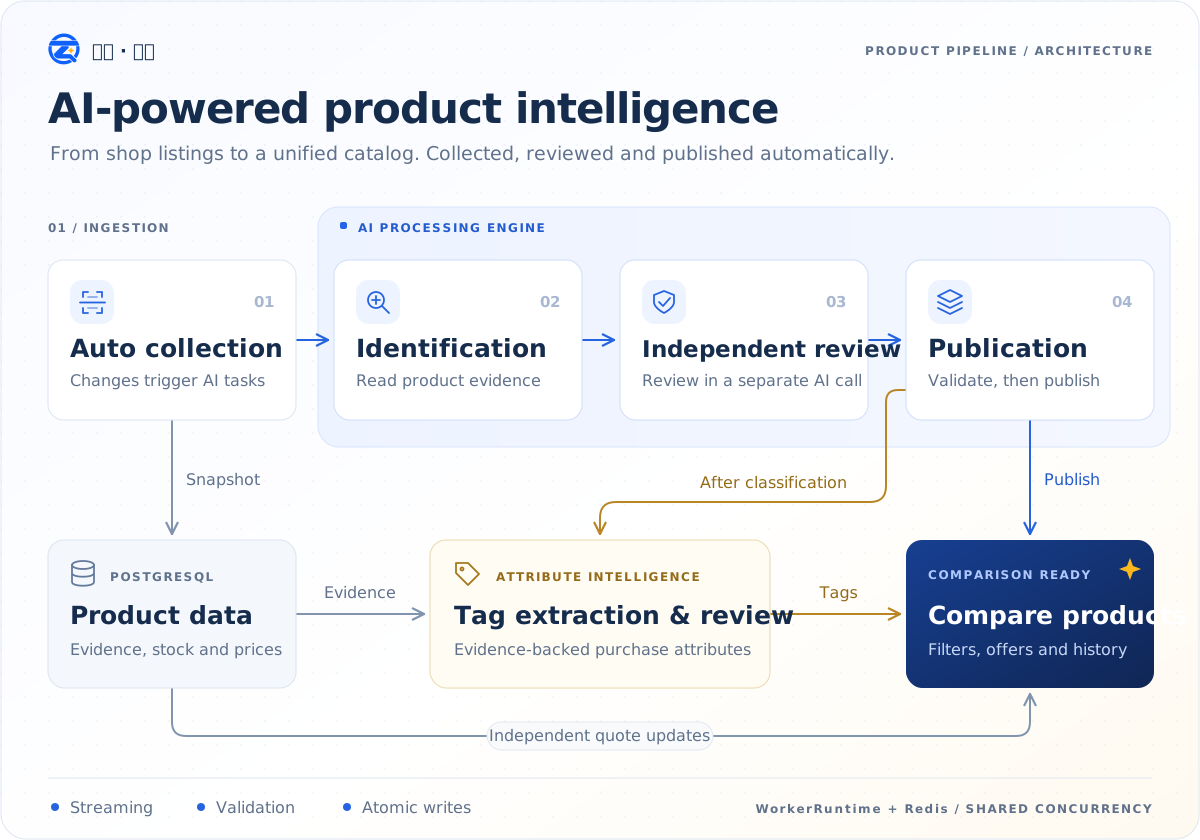
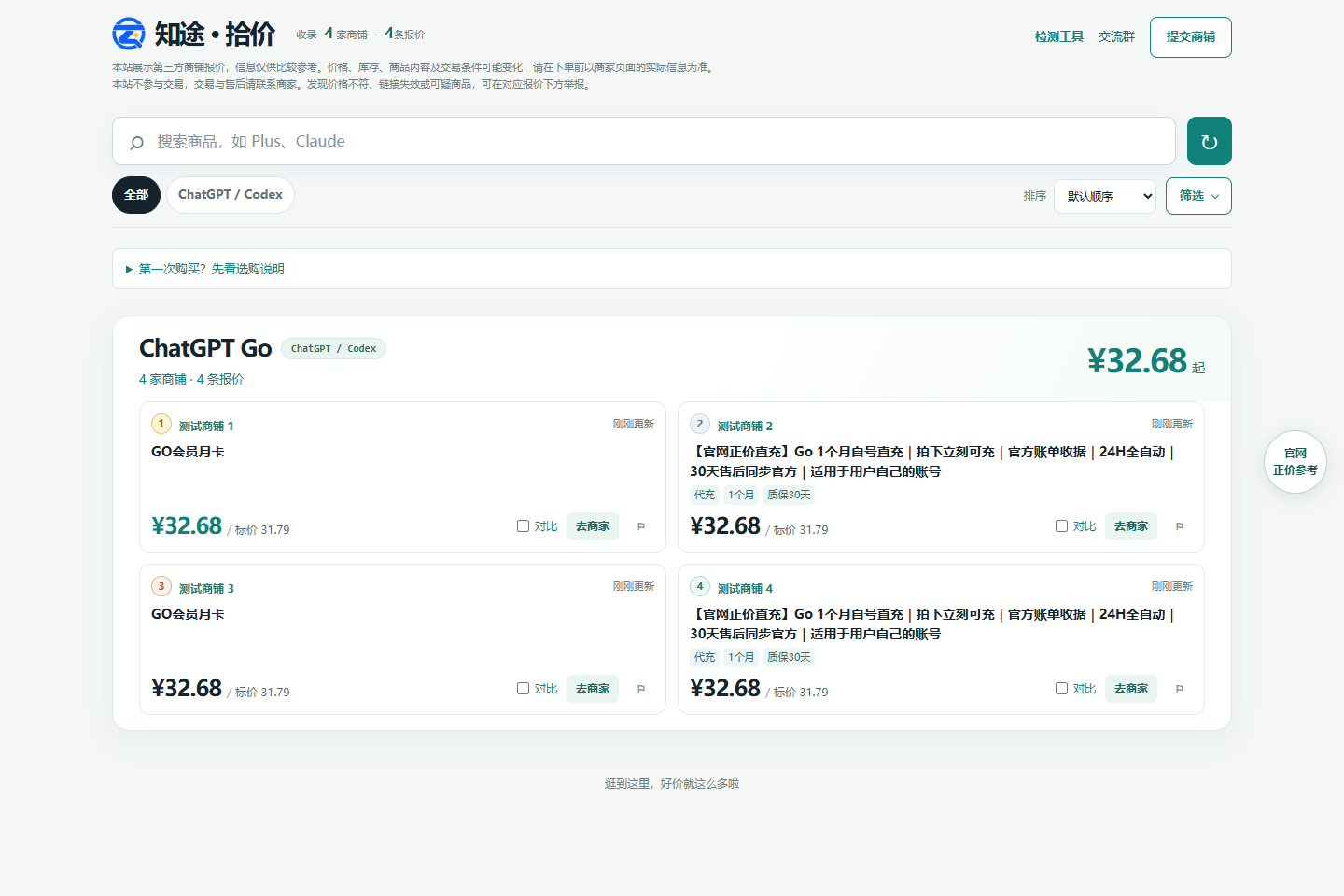
The same subscription, multiple offers. Filter by platform, delivery method, access duration, and warranty terms to compare prices and availability across shops.
Installation
Build and run with npm
Use Node.js 26 LTS, PostgreSQL 16+, and Redis 7+. Create a PostgreSQL database and start Redis, then run from the repository root:
git clone https://github.com/hhtower/price-comparison.git
cd price-comparison
npm ci
cp .env.example .env
# Set DATABASE_URL, REDIS_URL, ADMIN_PASSWORD, and PUBLIC_SITE_URL in .env
# Initialize the complete database schema
npm run db:migrate
npm run build
npm start
In PowerShell, copy the configuration with Copy-Item .env.example .env. Replace the example admin password and set PUBLIC_SITE_URL to your site's HTTPS origin. Open http://localhost:3000; the admin dashboard is at /admin. A fresh installation has no business data: add and approve shops in the dashboard before crawling products.
For development, run npm run dev and open the frontend address printed in the terminal. See .env.example for settings and WORKFLOW.md for worker and deployment details. AI is disabled by default; enabling it sends product evidence to your configured provider and may incur charges.
The AI shopping assistant requires a separate feature switch and worker; see the deployment workflow for setup. When enabled, it sends shopping conversations and candidate product evidence to the configured model provider.
Install with Docker
Requires Docker Engine / Desktop and Compose v2. Build the image locally and start PostgreSQL, Redis, the API, and basic workers:
git clone https://github.com/hhtower/price-comparison.git
cd price-comparison
cp .env.example .env
# Set at least ADMIN_PASSWORD and PUBLIC_SITE_URL
# Local Compose overrides DATABASE_URL and REDIS_URL to use its bundled services

docker compose -f docker-compose.dev.yml up -d postgres redis
docker compose -f docker-compose.dev.yml run --rm --build migrate
docker compose -f docker-compose.dev.yml up -d --build
Open http://localhost:3000. Database state persists in Docker volumes. The bundled database password is suitable only for local development. For external databases, see docker-compose.yml and the deployment workflow.
Community
| QQ group | Telegram group |
|---|---|
 |
 |
Contributing
Bug reports, feature suggestions, and pull requests are welcome. Use the issue templates and read the contribution guide first. Community participants are expected to follow the code of conduct.
The repository uses npm workspaces:
apps/web/           React frontend and UI tests
apps/api/           NestJS API, workers, migrations, and backend tests
packages/catalog/   Shared product rules and types
scripts/            Local development launcher
docs/               Screenshots, shop scoring rules, and deployment notes
See the documentation index for more information. Report security issues as described in SECURITY.md.
Acknowledgments
License
GNU GPL v3.0 (GPL-3.0-only). Commercial use is permitted. Distribution of this program or modified versions must comply with GPL requirements, including notices, corresponding source, and the same license. Third-party dependencies and materials retain their own licenses.