
heysagnik/diy-analytics
heysagnik/diy-analytics has 33 GitHub stars and 3 forks. GitHot measured 0 stars in 24 hours and 0 in 7 days. Last checked 2026-11-09 17:39 UTC. Last push 2026-09-24.
Set up your analytics server before your coffee gets cold.
What you can do
- No cookies, no personal data collected — GDPR/CCPA-friendly by design.
- Tracking script under 2 KB, loaded asynchronously.
- Traffic, pages, sources, campaigns, countries, devices, and browsers, with click-to-filter breakdowns.
- Live visitor count and historical views with per-project timezone support.
Measured star growth
- in 24h
- 0
- in 7 days
- 0
- in 15 days
- Update delayed
- in 1 month
- Update delayed
Net star changes over overlapping periods, not daily totals. Missing measurements are left blank. Stars measure attention, not software quality.
README.md
Original

Self-hosted, privacy-friendly website analytics.

Status: alpha. The core dashboard is functional, but expect breaking changes before
1.0.0. See CHANGELOG.md.
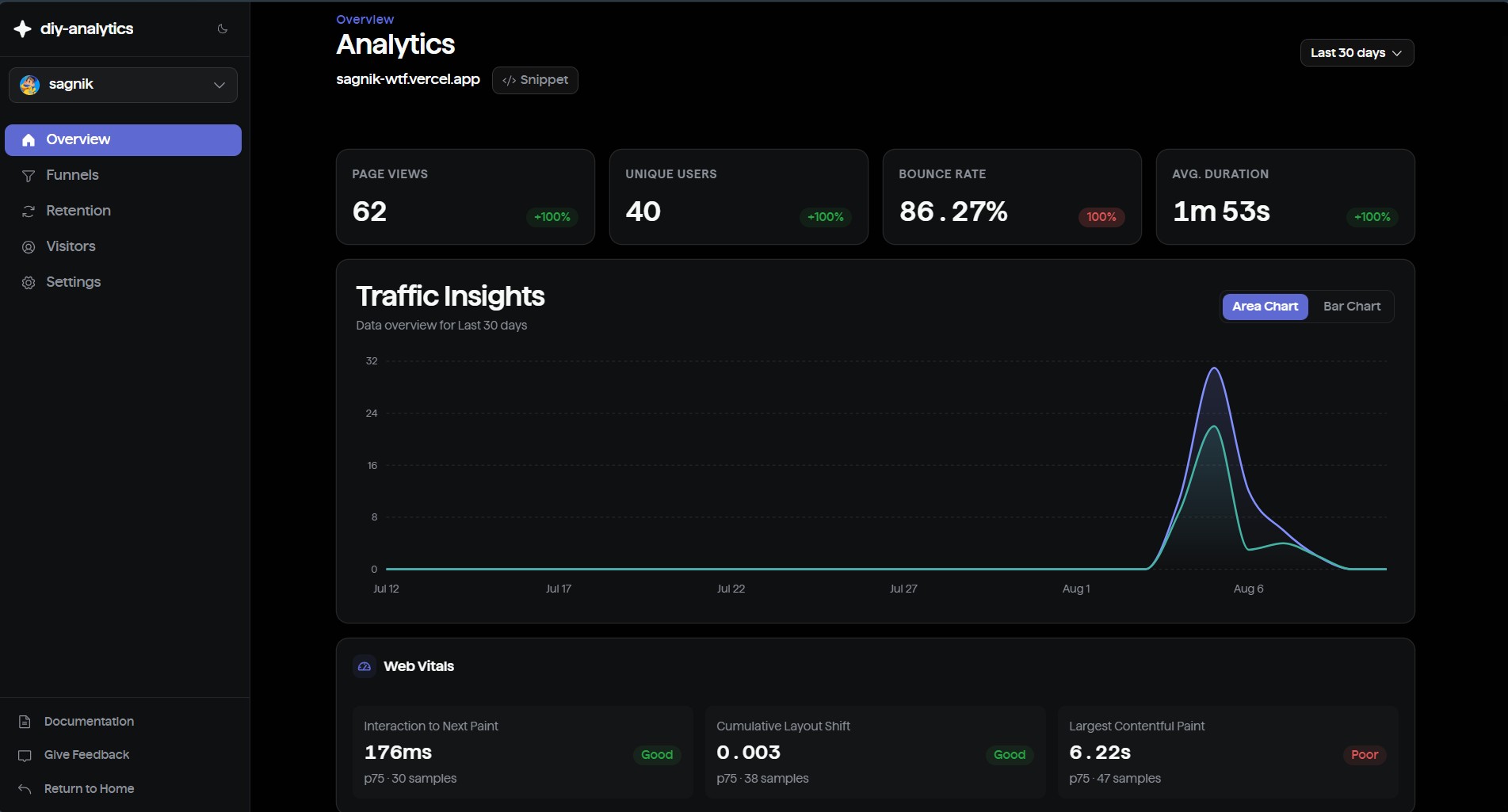
You run diy-analytics yourself (Vercel + Postgres), point a tracking snippet at it, and get a dashboard with the traffic metrics, funnels, error tracking, and session-level tools described below — no third-party processor ever sees your visitors' data.
Features
- No cookies, no personal data collected — GDPR/CCPA-friendly by design.
- Tracking script under 2 KB, loaded asynchronously.
- Traffic, pages, sources, campaigns, countries, devices, and browsers, with click-to-filter breakdowns.
- Live visitor count and historical views with per-project timezone support.
- Goals, multi-step funnels, retention cohorts, ad-hoc session exploration, and page-to-page journey diagrams.
- Automatic error tracking with release tagging and on-demand source map resolution.
- Auto-computed recency/frequency visitor segments.
- Threshold-based alerts delivered via webhook.
- Optional public, read-only dashboards via a shareable link.
- Track a project from multiple domains (e.g. a
*.vercel.apppreview alongside a custom domain). - Workspaces with role-based member access.
- A built-in MCP server so AI assistants can query your analytics directly.
- An in-app AI chat assistant (bring your own API key — Anthropic, OpenAI, Gemini, Groq, OpenRouter, or NVIDIA NIM) that answers questions about your data using the same read-only tools as the MCP server.
Getting started
Deploy
Note: the dashboard and database can run anywhere, but the public tracking endpoint (
/api/track) depends on Vercel Queues for durable ingestion, so it only works when the app is deployed on Vercel. See docs/database.md.
Run locally
git clone https://github.com/heysagnik/diy-analytics.git
cd diy-analytics
cp .env.local.example .env.local
npm install
npm run dev
Set DATABASE_URL in .env.local to your PostgreSQL connection string
(the "Deploy with Vercel" button above does not provision a database for
you — bring your own Postgres, e.g. Vercel Postgres, Neon, Supabase, or a
self-hosted instance; see docs/database.md for
provider-specific connection string notes), and NEXT_PUBLIC_SITE_URL to
the URL the app will be served from (used when generating tracking
snippets). DATABASE_STORAGE_CAP_MB is optional and defaults to 512MB —
it sets the soft cap shown as "storage used" in the workspace/profile
dashboards. Then apply the schema and start the app:
npm run db:migrate
npm run dev
The app runs at http://localhost:3000.
To enable the in-app AI chat assistant, set exactly one provider API key
(e.g. ANTHROPIC_API_KEY) in .env.local — see the "AI chat agent" section
of .env.local.example for the full list of supported providers, model
overrides, and priority order. It's entirely optional; the rest of the
dashboard works without it.
On Vercel, migrations run automatically on every Production deploy
(gated on VERCEL_ENV=production, via a postinstall hook) — Preview
deployments and local npm install are unaffected, so PRs won't apply
schema changes against your production database before merge. Non-Vercel
deployments still need to run npm run db:migrate manually before first
traffic.
Upgrading from a MongoDB-backed deployment? This is a breaking change — see docs/migrating-from-mongodb.md.
Daily rollup cron
vercel.json schedules GET /api/cron/rollup once a day (03:00 UTC) to
roll up the prior day's pageviews into daily_rollups and prune data past
the configured retention window. On Vercel this is wired up automatically —
set CRON_SECRET in your project's environment variables and Vercel Cron
sends it as Authorization: Bearer $CRON_SECRET on every invocation. If
CRON_SECRET is unset the route accepts unauthenticated requests, so set it
before exposing the app publicly. Self-hosting elsewhere: point your own
scheduler at that route with the same header once a day.
Adding it to a site
Create a project in the dashboard, then paste its tracking snippet into your
site's <head>:
<script async defer src="https://your-instance.example.com/api/tracker.js?site-id=YOUR_SITE_ID"></script>
See docs/integration.md for framework-specific snippets, the custom-events API, and troubleshooting.
Documentation
Full documentation lives in docs/:
- Features — a detailed reference for everything in the dashboard, including error tracking, explore, journeys, visitor segments, and the MCP server.
- Integration Guide — installing the tracking script, custom events, and multi-domain authorization.
Contributing
Issues and pull requests are welcome. Open an issue before starting significant work so the approach can be discussed first.
License
Explore related projects
freeCodeCamp/freeCodeCamp
freeCodeCamp.org's open-source codebase and curriculum. Learn math, programming, and computer science for free.
458,826 starsdonnemartin/system-design-primer
Learn how to design large-scale systems. Prep for the system design interview. Includes Anki flashcards.
377,475 starsreact/react
The library for web and native user interfaces.
252,467 starsvuejs/vue
This is the repo for Vue 2. For Vue 3, go to https://github.com/vuejs/core
212,625 stars