
hey-three/han-card-tracker
hey-three/han-card-tracker has 27 GitHub stars and 9 forks. GitHot measured 0 stars in 24 hours. Last checked 2026-11-15 09:34 UTC. Last push 2026-11-01.
Measured star growth
- in 24h
- 0
- in 7 days
- Collecting history
- in 15 days
- Collecting history
- in 1 month
- Collecting history
Net star changes over overlapping periods, not daily totals. Missing measurements are left blank. Stars measure attention, not software quality.
About
斗地主自动记牌器 / Dou Dizhu Auto Card Counter & Tracker。适配不同斗地主游戏窗口, 基于 YOLO 自动识别扑克牌,统计剩余未知牌及三家出牌历史;支持自动/手动布局、CPU/CUDA 推理。
Machine LearningREADME.en.md
OriginalHan Card Tracker — Dou Dizhu Card Counter for Windows
简体中文 · Documentation · Issues · YOLO training repository · ❤ Support
Han Card Tracker is a Windows desktop application for Dou Dizhu (斗地主) card counting. It uses YOLO playing-card detection to recognize cards in a visible game window, track remaining cards outside the user's initial hand, and display play history. The application is built with Python, PySide6 and PyTorch.
V4.3.3 uses a centered 70% horizontal bottom-card region with a learned, round-stable height. Preview labels are 上/下/本/底/手 and show the actual bottom-card decision region. Settings remain open while background recognition continues.
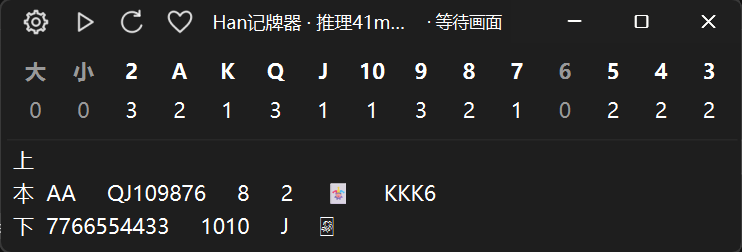

Usage notes
- Prefer original-image inference with the bundled models. Their training data consists entirely of original game screenshots. Packed inputs are not yet adequately represented, and currently have lower recognition accuracy and stability. Manual layouts can switch to original inference; automatic layouts always use the full image.
- Include all three J, O and K letters when selecting joker regions. The training annotations cover those three letters. Selecting only J or J/O can cause missed or incorrect detections.
- The current YOLO models were trained mainly on screenshots from 欢乐斗地主 (Happy Dou Dizhu). Other Dou Dizhu games may be recognized less accurately because their card designs, colors and interfaces differ.
Features
- YOLO object detection with CPU/CUDA execution and optional ONNX Runtime/TensorRT backends.
- Automatic layout learning for common three-player interfaces, or five user-defined regions.
- Original-image or packed inference for manual layouts; automatic layouts always use the full image.
- Two-stage packing: bottom cards and initial hand first, then bottom cards and the three play areas after the initial hand has been deducted.
- Strict user-region crops with no added margins, fixed initial scaling, and online scale estimates from individual card detections.
- A fixed pixel canvas per model's
model_config.yaml, overlap-aware coordinate restoration and duplicate removal. New weights must include this sidecar; square and rectangular inputs use their declared dimensions. - Pause/resume, always-on-top UI, play history, timing, actual YOLO input preview, and paired original/annotated screenshots.
- Separate remaining-card and play-history panels, with stacked or side-by-side arrangements in Basic Settings.
This repository currently maintains the Windows Dou Dizhu application. It does not ship an Android APK, use OCR for rank recognition, or implement other card games. It does not control the game. Compatibility and accuracy must be checked for each interface and skin.
Source installation
Use Windows and 64-bit Python 3.11. Alternatively, download a CPU ZIP or CPU/GPU 7z archive from Releases. The usage guide covers EXE operation and settings first, then source installation.
git clone https://github.com/hey-three/han-card-tracker.git
cd han-card-tracker
py -3.11 -m venv .venv
.\.venv\Scripts\python.exe -m pip install -r requirements.txt --extra-index-url https://download.pytorch.org/whl/cu121
.\.venv\Scripts\python.exe main.py
The dependency file pins CUDA 12.1 PyTorch wheels. Follow the official PyTorch instructions rather than assuming the default index or any Python version will work. Installation details are maintained in Chinese.
Weights are stored in yolo/weights/<model-name>/best.pt. Custom models must preserve the configured class mapping. The training project is maintained separately.
First use
- Open the game window and keep it visible.
- Create a named automatic preset in basic settings and select its game window, or define the five regions in a manual preset. Each mode remembers its last successfully used preset; clicking a mode applies it.
- For a manual layout, choose packed or original inference under Basic settings → Manual layout. This preference applies to all manual layouts.
- Start before the round begins and inspect the actual YOLO input preview.
Any bottom card in two consecutive screenshots opens a round; card identities and counts need not match. The second screenshot begins initial-hand confirmation using the configured stable-frame threshold. A stable, nonempty legal hand is deducted once; an exact 17/20-card hand is not required. The count excludes the user's initial hand and confirmed opponent plays; the user's plays only add history and never trigger another deduction or retroactive initial-hand correction.
Missing bottom cards pause updates. A consecutive-frame and elapsed-time threshold ends the round internally while preserving the displayed history until the next round starts. See the counting contract.
Releases and verification
Releases provides a CPU-only ZIP without CUDA libraries and a larger CPU/GPU 7z archive supporting CPU and compatible NVIDIA CUDA GPUs. Extract the entire archive before launching HanCardTracker.exe; the 7z format can be opened with 7-Zip. See CHANGELOG.
The diagnostic update passed 203 unit tests, including a real Windows spawn/worker-shutdown test, and compared recorder modes on repeated static reference images. This does not establish complete live-game accuracy, GPU/backend compatibility, or a 200 ms latency target. Optional full diagnostics groups evidence into per-round folders under a recording session. Its total disk budget defaults to 1 GiB and is adjustable in advanced settings (0.1–1024 GiB); retention removes sealed old rounds while protecting the current round. It records each model input/output and before/after tracker state through one bounded background writer; daily key-event logs rotate automatically. Queue/memory backpressure recovers automatically with explicit gap records. Disk/write failures still pause diagnostics. Replay and one-click export are not implemented. Details: verification and troubleshooting.
The included configuration is the maintainer's current setup. Choose your own game window/layout, model and device in basic settings, and enable or disable full diagnostics as needed in advanced settings.
Support this project
If this project has helped you, optional donations via the WeChat Pay or Alipay QR codes support its maintenance. You can also view the local QR code in the app under Settings → Support. Stars, issue reports and code contributions are welcome too.

Contributing and license
Read CONTRIBUTING and AGENTS. Please include the source revision, model/backend, layout mode, reproduction steps and relevant sanitized screenshots in bug reports.
The repository license is MIT. Third-party packages, models and datasets retain their own licenses.
Development roadmap
- Improve packed inference with actual packed training examples and evaluate resizing and slicing effects.
- Prioritize bottom-card detection: current recognition problems are concentrated in this area, where targets are small in full screenshots and fade after the landlord plays the corresponding cards. Add representative training examples and improve stability.
- Improve joker recognition and prevent changing partial detections from creating duplicate play-history entries.
- Port capture, overlay and inference workflows to Android. No Android APK is released yet.