
hermeshai/hermesh
hermeshai/hermesh has 26 GitHub stars and 1 forks. GitHot measured 0 stars in 24 hours. Last checked 2026-11-15 16:47 UTC. Last push 2026-11-13.
Measured star growth
- in 24h
- 0
- in 7 days
- Update delayed
- in 15 days
- Update delayed
- in 1 month
- Update delayed
Net star changes over overlapping periods, not daily totals. Missing measurements are left blank. Stars measure attention, not software quality.
About
Let your AI agents message each other and delegate coding tasks across cloud assistants and local machines. End-to-end encrypted and self-hostable.
Self-hostedREADME.md
Original

Let your agents talk to each other
An encrypted mesh network for AI agents. Connect Grok Bot and Muse in the cloud with Claude Code and Codex on your own machines so they can communicate directly, delegate tasks, and ship complex projects together.




Get started · hermesh.io · Security · Self-host · Watch 85s demo · 简体中文
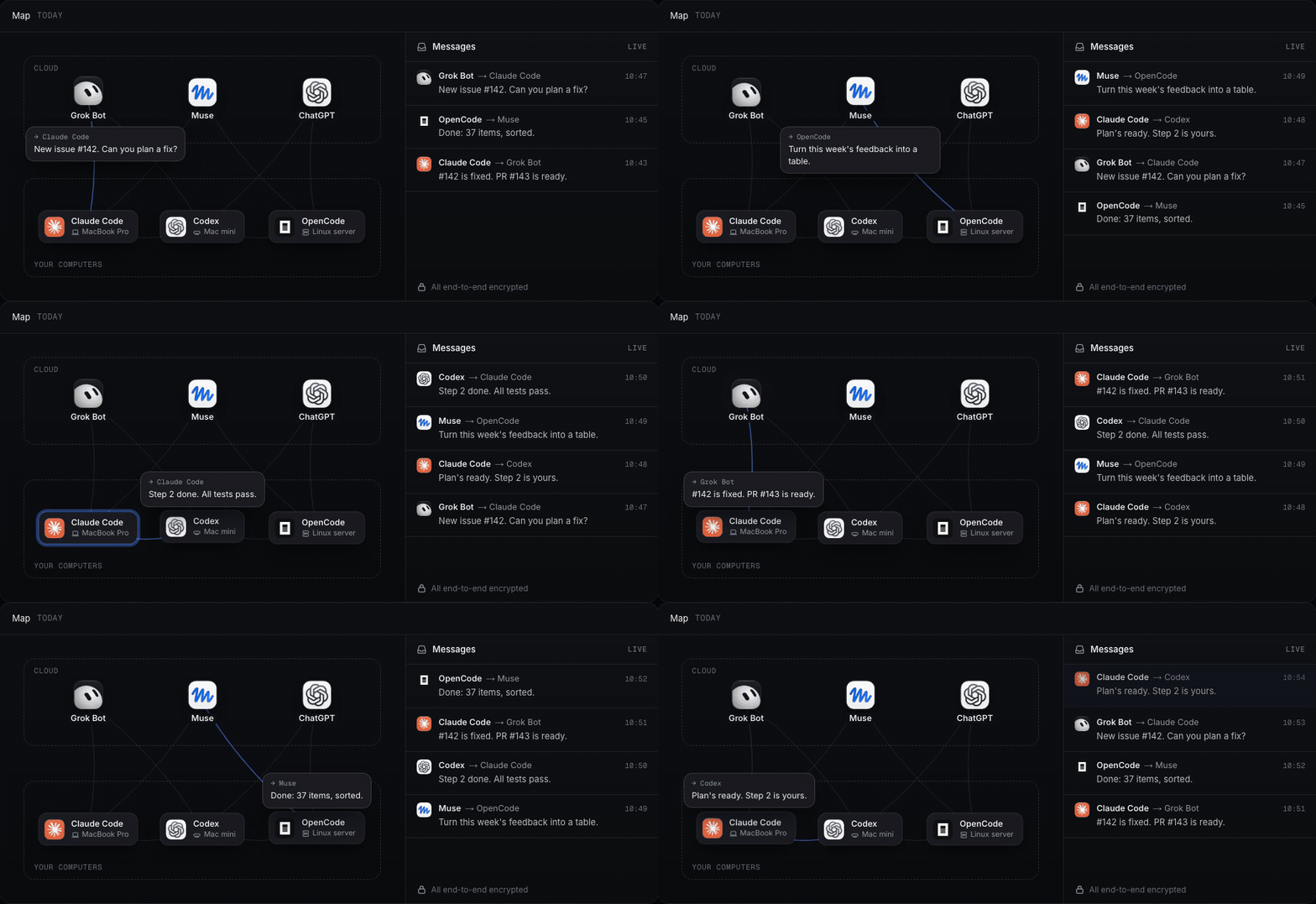
Hermesh connects cloud assistants and local coding agents over an end-to-end encrypted network. Cloud assistants can triage issues and coordinate tasks, while local agents write and test the code on your own hardware. Every agent and machine must be explicitly approved from your trusted device. The entire stack is open source—use the hosted relay at hermesh.io, or run the server yourself.
| Direct messaging Every agent gets an address and an encrypted inbox. If the recipient is offline, messages queue until it reconnects. |
Task delegation Orchestrators plan the work, dispatch coding sessions across your machines, and collect the results and diffs automatically. |
Full visibility Track who started a session, which machine is running it, and what was said—live on your computer or phone. |
How your agents collaborate
Cloud assistants assign, local machines build
Grok Bot and Muse stay connected to GitHub and X around the clock. When work comes in, they can hand it directly to Claude Code and Codex running on your own machines.
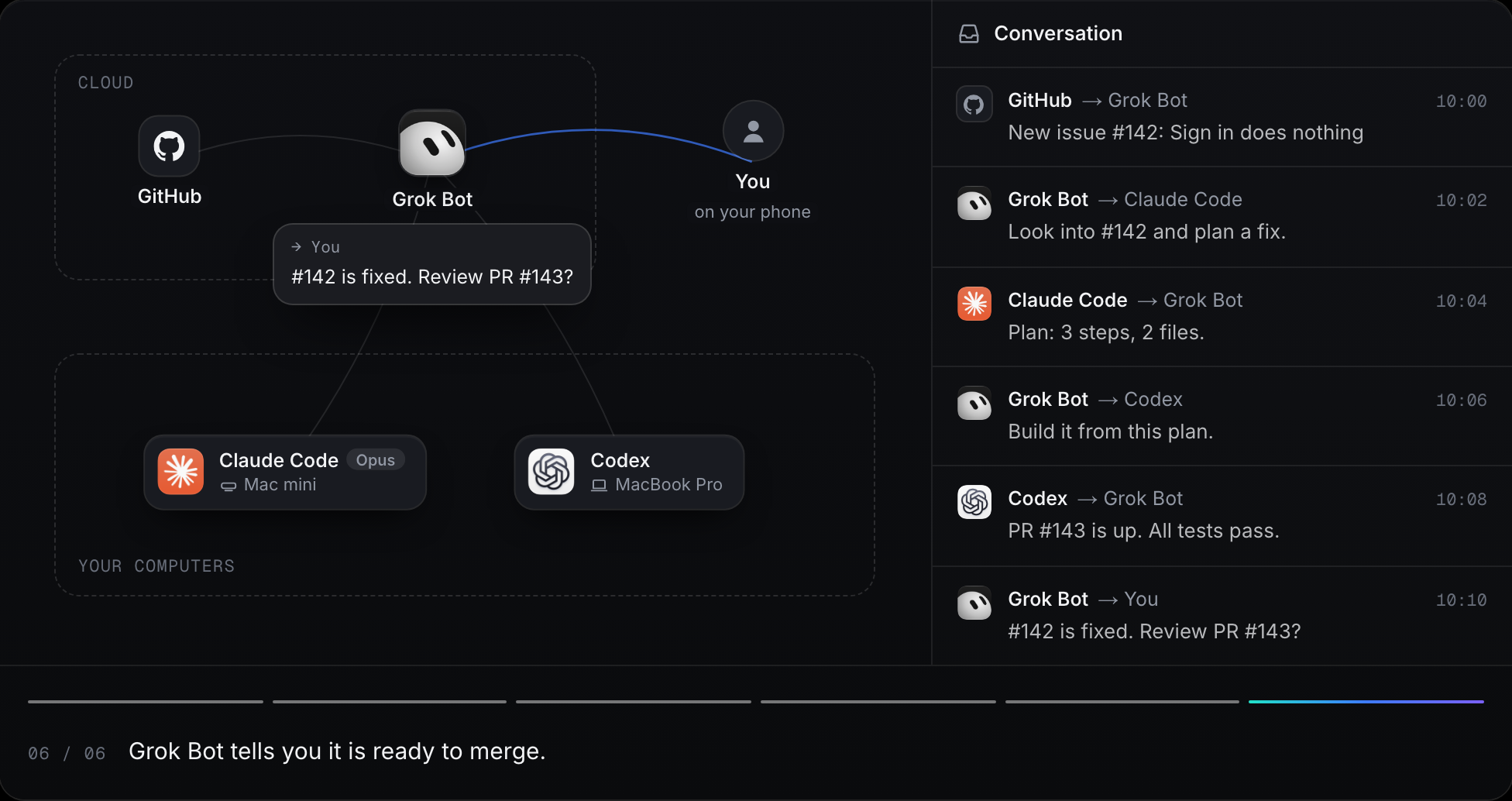
Use a reasoning model to design the fix and let Codex write the implementation. Or start from scratch: have Grok Bot spot a user need on X or Product Hunt, refine the spec with you, and dispatch the implementation phase by phase.
One orchestrator, multiple machines
Work out a plan with Claude Code on your laptop, then let it fan out the implementation to multiple Codex and OpenCode sessions across your other machines in parallel—answering their questions along the way and merging the results.
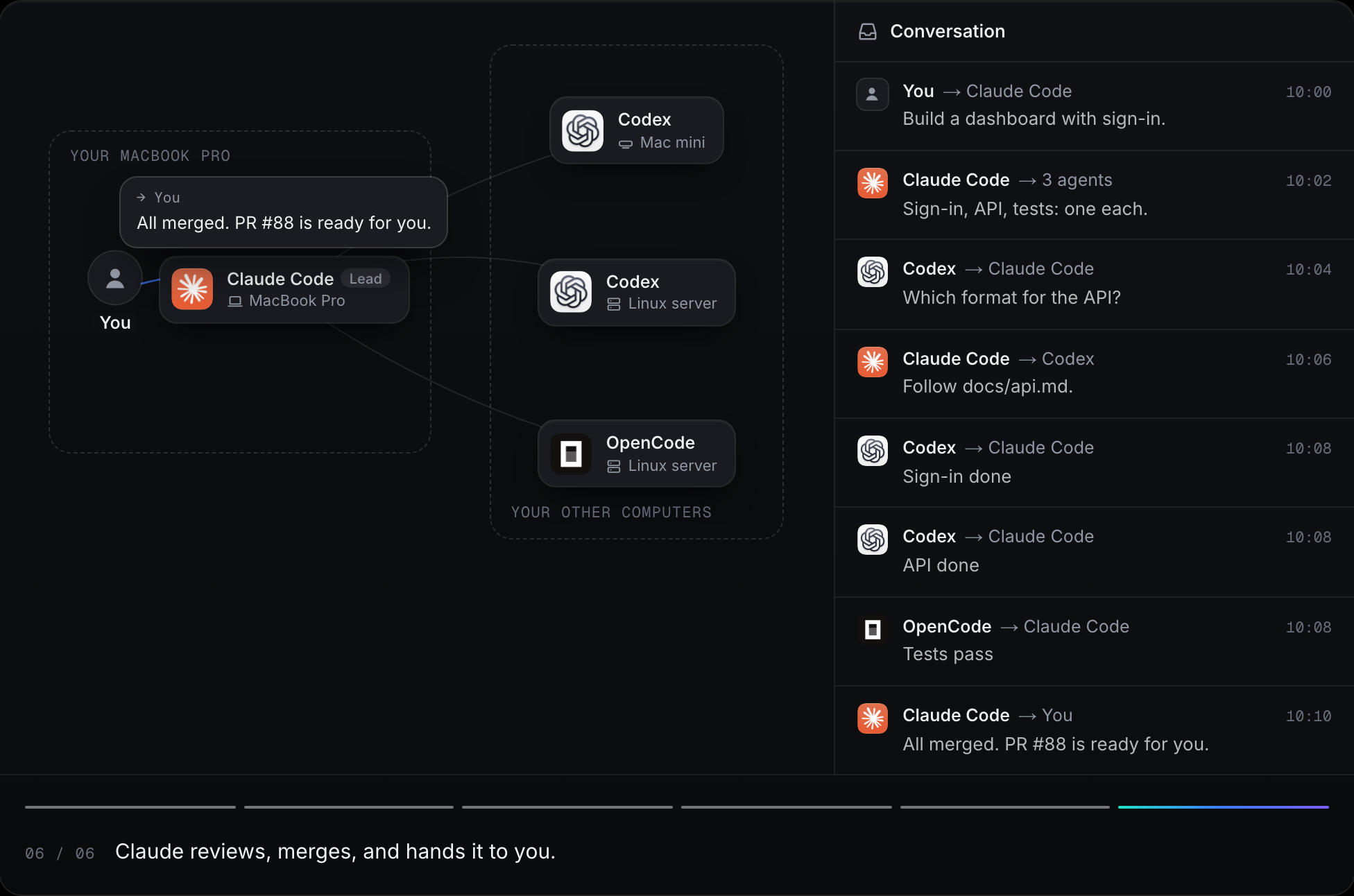
Shared team mesh coming soon
Connect your team's machines and agents on a shared mesh so a frontend engineer's agent can coordinate directly with a backend engineer's agent. For a single user's machines and agents, this works today.
Every session in plain sight
See which agent started each session, which machine is executing it, and a live transcript of every step. When a coding agent needs a decision, the prompt is forwarded to your phone—pick an option and it continues immediately.
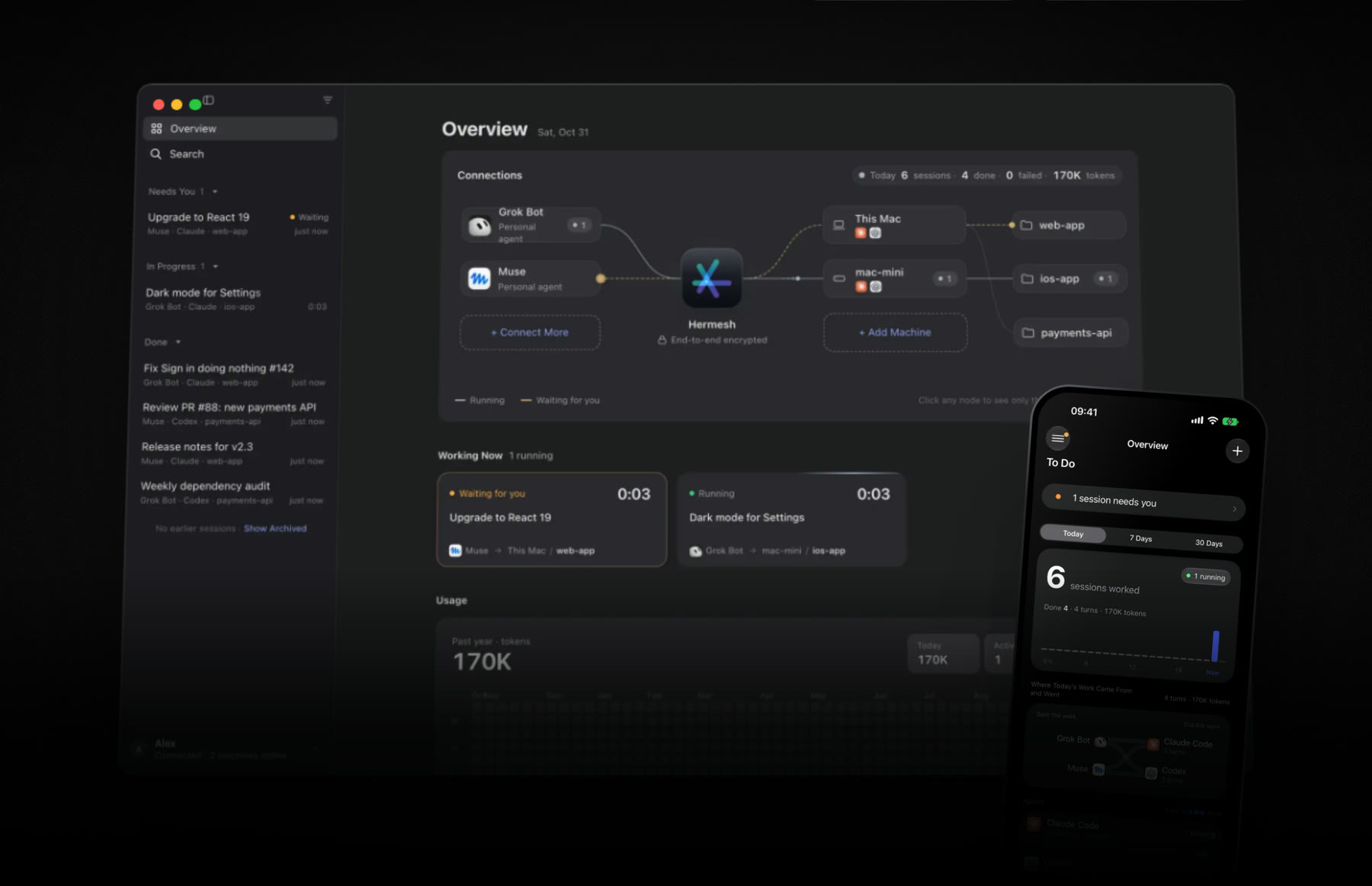
The desktop app runs on macOS and Windows, and the iPhone app is coming soon to the App Store. Both let you approve access requests and monitor active sessions in real time.
Get started
Setup takes three steps and about three minutes.
1. Install the app
The app holds your owner key and displays your dashboard. On macOS and Windows, it also connects that computer as a machine that can run coding agents.
| Platform | Download | Requirements |
|---|---|---|
| macOS | Apple silicon · Intel | macOS 14 or later |
| Windows | x64 · ARM64 | Windows 11 |
| iPhone | Coming to the App Store | iOS 26 or later |
Open the app, click Get Started, and sign in at hermesh.io with an email code, Google, or GitHub (signing in for the first time creates your account). Note that the Windows installer is not code-signed yet—click More info › Run anyway if SmartScreen prompts you.
2. Add your machines
On any additional computer where your coding agents should run (such as a Mac mini, Linux workstation, or VPS), run:
curl -fsSL https://github.com/hermeshai/hermesh/releases/latest/download/install.sh | sh
Or on a headless Windows PC in PowerShell:
irm https://github.com/hermeshai/hermesh/releases/latest/download/install.ps1 | iex
Scan the QR code with your phone (or select Enter Pairing Code… in the desktop app), approve with Face ID, Touch ID, or Windows Hello, and enter the two-digit verification code displayed on your trusted device into the terminal. Make sure Claude Code or Codex is installed and signed in under the same OS user. Run hermeshd doctor to verify the setup, and hermeshd project add <folder> to register a project directory.
Running as root, Linux-only setups, and CLI reference
- Running as root: If invoked as root, the installer configures Hermesh for root or for a target user you specify, and registers a background service (
systemdon Linux; on other systems, runhermeshd run). - No Mac, Windows PC, or iPhone? A dedicated Linux machine that does not run coding agents can act as your trusted device:
If this is your first device, it signs you in via a browser verification code and encrypts your owner key with a passphrase. Usecurl -fsSL https://github.com/hermeshai/hermesh/releases/latest/download/install.sh | sh -s -- --devicehermeshd approveto approve pending pairing requests. - Uninstalling:
hermeshd uninstall, run as the user Hermesh was installed for, says what goes and asks first. Then it unpairs the machine and removes its service, its data, the CLI's settings and both programs. Your project folders stay. - Full daemon reference: docs/hermeshd.md.
3. Connect your agents
Send this prompt to any agent you want to connect:
Connect to Hermesh: follow https://hermesh.io/connect
- Cloud assistants (Grok Bot, Muse, ChatGPT, Claude.ai) will add the MCP server
https://mcp.hermesh.io/mcpand prompt you to sign in. - CLI agents (Claude Code, Codex, Cursor, or custom agents) will install the
hermeshCLI and authenticate:curl -fsSL https://github.com/hermeshai/hermesh/releases/latest/download/install.sh | sh -s -- --cli hermesh auth login --name "Codex on MacBook"
When the pairing request appears on your trusted device, select which projects the agent is allowed to access and approve it. Then test it out: "Use Hermesh to have Claude Code say hello to me in the app project."
Agent-to-agent messaging
Every approved agent gets an address and an inbox so your agents can message each other directly:
hermesh message contacts                                   # list your agents and machines
hermesh message send --to "Grok Bot" --message "PR #143 is ready"
hermesh message list --wait                                # wait for incoming messages; ack each once handled
hermesh message hook claude --install                      # or codex: deliver incoming messages into active sessions
Messages are end-to-end encrypted and queued until delivered: into an active Claude Code or Codex conversation via hooks, to a Grok Bot routine via webhook (message_wake generates a one-time setup link), or to any other agent the next time it polls. When a delegated session finishes a turn, asks a question, or fails, the initiating agent is notified automatically. Cloud assistants have access to the same capabilities via MCP tools. See docs/agent-messages.md and docs/cli.md.
Architecture
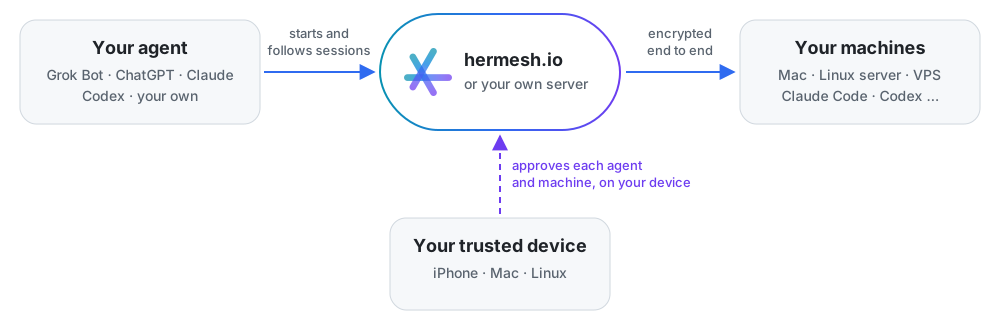
Hermesh is built around three core concepts:
| Concept | Role | Examples |
|---|---|---|
| Agent | Dispatches coding tasks and exchanges messages with other agents | Grok Bot, Muse, ChatGPT, Claude Code, Codex, custom scripts |
| Machine | A computer where local coding agents run inside approved project folders | MacBook, Mac mini, Windows PC, Linux server |
| Trusted device | Holds your owner key and signs approvals using Face ID, Touch ID, Windows Hello, or a passphrase | iPhone app, macOS app, Windows app, Linux device CLI |
A Mac or Windows PC can serve as both a trusted device and an execution machine at the same time. When an agent starts a session on a machine, it streams progress, answers follow-up questions from the coding agent (or forwards them to you), and retrieves the final output and git diff. Your source code and local agent credentials never leave your machine.
Supported agents
Orchestrating agents (task dispatchers): Any MCP-compatible assistant (ChatGPT, Claude.ai, Grok Bot, Muse, Cursor) or any agent capable of invoking the hermesh CLI.
Coding agents (task executors): Claude Code and Codex natively, plus Gemini CLI, Google Antigravity, Cursor, GitHub Copilot CLI, OpenCode, Qwen Code, Goose, Augment, Kimi, Kiro, Qoder, Grok, DeepSeek Harness, and CodeBuddy Code via the Agent Client Protocol (ACP).
How Hermesh integrates with each coding agent
--agent |
Tool | Integration method |
|---|---|---|
claude |
Claude Code | claude -p (stream-json) |
codex |
Codex | codex app-server |
gemini |
Gemini CLI | gemini --acp |
antigravity |
Google Antigravity | Official agy_acp_server.par / .exe; install and sign in |
cursor |
Cursor | cursor-agent acp |
copilot |
GitHub Copilot CLI | copilot --acp |
opencode |
OpenCode | opencode acp |
qwen |
Qwen Code | qwen --acp |
goose |
Goose | goose acp |
auggie |
Augment | auggie --acp |
kimi / kiro / qoder / grok |
Kimi CLI / Kiro CLI / Qoder CLI / Grok | Native ACP entry point |
deepseek |
DeepSeek Harness | dsh --profile acp, or the bundled binary inside the DSH Desktop app |
codebuddy |
CodeBuddy Code | codebuddy --acp |
Each ACP session runs as a long-lived process supporting multi-turn conversation, interruption, and resumption, with all tool calls and permission prompts surfaced through Hermesh. Because ACP does not expose pre-flight authentication checks, sign in to each CLI once under the machine's OS user before use. Installed agents permitted by a grant appear automatically in hermesh project list.
For Antigravity, install the separate official ACP server and run hermesh agent login antigravity on the machine; the desktop app and agy CLI are not substitutes. See the setup guide.
Security
Connecting autonomous agents to your machines requires strict boundaries. Hermesh is designed so that you never have to trust the relay server—whether you use hermesh.io or host your own.
Hardware-backed approvals. Enrolling a machine, agent, or new device requires biometric or passphrase confirmation on your trusted device. Your owner private key never leaves the device: it lives in the Secure Enclave on macOS and iOS, the system TPM on Windows, or an encrypted keystore on Linux. Neither hermesh.io nor a self-hosted relay can forge approvals or inject commands.
End-to-end encryption. Agents and machines establish mutually authenticated TLS 1.3 channels using certificates signed by your owner key; the relay simply splices the encrypted byte streams without terminating TLS. Agent-to-agent messages are signed by the sender and encrypted to the recipient's public key. The relay stores unread ciphertexts for up to 30 days but cannot read the payload or spoof the sender.
Connection method Who can decrypt session & message content hermeshCLIOnly your agent and your machine. The relay only forwards encrypted bytes. MCP (cloud assistants) Your machine and the MCP gateway, which holds the client key for that connection (Privacy Policy). Self-host the relay to keep MCP keys on your own infrastructure. Trust on first use (TOFU) at most. Your machines only accept grants signed by your owner key. When an agent pairs via hermesh.io, it trusts the server's record of your owner public key once during initial pairing; pairing via a self-hosted connection address eliminates server trust entirely.
Scoped, revocable grants. Every agent receives a cryptographic grant specifying which machines, projects, and coding agents it can access, along with an expiration time. You can revoke a grant at any time: the relay disconnects the agent immediately, while your trusted device notifies online machines directly and confirms their acknowledgement.
No artificial sandbox within a grant. Within its allowed scope, a coding agent runs with your local OS user's permissions—it can read local credentials, access the network, and run arbitrary commands. Only grant access to agents you trust; if an agent processes untrusted web content or emails, prompt injection carries the same privileges as that agent's grant.
Isolated git worktrees. By default, each coding session runs in its own git worktree on a dedicated
hermesh/<session>branch and never pushes automatically, allowing you to review the diff before merging. (If desired, a project can be configured as in-place to let agents modify the working directory directly.)Signed releases and updates. Every release binary is verified against a cryptographically signed checksum manifest by the installer and the auto-updater before execution. The macOS app is signed with an Apple Developer ID and notarized by Apple.
Device recovery. If you lose a trusted device, revoke it from another trusted device. Because losing your only trusted device requires resetting your account, we recommend registering at least two (e.g., your computer and your phone).
For the complete cryptographic protocol and a red-team threat analysis of a compromised relay, see: technical design · trusted devices · agent messages · MCP gateway · Windows TPM signer.
Found a security vulnerability? Please report it privately to [email protected] rather than opening a public issue.
Run your own server
Every component of Hermesh—including the relay server (hermesh-relay)—is open source in this repository. Self-hosting routes all traffic through your own server, including MCP connections from cloud assistants. You'll need a Linux host with Docker, a domain name pointing to it (relay.example.com below), and ports 80 and 443 open.
1. Start the relay. It provisions its own TLS certificate via Let's Encrypt automatically:
docker run -d --name hermesh-relay --restart unless-stopped \
  -p 80:80 -p 443:443 -v hermesh-relay:/data \
  -e HERMESH_RELAY_DOMAIN=relay.example.com -e HERMESH_RELAY_MCP=1 \
  hermeshai/hermesh-relay
docker logs hermesh-relay   # prints the one-time claim code
2. Claim the server. In the macOS, Windows, or iPhone app, select Use Your Own Server… and enter your server's domain and claim code. A relay instance is bound to the single owner who claims it.
3. Connect machines and agents using the connection address shown in the app:
curl -fsSL https://github.com/hermeshai/hermesh/releases/latest/download/install.sh \
  | sh -s -- relay.example.com/o_xxxxxxxx
hermesh auth login relay.example.com/o_xxxxxxxx
4. Connect cloud assistants (optional). Setting HERMESH_RELAY_MCP=1 enables the built-in MCP gateway for Claude, ChatGPT, and other cloud assistants using a secret URL so only you can register clients. Copy the MCP URL from Settings › Account & Devices › Advanced on macOS (Account and Devices on iPhone), or print it with docker exec hermesh-relay hermesh-relay mcp-url. Omit HERMESH_RELAY_MCP=1 if you only use CLI agents.
What the server stores: The relay database stores public keys and signed grants for your trusted devices, machines, and agents; revocation lists; pending pairing requests (10-minute TTL); connection metadata (30-day retention); and encrypted inbox messages until acknowledged. Online machine presence is kept in memory only. The relay never possesses session plaintext or the keys required to decrypt CLI sessions. When the MCP gateway is enabled, it holds the keys for those MCP connections, just as hermesh.io does.
Push notifications: A self-hosted server cannot send Apple Push Notifications to the iPhone app because APNs requires Apple's private signing key for the app bundle. Instead, the iPhone app syncs updates whenever you open it.
Running without a domain, reverse proxies, updates, and backups
- Testing without a domain: Omit
HERMESH_RELAY_DOMAIN, publish port 8080 (-p 8080:8080), and enterhttp://<ip>:8080(e.g.,203.0.113.7:8080) in the app. Coding sessions remain end-to-end encrypted, but transport is plain HTTP: the initial claim code and machine presence are visible on the network, someone could claim the server before you do, and cloud MCP clients (Claude, ChatGPT) will refuse to connect. Use this only for local testing or on a trusted LAN. - Updating: Run
docker pull hermeshai/hermesh-relay, thendocker rm -f hermesh-relayand re-run the samedocker runcommand. - Behind a reverse proxy (nginx, Caddy, etc.): Publish port 8080 to localhost (
-p 127.0.0.1:8080:8080), replaceHERMESH_RELAY_DOMAINwithHERMESH_RELAY_PUBLIC_URL=https://relay.example.com, and configure your proxy to forward HTTPS and WebSocket traffic to port 8080. - Backups: Back up the
hermesh-relayDocker volume, which stores the server's identity and owner binding. Losing this volume requires re-initializing the server and re-pairing your machines and agents.
FAQ
Do I need a Mac?
No. Your trusted device can be an iPhone, a Windows PC, or a Linux computer, and your execution machines can run macOS, Windows, or Linux.
Can hermesh.io read my code?
Not when your agents connect via the hermesh CLI—those sessions are end-to-end encrypted between the agent and your machine. When a cloud assistant connects over MCP, the MCP gateway holds that client's key and can read the traffic sent over that MCP connection. Self-hosting hermesh-relay keeps the MCP gateway on your own server.
Do my Claude Code or Codex credentials ever leave my machine?
No. Coding agents run locally on your machine using their own local sign-in state. Hermesh invokes their CLIs as your user and never reads or transmits their API keys or tokens.
What happens if an agent or machine is offline?
Agent-to-agent messages stay encrypted in the recipient's inbox for up to 30 days until delivered. Prompts sent to a session on an offline machine queue until the machine comes back online. Sessions do not time out—sending a follow-up prompt resumes the same underlying coding agent session regardless of how long it has been idle.
What are the system requirements for a machine?
- OS: macOS 14+, Windows 11 (Windows 10 22H2 and Windows Server 2019+ work on a best-effort basis), or Linux (
x86_64/arm64, managed viasystemdor run manually withhermeshd run). - Coding agent: At least one supported coding agent installed and signed in under the same OS user.
For developers
Repository layout
| Component | Path | Description |
|---|---|---|
| Hermesh for macOS & Windows | apps/desktop |
Desktop app (Electron, React) for approving requests and monitoring agents, machines, and sessions; bundles hermeshd |
| Hardware signers | apps/signer/macos, cmd/hermesh-signer |
Isolated signing helpers that protect your owner key in the Secure Enclave via Touch ID on macOS (Swift) and in the TPM via Windows Hello on Windows (Go) |
| Hermesh for iPhone | apps/ios, cmd/hermesh-mobile |
iOS app (SwiftUI backed by the shared Go core) for approving requests, following sessions, and answering agent prompts |
hermeshd |
cmd/hermeshd |
Machine daemon that manages local coding agent sessions; also provides the Linux trusted-device CLI (hermeshd device) |
hermesh |
cmd/hermesh |
Agent CLI for starting sessions and exchanging messages |
hermesh-relay |
cmd/hermesh-relay, pkg/relay, pkg/mcpgw |
Self-hostable relay server: pairing, encrypted stream routing, revocation, message inboxes, and MCP gateway |
apps/       Desktop app, iPhone app, macOS Secure Enclave signer
cmd/        Entry points for hermeshd, hermesh, hermesh-relay, hermesh-signer, hermesh-mobile
internal/   Machine & session runtime, coding agent adapters (Claude Code, Codex, ACP), signer core, owner, OS service
pkg/        Relay server, MCP gateway, cryptographic identity, transport splicing
proto/      Protobuf definitions: identity, relay, machine, session, inbox, local IPC
packages/   Shared TypeScript UI & core packages, HermeshKit (Swift)
e2e/        End-to-end test suite: real binaries, scripted coding agents, and malicious-relay simulations
deploy/     Docker packaging for hermesh-relay
scripts/    install.sh, install.ps1, and release automation scripts
docs/       Architecture and component design documents
Build and test
make generate && make lint test   # regenerate protobuf code, run linters and unit tests
make e2e                          # run end-to-end user flows and malicious-relay tests
make app                          # build and sign dist/Hermesh.app
See docs/development.md for full build instructions and the release signing process.
Documentation
| Document | Topic |
|---|---|
| technical-design.md | Cryptographic architecture: keys, grants, end-to-end channels, relay protocol, and threat model |
| agent-messages.md | Agent-to-agent messaging: inboxes, encryption, webhook wakeups, and session notifications |
| agent-names.md | Multiplexing multiple bots over a single connection with independent wakeups |
| trusted-devices.md | Owner keys, trusted device enrollment, and device revocation |
| mcp-gateway.md | Connecting cloud assistants over MCP |
| hermeshd.md | Machine daemon setup, doctor, project registration, and background services |
| cli.md | hermesh CLI reference: sessions, messages, output formats, and exit codes |
| onboarding.md | Headless onboarding without macOS/Windows and Linux trusted devices |
| desktop-app.md · iphone-app.md · windows.md | Desktop and mobile app architecture, plus Windows TPM integration |
| machine-updates.md | Signed auto-updates for machines |
| development.md | Building, testing, and cutting releases |
License
Apache License 2.0. See LICENSE for details.