
haxsd/toolkit-map
haxsd/toolkit-map has 111 GitHub stars and 6 forks. GitHot measured 0 stars in 24 hours and 0 in 7 days. Last checked 2026-11-17 02:35 UTC. Last push 2026-11-13.
Measured star growth
- in 24h
- 0
- in 7 days
- 0
- in 15 days
- Collecting history
- in 1 month
- Collecting history
Net star changes over overlapping periods, not daily totals. Missing measurements are left blank. Stars measure attention, not software quality.
About
让 AI 编程助手先查本机工具、按项目声明选对版本;查询严格只读。setup 默认可预授权定向更新,scan/add/install 仍需确认。Windows 工具发现 + 零依赖 Node MCP。
Developer ToolsREADME-EN.md
Originaltoolkit-map
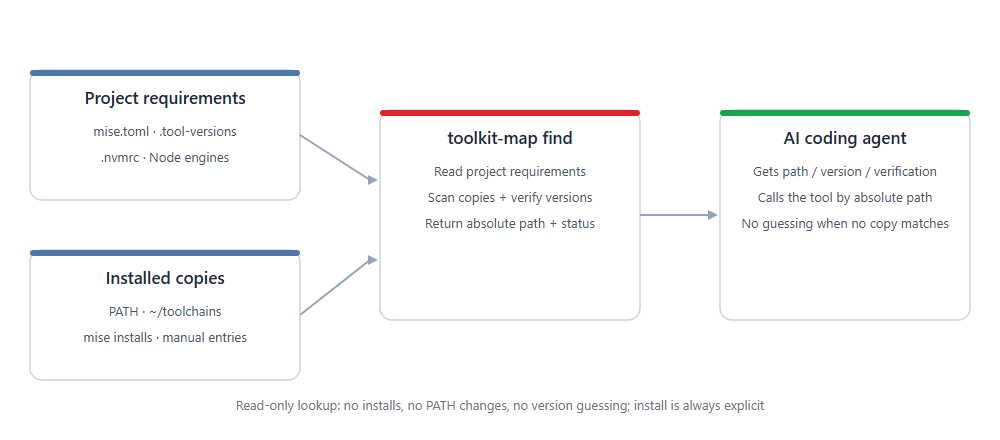
Let AI coding agents look up tools before they run them: find the copies installed on this machine, pick the version the project requires, and get a verified absolute path.



English · 简体中文 · Quick start · Reference · Agent integration · Changelog
The problem
AI coding agents usually run node, python or git straight from PATH. That breaks when PATH points at Node 16 while the project requires Node 22, when several copies exist and the agent cannot tell which one to use, or when node --version only says who PATH resolves to, not which version the project requires.
toolkit-map answers three questions before the tool call:
- What does the project require? It reads common declarations such as
mise.toml,.tool-versions,.nvmrcand Nodeengines. - Which verified copies exist locally? It scans
PATH, tool warehouses, mise installs and manually registered paths. - Which absolute path should be used now? It returns
path,version,verificationandrequirement.
Lookups are strictly read-only — no installs, no PATH changes, no version guessing. Map maintenance (scan / update / add) is a separate, explicit action that requires user authorization. When no copy satisfies the requirement it returns version_mismatch instead of silently falling back; when a declaration cannot be interpreted it returns requirement_unsupported. See the reference for the comparison and a sample result.
Quick start
Requirements: Windows, Windows PowerShell 5.1 or PowerShell 7, and Git. MCP access additionally needs Node.js 18+; the map itself does not depend on Node.
One paste to download, wire the project and write the project-level MCP config:
$project = (Get-Location).Path
$d = Join-Path $env:USERPROFILE 'Projects\toolkit-map'
git clone --branch v2.0.0 --depth 1 https://github.com/haxsd/toolkit-map $d
if ($LASTEXITCODE -ne 0) { throw 'Download failed. For an existing install, follow the upgrade steps instead of overwriting it.' }
$ps = (Get-Process -Id $PID).Path
& $ps -NoProfile -ExecutionPolicy Bypass -File "$d\scripts\quickstart.ps1" -Project $project -Mcp -WriteMcp
Read the exit code: 0 means everything completed; 2 means partial success (rules are wired, MCP was not written — for example no Node 18+ or a failed startup check); 1 means project setup failed. -ExecutionPolicy Bypass applies to that child process only; if an organization policy rejects it, follow the organization process instead of changing the registry or group policy.
Or do the same steps manually:
$project = (Get-Location).Path
$installDir = Join-Path $env:USERPROFILE 'Projects\toolkit-map'
git clone --branch v2.0.0 --depth 1 https://github.com/haxsd/toolkit-map $installDir
$map = Join-Path $installDir 'scripts\map.ps1'
$ps = (Get-Process -Id $PID).Path
function toolkit { & $ps -NoProfile -ExecutionPolicy Bypass -File $map @args }
toolkit setup -Project $project -WhatIf -Json   # preview
toolkit setup -Project $project                 # build the map and write AGENTS.md
toolkit doctor -Project $project -Json          # read-only diagnosis
toolkit find git -Project $project              # read-only lookup
Existing installs: upgrade steps. No Git or prefer a ZIP: ZIP route. MCP clients can call the map directly; configuration, protocol and acceptance are in MCP access, and rule locations/templates in agent integration.
Safety boundaries
- Read-only lookups:
status/find/doctornever install tools, changePATHor write configuration;finddoes not execute new candidates or write the map. - Maintenance and installation are explicit:
scan/update/addwrite the map and may probe local candidates;installis a separate action and should start with-WhatIf. MCP maintenance returns a preview by default;confirm:trueis a request to execute, not proof of user authorization. - No environment changes: existing tools are never moved,
PATHis never modified, the global execution policy is untouched, and credentials are never read. - Team repositories: generated rules and MCP configs contain local absolute paths; do not commit them — each teammate generates their own.
- Local maps, tools, caches and credentials never enter a release package. Full boundaries: security policy.
Docs
Reference · Contract · MCP access · 2-minute demo · Agent integration · Platform notes · Storage · Troubleshooting · Uninstall · Development and contributing · Security · Changelog
FAQ
- Will it pick the latest version when the project has no declaration? No. The order is
-Version> project declarations > parent/global declarations > the system default onPATH. IfPATHhas Node 16,find nodereturns 16; write a declaration or pass-Versionwhen you need another version. - Does it move tools or change
PATH? No. Existing copies stay where they are;installis a separate, explicit action. - Is mise required? No. Discovery, registration and lookup work without mise; use it when the project needs a full manager environment.
- Can I undo it? Yes — remove the integration rules, MCP config entries and skill links while keeping existing tools; see uninstall.
Contributing and license
Issues and PRs are welcome. Start with the development and contributing guide; for bugs and feature requests use the issue templates and include reproduction steps plus the output of doctor -Bundle -Json (redact usernames in paths before pasting).
Source, protocol, generic examples and recipes are MIT licensed.