
hassancs91/desktop-app-starter
hassancs91/desktop-app-starter has 62 GitHub stars and 52 forks. GitHot measured 0 stars in 24 hours. Last checked 2026-11-15 12:08 UTC. Last push 2026-10-18.
Measured star growth
- in 24h
- 0
- in 7 days
- Collecting history
- in 15 days
- Collecting history
- in 1 month
- Collecting history
Net star changes over overlapping periods, not daily totals. Missing measurements are left blank. Stars measure attention, not software quality.
About
Free Electron + React + TypeScript starter for building desktop apps with Claude Code
Web & AppsREADME.md
OriginalDesktop App Starter
A free starter for building desktop apps with Claude Code. Electron 41, React 19, TypeScript and Tailwind 4, and it already runs.
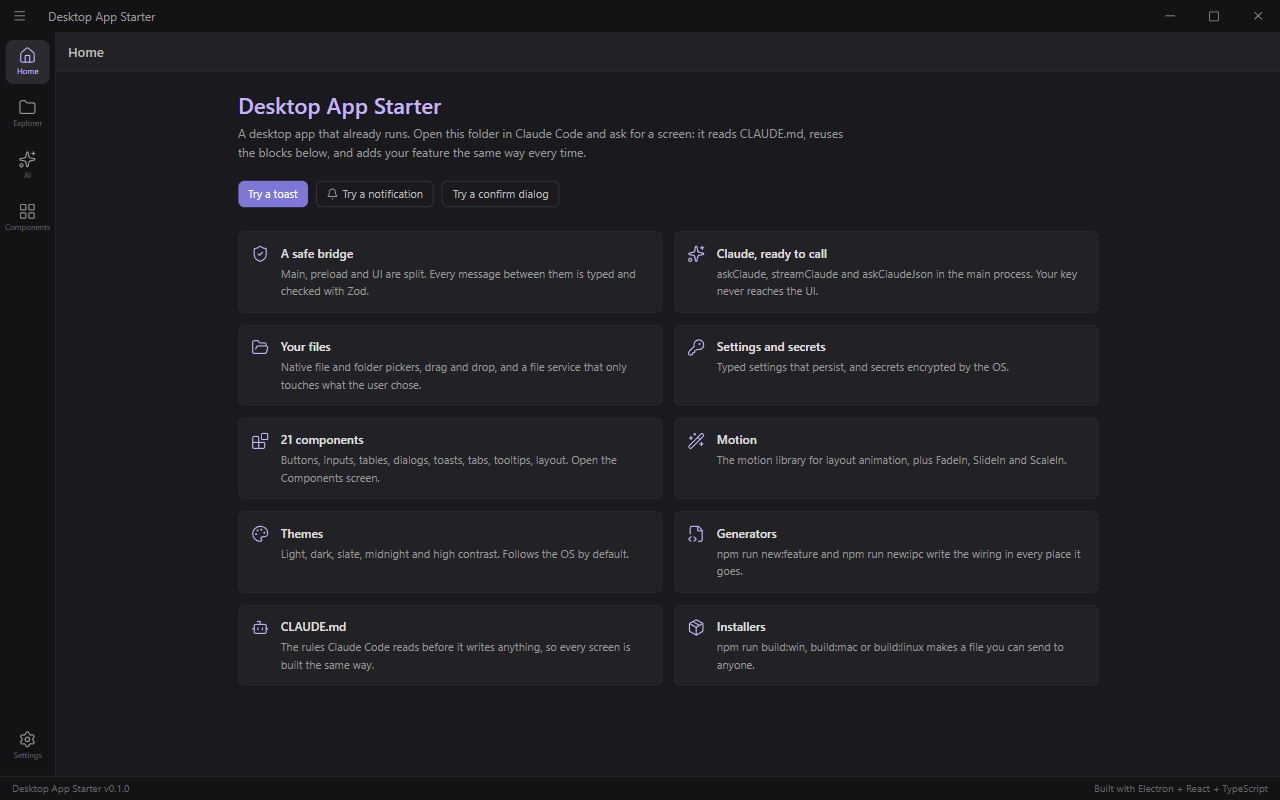
Open the folder in Claude Code and ask for a screen in plain words. Claude reads CLAUDE.md first,
reuses the pieces that are already here, adds your feature the way the rest of the app is built, and
writes a test. It doesn't have to rebuild the window, the bridge, the settings or the components for
every new app.
MIT licensed. Use it for anything, including apps you sell.
Want license keys, code signing and auto-update too? That's the full Desktop App Boilerplate, also included in my course Build With AI 1.0. See what's different.
What's inside
- The window. Title bar, sidebar and status bar. A new screen is one line in a registry.
- 6 themes. System, light, dark, slate, midnight and high contrast.
- Settings that persist, typed and checked with Zod.
- API key storage by the OS. Your key is encrypted with Electron
safeStorageand never reaches the UI. - Claude, ready to call.
askClaude,streamClaudeandaskClaudeJsonin the main process, on the official@anthropic-ai/sdk. The default model is Claude Opus 5.5. - 21 ready components, plus 8 layout and 3 motion pieces: buttons, inputs, select, table, modal, confirm dialog, toasts, tabs, tooltips and more. They're all on the Components screen.
- Your files. File and folder pickers, drag and drop, and a file service that only touches what the user picked.
- A safe bridge. Main, preload and UI are split, and every message between them is typed and checked.
- Installer builds for Windows, Mac and Linux, wired in.
- CLAUDE.md. The rules Claude Code reads before it writes anything, so every screen lands in the same structure.
- Generators and checks.
npm run new:featureandnpm run new:ipcwrite the wiring for you. TypeScript strict, ESLint, Vitest and a GitHub Actions file.
Quick start
You need Node.js 20.19+ or 22.12+.
git clone https://github.com/hassancs91/desktop-app-starter.git my-app
cd my-app
npm install
npm run setup
npm run dev
The app opens. Go to the AI screen and paste your Claude API key once (get one here). Your operating system stores it encrypted.
The starter is free. The model isn't: every call is billed to your own Anthropic key. A sort like the one in the video costs cents (the run below: 28 files, about $0.04).
Your first feature, with one prompt
Open the folder in Claude Code and give it this. It's the exact prompt from the video:
Add a screen called Desk Cleaner. The user drops a folder onto the window or picks one; default to their Downloads folder. Show every file as a card with its type icon, name, size and age, animated in. Send the file names, sizes and the first 300 characters of any text file to Claude in one request and ask it to group them into 5 to 8 plain-English categories and suggest a clean file name for each, with a one-line reason. Animate the cards flying into their category columns; let me drag a card to another column. A Clean up button moves and renames the files after a confirm dialog, with a progress bar and a notification when done. Nothing moves before Clean up. Follow the way the rest of this app is built, and write a test for the categorization service.
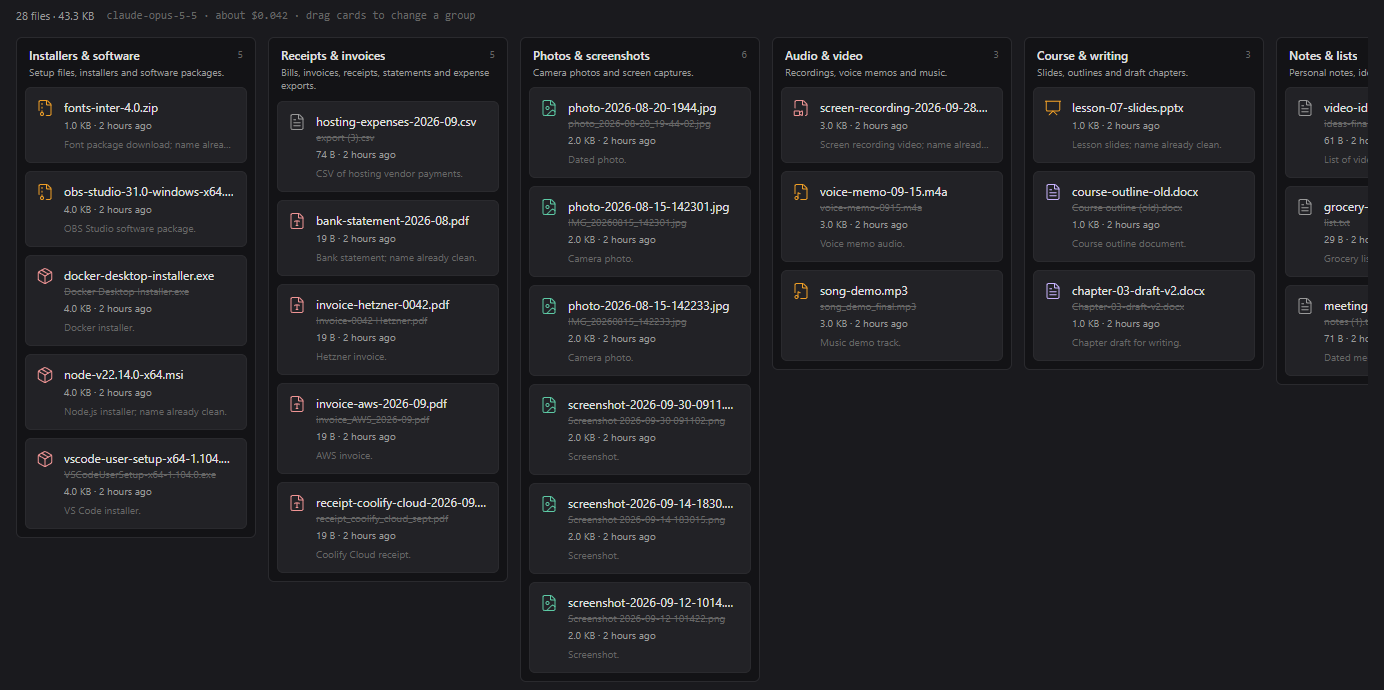
In my test runs Claude Code took between 22 and 28 minutes on this prompt. When it's done, check its work:
npm run typecheck && npm run lint && npm run test
The app this prompt builds sends file names, sizes and the first 300 characters of each text file to Anthropic, using your key.
CLAUDE.md and AGENTS.md
CLAUDE.md tells the agent where every kind of code goes. A new screen is a folder under
src/features/ plus one line in src/renderer/screens-registry.ts. File and AI calls live in the main
process. Every IPC channel touches the same five places. Every feature gets a test. It also lists the
mistakes AI agents make most often in a codebase like this one.
Using Codex? It reads AGENTS.md, which sends it to the same rules in CLAUDE.md. There's only one file
to keep up to date.
Build an installer
npm run build:win     # Windows installer (.exe)
npm run build:mac     # macOS (.dmg)
npm run build:linux   # Linux (AppImage + .deb)
npm run build:unpack  # unpacked folder for a quick test
Installers land in dist/. They aren't signed, so Windows SmartScreen and macOS Gatekeeper ask the
user to confirm the first time. Build each one on its own OS. I build on Windows; the Mac and Linux
builds are wired in, but I haven't tested them yet.
To give it your own name:
npm run rebrand -- --name "My App" --id com.me.myapp
Then replace resources/icon.png (1024×1024) with your icon.
Free vs full
If you just want a tool for yourself, this is all you need. You don't need to buy anything.
To sell an app, you need a few more things: license keys, signed installers, and a way to ship updates. The full Desktop App Boilerplate has them wired in. This starter is a cut of it.
| Desktop App Starter (free) | Desktop App Boilerplate (full) | |
|---|---|---|
| Window, 6 themes, settings, validated IPC, generators | ✓ | ✓ |
| API key encrypted by the OS | ✓ | ✓ |
| AI in the app | Claude (Anthropic SDK) | Claude Agent SDK and OpenAI, each with a demo screen |
| UI components | 21, plus 8 layout and 3 motion | 45, counting the same layout and motion pieces |
| Working screens | 5 | 15 |
| CLAUDE.md | 325 lines | 950 lines |
| Tests | 29 | 78 |
| Installers for Windows, Mac and Linux | unsigned | Windows and Mac code signing plus Mac notarization, with a guide |
| Auto-update | – | GitHub Releases or any S3-compatible host |
| License keys | – | activation, with 7 days of offline grace |
| Local database | – | SQLite with migrations |
| Sign-in | – | OAuth 2 with PKCE: GitHub, Google and a generic provider |
| Background jobs with progress and cancel | – | ✓ |
| Tray, global shortcuts, command palette, deep links | – | ✓ |
| Two languages | – | English and Spanish (i18next) |
| In-app logs, redacted diagnostics export, telemetry | – | ✓ |
| License | MIT | single-app commercial license |
Links
- The full Desktop App Boilerplate: https://learnwithhasan.com/boilerplates/electron-starter-template/
- Build With AI 1.0, my course. It includes the full Desktop App Boilerplate and three more (Python MCP server, mobile app and Django SaaS): https://learnwithhasan.com/courses/build-with-ai-10/
- My free book, one building block per page: https://learnwithhasan.com/blocks/
- The video: coming soon.
Commands
| Command | What it does |
|---|---|
npm run dev |
Start the app with hot reload |
npm run typecheck |
TypeScript on main and renderer |
npm run lint |
ESLint |
npm run test |
Vitest unit tests |
npm run new:feature |
Scaffold a screen and register it |
npm run new:ipc |
Scaffold an IPC channel in all 5 places |
npm run rebrand |
Rename the app |
npm run build:* |
Build installers |
Docs
- CLAUDE.md: architecture, patterns and rules (also the best overview for humans).
- docs/components.md: every component and hook.
- docs/design-tokens.md: colors, spacing, radius, motion tokens.
License
MIT. See LICENSE.