
harlanhong/ICCV2023-MCNET
harlanhong/ICCV2023-MCNET has 253 GitHub stars and 23 forks. GitHot measured 0 stars in 24 hours. Last checked 2026-11-15 23:18 UTC. Last push 2023-10-05.
Measured star growth
- in 24h
- 0
- in 7 days
- Update delayed
- in 15 days
- Update delayed
- in 1 month
- Update delayed
Net star changes over overlapping periods, not daily totals. Missing measurements are left blank. Stars measure attention, not software quality.
About
The official code of our ICCV2023 work: Implicit Identity Representation Conditioned Memory Compensation Network for Talking Head video Generation
Creative & MediaREADME.md
Original:book: Implicit Identity Representation Conditioned Memory Compensation Network for Talking Head Video Generation (ICCV 2023)
:fire: If MCNet is helpful in your photos/projects, please help to :star: it or recommend it to your friends. Thanks:fire:
Fa-Ting Hong, Dan Xu
The Hong Kong University of Science and Technology
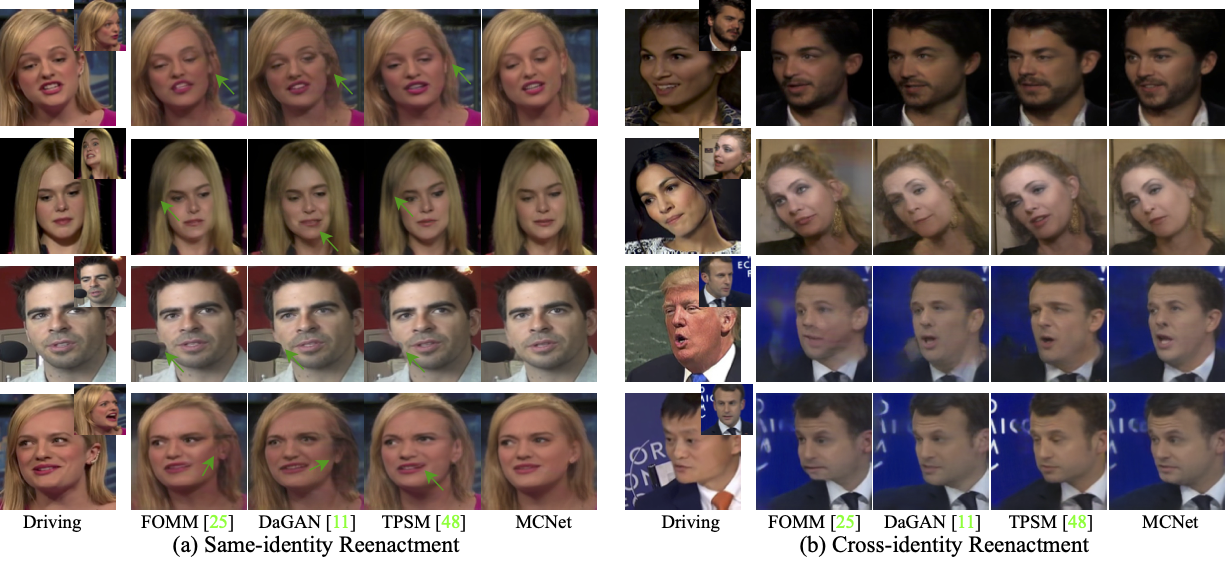
Interesting Sample
https://github.com/harlanhong/ICCV2023-MCNET/assets/19970321/4e8af5f6-b042-4ced-af2c-93c95e1b7009
:triangular_flag_on_post: Updates
- :fire::fire::white_check_mark: July 20 2023: Our new talking head work MCNet was accpted by ICCV2023. The code will be released in ten days. You can talk a look at our previous work DaGAN first.
:wrench: Dependencies and Installation
- Python >= 3.7 (Recommend to use Anaconda or Miniconda)
- PyTorch >= 1.7
- Option: NVIDIA GPU + CUDA
- Option: Linux
Installation
We now provide a clean version of MCNet, which does not require customized CUDA extensions.
Clone repo
git clone https://github.com/harlanhong/ICCV2023-MCNET.git
cd ICCV2023-MCNET
Install dependent packages
pip install -r requirements.txt

## Install the Face Alignment lib
cd face-alignment
pip install -r requirements.txt
python setup.py install
:zap: Quick Inference
We take the paper version for an example. More models can be found here.
YAML configs
See config/vox-256.yaml to get description of each parameter.
Pre-trained checkpoint
The pre-trained checkpoint of face depth network and our MCNet checkpoints can be found under following link: OneDrive.
Inference! To run a demo, download checkpoint and run the following command:
CUDA_VISIBLE_DEVICES=0 python demo.py --config config/vox-256.yaml --driving_video path/to/driving --source_image path/to/source --checkpoint path/to/checkpoint --relative --adapt_scale --kp_num 15 --generator Unet_Generator_keypoint_aware --result_video path/to/result --mbunit ExpendMemoryUnit --memsize 1
The result will be stored in path/to/result. The driving videos and source images should be cropped before it can be used in our method. To obtain some semi-automatic crop suggestions you can use python crop-video.py --inp some_youtube_video.mp4. It will generate commands for crops using ffmpeg.
:computer: Training
Datasets
- VoxCeleb. Please follow the instruction from https://github.com/AliaksandrSiarohin/video-preprocessing.
Train on VoxCeleb
To train a model on specific dataset run:
CUDA_VISIBLE_DEVICES=0 python -m torch.distributed.launch --master_addr="0.0.0.0" --master_port=12347 run.py --config config/vox-256.yaml --name MCNet --batchsize 8 --kp_num 15 --generator Unet_Generator_keypoint_aware --GFM GeneratorFullModel --memsize 1 --kp_distance 10 --feat_consistent 10 --generator_gan 0 --mbunit ExpendMemoryUnit
The code will create a folder in the log directory (each run will create a new name-specific directory).
Checkpoints will be saved to this folder.
To check the loss values during training see log.txt.
By default the batch size is tunned to run on 8 GeForce RTX 3090 gpu (You can obtain the best performance after about 150 epochs). You can change the batch size in the train_params in .yaml file.
Also, you can watch the training loss by running the following command:
tensorboard --logdir log/MCNet/log
When you kill your process for some reasons in the middle of training, a zombie process may occur, you can kill it using our provided tool:
python kill_port.py PORT
Training on your own dataset
Resize all the videos to the same size e.g 256x256, the videos can be in '.gif', '.mp4' or folder with images. We recommend the later, for each video make a separate folder with all the frames in '.png' format. This format is loss-less, and it has better i/o performance.
Create a folder
data/dataset_namewith 2 subfolderstrainandtest, put training videos in thetrainand testing in thetest.Create a config
config/dataset_name.yaml, in dataset_params specify the root dir theroot_dir: data/dataset_name. Also adjust the number of epoch in train_params.
:scroll: Acknowledgement
Our MCNet implementation is inspired by FOMM. We appreciate the authors of FOMM for making their codes available to public.
:scroll: BibTeX
@inproceedings{hong23implicit,
            title={Implicit Identity Representation Conditioned Memory Compensation Network for Talking Head video Generation},
            author={Hong, Fa-Ting and Xu, Dan},
            booktitle={ICCV},
            year={2023}
          }

@inproceedings{hong2022depth,
            title={Depth-Aware Generative Adversarial Network for Talking Head Video Generation},
            author={Hong, Fa-Ting and Zhang, Longhao and Shen, Li and Xu, Dan},
            journal={IEEE/CVF Conference on Computer Vision and Pattern Recognition (CVPR)},
            year={2022}
          }

@inproceedings{hong2023depth,
            title={DaGAN++: Depth-Aware Generative Adversarial Network for Talking Head Video Generation},
            author={Hong, Fa-Ting and and Shen, Li and Xu, Dan},
            journal={arXiv preprint arXiv:2305.06225},
            year={2023}
          }
:e-mail: Contact
If you have any question or collaboration need (research purpose or commercial purpose), please email [email protected].