
hamidfzm/glyph
hamidfzm/glyph has 41 GitHub stars and 4 forks. GitHot measured +1 stars in 24 hours. Last checked 2026-11-09 09:13 UTC. Last push 2026-11-02.
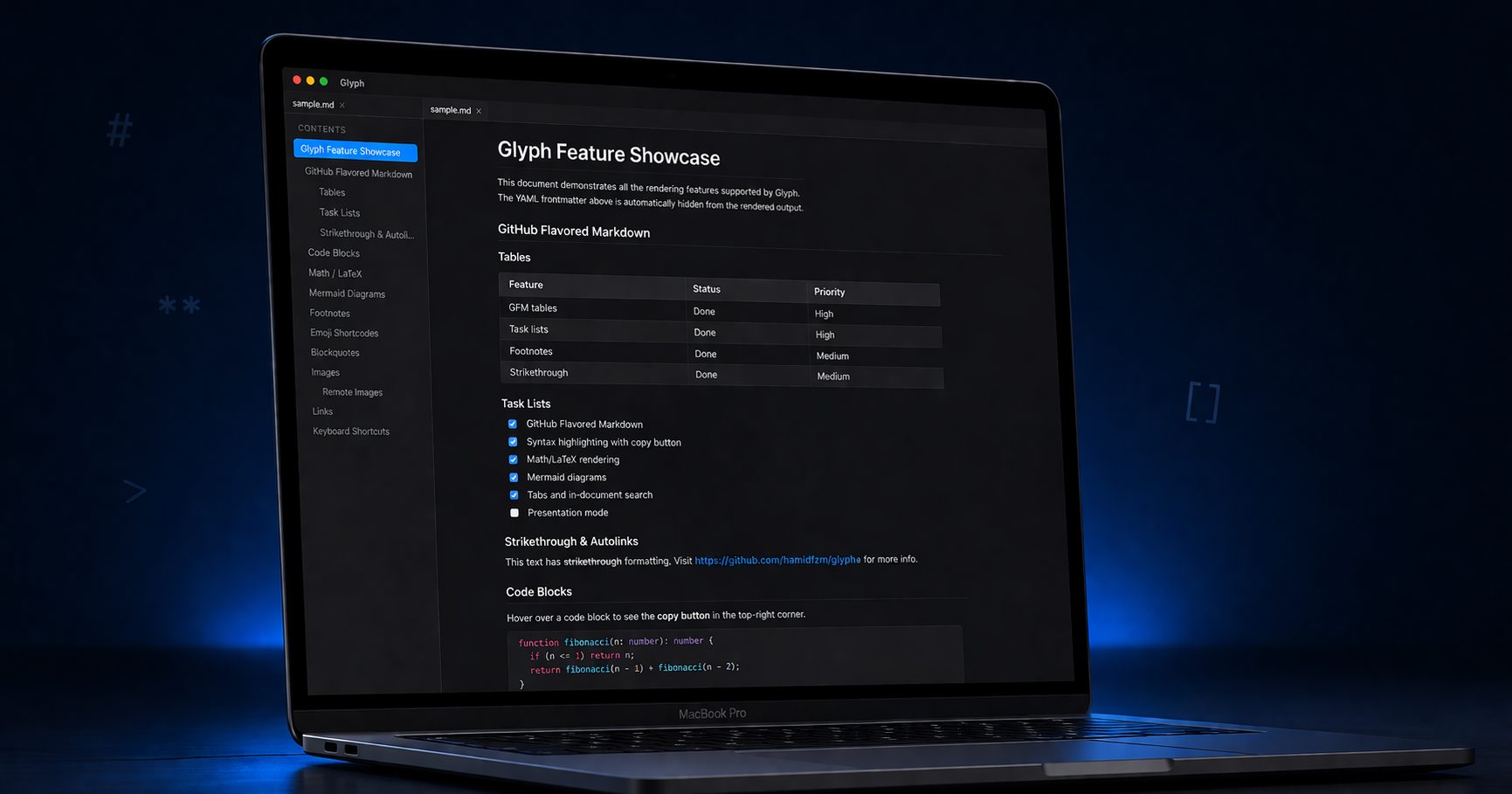
A modern, cross-platform markdown viewer and editor with native styling, live preview, AI assistance, and offline-first.
What you can do
- AI (multi-provider, local) - ✅ - plugin - ❌ - ❌ - ❌ - ❌ - plugin
- Text-to-speech - ✅ - plugin - ❌ - ❌ - ❌ - ❌ - plugin
- Plugin / extension API - ⚠️ experimental - ✅ - ❌ - ❌ - ⚠️ - ✅ - ✅
- Cloud sync - ⚠️ Git-backed - paid - ❌ - ❌ - ❌ - ✅ - ✅
Measured star growth
- in 24h
- +1
- in 7 days
- Update delayed
- in 15 days
- Update delayed
- in 1 month
- Update delayed
Net star changes over overlapping periods, not daily totals. Missing measurements are left blank. Stars measure attention, not software quality.
README.md
OriginalGlyph


A modern, cross-platform markdown viewer and editor with platform-native styling.
Built with Tauri v2, React 19, and TypeScript.
Demo
Try It
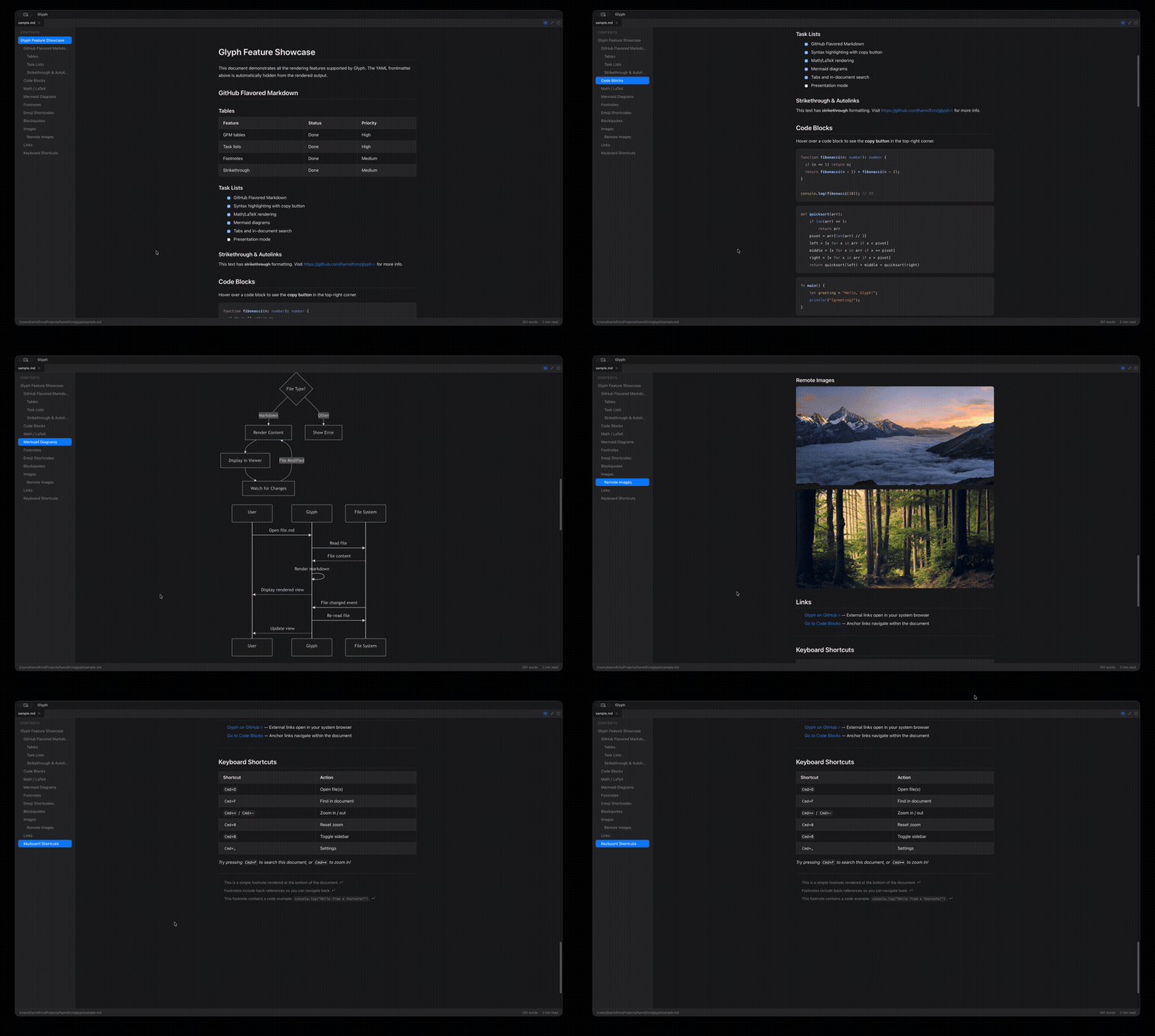
The samples/ directory is a tiny demo workspace. Open it as a folder (Cmd/Ctrl+Shift+O) to see every rendering feature plus working wikilinks. samples/README.md is the showcase document; the surrounding files exist so its [[wikilinks]] resolve.
Features
Markdown Rendering
- GitHub Flavored Markdown, alerts, footnotes, heading anchors, and emoji shortcodes
- Wikilinks and backlinks with hover preview and inline note embeds (
[[note]],![[note]]) - Math (KaTeX), Mermaid and D2 diagrams, CSV/TSV tables, and syntax-highlighted code (6 themes)
- YAML frontmatter, sanitised inline HTML, and bidirectional (RTL) text
- Local and remote images with a zoomable lightbox, plus inline video and audio playback
- Per-syntax toggles in Settings → Markdown
Editor
- Source, split, and live-preview modes per tab
- New untitled (in-memory) documents (
Cmd/Ctrl+N), save withCmd/Ctrl+S, and an optional Auto Save toggle - Format toolbar, inline formatting shortcuts, and wrap-selection
- Wikilink autocomplete, spell check, and Vim/VSCode keymaps
- Undo/redo for programmatic edits (task toggles, etc.)
Workspace & Navigation
- Folder workspaces with a sidebar tree, tabs, and create/rename/move/delete (links follow renames and moves); create a new workspace from within the app; daily notes (
Cmd/Ctrl+Shift+T) with a per-workspace folder, file name pattern, and template - Graph view (
Cmd/Ctrl+G), command palette (Cmd/Ctrl+K, withtag:/ frontmatter filters), a sidebar Tags panel, in-document search (Cmd/Ctrl+F), and workspace-wide full-text search with case/whole-word/regex toggles (Cmd/Ctrl+Shift+F) - Table of contents, resizable panels, zoom, and session/window restore
- Drag-and-drop, file associations, Windows Explorer and macOS Quick Look previews, and a
glyphCLI (glyph file.md,glyph ~/notes/)
Viewer & Export
- Jupyter notebooks (
.ipynb) and JSON Canvas (.canvas) boards - Print and export to HTML, DOCX, EPUB, and PDF (vector diagrams, self-contained, offline)
- Export a whole workspace as a static website, in-app or headless from the CLI
Sync (experimental)
- Per-workspace, Git-backed Cloud Sync to any remote you control, with a status-bar ahead/behind/dirty pill
Appearance
- System / Light / Dark themes, Sepia, Solarized, and High contrast presets, and platform-native styling (macOS vibrancy, Windows Mica)
- Localized, RTL-aware UI; customizable fonts, size, line height, and content width
AI (optional)
- Chat sidebar, quick actions (summarize, explain, translate, simplify), and text-to-speech
- Providers: Claude, OpenAI, and Ollama (local)
Platform
- macOS, Windows, and Linux; native menu bar with remappable shortcuts and update notifications
- iOS and Android (experimental): open and read single files, with a touch layout for phones and tablets; folder workspaces are desktop-only for now
- Web viewer (experimental): read a markdown file in any browser, or share one as a link that carries the whole document; nothing is uploaded
- Plugins (experimental): extend rendering, palette, status bar, dictionaries, and themes; sandboxed by default with consent-gated permissions and checksum-verified marketplace installs (see the plugin docs)
- Local-first with opt-in crash reporting (off by default; see Privacy & Error Reporting)
Install
Install commands for every package manager are on the website. Each release lists them too, next to the .dmg, .msi, .deb, .rpm, and .AppImage downloads.
If glyph prints Error: input file must be specified. after a Homebrew install, homebrew-core's unrelated glyph formula (an ASCII-art converter) is shadowing the app: remove it with brew uninstall --formula glyph and reinstall the cask.
Command-line usage
Installing from a package manager puts a glyph command on your PATH:
glyph README.md      # open a file
glyph a.md b.md      # open several files as tabs
glyph ~/notes/       # open a folder as a workspace
glyph --help         # usage, flags, and export formats

# export a document (headless; exits when done)
glyph export README.md --format pdf              # writes README.pdf beside it
glyph export notes.md --format docx --out ~/out.docx

# export a workspace as a static website
glyph export ~/notes/ --format site --out ./site
# serve a workspace as a website, rebuilding as it changes
glyph serve ~/notes/
glyph serve ~/notes/ --port 8080          # pick the port; 0 asks the OS
glyph serve ~/notes/ --host 0.0.0.0       # let the local network read it
glyph serve ~/notes/ --out ./site         # keep the build instead of a temp dir
serve renders the folder, prints the URL, and keeps running: every change to the folder rebuilds the site, and pages open in a browser reload themselves. It binds 127.0.0.1 unless --host says otherwise, so nothing leaves the machine by default, and it answers only to its own hostnames so a web page cannot reach it through your browser. Everything in the output directory is served, so point --out at a directory of its own; without one, the site lives in a temporary directory removed when you interrupt the command. Like the exports above, it renders through a webview, so a Linux server without a display needs xvfb-run.
--format accepts pdf, docx, epub, html, and site. Without --out a document export writes beside its input with the format's extension; site always needs one. Exports run without showing a window, print only the path they wrote to stdout (the summary and any warning go to stderr), and exit nonzero with a message on stderr if they fail, so they can drive CI publishing (on Linux runners, wrap the command in xvfb-run, which merges stderr into stdout, so a script that captures the path should use the Docker image below). A document export includes the table of contents when Settings > Print has it enabled.
The command is provided by the Homebrew cask (macOS), Chocolatey or Scoop (Windows), and the deb package or Homebrew formula (Linux). The macOS .dmg and Windows MSI install the app only; use a package manager for the terminal command.
Docker
Run the exports without installing anything, which is what a docs pipeline usually wants:
docker run --rm --user "$(id -u):$(id -g)" \
  -v "$PWD/docs:/docs:ro" -v "$PWD/site:/out" \
  ghcr.io/hamidfzm/glyph
/docs is the workspace to render, /out is where the static site lands. Anything after the image name replaces the default command, so the document formats work the same way:
docker run --rm --user "$(id -u):$(id -g)" \
  -v "$PWD/docs:/docs:ro" -v "$PWD/out:/out" \
  ghcr.io/hamidfzm/glyph export /docs/README.md --format pdf --out /out/readme.pdf
The image ships the same .deb the apt repository serves, plus the WebKitGTK stack and the X server a headless export needs, so no xvfb-run wrapper is required. It runs as uid 1000; passing --user keeps exported files owned by you when your uid differs. Images are published for linux/amd64 and linux/arm64 on every release, tagged X.Y.Z, X.Y, and latest.
Development
pnpm install
pnpm tauri dev
Open a file or folder via CLI argument:
pnpm tauri dev -- -- /path/to/file.md
pnpm tauri dev -- -- /path/to/folder
Build for production:
pnpm tauri build
Testing
pnpm test                       # Run frontend tests (Vitest)
pnpm test:coverage              # Run with coverage report
cd src-tauri && cargo test      # Run Rust tests
Linting & Formatting
pnpm lint                       # Lint TypeScript (Biome)
pnpm format:check               # Check formatting (Biome)
pnpm check                      # Lint + format + organize imports
cd src-tauri && cargo clippy    # Lint Rust
Comparison with Other Markdown Apps
Glyph is built around speed, native feel, and offline-first usage. The tables below compare its current capabilities against widely used markdown apps.
Rendering
| Feature | Glyph | Obsidian | Typora | MarkText | Zettlr | Joplin | VS Code |
|---|---|---|---|---|---|---|---|
| GitHub Flavored Markdown | ✅ | ✅ | ✅ | ✅ | ✅ | ✅ | ✅ |
| Math (KaTeX/MathJax) | ✅ | ✅ | ✅ | ✅ | ✅ | ✅ | plugin |
| Mermaid diagrams | ✅ | ✅ | ✅ | ✅ | ⚠️ | ✅ | plugin |
| D2 diagrams | ✅ | plugin | ❌ | ❌ | ❌ | ❌ | plugin |
| Syntax-highlighted code | ✅ (6 themes) | ✅ | ✅ | ✅ | ✅ | ✅ | ✅ |
| GitHub-style alerts | ✅ | ✅ | ⚠️ | ❌ | ❌ | ⚠️ | ✅ |
| YAML frontmatter | ✅ | ✅ | ✅ | ✅ | ✅ | ⚠️ | ✅ |
| Emoji shortcodes | ✅ | ✅ | ✅ | ✅ | ❌ | ✅ | plugin |
Jupyter notebooks (.ipynb) |
✅ | plugin | ❌ | ❌ | ❌ | ❌ | ✅ |
JSON Canvas (.canvas) |
✅ | ✅ | ❌ | ❌ | ❌ | ❌ | plugin |
Editing
| Feature | Glyph | Obsidian | Typora | MarkText | Zettlr | Joplin | VS Code |
|---|---|---|---|---|---|---|---|
| Source editor | ✅ | ✅ | n/a | ✅ | ✅ | ✅ | ✅ |
| WYSIWYG / inline preview | ⚠️ | ✅ | ✅ | ✅ | ⚠️ | ⚠️ | ❌ |
| Split view | ✅ | ✅ | ❌ | ✅ | ✅ | ✅ | ✅ |
| Spell check | ✅ | ✅ | ✅ | ✅ | ✅ | ✅ | ✅ |
Navigation
| Feature | Glyph | Obsidian | Typora | MarkText | Zettlr | Joplin | VS Code |
|---|---|---|---|---|---|---|---|
| Tabs | ✅ | ✅ | ❌ | ✅ | ✅ | ❌ | ✅ |
| Folder / workspace (vault) sidebar | ✅ | ✅ | ⚠️ | ✅ | ✅ | ✅ | ✅ |
| Wikilinks & backlinks | ✅ | ✅ | ❌ | ❌ | ✅ | ❌ | plugin |
| Graph view | ✅ | ✅ | ❌ | ❌ | ❌ | plugin | plugin |
| Tag / metadata search | ✅ | ✅ | ❌ | ❌ | ✅ | ✅ | plugin |
| Command palette | ✅ | ✅ | ❌ | ❌ | ❌ | ❌ | ✅ |
| In-document search | ✅ | ✅ | ✅ | ✅ | ✅ | ✅ | ✅ |
| Workspace-wide full-text search | ✅ | ✅ | ✅ | ✅ | ✅ | ✅ | ✅ |
| Table of contents | ✅ | ✅ | ✅ | ✅ | ✅ | ✅ | ✅ |
| Live reload on disk change | ✅ | ⚠️ | n/a | n/a | ⚠️ | n/a | ✅ |
Output
| Feature | Glyph | Obsidian | Typora | MarkText | Zettlr | Joplin | VS Code |
|---|---|---|---|---|---|---|---|
| ✅ | ✅ | ✅ | ✅ | ✅ | ✅ | ✅ | |
| Export PDF | ✅ | ✅ | ✅ | ✅ | ✅ | ✅ | plugin |
| Export HTML / DOCX / EPUB | ✅ | plugin | ✅ (Pandoc) | ⚠️ | ✅ (Pandoc) | ⚠️ | plugin |
Power features
| Feature | Glyph | Obsidian | Typora | MarkText | Zettlr | Joplin | VS Code |
|---|---|---|---|---|---|---|---|
| AI (multi-provider, local) | ✅ | plugin | ❌ | ❌ | ❌ | ❌ | plugin |
| Text-to-speech | ✅ | plugin | ❌ | ❌ | ❌ | ❌ | plugin |
| Plugin / extension API | ⚠️ experimental | ✅ | ❌ | ❌ | ⚠️ | ✅ | ✅ |
| Cloud sync | ⚠️ Git-backed | paid | ❌ | ❌ | ❌ | ✅ | ✅ |
Platform
| Feature | Glyph | Obsidian | Typora | MarkText | Zettlr | Joplin | VS Code |
|---|---|---|---|---|---|---|---|
| Native window styling | ✅ (vibrancy/Mica) | ⚠️ | ⚠️ | ⚠️ | ⚠️ | ⚠️ | ⚠️ |
| Native bundle (non-Electron) | ✅ Tauri (~3 MB core) | ❌ | ✅ Qt | ❌ | ❌ | ❌ | ❌ |
| macOS / Windows / Linux | ✅ | ✅ | ✅ | ✅ | ✅ | ✅ | ✅ |
| Mobile (iOS / Android) | ⚠️ experimental (viewing) | ✅ | ❌ | ❌ | ❌ | ✅ | ❌ |
| File associations + CLI | ✅ | ⚠️ | ✅ | ⚠️ | ⚠️ | ❌ | ✅ |
| Open source | ✅ MIT | ❌ | ❌ | ✅ | ✅ | ✅ | ✅ |
| Free | ✅ | ✅ | $14.99 | ✅ | ✅ | ✅ | ✅ |
Legend: ✅ supported · ⚠️ partial / inconsistent · ❌ not supported · plugin = third-party
Note on "WYSIWYG / inline preview": Glyph's editor has split-view live preview and styled markdown tokens (bold/italic render as bold/italic in source), but markdown markers remain visible. Typora-style fully inline rendering is not implemented.
Privacy & Error Reporting
Glyph is local-first: your documents are read and written on your machine. Nothing is uploaded anywhere unless you opt into Cloud Sync for a workspace, which pushes that workspace to a Git remote you control.
Crash and error reporting is opt-in and off by default. Nothing is sent until you turn it on in Settings → Privacy → Send crash reports, and even then it is only active in production builds (never during development).
When enabled, reports include only:
- Stack traces of the crash or unhandled error
- Operating system and Glyph version
- The error message
They never include your file contents, file paths, file names, or any links: these are stripped from every report before it is sent. You can turn reporting off again at any time from the same setting.
Sponsors
Glyph is free and open source. These sponsors help keep it that way.

Sentry provides error monitoring through their Sponsored Business plan, which we use for the opt-in crash reporting above.
Support Glyph
If Glyph is useful to you, donations are welcome via crypto: see DONATE.md for the addresses.
Explore related projects
ytdl-org/youtube-dl
Command-line program to download videos from YouTube.com and other video sites
141,500 starsexcalidraw/excalidraw
Virtual whiteboard for sketching hand-drawn like diagrams
135,396 starsgodotengine/godot
Godot Engine – Multi-platform 2D and 3D game engine
119,840 starsmrdoob/three.js
JavaScript 3D Library.
117,983 stars