
gyorgysh/openradview
gyorgysh/openradview has 26 GitHub stars and 3 forks. GitHot measured 0 stars in 24 hours. Last checked 2026-11-14 18:44 UTC. Last push 2026-11-09.
Measured star growth
- in 24h
- 0
- in 7 days
- Collecting history
- in 15 days
- Collecting history
- in 1 month
- Collecting history
Net star changes over overlapping periods, not daily totals. Missing measurements are left blank. Stars measure attention, not software quality.
About
Free, open-source desktop viewer for exploring your own DICOM and NIfTI images. Local viewing with GPU rendering, linked MPR and optional MCP agent access. For personal education and research; not for diagnosis or care decisions.
SecurityREADME.md
Original



OpenRadView is a free, open-source viewer for opening and exploring your own medical images on your computer. It is a personal research project for education, built with Rust, egui and wgpu.
Images stay on your device during local viewing. There is no app account, telemetry or advertising. Optional agent sharing needs your approval; update checks contact GitHub when enabled or requested.
Not clinically validated. Do not use OpenRadView for diagnosis, treatment or decisions about care. Images and measurements can be wrong; ask a qualified clinician to interpret your scans. Disclaimer · Privacy
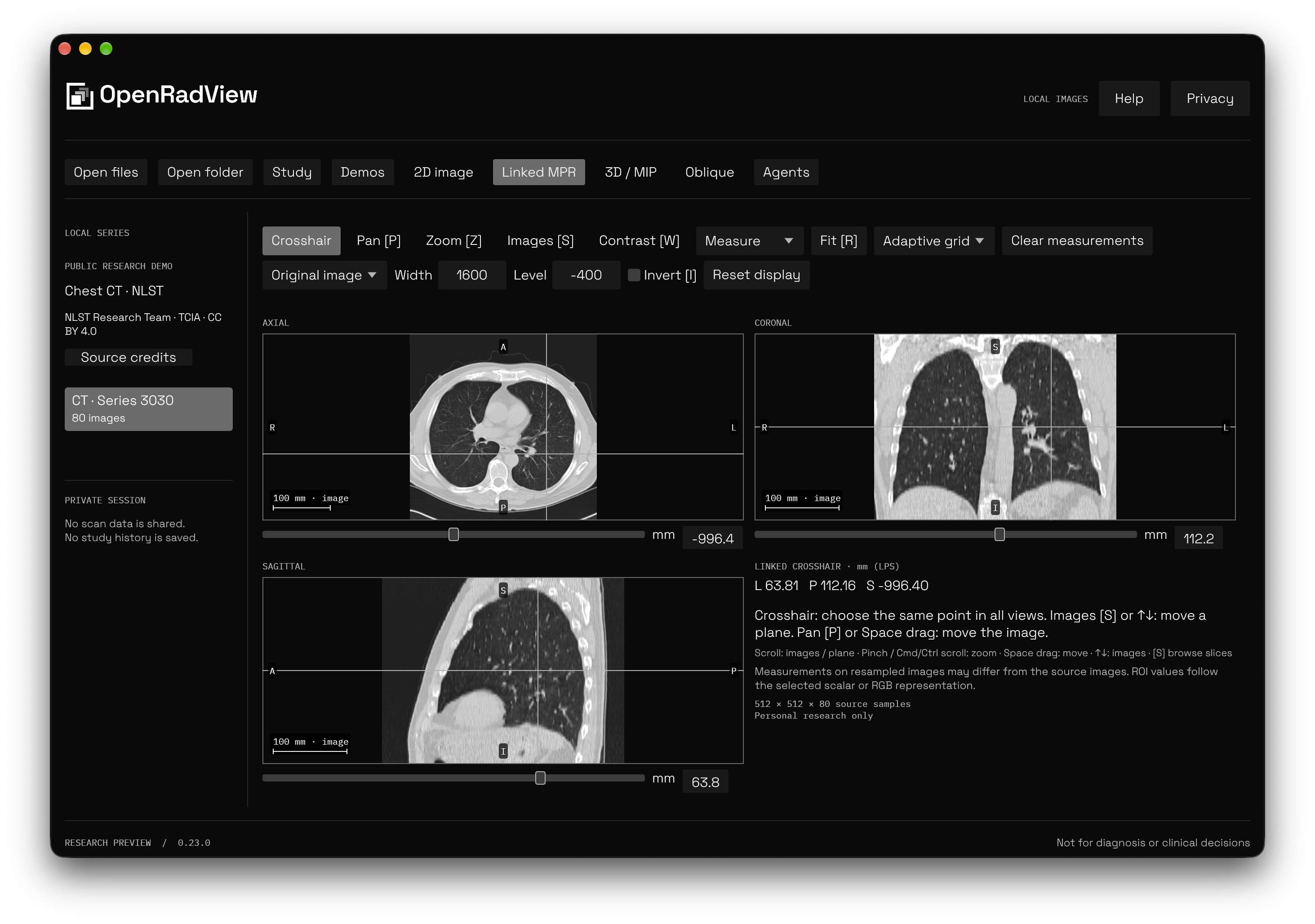
Linked MPR with the included public NLST chest CT. Image credits.
Explore locally
| Capability | What is available |
|---|---|
| Open images | DICOM files, folders and ZIP/ZIP64; supported NIfTI-1/2 single or paired files, including gzip. Time points and components stay separate; complex presentations are explicit. |
| Navigate | Slice scrolling, pan, zoom, contrast, presets, fit, invert, reset, 90° rotation and flips. NIfTI axis/complex-view and supported declared DICOM temporal/echo selectors, a searchable series list, temporary previews and decoder-paced image playback. Optional DICOM source intervals follow validated timing and trim without skipping images. |
| Compare planes | Linked axial/coronal/sagittal MPR and oblique slices from a validated regular volume, including scalar maximum, minimum and mean slabs with explicit thickness and sample counts. NIfTI scanner, aligned and template references stay distinct. |
| Compare series | Two or four local source panes, with optional physical slice/pan/zoom links, compatible scalar-window links and finite reference lines for one chosen pair. Open separate files or folders and save views and marks in two-pane mode; extra panes stay in memory. Entering comparison ends agent sharing. |
| View in 3D | Experimental GPU volume rendering, MIP, material and lighting controls, and one opaque manual or supplied region. MPR + 3D shares the same volume, with separate camera controls and linked cuts. Optional textured thin planes follow the MPR point and contrast, with individual visibility controls; regions then use lit cell faces. Pick a visible face to move MPR to its source cell; covering planes or foreground source can block a pick. Combined views stay local. Projections use the loaded data; no anatomy is inferred. |
| Use the controls | Search and remap tool keys in Shortcuts. Help includes a manually advanced offline guide and technical glossary. Measurement points and MPR positions accept typed coordinates. |
| Inspect pixels | Image information, histograms, nearest-pixel values, editable distance/angle marks and scalar/RGB rectangle, ellipse and polygon statistics, with geometry undo/redo. Declared padding and missing samples are excluded. Physical measurements are disabled on slab projections. |
| View color | Supported 8/16-bit RGB/YBR, palettes and embedded RGB input ICC conversion to sRGB. Source code values stay separate; the app does not calibrate your monitor. |
| Add local labels | Brush, erase, scalar threshold fill, seeded region growing, connected-region cleanup, undo/redo, matching NIfTI import and explicit NIfTI-2 export. MPR + 3D previews physical sphere or disk edits at the linked point or along a drawn plane path before Apply. Surface erase stamps separately preview one visible cell layer of a manual label before Apply or Cancel. No organ recognition or model inference. |
| Inspect supplied masks | Explicit matching binary, fractional and label-map DICOM SEG import, separate overlapping segments, sparse coverage, numeric visibility/styles and source counts. Read-only on source and thin MPR/oblique planes. |
| Save a picture | Image-only PNG and view settings, or a reviewed illustration with selected completed outlines and applied masks. Include one pane, a three-plane MPR grid or up to 16 selected source images. Saves are explicit and leave original files unchanged. Check for text burned into pixels before sharing. |
Large studies are indexed before pixels are decoded. The decoded-slice cache and active-volume allowance adapt to physical memory, with shared ceilings up to 8 GiB each and lower limits under pressure. These are working-set limits, not study-file size limits. Color buffers and validity masks count toward admission. Prepared sources are reused while a view needs them. GPU limits and available resources may require 2D/MPR; larger series remain available in indexed 2D. Tests cover sparse files and ZIP64 archives above 4 GiB. Compressed reverse or distant navigation may take longer. Supported formats and limits
Connect your own agent
Open Agents and copy the setup prompt or MCP configuration into your local client. The connector discovers running apps and available ports. If several are open, list_instances lets you choose one.
Each sharing session opens a review with the recipient, selected series, preview and tools. Study data stays private until you choose Allow. Advanced permissions can restrict tools or require exact-view review. Revoke, changing or closing the series, or quitting ends access. Other series and arbitrary file paths stay outside the grant.
Approved agents can request snapshots, adjust supported views and query geometry or measurements. Replies are experimental AI commentary and can be wrong. Your client/provider controls onward sharing, retention and training; OpenRadView cannot enforce those settings or remove identifying text burned into pixels. Setup, tools and permissions
Updates and platforms
Automatic GitHub update checks are enabled by default in standalone installations. Turn them off on first launch or in Privacy → Updates, where you can also check manually. Debian packages from 1.1.0 disable automatic checks and in-app installation; 1.0.0 may still check when enabled, but requires your package manager to install updates. Checks contain no study data; GitHub receives ordinary connection information, app version and platform. Download, installation and restart require your action. The updater verifies signed manifests, target, size and hashes and supports rollback.
On macOS, versions 1.0.0 and 1.1.0 need a manual DMG update because their in-app installation fails signature verification. Manual update guidance
Apple Silicon with Metal has native UI checks. Windows and Linux builds are previews with native CI tests, GPU rendering and installer checks. Broader interactive desktop, accessibility, consumer GPU performance and older-version update acceptance remain pending. Platform status · Validation scope
Build from source
cargo run -p orv-app                        # Viewer without integrations
cargo run -p orv-app --features mcp,updates  # Viewer with agent and updater support
sh scripts/bundle-macos.sh                  # Optimized local macOS app and connector
Use the pinned Rust toolchain, CMake and your platform's development tools. macOS bundles need Xcode. Fonts and codecs are bundled; the installed app does not download them. Contributing and development · Architecture · Release process
Built by gyorgy.sh. Licensed under GPL-3.0-or-later; dependencies, fonts and demo images retain their own notices, available in Help → Third-party licenses.