
groupultra/telegram-search
groupultra/telegram-search has 4,139 GitHub stars and 277 forks. GitHot measured -1 stars in 24 hours. Last checked 2026-11-07 00:49 UTC. Last push 2026-10-17.
🔍 导出并模糊搜索 Telegram 聊天记录 | Export and fuzzy search your Telegram chat history
Measured star growth
- in 24h
- -1
- in 7 days
- Collecting history
- in 15 days
- Collecting history
- in 1 month
- Collecting history
Net star changes over overlapping periods, not daily totals. Missing measurements are left blank. Stars measure attention, not software quality.
docs/README_EN.md
Original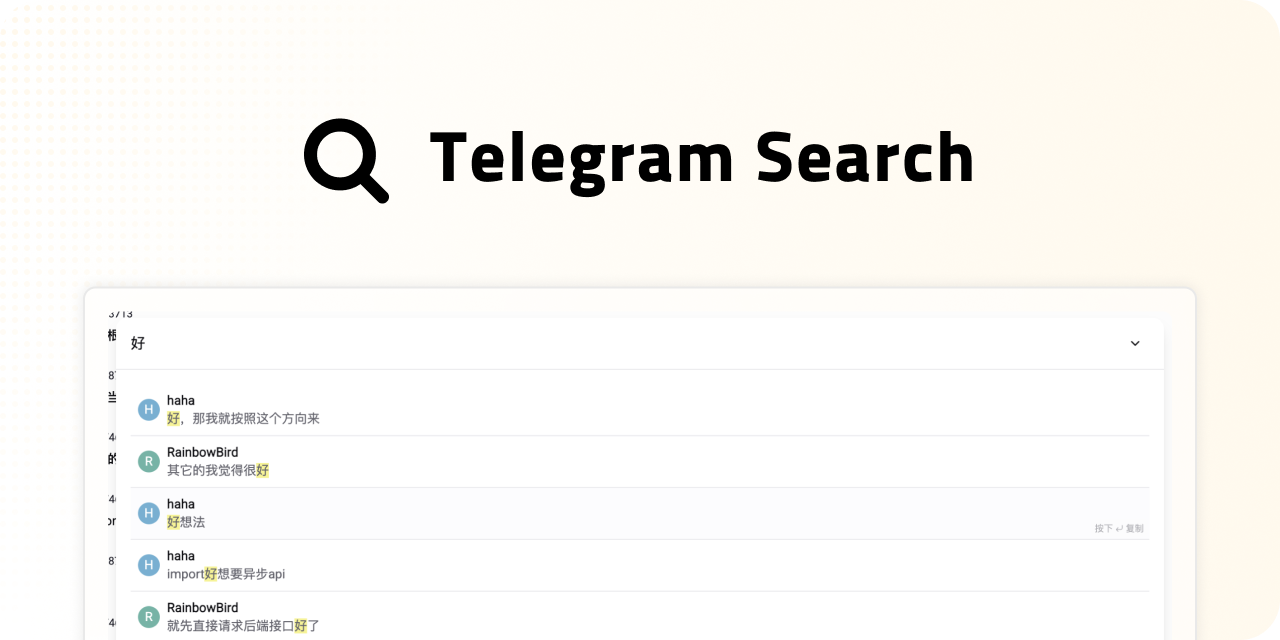


[!TIP] Struggling to search Chinese, Japanese, or Korean (CJK) messages in Telegram?
Important messages often get lost in the noise — especially when word boundaries aren’t clear.
Telegram Search solves this with advanced semantic search and word segmentation, fully supporting CJK and all languages.
Vector search enables fuzzy, sentence-level matching, making it easy to find the information you need—even in languages without spaces.
💖 Sponsors
✅ Feature Highlights
📦 Export & Backup
- Export chat history to multiple database types: supports both PGlite and PostgreSQL
- Media files are automatically backed up to MinIO object storage—no manual steps required
- Automatic vector embedding and tokenization during export for precise future search
- Real-time sync keeps all conversations updated continuously
🔍 Chat Record Search
- Intelligent word segmentation for accurate, multilingual retrieval
- Combines fuzzy matching with vector-based semantic search for highly efficient results
- Image semantic search: find images by text description via image embedding
- Infinite scroll for search results — smoother browsing experience
- RAG-powered AI Q&A: Chat with AI using your Telegram history as real-time context
🤖 Telegram Bot
- Search and export messages via Bot
- Message deep links — jump to the original conversation in one click
🚀 Advanced Features
- Smart unread message summaries: Instantly aggregate all unread content with a concise AI-generated summary
- Date range filtering for quickly narrowing down search results
- Context menu to jump to the original Telegram message, with mobile support
🛣️ Roadmap
🧠 Enhanced AI Capabilities
- Automatic session summaries
- "Super Brain": Build knowledge graphs of people and events directly from your chat records
🔗 Media & Link Extensions
- Intelligently organize your "Saved Messages" for efficient content management
- Deep link and image indexing: web page summarization, OCR for images, AI-driven captions—powerful search & archival
🌐 Multi-platform Integration
- Expand to Discord and other major social/messaging platforms for unified search and backup
🎉 Try It Now
We offer an online experience—no deployment needed. Try all Telegram Search features instantly.
Visit: https://search.lingogram.app
[!WARNING] No cryptocurrency has been issued by us. Please beware of scams.
This tool exports only your own chat history. Do not use it for illegal purposes.
🚀 Quick Start
Install the CLI with Homebrew (macOS / Linux)
Homebrew installs the local CLI and its Node.js runtime dependency. No manual Node.js installation or repository build is needed. For the web interface, use the Docker deployment below.
brew tap groupultra/telegram-search https://github.com/groupultra/telegram-search
brew install groupultra/telegram-search/tg-search

tg-search profile configure --apiId YOUR_API_ID --apiHash YOUR_API_HASH
tg-search auth login
brew services start groupultra/telegram-search/tg-search
tg-search daemon status
Get your API ID and API Hash from my.telegram.org. These commands use the default profile; authenticate before starting the service. Run brew services as your user, without sudo. The daemon runs in the background and starts at system login. After Telegram login, it persists new messages, edits, and deletions. Bulk history still requires an explicit sync --takeout command.
brew services stop groupultra/telegram-search/tg-search
brew upgrade groupultra/telegram-search/tg-search
brew services restart groupultra/telegram-search/tg-search
Upgrades preserve profile data. Rotating logs are daemon.stdout.log and daemon.stderr.log in the default profile directory. For another profile, run tg-search --profile NAME daemon run. See the CLI documentation for data paths, commands, and privacy boundaries.
Deploy with Docker Compose
The recommended way to self-host is with Docker Compose. This launches the UI, backend, database, and media storage in one step.
- Create an empty folder for your Telegram Search data and config:
mkdir telegram-search
cd telegram-search
- Download the Docker Compose and default environment files:
curl -L https://raw.githubusercontent.com/groupultra/telegram-search/refs/heads/main/docker/docker-compose.yml -o docker-compose.yml
curl -L https://raw.githubusercontent.com/groupultra/telegram-search/refs/heads/main/docker/.env.example -o .env
curl -L https://raw.githubusercontent.com/groupultra/telegram-search/refs/heads/main/docker/init.sql -o init.sql
- Start all containers:
docker compose -f docker-compose.yml up -d
- Open http://localhost:3333 in your browser to start using Telegram Search! 🎉
Deploy with Docker Image
If MinIO is not configured, media files will be stored in the local data/media directory.
docker run -d --name telegram-search -p 3333:3333 ghcr.io/groupultra/telegram-search:latest
Environment Variables
[!IMPORTANT] AI Embedding & LLM settings are now per-account in-app (Settings → API).
Please restart the service after modifying the
.envfile by runningdocker compose -f docker-compose.yml up -d.
All environment variables are optional. If not provided, the default values will be used.
| Variable | Description | Example |
|---|---|---|
TELEGRAM_API_ID |
From my.telegram.org | 611335 |
TELEGRAM_API_HASH |
From my.telegram.org | d524b414d21f4d37f08684c1df41ac9c |
DATABASE_TYPE |
Database type: postgres or pglite |
pglite |
DATABASE_URL |
PostgreSQL connection string (DATABASE_TYPE=postgres only) |
postgresql://postgres:123456@pgvector:5432/postgres |
TELEGRAM_BOT_TOKEN |
Bot token from @BotFather | 123456:ABC-DEF1234ghIkl-zyx57W2v1u123ew11 |
PROXY_URL |
Proxy address (formats like socks5://user:pass@host:port) |
socks5://user:pass@host:port |
PORT |
Backend HTTP/WebSocket listening port | 3333 |
HOST |
Backend listening address | 0.0.0.0 |
BACKEND_URL |
Upstream backend for Nginx /api//ws proxy |
http://127.0.0.1:3333 |
MINIO_URL |
MinIO service address | http://minio:9000 |
MINIO_ACCESS_KEY |
MinIO access key | minioadmin |
MINIO_SECRET_KEY |
MinIO secret key | minioadmin |
MINIO_BUCKET |
MinIO bucket name | telegram-media |
Deploy with Docker Image
Please modify the environment variables according to your needs.
docker run -d --name telegram-search \
  -p 3333:3333 \
  -e TELEGRAM_API_ID=1234567890 \
  -e TELEGRAM_API_HASH=1234567890 \
  -e DATABASE_TYPE=postgres \
  -e DATABASE_URL=postgresql://postgres:123456@pgvector:5432/postgres \
  -e PROXY_URL=socks5://user:pass@host:port \
  -e PORT=3333 \
  -e HOST=0.0.0.0 \
  ghcr.io/groupultra/telegram-search:latest
💻 Development Guide
Browser-only Mode
git clone https://github.com/groupultra/telegram-search.git
cd telegram-search
pnpm install
cp .env.example .env
pnpm run dev
Server Mode
git clone https://github.com/groupultra/telegram-search.git
cd telegram-search
pnpm install

cp .env.example .env

docker compose up -d pgvector minio

pnpm run server:dev
pnpm run web:dev
📖 More details: CONTRIBUTING.md
🚀 Activity
Explore related projects
affaan-m/ECC
The agent harness performance optimization system. Skills, instincts, memory, security, and research-first development for Claude Code, Codex, Opencode, Cursor and beyond.
298,791 starsNousResearch/hermes-agent
The agent that grows with you
261,322 starsmultica-ai/andrej-karpathy-skills
A single CLAUDE.md file to improve Claude Code behavior, derived from Andrej Karpathy's observations on LLM coding pitfalls.
230,408 starsfirecrawl/firecrawl
Supercharge your AI agents with data from the web and beyond. Building the library for superintelligence. 🔥
199,303 stars