Projects View on GitHub
grigio/opencode-benchmark-dashboard
grigio/opencode-benchmark-dashboard has 47 GitHub stars and 8 forks. GitHot measured 0 stars in 24 hours. Last checked 2026-11-15 04:52 UTC. Last push 2026-06-05.
Measured star growth
- in 24h
- 0
- in 7 days
- Collecting history
- in 15 days
- Collecting history
- in 1 month
- Collecting history
Net star changes over overlapping periods, not daily totals. Missing measurements are left blank. Stars measure attention, not software quality.
About
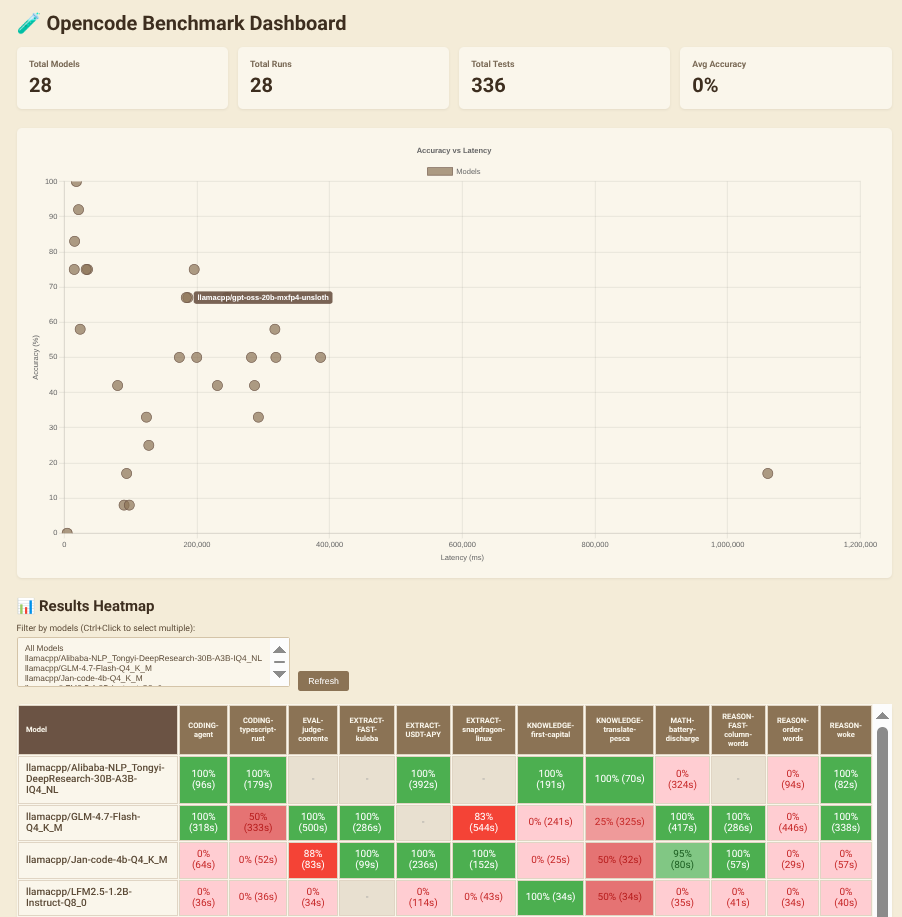
Benchmark system for testing opencode with various LLM models, measuring speed (latency) and correctness (accuracy).
AIREADME.md
Originalopencode-benchmark-dashboard
Benchmark system for testing opencode with various LLM models, measuring speed (latency) and correctness (accuracy).
Why ?
- The best tradeoff depends on your use-case and your hardware
- accuracy vs speed: reasoning, tok/s, different quantizations matters. Some small LLM can fix themself using tools, a fast LLM can be slow because it wastes too many tokens in the reasoning. Just test them in real world scenarios.
Quick Start
# Install dependencies
bun install

# Fill prompts/ and prompt-answers/ with your test cases ex. CODING-my-single-test.txt
# Check `~/.config/opencode/opencode.json` with your OpenAI-compatible models.

# It generates the answers with a specific model. use `opencode models` to see the availables
bun run answer -m "opencode/minimax-m2.5-free"
# bun run answer -m "opencode/minimax-m2.5-free" -t CODING-my-single-test

# It generates the evaluations with a specific model.
bun run evaluate -m "opencode/minimax-m2.5-free"
# bun run evaluate -m "opencode/minimax-m2.5-free" -t CODING-my-single-test

# it opens the dashboard on http://localhost:3000
bun run dashboard