
gridctl/gridctl
gridctl/gridctl has 46 GitHub stars and 9 forks. GitHot measured 0 stars in 24 hours. Last checked 2026-11-09 20:09 UTC. Last push 2026-11-04.
🔒 MCP gateway with a built-in skill library.
Measured star growth
- in 24h
- 0
- in 7 days
- Update delayed
- in 15 days
- Update delayed
- in 1 month
- Update delayed
Net star changes over overlapping periods, not daily totals. Missing measurements are left blank. Stars measure attention, not software quality.
README.md
Original
Put your agent setup in version control.
MCP servers, skills, agent definitions, and rules, declared in files you commit.
Gridctl runs MCP servers behind one gateway; separate projection writes skills, agents, and rules to supported clients.





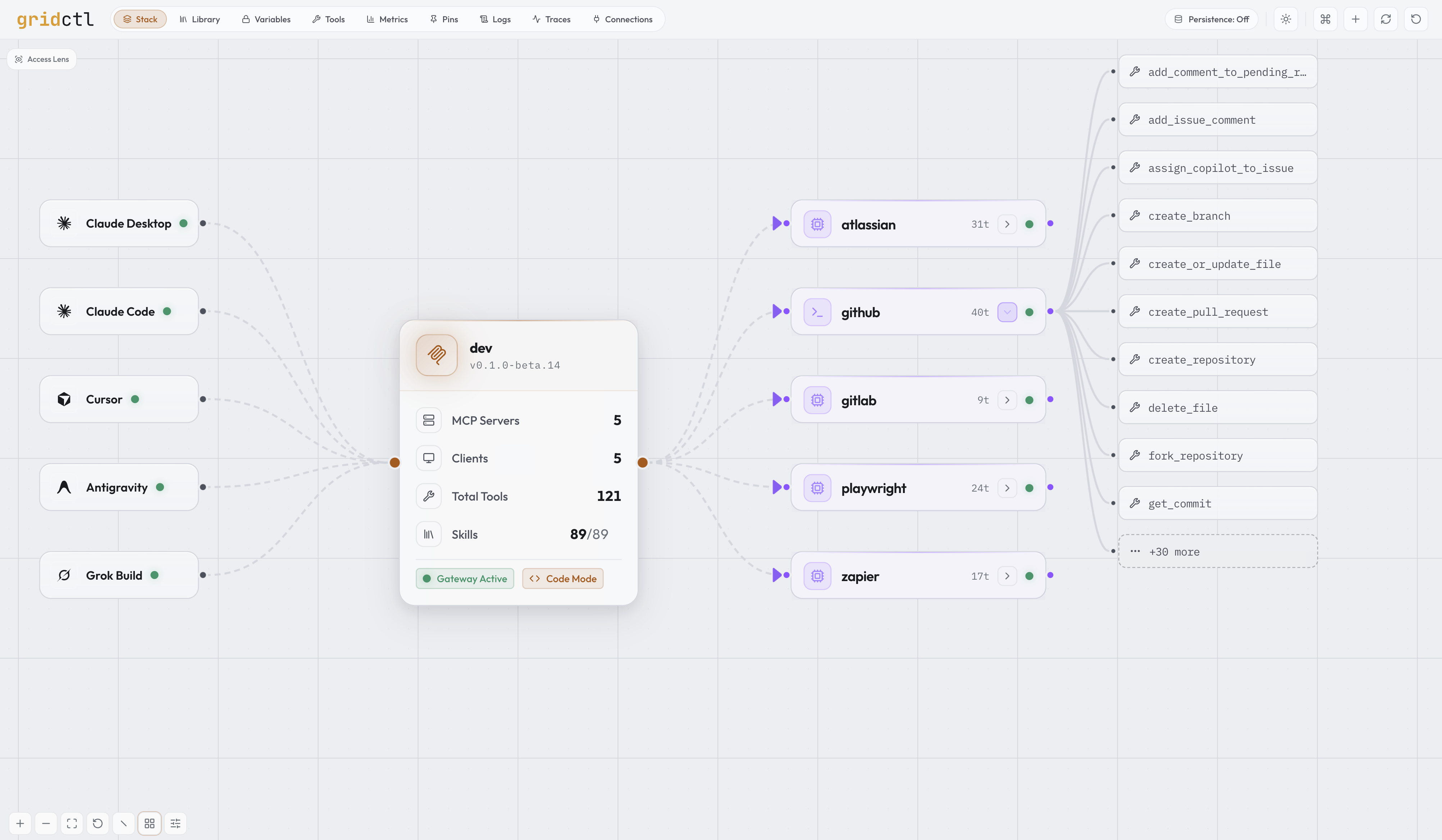
Gridctl defines a stack of MCP servers in YAML, starts them, and exposes them through one gateway. Alongside the gateway it keeps a registry of Agent Skills and agent definitions, and projects those, your agents.md global-context rules, and the gateway wiring into the clients you select, with lockfile-tracked ownership. A pack imports that set from a git repository.
gridctl link writes the gateway endpoint into a client config. It does not install skills, agents, or rules. Those are a separate projection, and each resource reaches only the clients that can read it (skill channels, context coverage). Commit the stack file, the pack manifest, and the instruction files. Do not commit variable values, pins, or lockfiles: those stay on the host. A repeatable setup depends on pinned inputs and a compatible host. A successful tool call shows that the gateway served that tool on this machine. It is not proof that another host will reconstruct the same setup. See Concepts.
gridctl apply stack.yaml
Inspired by Containerlab.
⚡️ Why gridctl
Gridctl is for developers who maintain an agent setup of their own, or a shared one a team commits. MCP servers, skills, agent definitions, and rules belong in files. The running processes, secret values, and per-machine client installs do not.
The stack you commit is what gridctl apply brings up on this host. What comes back depends on the pins in those files and on a host that can run them. It does not promise identical agent behavior, and linking does not install skills, agents, or rules. Terms are defined in Concepts.
Gridctl does not run the agent's planning or model loop. Use an agent runtime of your choice over the gateway, and let that runtime plan. gridctl plan is a different command: it previews deployment changes against the running stack, and it does not plan agent work. See What gridctl deliberately does not do.
The file below is a stack. It declares servers and gateway access. Skills, agents, and rules are separate files.
version: "1"
name: daily

#  Secret set passed in at runtime
secrets:
  sets:
    - dev

network:
  name: daily-net
  driver: bridge

# Global gateway configuration
gateway:
  name: dev
  code_mode: on

# LLM clients auto-linked to this gateway on apply
link:
  - claude
  - claude-code
  - cursor
  - antigravity
  - grok

# Downstream MCP servers behind the gateway
mcp-servers:

  # Jira and Confluence via Atlassian's hosted remote MCP.
  # Authorize once with `gridctl auth login atlassian`; tokens are stored
  # encrypted and refreshed automatically.
  - name: atlassian
    url: https://mcp.atlassian.com/v1/mcp/authv2
    auth:
      type: oauth

  # GitHub repos, issues, and PRs (containerized stdio server)
  - name: github
    image: ghcr.io/github/github-mcp-server:v1.12.1@sha256:0ba840c46a237879c8300e7fddb0b6347f20e029ccb9cbe2ce4a943daa1ff560
    transport: stdio
    env:
      GITHUB_PERSONAL_ACCESS_TOKEN: ${var:GITHUB_PERSONAL_ACCESS_TOKEN}

  # Browser automation and page inspection
  - name: playwright
    command:
      - npx
      - '@playwright/[email protected]'

  # SaaS app actions through Zapier's hosted MCP endpoint.
  # Same flow: `gridctl auth login zapier` after apply.
  - name: zapier
    url: https://mcp.zapier.com/api/v1/connect
    auth:
      type: oauth
🪛 Install
curl -fsSL https://raw.githubusercontent.com/gridctl/gridctl/main/install.sh | sh
Installs the latest release to ~/.local/bin/gridctl. Full instructions for Homebrew, pre-built binaries, building from source, container runtime setup, and updating/uninstalling are in the Installation guide.
The installer checks SHA256, not release origin. For covered releases, follow Release Verification before extraction or installation, then install the same verified local archive. The guide explains coverage, expected signer and source identity, and the published inventories.
🚦 Quick Start
Needs Docker or Podman, and network access to PyPI on the first build. gridctl tools search and gridctl call are included in v1.0.0-rc.2. gridctl init scaffolds your own starter stack.yaml, but that scaffold is not a verified tool server.
gridctl apply examples/python-sources/pypi.yaml   # builds mcp-server-fetch 2026.8.18 into a non-root container
gridctl status
gridctl tools search fetch
gridctl call fetch__fetch '{"url":"https://example.com"}'
gridctl destroy examples/python-sources/pypi.yaml
Connect an installed client separately with gridctl link, which detects clients and lets you choose. An explicit command such as gridctl link claude-code exits 1 when that client is not installed. Linking is not needed for gridctl tools search or gridctl call.
A missing runtime is covered in Container Runtime. A busy 8180 is covered in Port Conflicts.
Running the commands above shows gateway python-pypi running, container fetch from gridctl-python-pypi-fetch:2026.8.18-cae029c1bc69 in state running with pin status pinned, and this server row:
MCP SERVERS
NAME   TYPE   REPLICAS  PROMPTS  RESOURCES  STATE
fetch  stdio  —               1          0  healthy
gridctl tools search fetch printed:
1 matched, 1 shown (substring match)
  fetch__fetch  MCP server: fetch. Call using the exact tool name "fetch__fetch". Fetches a U...
gridctl call fetch__fetch '{"url":"https://example.com"}' printed:
Contents of https://example.com/:
Example Domain

This domain is for use in documentation examples without needing permission. This is not a service; avoid relying on it for testing and monitoring purposes.
The PROMPTS and RESOURCES columns are from downstream prompt and resource aggregation, included in v1.0.0-rc.2. A release before that may omit them. The web UI at http://localhost:8180 shows the server and the advertised fetch tool. It is not required for the call, and it is not the invocation path. A default apply listens on 8180. PID, container ID, and uptime in gridctl status vary by host.
🖥️ Connect LLM Application
The easiest way to connect a client to the gateway is with gridctl link, which auto-detects installed LLM clients and injects the gateway configuration. Linking does not install skills, agents, or rules. See Concepts.
gridctl link              # Interactive: detect and select clients
gridctl link claude       # Link a specific client
gridctl link --all        # Link all detected clients at once

# Local-model clients bog down on large tool lists; link a smaller
# surface via a tool group (or enable gateway code_mode)
gridctl link lmstudio --group <name>
Declaring a link: block in stack.yaml (as above) does the same thing on every gridctl apply: each listed client is linked idempotently once the gateway is healthy, and clients that aren't installed warn and skip. gridctl destroy --unlink removes those entries again.
Already have MCP servers configured in your clients? gridctl import runs the same detection in reverse: it scans those configs (read-only), including project MCP files from the working directory up to the nearest git root, dedupes the servers it finds, and appends your selection to stack.yaml, offering plaintext secrets into the encrypted variable store on the way. gridctl import <client> --kind all, included in v1.0.0-rc.2, also imports that client's skills, agents, and global context in one run, with one summary. Omitting --kind stays servers-only. OpenCode's user file is still one selected file, not OpenCode's merged configuration. See the CLI reference.
Supported clients: Claude Desktop, Claude Code, Cursor, Windsurf, VS Code, Gemini, Antigravity, OpenCode, Grok Build, Continue, Cline, AnythingLLM, LM Studio, Roo, Zed, Goose
Manual configuration
Most Applications
{
  "mcpServers": {
    "gridctl": {
      "url": "http://localhost:8180/mcp"
    }
  }
}
Claude Desktop
{
  "mcpServers": {
    "gridctl": {
      "command": "npx",
      "args": ["-y", "[email protected]", "http://localhost:8180/mcp", "--allow-http"]
    }
  }
}
Restart Claude Desktop after editing. All tools from your stack are now available.
Antigravity
{
  "mcpServers": {
    "gridctl": {
      "serverUrl": "http://localhost:8180/mcp"
    }
  }
}
Antigravity borrows Windsurf's serverUrl field but speaks streamable HTTP, so point it at the /mcp endpoint (not /sse). The IDE and CLI share ~/.gemini/config/mcp_config.json on Antigravity 2.0. Since Antigravity caps each MCP server at 100 tools, pair a large stack with gateway.code_mode: on, or with gateway.tool_discovery.mode: deferred when the host should not run code.
🎬 Features
Stack as Code
Declarative, version-controlled MCP environments. Validate before you commit, plan before you apply, and detect the moment your environment drifts from what's in version control. Drift detection runs in the background: the canvas flags servers running but absent from your spec, and declarations in your spec that haven't been deployed.
gridctl search postgres        # Find servers in the catalog and the MCP Registry
gridctl add github             # Append a catalog server to stack.yaml by name
gridctl validate stack.yaml    # Lint and schema-check the spec (exit 0/1/2)
gridctl validate stack.yaml --policy policy.yaml  # Offline declaration-policy check (opt-in, v1.0.0-rc.2)
gridctl plan stack.yaml        # Diff against running state
gridctl apply stack.yaml       # Apply the spec
gridctl export                 # Export authored config with references preserved
Export rereads the running deployment's stack file without resolving variables. Recognized inline credentials block export; replace them with authored references and supply values separately on the recipient's host. Review other authored literals before sharing. The Stack spec view's Export YAML action applies the same policy; raw spec content may still contain credentials. See export semantics and migration guidance.
Learn more → Configuration Reference
Generated Python Containers
Build an exact public PyPI release, or a packaged Python project from git or a
local directory, without maintaining a Dockerfile. Generated images use pinned
Python and uv bases, run as a non-root user, and keep existing host uvx
workflows unchanged. In the web UI, choose the Python Package template or the
Generated Python source strategy; eligible catalog packages also offer a
Run in a container toggle that is off by default.
mcp-servers:
  - name: fetch
    source:
      type: pypi
      package: mcp-server-fetch
      ref: 2026.8.18

  - name: time
    source:
      type: git
      url: https://github.com/modelcontextprotocol/servers.git
      ref: d73f99efbfd40c3aa1b61e88728b3d49fb52608f
      path: src/time
      runtime: python
Learn more → Source configuration · Runnable example · Python runtime base (recipe in v1.0.0-rc.2; supported image tags are not published)
MCP Execution Controls
Included in v1.0.0-rc.2. Opt into execution.mode: hardened for managed MCP containers, with explicit numeric UID/GID, finite per-replica limits, read-only root, bounded scratch, and no network by default. Required engine and kernel evidence gates routing. Existing server details show execution evidence separately from MCP health.
Local processes can select execution.mode: local for explicit environment inheritance and executable lookup; they remain unsandboxed. Omission retains compatibility behavior. Container observation requires a supported Linux daemon environment; see the guide for runtime limits and acceptance status.
Learn more → Execution controls · Runnable example
gridctl optimize & Usage Observability
Ordinary successful tool dispatches count arguments and results per server, replica, client, and tool. The Metrics workspace charts throughput, call counts, and the savings from output format conversion (measured from the gateway's own before/after counts). Internal sensitive-call handling uses local estimates without payload-bearing observers or client attribution; see counting boundaries. gridctl optimize scans the running gateway and surfaces actionable findings with projected weekly token impact (unused servers, unused tools, schema overhead, and format-conversion shortfalls), plus a paste-ready YAML remediation for each.
gridctl optimize                          # styled findings table
gridctl optimize --format json            # machine-readable OptimizeReport
gridctl optimize --severity warn,critical # narrow to actionable findings
Learn more → Usage Observability
Output Format Conversion
Tool call results default to JSON. Set output_format at the gateway or per-server level to convert structured responses into TOON or CSV before they reach the client, reducing token consumption by 25–61% for tabular and key-value data. Non-JSON responses and payloads over 1 MB are passed through unchanged. Format conversion rewrites text blocks only; non-text blocks are left intact. A2A envelopes retain atomic JSON and bypass format conversion.
gateway:
  output_format: toon      # Default for all servers: json, toon, csv, text

mcp-servers:
  - name: analytics
    output_format: csv     # Override per server
Learn more → Configuration Reference
Tool Surface Control
A large stack floods the client's context with tools it will never call. Three axes compose: the per-server tools: whitelist narrows what exists, groups: bundle tools across servers behind their own endpoint at /groups/{name}/mcp, and clients: restricts what each linked client may touch. Those three decide what is listed. A listed tool can still be blocked by the per-tool call policy.
groups:
  release:
    servers: [github]                      # every tool of these servers
    tools: [gitlab__create_merge_request]  # plus specific prefixed tools
    exclude: [github__delete_repo]         # subtract, applied last
gridctl groups                     # Groups, member counts, and endpoints
gridctl link cursor --group release
With gateway.auth configured, grouped endpoints require the same credential as /mcp on every request. Linking selects an endpoint but does not provision credentials. Unreleased OAuth resource-server mode (gateway.auth.type: oauth) validates an external issuer's JWTs and uses the verified identity claim for client profiles and session ownership. A compatible MCP host discovers the issuer and completes login; CLI commands use GRIDCTL_GATEWAY_TOKEN. Bearer and API-key modes retain self-declared client selectors. See gateway authentication and the OAuth example, including HTTPS and origin-allowlist requirements for remote access.
For deployment and review steps, read the Practical Security Guide, which distinguishes current defaults, opt-in controls, and release availability.
Gateway authentication and listener security settings are restart-only: reload rejects security changes, including mixed edits, while preserving the saved file and active settings. Follow restart recovery. The web prompt supports Bearer and API-key modes (included in v1.0.0-rc.2) and verifies credentials before saving; browser credential guidance covers custom headers and storage limits.
Learn more → Tools Workspace
Live Tool Invocation
Included in v1.0.0-rc.2. Search and invoke tools on a selected running gateway without starting a daemon:
gridctl tools search "message"
gridctl call echo__echo '{"message":"hello"}' --format json
gridctl search remains the install catalog. --as is display-only in OAuth mode; in other modes it selects a caller-declared scope label without authenticating as that client. See Live tools.
Outbound A2A (Experimental)
Declare a remote Agent Card under a2a: and enable experimental.a2a to expose
A2A 1.0/0.3 JSON-RPC send, task-get, task-cancel, and advisory skill tools to MCP
clients. The adapter requires card-byte trust and needs no container runtime.
It is off by default and included in v1.0.0-rc.2.
Task and context handles are bearer secrets, expire after 24 hours, and become invalid on adapter replacement or restart. Use private argument files and protect call output. Handles authorize gateway routing within current policy; they do not isolate a remote agent's shared memory.
Learn more → A2A configuration · Example setup · Real-agent rehearsal and acceptance limits
Rate Limits
Cap call rates per client, server, or tool, enforced at tool-call dispatch, so a runaway agent stops at the limit instead of hammering a server. Omitting the block limits nothing.
limits:
  rate_limits:
    - server: github
      calls_per_minute: 30
      burst: 10
gridctl limits # Every rate limit and its state
Learn more → Configuration Reference
Per-tool call policy
Decide whether a listed tool may be called, independent of the whitelist. Omitting the block allows every listed tool. Rules are ordered and the last match wins, so a broad block can keep a later exception. A denial does not reach the downstream server. This block is not the offline gridctl validate --policy check.
policy:
  default: allow
  rules:
    - match: "vault__*"
      action: block
    - match: "vault__list_paths"
      action: allow
Learn more → Policy
Schema Pinning
Gridctl pins every tool definition the first time it sees it and flags drift on later applies, so a server that quietly rewrites a tool's description or schema surfaces as a reviewable diff instead of reaching your agent unnoticed. Pinned definitions are also scanned for injection signals: hidden instructions, sensitive-file references, hidden Unicode, and cross-server tool shadowing. Skill documents get the same trust-on-first-use treatment (gridctl skill pins): per-file digests over the whole document set, drift held for human approval, and the same injection heuristics as advisory findings. Context fragments, or the single AGENTS.md when fragments mode is off, are pinned the same way (gridctl ctx pins): a write pass records the first digest, later edits stay pin drift until approved, and projection warns rather than refusing.
gridctl pins verify                # Exit 1 on drift
gridctl pins diff github           # Per-tool before/after plus scan findings
gridctl pins approve github        # Re-pin after review
Learn more → Configuration Reference
Downstream Authorization
For OAuth-protected remote servers, gridctl is the OAuth client: one browser login serves every connected LLM client, with tokens encrypted on disk and refreshed automatically. An unauthorized server deploys in a needs auth state rather than failing the stack.
mcp-servers:
  - name: notion
    url: https://mcp.notion.com/mcp
    auth:
      type: oauth
gridctl auth login notion
gridctl auth status
Learn more → Configuration Reference
Scoped Variable Delivery
Keep secrets and environment-specific configuration in the variable store (encrypted at rest when locked), declare value-free prerequisites in stack.yaml, and inspect where each key is consumed without exposing its value. Delivery stays explicit: stack references and scoped sets feed workloads, while var run selects the keys made available to a child process.
variables:
  GITHUB_TOKEN:
    required: true
    description: Token used by the GitHub server

mcp-servers:
  - name: github
    env:
      GITHUB_PERSONAL_ACCESS_TOKEN: ${var:GITHUB_TOKEN}
gridctl var explain GITHUB_TOKEN     # Resolution, declaration, and consumers
gridctl var run --only GITHUB_TOKEN -- gh auth status
gridctl var scan --staged            # Exact-value check before commit
Names beginning with GRIDCTL_, plus OP_CONNECT_TOKEN and OP_SERVICE_ACCOUNT_TOKEN, are reserved for gridctl control-plane credentials and cannot be delivered to workloads.
Learn more → CLI Reference · Variable declarations
Skill Library
Active, policy-visible registry skills reach upstream MCP clients as prompts, resources, and through Skills over MCP (io.modelcontextprotocol/skills), with file manifests and directory browsing. Author a skill as SKILL.md in any editor, or in the Library workspace. It enters the registry through gridctl skill add (a git repo or a local directory), gridctl skill import <client>, gridctl import <client> --kind all, or a pack. Local-directory import, client-home import, and --kind are included in v1.0.0-rc.2. A draft is activated with gridctl activate. Client support and file projection options are in the per-client matrix.
gridctl skill list                        # Show what's in the registry
gridctl skill add <git-repo>              # Import skills (and agents) from a remote repo
gridctl skill add <directory>             # Import a directory that is not a git repository root
gridctl skill import claude-code          # Import skills already present in a client home
gridctl import opencode --kind all        # Servers, skills, agents, and context in one run
gridctl activate my-skill                 # Promote a draft → active
Skills follow the agentskills.io specification: author them as plain markdown with frontmatter and they work with every skill-aware client, not just gridctl.
The registry holds more than skills. The same import pipeline discovers Claude Code subagent definitions (agents/*.md) from a git repository, a local directory, or a client home (gridctl skill import, or gridctl import <client> --kind agents (included in v1.0.0-rc.2)). gridctl skill project sync <skill> places named skills onto compatible clients. gridctl skill project sync --kind agent places every imported agent onto separate agent targets: an identity copy for Claude Code, and rendered dialects for OpenCode, Copilot, and Gemini CLI. Copilot is an agent projection target, not one of the linkable MCP clients. A shared lockfile tracks every projected file, so drift is detected, hand edits are adoptable, and unsync removes exactly what gridctl wrote. The global context can likewise become a library of rule fragments with per-client assembly; see Global Context Sync.
Learn more → Skills guide
Packs
A pack is a git repo with a gridctl-pack.yaml manifest: a versioned selection of skills, agents, hook definitions, rule fragments, gateway wiring, and an optional stack. Hooks are opt-in and come from the pack repository only. pack add imports and pins them. pack apply does not project them. See Hooks. A booster extends another pack's stack with a fragment, and gridctl pack lock writes gridctl-pack.lock.yaml so source commits stay pinned. pack add imports that selection, then pack apply starts a carried stack and projects skills, agents, rules, and wiring, with secret values supplied on the host. Skills and agents may also come from git repositories the manifest names. Rules, hooks, and the stack still come from the pack repository. Starting, replacing, and reloading the carried stack are CLI-only; REST and the web UI project resources but do not start, stop, or reload the daemon, and they do not write the pack lock.
gridctl pack add <git-repo>               # Clone, scan, and import the manifest's selection
gridctl pack apply team-pack              # Start a carried stack, then project to detected clients
gridctl pack remove team-pack             # Cascade removal by pack tag, never by name match
Every projection a pack applies is tagged with the pack name in the lockfile, which is what makes pack status and removal exact: resources you created yourself are never claimed or deleted.
Learn more → Packs guide
📙 Examples
| Example | What It Shows |
|---|---|
pypi.yaml |
First example that serves a live tool: pinned mcp-server-fetch 2026.8.18 |
mcp-basic.yaml |
Stack structure and tool filtering with placeholders; no live tool |
local-mcp.yaml |
Run MCP servers as local host processes over stdio |
ssh-mcp.yaml |
Connect to MCP servers on remote machines via SSH |
openapi-basic.yaml |
Turn a REST API into MCP tools via OpenAPI spec |
a2a/ |
Experimental outbound A2A tools, included in v1.0.0-rc.2, with card trust and secret task/context handles |
mcp-apps/ |
Remote MCP App server with protocol_extensions |
code-mode-basic.yaml |
Gateway code mode with search + execute meta-tools |
deferred-discovery.yaml |
Deferred tool discovery: search_tools and call_tool, without code execution |
github-mcp.yaml |
GitHub MCP server integration |
registry-basic.yaml |
Skills registry with a single server |
var-basic.yaml |
Reference variable-store secrets with ${var:KEY} syntax |
providers.yaml |
External exec and onepassword providers with ${secret:} references |
per-client-scoping.yaml |
Restrict which servers and tools each linked client may touch |
read-only-secrets.yaml |
Per-tool policy: block; substitute a real Vault image before calling tools |
declarative-link/stack.yaml |
Auto-link LLM clients on apply with a link: block |
autoscale-basic.yaml |
Reactive replica autoscaling for a stdio server |
python-sources/ |
Generate non-root Python containers from exact PyPI and Git sources |
execution/ |
Included in v1.0.0-rc.2: opt-in container restrictions and instance-bound execution evidence |
security-evidence/ |
Included in v1.0.0-rc.2: partial, unknown, and N/A states for gridctl doctor --security |
otlp-jaeger.yaml |
Export traces to Jaeger via OTLP |
otel-collector.yaml |
Export traces and metrics to a local collector |
runs/stack.yaml |
Included in v1.0.0-rc.2: opt-in metadata-only persisted dispatch records |
portable-pack/ |
Team pack: skills, agents, wiring, a local-process stack, and a commented external source example from one manifest |
booster-pack/ |
Fragment pack that composes one local-process server onto the network-eng pack |
📖 Documentation
- Getting started: Installation
- Reference: CLI · Configuration · REST API
- Guides: Concepts · Skills · Packs · Hooks · Tools Workspace · Global Context Sync · Scaling · Usage Observability
- Operations: Project Status · Troubleshooting
Full index at docs/.
🤝 Contributing
See CONTRIBUTING.md. PRs welcome for new transport types, example stacks, and documentation improvements.
🪪 License
Put your agent setup in version control.
Explore related projects
n8n-io/n8n
Fair-code workflow automation platform with native AI capabilities. Combine visual building with custom code, self-host or cloud, 400+ integrations.
210,011 starslanggenius/dify
Build Agentic workflows, RAG pipelines, with rich AI model and tool support on one collaborative workspace. Deploy on cloud, VPC, or self-hosted, so teams move from prototype to production without rebuilding the stack.
160,773 starsmicrosoft/PowerToys
Microsoft PowerToys is a collection of utilities that supercharge productivity and customization on Windows
140,755 starsstablyai/orca
Orca is the place for working with a fleet of agents (e.g. Grok Bot, Claude Code). Run any coding agent with your own subscription. Available on desktop, mobile and remote runtime.
121,300 stars