
greenlogles/ProxUI
greenlogles/ProxUI has 77 GitHub stars and 5 forks. GitHot measured 0 stars in 24 hours, +1 in 7 days, and +5 in 15 days. Last checked 2026-11-14 22:31 UTC. Last push 2026-10-14.
Measured star growth
- in 24h
- 0
- in 7 days
- +1
- in 15 days
- +5
- in 1 month
- Collecting history
Net star changes over overlapping periods, not daily totals. Missing measurements are left blank. Stars measure attention, not software quality.
About
A modern web-based management interface for Proxmox VE with multi-cluster support and focus on desktop and mobile experience.
Self-hostedREADME.md
OriginalProxUI
A modern web-based management interface for Proxmox VE with multi-cluster support and focus on desktop and mobile experience.
Features
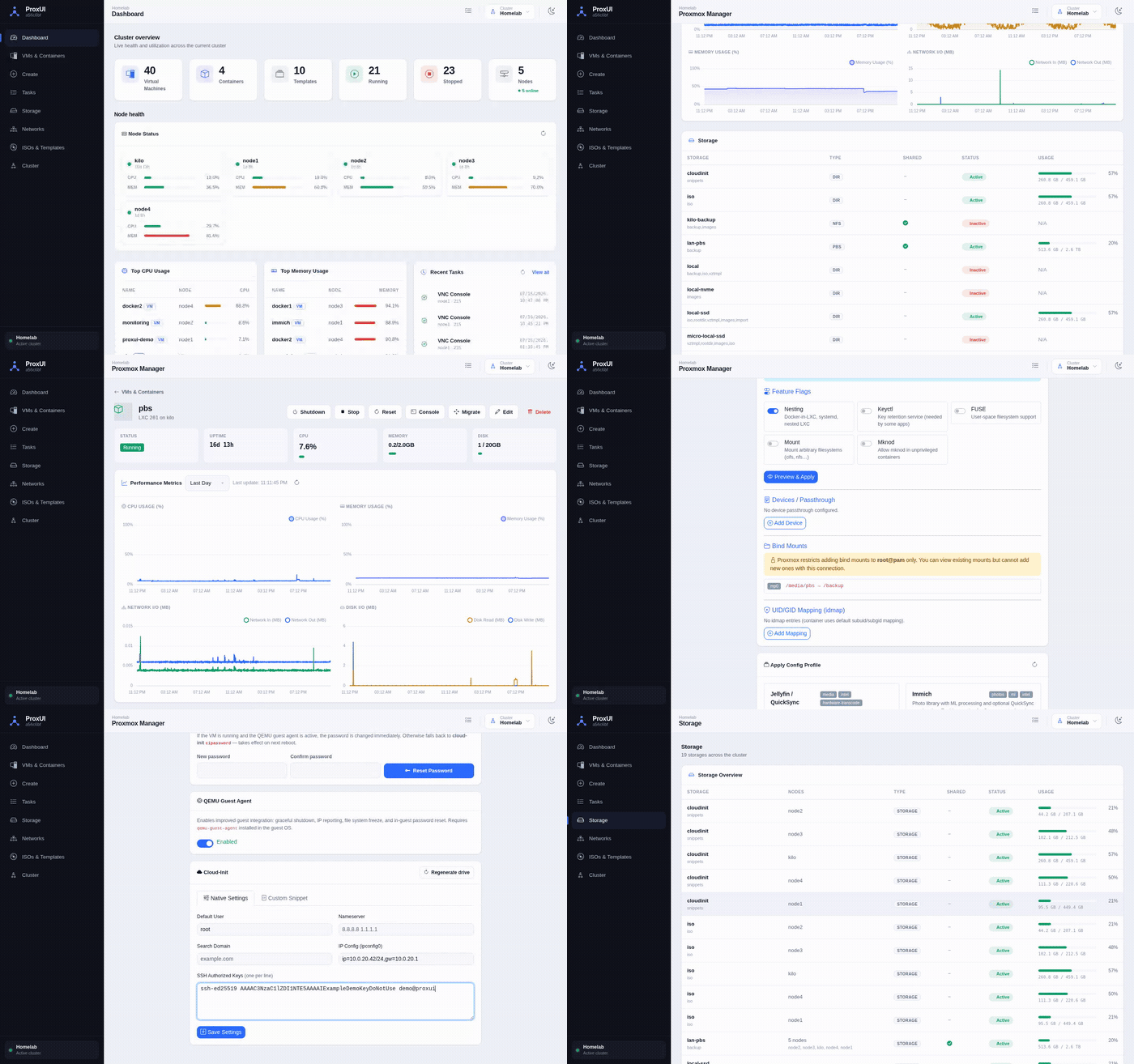
ProxUI isn't a replacement for Proxmox web interface, but a light-weight addition to represent available information in more user friendy way as well as filling some gaps. It has essential functionality to manage single instance(s) or cluster(s).
Virtual Machine Management
- Represents VM and container status and performance metrics in more readable way
- Live VM status and resource metrics polling on the detail page
- Creation VMs and containers from templates
- Cloud VM Templates: Create VM templates from popular cloud images (Ubuntu, Debian, Rocky, Alma, Fedora) with cloud-init support
- Cloud-init editing: Native cloud-init settings plus custom snippets written to nodes over SSH, with a storage picker and migration warnings
- Built-in configuration editor
- QEMU Guest Agent: disk usage monitoring plus an opt-in per-VM toggle (off by default for new VMs)
- Reset the guest root password from the Edit page
- Consolidated configuration single-page view incluing cloud-init params (like ssh keys)
- Background job queue for long-running operations with real-time progress tracking
LXC / Container Advanced Configuration
- Container feature flags (nesting, keyctl, fuse, mount) with a safety layer
- Device passthrough and bind mounts
- Unprivileged container idmap editor
- Reusable LXC configuration profiles
Storage Management
- Unified storage view across all cluster nodes
- Group shared media
- Real-time storage usage monitoring
System Monitoring
- Dashboard with cluster overview and statistics
- Task monitoring
- Network configuration viewing
- Real-time basic resource usage charts
Multi-Cluster Management
- Connect and manage multiple Proxmox clusters or individual servers from a single interface
- Easy cluster switching with persistent user preferences
- Cluster connection management and status monitoring
User Experience
- Focus on desktop and mobile devices
- Light and dark mode with saved browser preference
Screencast
Demo
Demo instance with read-only access is available at https://demo.proxui.app
Quick Start
Using Docker Compose (Recommended)
- Download docker-compose.yml file:
wget -O docker-compose.yml https://raw.githubusercontent.com/greenlogles/ProxUI/refs/heads/main/docker-compose.yml
- Start the application:
docker-compose up -d
Access the web interface at
http://localhost:8080Configure your first Proxmox cluster through the connect page
Manual Installation
- Install dependencies:
pip install -r requirements.txt
- Run the application:
python app.py
- Access the web interface at
http://localhost:8080
Configuration
The application stores configuration in /app/data/config.toml (or ./data/config.toml in development). The configuration file supports multiple clusters:
# Password authentication
[[clusters]]
id = "homelab"
name = "Home Lab"
[[clusters.nodes]]
host = "192.168.1.100:8006"
user = "root@pam"
password = "your-password"
verify_ssl = false

# API Token authentication (recommended for production)
[[clusters]]
id = "production"
name = "Production Cluster"
[[clusters.nodes]]
host = "pve.example.com"
user = "root@pam"
token_name = "proxui"
token_value = "xxxxxxxx-xxxx-xxxx-xxxx-xxxxxxxxxxxx"
verify_ssl = true
Authentication Methods
ProxUI supports two authentication methods:
Password Authentication: Traditional username/password login. Simple but less secure for production.
API Token Authentication (Recommended): Uses Proxmox API tokens for authentication. To create a token:
- Go to Datacenter → Permissions → API Tokens in Proxmox
- Click "Add" and select a user (e.g.,
root@pam) - Enter a token ID (e.g.,
proxui) - Optionally uncheck "Privilege Separation" for full user permissions
- Copy the token secret (shown only once!)
Configuration file can be managed manually or through the web UI (Cluster Management page).
Environment Variables
| Variable | Description | Default |
|---|---|---|
CONFIG_FILE_PATH |
Path to the main configuration file | ./data/config.toml |
CLOUD_IMAGES_PATH |
Path to custom cloud images JSON file | ./cloud_images.json |
CLOUD_IMAGE_CACHE |
How to handle existing cloud images: REUSE (skip download if exists) or OVERWRITE (delete and re-download) |
REUSE |
PROXUI_SECRET_KEY |
Secret key used to sign Flask sessions and CSRF tokens. Set this to a long random value for deployments. | Temporary random key per process |
PROXUI_AUTH_USERNAME |
Optional HTTP Basic Auth username for protecting the whole UI. Requires PROXUI_AUTH_PASSWORD. |
Disabled |
PROXUI_AUTH_PASSWORD |
Optional HTTP Basic Auth password for protecting the whole UI. Requires PROXUI_AUTH_USERNAME. |
Disabled |
PROXUI_SESSION_COOKIE_SECURE |
Set to true when serving ProxUI over HTTPS so browsers only send session cookies over TLS. |
false |
PROXUI_DEBUG |
Enables Flask debug mode when set to true. Do not enable in production. |
false |
PROXUI_HOST |
Host interface for the built-in Flask server. | 0.0.0.0 |
PROXUI_PORT |
Port for the built-in Flask server. | 8080 |
Custom Cloud Images
ProxUI includes a default list of popular cloud images (Ubuntu, Debian, Rocky Linux, AlmaLinux, Fedora). You can customize this list by:
- Create your own
cloud_images.jsonfile:
{
    "my-custom-image": {
        "name": "My Custom Linux",
        "url": "https://example.com/my-image.qcow2",
        "os_type": "l26",
        "description": "My custom cloud image"
    }
}
- Mount it and set the environment variable:
docker run -d \
  -e CLOUD_IMAGES_PATH=/config/my-images.json \
  -v ./my-images.json:/config/my-images.json \
  ghcr.io/greenlogles/proxui:latest
Custom User creation
If you are willing to use ProxUI with read-only user, create new one by running next command on one of the ProxMox servers:
# Create new user
pveum user add proxui-readonly@pve --password yourpassword --comment "ProxUI read-only user"

# Assign built-in PVEAuditor role to root path with propagation
pveum acl modify / --users proxui-readonly@pve --roles PVEAuditor --propagate 1
Docker Deployment
The application is designed for Docker deployment with persistent volume mounting. Docker images are automatically built and published via CI/CD pipeline.
Available Image Tags
ghcr.io/greenlogles/proxui:latest- Latest stable release (recommended for production)ghcr.io/greenlogles/proxui:testing- Latest development build from main branchghcr.io/greenlogles/proxui:v1.2.3- Specific version tags for releases
Docker Compose (Recommended)
version: '3.8'
services:
  proxui:
    image: ghcr.io/greenlogles/proxui:latest  # or :testing for latest development
    container_name: proxui
    ports:
      - "8080:8080"
    volumes:
      - ./data:/app/data
      # Optional: mount custom cloud images config
      # - ./my-cloud-images.json:/config/cloud-images.json
    environment:
      - CONFIG_FILE_PATH=/app/data/config.toml
      # Optional: use custom cloud images
      # - CLOUD_IMAGES_PATH=/config/cloud-images.json
    restart: unless-stopped
Docker Run
# Latest stable release
docker run -d \
  --name proxui \
  -p 8080:8080 \
  -v ./data:/app/data \
  -e CONFIG_FILE_PATH=/app/data/config.toml \
  ghcr.io/greenlogles/proxui:latest

# Latest development build
docker run -d \
  --name proxui \
  -p 8080:8080 \
  -v ./data:/app/data \
  -e CONFIG_FILE_PATH=/app/data/config.toml \
  ghcr.io/greenlogles/proxui:testing
CI/CD and Automated Builds
ProxUI uses GitHub Actions for automated testing and Docker image building with GitHub Container Registry:
- Testing Images: Built automatically on every push to
mainbranch (:testingtag) - Release Images: Built automatically when GitHub releases are created (
:latest+ version tags) - Multi-platform: Images support both
linux/amd64andlinux/arm64 - No Setup Required: Uses built-in GitHub authentication and permissions
Images are published to GitHub Container Registry at ghcr.io/greenlogles/proxui.
Requirements
- Python 3.7+
- Flask 2.3.3
- proxmoxer 2.0.1
- Access to Proxmox VE cluster(s)
Security Notes
- Configuration files contain sensitive credentials
- Set
PROXUI_SECRET_KEYto a stable random value before exposing the app - Set
PROXUI_AUTH_USERNAMEandPROXUI_AUTH_PASSWORD, or place ProxUI behind another authenticated reverse proxy - Use strong passwords and consider API tokens instead of root passwords
- SSL certificate verification can be disabled for self-signed certificates
- Ensure proper network security when exposing the web interface
- URL-based template and ISO downloads only accept
http://andhttps://URLs with simple filenames
Support
If you have any questions, need assistance, please open issue or discussion here on GitHub.
Author(s)
Alex Shut @greenlogles (https://github.com/greenlogles/ProxUI)