
gorkaydemir/track_on
gorkaydemir/track_on has 203 GitHub stars and 14 forks. GitHot measured 0 stars in 24 hours. Last checked 2026-11-19 17:30 UTC. Last push 2026-09-01.
Measured star growth
- in 24h
- 0
- in 7 days
- Collecting history
- in 15 days
- Collecting history
- in 1 month
- Collecting history
Net star changes over overlapping periods, not daily totals. Missing measurements are left blank. Stars measure attention, not software quality.
About
[ICLR 25, TPAMI 26, CVPR 26] Track-On: Online Point Tracking with Memory
Developer ToolsREADME.md
OriginalTrack-On: Online Point Tracking with Memory
Project Page | Track-On-R (CVPR 26) | Track-On2 (TPAMI 26) | Track-On (ICLR 25)


Official implementation of the Track-On family of online point tracking models.
Track-On is an online point tracking model that processes videos frame-by-frame using a compact transformer memory. Track-On2 improves the architecture for stronger performance and efficiency, while Track-On-R further improves real-world performance through verifier-guided pseudo-label fine-tuning.
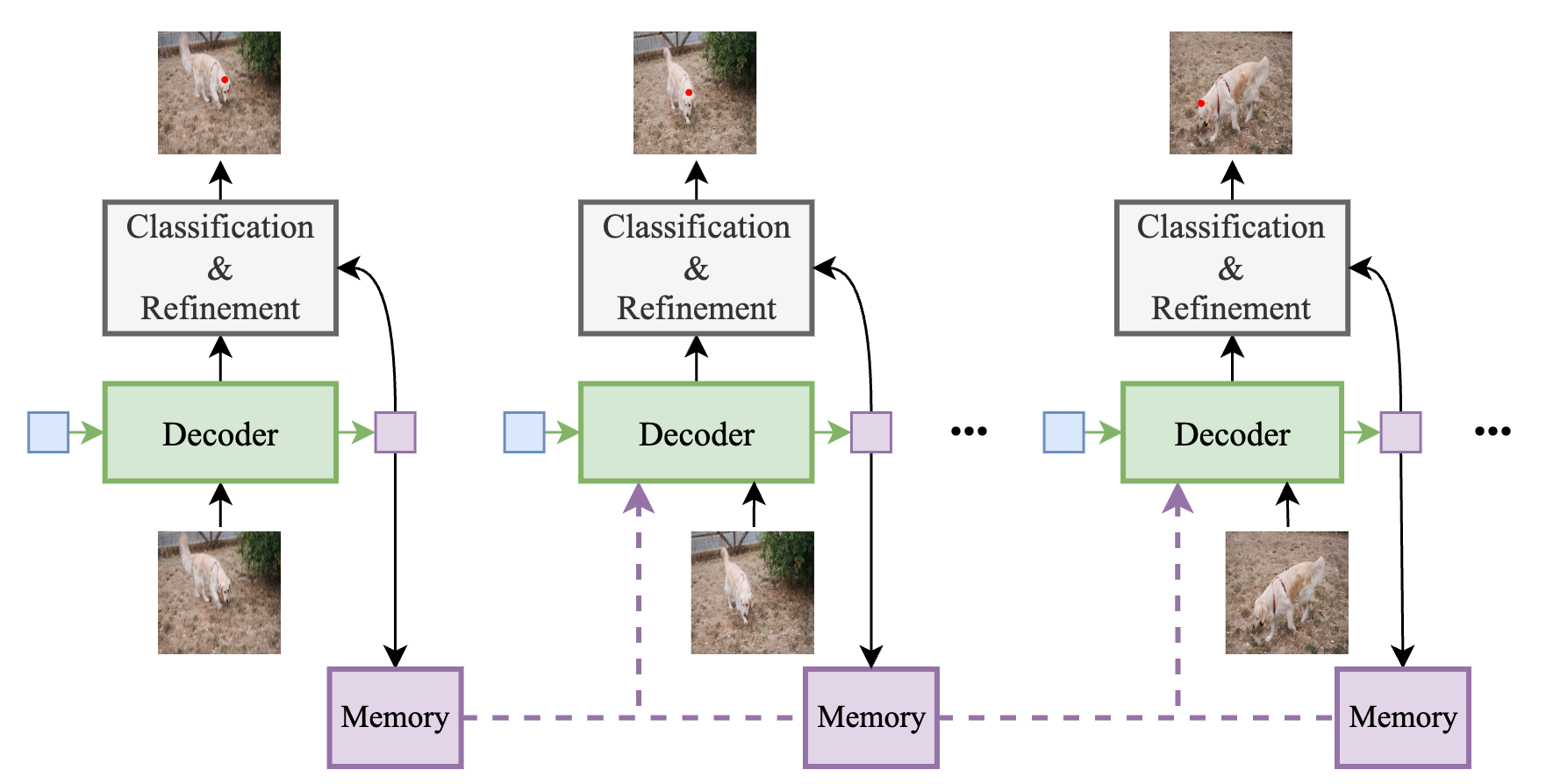
Beyond the Track-On models, this repository is designed as a self-contained point tracking toolkit.
- 📊 6 evaluation benchmarks — dataloaders and a unified evaluation pipeline for TAP-Vid DAVIS, TAP-Vid Kinetics, RoboTAP, Dynamic Replica, PointOdyssey, and EgoPoints
- 🤝 8 baseline trackers — clean inference wrappers for TAPIR, BootsTAPIR, TAPNext, BootsTAPNext, CoTracker3, LocoTrack, Anthro-LocoTrack, and AllTracker
- 🗂️ Training datasets — dataloaders for TAP-Vid Kubric (Movi-F), K-Epic, and real-world video collections
🚀 Installation
Clone the repository
git clone https://github.com/gorkaydemir/track_on.git
cd track_on
Set up the environment
Note: This project was trained and tested with CUDA 12.1. We recommend using the same setup for best compatibility.
Use mamba or conda:
mamba create -n track_on_r python=3.12
mamba activate track_on_r
mamba install pytorch==2.4.1 torchvision==0.19.1 torchaudio==2.4.1 pytorch-cuda=12.1 -c pytorch -c nvidia
pip install mmcv==2.2.0 -f https://download.openmmlab.com/mmcv/dist/cu121/torch2.4/index.html
pip install -r requirements.txt
If your GPU does not support CUDA 12.1
The prebuilt mmcv wheel above targets CUDA 12.1. GPUs based on newer architectures (e.g., H100) may require a higher CUDA version and will not work with the prebuilt wheel. In that case, you need to build mmcv from source.
The following runtime error is a reliable sign that the prebuilt wheel is not compatible with your GPU:
error in ms_deformable_im2col_cuda: no kernel image is available for execution on the device
Build mmcv from source targeting your GPU's compute capability:
git clone https://github.com/open-mmlab/mmcv.git ~/mmcv
cd ~/mmcv
git checkout v2.2.0
pip install -r requirements/optional.txt
pip install "setuptools<70" --force-reinstall
MMCV_WITH_OPS=1 FORCE_CUDA=1 TORCH_CUDA_ARCH_LIST="<arch>" pip install -e . --no-build-isolation
python .dev_scripts/check_installation.py
cd ~/track_on
Replace <arch> with your GPU's compute capability:
| GPU | TORCH_CUDA_ARCH_LIST |
|---|---|
| H100 | 9.0 |
| A100 | 8.0 |
| A6000 / RTX 3090 | 8.6 |
| V100 | 7.0 |
After the source build, re-run pip install -r requirements.txt to restore any Track-On dependencies.
Note: This setup has been tested on an H100 GPU and results were successfully reproduced. Compatibility with other architectures has not been verified.
🔑 Pretrained Models
We release the following models with DINOv3 backbone:
| Model | Training | Download |
|---|---|---|
| Track-On-R | Kubric + Real-world | Link |
| Track-On2 | Kubric | Link |
| Verifier | Epic-K | Link |
⚠️ Important
Track-On checkpoints do not include the DINOv3 backbone weights due to licensing restrictions.
You must request access to the official pretrained weights for dinov3-vits16plus on Hugging Face.
Once access is granted and you are logged in (huggingface-cli login), the weights will be automatically downloaded and cached locally on the first run.
If you want the DINOv2 version of Track-On2, please use the previous branch: track-on2
🎬 Demo
You can track points on a video using the Predictor class.
Minimal example
import torch
from model.trackon_predictor import Predictor

device = "cuda" if torch.cuda.is_available() else "cpu"

# Initialize
model = Predictor(checkpoint_path="path/to/checkpoint.pth").to(device).eval()

# Inputs
# video:   (1, T, 3, H, W) in range 0-255
# queries: (1, N, 3) with rows = (t, x, y) in pixel coordinates
#          or use None to enable the model's uniform grid querying
video = ...          # e.g., torchvision.io.read_video -> (T, H, W, 3) -> (T, 3, H, W) -> add batch dim
queries = ...        # e.g., torch.tensor([[0, 190, 190], [0, 200, 190], ...]).unsqueeze(0).to(device)

# Inference
traj, vis = model(video, queries)

# Outputs
# traj: (1, T, N, 2)  -> per-point (x, y) in pixels
# vis:  (1, T, N)     -> per-point visibility in {0, 1}
Frame-by-frame usage
In addition to full-video inference, Predictor supports frame-by-frame tracking via forward_frame.
New queries can be introduced at arbitrary timesteps, and full-video inference internally relies on the same mechanism.
This interface is intended for streaming scenarios where frames are processed sequentially.
For a complete reference implementation of video-level tracking, please check Predictor.forward, which shows how frame-by-frame tracking is composed into a full pipeline.
import torch
from model.trackon_predictor import Predictor

device = "cuda" if torch.cuda.is_available() else "cpu"

# Initialize
model = Predictor(checkpoint_path="path/to/checkpoint.pth").to(device).eval()
model.reset()  # reset internal memory before a new video

# video:   (1, T, 3, H, W)
# queries: (1, N, 3) with rows = (t, x, y)
video = ...
queries = ...

for t in range(video.shape[1]):
    frame = video[:, t]  # (1, 3, H, W)

    # Add queries whose start time is t
    new_queries = (
        queries[0, queries[0, :, 0] == t, 1:]
        if queries is not None else None
    )

    # Track a single frame
    points_t, vis_t = model.forward_frame(
        frame,
        new_queries=new_queries
    )

    # points_t: (N_active, 2), vis_t: (N_active,)
Using demo.py
A ready-to-run script (demo.py) handles loading, preprocessing, inference, and visualization.
Given:
--video: Path to the input video file (e.g.,.mp4)--ckpt: Path to the Track-On2 checkpoint (.pth)--output: Path to save the rendered tracking video (default:demo_output.mp4)--use-grid: Whether to enable a uniform grid of queries (trueorfalse, default:false)--config: Optional path to model config YAML (default: built-in parameters)
you can run the demo by
python demo.py \
--video /path/to/video \
--ckpt /path/to/ckpt \
--output /path/to/output \
--use-grid true
Running the model with uniform grid queries on the video at media/sample.mp4 produces the visualization shown below.

📦 Datasets
Dataset preparation instructions are provided in
Below we summarize the datasets used in different stages of training and evaluation, together with the corresponding path variables.
Synthetic pretraining
We use the TAP-Vid Kubric Movi-F split from CoTracker3.Verifier training
We use K-Epic from EgoPoints.Real-world fine-tuning
We use the TAO dataset with additional videos from OVIS and VSPW, all located underrw_dataset_path.Evaluation datasets
🛠️ Training
Training consists of three stages:
- Track-On2 – Synthetic pretraining of the tracker on TAP-Vid Kubric.
- Verifier – Training the verifier on the K-Epic dataset.
- Track-On-R – Real-world fine-tuning using verifier-guided pseudo-labels.
Training behavior is controlled through configuration files. These configs define the model parameters, training settings, and dataset paths.
In general:
model_save_pathspecifies where the last and best checkpoints are saved.checkpoint_pathcan be used to resume training from a previous checkpoint.
Additional dataset and model paths required for each stage are described below.
Pretraining (Track-On2)
Set the configuration in config/train.yaml:
movi_f_root– Path to the TAP-Vid Kubric datasettapvid_root– Path to the TAP-Vid DAVIS dataset (used for evaluation after each epoch)
Train the base tracker (Track-On2) on TAP-Vid Kubric:
torchrun --master_port=12345 --nproc_per_node=#gpus main.py \
--config_path config/train.yaml
Verifier Training
During verifier training, we optionally evaluate the model after each epoch using predictions from a set of baseline trackers.
You may choose any subset of pretrained trackers for this purpose. Instructions for downloading and setting up these models are provided in: ensemble/README.md
For example, if you want per-epoch evaluation using Track-On2, BootsTAPNext, BootsTAPIR, and CoTracker3 (window), you need to specify the corresponding checkpoint paths.
Note that CoTracker3 does not require an explicit checkpoint path.
If you are not interested in per-epoch evaluation, these model paths can be omitted.
[Config keys and launch command]
Set the configuration in `config/train_verifier.yaml`:epic_k_path– Path to the K-Epic dataset (train split)tapvid_root– Path to TAP-Vid DAVIS (used for evaluation after each epoch)trackon2_config_path– Track-On2 config (default:./config/test.yaml)trackon2_checkpoint_path– Track-On2 checkpointbootstapnext_checkpoint_path– BootsTAPNext checkpointbootstapir_checkpoint_path– BootsTAPIR checkpoint
Train the verifier model:
torchrun --master_port=12345 --nproc_per_node=#gpus main_verifier.py \
--config_path config/train_verifier.yaml
Real-World Fine-Tuning (Track-On-R)
Real-world fine-tuning combines:
- A Track-On2 checkpoint to initialize the tracker
- A trained verifier
- A set of teacher models whose predictions are scored by the verifier
The teacher ensemble consists of:
- Track-On2
- BootsTAPNext
- BootsTAPIR
- CoTracker3 (window)
- Anthro-LocoTrack
- AllTracker
See ensemble/README.md for instructions on setting up these models.
Training uses both synthetic data and real-world videos by default. Synthetic data can optionally be disabled.
[Config keys and launch command]
Set the configuration in config/train_real_world.yaml:
movi_f_root– Path to TAP-Vid Kubric (required only ifsyn_real_trainingisTrue)tapvid_root– Path to TAP-Vid DAVIS.pklfile (used for evaluation after each epoch)syn_real_training– Mix synthetic and real-world data; set toFalsefor real-world only (default:True)trackon2_config_path– Track-On2 config used for fine-tuning (default:./config/test.yaml)trackon2_checkpoint_path– Track-On2 checkpoint to initialize the modelrw_dataset_path– Path to the real-world dataset root (seedataset/README.md)bootstapnext_checkpoint_path– BootsTAPNext checkpointbootstapir_checkpoint_path– BootsTAPIR checkpointanthro_locotrack_checkpoint_path– Anthro-LocoTrack checkpointalltracker_checkpoint_path– AllTracker checkpointverifier_config_path– Verifier config (same as the verifier training config:./config/train_verifier.yaml)verifier_checkpoint_path– Trained verifier checkpoint
torchrun --master_port=12345 --nproc_per_node=#gpus main_real_world_ft.py \
--config_path config/train_real_world.yaml
⚖️ Evaluation
You can evaluate (i) Track-On model, (ii) any teacher model, (iii) the verifier ensemble. Detailed evaluation instructions:
In general:
--dataset_name: One ofdavis,kinetics,robotap,point_odyssey,dynamic_replica,ego_points--dataset_path: Path to the selected evaluation dataset--model_names: Model names to evaluate. The corresponding checkpoint path must be provided for each listed model.
Below, we show simple Track-On model, either Track-On2 or Track-On-R evaluation; and verifier with a subset of models.
Track-On Evaluation
Evaluate Track-On on a dataset:
torchrun --master_port=12345 --nproc_per_node=1 -m evaluation.eval \
--model_names "trackon2" \
--trackon_config_path config/test.yaml \
--trackon_checkpoint_path /path/to/trackon/ckpt \
--dataset_name dataset_name \
--dataset_path path/to/dataset
This should reproduce the paper’s results ($\delta_{avg}^x$) when configured correctly:
| Model | DAVIS | Kinetics | RoboTAP | EgoPoints | Dynamic Replica | PointOdyssey |
|---|---|---|---|---|---|---|
| Track-On-R | 80.3 | 71.0 | 82.6 | 67.3 | 75.1 | 53.4 |
| Track-On2 | 79.9 | 69.3 | 80.5 | 61.7 | 74.5 | 45.1 |
Verifier Ensemble Evaluation
[Verifier evaluation command]
Evaluate the verifier using multiple teacher tracker predictions. This will evaluate everything listed:
torchrun --master_port=12345 --nproc_per_node=1 -m evaluation.eval \
--model_names "trackon2" "bootstapnext" "bootstapir" "cotracker3_window" "anthro_locotrack" "alltracker" "verifier" \
--dataset_name dataset_name \
--dataset_path path/to/dataset \
--trackon_config_path config/test.yaml \
--trackon_checkpoint_path /path/to/trackon/ckpt \
--bootstapnext_checkpoint_path /path/to/bootstapnext/ckpt \
--bootstapir_checkpoint_path /path/to/bootstapir/ckpt \
--anthro_locotrack_checkpoint_path /path/to/anthrolocotrack/ckpt \
--alltracker_checkpoint_path /path/to/alltracker/ckpt \
--verifier_checkpoint_path /path/to/verifier/ckpt
Detailed evaluation instructions:
Teacher model setup:
Benchmarking
Compute inference statistics (GPU memory and throughput) on DAVIS.
Given:
/path/to/davis: Path to TAP-Vid DAVIS/path/to/ckpt: Path to the Track-On checkpointN_sqrt: √(number of points) (e.g.,8→ 64 points)memory_size: Inference-time memory size
torchrun --master_port=12345 --nproc_per_node=1 -m evaluation.benchmark \
--config_path config/test.yaml \
--davis_path /path/to/davis \
--model_checkpoint_path /path/to/ckpt \
--N_sqrt N_sqrt \
--memory_size memory_size
📜 Previous Versions
Track-On-R (based on the same architecture as Track-On2) is recommended for best performance.
For convenience, earlier versions of this repository are preserved in separate branches:
track-on2— code corresponding to the Track-On2 papertrack-on— original Track-On implementation (ICLR 2025)
📖 Citation
If you find this work useful, please cite:
@inproceedings{aydemir2026trackonr,
  title     = {Real-World Point Tracking with Verifier-Guided Pseudo-Labeling},
  author    = {Aydemir, G\"orkay and G\"uney, Fatma and Xie, Weidi},
  booktitle = {Proceedings of the IEEE/CVF Conference on Computer Vision and Pattern Recognition (CVPR)},
  year      = {2026}
}
@article{aydemir2025trackon2,
  title     = {Track-On2: Enhancing Online Point Tracking with Memory},
  author    = {Aydemir, G\"orkay and Xie, Weidi and G\"uney, Fatma},
  journal   = {arXiv preprint arXiv:2509.19115},
  year      = {2025}
}
@inproceedings{aydemir2025trackon,
  title     = {Track-On: Transformer-based Online Point Tracking with Memory},
  author    = {Aydemir, G\"orkay and Cai, Xiongyi and Xie, Weidi and G\"uney, Fatma},
  booktitle = {International Conference on Learning Representations (ICLR)},
  year      = {2025}
}
Acknowledgments
This repository incorporates code from public works including CoTracker, TAPNet, DINOv2, ViT-Adapter, and SPINO. We thank the authors for making their code available.