
goldvideo/h265player
goldvideo/h265player has 1,659 GitHub stars and 301 forks. GitHot measured 0 stars in 24 hours and 0 in 7 days. Last checked 2026-11-09 02:13 UTC. Last push 2026-04-12.
一套完整的Web版H.265播放器解决方案,非常适合学习交流和实际应用。基于JS码流解封装、WebAssembly(FFmpeg)视频解码,利用Canvas画布投影、AudioContext播放音频。
Measured star growth
- in 24h
- 0
- in 7 days
- 0
- in 15 days
- Collecting history
- in 1 month
- Collecting history
Net star changes over overlapping periods, not daily totals. Missing measurements are left blank. Stars measure attention, not software quality.
README_en.md
Original
Introduction
With the development of video encoding technology, compared with H.264, H.265 has only half the volume of the same picture quality, half of the bandwidth consumption, and more detailed picture quality. However, the web browser does not support the decoding of H.265. so we make the project based on Web Assembly (from FFmpeg), JS demux, paint by Canvas and AudioContext to achieve H265 play on the web browsers.
Supported browsers: Chrome(>57) Safari (>11) Firefox (>52)
This project is a publicly basic version and does not contain business logic codes. Business can be based on this project for specific business realization.

Installization
Download
# create ROOT directory
* mkdir goldvideo
* cd goldvideo
# download h265player source code, and make `h265player` directory
* git clone https://github.com/goldvideo/h265player.git
* cd h265player
# install dependencies
* npm install
Contruction
# choose one to build
* npm run dev
# npm run test
# npm run build
# rollup -c      # build csj and esm version
Nginx configuration(Or other Server)
server {
    listen       8000;
    location / {
        root   <path of goldvideo>/goldvideo;
        index  index.html index.htm;
        autoindex on;
    }
}
Run test
restart nginx server and visit demo page, you can see the player. http://localhost:8000/h265player/demo/demo.html if you have seen the player. congratulations! if you can't play the video, you need to check the source path and the error of control bar. please feedback the problem the you have met, we'll respond to you quickly.
More details, then go down.
NPM quick install. [optional]
# you can using npm to install and run the DEMO simply.
* npm i goldvideo-player
see more https://github.com/goldvideo/example
Install and build demuxer from source code. [optional]
you can download demuxer library source from github or install from npm(https://www.npmjs.com/package/demuxer)
* cd goldvideo
* git clone https://github.com/goldvideo/demuxer.git
* cd demuxer
* npm install
# build the module, you can see the pageage.json of demuxer
* npm install --global rollup
# build demuxer module by rollup
* rollup -c ./rollup.config.js --environment BUILD_MODE:production
* cd h265player
# install demuxer from local
* npm install ../demuxer
Compile WASM module from source. [optional]
decoder_wasm has been compiled and copied to dist/lib/ before. You can compile it and replace the files(libffmpeg.js, libffmpeg.wasm).
* cd goldvideo
* git clone http://github.com/goldvideo/decoder_wasm.git
* cd decoder_wasm
compiling step detail to see README of wasm module.
Module Contruction
Source code directory
├─goldvideo
│  ├─demuxer
│  ├─h265player
│  ├─decoder_wasm
│  ├─example
Main Architecture
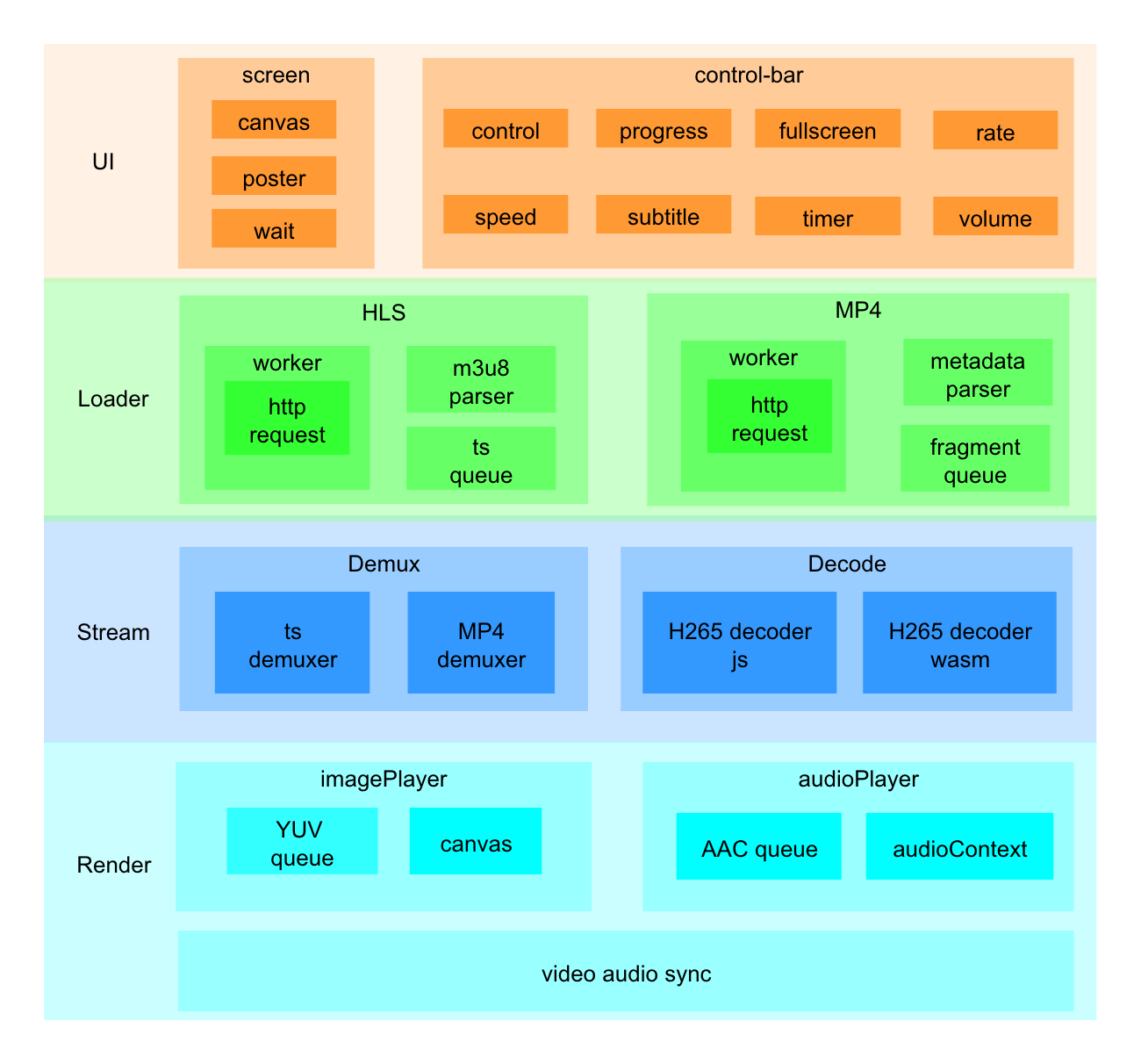 The player is divided into four parts of UI: Loader, Data processing, Data rendering and 3 threads. The threads One is the main thread, including interface control, download control, data flow control, audio and video control and other functions; data loading thread to complete requests for metadata and data fragments; data processing thread to complete data decapsulation and decoding.
- UI: The player have two parts that contains screen and controlbar. The screen includes video images, popup, posters, etc. And the controlbar includes components such as progress bar, play button, and volume control.
- Loader: responsible for loading and parsing of media data, currently only supports HLS protocol. The data request through by the
web worker. After the loading is completed, the requested ts data is stored according to the set cache size, and the loading is stopped when the cache upper limit is reached. After the decoder obtains ts from the ts data queue, HlS Loader will release the requested ts, continue to load the next ts, and stop loading after reaching the maximum cache limit - Data processing: mainly including data demux and H265 decoding. Demux is realized by demuxe.js module, H265 decoding worked by the
wasmsoftware solution generated byffmpegpackaging, and the CPU usage rate is high. - Data rendering: including video rendering and audio rendering. Video rendering uses
ImagePlayerto render the decodedyuvdata directly to the canvas. Audio usesAudioPlayerto decode theAACdata for audio playback. Finally, audio and video synchronization is achieved throughpts. The synchronization strategy uses audio as a reference to determine the difference between the current videoptsand the get audioptsto adjust the video display time to achieve audio and video synchronization.
Progress
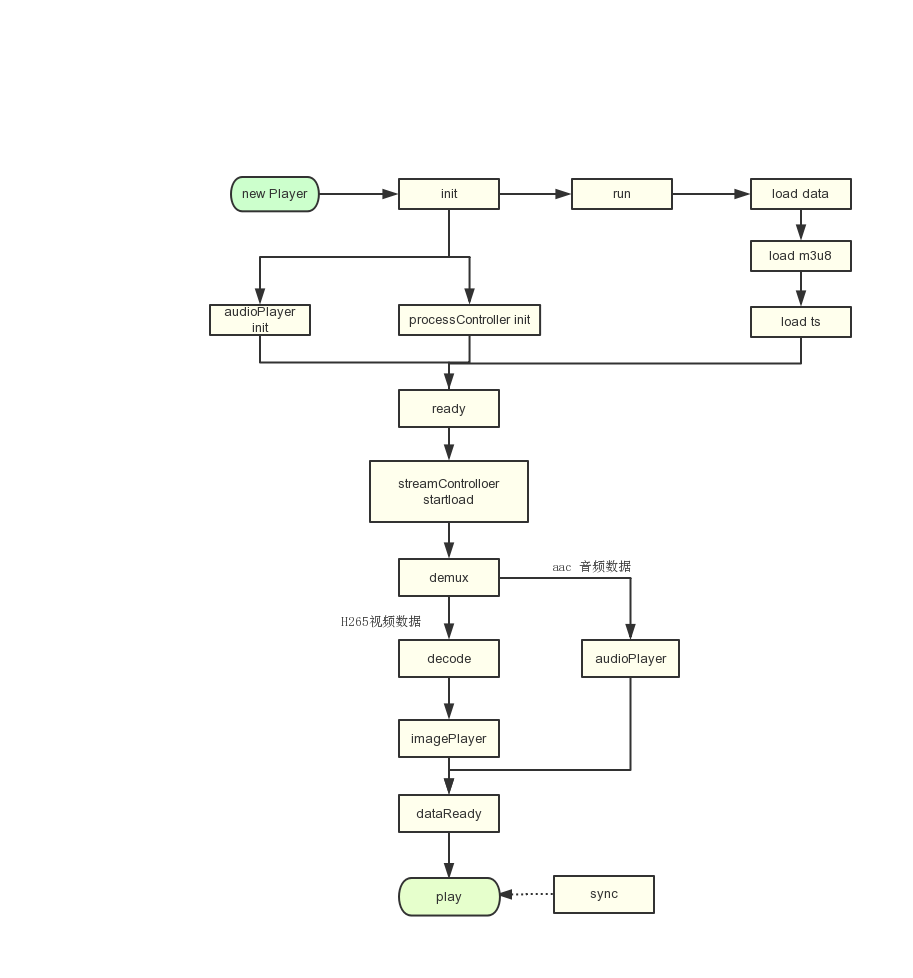
The process of figure:
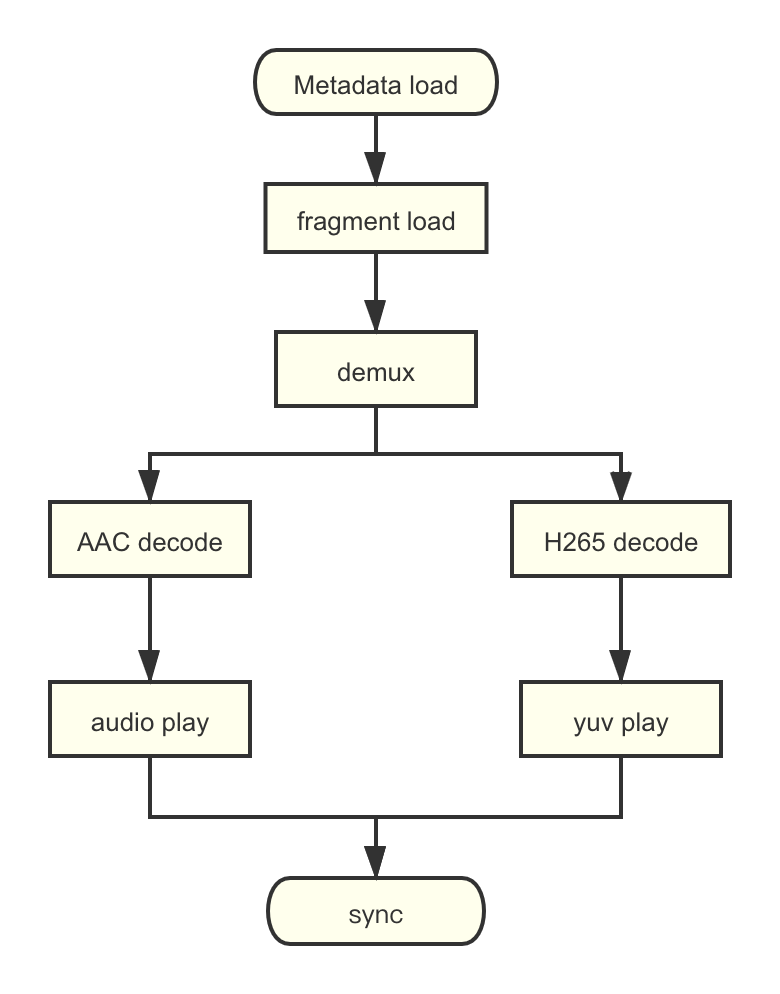
Decode progress:
Demuxer
Through demux module to achieve demux of media data, so as to obtain independent video (H265) data and audio (AAC) data. For details, please refer to demuxer
Decoder
The soft decoding of H265 data is realized through ffmpeg. If you want to invoke ffmpeg in the browser, you need to compile ffmpeg into wasm. For the specific process of compiling ffmpeg into wasm, please refer to [decoder_wasm](https://github.com/goldvideo/ decoder_wasm)
ImagePlayer
 Through yuv-canvas to realize YUV data rendering, there will be a queue in
ImagePlayer to store YUV data and calculate the length of time of the current yuv data, which is greater than or equals to the value of readybufferLength , It will trigger the ImagePlayerReady event. When the audio and video players are in the ready state, the H265 player triggers the dataReady event and starts calling the play method for video playback.
AudioPlayer
Web Audio API
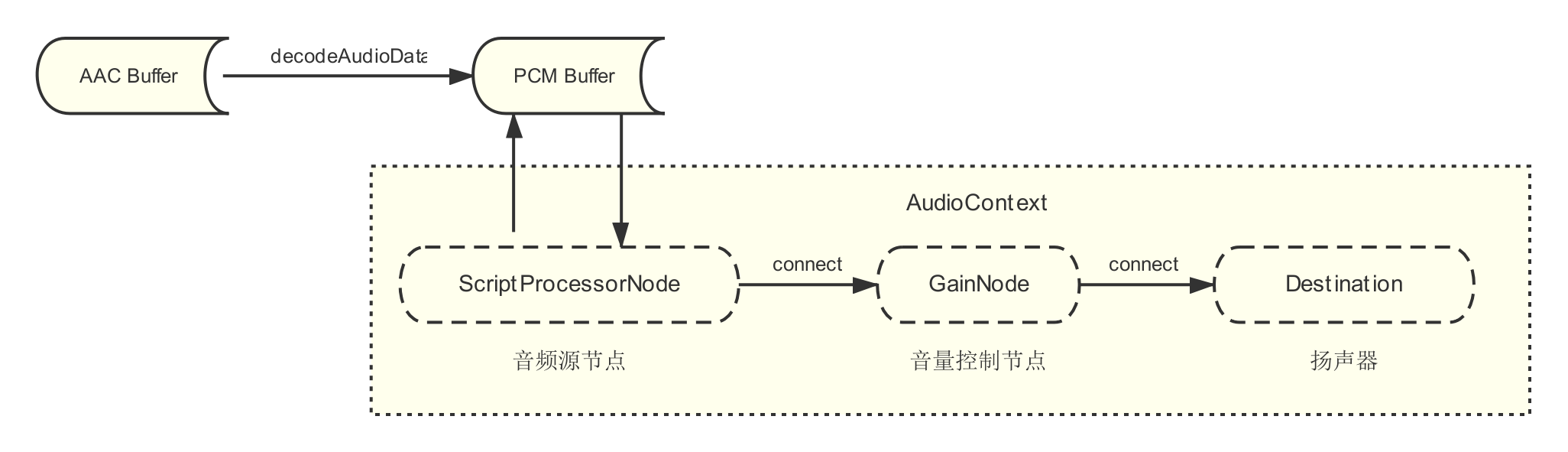
The implementation of Audio Player is based on Web Audio API, including decoding of AAC audio stream and playback of PCM data.
- Decoding: The Audio Player module receives the AAC data streaming from the
demuxermodule, and decodes it to being played data of PCM through the AudioCode's decodeAudioData API. - Audio Node: Audio Node is the audio data
processorin the Web Audio API. The Web Audio API serially processes the audio data through differentprocessorsand finally plays it by the speaker (audioContext.destination).- ScriptProcessorNode:The source node of Audio.Web Audio API provider more audio node, such as AudioBufferSourceNode, MediaElementAudioSourceNode etc. Considering speed playback, we used ScriptProcessorNode, request audio data by the
onaudioprocesscallback function. - GainNode:Node of audio volume controlling
- ScriptProcessorNode:The source node of Audio.Web Audio API provider more audio node, such as AudioBufferSourceNode, MediaElementAudioSourceNode etc. Considering speed playback, we used ScriptProcessorNode, request audio data by the
Adjust speed
The Audio Context provides the playbackRate attribute to achieve function of multiple speed, and while the video is played at speed, the tone of the audio is also increased/decreased synchronously.
For achieve speed changing and without modifying tone. We using the audio processing library
[SoundTouchJS](https://github.com/cutterbl/SoundTouchJS), the library will give the data of processed to ScriptProcessorNode.
Quick start
Import the js,css files
<link rel="stylesheet" href="../dist/goldplay-h265.css">
<script src="../dist/goldplay-h265-sdk.js"></script>
<style>
    .play-container{
        width: 800px;
        height: 500px;
    }
</style>
Create a container for player
<div class="play-container"></div>
create a new GoldPlay instance and give some parameters
// defined the container
let el = doc.querySelector('.play-container')
// set parameters for Player
let options = {
    // playlist address
    sourceURL: 'http://localhost:8000/h265player/data/video2/playlist.m3u8',
    type: 'HLS'
    // wasm address
    libPath: 'http://localhost:8000/h265player/dist/lib',
}
let player = new GoldPlay(el, options}
Online demo
Component expand
How to add the new UI component? addComponentReadme componentadd
APIs
https://goldvideo.github.io/h265player/API/index.html
Developer
* github: [https://github.com/goldvideo/h265player](https://github.com/goldvideo/h265player)
Explore related projects
ytdl-org/youtube-dl
Command-line program to download videos from YouTube.com and other video sites
141,487 starsexcalidraw/excalidraw
Virtual whiteboard for sketching hand-drawn like diagrams
135,331 starsgodotengine/godot
Godot Engine – Multi-platform 2D and 3D game engine
119,771 starsmrdoob/three.js
JavaScript 3D Library.
117,842 stars