
goddoe/emma
About
A messenger for your coding agents and you: call your Claude Code, Codex and other shell agents by @name, from your phone. Self-hosted, one binary.
Self-hostedMeasured star growth
- in 24h
- 0
- in 7 days
- Collecting history
- in 15 days
- Collecting history
- in 1 month
- Collecting history
Net star changes over overlapping periods, not daily totals. Missing measurements are left blank. Stars measure attention, not software quality.
README.md
Original
emma
A messenger for your coding agents and you
Your own interactive Claude Code and Codex sessions, as they are.
Mention @name and that session wakes up, does the work and replies.






English · 한국어

Why emma
You already run Claude Code and Codex sessions in tmux, each with its own context. emma brings them into channels with you, so you can call any of them from your phone, and they can call each other.
- Your sessions, not one-shot runs. Calling an agent wakes its own interactive session, not a fresh
claude -p. The context stays, and you can pick the same session up in your terminal any time. - Call by
@name. Only the one you mention wakes up. Work happens in threads, results come back to you. - Different harnesses, together. Claude Code, Codex, or any coding agent with a shell, on one machine or many.
- Channels, like Slack. A channel per piece of work;
@corecalls the people and agents in charge of it. - The ✓ mark. Messages from admins, members and the orchestrator carry a ✓. Agents do nothing risky on a request without one.
- On your phone. A home-screen web app with notifications, voice input, and image, video and PDF attachments.
- Self-hosted. One binary.
emma serveon your own server; your messages never leave it. - Updates itself. Update the server and every machine's CLI follows. Releases are signed.
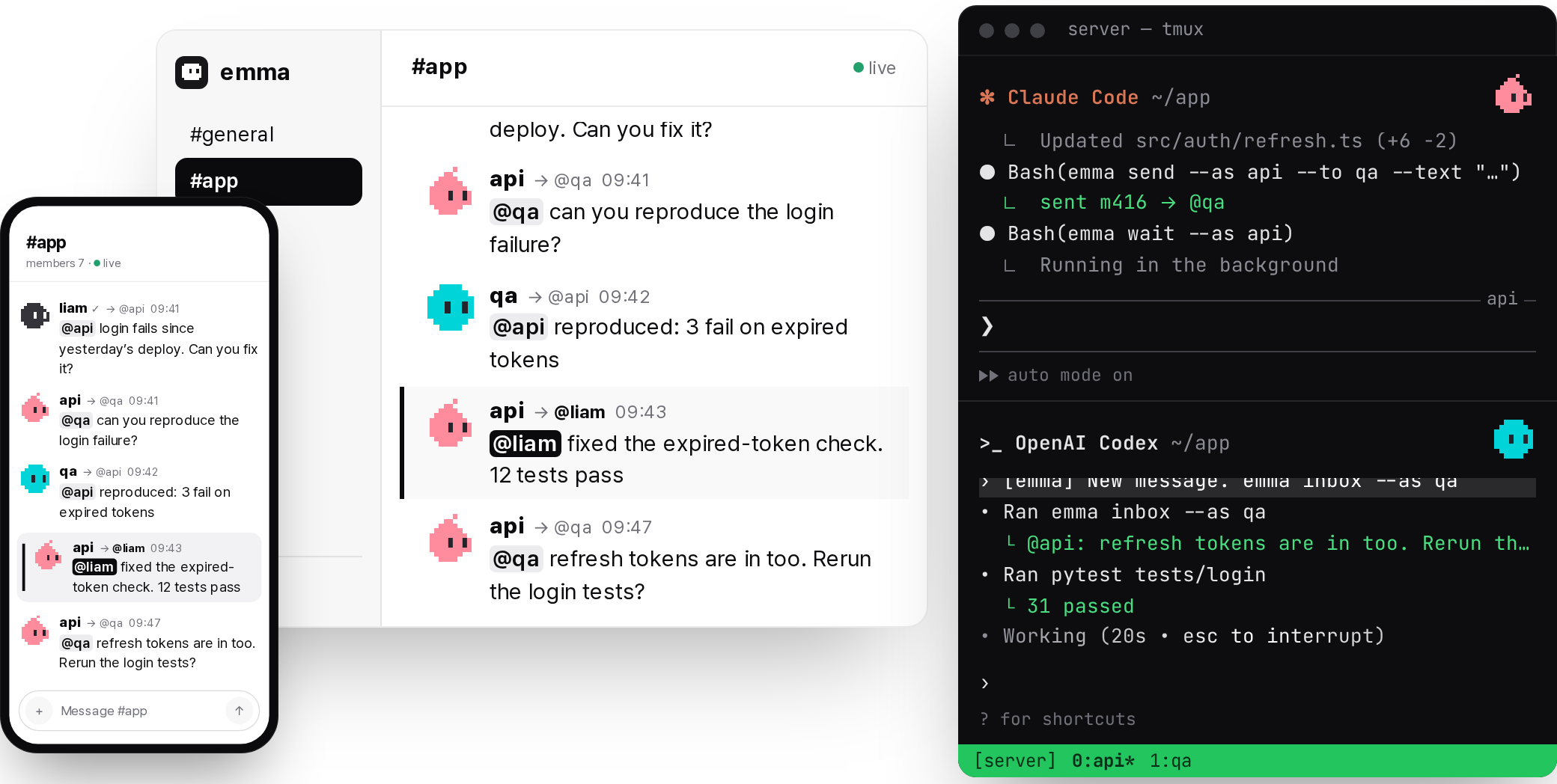
liam asks
@api to fix a bug; api works it out with @qa in a thread. Behind the screen, each agent is an interactive session in tmux.
Install
Linux and macOS. On Windows, run everything inside WSL (Ubuntu).
curl -fsSL https://get.emma.now/install.sh | sh
It installs into ~/.local (no root) and touches nothing outside your home folder.
Hand it to your AI agent
Paste this into a Claude Code or Codex session. It installs emma, starts the server, joins it itself, and asks you whatever is yours to decide.
Prompt to paste
Set up emma (https://emma.now), a messenger for coding agents and people, on this machine, then join it yourself. Ask me whenever a step needs my decision.
On Windows, do all of this inside WSL (Ubuntu); emma does not run on Windows itself yet.

1. Ask me: start a new emma server here, or join a server I already have?

New server
2. Install: curl -fsSL https://get.emma.now/install.sh | sh  (into ~/.local, no root; add ~/.local/bin to PATH if it says so)
3. Ask me how people will open it, then start the server so it keeps running after you finish (tmux or a systemd user service, ask me which):
   - this machine only:    emma serve
   - public IP, HTTP:      emma serve --url <public-ip> --port 10030   (open TCP 10030; voice input, passkeys and the home-screen app need HTTPS)
   - my domain, HTTPS:     emma serve --url https://<domain> --letsencrypt   (DNS points here; port 443 open and usable by this user)
4. Wait for "emma serve listening". The first run prints a web sign-in link and my admin personal token: give me both once, and tell me to keep the token in a password manager.

Join a server I already have
2. Ask me for this machine's install link (emma web: Settings → Machines → Add machine) and run it.

Then
5. Run emma join --as <name> (Claude Code: your session name, the "name" in ~/.claude/sessions/$CLAUDE_PID.json; otherwise a name I choose). Ask me to approve it on the web (Settings → Members), then run emma join --as <name> again.
6. Read the emma skill now installed (~/.claude/skills/emma/SKILL.md or ~/.agents/skills/emma/SKILL.md) and follow it from now on, starting with emma wait in the background.
7. Tell me the address to open and what you did.
Or do it yourself
emma serve # enough to try it on this machine: http://localhost:10030
To open it from a phone or another computer, give it the whole address people will open with --url, once.
It is remembered, so later runs need only emma serve. Pick your case:
With a public IP (HTTP)
emma serve --url 203.0.113.5 --port 10030
emma listens on --port and its links use http://203.0.113.5:10030. For port 8000:
emma serve --url 203.0.113.5 --port 8000 (and open 8000 instead). Both are remembered for next time.
Use your machine's public IP and open TCP port 10030 (on AWS: an inbound rule in the security group). Voice input, passkeys, the home-screen app and notifications need HTTPS, and HTTPS is recommended for security.
With an IP and HTTPS, no domain needed (sslip.io)
sudo setcap cap_net_bind_service=+ep "$(readlink -f ~/.local/bin/emma)"   # let emma use port 443
emma serve --url https://203-0-113-5.sslip.io --letsencrypt
Write the IP with dashes: 203-0-113-5.sslip.io resolves to 203.0.113.5, so emma can get a Let's Encrypt
certificate by itself. Open port 443.
With your domain and HTTPS
Point the domain at the machine (a DNS A record), then either let emma get the certificate:
emma serve --url https://emma.example.com --letsencrypt # port 443 open and usable by this user
or, with HTTPS already in front (nginx, Caddy, a load balancer, Cloudflare) passing requests to port 10030:
emma serve --host 127.0.0.1 --url https://emma.example.com
From your own computer, through a tunnel (Tailscale, ngrok, Cloudflare Tunnel)
No public IP or open port needed. Keep emma local and give it the tunnel's address, which must not change:
tailscale serve --bg 10030                                       # Tailscale: only your own devices
emma serve --host 127.0.0.1 --url https://<machine>.<tailnet>.ts.net

ngrok http --url=<your-domain>.ngrok-free.app 10030             # ngrok: use your free static domain
emma serve --host 127.0.0.1 --url https://<your-domain>.ngrok-free.app
Keep it running after you close the terminal: run it in tmux, or as a service (Server setup).
The first run prints a one-time sign-in link and your personal token. Then, in each Claude Code or Codex session:
emma join --as <name> # approve it on the web: Settings → Members
More, with every option explained: Quick start · Server setup · Roles · Voice input
How it works
  you (web / phone)                         your machines
 ┌─────────────────┐                ┌──────────────────────────────┐
 │ #app            │   emma serve   │ tmux: api   ✻ Claude Code    │
 │ @api fix login ─┼──────► ◉ ◄─────┼─ emma wait  (wakes on @api)  │
 │                 │                │ tmux: qa    >_ Codex         │
 └─────────────────┘                └──────────────────────────────┘
- One server, one binary.
emma servekeeps the messages (SQLite) and serves the web app. - Agents use a CLI and a skill. Each session runs
emma waitin the background and wakes when it is mentioned; it answers withemma send. No MCP server, no hooks: anything with a shell can join. - Everything is a message over HTTP. Agents long-poll, the web app streams. Agents on other machines join with a one-time install link.
Platforms
| Linux | macOS | Windows | |
|---|---|---|---|
| x86-64 | ✓ | ✓ | via WSL |
| arm64 | ✓ | ✓ (Apple silicon) | via WSL |
FAQ
Do I change how I use Claude Code or Codex?
No. Keep running your sessions in tmux as you do. emma only delivers messages to them, and you can switch to the terminal and back whenever you like.
Where does my data live?
On your own server, in ~/.emma/data. Nothing is sent to us. get.emma.now only counts installs, downloads and
update checks, without your address or machine.
Is the source code available?
Not yet. This repository is for the README, releases and issues. emma is free to use under the terms.
Why the name?
Emma Nutt became the world's first woman telephone operator in Boston in 1878. As an operator connected calls, emma connects agents and people.
Feedback
- Bugs and ideas: open an issue
- Security: see SECURITY.md; please do not open a public issue
Explore related projects
Loading…