
girorme/binoculo
girorme/binoculo has 26 GitHub stars and 1 forks. GitHot measured 0 stars in 24 hours and 0 in 7 days. Last checked 2026-11-14 03:35 UTC. Last push 2026-11-05.
What you can do
- Fast Network Scanning: Leverage Elixir's concurrent processing for rapid scans across multiple hosts and ports.
- Search Engine Integration: Integrate with Meilisearch to index and query scan results for efficient data retrieval.
- Specific Banner Searches: Perform targeted searches for specific service banners or versions.
- HTTP Write: Send custom commands over HTTP to communicate with services and perform actions.
Measured star growth
- in 24h
- 0
- in 7 days
- 0
- in 15 days
- Collecting history
- in 1 month
- Collecting history
Net star changes over overlapping periods, not daily totals. Missing measurements are left blank. Stars measure attention, not software quality.
About
Binoculo is a lightning-fast banner grabbing tool built with Elixir, designed to swiftly retrieve service banners from target hosts
SecurityREADME.md
Original



Binoculo
A lightning-fast banner grabbing tool built with Elixir, designed to quickly retrieve service banners from target hosts. Ideal for network reconnaissance and analysis, Binoculo efficiently collects service info across multiple ports.

:rocket: Features
- Fast Network Scanning: Leverage Elixir's concurrent processing for rapid scans across multiple hosts and ports.
- Search Engine Integration: Integrate with Meilisearch to index and query scan results for efficient data retrieval.
- Specific Banner Searches: Perform targeted searches for specific service banners or versions.
- HTTP Write: Send custom commands over HTTP to communicate with services and perform actions.
- HTTP Server Mode: Start a lightweight HTTP server to expose scan results and interact with the tool programmatically.
Requirements
- Docker
- Optional: Elixir installed locally
Quick Start
Run Binoculo easily with Docker with the binoculo shell script. Example:
$ ./binoculo -r 192.168.101.1/24 -p 21,22 --output my_result.txt
Results will be saved in output/my_result.txt.
The container runs as your user, so the files in output/ belong to you. If an older run left output/ owned by root, fix it once with sudo chown -R $USER output.
Example Commands
Basic Usage:
In addition to saving the results with --output, you can use meilisearch/dashboard to store and visualize the results. (meilisearch integration)
Binoculo: You Know, for Banner Grabbing! Version: 1.3.1

USAGE:
    Binoculo --range <host_notation> --port <port(s)> [--output <file>] [--write <payload>] [--read <criteria>]
Range of ports:
$ ./binoculo --range 192.168.101.1/24 --port 21,22,3301
$ ./binoculo --range 192.168.101.1/24 --port 8080-8082,9000
Write Custom Payload:
$ ./binoculo --range 192.168.101.1/24 -p 80 --output result.txt -w "GET / HTTP/1.1"
Save Only Matching Criteria:
$ ./binoculo --range 192.168.101.1/24 -p 80 --output result.txt -w "HEAD / HTTP/1.1" -r "Apache"
Tune the scan (large ranges, e.g. /16):
$ ./binoculo --range 10.0.0.0/16 -p 22 --concurrency 5000 --partitions 8 --timeout 1500
| Option | Default | Description |
|---|---|---|
--concurrency |
1000 (lower if ulimit -n is low) |
Max simultaneous connections (split across the partitions) |
--partitions |
CPU cores | Parts the hosts x ports work is split into and scanned in parallel |
--timeout |
500 |
Connect/read timeout per host:port, in ms. It only costs time on hosts that do not answer (most of a big range); hosts slower than this are missed, use e.g. --timeout 3000 to find more |
The defaults come from measuring a /18 on port 22: what matters is the rate of new connections
(concurrency / timeout). 5000 / 2000 found 20 banners in 8s, 1000 / 500 found 31 in 9s,
1000 / 3000 found 48 in 51s and 300 / 2000 found 54 in 1m54s; a very high rate loses SYNs and
a short timeout misses slow hosts. Raise the timeout to miss less or the concurrency for speed,
depending on your network.
Every connection needs a file descriptor, so a high --concurrency needs a high ulimit -n.
Docker containers start with a soft limit of 1024, so the ./binoculo launcher runs the container
with --ulimit nofile=65536:65536. If --concurrency is not given, it is lowered to fit the
limit found at startup. When the machine runs out of descriptors/ports the scan reports
Resource errors and suggests a lower --concurrency.
To debug why hosts did not answer, the summary lists the errors by stage/reason
(connect = could not connect, recv = connected but no banner arrived in --timeout), and
--errors-output errors.txt saves every failed host:port stage reason to output/errors.txt.
If recv/timeout is high, try a larger --timeout and/or a lower --concurrency and compare the banners.
At the end of each scan Binoculo prints the start and end time, how long the scan and the saving of the results took, the rate in units/s (a unit is one host:port) and the amount of banners, errors and resource errors. Use it to compare the same scan between versions or settings.
Meilisearch Integration
$ ./binoculo --dashboard
View results in your browser at localhost:3000
This command launches Meilisearch along with a dashboard where you can view your scan results. The results are displayed in a faceted manner, making it easier to search and filter through the collected data. Faceted search allows you to narrow down your results based on various categories, providing an efficient way to explore your network scans.
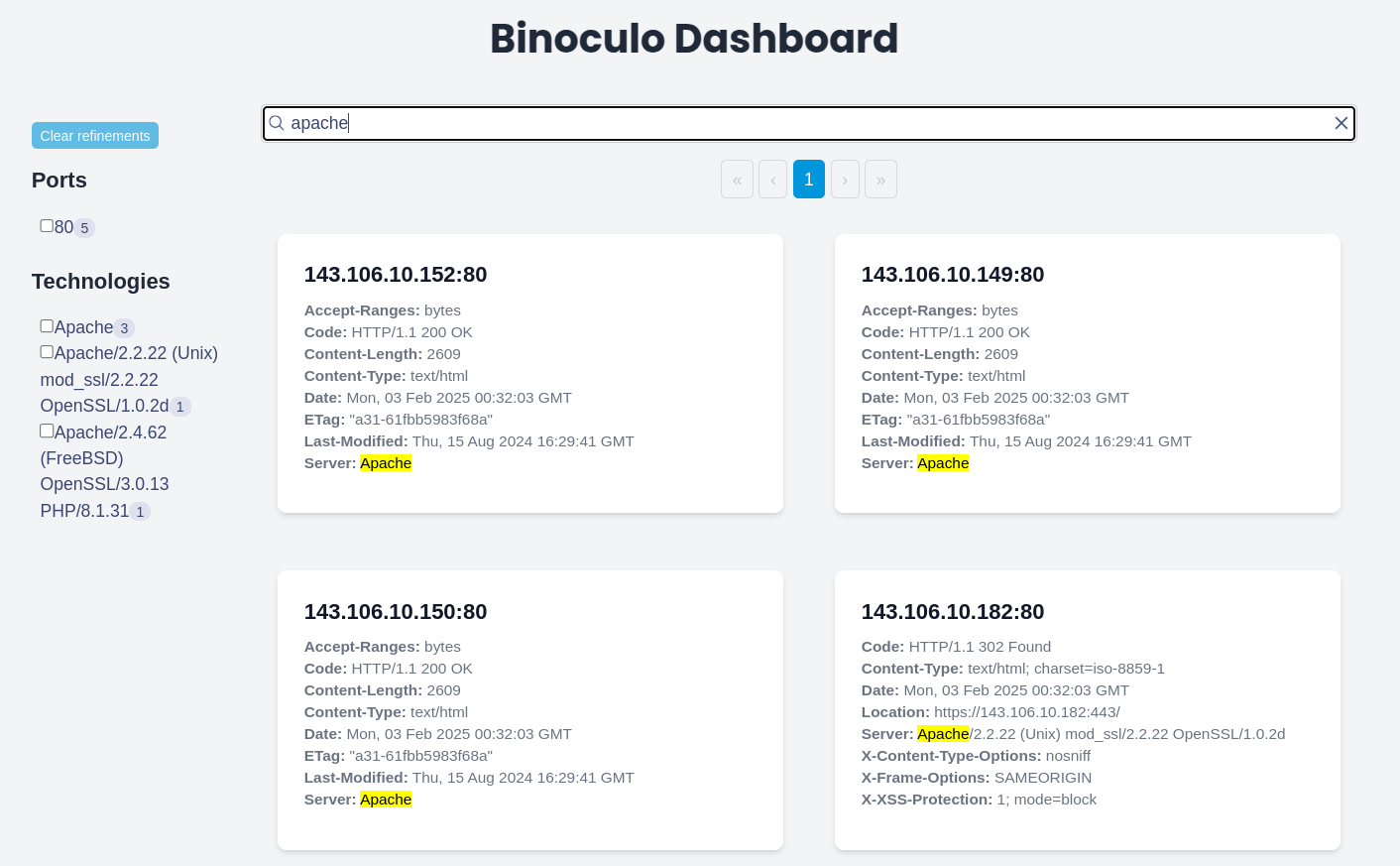
Using Meilisearch Endpoints
In addition to the dashboard, you can also interact with Meilisearch (localhost:7700) directly via its API endpoints to perform searches. The scan results are indexed under the hosts index, allowing you to make custom queries and retrieve data without needing to use the dashboard interface. This gives you the flexibility to integrate Binoculo with other systems or tools that can consume the Meilisearch API for advanced searching and filtering.
Http server:
$ ./binoculo --server
This command starts an HTTP server on port 4000, allowing you to interact with Binoculo via a REST API. The server exposes endpoints to retrieve scan results
Once the HTTP server is running, you can interact with it using the following endpoints:
- POST /scan: Trigger a new scan by sending a JSON payload with the scan parameters:
{
  "host_notation": "192.168.101.1/24",
  "ports": "21,22,80",
  "read": "GET / HTTP/1.1"
}
Example usage with curl:
$ curl -X POST http://localhost:4000/scan -H "Content-Type: application/json" -d '{"host_notation":"192.168.101.1/24","ports":"80"}'
Update Binoculo
Keep Binoculo up to date:
$ ./binoculo -u
Architecture
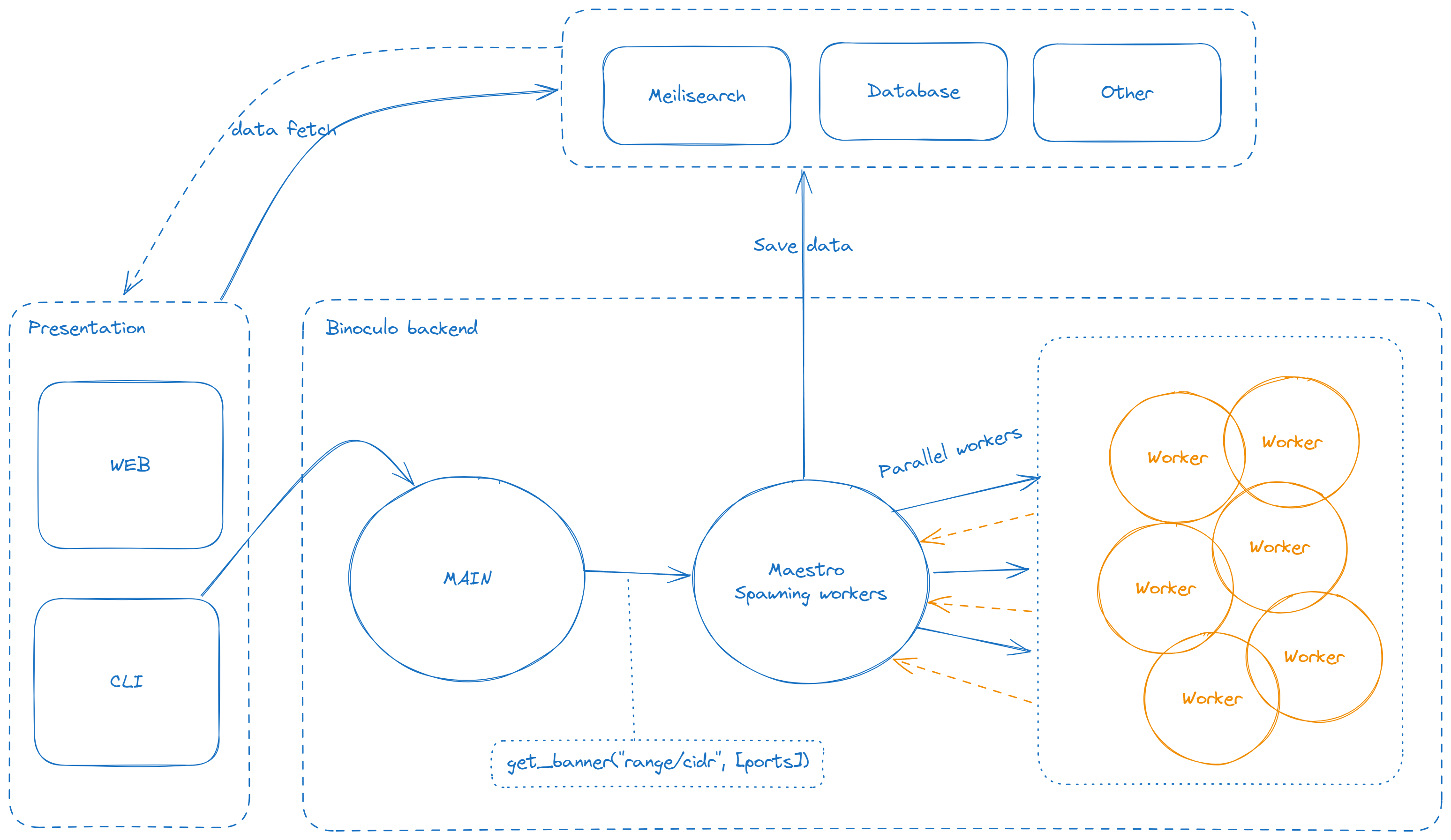
This tool was inspired by the speed and simplicity of pnscan, but built with the power of Elixir to take banner grabbing to the next level!
MIT License

Copyright (c) 2023 Girorme

Permission is hereby granted, free of charge, to any person obtaining a copy
of this software and associated documentation files (the "Software"), to deal
in the Software without restriction, including without limitation the rights
to use, copy, modify, merge, publish, distribute, sublicense, and/or sell
copies of the Software, and to permit persons to whom the Software is
furnished to do so, subject to the following conditions:

The above copyright notice and this permission notice shall be included in all
copies or substantial portions of the Software.

THE SOFTWARE IS PROVIDED "AS IS", WITHOUT WARRANTY OF ANY KIND, EXPRESS OR
IMPLIED, INCLUDING BUT NOT LIMITED TO THE WARRANTIES OF MERCHANTABILITY,
FITNESS FOR A PARTICULAR PURPOSE AND NONINFRINGEMENT. IN NO EVENT SHALL THE
AUTHORS OR COPYRIGHT HOLDERS BE LIABLE FOR ANY CLAIM, DAMAGES OR OTHER
LIABILITY, WHETHER IN AN ACTION OF CONTRACT, TORT OR OTHERWISE, ARISING FROM,
OUT OF OR IN CONN
Explore related projects
trimstray/the-book-of-secret-knowledge
A collection of inspiring lists, manuals, cheatsheets, blogs, hacks, one-liners, cli/web tools and more.
258,387 starsHack-with-Github/Awesome-Hacking
A collection of various awesome lists for hackers, pentesters and security researchers
125,488 starsswisskyrepo/PayloadsAllTheThings
A list of useful payloads and bypass for Web Application Security and Pentest/CTF
82,670 starscaddyserver/caddy
Fast and extensible multi-platform HTTP/1-2-3 web server with automatic HTTPS
79,034 stars