
getnao/nao has 1,992 GitHub stars and 303 forks. GitHot measured +8 stars in 24 hours and +21 in 7 days. Last checked 2026-11-05 13:53 UTC. Last push 2026-10-31.
👾 nao is the #1 open source agentic BI. (1) Create context with nao-core cli, (2) deploy nao chat interface for everyone
What you can do
- 🧱 Build your data context layer: sync your warehouse, dbt and docs into files your agent reads.
- 🧪 Evaluate offline: nao test runs your key questions against the SQL you expect and scores every context change before it ships.
- 🔭 Observe online: chat replay shows every conversation. Context recommendations turn errors and downvotes into fixes, opened as pull requests.
- 🏳️ Stack agnostic: nao works with all warehouses, data stacks and LLMs. Anything missing? Contribute to build it!
Measured star growth
- in 24h
- +8
- in 7 days
- +21
- in 15 days
- Update delayed
- in 1 month
- Update delayed
Net star changes over overlapping periods, not daily totals. Missing measurements are left blank. Stars measure attention, not software quality.
README.md
Original

nao
The #1 open source agentic BI builder
Your data team builds the analytics agent and owns the context layer. Everyone in the company builds on data.
🌐 Website · 📚 Documentation · ☁️ nao Cloud · 💬 Slack
What is nao?
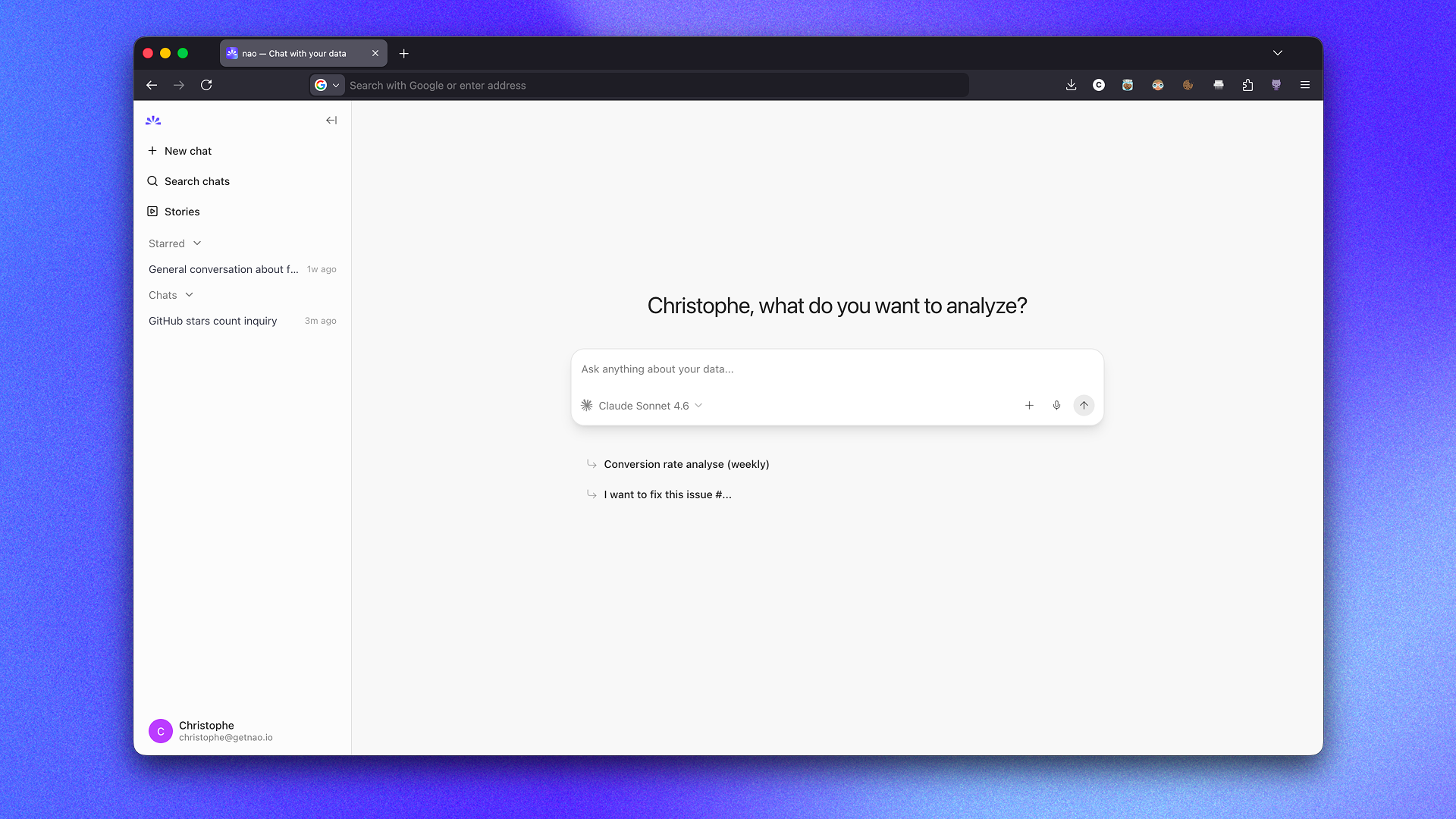
nao lets you build your own agentic BI: an open source analytics agent built on a context layer your data team controls and tests. Sign up on nao Cloud or self-host it.
- Build your data context layer: your data team syncs the warehouse, dbt, docs and rules into files the agent reads, with the
nao-coreCLI or your coding agent. - Let your whole company analyze data: anyone can chat with your data from the nao app, Slack, Teams or Claude, and build their own live dashboards, data apps and slides as stories.
- Monitor that your agent always gets it right: test every context change offline with
nao test, and observe real usage online.
Watch your whole company grow into analysts.
Key features
For data teams
- 🧱 Build your data context layer: sync your warehouse, dbt and docs into files your agent reads.
- 🧪 Evaluate offline:
nao testruns your key questions against the SQL you expect and scores every context change before it ships. - 🔭 Observe online: chat replay shows every conversation. Context recommendations turn errors and downvotes into fixes, opened as pull requests.
- 🏳️ Stack agnostic: nao works with all warehouses, data stacks and LLMs. Anything missing? Contribute to build it!
- 🤖 Set up with your agent: install the nao skills and let Claude Code, Codex or Cursor build your context.
For everyone in the company
- 💬 Analyze data from anywhere: ask questions in plain English from the web app, Slack, Teams or any MCP client.
- 📊 Build your own stories: turn chats into interactive, custom stories and share them with your team.
- 🧊 Transparent reasoning: see the SQL and the files behind every answer.
- 👍 Easy feedback: tell the data team when an answer is right or wrong.
Secure by design
- 🔓 Open source: the whole core product is Apache 2.0. Self-host it, read the code, and shape the roadmap with the community.
- 🏠 Deploy in your own infrastructure: self-host on your own cloud, or run on nao Cloud.
- 🔑 Bring your own LLM key: any provider at your own price, with budgets per user and per team.
- 🛡️ Your SSO and warehouse permissions: Okta, Google, Microsoft Entra ID or any OIDC. Row-level security and identity passthrough.
- ✅ SOC 2 Type II: audited controls. Your data is never used to train models. See our Trust Center.
⚡️ Get started
Option 1: sign up on nao Cloud
Sign up on nao Cloud, connect your warehouse, add your business context and deploy agentic BI to your whole company from the nao UI. No CLI needed.
Option 2: set it up with your coding agent
nao ships skills that teach Claude Code, Codex, Cursor or any skills-compatible agent how to build a nao project end to end: scope the tables, write nao_config.yaml, sync, write RULES.md and create tests.
1. Install the nao CLI and the nao skills in the folder where you want your project:
pip install nao-core
nao skills add getnao/nao
nao skillsis a thin wrapper aroundnpx skills(Node.js 18+ required).npx skills add getnao/naoworks too.
2. Ask your agent to set up nao. Open Claude Code, Codex or Cursor in that folder and paste:
Set up nao, the open source agentic BI builder, on my data: run `pip install nao-core`, then `nao skills add getnao/nao`, then use the setup-context skill to create a nao project on my warehouse. Docs: https://docs.getnao.io/nao-agent/quickstart
The agent asks you once for your warehouse, the tables in scope, extra context (dbt repo, docs) and your LLM provider, then runs nao init, nao sync, and writes your first RULES.md.
3. Launch the chat:
nao chat
The nao chat opens at http://localhost:5005. Start asking questions.
Option 3: self-host
Run the Docker image getnao/nao, or set up a project manually with the CLI:
Step 1: Install nao-core package
pip install nao-core
Step 2: Initialize a nao project
nao initIt asks for a project name, then optionally a database, a repo, an LLM key and a Slack connection (you can skip them and edit
nao_config.yamllater). It creates your project folder withnao_config.yaml,RULES.mdand the context structure.
Step 3: Verify your setup
cd to the project folder and run:
nao debug
Step 4: Synchronize your context
nao syncThis will populate your context folder with your context files (data, metadata, repos, etc.)
Step 5: Launch the chat and ask questions
nao chatThis will start the nao chat UI. It will open the chat interface in your browser at
http://localhost:5005. From there, you can start asking questions to your agent.
Evaluation framework
Unit test your agent performance before deploying it to users. First, create a folder tests/ with questions and expected SQL in yaml.
Then, measure agent's performance on examples with nao test command:
nao test
View results in tests panel:
nao test server
🚀 Deploy
nao Cloud: sign up and set everything up from the nao UI. To push context from a local project instead, create an organization API key in Settings → Organization → Organization API keys, then push your context:
nao deploy https://app.getnao.io --api-key "$NAO_API_KEY"Self-hosted: run the Docker image below, or follow the deployment guide (for example on Cloud Run with PostgreSQL, or with the Helm chart).
Continuous deployment: the
deploy-contextskill sets up a GitHub Action that runsnao deployon every push tomain.
🐳 Docker
Pull the image from DockerHub:
docker pull getnao/nao:latest
Run nao chat with the example project bundled in the image:
docker run -d \
  --name nao \
  -p 5005:5005 \
  -e BETTER_AUTH_URL=http://localhost:5005 \
  getnao/nao:latest
Run nao chat with your local nao project:
docker run -d \
  --name nao \
  -p 5005:5005 \
  -e BETTER_AUTH_URL=http://localhost:5005 \
  -v /path/to/your/nao-project:/app/project \
  -e NAO_DEFAULT_PROJECT_PATH=/app/project \
  getnao/nao:latest
Access the UI at http://localhost:5005 (or at any URL you configured). See the DockerHub page for more details.
🏢 Open source vs Enterprise
The core of nao is open source under Apache 2.0. The Enterprise license adds the controls large companies need, on the same self-hosted deployment. nao Cloud includes the equivalent features.
| Capability | Open source | Enterprise |
|---|---|---|
| Open source agent, chat UI and every LLM provider | ✅ | ✅ |
| Slack, Teams, WhatsApp, Telegram and Mattermost bots | ✅ | ✅ |
| Self-hosting on your infrastructure | ✅ | ✅ |
| Google, GitHub and GitLab login | ✅ | ✅ |
| User groups | Up to 3 | Unlimited |
| Multiple projects (separate data, context and access) | ✅ | |
| Microsoft Entra ID and OIDC SSO | ✅ | |
| Row-level security | ✅ | |
| Warehouse identity passthrough | ✅ | |
| LLM budgets per member and per group | ✅ | |
| White-label branding | ✅ | |
| Priority support and roadmap input | ✅ |
Yearly license per company. The license is verified offline at startup against a signed key. Online licenses also send a periodic heartbeat to licenses.getnao.io; for air-gapped deployments, ask for an offline license, which never phones home. The nao team also helps with implementation, context engineering advisory and training. Talk to us.
Commands
nao --help
Usage: nao COMMAND

╭─ Commands ───────────────────────────────────────────────────────────────────╮
│ chat            Start the nao chat UI.                                       │
│ debug           Test connectivity to configured databases and LLMs.          │
│ deploy          Deploy project context to a remote nao instance.             │
│ docs            Open nao official documentation in your browser              │
│ init            Initialize a new nao project.                                │
│ login           Log in to nao from your browser.                             │
│ logout          Log out of nao and revoke the stored session.                │
│ migrate         Migrate dashboards from Metabase or Tableau.                 │
│ reset-password  Reset a local nao user's password.                           │
│ skills          Install and manage agent skills via npx skills.              │
│ sync            Sync resources using configured providers.                   │
│ test            Run and explore nao tests.                                   │
│ upgrade         Upgrade nao-core to the latest version.                      │
│ --help (-h)     Display this message and exit.                               │
│ --version       Display application version.                                 │
╰──────────────────────────────────────────────────────────────────────────────╯
👩🏻💻 Development
See CONTRIBUTING.md for development setup, commands, and guidelines.
Start nao locally
Prerequisites:
- nvm
- bun
- uv
Run the following commands:
npm run npm:pin
npm install
npm run db:migrate -w apps/backend
Create a .env file at the root of the repository and input environment variables
Minimum variables necessary are:
BETTER_AUTH_SECRET=#run `openssl rand -base64 32` to generate
# Public URL of your app (used for authentication, trusted origins, and Slack redirects)
BETTER_AUTH_URL=http://localhost:3000

# LLM providers
OPENAI_API_KEY=12345678

NAO_DEFAULT_PROJECT_PATH=#path to example folder
Run the following command:
npm run dev
Go to http://localhost:3000 on your browser
📒 Stack
Backend
- Fastify: https://fastify.dev/docs/latest/
- Drizzle: https://orm.drizzle.team/docs/get-started
- tRPC router: https://trpc.io/docs/server/routers
Frontend
- tRPC client: https://trpc.io/docs/client/tanstack-react-query/usage
- Tanstack Query: https://tanstack.com/query/latest/docs/framework/react/overview
- Shadcn: https://ui.shadcn.com/docs/components
⛹️♀️ Join the Community
- Star the repo
- Subscribe to releases (Watch → Custom → Releases)
- Follow us on LinkedIn
- Join our Slack
- Contribute to the repo!
🫰🏻 Partners
nao Labs is a proud Y Combinator company!
📄 License
nao is licensed under the Apache 2.0 License (see LICENSE), except for files marked with /* @license Enterprise */, which are subject to the nao Labs Commercial License in LICENSE-ENTERPRISE.
Explore related projects
Asabeneh/30-Days-Of-Python
The 30 Days of Python programming challenge is a step-by-step guide to learn the Python programming language in 30 days. This challenge may take more than 100 days. Follow your own pace. These videos may help too: https://www.youtube.com/channel/UC7PNRuno1rzYPb1xLa4yktw
78,236 starsgrafana/grafana
The open and composable observability and data visualization platform. Visualize metrics, logs, and traces from multiple sources like Prometheus, Loki, Elasticsearch, InfluxDB, Postgres and many more.
77,724 starsredis/redis
For developers, who are building real-time data-driven applications, Redis is the preferred, fastest, and most feature-rich cache, data structure server, and document and vector query engine.
77,201 starsapache/superset
Apache Superset is a Data Visualization and Data Exploration Platform
75,420 stars