
getnamo/TensorFlow-Unreal
getnamo/TensorFlow-Unreal has 1,223 GitHub stars and 208 forks. GitHot measured 0 stars in 24 hours. Last checked 2026-11-09 07:38 UTC. Last push 2026-10-13.
TensorFlow plugin for the Unreal Engine.
Measured star growth
- in 24h
- 0
- in 7 days
- Update delayed
- in 15 days
- Update delayed
- in 1 month
- Update delayed
Net star changes over overlapping periods, not daily totals. Missing measurements are left blank. Stars measure attention, not software quality.
README.md
OriginalTensorFlow Unreal Plugin



TensorFlow and Keras for Unreal Engine 5.8, from Blueprints and C++. You write the model in Python. The plugin runs it, trains it, feeds it inputs, render targets and audio, and returns results and events to Unreal.
2.0 is a re-architecture
- Python runs out of process, in an embedded interpreter with a per-project virtual environment, through PythonCLI on top of CLISystem.
- A crash in TensorFlow never takes the editor down, and the GIL never touches the game thread.
- MachineLearningRemote, socket.io and UnrealEnginePython are gone.
- The Python API stays the same:
TFPluginAPIscripts keep working. See Migrating from 1.x.
PyTorch Alternative
If you find TensorFlow GPU support on Windows lacking or would like to use a more modern python ML library with unreal, consider using the PyTorch-Unreal plugin instead.
Setup
Put these three plugins in your project's
Plugins/:TensorFlow-Unreal- PythonCLI-Unreal
- CLISystem-Unreal
Release archives include all three, with the Python interpreter. From git, fetch the interpreter with PythonCLI's
Tools/FetchRuntime.ps1(orfetch_runtime.sh).Start the editor. In the background, PythonCLI creates
Intermediate/PythonCLI/venvand installs the TensorFlow profile into it:- The download is about 350 MB, once.
- Later starts skip setup.
- A rebuilt venv comes from uv's cache in seconds.
Add a TensorFlow component to an actor. Set Script Params > Script to your script, for example
my_modelforContent/Scripts/my_model.py, or a bundled example such asexamples/mnist_keras_cnn.
Environment profiles
Choose one in Project Settings > Plugins > TensorFlow > Profile:
| Profile | Installs | Use |
|---|---|---|
| TensorFlow (CPU), the default | tensorflow-cpu 2.21 |
Windows and Linux. Windows has had no native TensorFlow GPU build since 2.10. |
| TensorFlow (CUDA, Linux) | tensorflow[and-cuda] 2.21 |
Linux with an NVIDIA GPU (a few GB of CUDA wheels). |
| Keras on PyTorch (GPU on Windows) | keras 3 + torch (CUDA build) |
GPU on Windows: Keras 3 on the torch backend (KERAS_BACKEND=torch). |
| None | nothing | List your own packages in Python CLI > Requirements. |
- Your own packages: add them in Project Settings > Plugins > Python CLI > Requirements, or in
Content/Scripts/requirements.txt. - Long paths: keep the project path short or enable long paths on Windows; TensorFlow's files are deep.
- Log level: TensorFlow's C++ logging uses Profile's TensorFlow Log Level (
TF_CPP_MIN_LOG_LEVEL).
Packaging
Packaged games (Win64, Linux) take the interpreter, the scripts and, by default, the installed packages with them. PythonCLI installs the environment's packages for the target platform while packaging, so a Linux build packaged on Windows gets Linux wheels. The tensorflow-cpu profile adds about 1.2 GB to a Linux build and 1.3 GB to a Win64 build.
To keep TensorFlow out of the build, set Project Settings > Plugins > Python CLI > Packaged Env Mode to Install On First Run: the game then installs it on its first launch. See PythonCLI's packaging notes.
Python API
import unreal_bridge as ue
from unreal_bridge.ml import TFPluginAPI   # or MLPluginAPI: the same class, snake_case hooks

class Classifier(TFPluginAPI):
    def on_setup(self):                    # once, when the script starts: build or load the model
        import keras
        self.model = keras.saving.load_model(ue.content_path("Models", "mnist.keras"))

    def on_json_input(self, data):         # Send Json Input -> On Input Results
        return {"prediction": 3}

    def on_tensor_input(self, image):      # Send Tensor Input / Texture / Render Target: a numpy array
        scores = self.model(image[None], training=False)
        return {"prediction": int(scores.numpy().argmax())}

    def on_begin_training(self):           # Begin Training: runs on its own thread
        self.model.fit(x, y, epochs=5, callbacks=[ue.keras.StopOnRequest(self),    # Stop Training ends fit()
                                                  ue.keras.ProgressEvents(self)])   # -> On Training Progress
        self.call_event("Saved", {"path": "..."})                                   # -> On Custom Event
        return {"accuracy": 0.99}           # -> On Training Complete

def get_api():
    return Classifier.get_instance()
The API class:
- Hooks:
on_setup,on_json_input,on_float_array_input,on_tensor_input,on_begin_training,on_stop_training,on_save_modelandon_load_model. The camelCase forms from 1.x work too (onJsonInput,onBeginTraining, …). - Custom functions: any other method can be called with Call Custom Function.
- Stopping:
self.should_stop(orshouldStop) turns true on Stop Training, a script stop or reload, and EndPlay. - Events:
self.call_event(name, data)(orcallEvent) reaches On Custom Event.self.report_progress(data)reaches On Training Progress. - Concurrency: inputs are answered while training runs. Everything else for a script runs in order, on that script's own thread.
The rest of unreal_bridge (ue.log, ue.emit, @ue.on_stream, …) is in the PythonCLI README.
Blueprint API
TensorFlow component. It is a Python ML component, and runs in PythonCLI's shared Python process by default.
| Calls | |
|---|---|
| Send Json Input / Send String Input | on_json_input(data), or a named function; the result arrives in On Input Results |
| Send Tensor Input | a tensor (Make Tensor From Floats, Texture To Tensor, …) to on_tensor_input |
| Send Texture Input / Send Render Target Input | an image to on_tensor_input as a float32 (H, W, C) tensor (grayscale/RGB/RGBA, resize, invert, normalization) |
| Send Json Input Texture | 1.x: {"pixels": [grayscale], "size": {"x", "y"}} to on_json_input |
| Send Float Array Input | on_float_array_input(list); the result arrives in On Float Array Results |
| Call Custom Function | any method of the API object, with JSON arguments |
| Begin Training / Stop Training, Save Model / Load Model | |
| Send Json Input (Async), Send Tensor Input (Async), Call Custom Function (Async) | async nodes that return the result (or the error) instead of firing the events |
| Events | |
|---|---|
| On Setup Complete | on_setup finished |
| On Input Results (JsonResult, FunctionName), On Float Array Results | |
| On Training Started / Progress (Json) / Complete (JsonSummary, bStoppedEarly) | |
| On Custom Event (EventName, Data) | call_event |
| On Script Error (Message, Traceback) | load failures, exceptions in calls and training, crashes |
Properties:
- Train On Begin Play
- Stop Training On End Play
- Script Params: Script, Script Root and Args (
ue.args). - Use Shared Process: off gives the component its own process.
Reading results: use Get Json Number / String / Floats with a path such as "prediction", "scores.3" or "action.move".
Images:
- Texture To Tensor and Render Target To Tensor produce float32 tensors (H, W, C), or (C, H, W) when channels-first. Tensor To Texture goes the other way.
- The 1.x conversions are kept: To Float Array, To Grayscale Float Array, To Texture2D, Invert Float Array.
- Texture reading uses, in order:
- the editor's source image;
- a CPU copy (texture Availability: CPU);
- uncompressed platform data (Compression UserInterface2D or Grayscale).
- Render targets are read with a blocking call.
Streams: add a Python Render Target Stream next to the component, for every frame of a scene capture without stalls. Python Audio Stream does the same for audio and Python Observation Stream for gameplay data. See examples/camera_stream_classify.
TF Audio Capture (1.x): microphone capture as raw PCM bytes (On Audio Data, On Capture Finished, WAV helpers), now on Unreal's AudioCapture for every platform. New projects should use a Python Audio Stream.
Example map
Open /TensorFlow/Examples/MnistExample (Content Browser: Plugins > TensorFlow Content > Examples) and press Play.
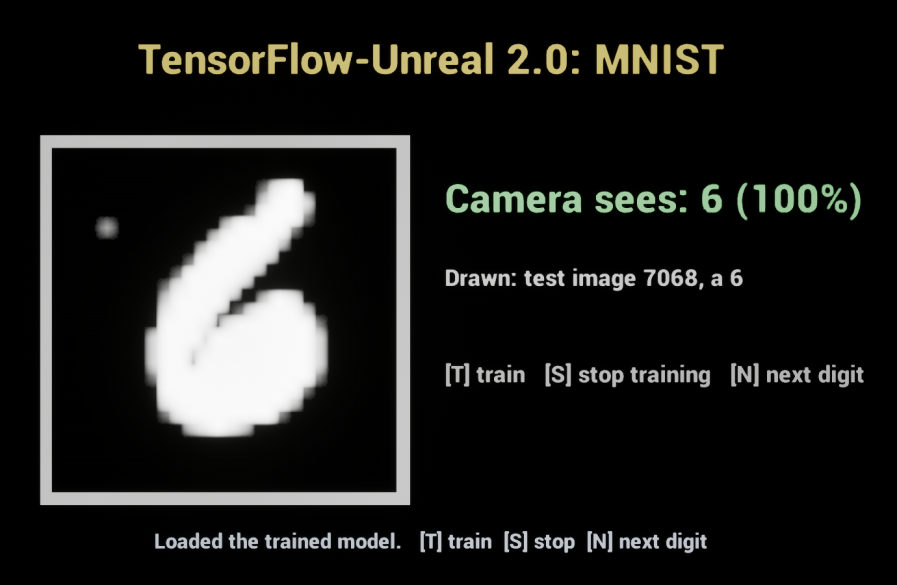
How it works:
BP_MnistExamplerunsexamples/mnist_demoon a TensorFlow component.- On the first play it trains a small CNN on MNIST (about 30 s on a CPU) with live status lines. It saves
Saved/TensorFlow/mnist.keras, and later plays load that model instead. - Every 3 seconds it asks Python for a test digit and draws it into a render target.
- A Python Render Target Stream next to the component streams that render target back to the script, and the model reads what the camera sees.
- Keys: T trains, S stops training, N shows the next digit.
Event graph: everything comes from events.
- On Custom Event (
Status,Digit,Prediction) drives the TextRender components and the canvas. - On Script Error shows Python errors.
- The keys call Begin Training, Stop Training and Call Custom Function.
Regenerating: the example content is generated by BlueprintOracle from Tools/Examples/mnist_example.json:
UnrealEditor-Cmd.exe <Project>.uproject -run=BlueprintOracle -migrate -spec=Plugins/TensorFlow-Unreal/Tools/Examples/mnist_example.json -commit -unattended -nullrhi -nopause
Examples
These are bundled in Content/Scripts/examples/ and resolve by name, for example Script = examples/mnist_keras_cnn:
| Script | |
|---|---|
add_example |
the smallest TF2 script: Send Json Input {"a": [1, 2], "b": [3, 4]} → {"c": [4, 6]} |
mnist_keras_cnn |
trains a Keras CNN on MNIST with progress events and early stop, then saves and loads Saved/TensorFlow/mnist.keras. Predicts tensors and 1.x JSON pixels. |
mnist_spawn_samples |
streams MNIST images to Unreal as events (Call Custom Function spawn_samples, or Begin Training until stopped) |
camera_stream_classify |
with a Python Render Target Stream named camera: classifies the digit the render target shows, as it streams |
mnist_demo |
the example map's script: mnist_keras_cnn plus display-ready Status / Digit / Prediction events and live classification of the camera stream |
The examples project has maps for 1.x.
Migrating from 1.x
The backend changed completely; there is no MachineLearningRemote, socket.io or UnrealEnginePython mode. What carries over:
- Python scripts:
TFPluginAPIsubclasses with camelCase hooks,getApi(),callEvent,shouldStop,import unreal_engine as ue(log,get_content_dir).from TFPluginAPI import TFPluginAPIstill works. Scripts using TF1 sessions and placeholders need porting to TF2 / Keras 3. - Script names: set Script Params > Script to your module name; the
.pyis optional. - Blueprints: the component is now C++ (
TensorFlowComponent).- A CoreRedirect maps the old Blueprint class, so references load, but its variables (Tensor Flow Module, Should Train On Begin Play) need setting again.
- The function names are the same: Begin Training, Stop Training, Send Json Input, Send Json Input Texture. The events are On Input Results, On Training Complete, and On Custom Event (1.x's On Event).
- Dependencies:
upymodule.jsonis gone. Use the environment profile, Python CLI Requirements, orContent/Scripts/requirements.txt. - Old code: the last 1.x commit is tagged
v1.6.0beta-legacy.
Tests
UnrealEditor-Cmd.exe <Project>.uproject -ExecCmds="Automation RunTests TensorFlow; Quit" -unattended -nullrhi -nopause
- The tests cover the profile, image conversions, the add example, and MNIST training, stop and prediction.
- Two tests need a real RHI (use
-RenderOffscreeninstead of-nullrhi):TensorFlow.Mnist.WithCameradraws a test digit into a render target, streams it, and checks the classification.TensorFlow.Examples.MnistMapplays the example map in PIE. It waits until the camera reads the digit the map drew, presses N, and saves a screenshot toSaved/Screenshots.
License
MIT; see LICENSE.
Explore related projects
tensorflow/tensorflow
An Open Source Machine Learning Framework for Everyone
201,400 starshuggingface/transformers
🤗 Transformers: the model-definition framework for state-of-the-art machine learning models in text, vision, audio, and multimodal models, for both inference and training.
168,711 starsAUTOMATIC1111/stable-diffusion-webui
Stable Diffusion web UI
165,261 starsComfy-Org/ComfyUI
The most powerful and modular diffusion model GUI, api and backend with a graph/nodes interface. The fastest local inference engine in the world.
145,835 stars