
geekcastradio/altered-audio-editor
geekcastradio/altered-audio-editor has 30 GitHub stars and 2 forks. GitHot measured +2 stars in 24 hours. Last checked 2026-11-19 21:09 UTC. Last push 2026-11-18.
Measured star growth
- in 24h
- +2
- in 7 days
- Collecting history
- in 15 days
- Collecting history
- in 1 month
- Collecting history
Net star changes over overlapping periods, not daily totals. Missing measurements are left blank. Stars measure attention, not software quality.
About
A free, open-source multitrack audio editor for podcasters and voiceover. It follows the editing workflow that experienced audio editors already know, with its own original design, then adds tools built for podcast production.
Creative & MediaREADME.md
Original
A free, open-source multitrack audio editor for podcasters and voiceover, from The GeekCast Radio Network.
It follows the editing workflow that experienced audio editors already know, with its own original design, then adds tools built for podcast production.
Status: in active development (phase P5, effects). Version 0.9.1 adds Pitch Tune and Pitch Curve (experimental), a Metadata panel with MP3 cover art and saved tag sets, a frequency band splitter, and a snap-to-zero mode. Editing, playback, recording, the Voice Chain effects, conversion and mixdown work today. Transcripts are still to come. Pre-release: keep backups of your recordings.
Download
Windows 10 and 11 (64-bit). Get the latest build from the Releases page, then pick one file under Assets:
Altered-Audio-Editor-<version>-setup.exeis the installer. It adds a Start menu entry and an uninstaller, and works per user or for all users.Altered-Audio-Editor-<version>-portable.zipneeds no install. Unzip it anywhere, including a USB drive, and run the app.SHA256SUMS.txtlists a checksum for each file so you can confirm your download is intact.
The app is not code signed yet, so Windows SmartScreen may say it does not recognize it. Choose More info, then Run anyway. Builds are made by GitHub Actions from the tagged source, so what you download matches what is in this repository.
A few antivirus scanners may flag the installer with a low-confidence guess. That is common for new, unsigned installers and goes away as the file builds a reputation. To check your copy, compare its SHA-256 with SHA256SUMS.txt (in PowerShell: Get-FileHash <file>).
Linux and macOS (experimental). Releases also carry a Linux AppImage and .deb, and a macOS .dmg for Apple silicon Macs. They are built from the same source but not tested by us yet, so reports are welcome. The macOS app is not notarized: the first time, right-click it and choose Open. AAC export works on Windows only for now.
Early versions are pre-releases. Expect rough edges and keep backups of your recordings.
What it does today
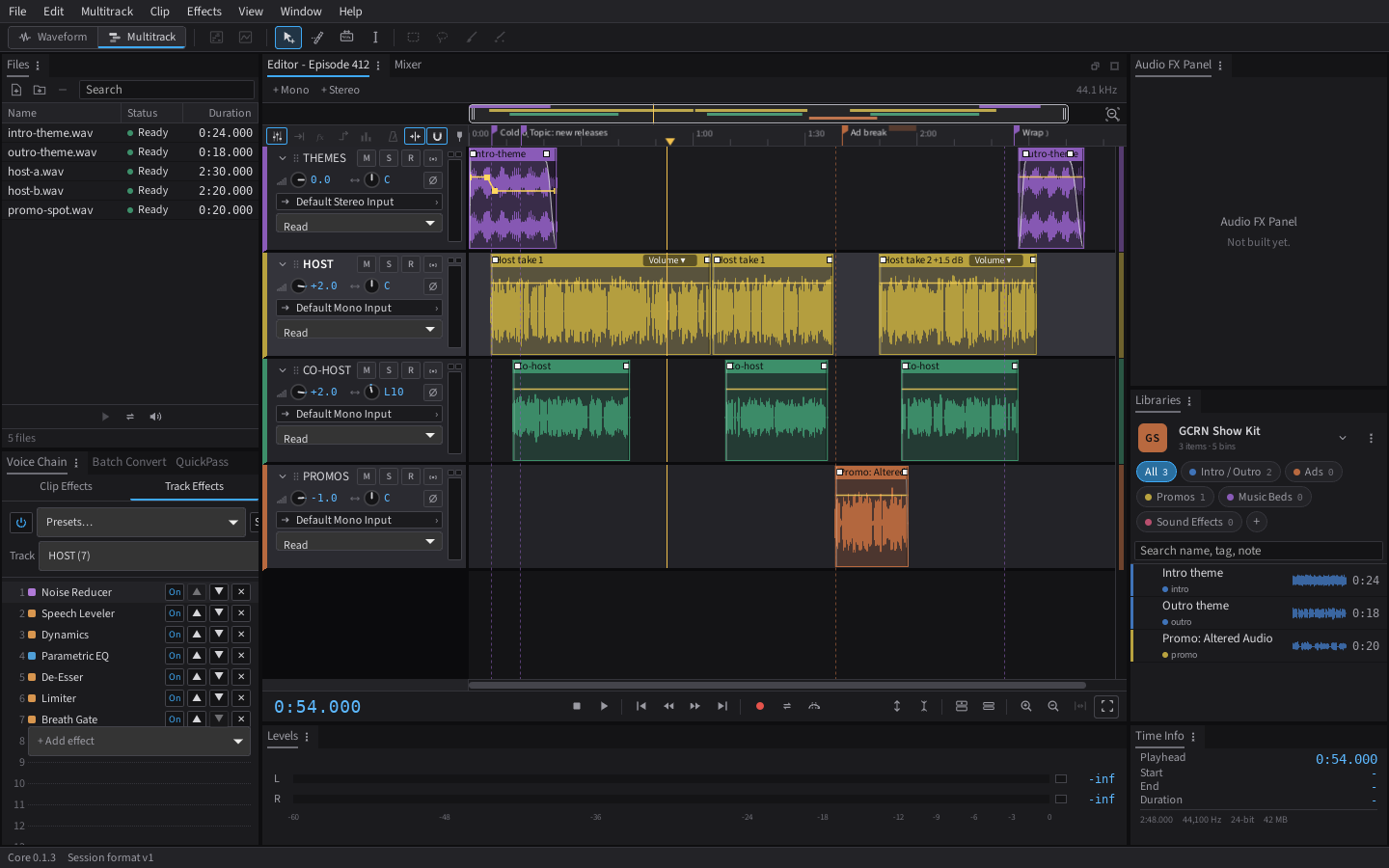
- Multitrack editing: move, razor, slip and time-selection tools; trim, split, merge, loop and copy clips; fades and crossfades; clip volume and pan envelopes; markers; ripple delete.
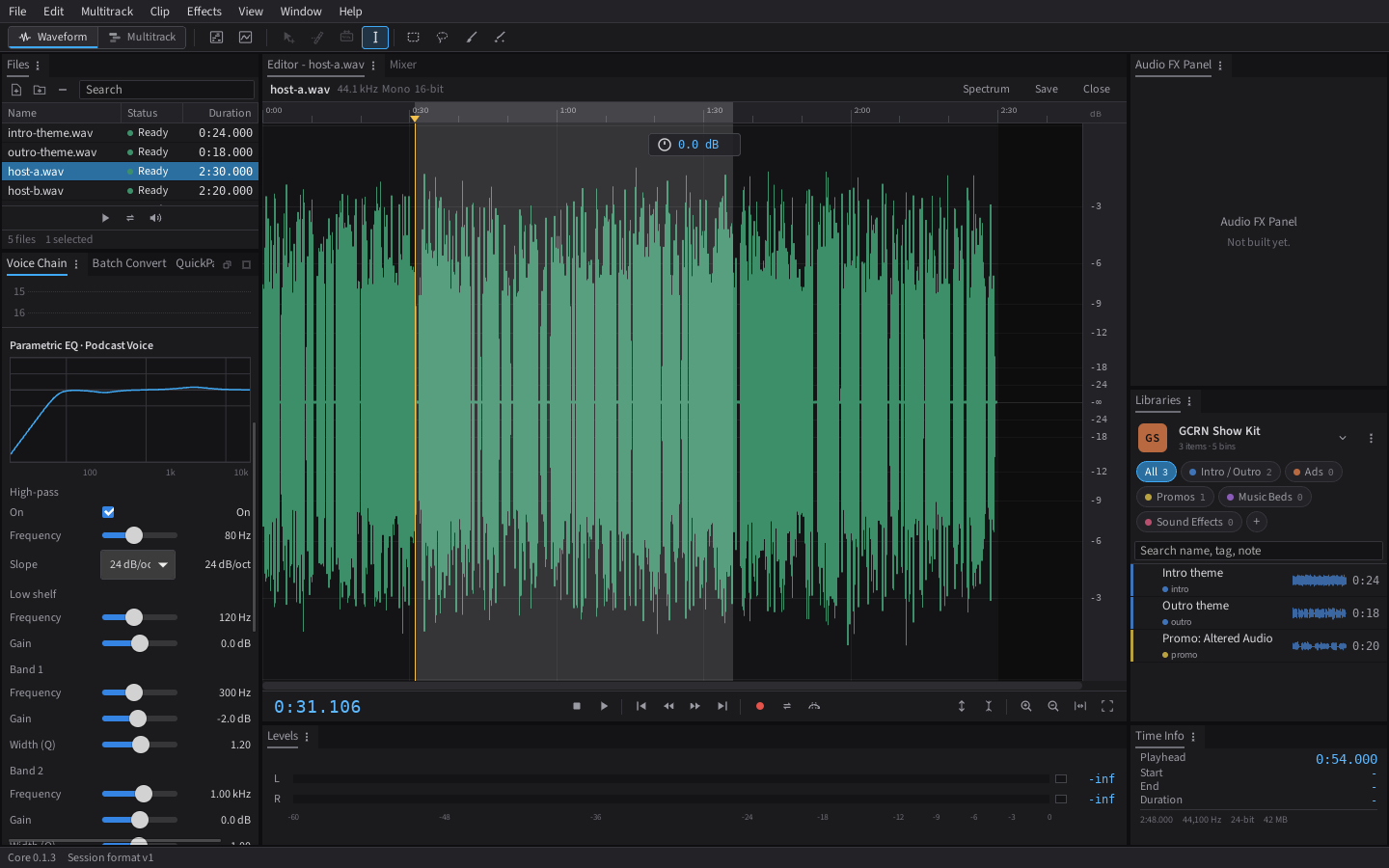
- Waveform editor: open any file on its own to cut, silence, amplify and fade it, try a Voice Chain on it as a live preview and apply it to the selection or the whole file (undoable), then save it in place as WAV, FLAC, MP3 or M4A, or as a new file.
- Opens what call recorders export: WAV (including 8-bit and ADPCM), FLAC, MP3, AAC/M4A, ALAC, Ogg Vorbis, Ogg FLAC and Opus. Insert Files as Tracks puts each speaker's file on its own track, straight from the downloaded zip.
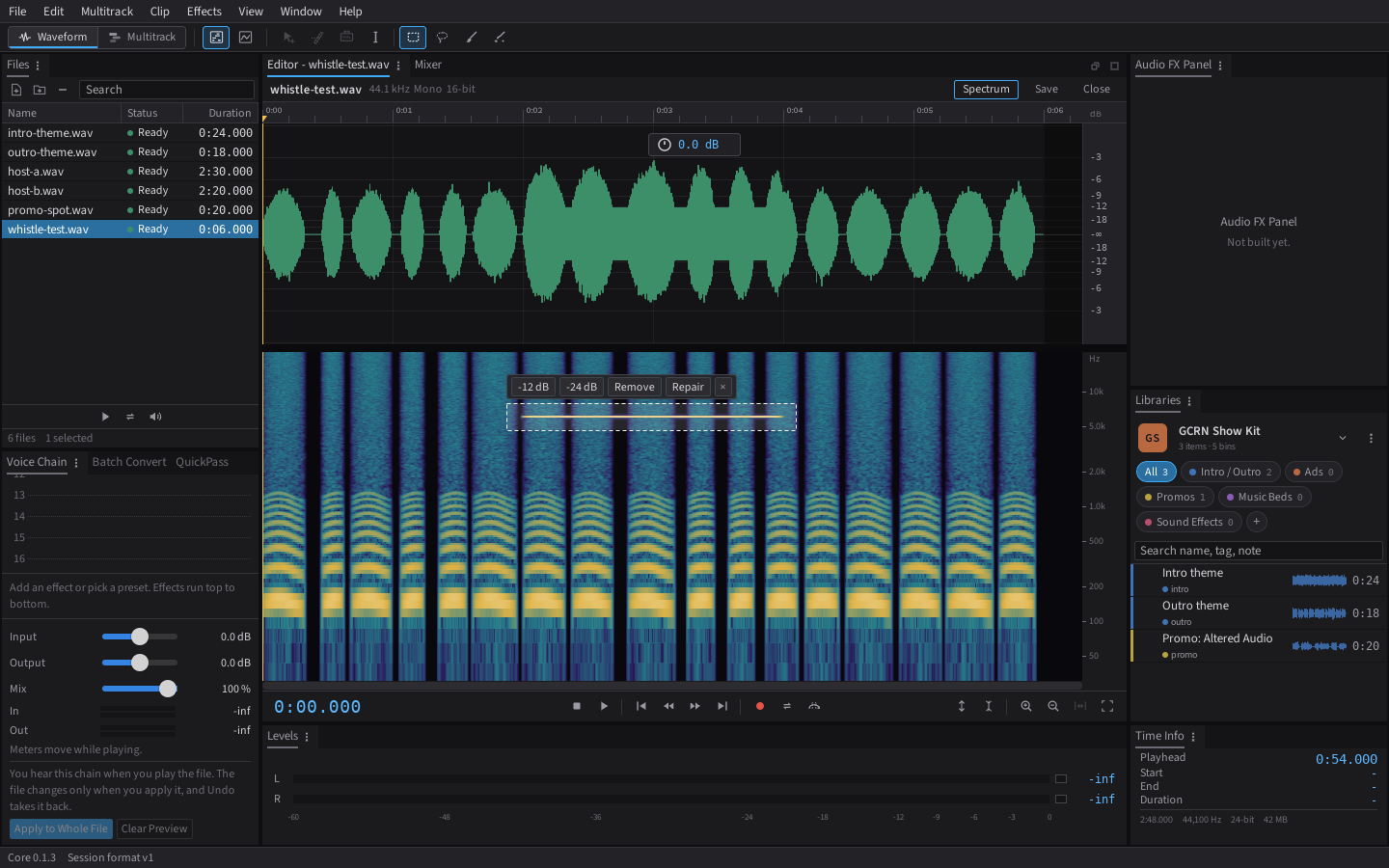
- Spectrum and pitch views: see frequencies over time, select an unwanted sound (a whistle, a buzz, a chair squeak) with a box, lasso or brush and reduce, remove or repair just that, leaving the voice under it alone. Spot Repair fills a painted click or cough from the audio around it.
- Audio drivers: the system driver everywhere, and ASIO on Windows (release builds), with every input channel of an interface pickable per track.
- Recording: arm tracks, pick each one's input, and record them to their own files while the session plays. Punch in over a time selection with pre-roll, and set a latency offset so takes line up. On Windows, a "System audio" input records what the computer plays, such as a call, next to your mics.
- Voice Chain: up to 16 effects on any clip or track, heard live and included in every export: Parametric EQ, Hum Cut, Dynamics, Limiter, Breath Gate, De-Esser, Speech Leveler, Gain, Noise Reducer, Noise Print Reducer and Sound Eraser (both learn from a selection), Hiss Reducer, Room Reducer, Click Repair, Clip Repair, DC Offset Fix, Band EQ (10, 20 or 30 bands), Curve EQ (drag its points on the graph), Notch Filter, Precision Filter (Butterworth, Chebyshev, Bessel or Elliptic), Multiband Compressor, Center Remover, Phase Rotate (phase angle, per-channel polarity and a fine delay, to line up tracks that partly cancel) and Pitch Shift. Each effect's settings open in their own movable window, and any setting can move over time: draw its points on the clip, like a volume envelope. Sliders change the sound as you drag, without stopping playback, and meters show the track chain's level in and out. EQs and filters draw their response. Start from presets like Podcast Voice or Voice Over and save your own.
- Playback: live mixing with per-track volume, pan, mute, solo and polarity; Loop Playback and Skip Selection; stereo meters on every track with peak hold and clip lights.
- Libraries: keep your show's intros, outros, promos and ads in one place and drag them straight onto tracks.
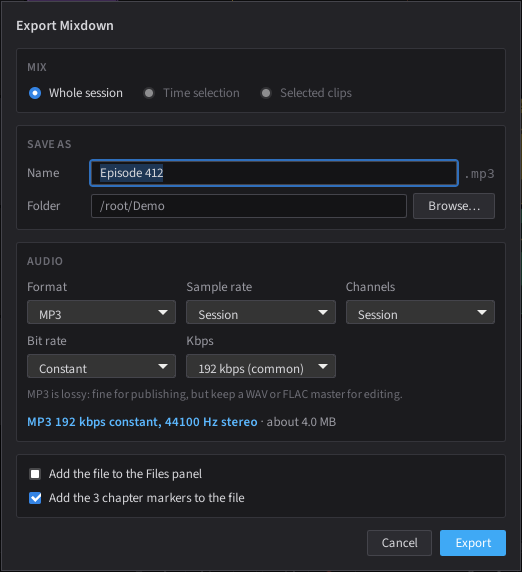
- Mixdown and stems: export the session, a selection or each track as WAV (4-bit ADPCM, 8, 16, 24 or 32-bit float), FLAC, MP3 (constant or variable bit rate) or AAC/M4A (on Windows) at any sample rate, with a loudness check (LUFS and true peak). File > Export > Multitrack Session (.sesx) writes a copy for editors that read that format (tracks, clips, levels and fades; effects stay behind).
- Loudness Match: set each clip or track to a podcast, platform or broadcast target in one step. Broadcast targets follow your region (US by default).
- QuickPass: scan for silences, short noises, clicks, clipping or the parts with sound. Remove silences (keeping a short natural pause), turn them down, split or mark them; repair clicks and clipped peaks into a copy of the clip's audio so the original is never touched. Comes with presets and saves your own.
- Time stretch: fit a clip to an exact length (a 15, 30 or 60 second ad slot, or a time selection) keeping the pitch, or change speed and pitch together like tape.
- Music Fit: make a music bed an exact length without changing its speed. It cuts out or repeats whole sections where the music lines up, keeps the intro and ending, and leaves the joins as editable crossfades. Offers up to three plans that join in different places, and says where each one joins.
- Phase Align: line up two recordings of the same voice (a host mic and a room mic, a camera and a recorder) to the sample, flipping polarity when needed.
- Chapters: chapter markers export as a timestamp list for video descriptions, a CSV spreadsheet, or podcast chapters JSON, with an optional link each and tips on titles. They are written into exported WAV, FLAC, MP3 and M4A files and read back when you open one.
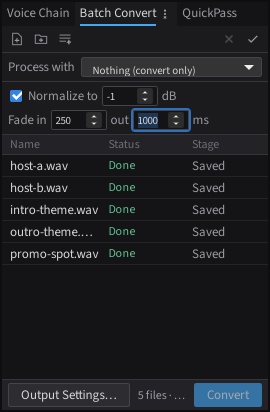
- Batch Convert: turn a folder of files into WAV, FLAC, MP3 or AAC in one go, optionally running a Voice Chain preset on each, then normalizing the peak and fading the ends, with naming, a destination folder, sample rate, channel and dither settings, per-file progress, and tags copied across or set for every file (WAV, FLAC, MP3 and M4A).
- Speaker Balance and host profiles: level every voice track to the quietest in one click before processing, and start each host's track from a Close Mic, Standard Mic or Remote Guest profile.
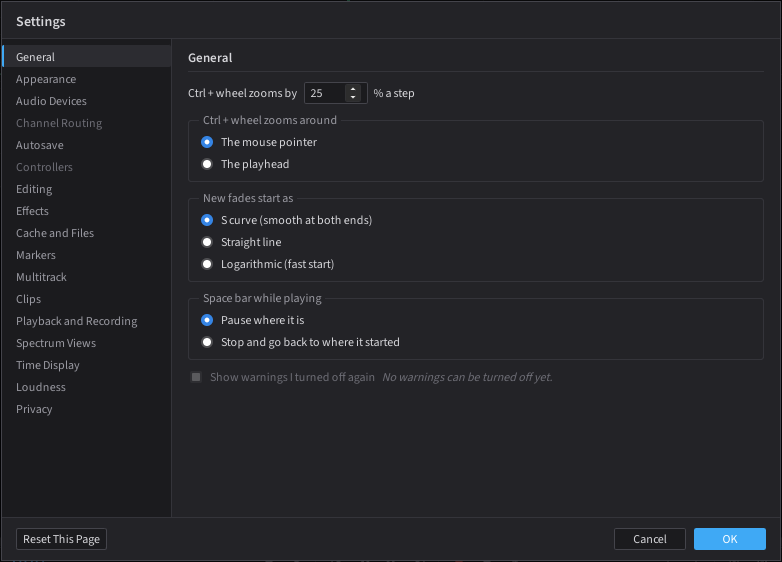
- Settings: zoom, fades, colors, output device, autosave, solo, meter colors, recording offset, time format loudness defaults, session backups and a record count-in in one place (Edit > Settings).
- Session templates: start every episode from your show's track layout.
- Music Mode (off by default): View > Music Mode adds the music tools without changing the podcast layouts: MIDI tracks with a piano roll and VST3 instruments, an Amp Model effect that loads Neural Amp Modeler captures, a metronome, a tempo strip and Bars and Beats time. The Music workspace (Window > Workspace) turns it on for you. Also from this release: buses, sends and sidechain, VST3 plug-ins in Voice Chains (each in its own process), a Phase Wheel, and a 3D Space panel (Window menu).
- Export check and Publish Package: after each export the app reopens the file and confirms it opens, decodes, has the right length and sample rate, is not silent and holds its chapters. A loudness scan shows the result before you export. File > Publish Package exports the MP3 and writes a folder with episode.json (RSS.com API fields), show notes, chapters (JSON and WebVTT), ad positions and soundbites. Nothing is uploaded.
- From the Audiform project: Convolution Reverb, Vox Strip, Reverse and Invert Polarity, fade bending, and searchable effect lists (see ATTRIBUTION.md).
- Duck Music Under Voice and the Audio FX Panel: Multitrack > Duck Music Under Voice turns a music track down while a voice track talks (light, medium or deep), using plain Dynamics effects you can still edit. The Audio FX Panel gives a voice Restoration, Level, Clarity and Polish at Light, Medium or Strong in one step; it writes ordinary Voice Chain effects, so nothing is hidden.
- Duck Music Under Voice and the Audio FX Panel: one step turns the music down while anyone speaks (light, medium or deep), and the Audio FX Panel offers four looks (restoration, level, clarity, polish) in Light, Medium or Strong, written as ordinary Voice Chain effects you can open and tune.
- Help > Check for Updates finds new versions and can install them (installer copies only; the portable zip gets the download page).
- Imports
.sesxsessions: brings in tracks, clips and positions from.sesxmultitrack session files.
Under the hood
- A Rust audio engine. Memory-safe by design, with no
unsafecode in the app's own engine and file handling. - Plug-ins run in their own process. A VST3 plug-in that crashes shows an error on its slot; your session carries on.
- Predictable output. The same session renders to the same bits every time, whatever block size the sound card uses, and every built-in effect gives identical results on a repeat run. Tests check this on every change.
- Native 64-bit. Big sessions are fine.
- Audio on the CPU. Sound processing stays off the graphics card on purpose: it is light work, and the CPU keeps latency low and results exact.
Private by design
- No account and no login. Ever.
- No telemetry, analytics or tracking. The app makes no network calls on its own.
- Update checks run only when you click Help > Check for Updates, or if you turn on the weekly check. Nothing installs without your click.
- Your audio never leaves your computer.
Support the project
Altered Audio Editor is free. If it helps your show, you can support it at paypal.me/scp21.
Contributing
Bug fixes and features are welcome through pull requests. See CONTRIBUTING.md. Report security problems privately as described in SECURITY.md.
Thanks to everyone listed in CONTRIBUTORS.md.
Build from source (Windows)
First time on this machine? Follow docs/setup-windows.md. It covers installing Rust, Node and the Microsoft build tools step by step.
Then, from the repo folder:
npm install
npm run tauri dev
Checks
These are the same checks CI runs. Run them before every commit.
npm run check
npm test
npm run build
cd src-tauri
cargo fmt --check
cargo clippy --all-targets -- -D warnings
cargo test
File formats
Every file the app writes is versioned JSON with a format and schema_version header. Schemas live in /schemas.
| File | Format id | Extension |
|---|---|---|
| Session | altaudio.session |
.altaudio |
| Library index | altaudio.library |
library.json |
| Session template | altaudio.template |
.altemplate |
| Workspace | altaudio.workspace |
.alworkspace |
| Host voice profile | altaudio.host_profile |
.alhost |
| Keyboard shortcuts | altaudio.keymap |
.alkeys |
Markers and chapters inside exported files
What Export Mixdown writes into the audio file itself, and what we have checked. "Checked" means the app reads the file back after export, and our test suite also runs ffprobe and flac -t on the files. Other programs differ in what they read, so the last column says what to expect rather than promising it.
| Format | What is written | Names | Ranges | Checked here | Notes |
|---|---|---|---|---|---|
| MP3 | ID3v2.3 chapters (CHAP frames and a CTOC table of contents), with a link per chapter |
yes | start and end | read back by the app and ffprobe |
Chapter markers only. The format podcast apps read. |
| M4A | A chpl chapter list |
yes | start only | read back by the app and ffprobe |
Chapter markers only. |
| FLAC | CHAPTERnnn and CHAPTERnnnNAME comments |
yes | start only | read back by the app and ffprobe |
Chapter markers only. |
| FLAC, optional cue sheet | A CUESHEET block with a track at each marker start, for every marker type |
no | start only | flac -t accepts it |
Off by default. A cue sheet has no names, and programs built on ffmpeg then show it as unnamed chapters in place of the named ones. Use it only when a program asks for a cue sheet. |
| WAV | cue points with labl names, and an ltxt length for ranges |
yes | start and length | read back by the app | By default chapter markers only. With "Add all markers", every marker type goes in. ffprobe does not show cue points as chapters. Not written to RF64 files (over 4 GB). |
Audio editors that keep markers in WAV cue chunks, which includes most of the editors the app imports from, are the ones to try first for WAV markers. We have not tested every editor, so if one drops names or ranges, open an issue with the editor and version.
Project docs
- CLAUDE.md: scope, phase plan, architecture and clean-room rules.
- docs/decisions.md: architecture decisions log.
- docs/design-principles.md: what stays familiar, what is our own, and the no-AI-unless-you-turn-it-on rule.
- ATTRIBUTION.md: credits for any adapted third-party code.
License
Copyright (c) The GeekCast Radio Network, LLC.
Licensed under the GNU General Public License v3.0 or later. See LICENSE.
"Altered Audio Editor" and its logo are trademarks of The GeekCast Radio Network, LLC and are not covered by the GPL. Forks are welcome under a different name. Launchers and app catalogs may list the unmodified official builds under the name, on the terms in TRADEMARKS.md.
All icons and artwork are original. This project is independent and not affiliated with or endorsed by any other software company.