
galkan/crowbar
galkan/crowbar has 1,539 GitHub stars and 316 forks. GitHot measured 0 stars in 24 hours. Last checked 2026-11-08 04:18 UTC. Last push 2023-12-19.
Crowbar is brute forcing tool that can be used during penetration tests. It is developed to support protocols that are not currently supported by thc-hydra and other popular brute forcing tools.
Measured star growth
- in 24h
- 0
- in 7 days
- Update delayed
- in 15 days
- Update delayed
- in 1 month
- Update delayed
Net star changes over overlapping periods, not daily totals. Missing measurements are left blank. Stars measure attention, not software quality.
README.md
OriginalCrowbar - Brute forcing tool
What is Crowbar?
Crowbar (formally known as Levye) is a brute forcing tool that can be used during penetration tests. It was developed to brute force some protocols in a different manner according to other popular brute forcing tools. As an example, while most brute forcing tools use username and password for SSH brute force, Crowbar uses SSH key(s). This allows for any private keys that have been obtained during penetration tests, to be used to attack other SSH servers.
Currently Crowbar supports:
- OpenVPN (
-b openvpn) - Remote Desktop Protocol (RDP) with NLA support (
-b rdp) - SSH private key authentication (
-b sshkey) - VNC key authentication (
-b vpn)
Installation
Kali Linux users can do
# sudo apt install -y crowbar
Else if you wish to install from source, install all the dependencies:
Debain 9/10+ & Kali Rolling
# sudo apt install -y nmap openvpn freerdp2-x11 tigervnc-viewer python3 python3-pip
Debain 7/8 & Kali 1/2
# sudo apt-get install -y nmap openvpn freerdp-x11 vncviewer
Then get latest version from GitHub:
# git clone https://github.com/galkan/crowbar
# cd crowbar/
# pip3 install -r requirements.txt
Note: The RDP client package depends on your OS:
- Debain 9/10 & Kali Rolling uses
freerdp2-x11 - Debian 7/8 & Kali 1/2 uses
freerdp-x11package. - Else you can try
xfreerdp. - The fall back method would be to compile & tweak
freerdpby following: http://opentechnotes.blogspot.co.uk/2015/02/compile-headless-freerdp-credential-checking.html
Don't forget to patch ./lib/main.py to point to the new binary!
Usage
- -b: Target service. Crowbar supports:
openvpn,rdp,sshkey,vnckey - -c: Static password to login with
- -C:
</path/to/file>for passwords list - -d: Run a tcp port scan (nmap) on the IP range (
-s/-S) before trying to brute force. This will discover whether the target's port is open - -D: Enable debug mode
- -h: Shows a help menu
- -k:
</path/to/file-or-folder>for key files (for SSH or VNC) - -l:
</path/to/file>to store the log file (default is./crowbar.log) - -m:
</path/to/file>for a OpenVPN configuration file - -n: Thread count
- -o:
</path/to/file>to store the successfully attempt(s) (default is./crowbar.out) - -p: Port number (if the service is not on the default port)
- -q: Enable quiet mode (only show successful logins)
- -s: Target IP address/range (in CIDR notation)
- -S:
</path/to/file>which is stores target IP addresses - -t: Timeout value
- -u: Single username
- -U:
</path/to/file>which stores the username list - -v: Enable verbose mode (shows all the attempts)
If you want see all usage options, please use: ./crowbar.py --help.
ATTENTION: If you want to use username including DOMAIN, please specify username like below. Backslash (\) is the escape character for python. So you have to use either of the following two formats:
# ./crowbar.py -b rdp -u DOMAIN\\gokhan alkan -c Aa123456 -s 10.68.35.150/32
2015-03-28 11:03:39 RDP-SUCCESS : 10.68.35.150:3389 - "DOMAIN\gokhan alkan":Aa123456,
# ./crowbar.py -b rdp -u gokhan alkan@ornek -c Aa123456 -s 10.68.35.150/32
2015-03-28 11:04:00 RDP-SUCCESS : 10.68.35.150:3389 - "gokhan alkan@DOMAIN":Aa123456,
Demonstration Videos
Brute Forcing - Remote Desktop Protocol (RDP)
Below are a few examples of attacking RDP using Crowbar.
RDP brute forcing a single IP address using a single username and a single password:
# ./crowbar.py -b rdp -s 192.168.2.182/32 -u admin -c Aa123456

RDP brute forcing a single IP address using username list file and a single password:
# ./crowbar.py -b rdp -s 192.168.2.211/32 -U ~/Desktop/userlist -c passw0rd

RDP brute forcing a single IP address using a single username and a password list:
# ./crowbar.py -b rdp -s 192.168.2.250/32 -u localuser -C ~/Desktop/passlist

RDP brute forcing a subnet using a username list and a password list in discovery mode:
# ./crowbar.py -b rdp -s 192.168.2.0/24 -U ~/Desktop/userlist -C ~/Desktop/passlist -d

Brute Forcing - SSH Private Keys
Below are a few examples which you have using Crowbar.
SSH key brute force attempt to a single IP address using a single username and a single private SSH key:
# ./crowbar.py -b sshkey -s 192.168.2.105/32 -u root -k ~/.ssh/id_rsa

SSH key brute force attempt to a single IP address using a single username and all the SSH keys in a folder:
# ./crowbar.py -b sshkey -s 192.168.2.105/32 -u root -k ~/.ssh/
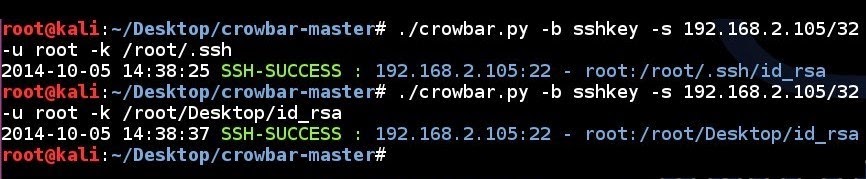
SSH key brute force attempt to a subnet using a single username and all the SSH keys in a folder in discovery mode:
# ./crowbar.py -b sshkey -s 192.168.2.0/24 -u root -k ~/.ssh/ -d

Brute Forcing - VNC
Below is an example of attacking a VNC service using Crowbar.
VNC brute force attempt to a single IP address using a password file with specified port number:
# ./crowbar.py -b vnckey -s 192.168.2.105/32 -p 5902 -k ~/.vnc/passwd

Brute Forcing - OpenVPN
Below is an example of attacking OpenVPN using Crowbar.
OpenVPN brute force attempt to a single IP address using a configuration file, a single username and a single password with specified port number and optional certificate file. Doesn't matter if its TCP or UDP:
# grep remote ~/Desktop/vpnbook.ovpn
remote vpn.example.com 1194 udp
# host vpn.example.com | awk '{print $1}'
198.7.62.204
# grep '^auth-user-pass' ~/Desktop/vpnbook.ovpn
# ./crowbar.py -b openvpn -s 198.7.62.204/32 -p 1194 -m ~/Desktop/vpnbook.ovpn -k ~/Desktop/vpnbook_ca.crt -u vpnbook -c cr2hudaF

Logs & Output
Once you have executed Crowbar, it generates 2 files for logging and result that are located in your current directory. Default log file name is crowbar.log which stores all brute force attempts while execution. If you don't want use default log file, you should use -l log_path. The second file is crowbar.out which stores successful attempts while execution. If you don't want use default output file, you should use -o output_path. After that you can observe Crowbar operations.
You can make the output more verbose by doing -v, or even more information can be shown with -vv. If you're trying to troubleshoot an issue or potential bug, using -D will enable debug mode and will give a lot more output.
Black Hat Sessions


Categories
- Network Attacks
Code
Lead Developer
- Gokhan Alkan - https://github.com/galkan
Social Media
Thanks To
- Bahtiyar Bircan
- Ertuğrul Başaranoğlu
- g0tmi1k
Bookmarks
- Patator - A multi-purpose brute-forcer for protocols that are not supported by Crowbar
- Debian OpenSSL Predictable PRNG - Weak predictable SSH keys for Debian based systems (2011)
- ssh-badkeys - A collection of static private SSH keys
Explore related projects
codecrafters-io/build-your-own-x
Master programming by recreating your favorite technologies from scratch.
561,095 starspublic-apis/public-apis
A collective list of free APIs
497,334 starsmorluto/rea
Reverse engineer anything with agents, from app behavior down to native binaries.
443,859 starsopenclaw/openclaw
The AI that really does things. Any OS. Any Platform. The lobster way. 🦞
394,213 stars