
furmanp/gitlab-activity-importer
furmanp/gitlab-activity-importer has 27 GitHub stars and 42 forks. GitHot measured 0 stars in 24 hours. Last checked 2026-11-14 19:30 UTC. Last push 2026-09-05.
What you can do
- Automated Daily Imports: Syncs your GitLab activity with GitHub automatically each day.
- Manual Imports: Allows on-demand updates.
- Secure Data Handling: Requires minimal permissions and uses GitHub repository secrets for configuration.
Measured star growth
- in 24h
- 0
- in 7 days
- Collecting history
- in 15 days
- Collecting history
- in 1 month
- Collecting history
Net star changes over overlapping periods, not daily totals. Missing measurements are left blank. Stars measure attention, not software quality.
About
Automatically recreate your GitLab activity chart in Github without moving entire codebase.
Developer ToolsREADME.md
Original

Git activity Importer (Gitlab -> Github)
A tool to transfer your GitLab commit history to GitHub, reflecting your GitLab activity on GitHub’s contribution graph.
Table of Contents
Overview
This tool fetches your commit history from private GitLab repositories and imports it into a specified GitHub repository, creating a visual representation of your activity on GitHub’s contribution graph. It can be configured for automated daily imports or manual runs.
Features
- Automated Daily Imports: Syncs your GitLab activity with GitHub automatically each day.
- Manual Imports: Allows on-demand updates.
- Secure Data Handling: Requires minimal permissions and uses GitHub repository secrets for configuration.
Setup
1. Environmental Variables
    | Secret Name       | Description                                                            |
    | ----------------- | ---------------------------------------------------------------------- |
    | `BASE_URL`        | URL of your GitLab instance (e.g., `https://gitlab.com`)               |
    | `GITLAB_USERNAME` | Your GitLab username                                                   |
    | `GH_USERNAME`     | Your GitHub username                                                   |
    | `COMMITER_EMAIL`  | Email associated with your GitHub profile                              |
    | `GITLAB_TOKEN`    | GitLab personal access token (read permissions only)                   |
    | `ORIGIN_TOKEN`    | GitHub personal access token (with write permissions for auto-push)    |
    | `ORIGIN_REPO_URL` | HTTPS URL of your GitHub repository (ensure it has a `.git` extension) |
2. Automatic Imports (Recommended)
This approach will automatically keep your activity up to date. The program is being run daily at midnight UTC. It imports your latest commits and automatically pushes them to specified GitHub repository.
To do that follow these steps:
- Fork this repository to your GitHub account.
- Create an empty repository in your GitHub profile where the commits will be pushed.
The repository can be completely empty; the importer creates the first commit on a
mainbranch itself. - Configure repository secrets in your forked repository:
- Go to your forked repository settings.
- Under Security, navigate to Secrets and variables > Actions.
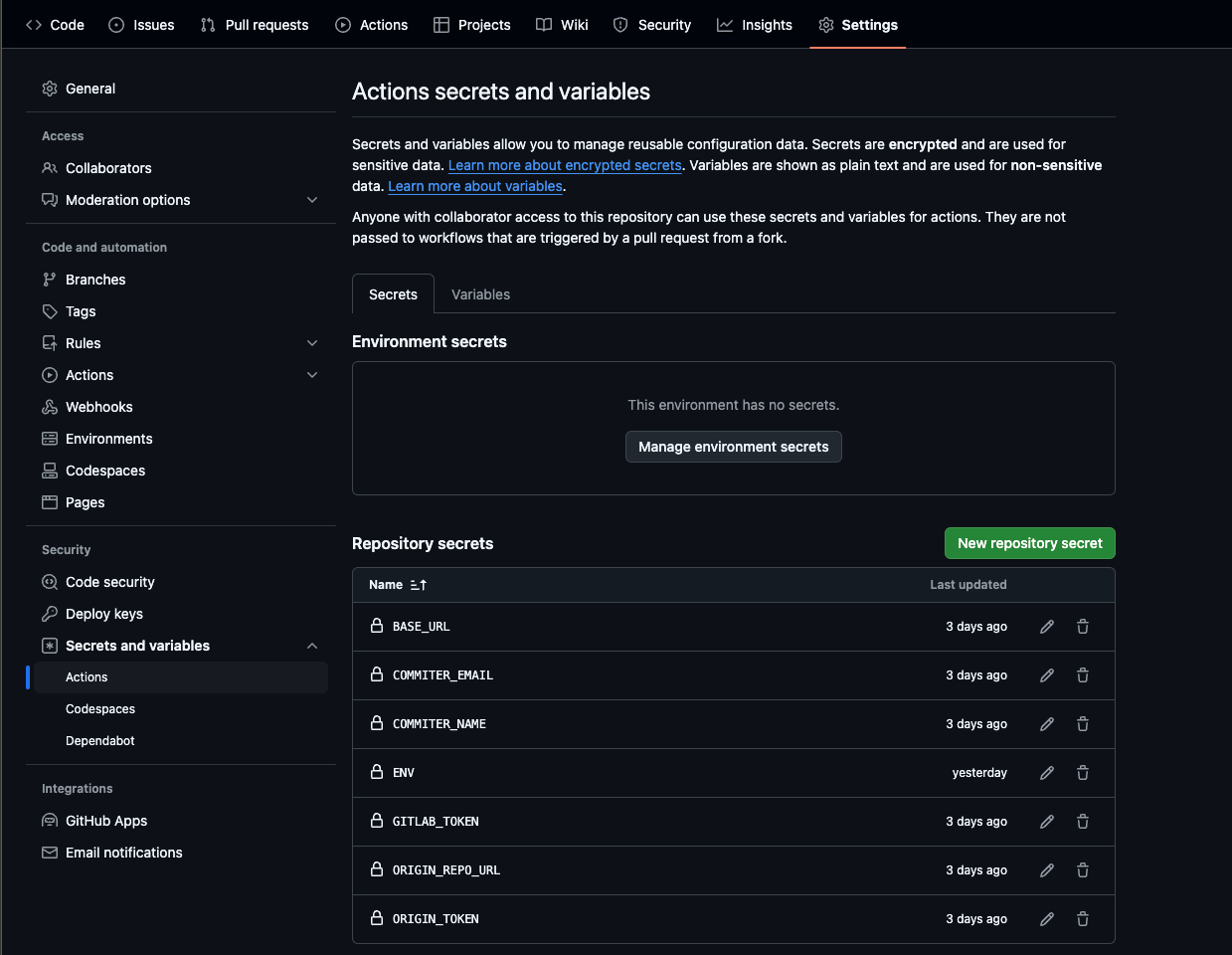
- Add the secrets from section 1:
- Enable GitHub Actions in your fork. Open the Actions tab of the fork and confirm that workflows are enabled — GitHub does not run them in a new fork until you do.
Once these variables are saved in your Repository secrets, your commits will be automatically updated every day.
3. Manual Imports using repository
You need to have GO installed on your computer
If you prefer to run the importer manually:
- Clone the repository
- Create an
.envfile in the root of your project and provide necessary variables - Run the tool locally whenever you want to sync your activity using
go run ./cmd/main.go
4. Manual Imports using binary
- Download the latest release of the tool.
- Set up the same environment variables on your local machine:
export BASE_URL=https://gitlab.com
export GITLAB_USERNAME=your_gitlab_username
export GH_USERNAME=your_github_username
export [email protected]
...
- Run the tool binary whenever you want to sync your activity.
Configuration
This project uses GitHub Actions to automate builds and daily synchronization:
- GitHub Actions Workflow: The .github/workflows/schedule.yml defines the automation steps for building and running the tool.
- Secrets Configuration: The secrets allow secure storage and retrieval of required tokens and URLs during automation.
Important Notes:
- GitLab permissions: The tool requires read-only access to your GitLab user and Gitlab repositories (
read_userandread_repository) - GitHub permissions: Your GitHub token must have write access to the destination repository for automatic pushes.
License
This project is licensed under the MIT License, which allows for free, unrestricted use, copying, modification, and distribution with attribution.