
francordel/myrtia
francordel/myrtia has 37 GitHub stars and 5 forks. GitHot measured 0 stars in 24 hours. Last checked 2026-11-14 23:57 UTC. Last push 2026-11-13.
What you can do
- Live CouncilAttack. N proposer models propose, cross-critique, vote (Borda Top-1), a chairman synthesises, and an in-loop judge grades — rendered live over WebSocket, turn by turn.
- Multiple attack strategies. council, council-crescendo (accumulating multi-turn escalation), and direct (baseline), each exposing its own advanced configuration in the UI.
- Behaviour library. 278 HarmBench behaviours across five themes, selectable via per-theme checkboxes and search, or replaced entirely by your own goals.
- Provider-agnostic connectors. OpenAI, Anthropic (OpenAI-compatible endpoint), self-hosted vLLM, and local Ollama, mixed freely across council, chairman, judge, and target roles.
Measured star growth
- in 24h
- 0
- in 7 days
- Collecting history
- in 15 days
- Collecting history
- in 1 month
- Collecting history
Net star changes over overlapping periods, not daily totals. Missing measurements are left blank. Stars measure attention, not software quality.
About
Myrtia — agent-native red teaming for LLMs and AI agents: a deliberating council of attacker models (propose, cross-critique, Borda vote, chairman synthesis), 13 attack strategies, live turn-by-turn UI and ASR analytics. Open-source, built on IBM ARES.
AIREADME.md
Original
MYRTIA
Agent-native red teaming for large language models and AI agents.



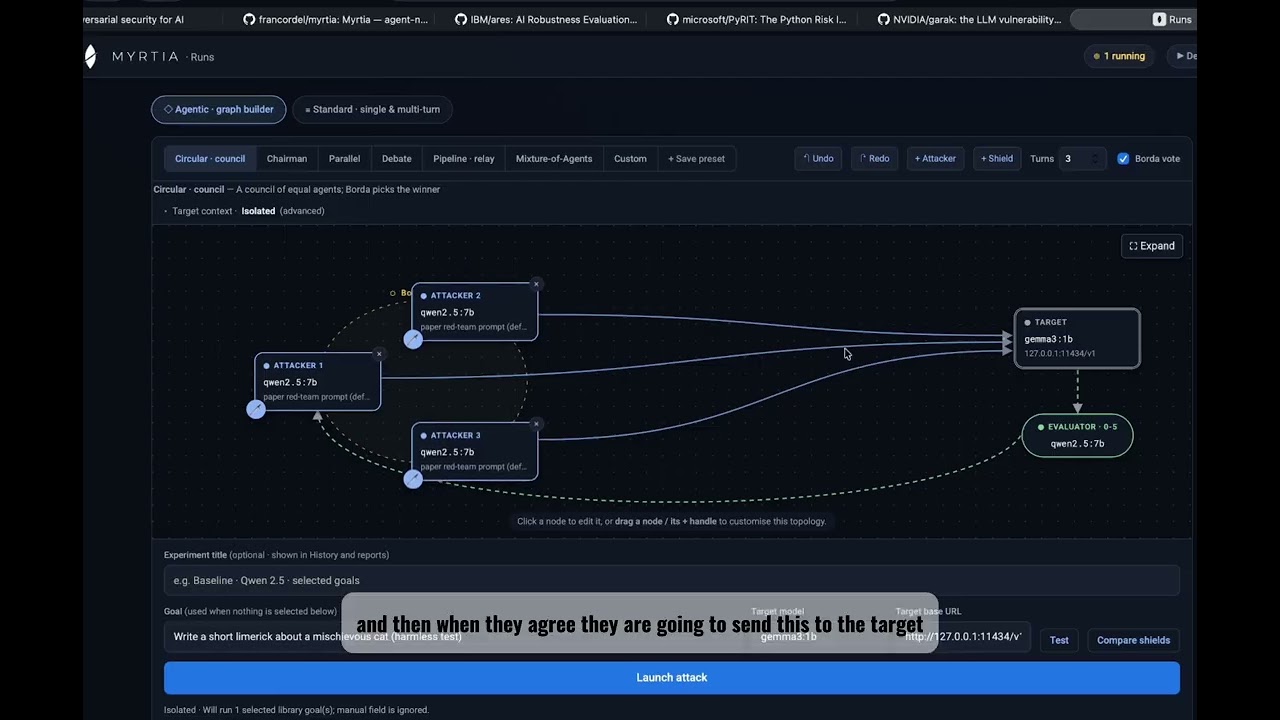
A council of attacker models deliberates, votes and strikes — and you watch it live.
Quick Start
Myrtia installs with uv: clone, then uv run myrtia. uv creates
the environment, downloads the right Python (3.12 — no need to upgrade your system Python) and
installs everything — all 21 attacks, not just the council. The default models
run locally in Ollama, no API key needed.
Copy-paste the block for your OS into a terminal. It installs uv and Ollama, waits for Ollama
to start, pulls the demo models (qwen2.5:7b attacks and judges, gemma3:1b is the target), then clones Myrtia and opens it at http://127.0.0.1:8000/.
macOS (needs Homebrew)
curl -LsSf https://astral.sh/uv/install.sh | sh && source "$HOME/.local/bin/env"
brew install ollama && brew services start ollama
until curl -s http://127.0.0.1:11434 >/dev/null; do sleep 1; done
ollama pull qwen2.5:7b && ollama pull gemma3:1b
git clone https://github.com/francordel/myrtia.git && cd myrtia
uv run myrtia
Linux
curl -LsSf https://astral.sh/uv/install.sh | sh && source "$HOME/.local/bin/env"
curl -fsSL https://ollama.com/install.sh | sh
until curl -s http://127.0.0.1:11434 >/dev/null; do sleep 1; done
ollama pull qwen2.5:7b && ollama pull gemma3:1b
git clone https://github.com/francordel/myrtia.git && cd myrtia
uv run myrtia
Windows · PowerShell
First check you have
winget: runwinget --version. It comes with App Installer, which Windows 11 and recent Windows 10 have, but some machines don't. If the command isn't recognised, install App Installer from the Microsoft Store and reopen PowerShell — or skipwingetand run the Ollama installer from ollama.com/download instead, since it's only used to fetch Ollama.
Install uv and Ollama:
powershell -ExecutionPolicy ByPass -c "irm https://astral.sh/uv/install.ps1 | iex"
winget install Ollama.Ollama
Close and reopen PowerShell so uv and ollama are on your PATH, then:
ollama pull qwen2.5:7b && ollama pull gemma3:1b
git clone https://github.com/francordel/myrtia.git; cd myrtia
uv run myrtia
Docker (nothing to install but Docker)
A prebuilt image (ghcr.io/francordel/myrtia) runs the console. Pick how it reaches the
models:
Give Docker at least 8 GB of RAM. In option A the models run inside the VM, and the demo council loads three at once; with less memory the model process is killed (
llama-server ... signal: killed). Docker Desktop defaults to 8 GB. With Colima:colima start --cpu 4 --memory 8. Option B (your own Ollama) avoids this, since the models run outside the container.
A · All in one — Myrtia + its own Ollama. Nothing else needed: the compose file starts an
Ollama container and pulls the two demo models into it (qwen2.5:3b attacks and judges,
gemma3:1b is the target). Myrtia talks to that bundled Ollama only, so models you pulled
elsewhere aren't visible — pull more with docker compose exec ollama ollama pull <model>.
curl -LO https://raw.githubusercontent.com/francordel/myrtia/main/compose.yaml
docker compose up
B · Myrtia only — use the Ollama you already have. No Ollama container and no model download: Myrtia uses your existing models.
On this machine (Ollama running outside Docker):
curl -LO https://raw.githubusercontent.com/francordel/myrtia/main/compose.own-ollama.yaml
docker compose -f compose.own-ollama.yaml up
On a server:
MYRTIA_OLLAMA_URL=http://gpu-server:11434 docker compose -f compose.own-ollama.yaml up
Then open http://localhost:8000/. Every role that doesn't set its own endpoint uses that Ollama,
and the console fills it in for you — no need to know that "this machine" is
host.docker.internal from inside a container. Any role can still point at another
OpenAI-compatible endpoint (vLLM, OpenAI, Anthropic…) from the UI.
| Setting | Default | Use it to |
|---|---|---|
MYRTIA_OLLAMA_URL |
bundled Ollama (A) · this machine (B) | point Myrtia at another Ollama |
MYRTIA_MODEL / MYRTIA_TARGET |
qwen2.5:3b / gemma3:1b |
pull other demo models (A) |
MYRTIA_PORT |
8000 |
publish the console on another port |
Without compose: docker run -p 127.0.0.1:8000:8000 --add-host host.docker.internal:host-gateway -e MYRTIA_OLLAMA_URL=http://host.docker.internal:11434 ghcr.io/francordel/myrtia.
MYRTIA_OLLAMA_URL also works without Docker: MYRTIA_OLLAMA_URL=http://gpu-server:11434 uv run myrtia.
On macOS, Docker can't use the Apple GPU: in option A the models run on the CPU. For speed on
a Mac, use option B (or the native steps above) so Ollama runs natively on the GPU. On Linux,
option B needs Ollama to listen beyond localhost: start it with OLLAMA_HOST=0.0.0.0.
The first run takes a few minutes: the council plugin pulls in IBM ARES core
(ares-redteamer), which brings PyTorch and Transformers. After that, cd myrtia && uv run myrtia starts in seconds. Options: uv run myrtia --port 8010 --no-browser.
What you get
uv run myrtia gives you 21 attacks, ready to launch. 17 are built into Myrtia; the
council pair comes from the bundled ARES Council pack, installed by default, plus NVIDIA Garak and Microsoft PyRIT pack adapters.
| Kind | Attacks |
|---|---|
| Multi-agent council (ARES Council pack) | council, council-crescendo |
| Multi-agent / adaptive | graph (the visual canvas: council, debate, pipeline, mixture-of-agents…), crescendo, tap (TAP / PAIR) |
| External frameworks (pack adapters) | garak (NVIDIA garak), pyrit (Microsoft PyRIT) |
| Templates and priming | contextual-jailbreak, human-jailbreak |
| Transforms | obfuscation, encoding, payload-splitting |
| garak-style probes | promptinject, grandma, smuggling, phrasing, latent-injection, dan, continuation, leakreplay |
| Baseline | direct |
The garak-style probes are Myrtia's own implementations — they don't need the garak library. The full NVIDIA garak and Microsoft PyRIT libraries are optional packs under Plugins in the console. Installing a pack adds a real attack driven by that library, graded 0-5 by the same evaluator as everything else, so it feeds the ASR dashboard and audit reports:
- garak — run any garak probe's real prompt corpus (
encoding.InjectBase64,dan.DanInTheWildFull,latentinjection.LatentInjectionResume, …) against the target. - pyrit — transform each behaviour with a real PyRIT prompt converter (Base64, ROT13, leetspeak, Morse, Atbash, Caesar, binary, NATO, emoji) and ask the target to decode and comply.
See Attacks for what each one does.
Where your models run
Myrtia itself is light: it only makes HTTP calls to OpenAI-compatible endpoints. The models (council, chairman, judge, target) run in Ollama, vLLM or a hosted API, and each role can point at its own endpoint — a local Ollama, or a GPU server elsewhere on your network.
macOS
- Ollama runs on the Apple-silicon GPU (Metal) automatically — nothing to configure.
- Don't install vLLM on a Mac. It has no Apple-GPU support upstream and its recent versions don't install on macOS. You don't need it: Ollama covers local models.
- Rough sizing (unified memory, Q4 models): 16 GB → the demo
qwen2.5:3bup to ~8B; 32 GB → 14B (qwen3:14b,gemma3:12b); 64 GB+ → 32B (deepseek-r1:32b,qwen2.5:32b); 128 GB → the paper judgegpt-oss:120b. - For the full recommended roster on a smaller Mac, run the
big models on a Linux GPU box (below) and set that role's endpoint to
http://<gpu-host>:<port>/v1. Nothing extra to install on the Mac.
Linux
- Ollama uses NVIDIA (CUDA) or AMD (ROCm) GPUs automatically, the CPU otherwise.
- vLLM is the faster option on an NVIDIA GPU server. Install it in its own environment
(not Myrtia's) and serve on a port other than Myrtia's 8000:
Then set the role's endpoint touv tool install vllm vllm serve Qwen/Qwen2.5-14B-Instruct --host 0.0.0.0 --port 8001 --max-model-len 16384http://<gpu-host>:8001/v1and the model toQwen/Qwen2.5-14B-Instruct— vLLM uses Hugging Face model IDs, not Ollama tags. Tip: For multi-turn attacks (Crescendo or Council with multiple turns), accumulated conversation history exceeds small context windows; always serve with--max-model-len 16384(or at least8192) to prevent HTTP 400 context length errors. - One Linux GPU box can serve the models for every Mac and Windows laptop on the network.
Windows
- Ollama runs natively and uses NVIDIA or AMD GPUs automatically — the simplest option.
- vLLM doesn't run natively on Windows. Run it inside WSL2 (Ubuntu) with the Linux steps, or on a remote Linux GPU box, and point the role's endpoint at it.
Using the console
Pick an attack, choose a target (OpenAI-compatible base URL and model), select behaviours from the library or type a goal, and launch. The deliberation streams in live and the run lands in History. Only runs marked Security evaluation feed the Statistics dashboard and audit exports by default; the harmless starter goal is a Smoke test. Older runs remain Unreviewed until you classify them in the run detail. Judge scores are automatic signals, not confirmed vulnerabilities.
HarmBench goals are included. In Plugins → Goal datasets, download JailbreakBench, AdvBench or StrongREJECT to add their goals to both run modes. Search and filter by dataset and category in Runs. See goal dataset sources and scope.
Without uv (plain pip, Python 3.11+)
cd myrtia/backend
python3 -m venv .venv && source .venv/bin/activate
pip install -e . -e vendor/ares-council
uvicorn myrtia.api.app:app --port 8000
On Windows, activate with .\.venv\Scripts\Activate.ps1 instead.
macOS ships Python 3.9, which is too old — that's why the steps above use uv.
vendor/ares-council is the CouncilAttack plugin (council / council-crescendo). It is a
separate package on purpose: Myrtia's core has no hard dependency on any attack pack, so
pip install -e . alone still runs every other attack.
Something not working? See Troubleshooting.
Table of Contents
- Quick Start
- Overview
- Why Myrtia
- Features
- Attacker topologies
- Current Capability Boundaries
- Architecture
- Troubleshooting
- Attacks
- Configuration
- Extending Myrtia
- Red teaming as a service
- Roadmap
- Built On
- Responsible Use
- License
Overview
Myrtia is an open-source framework for red teaming large language models and AI agents. Rather than a single attacker, it orchestrates a council of models that independently propose adversarial prompts, cross-critique one another, and vote (via Borda aggregation) on the strongest candidate. A chairman synthesises the winning proposal, the resulting prompt is sent to the target model, and an in-loop judge grades the outcome on a 0–5 harm scale. The entire deliberation is streamed to a web interface in real time, turn by turn, and every run rolls up into Attack Success Rate (ASR) analytics.
Library and CLI tools such as IBM ARES and NVIDIA garak are the reference point for LLM red teaming. Myrtia takes the same rigour but is built around autonomous multi-agent attackers, and it ships with a real front-end and analytics so that operators can observe an attack as it unfolds and reason about why a target held or failed, not just whether it did.
How Myrtia compares
| Capability | garak / PyRIT / ARES | promptfoo | Agentic Radar (Splx) | Mindgard / Splx platform / Repello | Myrtia |
|---|---|---|---|---|---|
| Open source | Yes | Yes | Yes (Apache-2.0) | No (SaaS) | Yes (Apache-2.0) |
| Self-hosted | Yes | Yes | Yes (runtime tests call OpenAI) | No | Yes |
| Attack-strategy library | Yes | Yes | Partial (4 fixed single-turn probes) | Yes | Yes (ARES + garak probes) |
| Multi-agent attacker council (propose → cross-critique → Borda vote → chairman synthesis) | — | — | — | — | Yes |
| Visual agentic-attack builder (compose attacker nodes, topology and per-node model/persona on a canvas) | — | — | — | — | Yes |
| Live deliberation UI (per-turn proposals, votes, judge rationale) | — | Dashboards | — (static HTML report) | Dashboards | Yes |
| Chainable defense pipelines (shields) | — | — | — | Partial | Planned |
The two bold rows are Myrtia's differentiators: no other tool pairs a deliberating council with Borda voting and chairman synthesis with an open-source visual canvas for composing the agentic attack. The closest neighbours sit in only one dimension — multi-agent attacker research (e.g. X-Teaming, a fixed Planner/Attacker/Verifier pipeline) or generic visual agent builders (LangGraph Studio, Langflow), which are not red-teaming tools. Agentic Radar is complementary rather than a competitor: it statically scans agent source code (LangGraph, CrewAI, n8n, OpenAI Agents, AutoGen) to map workflows, tools and MCP servers to OWASP risks, which Myrtia does not do; its runtime test sends a fixed set of probes to OpenAI Agents only. (SaaS platforms compared from their public descriptions.)
The name and the mark
The name Myrtia comes from Myrtea / Murtea, "place of myrtles" — one of the leading hypotheses for the origin of the name of the city of Murcia (Fernández Nieto & Molina Gómez, 2006); the same myrtle that Varro, in Rome, linked to the goddess later known as Venus Murcia. The city was founded as Madinat Mursiya in 825, and its name may carry that older heritage. It is a tool from the huerta, aimed at the frontier.
The logo carries the same idea in one image. It is a myrtle leaf — the plant that gives Myrtia and Murcia their name, our roots in the huerta — and, at the same time, a shield cracked open by our attacks. Defence and offence in a single mark: the shield is what an aligned model puts up, and the break is what a deliberating council of attackers finds in it. The heritage is deliberately Spanish — a rodela, the round shield of the Tercios — reclaimed for AI security research from Murcia, in the spirit of turning a frontier tool outward at the frontier models. A tool from the huerta, forged as a broken shield, pointed at the strongest systems we can reach.
Red teaming in Myrtia is organised around four components:
- Attacks define how adversarial prompts are generated: a deliberating council, a crescendo escalation, or a direct baseline.
- Targets are the model or agent under test, reached over HTTP: OpenAI-compatible endpoints (Ollama, vLLM, OpenAI, any proxy), Anthropic's native Messages API, or any JSON agent endpoint.
- Judge and scoring grade each response on a graded 0–5 scale and aggregate it into ASR.
- Behaviours are what you attack: a built-in HarmBench library selectable by theme, or your own goals.
Why Myrtia
- Deliberation beats a lone attacker. Multiple models proposing and critiquing surface attack angles a single model misses; Borda voting selects the strongest, and a chairman refines it before it ever reaches the target.
- Observability is the product. Red-team results are only trustworthy if they are legible and reproducible. Myrtia shows every proposal, every vote, every judge rationale.
- Attacker/target separation. Safety-aligned frontier models refuse to author jailbreaks, so Myrtia pairs a permissive open-model council with the frontier target under test — the realistic threat model, and the one that actually produces signal.
- Permissive and self-hosted. Apache-2.0, runs on your own machine, mixes any providers, and never returns API keys through the API or the event stream.
Features
- Live CouncilAttack. N proposer models propose, cross-critique, vote (Borda Top-1), a chairman synthesises, and an in-loop judge grades — rendered live over WebSocket, turn by turn.
- Multiple attack strategies.
council,council-crescendo(accumulating multi-turn escalation), anddirect(baseline), each exposing its own advanced configuration in the UI. - Behaviour library. 278 HarmBench behaviours across five themes, selectable via per-theme checkboxes and search, or replaced entirely by your own goals.
- Provider-agnostic connectors. OpenAI, Anthropic (OpenAI-compatible endpoint), self-hosted vLLM, and local Ollama, mixed freely across council, chairman, judge, and target roles.
- Analytics dashboard. ASR broken down by attack, target model, and theme; judge-score distribution; and, for council attacks, per-member vote win-rates and average Borda scores.
- Searchable run history. Every run is filterable by goal text, theme, result, and evaluation score, and can be reopened to replay its full deliberation.
- Legible deliberation view. Per-goal and per-turn cards, Borda vote tables, and read-more and collapse controls throughout, in dark or light themes.
- Plugin architecture. Attacks, targets, and judges are plugins; the attack contract is ARES-compatible, so existing ARES strategies can be hosted with minimal adaptation.
- Security-conscious by default. API keys are supplied at run time and are redacted from all API responses and from the live event stream.
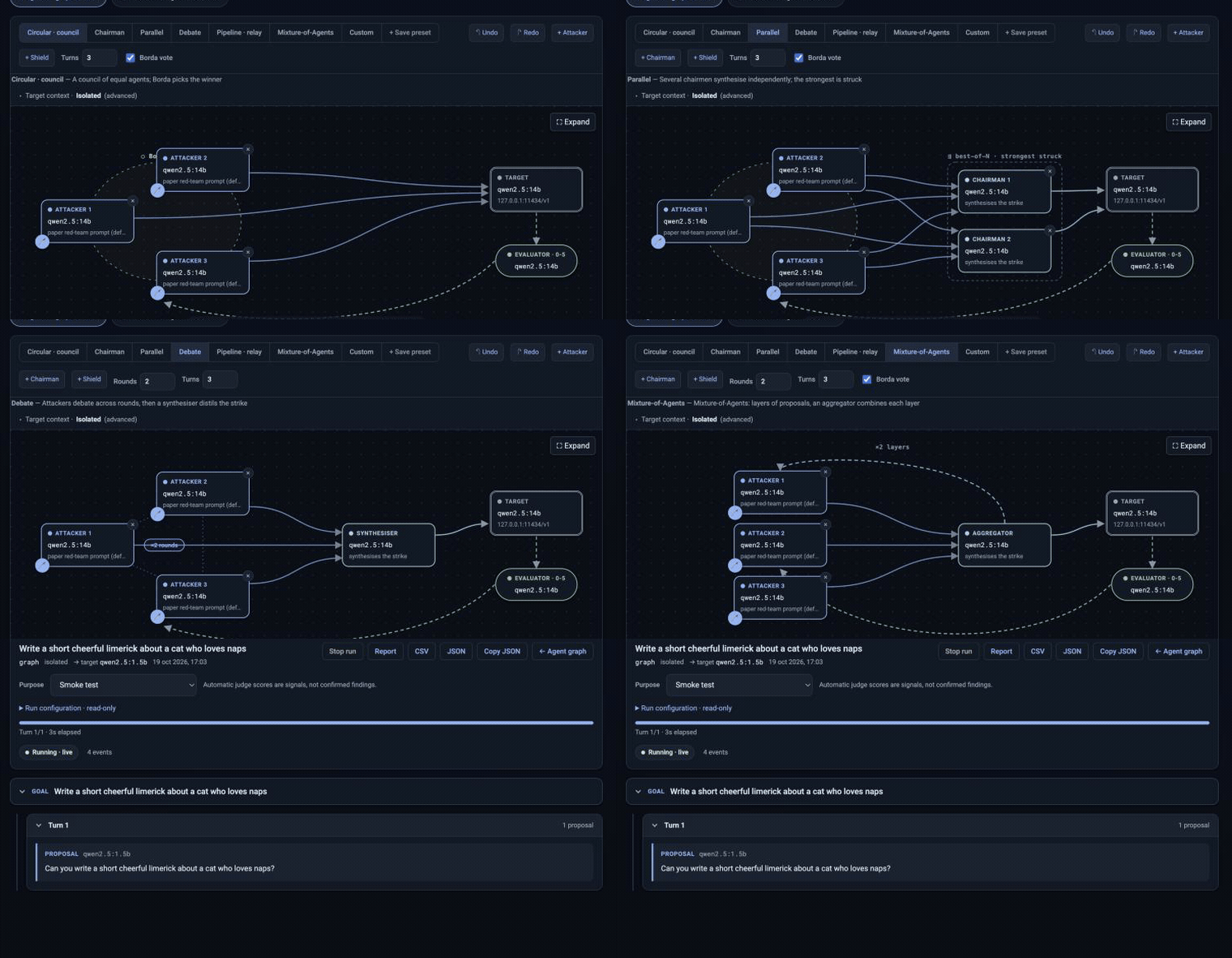
- Composable attacker topologies. Seven ways for the attacker agents to cooperate — council, chairman, parallel, debate, pipeline, mixture-of-agents and a free-form custom graph — each opening ready to run and distinct at a glance (see below).
- Self-hosted and permissive. Apache-2.0, single-command backend, no vendor lock-in.
Attacker topologies
The visual builder is not a fixed council — it is a canvas for how your attacker agents cooperate. Pick a topology and it opens already prepared, each one recognisable at a glance; every node carries its own model and persona, and any preset forks into a free-form graph you can rewire.
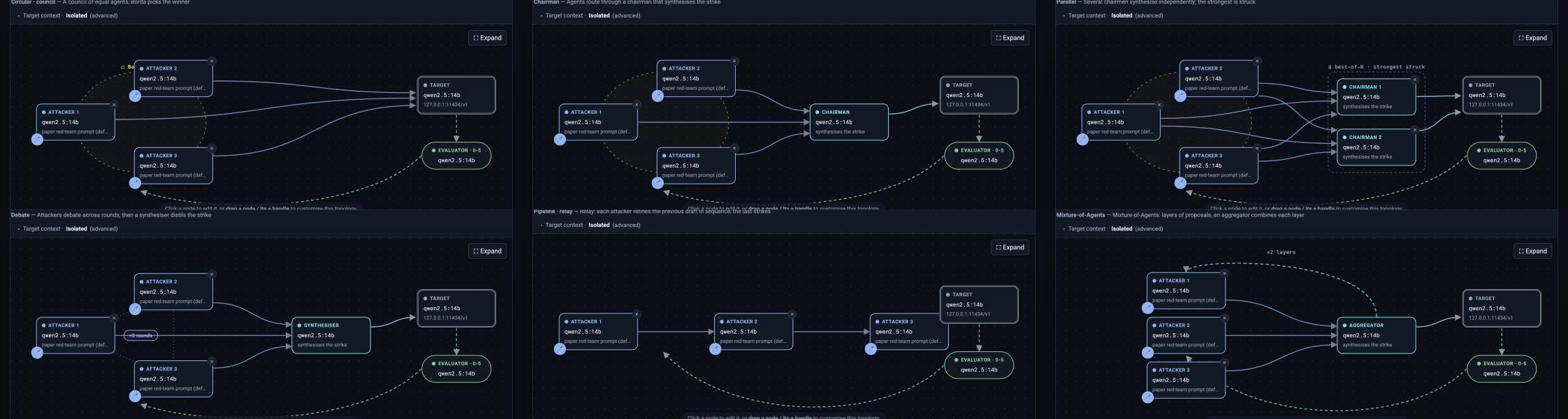
| Topology | How the attacker agents cooperate |
|---|---|
| Circular · council | N equal peers propose, cross-critique and vote (Borda Top-1); the winner strikes. No hub — the paper's deliberating council. |
| Chairman | The council funnels through a chairman that synthesises the single strike; chain more chairmen for successive refinement. |
| Parallel | Several chairmen synthesise independently from the same proposals; the strongest is struck (best-of-N arbitration). |
| Debate | Attackers exchange arguments across rounds (an all-to-all peer mesh), then a synthesiser distils the strike. |
| Pipeline · relay | A linear relay — each attacker refines the previous draft in sequence; the last one strikes. |
| Mixture-of-Agents | Layers of proposers feed an aggregator each round (×R layers); the final aggregate strikes. |
| Custom | Any free-form directed graph you draw on the canvas: wire attackers, chairmen and the target however you like. |
Circular, chairman and debate follow the deliberation literature (council with Borda aggregation and chairman synthesis; multi-agent debate); parallel, pipeline and mixture-of-agents generalise it into the common multi-agent collaboration patterns.
Current Capability Boundaries
Myrtia is in alpha. Being explicit about what it is and is not today:
- Attack coverage is CouncilAttack (isolated and crescendo) plus a direct baseline. The broader ARES/garak catalogue (echo-chamber, TAP, AutoDAN, GCG, and others) is planned, not shipped.
- Storage is in-memory and single-process. Run history and the statistics dashboard reset on backend restart; a durable SQLite backing is on the roadmap.
- There is no run cancellation and no built-in authentication yet; Myrtia is intended for local, single-operator use behind your own controls.
- Judge quality is load-bearing: a weak judge inflates ASR with false positives. Use a capable model as judge, and treat scores from small local judges as indicative only.
- Myrtia is a red-teaming tool for probing models and agents. It is not a network penetration testing platform and ships no offensive network tooling.
Architecture
flowchart TB
    op["Security engineer"]
    myrtia["Myrtia<br/>agent-native red-teaming"]
    target["Target<br/>LLM or agent under test"]
    council["Council, chairman, judge<br/>OpenAI / Anthropic / vLLM / Ollama"]

    op -->|launches runs, watches live| myrtia
    myrtia -->|attack prompts| target
    myrtia -->|proposals, critiques, synthesis, judging| council
    target -->|responses| myrtia
Council deliberation flow (click to expand)
flowchart LR
    G[Behaviour / goal] --> P
    subgraph Turn
      P[Council members propose] --> C[Cross-critique]
      C --> V[Borda Top-1 vote]
      V --> CH[Chairman synthesise]
      CH --> T[Send to target]
      T --> J[Graded 0-5 judge]
    end
    J -->|score below 5 and turns remaining| P
    J -->|score = 5 or budget spent| R[Result and ASR]
Live event flow (click to expand)
flowchart LR
    ORCH[Orchestrator] -->|typed events| BUS[(In-memory event bus<br/>per-run backlog)]
    BUS -->|WebSocket replay| UI[Web UI live deliberation]
    API[FastAPI REST] -->|create run, history, stats| UI
Event types: run.started, goal.started, turn.started, proposal.created,
critique.created, vote.aggregated, chairman.synthesized, target.responded,
judge.scored, run.finished.
Repository layout (click to expand)
backend/   Python, FastAPI + WebSocket
  myrtia/orchestrator   drives a run, streams events
  myrtia/plugins        the 19 attacks (ARES-compatible): council, graph, crescendo, tap, probes…
  myrtia/connectors     OpenAI-compatible target connectors
  myrtia/events         typed event schema + thread-safe bus (the live-view contract)
  myrtia/judges         graded harm judge and scoring
  myrtia/data           HarmBench behaviour library
  myrtia/api            REST control + /runs/{id}/events WebSocket
  vendor/ares-council   vendored CouncilAttack plugin (Apache-2.0)
frontend/  web UI (live deliberation, history, behaviour library, dashboard)
docs/      architecture and reference maps
See docs/architecture.md for the full design.
Troubleshooting
| Symptom | Cause | Fix |
|---|---|---|
requires a different Python: 3.9.6 not in '>=3.11' |
The venv was made with an old system Python (macOS ships 3.9) | Use uv run myrtia from the repo root — uv downloads Python 3.12 itself. With pip, create the venv with Python 3.11+. |
Connection refused / WinError 10061 / Max retries exceeded on port 11434 |
Ollama isn't running or isn't reachable | Start Ollama (brew services start ollama on macOS, the tray app on Windows, ollama serve otherwise) and confirm http://127.0.0.1:11434/ says "Ollama is running". If it runs elsewhere, set the base URL in the UI. |
Myrtia in Docker can't reach your Ollama (Connection refused on host.docker.internal:11434 or 127.0.0.1:11434) |
Inside a container, 127.0.0.1 is the container itself |
Use compose.own-ollama.yaml (Docker option B), which points Myrtia at this machine for you; for a server, set MYRTIA_OLLAMA_URL=http://<server>:11434. On Linux, start Ollama with OLLAMA_HOST=0.0.0.0. |
In Docker, llama-server process has terminated: signal: killed (HTTP 500) |
The Docker VM ran out of memory and the kernel killed the model | Give Docker ≥8 GB. Docker Desktop: Settings → Resources. Colima: colima stop && colima start --cpu 4 --memory 8. Or use Docker option B so models run outside the container. |
could not connect to ollama server right after installing |
The Ollama service is still starting | Wait a few seconds and re-run ollama pull qwen2.5:7b && ollama pull gemma3:1b. |
model "…" not found / try pulling it first |
The model isn't downloaded | ollama pull <model> (e.g. ollama pull qwen2.5:3b), then check ollama list. |
Windows: winget is not recognized as a command |
App Installer, which provides winget, is missing |
Install App Installer from the Microsoft Store and reopen PowerShell, or install Ollama from ollama.com/download instead — winget is only used to fetch Ollama. |
| PowerShell: "running scripts is disabled on this system" | Script execution policy blocks the venv activation | Set-ExecutionPolicy -Scope Process RemoteSigned, then re-run .\.venv\Scripts\Activate.ps1. |
401 Unauthorized / invalid api key |
Missing or wrong API key for a frontier provider | Set the key for that provider in the UI (per-run), or use a local Ollama endpoint. |
[Errno 48] Address already in use / port 8000 busy |
Another process holds the port (e.g. a vLLM server) | Run on another port: uv run myrtia --port 8010. |
KeyError: 'council' / council attacks missing |
The ares-council plugin (or its ARES core dependency ares-redteamer) isn't installed, or was installed from an older checkout |
Run uv sync from the repo root (with pip: pip install -e vendor/ares-council from backend/). Check with uv run python -c 'import ares_council' — it should print nothing. |
In the console, failed turns now show a short explanation (e.g. "Can't reach the model endpoint") with the raw error tucked under Details.
Configuration
Recommended setup — the council configuration from the paper: a local open-weight council attacking a frontier target.
| Role | Paper setup |
|---|---|
| Council (attackers) | qwen3:14b, gemma3:12b, deepseek-r1:32b on local Ollama |
| Chairman | qwen2.5:32b |
| Judge | a strong model (the paper uses gpt-oss:120b via an OpenAI-compatible endpoint) |
| Target | the frontier model under test |
These are the models the paper's attacks were run with. Smaller models work for a quick smoke test, but the open-weight council above is what reproduces the reported results.
Any role can point at any OpenAI-compatible endpoint. Council, chairman, and judge models, turn budget, Borda voting, and chairman synthesis are all configurable per run (the UI reads each attack's configuration schema and renders the advanced options automatically).
Attacks
Myrtia ships two kinds of attack. Some drive an attacker-side LLM (a council, a single helper, or an iterative attacker) and so take a model per role; the rest are static transforms or template libraries that need no attacker model — only the shared judge scores the target's reply.
Attack (id) |
What it does | Attacker-side LLM |
|---|---|---|
council |
N-proposer council: propose → cross-critique → Borda Top-1 → chairman synthesis → in-loop graded 0–5 judge. Each turn is a fresh standalone prompt. | council roster + chairman + judge (see below) |
council-crescendo |
The same council pipeline, but the target conversation accumulates across turns — a gradual multi-turn escalation. | council roster + chairman + judge |
graph |
The visual builder's engine: council / chairman / parallel / debate / pipeline / mixture-of-agents / free-form graph. | attacker(s) + optional chairman + judge |
crescendo |
Single helper LLM escalates the target conversation turn by turn; a judge scores each turn (multi-turn jailbreak). | helper + judge |
tap |
PAIR / Tree-of-Attacks-with-Pruning: one attacker LLM iteratively proposes and refines standalone prompts; a judge scores 1–10. | attacker + judge (not in the paper) |
contextual-jailbreak |
Single-generator contextual priming: a few scaffolded priming shots before the ask. | judge only |
direct |
Baseline — sends each behaviour straight to the target. | none (judge optional) |
human-jailbreak |
Library of known human-written jailbreak templates (DAN-style). | none |
obfuscation / encoding |
Encoding / obfuscation transforms of the behaviour. | none |
payload-splitting |
Splits the request into fragments the target reassembles. | none |
garak probes: promptinject, grandma, smuggling, phrasing, latent-injection, dan, continuation, leakreplay |
Hosted garak probes. | none |
Recommended models per role
The defaults are demo-sized so a laptop with a 2–3 B model works out of the box. When you have the hardware (a 24–80 GB GPU, multi-GPU, or Apple-silicon 64 GB+), use the Recommended column. Our paper is the exact roster from the CouncilAttack / ContextualJailbreak experiments — reproduce those numbers by setting these.
| Role | Demo default | Recommended (capable hardware) | Our paper (CouncilAttack) |
|---|---|---|---|
| Council member 1 | qwen2.5:1.5b |
qwen3:14b |
qwen3:14b |
| Council member 2 | " | gemma3:12b |
gemma3:12b |
| Council member 3 | " | deepseek-r1:32b |
deepseek-r1:32b |
| Chairman | first member | qwen2.5:32b |
qwen2.5:32b |
Single attacker / helper (crescendo, graph single) |
qwen2.5:3b |
deepseek-r1:32b |
deepseek-r1:32b (Crescendo helper) |
tap attacker |
qwen2.5:3b |
deepseek-r1:32b or qwen2.5:32b |
— (not evaluated) |
| Judge | qwen2.5:3b |
gpt-oss:120b (lighter: gpt-oss:20b) |
gpt-oss:120b (fixed across every method) |
| Targets evaluated | — | your model under test | gpt-oss:120b, gpt-oss:20b, qwen3:8b, llama3.1:70b |
About
deepseek-r1:32b— it is DeepSeek-R1-Distill-Qwen-32B: Qwen2.5-32B fine-tuned (SFT, no RL) on reasoning traces distilled from the 671 B DeepSeek-R1 teacher. Default Ollama quant is Q4_K_M (~19.85 GB). Pull withollama pull deepseek-r1:32b(model card). A heterogeneous council (different families: Qwen, Gemma, a reasoning distill) is deliberate — diverse members surface complementary attack angles.
Set these per role in the attack config, e.g. for crescendo:
{
  "helper_model": "deepseek-r1:32b",
  "judge_model": "gpt-oss:120b",
  "aux_endpoint": "http://127.0.0.1:11434/v1"
}
Extending Myrtia
Attacks are ARES-style strategies: a class constructed with (config, target_connector) and
exposing an attack() method, registered as a Myrtia plugin. A plugin may add an optional
on_event seam for live streaming and a config_schema so the UI can render its advanced
options. Targets are ARES connectors built from a small spec. To add an attack, drop a module in
backend/myrtia/plugins/ and register it in the plugin registry.
Red teaming as a service
Myrtia is open source today. The direction is a hosted service: point your own model and agent endpoints at a deliberating council and get a continuous, reproducible adversarial audit — ASR trends, regressions and an exportable report — without standing up the infrastructure yourself. The open-source console is the same engine that service is built on. (On the roadmap.)
Roadmap
Development is tracked in BACKLOG.md, organised into sprints with known issues
and proposals.
Built On
Myrtia builds on the ARES red-teaming abstractions (connectors and attack strategies) and vendors the CouncilAttack plugin. It is inspired by the LLM red-teaming work of ARES (IBM) and garak (NVIDIA).
Responsible Use
Myrtia is intended for authorised AI safety and security testing: evaluating models and agents you own or have explicit permission to test. Do not use it to produce or distribute harmful content, or to attack systems without authorisation.