franckferman/MetaDetective
franckferman/MetaDetective has 515 GitHub stars and 65 forks. Star changes are not measured yet. Last checked 2026-10-28 23:01 UTC. Last push 2026-10-27.
Measured star growth
- in 24h
- Update delayed
- in 7 days
- Update delayed
- in 15 days
- Update delayed
- in 1 month
- Update delayed
Net star changes over overlapping periods, not daily totals. Missing measurements are left blank. Stars measure attention, not software quality.
About
Unleash Metadata Intelligence with MetaDetective. Your Assistant Beyond Metagoofil.
SecurityREADME.md
Original

Powered by Swiftproxy — Fast, reliable proxies with free trial & non-expiring traffic.
Use code PROXY90 for 10% off!

Supported by IPRoyal — Proxy services for OSINT and security research.

Backed by KatanHack — Red Team, pentest, SOC & security governance.




MetaDetective
Metadata extraction and web scraping for OSINT and pentesting.
Table of Contents
About
MetaDetective is a single-file Python 3 tool for metadata extraction and web scraping, built for OSINT and pentesting workflows.
It has no Python dependencies beyond exiftool. One curl and you're operational.
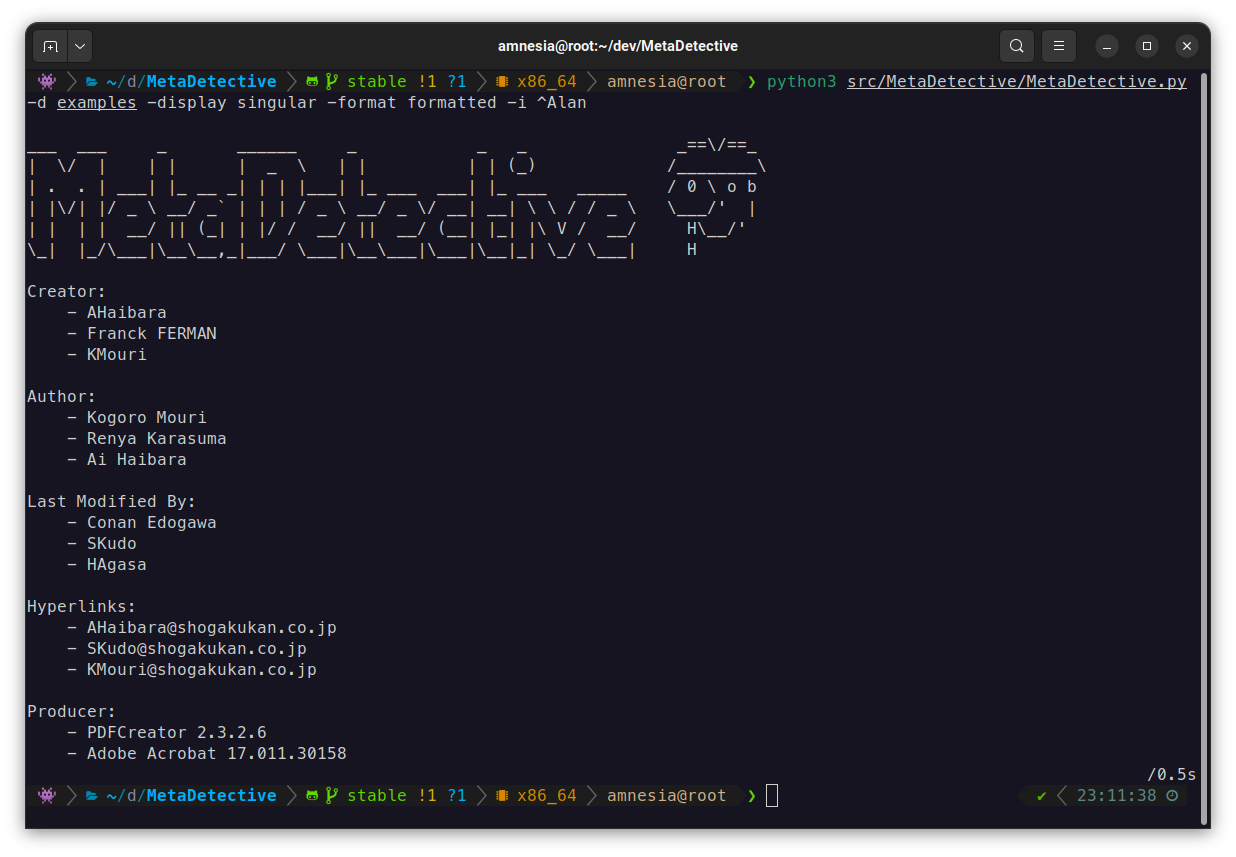
What it extracts: authors, software versions, GPS coordinates, creation/modification dates, internal hostnames, serial numbers, hyperlinks, camera models - across documents, images, and email files.
What it does beyond extraction:
- Direct web scraping of target sites (no search engine dependency, no IP blocks)
- GPS reverse geocoding with OpenStreetMap (opt-out with
--no-geocode), map link generation - Export to HTML, TXT, or JSON
- Selective field extraction with
--parse-only - Deduplication across multiple files
It was built as a replacement for Metagoofil, which dropped native metadata analysis and relied on Google search (rate limiting, CAPTCHAs, proxy overhead).
Installation
Requirements: Python 3, exiftool.
# Debian / Ubuntu / Kali
sudo apt install libimage-exiftool-perl

# Arch
sudo pacman -S perl-image-exiftool

# Gentoo
sudo emerge -av media-libs/exiftool

# macOS
brew install exiftool

# Windows
winget install OliverBetz.ExifTool
Direct download (recommended for field use)
curl -O https://raw.githubusercontent.com/franckferman/MetaDetective/stable/src/MetaDetective/MetaDetective.py
python3 MetaDetective.py -h
pip
pip install MetaDetective
metadetective -h
git clone
git clone https://github.com/franckferman/MetaDetective.git
cd MetaDetective
python3 src/MetaDetective/MetaDetective.py -h
Docker
docker pull franckferman/metadetective
docker run --rm franckferman/metadetective -h

# Mount a local directory
docker run --rm -v $(pwd)/loot:/data franckferman/metadetective -d /data
Usage
Quick start (positional shortcut)
MetaDetective auto-detects a positional argument: a path runs analysis, an http(s):// URL runs scraping. The classic -d / -s -u flags still work exactly as before.
# Analyze a directory
python3 MetaDetective.py ./loot/

# Analyze a single file
python3 MetaDetective.py report.pdf

# Scrape a website (preview only)
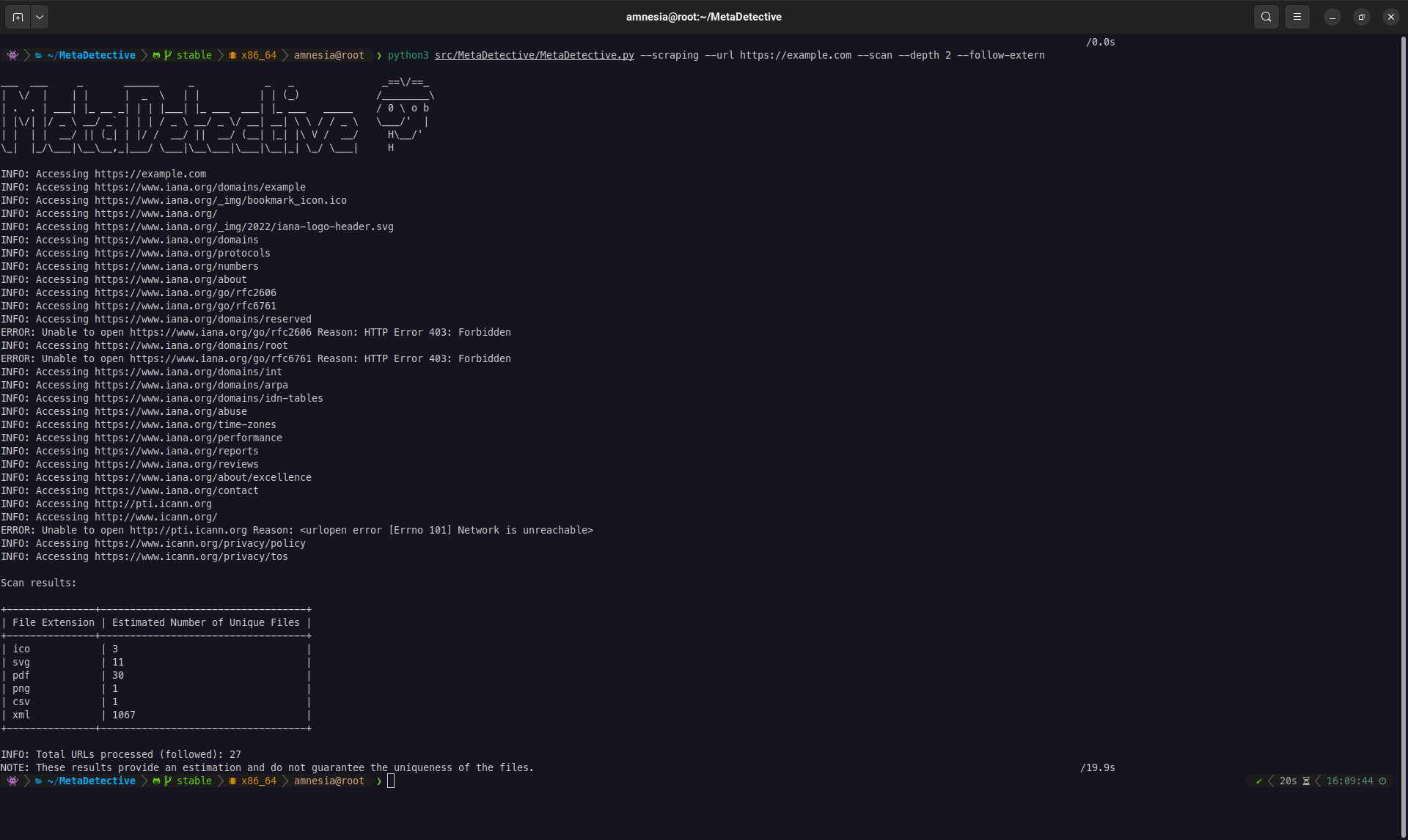
python3 MetaDetective.py https://target.com/ --scan

# Scrape and download (defaults to ./loot/ and --depth 1)
python3 MetaDetective.py https://target.com/
Safeguards are preserved: a path never triggers web scraping, and a URL rejects analysis-only flags.
File analysis
# Analyze a directory (deduplicated singular view by default)
python3 MetaDetective.py -d ./loot/

# Specific file types, filter noise
python3 MetaDetective.py -d ./loot/ -t pdf docx -i admin anonymous

# Per-file display
python3 MetaDetective.py -d ./loot/ --display all

# Formatted output (singular/default display)
python3 MetaDetective.py -d ./loot/ --format formatted

# Single file
python3 MetaDetective.py -f report.pdf

# Multiple files
python3 MetaDetective.py -f report.pdf photo.heic
Summary and timeline
# Quick stats: identities, emails, GPS exposure, tools, date range
python3 MetaDetective.py -d ./loot/ --summary

# Chronological view of document creation/modification
python3 MetaDetective.py -d ./loot/ --timeline

# Both together
python3 MetaDetective.py -d ./loot/ --summary --timeline

# Scripting: no banner, summary only
python3 MetaDetective.py -d ./loot/ --summary --no-banner
Selective parsing
--parse-only limits extraction to specific fields. Useful to cut noise or target a specific data point.
# Extract only Author and Creator fields
python3 MetaDetective.py -d ./loot/ --parse-only Author Creator

# Extract GPS data only from iPhone photos
python3 MetaDetective.py -d ./photos/ -t heic heif --parse-only 'GPS Position' 'Map Link'
Export
# HTML report (default)
python3 MetaDetective.py -d ./loot/ -e

# TXT
python3 MetaDetective.py -d ./loot/ -e txt

# JSON - singular (deduplicated values per field)
python3 MetaDetective.py -d ./loot/ -e json

# JSON - per file
python3 MetaDetective.py -d ./loot/ --display all -e json

# Custom filename suffix and output directory
python3 MetaDetective.py -d ./loot/ -e json -c pentest-corp -o ~/results/
JSON singular output structure:
{
  "tool": "MetaDetective",
  "generated": "2026-03-21T...",
  "unique": {
    "Author": ["Alice Martin", "Bob Dupont"],
    "Creator Tool": ["Microsoft Word 16.0"]
  }
}
Pivot with jq:
jq '.unique.Author' MetaDetective_Export-*.json
Web scraping
MetaDetective can crawl a target website, discover downloadable files (PDF, DOCX, XLSX, images, etc.), and download them for local metadata analysis.
Try it live — this project's own site hosts a hidden practice lab (metadata-rich sample documents). Point MetaDetective at it and analyze what comes back:
python3 MetaDetective.py https://franckferman.github.io/MetaDetective/
python3 MetaDetective.py ./loot/ --summary
You'll recover planted identities, emails, tools, and GPS coordinates.
Two scraping modes:
--download-dir- Download files to a local directory for analysis. This is the primary mode.--scan- Preview only: list discovered files and stats without downloading. Useful for scoping before a full download.
--scanand--download-dirare mutually exclusive. If neither is given, MetaDetective defaults to download mode into./loot/(created if missing).
The --depth flag controls crawl breadth. The default is 1: MetaDetective looks at the target URL and the pages linked from it, which covers most site structures. Use 0 to restrict to the single target page, or 2+ for deeper crawls.
| Depth | Behavior |
|---|---|
0 |
Only the target URL. Finds files directly linked on that single page. |
1 (default) |
Target URL + all pages linked from it. Covers most site structures. |
2+ |
Follows links N levels deep. Broader coverage, more requests, slower. |
Download (primary workflow):
# Standard download with depth 1 (recommended starting point)
python3 MetaDetective.py --scraping --url https://target.com/ \
  --download-dir ~/loot/ --depth 1

# Target specific file types
python3 MetaDetective.py --scraping --url https://target.com/ \
  --download-dir ~/loot/ --depth 2 --extensions pdf docx xlsx pptx

# Parallel download (8 threads, 10 req/s)
python3 MetaDetective.py --scraping --url https://target.com/ \
  --download-dir ~/loot/ --depth 2 --threads 8 --rate 10

# Follow external links (CDN, subdomain, partner sites)
python3 MetaDetective.py --scraping --url https://target.com/ \
  --download-dir ~/loot/ --depth 1 --follow-extern

# Stealth: realistic User-Agent + low rate
python3 MetaDetective.py --scraping --url https://target.com/ \
  --download-dir ~/loot/ --depth 2 --user-agent stealth --rate 2
Scan (preview):
# Quick preview: how many files are reachable?
python3 MetaDetective.py --scraping --scan --url https://target.com/ --depth 1

# Filter preview by extension
python3 MetaDetective.py --scraping --scan --url https://target.com/ \
  --depth 2 --extensions pdf docx
Full pipeline (scrape + analyze + export):
# Step 1: download files
python3 MetaDetective.py --scraping --url https://target.com/ \
  --download-dir ~/loot/ --depth 2 --extensions pdf docx xlsx

# Step 2: analyze and export
python3 MetaDetective.py -d ~/loot/ -e html -o ~/results/
| Flag | Default | Description |
|---|---|---|
--url |
required | Target URL |
--download-dir |
./loot/ |
Download destination (created if missing). Used by default when neither --scan nor --download-dir is set. |
--scan |
- | Preview mode (no download) |
--depth |
1 |
Link depth to follow. Use 0 for the single page, 2+ for deeper crawls. |
--extensions |
all supported | Filter by file type |
--threads |
4 |
Concurrent download threads (1-100) |
--rate |
5 |
Max requests per second (1-1000) |
--follow-extern |
off | Follow links to external domains |
--user-agent |
MetaDetective/<ver> |
Custom or preset UA string |
--curl-file |
- | Replay browser headers from a 'Copy as cURL' file (- for stdin) |
Display modes
MetaDetective offers two display modes that control how results are structured:
--display singular (default) - Aggregates all unique values per field across every file. Best for OSINT: "who touched these documents?" at a glance.
# Default: deduplicated singular view
python3 MetaDetective.py -d ./loot/

# With formatted style (vertical list with markers)
python3 MetaDetective.py -d ./loot/ --format formatted

# With concise style (comma-separated on one line)
python3 MetaDetective.py -d ./loot/ --format concise
--display all - One block per file with its individual metadata. Best for forensic analysis: examine each document's properties independently.
python3 MetaDetective.py -d ./loot/ --display all
--formatonly works with--display singular. Using--formatwith--display allproduces an error.
Additional views:
| Flag | Description |
|---|---|
--summary |
Statistical overview: file count, unique identities, emails, GPS exposure, tools, date range |
--timeline |
Chronological view of document creation and modification events |
--classify |
Opt-in LLM triage of extracted identities (see AI-assisted triage) |
--no-banner |
Suppress the ASCII banner for scripting and pipeline use |
Export formats
Three export formats are available. All respect the current --display mode.
# HTML report with dark theme, stats bar, and responsive layout
python3 MetaDetective.py -d ./loot/ -e html

# HTML per-file view
python3 MetaDetective.py -d ./loot/ --display all -e html

# Plain text
python3 MetaDetective.py -d ./loot/ -e txt

# JSON (structured, pipe into jq)
python3 MetaDetective.py -d ./loot/ -e json

# Custom output directory (created automatically if it does not exist)
python3 MetaDetective.py -d ./loot/ -e html -o ~/results/

# Custom filename suffix
python3 MetaDetective.py -d ./loot/ -e json -c pentest-corp -o ~/results/
The HTML export includes a summary header showing total files analyzed, total metadata fields extracted, and unique identities found (from Author, Creator, and Last Modified By fields).
All metadata values are HTML-escaped in the report. A document carrying crafted metadata (e.g. a malicious
Authorfield) cannot inject markup or scripts into the report you open in your browser.
User-Agent (scraping)
When scraping, MetaDetective identifies itself as MetaDetective/<version> by default. Use --user-agent to change this:
# Use a preset
python3 MetaDetective.py --scraping --scan --url https://target.com/ --user-agent stealth

# Available presets
#   stealth, chrome-win, chrome-mac, chrome-linux,
#   firefox-win, firefox-mac, firefox-linux,
#   safari-mac, edge-win, android, iphone, googlebot

# Custom string
python3 MetaDetective.py --scraping --scan --url https://target.com/ \
  --user-agent 'Mozilla/5.0 (compatible; MyScanner/1.0)'
Browser headers (bot detection)
Some sites gate on the full request header set (Accept, Accept-Language, Sec-Fetch-*, sec-ch-ua, cookies) rather than the User-Agent alone. --curl-file replays the exact headers your browser sends:
- Open the target site in your browser (solve any challenge if prompted).
- In the dev tools Network tab, reload, right-click the page request and pick Copy > Copy as cURL (bash or cmd both work).
- Paste it into a file and point MetaDetective at it:
python3 MetaDetective.py --scraping --scan --url https://target.com/ --curl-file request.txt

# Or read the command from stdin (straight from the clipboard)
pbpaste | python3 MetaDetective.py --scraping --scan --url https://target.com/ --curl-file -
- Every header is reused along with cookies from
-H 'Cookie: ...'or-b 'k=v'. - Cookies,
Authorizationand CSRF/API-key headers are only sent to the host the command was copied from, including across redirects, so--follow-externcannot leak session material. Host,Content-Length,Accept-Encodingand conditional headers (If-None-Match, ...) are dropped - they apply only to the original request or would break urllib's response handling.--user-agent, if also given, overrides the imported User-Agent.- Request bodies and non-GET methods in the command are ignored (scraping is GET-only).
This gets past header- and cookie-based checks. It does not change the TLS or HTTP/2 fingerprint of Python's HTTP client, so a service that fingerprints the connection itself may still block the scraper. Imported cookies are session credentials - keep the file private and delete it when the engagement is done.
AI-assisted triage (opt-in)
Metadata dumps mix OSINT-useful rows with noise: real humans ("John Smith", "[email protected]") sit next to template defaults ("Microsoft Office User"), service accounts ("Administrator", "root"), software signatures ("Adobe Illustrator", "LaTeX") and role-based mailboxes ("noreply@...", "support@..."). --classify runs the extracted authors and emails through a local or remote LLM and buckets each row into one of four categories per axis, then flags author/email pairs that likely point to the same person.
# Local-first: auto-detects 'claude' CLI, then ollama, then env-var API keys
python3 MetaDetective.py -d ./loot/ --summary --classify

# Explicit backend + model
python3 MetaDetective.py -d ./loot/ --classify --llm-provider ollama --llm-model llama3.2

# Remote ollama (useful when the model lives on a GPU box)
python3 MetaDetective.py -d ./loot/ --classify --llm-provider ollama \
                                     --llm-endpoint http://10.0.0.5:11434

# Paid API (requires ANTHROPIC_API_KEY or OPENAI_API_KEY in env + --yes-send)
python3 MetaDetective.py -d ./loot/ --classify --llm-provider anthropic --yes-send
Providers (--llm-provider):
| Provider | Mode | Credential | Cost |
|---|---|---|---|
claude-code |
wraps the local claude CLI |
none if CLI installed | included in the Claude Code plan |
ollama |
HTTP to a local or remote ollama daemon | none | free, local |
anthropic |
HTTPS to api.anthropic.com | ANTHROPIC_API_KEY env var |
per-token API billing |
openai |
HTTPS to api.openai.com | OPENAI_API_KEY env var |
per-token API billing |
Default: auto-detect, local-first (claude CLI > ollama daemon > ANTHROPIC_API_KEY > OPENAI_API_KEY).
Opt-in and safety:
- Nothing contacts the network without
--classify. Full stop. - Paid providers (
anthropic,openai) require--yes-sendso you don't accidentally bill an API key on a large corpus.--llm-dry-runprints the exact prompt that would leave your machine without sending it. - When a provider is unreachable or the API key is missing, classification fails cleanly with a logged error. The rest of the analysis (
--summary,--timeline, exports) still runs.
| Flag | Default | Description |
|---|---|---|
--classify |
off | Enable LLM classification. No network call without this flag |
--llm-provider |
auto | claude-code, ollama, anthropic, or openai |
--llm-model |
provider's default | Override the model name |
--llm-endpoint |
provider's default | Override the endpoint URL |
--llm-timeout |
180 | Per-request timeout in seconds |
--llm-dry-run |
off | Print the prompt instead of sending it |
--yes-send |
off | Confirm paid-provider use for non-interactive runs |
The identities you send are typically public once a document is published, but a corpus of them is still information about the target. Prefer
claude-codeorollamawhen the engagement is sensitive.--llm-dry-runis the right first step on an unfamiliar target.
Reverse geocoding and privacy
When a file exposes GPS coordinates, MetaDetective resolves them to a human-readable address via OpenStreetMap's Nominatim service. This sends the target's coordinates to a third party. Requests are rate-limited to 1/second (per Nominatim's usage policy) and cached.
# Opsec: disable geocoding entirely, show raw GPS only, no third-party request
python3 MetaDetective.py -d ./loot/ --no-geocode

# Query your own (self-hosted) Nominatim server instead of the public one
python3 MetaDetective.py -d ./loot/ --nominatim-url https://nominatim.example.com
| Flag | Default | Description |
|---|---|---|
--no-geocode |
off (geocoding on) | Disable reverse geocoding; no coordinates leave your machine |
--nominatim-url |
public OSM server | Base URL of a Nominatim server to query |
Filtering
| Flag | Description |
|---|---|
-t pdf docx |
Restrict to file types |
-i admin anonymous |
Ignore values matching pattern (regex supported) |
--parse-only Author Creator |
Extract only specified fields |
Supported formats
Documents: PDF, DOCX, ODT, XLS, XLSX, PPTX, ODP, RTF, CSV, XML Images: JPEG, PNG, TIFF, BMP, GIF, SVG, PSD, HEIC, HEIF Email: EML, MSG, PST, OST Video: MP4, MOV
License
AGPL-3.0. See LICENSE.
MetaDetective is provided for educational and authorized security testing purposes. You are responsible for ensuring compliance with applicable laws.
Star History
Contact