
foxhole-team/foxhole-guard
foxhole-team/foxhole-guard has 126 GitHub stars and 8 forks. GitHot measured +1 stars in 24 hours. Last checked 2026-11-15 15:39 UTC. Last push 2026-11-14.
What you can do
- FoxHole Core - a custom network core written in Rust.
- VPN protocol support - VLESS, VMess, Hysteria2, WireGuard, AmneziaWG (experimental), Trojan, Shadowsocks, Naive, TUIC, and AnyTLS.
- Tor access - connection to Tor inside a TCP VPN tunnel, routing for selected applications, bridge support, and automatic scheduled Tor circuit rotation.
- I2P access - access to .i2p resources through a separate i2pd process and a local SOCKS5 contract with FoxHole Core.
Measured star growth
- in 24h
- +1
- in 7 days
- Update delayed
- in 15 days
- Update delayed
- in 1 month
- Update delayed
Net star changes over overlapping periods, not daily totals. Missing measurements are left blank. Stars measure attention, not software quality.
About
Privacy-focused Android networking app with VPN, Tor, I2P, firewall, DNS filtering, traffic routing, and FoxHole Sentinel.
SecurityREADME.md
OriginalFoxHole Guard
FoxHole Guard is a network protection, privacy, and local network activity control suite for Android.










VPN only version
FoxHole VPN — a simplified VPN client for Android based on FoxHole Core,
without Guard’s additional protection and monitoring tools.
Learn more about FoxHole VPN → · Download APK
Published versions and APK assets are listed in GitHub Releases.
The application combines its own native FoxHole Core written in Rust, VPN, Tor, I2P, a local firewall, DNS filtering, network activity monitoring, web apps, and a proxy server.
The core idea of the project is a single application for everyday network protection, access to VPN and the Tor and I2P anonymity networks, application traffic routing, local detection of unusual network activity, and unauthorized application installations. FoxHole Guard maintains logs containing system events, application installations and removals, and network traffic anomalies.
FoxHole Guard contains no advertising, usage analytics, or telemetry. Application lists, statistics, logs, routing rules, and local analysis results remain on the device unless the user explicitly exports them.
Get started · Features · Details · What's new
🆕 What's new - 1.0.6 Stable
- Added Android 7 support.
- Improved web-address routing filters.
- Improved the visual style of notifications.
⬇️ Get started and download
Android 7 (API 24) or later is required. Choose the APK architecture listed in the published release.
- Install an APK.
- Add your VPN profile or enable the Tor module.
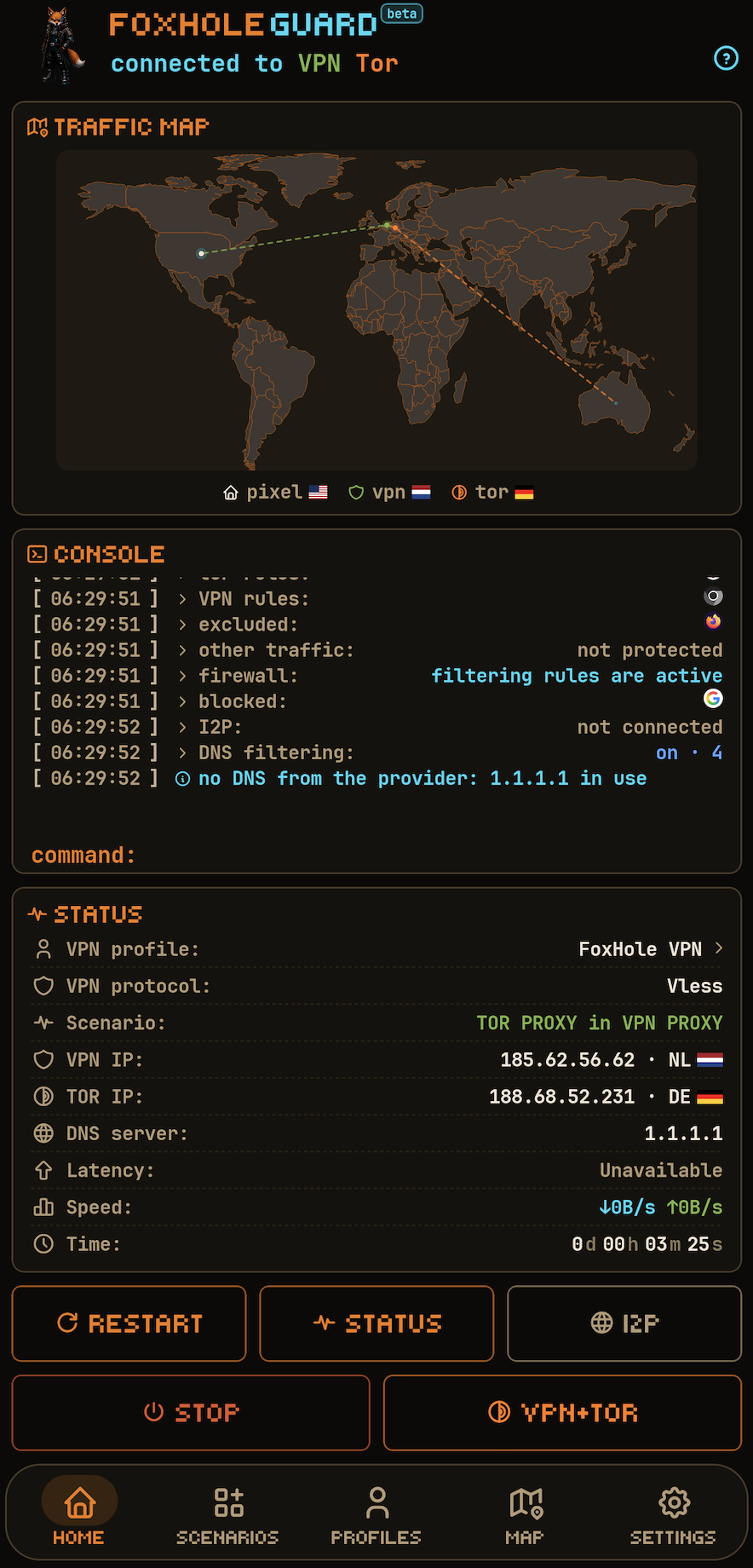
- Choose a scenario and approve Android’s VPN request when starting the system tunnel.
🔏 Release verification
For APKs from an official release, verifying the checksum and signing certificate is recommended.
sha256sum -c SHA256SUMS
apksigner verify --print-certs downloaded-apk.apk
Expected certificate SHA-256 fingerprint:
e59de2486084c38f3c77e9df0eb5eff9a4559f3c68024f1208e0e9c04b0df665
Expected SHA-1 fingerprint:
9e00dc6b54461a4647cb11133b394cdfc986646d
✨ Key features
- FoxHole Core - a custom network core written in Rust.
- VPN protocol support - VLESS, VMess, Hysteria2, WireGuard, AmneziaWG (experimental), Trojan, Shadowsocks, Naive, TUIC, and AnyTLS.
- Tor access - connection to Tor inside a TCP VPN tunnel, routing for selected applications, bridge support, and automatic scheduled Tor circuit rotation.
- I2P access - access to
.i2presources through a separatei2pdprocess and a local SOCKS5 contract with FoxHole Core. - Firewall - application blocking, kill switch, and quarantine for newly installed applications.
- DNS management - local DNS interceptor, UDP/TCP/DoT/DoH/DoQ/DoH3, cache, and stale cache.
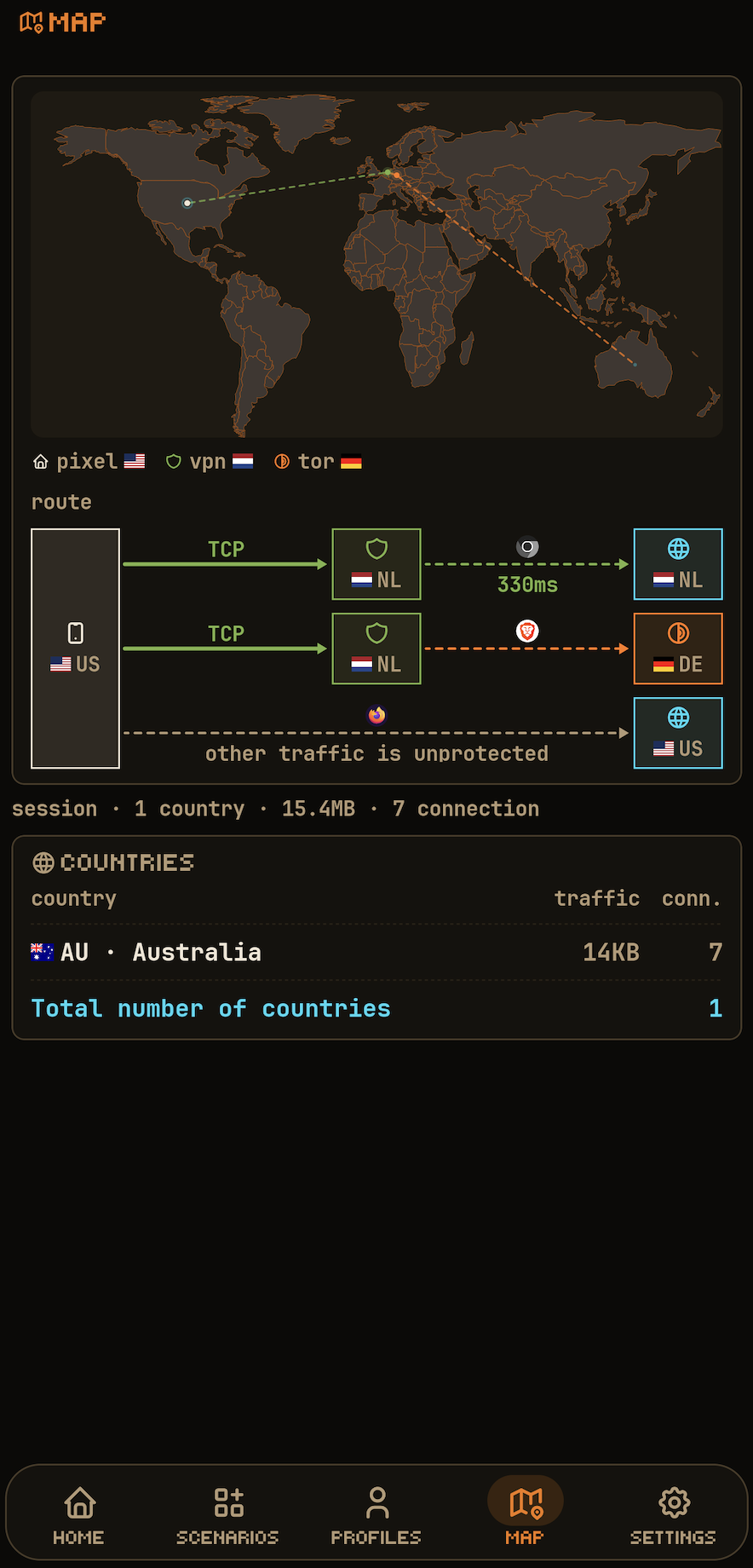
- Traffic map - displays current device network connections on a world map.
- FoxHole Sentinel - optional local IOC and network-anomaly analysis, disabled by default.
- Web apps - support for HTML5 applications and notification delivery.
- Proxy server - a local-network proxy server with SOCKS5 and HTTP CONNECT support and authentication.
- Router management public beta (OpenWrt) - setup, pairing, VPN profiles, device routing and protocol packages from Settings. The first installation requires an explicit, initially unchecked package-license choice; paired routers keep their settings. Router management is a public beta; device compatibility and installation/update workflows remain under validation.
- Background services -
foxhole watchdog webandfoxhole watchdog guardfor web-app notification delivery and background security-event monitoring. - Security - mechanisms for detecting signs of compromise and interference: application installation/removal logging, network anomaly analysis, and checks of newly installed applications against threat indicators and requested permissions. Custom encryption of application data is supported.
🧭 Architecture and operating model
🔁 Application control flow
application
        ↓
operating mode  →  scenario  →  traffic routing rules
        ↓
modules  ·  extensions  ·  background services
- Operating mode determines which connection - VPN and/or Tor - uses the Android system VPN tunnel.
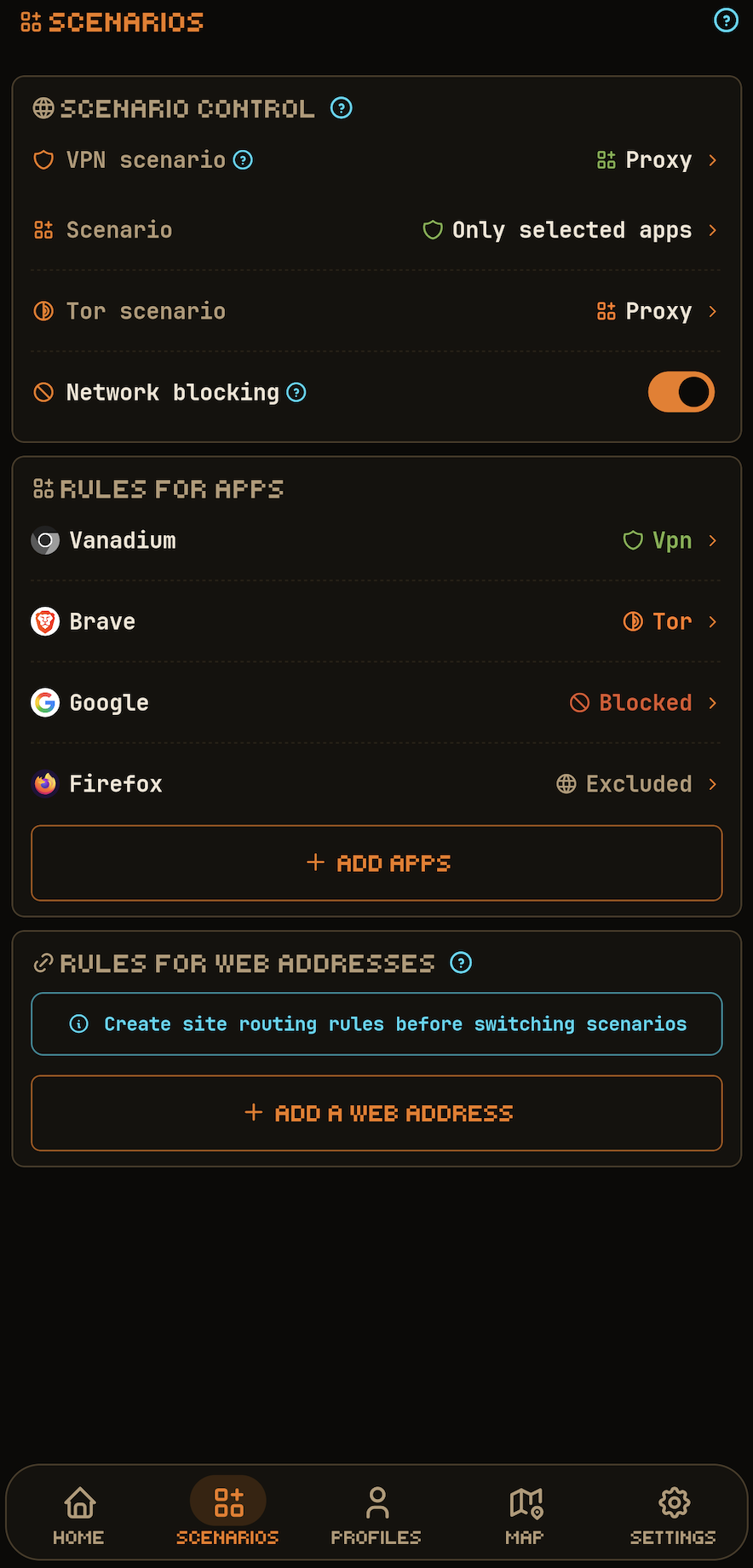
- Scenario determines how VPN and the Tor route are applied to the device.
- Rules determine how applications and websites use routes through VPN and Tor.
- Modules and extensions operate alongside any active application mode.
- Background services, when enabled, run continuously within Android platform restrictions.
👤 User and Expert interface
User presents the compact dashboard, connection controls and profile selector. Expert exposes additional diagnostics and tuning. This choice changes presentation; routing rules, security consent and advanced settings remain separate.
Choose User or Expert in Settings or the first-run appearance setup. The content-sized mode picker opens upward with light haptic feedback. The OpenWrt shortcut on the app home screen defaults ON; its dock shortcut defaults OFF. These independent settings only show or hide icons: OpenWrt settings remain accessible and router/routing/pairing policy is unchanged.
🎛️ Operating modes
The application supports three primary modes:
| Mode | Description |
|---|---|
| VPN | Standard VPN tunnel. |
| Tor | Connection to the Tor network through Arti. A VPN profile is not required; the Tor module must be enabled. |
| VPN and Tor | Both connections run simultaneously, each with its own scenario. |
🧩 Mode scenarios
The application mode is controlled by a scenario. In VPN and Tor mode, VPN and Tor use independent scenarios.
| Scenario | Meaning | Available for |
|---|---|---|
| Entire device | All device traffic goes through the tunnel. | VPN, Tor |
| Proxy scenario: selected applications | Only selected applications are routed. | VPN, Tor |
| Proxy scenario: all except selected | Everything except selected applications is routed. | VPN |
| Proxy server | Android proxy server through the active connection on the device. | VPN |
| Proxy server on local network | Creates a proxy server on the local network through the active connection on the device. | VPN, Tor, Mixed |
Restrictions apply to routing all device traffic through Tor alongside an active VPN connection. If Tor is started outside the VPN tunnel while VPN is active, the selected-applications scenario is used. In Mixed mode for the local-network proxy server, SOCKS5 traffic is routed through VPN, while HTTP CONNECT traffic is routed through Tor.
🔀 Traffic routing rules
Traffic routing rules are applied within the active mode and scenario:
- per-application rules control traffic routing between VPN and Tor;
- block internet access and exclude from DNS filtering rules remain active in any of the three operating modes when the firewall module is enabled;
- website rules support domain names, suffixes, and CIDR ranges;
- separate DNS policies are supported;
- traffic blocking on connection loss, quarantine for newly installed applications, and TTL rules are supported.
| Rule | Entire device | Proxy scenarios |
|---|---|---|
| application → VPN | not applied | applied |
| application → Tor | not applied | applied |
| application → exclude | applied | applied |
| application → block | applied | applied |
| web-address rules | applied | applied |
| In the Entire device scenario, separate application assignments to VPN or Tor are not applied. Application block/exclude rules and web-address rules still apply within the active route. Application blocking requires the system tunnel and firewall to be running. |
All traffic routing rules are applied atomically. Changes to application-mode scenarios are also applied atomically by default; this behavior can be disabled in settings.
🔒 Permissions and privacy
INTERNET- VPN, proxy, Tor, I2P, DNS, web apps, subscriptions, and updatable network data.ACCESS_NETWORK_STATE/ACCESS_WIFI_STATE- network state, network rules, and proxy server.ACCESS_LOCAL_NETWORK- router discovery, setup and management. On Android 17 (API 37) or later, when the app targets API 37 or later, the app requests the system permission before LAN actions. Denial blocks those actions.FOREGROUND_SERVICEand corresponding foreground-service permissions - long-running user-controlled network modes with a visible notification.QUERY_ALL_PACKAGES- application list for split routing, firewall, quarantine, DNS exclusions, and local auditing.PACKAGE_USAGE_STATS- only for user-enabled local statistics and analysis features that require the corresponding Android system access.CAMERA- QR import.POST_NOTIFICATIONS- network services, FoxHole Sentinel, and web-app notifications.RECEIVE_BOOT_COMPLETED- restoring the selected mode after reboot.WAKE_LOCK- maintaining network sessions where required.
The following data remains on the device:
- list of installed applications;
- local statistics;
- connections and logs;
- FoxHole Sentinel results;
- auto-connect history;
- DNS exclusions;
- firewall policy;
- route policy;
- local web-app data;
- module and extension settings;
- Vault metadata.
FoxHole Guard does not send this data to the developer.
🌍 Network requests
FoxHole Guard performs network requests only for enabled or user-initiated features:
- VPN;
- Tor;
- I2P;
- HTTPS subscription updates;
- connectivity checks;
- user-configured DNS;
- GeoIP/DNS/Tor bridge updates;
- web apps;
- event delivery for enabled web apps.
Connectivity checks contact Google and Cloudflare. External IP services with fallback endpoints provide the exit IP and approximate location. Those services receive the request and outgoing IP address; this does not send logs or Sentinel results to the developer.
Service requests also include GitHub-build app-update checks, selected FoxHole DB feeds-DNS, Tor bridges, GeoIP, IOC and TLS tables-and saved subscription sources. Background checks depend on enabled features and settings. F-Droid manages updates of its own APK.
🧱 Modules
Modules are configured separately from the application mode and can operate independently when their functions do not require an active network route.
| Module | Description |
|---|---|
| Traffic map | Displays current network connections on a world map. |
| Statistics | Local accounting by application, VPN profile, and DNS filtering. |
| Logs | Application log, network log, and security log. |
| Firewall | Application blocking and quarantine for newly installed applications. |
| Tor | Arti: TCP, .onion, bridges, and scheduled Tor circuit rotation. |
| I2P | .i2p through a separate i2pd process and loopback SOCKS5. |
| FoxHole Sentinel | Application auditing, IOC matching, and a log with hash-chain integrity verification. |
| DNS | DoT/DoH/DoQ/DoH3 and local filtering. |
🧅 Tor access
Tor access is implemented through Arti.
Supported:
- connection to the Tor network inside a TCP VPN protocol;
- bridges;
- network-access blocking when the connection is lost;
- Tor circuit rotation at a configured time interval;
- routing for selected applications.
The Tor module is included in the standard Android build of FoxHole Core.
🌐 Onion service
FoxHole Core provides an experimental onion-service publishing API. Its presence in the core does not imply a ready-to-use publishing flow in Guard. Access to existing .onion sites is a separate Tor-module feature.
🕸️ I2P access
I2P access is not implemented inside FoxHole Core.
A TCP-only loopback SOCKS5 contract with a separate i2pd process is used.
I2P route conditions are checked fail-closed:
- access to
.i2pfor applications whose traffic passes through an active FoxHole Guard route; - traffic relay mode into the I2P network;
- cellular-network usage restrictions;
- bandwidth management.
This route requires a running i2pd and DNS processing through FoxHole Guard. Android strict Private DNS is incompatible with the .i2p route: starting that route is rejected with an error.
🧱 Firewall
The firewall uses the shared FoxHole Core route policy.
Supported:
- application blocking;
Blocktaking precedence over allow routes;- per-app rules;
- network quarantine;
- TTL rules;
- kill switch;
- immediate targeted revocation of active stream-proxy flows after a deny rule is introduced; packet-tunnel L3 flows re-evaluate after their idle timeout;
- typed failures on invalid reloads.
🛡️ FoxHole Sentinel
FoxHole Sentinel is FoxHole Guard's optional local security-monitoring module. It is disabled by default; when enabled, its background work runs in the foxhole watchdog guard service.
FoxHole Sentinel is designed to combine several independent signal sources: indicators of compromise, network activity, static application analysis, and behavioral indicators. Analysis results are processed locally and are not sent to the developer.
FoxHole Sentinel is not positioned as an antivirus product. Its purpose is to show the user observable indicators, their sources, and confidence levels, while separating confirmed IOC matches from heuristic suspicions.
✅ Implemented
At the current stage, FoxHole Sentinel includes:
- Echap Stalkerware Indicators - local checking against known stalkerware indicators;
- network IOC matcher - application network activity from the live FoxHole Core event stream is matched against known domains and IP addresses; enabled with the FoxHole Sentinel analysis toggle;
- bounded APK/DEX inspection and optional YARA-X rules over verified classic DEX bytes in an isolated scanner process; incomplete coverage is reported;
- static DEX structure/API-reference indicators, without executing application code;
- statistical traffic alerts for upload/background/total-traffic spikes, new destination countries, DNS-block ratios, reconnect storms, latency shifts and dormant-app network activity;
- local correlation of detected IOCs with the application that owns the network flow;
- integration with the FoxHole Guard firewall and quarantine;
- core-event auditing through a bounded FoxHole Core event stream.
An IOC match is a security signal, but is not treated by itself as conclusive evidence that the device is compromised.
FoxHole Core does not maintain a persistent user Guard log. The core exposes a bounded event stream to the application, while the Android application maintains the long-term log. If the consumer cannot keep up with the stream, the audit interface explicitly reports dropped events.
🧪 Planned
The FoxHole Sentinel architecture is designed for further expansion of local analysis. The following capabilities are not yet implemented and are not part of the current version:
- native-library machine-code analysis and broader packer/anti-analysis detection;
- behavioral analysis of DEX and Android API sequences;
- correlation with MITRE ATT&CK Mobile;
- advanced analysis of application network behavior;
- detection of beacon-like activity;
- DGA-like DNS indicators;
- richer behavioral baselines beyond the current bounded traffic-window statistics;
- a correlation engine combining static, IOC, Android, and network evidence into a single finding.
These capabilities are planned as local detectors without cloud scanning and without sending APKs, the installed-application list, or network activity history.
📜 Security log
The application can maintain an encrypted local log containing:
- application installations;
- updates;
- removals;
- security events;
- selected network events.
A hash chain is used for integrity verification.
🔌 Supported protocols
| Protocol / mode | Support |
|---|---|
| VLESS | raw, WebSocket, HTTP Upgrade, gRPC/HTTP-2, XHTTP stream-one over HTTP/2, TLS, Reality, Vision, UDP-over-stream, XUDP, packetaddr |
| VMess | modern AEAD (alterId=0), raw, WebSocket, HTTP Upgrade, gRPC/HTTP-2, XHTTP stream-one over HTTP/2, TLS, TCP/UDP |
| Hysteria2 | QUIC/H3, auth, Brutal, TCP/UDP, Salamander obfs, destination-port hopping on one protected local UDP socket, reconnect |
| WireGuard | custom Noise_IKpsk2 handshake, L3 data path, reserved, import of wg:// and .conf |
| AmneziaWG (experimental) | Jc/Jmin/Jmax/S1..S4/H1..H4, checked header ranges, 2.0 templates I1..I5, RandomTrailers, content padding and HeaderProtectionKey |
| Trojan | TLS, WebSocket, HTTP Upgrade, gRPC/HTTP-2, XHTTP stream-one over HTTP/2, TCP and UDP framing |
| Shadowsocks | AEAD and AEAD-2022, TCP/UDP |
| Outline | Shadowsocks variant, not a separate protocol |
| Naive | native HTTP/2 CONNECT with protocol padding |
| TUIC | clean-room v5, QUIC, TLS-exporter auth, TCP/UDP, fragmentation, reconnect |
| AnyTLS | clean-room v2, TLS auth, padding, session reuse/multiplex, TCP and UoT v2 UDP |
| SOCKS5 | CONNECT, UDP ASSOCIATE, authentication |
| HTTP proxy | HTTP CONNECT, authentication |
| Tor | Arti, TCP, .onion, bridges |
| I2P | TCP-only loopback SOCKS5 adapter to a separate i2pd process |
Reality is a security layer below supported stream carriers, including XHTTP stream-one. Vision requires raw TCP. Other XHTTP modes and unsupported settings are refused.
↔️ Shadowsocks and Outline
Outline is treated as a Shadowsocks variant.
Profiles accept share links, v2rayTun subscriptions, SIP008 JSON and compatible Clash/mihomo YAML.
Dynamic Outline keys (ssconf://) retain their source for refresh and sharing.
Unsupported entries and client settings are reported; external YAML providers are not fetched.
Supported:
- AEAD;
- AEAD-2022;
- Outline
prefix=for compatible AEAD configurations; - SIP003
v2ray-pluginin WebSocket mode; simple-obfsinhttpandtlsmodes.
🚫 Not supported
ShadowsocksR (SSR) is deprecated and unsupported.
🌐 DNS
🧭 DNS management
FoxHole Core contains its own DNS interceptor.
Supported:
- UDP DNS;
- TCP DNS;
- DoT;
- DoH;
- DoQ and DoH3 with a custom DNS-server address; availability depends on the selected route and UDP support;
- protected DNS sockets;
- DNS bootstrap through a specific Android
Network; - cache;
- stale cache;
- fake-IP;
- route-aware DNS.
🧹 DNS filtering
FoxHole Guard can apply local rule sets for:
- advertising;
- trackers;
- telemetry;
- potentially malicious domains.
DNS filtering is off by default. Its four categories-ads, trackers, telemetry and potentially malicious domains-can be enabled independently. Trackers offer Normal/Pro levels; threats offer Medium/Full.
FoxHole DB builds the datasets from pinned public sources. Each dataset manifest and provenance record identify the exact sources, revisions and licenses.
The APK includes initial datasets for all four level combinations. Before use, the app checks size, SHA-256 and availability of the selected categories, so first use does not necessarily need a network download. Downloaded updates are signed data: signature, compatibility, expiry, version sequence and SHA-256 are checked.
Update URL for the selected variant:
https://foxhole-team.github.io/foxhole-db/dns-categories/<variant>/manifest.json
<variant> is normal-medium, normal-full, pro-medium or pro-full.
Stored or staged data is not necessarily active: the current FoxHole Core instance must verify and apply it. Invalid signed active/pending data is reported unavailable rather than silently replaced with an APK seed. These datasets contain filtering data, not executable code.
🔐 TLS and protected sockets
FoxHole Core uses a Rust TLS stack with certificate validation.
Supported:
- WebPKI validation;
- SNI;
- ALPN;
- SPKI SHA-256 pin;
insecurecompatibility mode.
insecure is not a secure default and requires explicit user consent.
Every outbound Android socket created by FoxHole Core follows:
protect(fd)
    ↓
bind to Android Network
    ↓
connect / send
🧩 Extensions and additional capabilities
Extensions add capabilities to the core application.
| Extension | Description |
|---|---|
| Proxy server | Exposes access to other devices on the current Wi-Fi network through SOCKS5 and HTTP CONNECT with mandatory authentication and binding to a confirmed network. |
| Web applications | HTML5 sites in a full-screen WebView with periodic notification checks. Separate storage profiles are used when the installed WebView supports them. |
🔗 Proxy server
The proxy server shares the active route with other devices on the current Wi-Fi network.
- SOCKS5 and HTTP CONNECT;
- mandatory authentication;
- changing networks disables the proxy server and invalidates credentials.
Routing presets: VPN, Tor, Mixed - SOCKS5 through VPN, HTTP CONNECT through Tor.
🖥️ Web apps
A separate ASCII identifier is created for each web app and used by FoxHole Core in network traffic routing policy.
- web-app identity: per-app storage isolation; on supported WebView versions, each web app runs in a separate profile with its own cookies, storage, and cache; without multi-profile support, a shared WebView profile is used with browser origin isolation;
- separate routable leases;
- network rules at the web-app level;
- notifications bound to the canonical origin identity;
- revocation of a granted lease.
Data cleanup depends on the installed WebView: an individual application profile, site data, or shared cleanup with separate confirmation. Without multiple-profile support, web applications share a profile with ordinary origin isolation. Pending cleanup is tracked and retried before loading.
🔔 Web-app background service - foxhole watchdog web
Web-app notifications are delivered by a separate background service.
Polling model. The service polls enabled web apps on a schedule through a hidden WebView: it injects a JS shim into the page and reads the site's counter when available, otherwise (N) from the tab title. Delivery is periodic rather than real-time; the interval is configured in settings. The schedule is driven by an in-process ticker and a WorkManager pass every 15 minutes as a fallback if the process is terminated. Concurrent passes are coalesced; images are not loaded during polling.
Polling conditions. An application is not polled if:
- its route is unavailable: a VPN route requires an active VPN connection and an available local proxy bridge; WireGuard and AmneziaWG are not used for this polling because they do not provide a local proxy bridge; Tor requires an active Tor circuit; I2P requires an active I2P connection; the
BLOCKroute always forbids polling; - the WebView proxy override is not installed: the override is process-global and validated fail-closed; only a loopback host with an available port and both credential values is accepted, otherwise the override is not applied.
After polling. The override is removed and removal is verified. Service-worker networking is blocked until the route changes so a background page worker cannot access the network outside the new override. A foreground frame takes exclusive ownership of the override: while it owns the override, background passes do not start, and if ownership cannot be obtained, the frame does not open. The frame never operates outside its assigned route.
🛜 Router management public beta
[!NOTE] Router management while a VPN connection is active is not yet supported.
Open OpenWrt in Settings to pair a router and manage its VPN profiles, device routing, protocol packages and FoxHole updates. Device compatibility and installation/update workflows remain under validation. The management switch applies to the selected saved pairing; turning it off does not stop the router VPN.
[!IMPORTANT] The restrictions below describe the current published release. Automatic installation currently supports only routers with a completely default OpenWrt configuration. You can also pair a router after manually installing the latest FoxHole OpenWrt Client. For setup and pairing, the phone and router must be on the same LAN, and the router needs internet access.
The Wi-Fi icon reports only a physical Wi-Fi connection, without an SSID or location access. Search and new setup/pairing require Wi-Fi. Manual entry is prefilled once with the current private IPv4 Wi-Fi gateway when available and stays editable.
Manage through home VPN is a separate opt-in, OFF by default for each existing pairing. It also requires your Public IP address confirmation (the router has a public IP and incoming VPN service) and a usable active VPN route. That confirmation does not assign an address or configure the firewall. The app can attempt foreground control through that VPN network at the saved private endpoint using the existing pinned TLS identity and paired authentication; it opens no WAN management port and does not enable discovery or new pairing over mobile data. Automatic phone VPN switching/handoff remains disabled; this opt-in concerns router management only.
Only incoming-VPN profiles delivered directly to the app by an authenticated paired router receive separate app-link metadata. Their connection URI, configuration and QR formats are unchanged. Generic web/QR/provider exports remain unmarked, and imported hints cannot establish trust.
Automatic recognition additionally requires the matching saved local profile, current configuration and selected pairing, with that profile actually connected through the app-owned VPN. It makes one bounded check per actual connection, with no timer, automatic retry or provider-profile polling. Retry pairing is an explicit Wi-Fi/permission/PIN flow: the old record remains until authentication succeeds, and a changed certificate identity is never accepted silently.
Setup requires OpenWrt 25.12.5 with APK, administrator access and an authenticated catalog matching the exact target and architecture. The current package/update policy admits mediatek/filogic and x86/64; this does not establish compatibility with every router model. Dependencies, kernel ABI, flash and RAM must also pass admission.
The first installation requires explicit agreement with the FoxHole OpenWRT Client license; this choice starts unchecked. The separate automatic-update checkbox starts enabled for a new installation: clear it to opt out or change it later in router Settings. Pairing an existing router preserves its policy. Direct CLI/backend defaults remain off.
Manual updates from the app and LuCI use the same authenticated transaction. When automatic updates are enabled, the router checks daily and installs verified FoxHole packages independently of the app update channel. Profiles, pairing and selected protocol modules are preserved; OpenWrt firmware and unrelated system packages are not upgraded. Unpairing the phone does not disable the router's update policy.
⚙️ Background services
FoxHole Guard uses two independent background services.
| Service | Function |
|---|---|
foxhole watchdog web |
Checks and delivers notifications for added web apps. |
foxhole watchdog guard |
Monitors events and records application installations/removals and network traffic anomalies in the protected log. |
In hardened mode, foxhole watchdog guard creates a foreground service so it remains in memory when there is no active network connection, and stops after an active connection is detected. Power-saving mode uses periodic WorkManager polling.
🗃️ FoxHole DB and datasets

FoxHole DB contains five independent signed datasets downloaded by the application as their features need them. The TLS feed carries tables only: ClientHello generation remains compiled into FoxHole Core, and a failed update leaves the built-in or last verified tables in use.
| Dataset | Artifact | Format | Source | License | Version |
|---|---|---|---|---|---|
| DNS - filtering categories | dns-categories/<variant>/dns-categories.fhds |
foxhole-dns-fst-v1, manifest schema: 3 |
Pinned AdGuard, EasyPrivacy and HaGeZi sources; exact composition in the manifest | Per source dataset; see provenance | Four variants: Normal/Pro × Medium/Full; APK seeds and verified updates |
| Tor - mirror of built-in bridges | bridges.json |
tor-bridges-json |
Tor Project built-in bridges (Moat) | public censorship-circumvention data | generated_at marker; object keys are normalized, while upstream array order is preserved. |
| FoxHole Sentinel - security lists (threat intelligence) | threat-intel.json |
sentinel-threat-intel-json, document schema: 3 |
AssoEchap/stalkerware-indicators | CC-BY-4.0 | The upstream commit is pinned for each build and recorded in threat-intel-source-info.json. |
| Geo database - IP → country | dbip-country-ipv4.csv, dbip-country-ipv6.csv |
dbip-country-csv |
DB-IP Lite via sapics/ip-location-db (dbip-country) |
CC-BY-4.0 | Upstream version from the dataset's package.json is copied into the manifest. |
| TLS fingerprint tables - ClientHello profiles | fingerprints.json |
tls-fingerprint-tables-json |
FoxHole Core fingerprints/ |
GPL-3.0-or-later | The upstream revision is pinned for each build; every profile re-derives its own fingerprint_sha256 before it is applied. |
🤖 Android / Native ABI
Android 7 (API 24) or later is required. FoxHole Core connects through a versioned C/JNI ABI; the Capabilities API reports the protocols and features compiled into the build.
The android4 delivery profile targets arm64-v8a, armeabi-v7a, x86 and x86_64. Each ABI needs matching native libraries and license data. Available APK architectures and asset names are determined by the actual published release; a build option alone is not device/runtime acceptance.
Native builds use pinned Rust/NDK toolchains and require ELF checks.
🔗 FoxHole ecosystem
| Project | Role |
|---|---|
| FoxHole Guard | Android: VPN, Tor/I2P, traffic rules and local monitoring |
| FoxHole VPN | Android: simple VPN client and paired OpenWrt management |
| FoxHole Core | Shared Rust networking core; features depend on the build |
| FoxHole OpenWrt | Router VPN and local-network management |
| FoxHole DB | Signed rules and reference datasets |
🤝 Contributing
Report bugs and propose changes through Issues.
💖 Support development
We develop and maintain FoxHole Guard entirely with our own time and resources, using AI tools in development. Your support helps us dedicate more time to the project and speed up development.
🪙 Cryptocurrency wallets
XMR (Monero):
48yBVPTdcyJ1WoJtnKmVpEZziEsDy4HvbCW7eQDS9mfdiWPFXwZ8F5h9YZ2UTTBLxPcJgQgvth7iqLZM2yMCaQ432qaouqr
BTC (Bitcoin):
bc1qatnyy7jcpqrp0d3dk9rta9vqfejgh4mysd6m2f
ETH (Ethereum):
0xDEBA357Cc8f5E865ea7FFa98E138C8241A16A465
⚠️ Disclaimer
- Tor is a trademark of The Tor Project. FoxHole Guard is not a product of The Tor Project and is not endorsed, sponsored, or affiliated with The Tor Project.
- FoxHole Guard is not a product of AdGuard and is not affiliated with AdGuard Software Ltd.
- FoxHole Guard is not an official product of I2P or PurpleI2P.
📄 Licenses
FoxHole Guard and FoxHole Core are distributed under:
GNU General Public License v3.0 or later (GPL-3.0-or-later)
Copyright (C) 2026 FOXHOLE TEAM.
Third-party dependency licenses are listed in:
THIRD_PARTY_NOTICES.md;- the project SBOM (
*.cdx.json).
The dependency and license graph is validated in CI.
Roadmap
See Roadmap for project priorities and TODO for planned work.