
fotedev/ghost
fotedev/ghost has 31 GitHub stars and 6 forks. GitHot measured 0 stars in 24 hours. Last checked 2026-11-18 00:13 UTC. Last push 2026-11-14.
Measured star growth
- in 24h
- 0
- in 7 days
- Collecting history
- in 15 days
- Collecting history
- in 1 month
- Collecting history
Net star changes over overlapping periods, not daily totals. Missing measurements are left blank. Stars measure attention, not software quality.
About
GHOST — Guided Hardware & OS Scrubbing Toolkit. Fresh-start identity resets for AI-IDEs (Cursor, Windsurf, Trae, Qoder, ZCode, QoderWork, MiniMax/OpenCode). Windows + Linux.
Developer ToolsREADME.md
OriginalGHOST — Guided Hardware & OS Scrubbing Toolkit



Fresh-start toolkit for local AI-IDE identity stores: rotate device identifiers for Cursor, Windsurf / Devin Desktop, Trae, Qoder, ZCode, QoderWork, MiniMax Agent, and OpenCode, and inspect or reset system machine IDs. Built for privacy hygiene, multi-account testing, and CI/dev-environment resets.
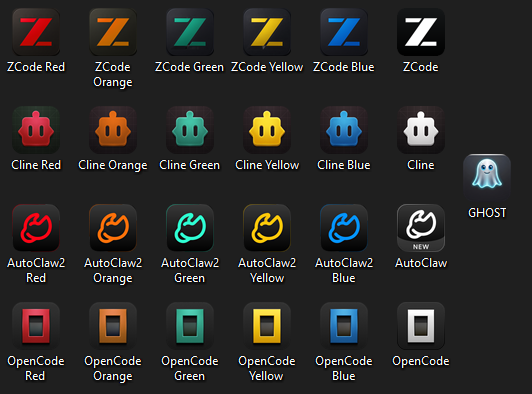
All four clone suites — ZCode, Cline, AutoClaw2, OpenCode — each with its Primary (stock icon) plus five color-branded clones, and the GHOST launcher icon.
Disclaimer
These scripts modify application and system identifiers on machines you own or are authorized to administer. They may violate vendor Terms of Service. Use at your own risk — no outcome is guaranteed. See SECURITY.md.
How it works
Applications create unique IDs to identify your computer. Each reset script generates fresh IDs, updates the relevant config files (JSON, SQLite, binary stores), verifies every write by re-reading it, backs up everything it touches, and emits an audit log plus a self-contained restore script.
| Task | Windows | Linux |
|---|---|---|
| Reset Cursor | reset_cursor.ps1 |
reset_cursor.sh |
| Reset Windsurf\Devin | reset_devin.ps1 |
reset_devin.sh |
| Reset Trae | reset_trae.ps1 |
reset_trae.sh (v0.2 modernized; deeper Windows stores not covered yet) |
| Reset Qoder | reset_qoder.ps1 |
reset_qoder.sh (v0.1 derived paths - provenance flagged) |
| Reset QoderWork | reset_qoderwork.ps1 |
reset_qoderwork.sh (v0.1 derived paths) |
| Reset ZCode (+Qoder stores) | reset_zcode.ps1 (-Target Primary|Secondary|Third|Fourth|Fifth|Sixth|Both|All) |
reset_zcode.sh (v0.1 default profile; shared CLI db untouched - matches Windows) |
| Reset MiniMax/OpenCode | reset_minimax_opencode.ps1 |
reset_minimax_opencode.sh (v0.1 derived paths; CLI XDG auth untouched) |
| ZCode clones (Primary + 5 branded clones) | launch_zcode_second_instance.ps1 -Instance Second|Third|Fourth|Fifth|Sixth + Launch-ZCode-*.bat |
— |
| ZCode Primary (stock profile, never elevated) | launch_zcode_primary.ps1 (explorer spawn, verify-after) |
— |
| ZCode light headless worker (no desktop window) | launch_zcode_cli_light.ps1 -Instance Second|...|Sixth (-Prompt / -Server) |
— |
| OpenCode light headless worker (CLI only, clone XDG state) | launch_opencode_cli_light.ps1 -Instance c1|...|c5 (-Prompt / -Server / -Login / -StopService) |
— |
| Reset AutoClaw2 (Primary + clones, chats/work kept) | reset_autoclaw2.ps1 (-Target Primary|c1|...|c5|All, -KeepLogin, -DryRun) |
— |
| Reset Cline (Primary + clones, chats/tasks kept) | reset_cline.ps1 (-Target Primary|c1|...|c5|All, -KeepLogin, -DryRun) |
— |
| Reset OpenCode desktop (Primary + clones, chats/repos kept) | reset_opencode.ps1 (-Target Primary|c1|...|c5|All, -KeepLogin, -DryRun) |
— |
| Device fingerprint self-test + machine-wide ID reset | change_device_id.ps1 (default = read-only Fingerprint; -Mode LegacyReset = the reset, IDE Resets [1]) |
change_device_id.sh Fingerprint / ResetMachineId |
| WMI serial spoof (BIOS/motherboard/disks/RAM via WMI) | spoof_wmi_serials.ps1 |
— |
| System machine ID | Windows Registry MachineGuid |
/etc/machine-id |
| Interactive menu | GHOST.bat |
ghost.sh |
Detailed per-tool walkthroughs (paths touched, preservation lists, flags): docs/getting-started.md.
Why not just use Sandboxie?
Sandboxie-Plus isolates an app's file writes — it does not change the app's identity. GHOST gives every instance its own fresh identity, data, and Windows presence, permanently. Full comparison (side-by-side table + diagram, including what Sandboxie does better): docs/why-not-sandboxie.md.
Prerequisites
Windows: Windows 10/11 · PowerShell 5.1 or 7 (run as Administrator) ·
Python 3 on PATH (SQLite writes run through the bundled stdlib-only core in
src/python/ghost) · close the target app first.
Linux: bash 4+ · python3 (recommended) · uuidgen or
/proc/sys/kernel/random/uuid · openssl or xxd · sudo only for
/etc/machine-id.
git clone https://github.com/fotedev/ghost.git
cd ghost
Note on "Download ZIP" copies: a ZIP extracted from GitHub has no
.git, so the git-based update flow cannot run there. Running the updater ([U]on the main menu, or Maintenance [2]) once from such a folder either converts it in place into a real git clone (after your confirmation, when Git is installed) or — when Git is not installed — updates it by downloading the latest GitHub archive directly (files are only added or replaced, never deleted; every replaced file is backed up first).
Quick start
Prefer the interactive menus:
# Windows (PowerShell as Administrator, from the repo root)
.\GHOST.bat
# Linux
./ghost.sh
Desktop app (optional)
GHOST also ships a native desktop launcher, built from visible source with the C# compiler already in Windows — nothing to download, no binary to trust:
# from GHOST.bat: System & GHOST Maintenance [5]
powershell -ExecutionPolicy Bypass -File tools\build_ghost_exe.ps1
Double-click the resulting GHOST.exe (repo root). It mirrors the same menu
as GHOST.bat and runs the very same PowerShell scripts in their own console
windows — a new face over the same toolkit, not a rewrite (it must stay next
to GHOST.bat; menu edits in src\desktop\menu.json need no rebuild).
Or run a script directly — full examples in docs/getting-started.md:
.\src\windows\reset_devin.ps1                        # Windsurf + Devin Desktop roots, one pass
.\src\windows\reset_zcode.ps1 -Target Secondary      # survivor instances keep running
.\src\windows\launch_zcode_primary.ps1                           # stock Primary - non-elevated (drag-drop works)
.\src\windows\launch_zcode_second_instance.ps1 -Instance Third   # yellow-branded clone
.\src\windows\launch_zcode_cli_light.ps1 -Instance Second        # headless account worker - low RAM
./src/linux/reset_cursor.sh                          # close Cursor first
sudo ./src/linux/change_device_id.sh ResetMachineId  # /etc/machine-id (root)
Repository layout
ghost/
├── GHOST.bat       # Windows interactive launcher (double-click)
├── ghost.sh        # Linux interactive launcher
├── src/
│   ├── windows/    # .ps1 resetters (unversioned names) + identity_utils.ps1 + change_device_id.ps1
│   │               #   + ZCode/AutoClaw2/Cline/OpenCode clone launchers
│   │               #   (launch_zcode_second_instance.ps1,
│   │               #   launch_autoclaw2_clone.ps1 + launch_autoclaw2_clones_all.ps1,
│   │               #   launch_cline_clone.ps1 + launch_cline_clones_all.ps1,
│   │               #   launch_opencode_clone.ps1 + launch_opencode_clones_all.ps1)
│   │               #   ghost_launch_guard.ps1 (shared 3-way RAM/concurrency
│   │               #   launch guard used by all four suites' launchers)
│   │               #   + reset_autoclaw2/reset_cline/reset_opencode.ps1
│   │               #   (per-clone identity resets, chats/work preserved)
│   ├── linux/      # .sh resetters + id_reset_common.sh
│   └── python/     # stdlib-only Python core (ghost/) + ghost_cli.py bootstrap —
│                   #   owns the shared SQLite/JSON identity logic
├── tools/          # watch_zcode_captcha.ps1 (captcha watchdog),
│                   #   watch_zcode_taskbar.ps1 (taskbar identity watcher),
│                   #   patch_zcode_icon_override.ps1 + .mjs (app.asar icon /
│                   #   accent / AUMID patch — re-run after app updates),
│                   #   install_zcode_second_shortcuts.ps1 (clone shortcuts),
│                   #   install_ghost_shortcut.ps1 (GHOST.lnk), update_ghost.ps1
│                   #   (repo self-updater), refresh_zcode_second_chats.ps1
│                   #   (cross-instance chat refresh + -Watch error watcher),
│                   #   diagnose_zcode_freeze.ps1 (read-only freeze diagnostic),
│                   #   diagnose_zcode_throttle.ps1 (read-only Start-Plan throttle
│                   #   diagnostic — CLI-only, no GHOST.bat entry),
│                   #   make_ghost_icon.ps1 (regenerates the launcher icon),
│                   #   make_clone_icon.ps1 (generic per-app clone-icon generator),
│                   #   new_clone_suite.ps1 (clone-suite scaffolding generator),
│                   #   set_zcode_bot.ps1 (per-clone Telegram bot audit/sync),
│                   #   sync_zcode_assets.ps1 (Primary→clone MCP/skills/plugins
│                   #   sync; -McpOnly is safe against RUNNING instances),
│                   #   zcode_mcp_merge.ps1 (unit-tested MCP merge core),
│                   #   watch_zcode_mcp_sync.ps1 (resident MCP sync watcher),
│                   #   sync_autoclaw2_mcp.ps1 (AutoClaw2: master manifest →
│                   #   closed-clone connected sources) + sync_autoclaw2_chats.ps1
│                   #   (chat inventory / guarded one-way import / revert),
│                   #   autoclaw2-mcp.master.json (AutoClaw2 device MCP manifest),
│                   #   zcode-{blue,yellow,green,red,orange}-branding/ (icon assets);
│                   #   cline-{blue,yellow,green,red,orange}-branding/ (clone icons,
│                   #   wired via install_cline_clone_shortcuts.ps1);
│                   #   patch_opencode_clone_home.ps1 + .mjs (OpenCode desktop
│                   #   clone-home + taskbar-identity asar patch — re-run after
│                   #   app updates), install_opencode_clone_shortcuts.ps1
│                   #   (OpenCode clone shortcuts);
│                   #   opencode-{blue,yellow,green,red,orange}-branding/
│                   #   (clone icons, wired via install_opencode_clone_shortcuts.ps1;
│                   #   orange generated 2026-10-24 as a placeholder);
│                   #   install_autoclaw2_clone_shortcuts.ps1 (AutoClaw2 clone
│                   #   shortcuts) + autoclaw2-{blue,yellow,green,red,orange}-branding/
│                   #   (clone icons)
├── tests/          # Pester 5 suite (PowerShell) + stdlib unittest suite (Python core)
├── docs/           # getting-started / architecture / cli / troubleshooting / faq
├── .github/        # CI workflow, issue forms, PR template, CODEOWNERS
└── archive/        # superseded versions — local-only, never committed
identity_utils.ps1 (Windows) and id_reset_common.sh (Linux) are the shared
libraries; the per-app scripts are thin target manifests on top. Details:
docs/architecture.md.
Configuration
reset_zcode.ps1 -Target Primary|Secondary|Third|Fourth|Fifth|Sixth|Both|All— per-instance resets with independent ID sets (survivors untouched in Single mode)reset_qoder.ps1/reset_qoderwork.ps1—-SkipMac,-SkipHostname,-DryRunreset_minimax_opencode.ps1—-KeepLogin,-SkipVersionChecktools/patch_zcode_icon_override.ps1— one-timeapp.asarpatch (engine v8) enablingZCODE_ICON_DIR/ZCODE_AUMID_SUFFIX/ZCODE_ACCENT_HEX/ZCODE_INSTANCE_NAME(per-clone icon, taskbar identity, accent color, window title) and injecting bidi auto-direction into the chat (Arabic RTL / English LTR per paragraph, code blocks stay LTR;ZCODE_BIDI_OFF=1opts out); re-run after every ZCode app update (-Restoreundoes it)tools/install_zcode_second_shortcuts.ps1— Desktop + Start-menu shortcuts for all five clones with per-clone AppUserModel IDs (-Removeuninstalls,-RepairPrimaryAumidfixes a collided Primary pin + restores its icon)tools/sync_zcode_assets.ps1 -Target Second|Third|Fourth|Fifth|Sixth|All— Primary→clone asset sync: merges MCP server definitions from the Primary (per-clone toggles stay local), replaces stale.zcode\skillscopies with a junction on the shared~\.agentsstore, mirrors the plugin cache; runs automatically before every clone launch.-McpOnlysyncs the MCP definitions only and is safe against RUNNING instances — ZCode [19] for a one-shot run (ZCode [18] for the full sync)tools/watch_zcode_mcp_sync.ps1— resident MCP sync watcher: stat-guards the Primary's~\.zcode\cli\config.jsonand re-invokessync_zcode_assets.ps1 -McpOnly -Target Allon every change, so all five clones converge within seconds (-RunOnce,-ApplyLiverecycles running clones' app-servers idle-guarded so the open session picks the change up immediately,-InstallAutostart). ZCode [20] (resident) / [21] (one-shot + apply live). The merge invariant lives intools/zcode_mcp_merge.ps1(unit-tested bytests/zcode_mcp_merge.Tests.ps1)tools/diagnose_zcode_throttle.ps1— read-only diagnostic for "Reconnecting... x/10" / "The system is busy..." turn failures: parses the shared agent JSONL logs for Start-Plan admission retries with their cause chain + hourly histogram. Verified root cause (2026-10-27): server-side admission control, NOT a device/IP ban. CLI-only — no GHOST.bat entrysrc/windows/spoof_wmi_serials.ps1— opt-in system-level WMI serial spoof (Maintenance [3], behind a confirm gate): redeclares Win32_BIOS / BaseBoard / ComputerSystemProduct / SystemEnclosure / DiskDrive / PhysicalMemory serials via a generated.mof, plus SQMClient UserId + Bluetooth LocalAddress; backs the WMI repository up first and generates awinmgmt /restorescript. WMI layer only — design + honest limits: docs/WMI_SERIAL_SPOOFING.mdtools/refresh_zcode_second_chats.ps1 -Target Primary|Second|Third|Fourth|Fifth|Sixth|All— shows another instance's chats in a running sidebar without an app restart;-Watchruns as a daemon that auto-refreshes on quota/captcha failurestools/diagnose_zcode_freeze.ps1— read-only freeze diagnostic: scans each ZCode instance's logs + crash dumps for renderer-OOM / freeze events and prints live RAM/commit pressure (-Days Nwidens the window)tools/watch_zcode_taskbar.ps1— resident watcher that re-stamps every ZCode window's taskbar identity every 5 s (heals merges and fresh windows);-InstallAutostartadds a startup-folder shortcut,-RunOncefor testingtools/install_ghost_shortcut.ps1— regenerates theGHOST.lnkshortcuts (Desktop + repo root) that carry the launcher icon;-Removeuninstallstools/update_ghost.ps1— repo self-updater: fetch + compare + guardedgit pull --ff-only(-CheckOnlyreports without writing)- AutoClaw multi-instance (SUNSET) — the AutoClaw v1.20 suite
(
launch_autoclaw_clone.ps1,reset_autoclaw.ps1,patch_autoclaw_ports.ps1+ engine v12,install_autoclaw_clone_shortcuts.ps1,docs/AUTOCLAW_CLONES_SPEC.md) was REMOVED 2026-10-31 with the v1.20 app (uninstalled from the dev host 2026-10-29; AutoClaw2 below is the successor). Recover the machinery from git history (last full presence: commit 874346f and its descendants) or the gitignoredarchive/autoclaw-v1.20/copy. - Cline multi-instance —
src/windows/launch_cline_clone.ps1 -Instance c1..c5launches fully isolated Cline desktop clones beside the Primary: each gets its own state tree (CLINE_DIR), web login profile (WEBVIEW2_USER_DATA_FOLDER), and hub/sidecar ports (CLINE_HUB_PORT/CLINE_SIDECAR_PORT); the Tauri single-instance guard (fixed-key mutex + hidden window) is neutralized by renaming its hidden window, and the launcher aborts a second copy on the same data.-Statusreports locks, ports and sign-in state;launch_cline_clones_all.ps1launches all five sequentially.tools/install_cline_clone_shortcuts.ps1installs per-color Desktop + Start-menu shortcuts with suffixed AUMIDs (-Remove). Fresh profile per clone — one manual sign-in each. Design + verified ground truth: docs/CLINE_CLONES_SPEC.md - OpenCode desktop multi-instance —
src/windows/launch_opencode_clone.ps1 -Instance c1..c5launches fully isolated OpenCode desktop clones beside the Primary: each gets its own Electron userData + sessionData (<cloneHome>\desktop,<cloneHome>\session) and its own CLI state via the app's ownXDG_*redirection (data\,config\,cache\,state\). Isolation needs the one-time clone-home asar patch (tools/patch_opencode_clone_home.ps1— packaged builds hardcodeai.opencode.desktop;-Restoreundoes it; re-run after app updates). Per-clone taskbar identity (AUMIDai.opencode.desktop.cN+ window icon- "OpenCode " title) rides the same patch; shortcuts install via
tools/install_opencode_clone_shortcuts.ps1(-Remove,-RepairPrimaryAumid). Fresh state per clone — one manual sign-in each. The light worker (src/windows/launch_opencode_cli_light.ps1—-Instance c1..c5,-Promptone-shot,-Serverv2 API/web server,-Acp,-Login,-StopService) drives the shippedopencode-cli.exeheadless on the clone's own XDG state (free model until-Login), andtools/install_t3_opencode_instances.ps1seeds the five clones into T3 Code as ACP provider instances (close T3 first;-Removeundoes). Design + verified ground truth: docs/OPENCODE_CLONES_SPEC.md
- "OpenCode " title) rides the same patch; shortcuts install via
- AutoClaw2 multi-instance —
src/windows/launch_autoclaw2_clone.ps1 -Instance c1..c5launches isolated AutoClaw2 (v2.1.1, zwork) clones beside the Primary with 100% env-based isolation and NO asar patching:ZWORK_USER_DATApins the whole Electron userData per clone before the per-profile single-instance lock, andAUTOCLAW_PROFILE_ROOTrelocates the legacy migration source so no clone reads live Primary state; the app generates a fresh device id per profile.-Statusintrospects a clone;launch_autoclaw2_clones_all.ps1launches all five sequentially;tools/install_autoclaw2_clone_shortcuts.ps1installs per-color shortcuts (-Remove). Wired intoGHOST.batmain [4] — the AutoClaw2 submenu runs the same launchers (rows [1]-[9]: launch c1..c5 / ALL / shortcuts / status / remove). Design + verified ground truth: docs/AUTOCLAW2_CLONES_SPEC.md - Telegram alerts for
tools/watch_zcode_captcha.ps1come from-TelegramBotToken/-TelegramChatIdparams orTELEGRAM_BOT_TOKEN/TELEGRAM_CHAT_IDin.envlocal(copy .env.example to.envlocal; it is git-ignored)
Testing
Invoke-ScriptAnalyzer -Path src,tools,tests -Recurse -Settings ./tests/PSScriptAnalyzerSettings.psd1 -Severity Error
Invoke-Pester -CI -Output Detailed
shellcheck src/linux/*.sh ghost.sh
for f in src/linux/*.sh ghost.sh; do bash -n "$f"; done

# Python core — stdlib unittest, no pip installs, runs on any OS
python -m unittest discover -s tests/python -v
CI runs three jobs on every push/PR: PowerShell lint + Pester
(windows-latest), ShellCheck (ubuntu-latest), and the Python core suite
(see .github/workflows/ci.yml).
Important notes
- Backups are automatic; a reset is reversible via the generated
restore_<App>_<ts>.ps1— see docs/troubleshooting.md - Close the target editor before running (the scripts force-kill it anyway)
- System ID changes may require a reboot (Linux) or restart (Windows)
Contributing
PRs welcome — read CONTRIBUTING.md first (conventions, PS 5.1 rules, local-only files, the no-silent-success invariant). Bug reports: use the issue templates and redact all machine identifiers and audit logs.
Security
Scope, intended use, and mandatory redaction rules: SECURITY.md. Please report vulnerabilities privately via GitHub's "Report a vulnerability".
Changelog & License
Notable changes: CHANGELOG.md · Licensed under Apache License 2.0 — see NOTICE. Product names (Cursor, Windsurf, Devin Desktop, Trae, Qoder, ZCode, MiniMax, OpenCode) belong to their respective owners; GHOST is not affiliated with any of them.