
fossasia/star-me
fossasia/star-me has 1,969 GitHub stars and 676 forks. GitHot measured +1 stars in 24 hours and +4 in 7 days. Last checked 2026-11-11 13:44 UTC. Last push 2026-09-16.
Star FOSSASIA repositories on Github and connect with the community
Measured star growth
- in 24h
- +1
- in 7 days
- +4
- in 15 days
- Collecting history
- in 1 month
- Collecting history
Net star changes over overlapping periods, not daily totals. Missing measurements are left blank. Stars measure attention, not software quality.
README.md
OriginalStar Me
Starring is fun and following open source projects even more so.
Star Me is a small browser based script that helps developers quickly connect with FOSSASIA projects on GitHub. By running the script in your browser console while logged into GitHub, you can automatically star repositories and stay up to date with project activity.
This tool is primarily intended for onboarding, workshops, and community engagement. No GitHub token or API access is required.
What does this script do
- Automatically stars FOSSASIA repositories on GitHub
- Follows configured GitHub organizations (FOSSASIA by default)
- Runs entirely in your browser while you are logged in
- Does not require any installation, extensions, or authentication tokens
- Helps you discover projects and receive updates more easily
Requirements
• A GitHub account • You must be signed in to GitHub • A modern browser such as Chrome or Chromium • JavaScript enabled
Configuration
Organization following is enabled by default near the bottom of star.user.js:
var CONFIG = {
  followOrganizations: true,
  organizationsToFollow: ["fossasia"]
};
Set followOrganizations to false to disable organization following. Add or remove organization names in organizationsToFollow to choose which organizations the script follows.
Steps
1. Sign in to GitHub
Make sure you are logged in to your GitHub account before proceeding.
2. Copy the script
Open the file star.user.js from the repository and copy the entire script content.
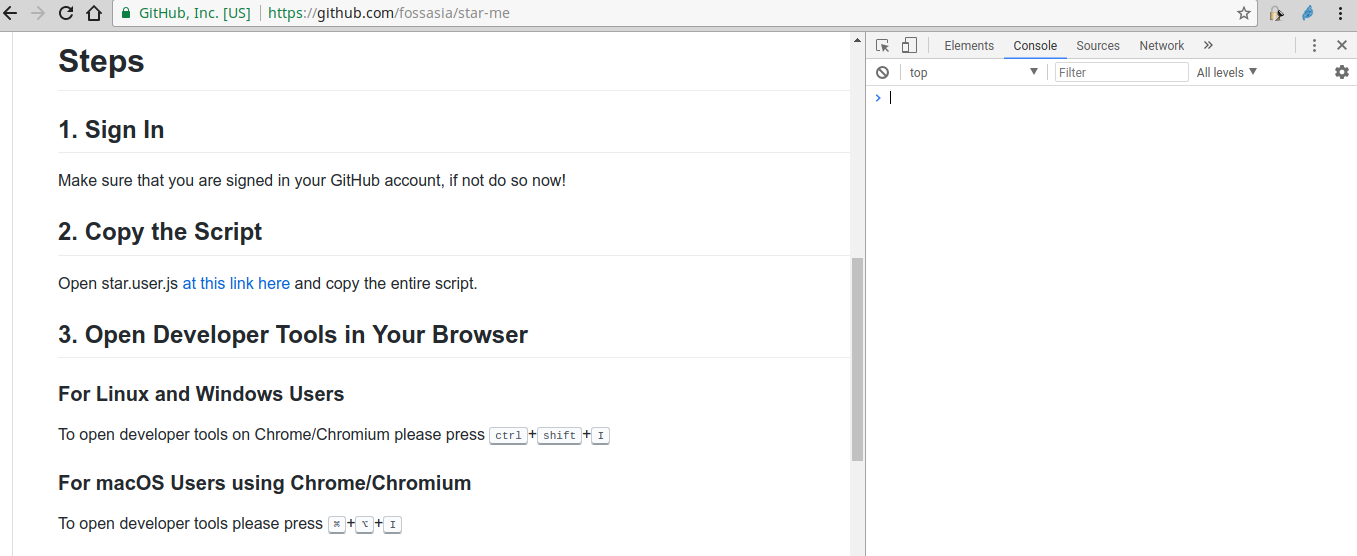
3. Open Developer Tools in your browser
Make sure you are on a tab with an open GitHub page.
Linux and Windows
Press Ctrl + Shift + I
macOS
Press ⌘ + ⌥ + I
Expected view
The Developer Tools window should open, similar to the screenshot below.
4. Open the Console tab
In the Developer Tools, switch to the Console tab and click inside the input area.
Ensure that the active browser tab is still a GitHub page.
5. Paste and run the script
Paste the script into the Console.
• Windows or Linux: Ctrl + V • macOS: ⌘ + V
Then press Enter.
6. Wait for completion
The script will run for a few minutes depending on the number of repositories.
When finished, it prints “Finally Over ;-)” in blue color.
Please allow the script to run until completion.
7. Done. Start contributing
Once finished, the repositories will appear in your starred list on GitHub. When organization following is enabled, the configured organizations will also be followed.
You can now
- Explore projects that match your interests
- Receive updates and notifications
- Start contributing to FOSSASIA open source projects
Safety note
You are running this script manually in your browser console. Only execute scripts that you understand and trust.
This script only interacts with GitHub pages you are currently logged into and does not send data elsewhere.
Future improvements
Planned or proposed improvements include
- Option to star only a selected list of repositories
Contributions and suggestions are welcome.
Explore related projects
codecrafters-io/build-your-own-x
Master programming by recreating your favorite technologies from scratch.
561,860 starspublic-apis/public-apis
A collective list of free APIs
498,219 starsmorluto/rea
Reverse engineer anything with agents, from app behavior down to native binaries.
452,559 starsopenclaw/openclaw
The AI that really does things. Any OS. Any Platform. The lobster way. 🦞
394,366 stars