
fossasia/meilix-generator
fossasia/meilix-generator has 1,529 GitHub stars and 109 forks. GitHot measured 0 stars in 24 hours and 0 in 7 days. Last checked 2026-11-10 03:13 UTC. Last push 2019-11-08.
WebApp for generating a custom ISO image based on Meilix http://meilix.org
What you can do
- 64 Bit support (or legacy 32 Bit)
- Power Management Saving
- Taskbar Autohide
- Add all the documents and files you need in your linux.
Measured star growth
- in 24h
- 0
- in 7 days
- 0
- in 15 days
- Update delayed
- in 1 month
- Update delayed
Net star changes over overlapping periods, not daily totals. Missing measurements are left blank. Stars measure attention, not software quality.
README.md
OriginalMeilix Generator
 A Webapp to generate customized iso live images of Meilix Linux. You can use the Meilix Generator (Web app) to make a Linux for your own brand/event, also add apps and features you need pre-installed, it will create an ISO Image of your Linux, which you can use as a live boot or install on PCs.



Gitter channel https://gitter.im/fossasia/meilix
Table of Contents
- Meilix components
- Under the hood
- Working
- Installation
- Contributions
- Issues and Branch policy
- Best Practices
- License
Meilix Generator Features
Following are some of the other features that Meilix-Generator offers:
You can brand your Linux as you want. Your company name and logo can be your:
- Linux name
- Linux logo
- Wallpaper
- Screensaver
Switch on/off various features of your linux. You can switch:
- 64 Bit support (or legacy 32 Bit)
- Notifications
- Screensaver
- Sleep Modes
- System Sounds
- Bookmarks
- Screen Dimming
- Power Management Saving
- Taskbar Autohide
Following apps can be pre-installed in your linux:
- Chromium
- Firefox
- Hangout
- VLC
- GIMP
- Inkscape
- LibreOffice
- Git
- NextCloud
- Dropbox
Add all the documents and files you need in your linux.
System Lock: it allows you to freeze all the systems you are hosting using Meilix.
Meilix-Generator components
- fossasia/meilix hosts and builds the source files of Meilix Linux.
- The bootscreen is build as a deb package in fossasia/meilix-artwork.
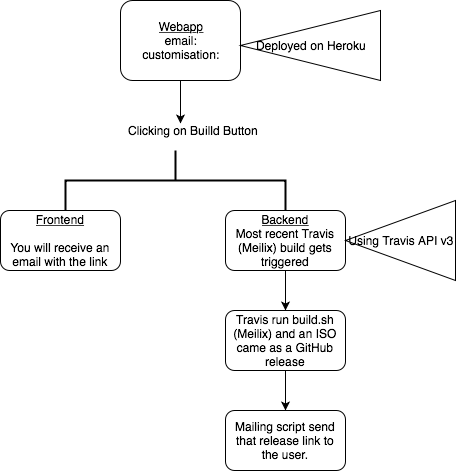
- This webapp is used to trigger a Meilix build based on the user configuration. Builds are run on Travis and the user is mailed a link download the custom build. Builds are released to Github releases.
- Meilix Generator follows the standard front end of other FOSSASIA projects like Open Event Webapp
Under the hood
- Flask used as the backend framework
- Bootstrap the frontend
- Heroku is used to host the webapp
- Travis is where builds are made, and
- Github Release for the custom releases
Working
Webapp
The webapp rests in 2 templates, served by Flask:
Generator
The generator runs on Flask, routes contained in main app script
- The route
/renders theindex.htmlwhich is used to /outputroute triggers the build on Meilix and renders thebuild.html
Scripts
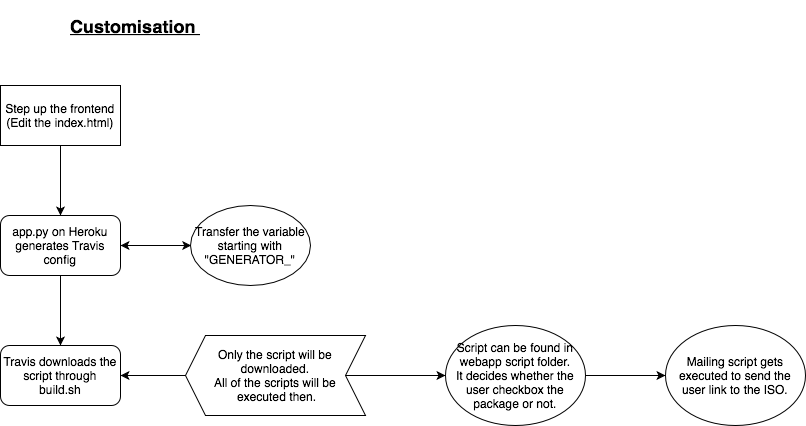
/output route runs the script.sh which in turn sends a curl request to Travis to trigger a build a Meilix repo. The request is sent with a JSON payload which contains information like which packages to pre-install, homepage URL, browser choice, build architechture, etc.
travis_tokens has configuration required by Travis, it specifies on which branch to trigger build on.
Work flow
Webapp is hosted at https://meilix-generator.herokuapp.com. Required configuration is obtained from the form and the user triggers the build. When the build is complete on the Meilix repo, the user is mailed with the link to download the iso image. Look at build.sh and .travis.yml on the Meilix repo for insight on the actual build process.
Installation
The meilix-generator can be easily deployed onto a variety of platforms. Platform specific installation instructions have been provided below:
Contributions
This is an Open Source project and we would be happy to see contributors who report bugs and file feature requests, submitting pull requests as well. Please report issues here https://github.com/fossasia/meilix-generator/issues
Note: Make sure to fork both meilix and meilix-generator and to use your own token. Refer to my_token.md for details.
Issues and Branch policy
Before making a pull request, please file an issue. So other developers will have a chance to give feedback or discuss upon. Match every pull request with an issue please and add the issue number in description e.g. like Fixes #123.
Go for only one issue per pull request
We have the following branches
- master All development goes on in the master branch. If you're making a contribution, you are supposed to make a pull request to master. PRs to the branch must pass a build check and a unit-test check on Travis. They are usually reviewed by at least two team members.
Best practices
- Go through CONTRIBUTING.md before making any contribution.
- Do read the Open Source Developer Guide and Best Practices at FOSSASIA.
Write-up containing project buildup
- These documents will help you to know more about the flexible framework of the web app: Flask and Heroku Travis Integration and Token Generation
License
This project is currently licensed under GNU Lesser General Public License v3.0 (LGPL-3.0). A copy of LICENSE.md should be present along with the source code. To obtain the software under a different license, please contact FOSSASIA.
If you like the project, don't forget to star it.
Explore related projects
freeCodeCamp/freeCodeCamp
freeCodeCamp.org's open-source codebase and curriculum. Learn math, programming, and computer science for free.
458,959 starsdonnemartin/system-design-primer
Learn how to design large-scale systems. Prep for the system design interview. Includes Anki flashcards.
377,600 starsreact/react
The library for web and native user interfaces.
252,509 starsvuejs/vue
This is the repo for Vue 2. For Vue 3, go to https://github.com/vuejs/core
212,623 stars