
fluxdb-alt/fluxDB
fluxdb-alt/fluxDB has 29 GitHub stars and 3 forks. GitHot measured +2 stars in 24 hours. Last checked 2026-11-14 10:09 UTC. Last push 2026-11-12.
Measured star growth
- in 24h
- +2
- in 7 days
- Collecting history
- in 15 days
- Collecting history
- in 1 month
- Collecting history
Net star changes over overlapping periods, not daily totals. Missing measurements are left blank. Stars measure attention, not software quality.
About
Open-source database GUI & SQL editor for MySQL, PostgreSQL, SQLite, Redis & TiDB. Native Rust + GPUI desktop app for macOS, Windows & Linux. 开源跨平台数据库客户端与 SQL 编辑器。
DataREADME.md
OriginalFluxDB
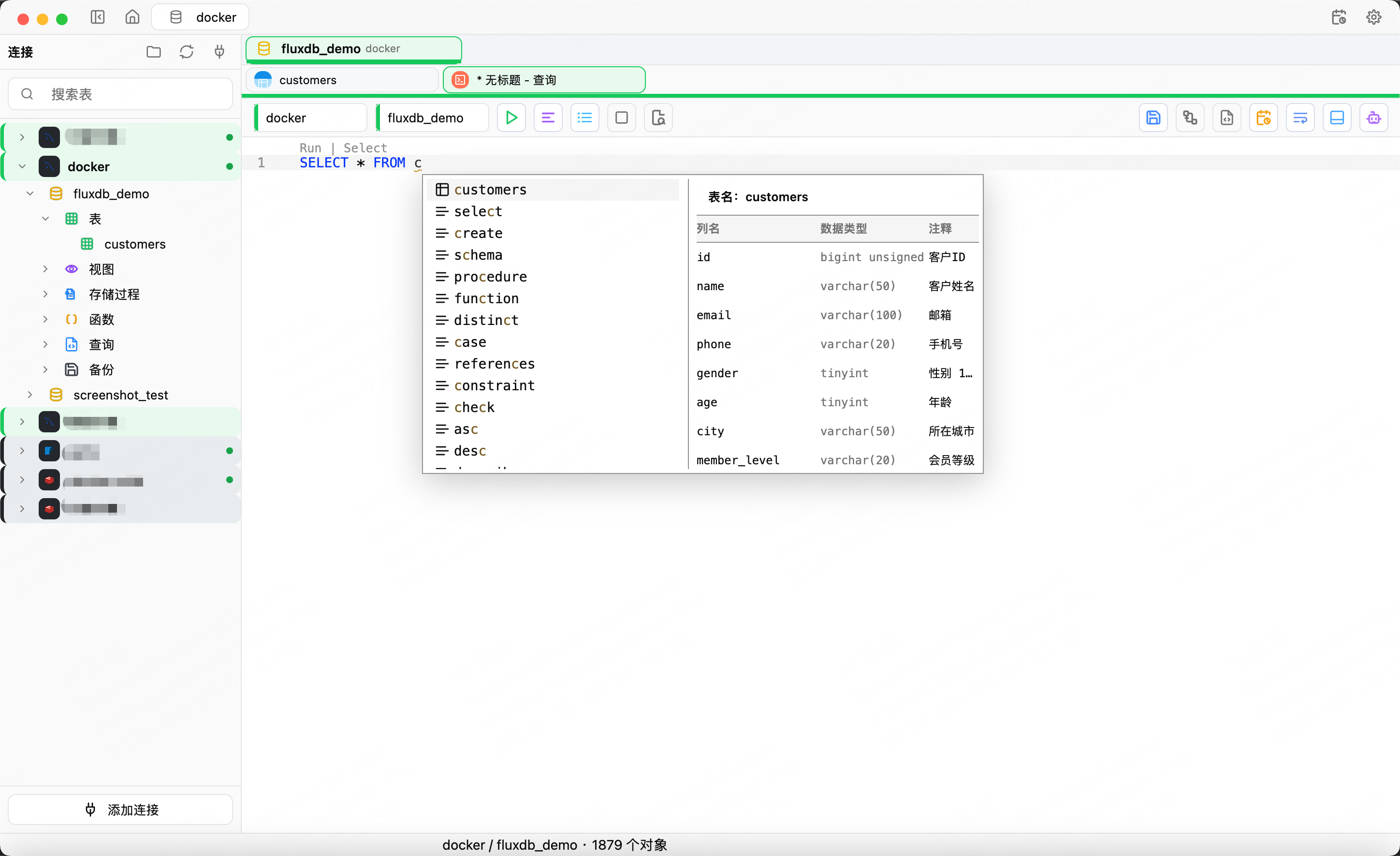
A native, cross-platform database client and SQL editor designed for high performance and low overhead: query, edit data, manage schemas and debug Redis in one window.
FluxDB is built with Rust and GPUI, without Electron or a WebView. It brings MySQL, MariaDB, PostgreSQL, KingbaseES, SQL Server, SQLite, TiDB, Dameng DM8, MongoDB and Redis into one desktop workflow, with a permission-aware AI Agent.
English | 简体中文




Download the latest release · Latest changes · Features · Database support · User guide · Report an issue
Latest changes
v0.1.18
- Server panels: a connection's context menu opens a "Server" tab with overview, sessions and lock waits for MySQL / MariaDB / TiDB, PostgreSQL / KingbaseES, SQL Server, Oracle and Dameng; Redis adds clients and slow log, and MongoDB adds current operations and an in-session trend. Queries, sessions and clients can be terminated after confirmation, read-only connections are blocked at three layers, and panels refresh manually or every 5 seconds.
- Switch query scope: the toolbar switches the target database and schema per connection type without opening a new query. Database switches clear results, running queries block switching, and PostgreSQL / KingbaseES return to the default schema with
RESET search_path. - Custom themes and fonts: create, edit and delete themes with SQL highlight tokens, import Zed / VS Code themes (JSONC included), and set UI font/size and code font/size/line-height independently with live preview.
- Local MCP over in-app HTTP: the stdio helper process is replaced by a loopback-only Streamable HTTP endpoint with a Bearer token, and existing client configs are taken over automatically.
- Improvements and fixes: centralized SQLite migrations with
VACUUM INTObackups and fail-closed version checks, unified SQLite / SQL Server / TiDB value and read-only semantics, numeric Redis database sorting, and exact negative DECIMAL rendering on SQL Server.
Full release notes · All releases
v0.1.17
- Structure compare and data transfer: new connection context-menu entries for structure compare/sync and cross-connection data transfer. Tables are paired by
schema.nameand reported as missing, extra, modified or identical with side-by-side DDL, then the selected tables can be created, dropped or recreated. Transfer supports append and truncate-then-write, creates a missing target table, and reads/writes in pages with cancellation. - Task center: collects backup, restore, SQL file execution, table and MongoDB import/export, structure sync and data transfer, with unified status, progress and logs, cancellation, and persisted history.
- Visual query plans: the toolbar "Explain" action parses MySQL / MariaDB / TiDB, PostgreSQL / KingbaseES and SQLite plan output into a node tree and inspector, flagging full table scans, filesorts and missing indexes, and falls back to the raw result when parsing fails.
- Connection form improvements: high-frequency fields stay under "Connection info", MySQL-family charset/collation/URL parameters move to "Advanced", and SQLite hides the empty network tab. MySQL / MariaDB / TiDB gain SOCKS5 and HTTP CONNECT proxies combinable with TLS, and PostgreSQL reuses the shared proxy dialer.
- Fixes: corrected legacy MySQL TLS-mode migration, kept compatible filter values when switching fields, added missing backup/restore cancel strings, and fixed KingbaseES completion compatibility and a nested
block_onin export pagination.
Full release notes · All releases
Why FluxDB
- One workspace for multiple data sources: manage relational databases, MongoDB and Redis side by side.
- From query to write: SQL editing, editable result sets, table design, import/export, backup/restore and ER diagrams.
- Native architecture, performance first: built with Rust + GPUI, without Electron or a WebView, with low overhead and responsive interaction as design goals.
- AI with explicit boundaries: bounded reads, authorized editor edits and approval for write or high-risk tools.
Core capabilities
SQL and data
- Syntax highlighting, code folding, keyword/table/column/function completion, SQL formatting and query history.
- Paginated browsing, filters, sorting, row details and cell details.
- Editable result sets with writes back to the database and safeguards for dangerous actions.
- Import TXT, CSV, JSON and XML.
- Export SQL, TXT, CSV, JSON and XML.
- Execute existing
.sqlfiles.
Schema and ER diagrams
- Inspect columns, indexes, foreign keys, triggers and DDL.
- Create and modify tables visually, with DDL generated for the target database dialect.
- Layout ER diagrams from real foreign keys, with optional local logical relationships.
- Local logical relationships never create or modify database foreign keys.
- Export ER diagrams as JSON, DBML, Mermaid or SVG.
MongoDB workbench
- Connection-string import with SRV discovery, browsing by database / collection / view, and connection info with topology.
- The documents tab supports filter, projection, sort, collation, paging and index hint, with card, table and JSON display modes.
- The condition builder and completion cover filter, projection, sort and aggregation pipelines; aggregation, indexes and collection info each have their own tab.
- Create, edit, duplicate and delete documents; import JSON / JSONL / CSV and export JSON / JSONL / CSV.
- Collection context menu covers pin, copy name, refresh, export, rename, import and drop; databases can create collections and be dropped.
Redis workbench
- Browse the keyspace and inspect or edit common value types, TTL and key details.
- Run commands with command history in the Workbench.
- Use the embedded Redis CLI terminal.
- Observe channel messages with Pub/Sub subscriptions.
- Connect with TLS, SSH tunnels, Sentinel, Cluster, URI or Cloud configuration.
Operations, security and updates
- Connection passwords and model API keys use controlled storage and stay out of ordinary exports, logs, event snapshots and AI context.
- In-app updates verify the signed manifest and package checksum.
- Release packages include SHA-256 checksums.
- The UI supports English and Simplified Chinese with runtime switching.
Demo
Full demo · 2 min 46 sec · MP4, about 8.6 MB
https://github.com/user-attachments/assets/f6075999-a87f-4644-9d14-dbda49a7981d
Database support
Capabilities vary by database. See the user guide for details.
| Database | Current capabilities | Backup / restore | Connections and limits | Not yet supported |
|---|---|---|---|---|
| MySQL | SQL queries, object browsing, table management, data editing, import/export, native client tool entry | mysqldump logical backup; SQL restore |
TLS/SSL, SSH tunnel, proxy, timeouts, charset | - |
| TiDB | Reuses the MySQL protocol path with TiDB SQL dialect, completion and schema management | Reuses MySQL logical backup | Same connection features as MySQL | - |
| MariaDB | Reuses the MySQL protocol path for object browsing, SQL queries, table structure management, data editing, import/export, and users/privileges; detects MariaDB server versions | Reuses mysqldump / mariadb-dump logical backup and SQL restore |
Same connection features as MySQL; default port 3306 | - |
| PostgreSQL | SQL queries, schema/object browsing, table management, data editing, users and roles, psql tool entry | pg_dump plain SQL; psql restore |
TLS, SSH, proxy, schema scope, timeouts | - |
| KingbaseES | Reuses the PostgreSQL connector in PG compatibility mode: connection, database/schema and object browsing, SQL queries, data viewing/editing, table structure viewing/design; the users and privileges page reuses the PostgreSQL implementation and has not been separately regression-tested | Native backup/restore not supported; use sys_dump / ksql from the command line |
PG compatibility mode only; default port 54321, username usually system, default database test; the same form, TLS/SSH/proxy entry points as PostgreSQL |
Oracle compatibility mode, native backup/restore, external psql / ksql tool entries |
| SQL Server | T-SQL queries, database/schema/object browsing, table design and data editing, table import/export, logins, database users, role membership and explicit permissions, object-level logical backup/restore, AI page context and controlled execution | Object-level logical SQL backup and restore | SQL Server authentication, TLS, explicit ports; named instances require the actual port | Windows integrated authentication, Azure AD, contained database users, column-level permission editing, user-defined server roles, SQL Browser/named-instance auto-discovery, and database-level physical BACKUP DATABASE. Object-level logical backup and restore is not a substitute for database-level disaster recovery. |
| SQLite | Local file connections, SQL queries, object browsing, table management, data editing | Consistent VACUUM INTO snapshot; restore to a new file with integrity and foreign-key checks |
Local file path | - |
| Dameng DM8 | Schema/object browsing, SQL queries, table design and management, data editing, table import | Logical backup and SQL restore; restore currently targets a single schema | Instance and schema connection settings | - |
| MongoDB | Connection-string import (mongodb:// / mongodb+srv://), database/collection/view browsing, collection workspace (document filter/projection/sort, condition builder, aggregation, indexes, collection info), document create/edit/duplicate/delete, JSON / JSONL / CSV import and export, collection rename and drop, command-line terminal, SQL-style query completion, AI page context and controlled execution |
No database-level backup/restore; export is document-level logical export (JSON / JSONL / CSV) | mongodb+srv:// discovery, SCRAM-SHA-1 / SCRAM-SHA-256 / MONGODB-X509, TLS options via connection-string import; at most 500 documents per query |
No mongodump / mongorestore backup and restore, no performance-metrics panel, no SSH tunnel, no bulk delete (and no undo), no cross-database collection moves, no view rename/drop, no time-series or capped collection creation, no in-table row editing, no transactions or change streams; CSV import supports scalar fields only and must be UTF-8; new documents always get an ObjectId _id. |
| Redis | Keyspace browsing, value editing, TTL, Workbench, CLI, Pub/Sub | No database-level backup/restore | TLS, SSH, Sentinel, Cluster, URI/Cloud; Cluster uses DB 0 only | - |
AI Agent
FluxDB includes an optional AI Agent for understanding schemas, writing SQL, investigating data and generating reports. It is not an unrestricted desktop assistant.
- Schema discovery: search connections, databases, schemas, tables, views and columns without reading whole tables by default.
- Bounded reads: read only the rows or content allowed by each tool contract.
- Authorized editor actions: edit only an explicitly authorized SQL range and never execute it implicitly.
- Controlled SQL and Redis execution: write or high-risk tools such as
db.runandredis.executerequire approval. - Scoped context: read only authorized attachments, page references or editor snapshots.
- BI and reports: generate report drafts, charts, tables and explanations as saveable artifacts.
- MCP and plugins: configure MCP Client/Server, model bindings, plugins, tool permissions and usage diagnostics.
- User-provided models: configure your own model service and API key. Secrets use controlled storage and do not enter ordinary logs, exports or AI context.
Download and install
Open the latest release and choose the package for your platform.
| Platform | Architecture | Package |
|---|---|---|
| macOS | Apple Silicon (ARM64) | FluxDB-<version>-macos-arm64.dmg |
| macOS | Intel (x64) | FluxDB-<version>-macos-x64.dmg |
| Windows | x64 | FluxDB-<version>-windows-x64-setup.exe |
| Linux | x64 | fluxdb_<version>_amd64.deb |
- macOS: open the DMG and drag FluxDB into Applications. The app is currently ad-hoc signed and not notarized. If macOS blocks the first launch, verify the download source and allow it in System Settings → Privacy & Security.
- Windows: run the installer and optionally create a desktop shortcut.
- Linux: targets Debian-based distributions such as Ubuntu 22.04/24.04 with X11 or Wayland. Run
sudo apt install ./fluxdb_<version>_amd64.deb.
Release packages include .sha256 checksums. Windows ARM64, Linux ARM64, AppImage, Flatpak and Snap are not currently available.
MySQL, MariaDB and PostgreSQL backup/restore depend on the local mysqldump/mariadb-dump, mysql/mariadb and pg_dump/psql clients. Basic queries and editing do not require them.
After installation, choose “Add connection”, select a database type, enter the connection details and test the connection. See the user guide; it currently uses Chinese screenshots and macOS shortcuts.
Run from source
Build dependencies, running and packaging
Prerequisites
Install the latest stable Rust toolchain (the project uses Rust edition 2024) and the native build tools for your platform:
| Platform | Build dependencies |
|---|---|
| macOS | Xcode Command Line Tools, available through xcode-select --install |
| Windows | Visual Studio Build Tools with Desktop development with C++ and the Windows SDK, using the MSVC toolchain; release builds require the SDK's fxc.exe |
| Linux | C/C++ compiler, pkg-config, CMake, Clang, OpenSSL, font and X11/Wayland development libraries; see the CI configuration for the complete list |
Run
git clone https://github.com/fluxdb-alt/fluxDB.git
cd fluxDB
cargo run --locked -p fluxdb-desktop
The first build downloads and compiles dependencies and may take a while.
Build and package
cargo build --locked --release -p fluxdb-desktop
On macOS, generate an .app and .dmg containing the required dynamic libraries:
./scripts/package-macos.sh
The script supports options such as PROFILE=debug and CREATE_DMG=0; see the packaging script. Windows installer and Linux DEB steps are defined in the release workflow.
Contributing
Issues, feature proposals, documentation improvements and code contributions are welcome.
- Report a bug: search existing issues first, then include the app version, operating system and architecture, database type and version, reproduction steps, expected and actual results, and sanitized logs or screenshots where useful.
- Suggest a feature: describe the use case and the problem it solves. Discuss larger changes before implementation.
- Contribute code: fork the repository, create a focused branch and explain the reason and validation results in the pull request. See AGENTS.md for development conventions and the UI style guide for interface changes (both in Chinese).
Run the local quality gate before submitting:
./scripts/check.sh
Cross-platform build differences still require CI verification before release.
AI is used extensively in the development workflow. Humans own requirements, review, validation and release approval.
Roadmap
Current priorities are real-world coverage for existing databases, stability and the cross-platform release experience. Candidate directions include:
- SQL Server follow-up: Windows integrated authentication and Azure AD, contained database users, column-level permissions, user-defined server roles, named-instance auto-discovery, and database-level physical backup/restore.
- MongoDB follow-up: database-level backup/restore, performance metrics, bulk delete and bulk writes, in-table row editing, transactions and change streams.
- More databases: evaluate ClickHouse, DuckDB, Elasticsearch/OpenSearch and others based on community demand.
The roadmap does not imply current support.
Support and sponsorship
If FluxDB is useful to you, consider starring the repository, sharing it with others, or contributing through issues, documentation and code.
You can also sponsor ongoing development and AI tooling costs.
| Alipay | |
|---|---|
 |
 |
Acknowledgements
- Zed: GPUI ecosystem, editor and native desktop architecture.
- GPUI Component / gpui-kit: reusable UI components.
- dbx: multi-database abstraction and connection-management design reference.
- RedisInsight: Redis visualization and interaction design reference.
License
FluxDB is licensed under the GNU GPL v3.0 or later.
See NOTICE for copyright and attribution details.
Explore related projects
Asabeneh/30-Days-Of-Python
The 30 Days of Python programming challenge is a step-by-step guide to learn the Python programming language in 30 days. This challenge may take more than 100 days. Follow your own pace. These videos may help too: https://www.youtube.com/channel/UC7PNRuno1rzYPb1xLa4yktw
78,723 starsgrafana/grafana
The open and composable observability and data visualization platform. Visualize metrics, logs, and traces from multiple sources like Prometheus, Loki, Elasticsearch, InfluxDB, Postgres and many more.
77,897 starsredis/redis
For developers, who are building real-time data-driven applications, Redis is the preferred, fastest, and most feature-rich cache, data structure server, and document and vector query engine.
77,491 starsapache/superset
Apache Superset is a Data Visualization and Data Exploration Platform
75,523 stars