
flutter-ml/google_ml_kit_flutter
flutter-ml/google_ml_kit_flutter has 1,293 GitHub stars and 890 forks. GitHot measured +1 stars in 24 hours. Last checked 2026-11-07 08:17 UTC. Last push 2026-10-27.
A flutter plugin that implements Google's standalone ML Kit
Measured star growth
- in 24h
- +1
- in 7 days
- Update delayed
- in 15 days
- Update delayed
- in 1 month
- Update delayed
Net star changes over overlapping periods, not daily totals. Missing measurements are left blank. Stars measure attention, not software quality.
README.md
OriginalGoogle's ML Kit for Flutter


Google's ML Kit for Flutter is a set of Flutter plugins that enable Flutter apps to use Google's standalone ML Kit.
Features
Vision APIs


Natural Language APIs
| Feature | Plugin | Source Code | Android | iOS |
|---|---|---|---|---|
| Language Identification | google_mlkit_language_id  |
 |
✅ | ✅ |
| On-Device Translation | google_mlkit_translation  |
|
✅ | ✅ |
| Smart Reply | google_mlkit_smart_reply  |
|
✅ | ✅ |
| Entity Extraction (Beta) | google_mlkit_entity_extraction  |
|
✅ | ✅ |
GenAI APIs
⚠️ Important: GenAI APIs are built on top of AICore and will not support all Android devices. These APIs require devices with AICore support. Please check device compatibility before using these features in production.
⚠️ Production Disclaimer: Using GenAI plugins in production is the responsibility of the developers consuming the plugins, not the authors. The authors provide these plugins as-is and are not responsible for any issues, failures, or compatibility problems that may arise from using these plugins in production environments.


Common APIs
| Feature | Plugin | Source Code | Android | iOS |
|---|---|---|---|---|
Shared types (InputImage, ModelManager) |
google_mlkit_commons  |
|
✅ | ✅ |
PLEASE READ THIS before continuing or posting a new issue:
Google's ML Kit was built only for mobile platforms: iOS and Android apps. Web or any other platform is not supported, you can request support for those platforms to Google in their repo.
This plugin is not sponsored or maintained by Google. The authors are developers excited about Machine Learning that wanted to expose Google's native APIs to Flutter.
Google's ML Kit APIs are only developed natively for iOS and Android. This plugin uses Flutter Platform Channels as explained here.
Messages are passed between the client (the app/plugin) and host (platform) using platform channels as illustrated in this diagram:
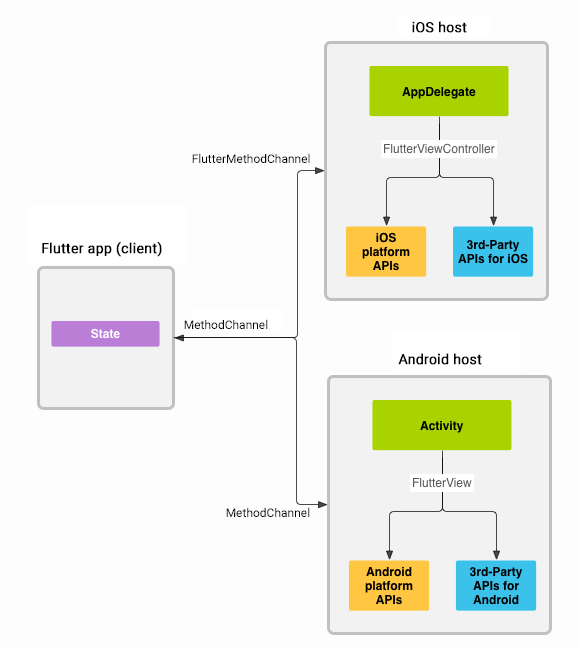
Messages and responses are passed asynchronously, to ensure the user interface remains responsive. To read more about platform channels go here.
Because this plugin uses platform channels, no Machine Learning processing is done in Flutter/Dart, all the calls are passed to the native platform using
MethodChannelin Android andFlutterMethodChannelin iOS, and executed using Google's native APIs. Think of this plugin as a bridge between your app and Google's native ML Kit APIs. This plugin only passes the call to the native API and the processing is done by Google's API. It is important that you understand this concept when it comes to debugging errors for your ML model and/or app.Since the plugin uses platform channels, you may encounter issues with the native API. Before submitting a new issue, identify the source of the issue. You can run both iOS and/or Android native example apps by Google and make sure that the issue is not reproducible with their native examples. If you can reproduce the issue in their apps then report the issue to Google. The authors do not have access to the source code of their native APIs, so you need to report the issue to them. If you find that their example apps are okay and still you have an issue using this plugin, then look at our closed and open issues. If you cannot find anything that can help you then report the issue and provide enough details. Be patient, someone from the community will eventually help you.
Requirements
iOS
- Minimum iOS Deployment Target: 15.5
- Xcode 15.3.0 or newer
- Swift 5.9 (Swift Package Manager)
- ML Kit does not support 32-bit architectures (i386 and armv7). ML Kit does support 64-bit architectures (x86_64 and arm64). Check this list to see if your device has the required device capabilities. More info here.
Swift Package Manager Setup
All ML Kit iOS plugins use Swift Package Manager (SwiftPM) via d-date/google-mlkit-swiftpm (9.0.2), which also supports Apple Silicon iOS Simulators out of the box.
Linker Flags: In Xcode, go to Runner > Build Settings > Linking - General > Other Linker Flags (
OTHER_LDFLAGS) and add:-ObjC-all_load
ML Kit Resource Bundles: SwiftPM cannot bundle model files inside
.binaryTargetframeworks into the main app bundle automatically. Download the required.bundlearchives for the ML Kit plugins you use from thed-date/google-mlkit-swiftpmv9.0.2 release and add them to your XcodeRunnertarget (Build Phases > Copy Bundle Resources). Seepackages/example/ios/download_mlkit_bundles.shfor a ready-to-use download script.
Android
- minSdkVersion: 21 (24 for
google_mlkit_subject_segmentation, 26 forgoogle_mlkit_genai_*) - targetSdkVersion: 36
- compileSdkVersion: 36
⚠️ Production Disclaimer: Using these plugins in production is the responsibility of the developers consuming the plugins, not the authors. The authors provide these plugins as-is and are not responsible for any issues, failures, or compatibility problems that may arise from using these plugins in production environments.
Migrating from ML Kit for Firebase to the new standalone ML Kit SDK
When migrating from ML Kit for Firebase to the new standalone ML Kit SDK read this guide.
For Android details read this.
For iOS details read this.
Example app
Find the example app here.
Consuming image streams on Android
Until flutter/flutter#145961 is resolved, the default CameraX implementation in the camera package doesn't support the required nv21 image format. To use camera image streams on Android, manually add camera_android to your app's pubspec.yaml.
Contributing
Contributions are welcome. In case of any problems look at existing issues, if you cannot find anything related to your problem then open an issue. Create an issue before opening a pull request for non-trivial fixes. In case of trivial fixes open a pull request directly.
Explore related projects
codecrafters-io/build-your-own-x
Master programming by recreating your favorite technologies from scratch.
560,778 starspublic-apis/public-apis
A collective list of free APIs
496,996 starsmorluto/rea
Reverse engineer anything with agents, from app behavior down to native binaries.
440,790 starsopenclaw/openclaw
The AI that really does things. Any OS. Any Platform. The lobster way. 🦞
394,142 stars