
flowForges/myFlowForge
flowForges/myFlowForge has 59 GitHub stars and 16 forks. GitHot measured 0 stars in 24 hours. Last checked 2026-11-16 18:57 UTC. Last push 2026-11-13.
Measured star growth
- in 24h
- 0
- in 7 days
- Collecting history
- in 15 days
- Collecting history
- in 1 month
- Collecting history
Net star changes over overlapping periods, not daily totals. Missing measurements are left blank. Stars measure attention, not software quality.
About
One GUI for native Claude Code, Codex, Cursor and more agents — manage them in one place, connect across devices. 一个 GUI,接入原生 Claude Code、Codex、Cursor 等 agent:一处管理,多端互联。
AIREADME.en.md
Original
myFlowForge
One GUI for native Claude Code, Codex, Cursor and more agents — manage them in one place, connect across devices.
myFlowForge invokes the official CLIs already installed on your machine (Claude Code, Codex, Cursor, Gemini, qoder, opencode, DeepSeek and others). It does not modify or replace the agents themselves; it only provides a unified GUI on top of them. It supports switching agents and models within the same session, importing native sessions, staged workflow execution and Codex native pets, and it can be accessed remotely from another computer, a server or a phone.





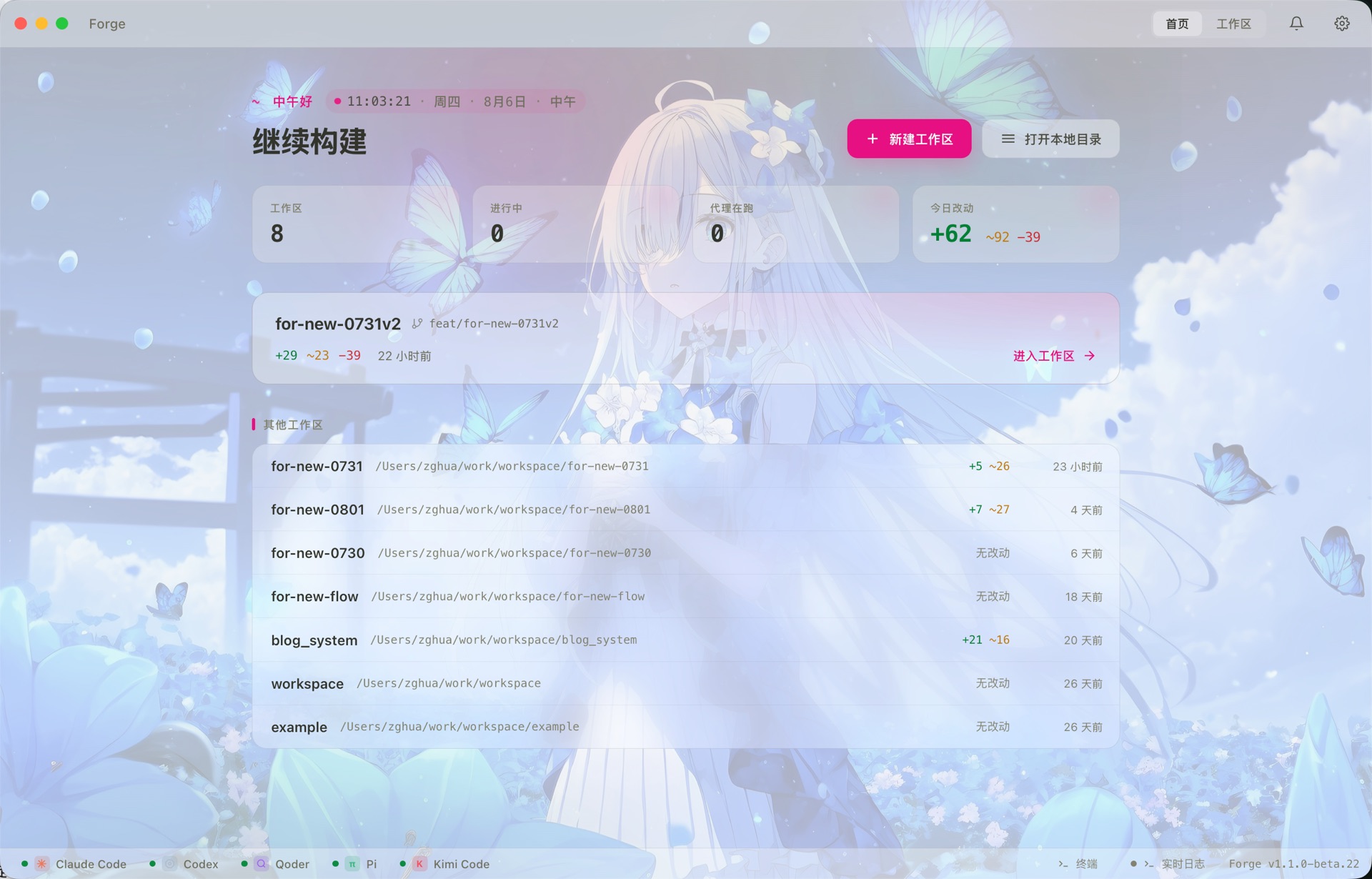
Home: workspaces, running agents and today's changes. Wallpaper, skin and accent color are all customizable.
Overview
Each AI coding CLI runs in its own terminal. Sessions, quotas and configuration are not shared between them, and a task often ends up tied to a single tool.
myFlowForge is a GUI layer on top of these CLIs, built on three principles:
- Native integration: agents are invoked through their official CLIs, using your own accounts, subscriptions and local configuration. myFlowForge does not fork or modify any agent, does not store API keys and does not proxy any requests. When an agent is upgraded, its new capabilities are available immediately.
- Unified management: multiple agents, projects and sessions are managed in one interface, so tasks are no longer tied to a single tool.
- Multi-device connectivity: the desktop app, the headless Linux daemon and the iOS / Android clients share the same workspaces and sessions, over direct LAN connection, SSH or an end-to-end encrypted relay.
Project status: maintained by an individual and under active development. Installers are provided for macOS, Windows and Linux, along with an Android APK; the iOS app is on the App Store as myFlowForge Assistant. The macOS build is signed with a Developer ID and notarized by Apple, the Android build is signed with a release key, and the Windows build is not yet signed.
Core Features
1. Native agent integration
14 coding CLIs are supported: Claude Code · Codex · Cursor · Gemini · qoder · opencode · Qwen · Copilot · Pi · Kimi · Reasonix · Trae · Antigravity · DeepSeek.
myFlowForge drives the official CLIs that are installed and signed in on your machine, without changing their behavior. Model lists are read from each CLI's local configuration where available, with a preset list as the fallback. Models can also be added manually, and manually added models are not overwritten on refresh. CLIs that are not installed or not signed in are marked in Settings, with installation guidance.
2. Switching agents and models within a session
The agent, model and permission level can be re-selected before every turn, and the context stays continuous:
- If a model is not performing well, you can continue with another model, which sees the entire conversation so far;
- If one provider's quota runs out, you can switch to another without starting a new session;
- You can assign models by the nature of the task, for example a more capable model for design and a lower-cost model for implementation and wrap-up.
Agents that support native session resume (Claude Code, Codex, Cursor, qoder, opencode, Antigravity) keep using their own session history; for other agents, myFlowForge reconstructs the context.
3. Multi-device connectivity
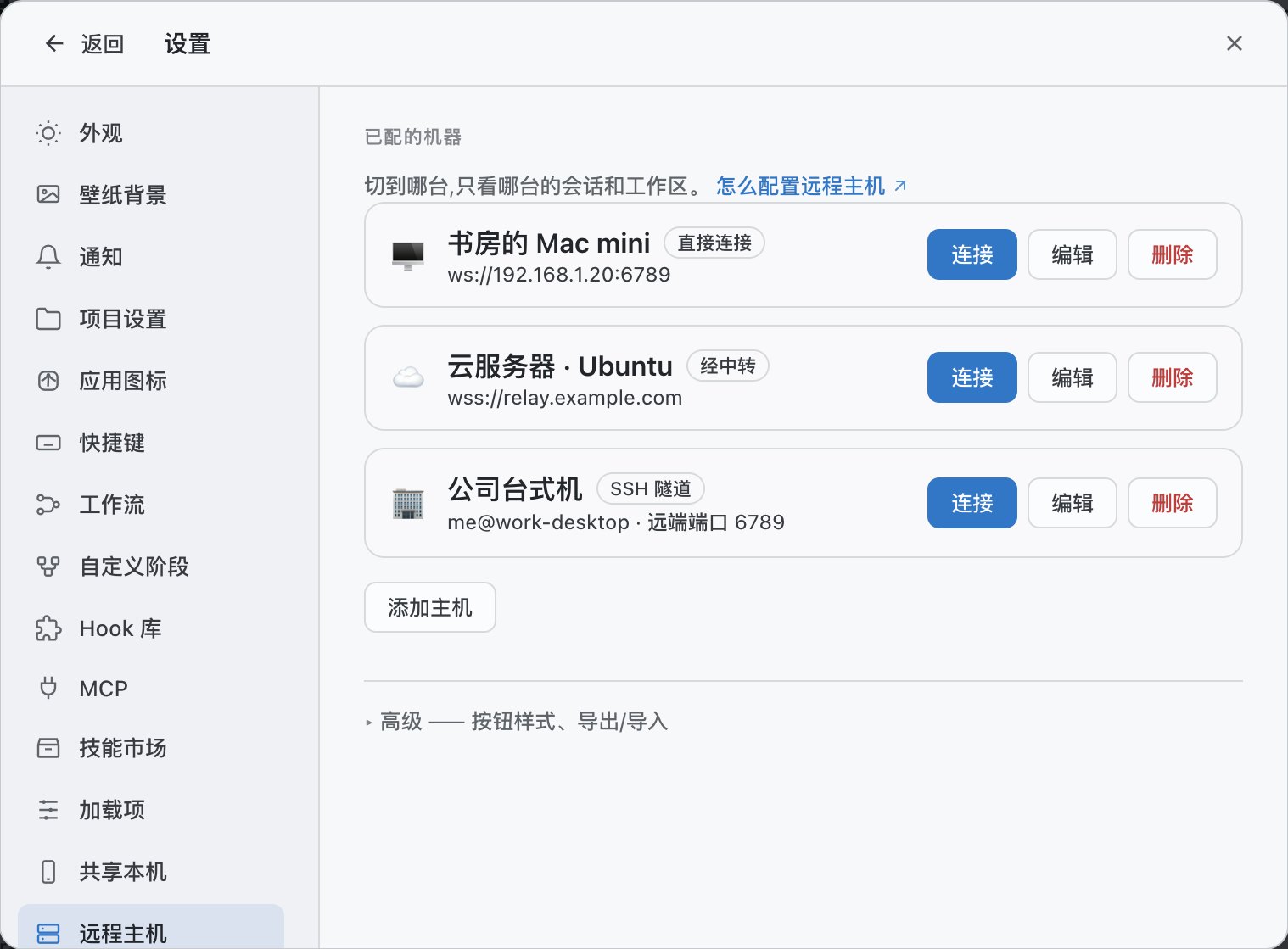
- Remote hosts: the desktop app can connect to another computer or server and drive the agents, repositories and terminal on that machine. The current host is switched from the status bar, and workspaces, sessions, git changes and the built-in terminal switch with it.
- Three connection methods: direct LAN connection, SSH and end-to-end encrypted relay. The relay only forwards ciphertext and cannot read session content. It can be self-hosted (Node or Cloudflare Worker).
- Headless daemon: run
myflowforge-daemonon a Linux server; thepaircommand prints a pairing QR code in the terminal. - Mobile: the iOS and Android clients support viewing conversations in real time, handling permission prompts and plan approvals, viewing changes and diffs, creating workspaces, editing workflows and switching hosts.
- Device authorization: each device uses its own pairing code and can be removed individually at any time. Revocation takes effect immediately.
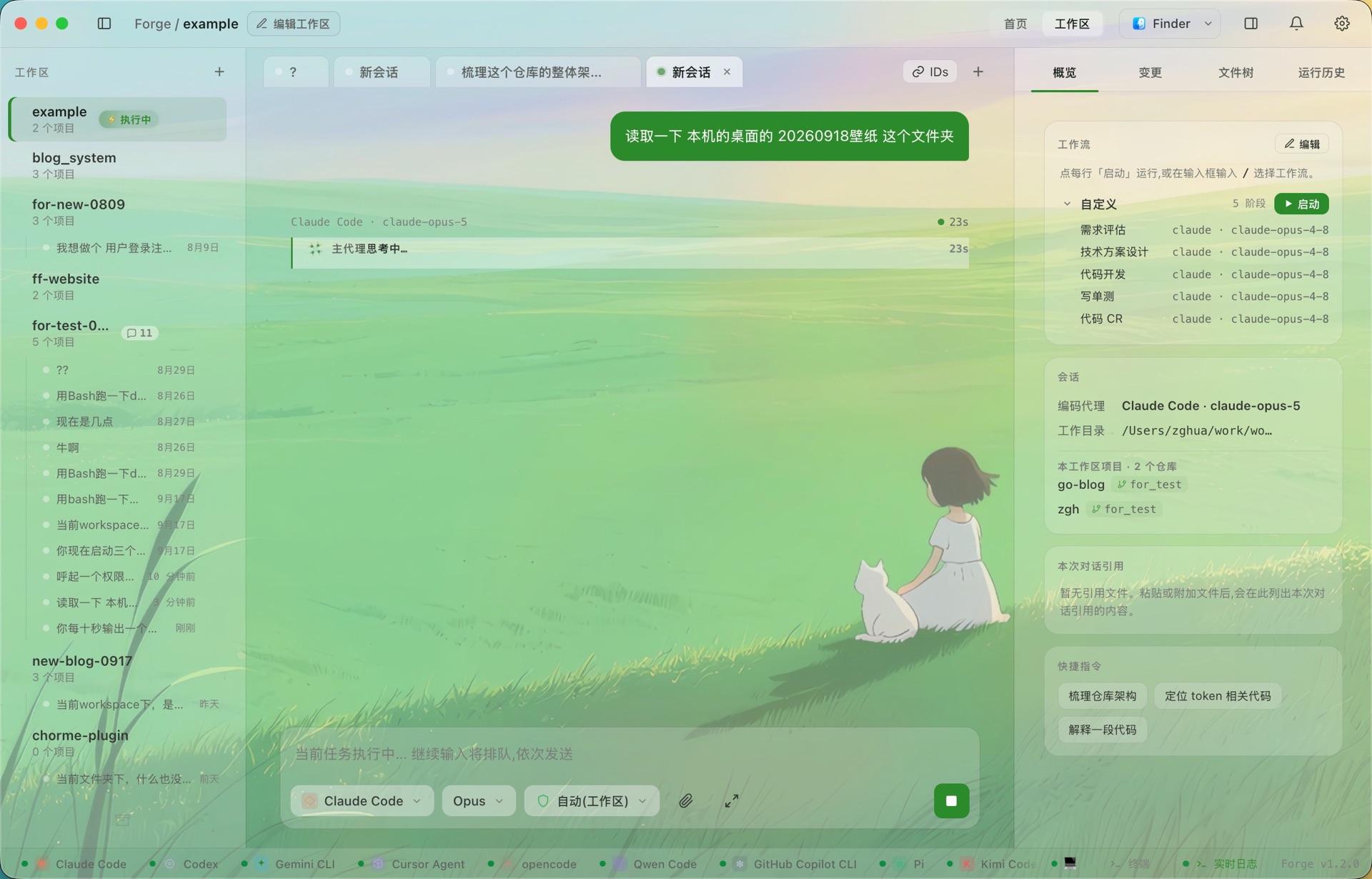 |
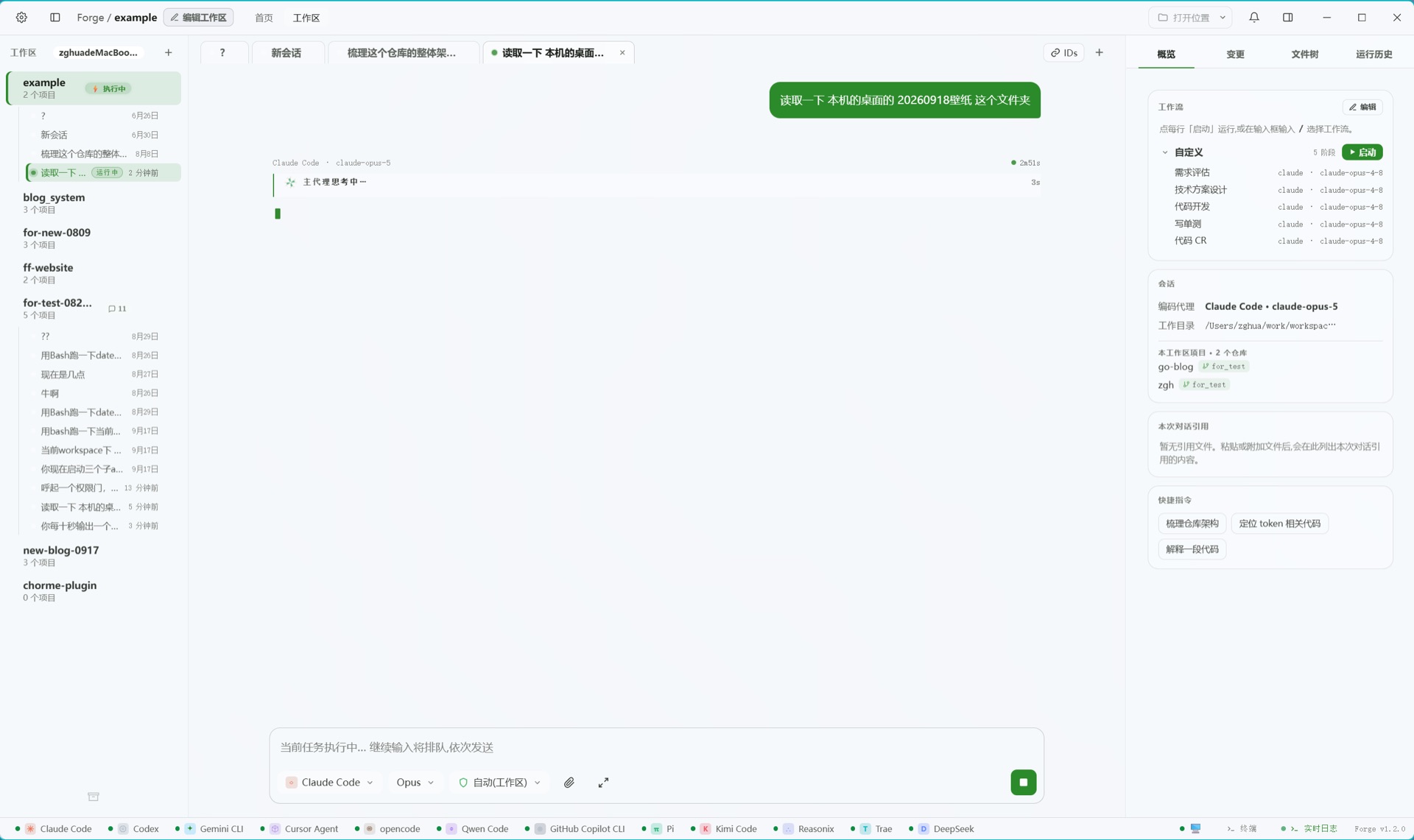 |
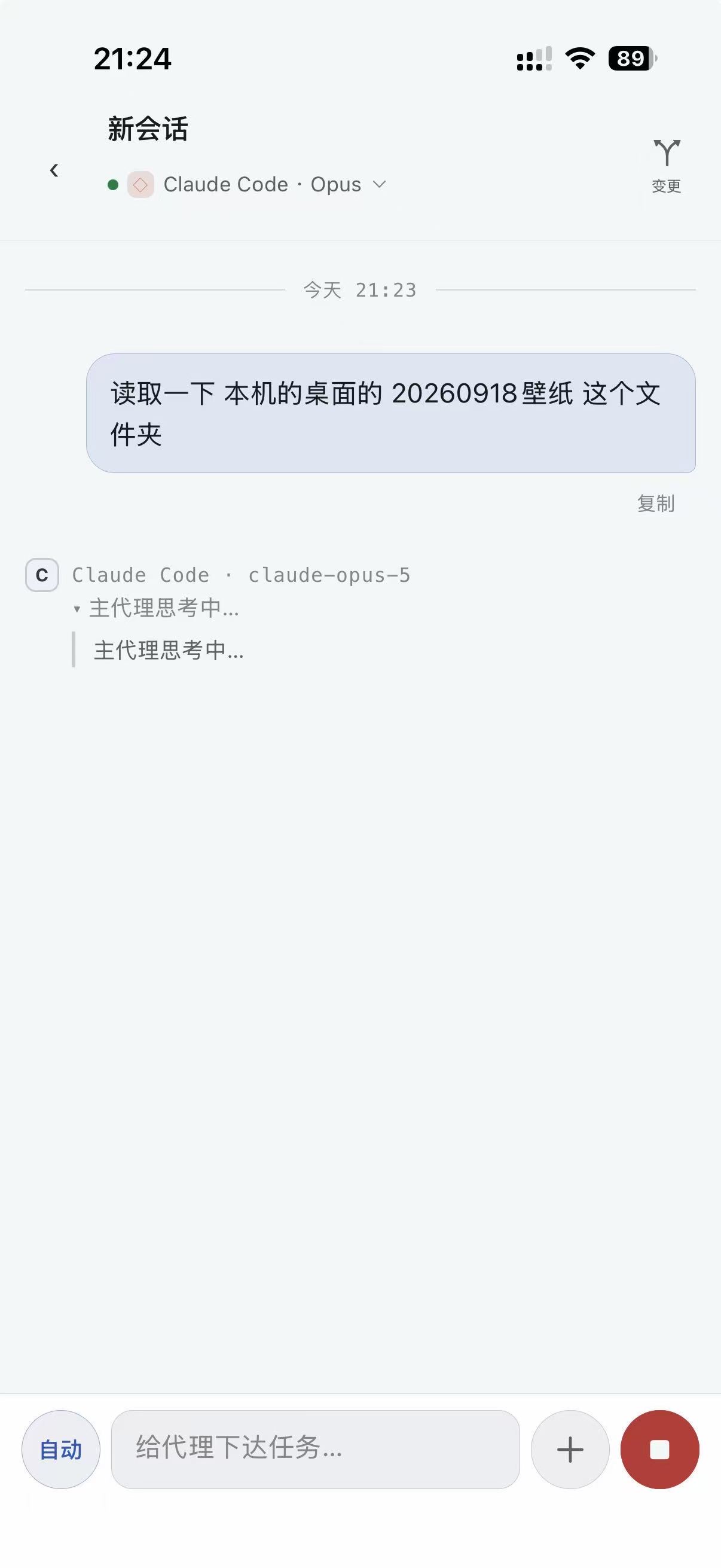 |
One session, in sync on macOS, Windows and iPhone
 |
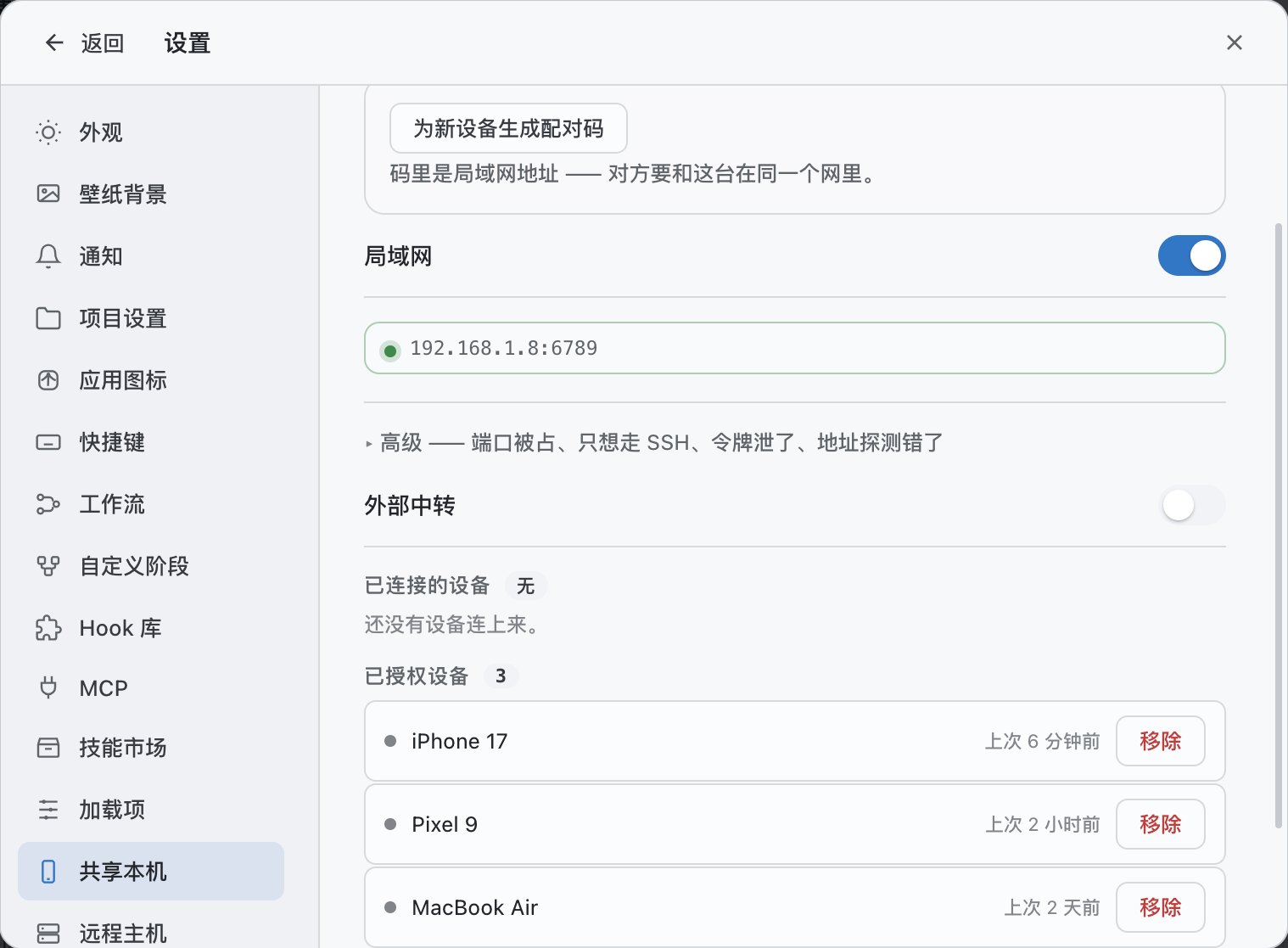 |
| Remote hosts: direct LAN, relay and SSH | Sharing: each device authorized separately and removable at any time |
4. Native session import
Local Claude Code, Codex, Cursor and qoder session history is scanned read-only and imported as workspaces, where the conversations can be continued directly. The original data is not affected.
5. Staged workflows
Besides regular conversations, tasks can also be executed in stages. Once a workflow starts, the conversation enters stage mode:
- The top bar shows current progress (step N of M), the current stage and the responsible agent;
- The agent for each stage works in the current conversation, and its output, tool calls and file changes are visible throughout;
- After each stage finishes, you must confirm "Next" before it is handed off to the next stage. Follow-up questions and corrections do not trigger a rerun;
- The design stage produces a complete markdown document (
forge-docs/design.md), which serves as the contract that all downstream agents follow; - Stages with approval support Approve, Reject (redo with annotations) or Ask, and you can also roll back to an earlier stage.
Each stage can be assigned its own agent, model and permission level. Workflows and stages can be customized, saved and reused.
6. Parallel multi-project work
A workspace can contain multiple repositories. A stage can fan out by project: frontend, backend and SDK are developed in parallel by separate agents, each in its own git worktree, and all changes are collected into a single changes panel for review. The fan-out can be limited to a subset of the repositories.
7. Stage hooks
Hooks are auxiliary steps inserted between stages. They can be attached before the run, after a given stage or after the run, and are used for pulling code, syncing documentation, running lint, updating boards, sending notifications and similar tasks.
Each hook runs as a restricted sub-agent at the workspace root and can only use the skills and tools assigned to it. If a hook fails, the pipeline pauses and you can retry, skip or abort. Hooks are stored in a global library and can be reused in any workflow.
8. Desktop pet
The desktop pet follows the current screen, reflects agent status in real time and can pop up confirmation cards directly. Codex native pets are supported: pets can be installed from the codex-pets.net marketplace, and custom images are also supported. There is also a growth pet that develops gradually with usage time.
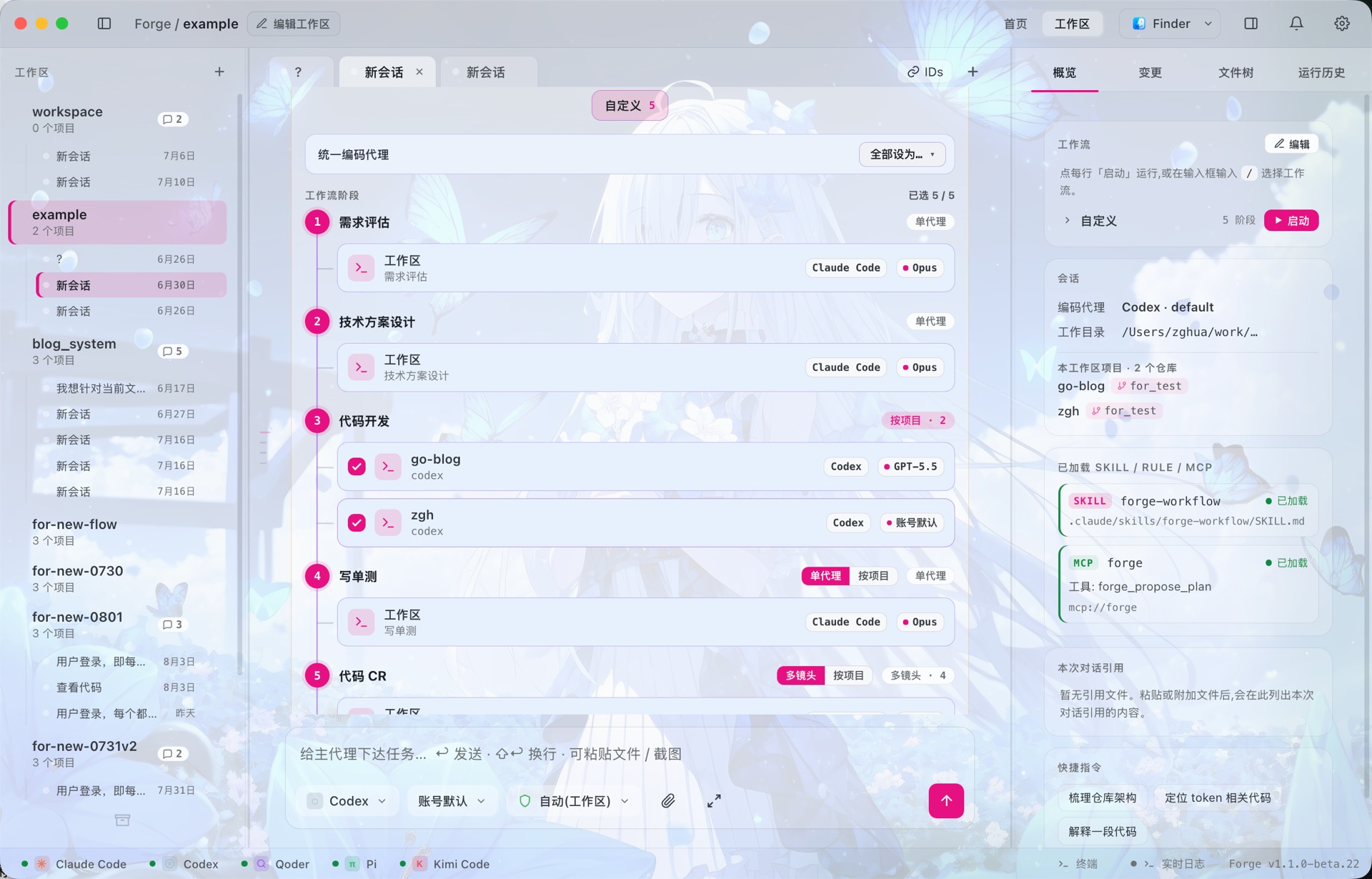
Stage orchestration: five stages, each with its own agent and model; the Develop stage fans out to two repositories.
Supported Agents
| Agent | Chat | Workflow | Native resume | MCP | Models |
|---|---|---|---|---|---|
| Claude Code | ✅ | ✅ | ✅ | ✅ | Read from CLI |
| Codex | ✅ | ✅ | ✅ | ✅ | Read from CLI |
| Cursor | ✅ | ✅ | ✅ | ✅ | Read from CLI |
| qoder | ✅ | ✅ | ✅ | ✅ | Read + custom |
| opencode | ✅ | ✅ | ✅ | ✅ | Multi-vendor gateway |
| Gemini | ✅ | ✅ | — | ✅ | Preset list |
| Qwen | ✅ | ✅ | — | ✅ | Preset list |
| Copilot | ✅ | ✅ | — | ✅ | Preset list |
| Pi | ✅ | ✅ | — | — | Account default / custom |
| Kimi | ✅ | ✅ | — | — | kimi-k2.5 · 256K |
| Reasonix | ✅ | ✅ | — | — | deepseek-flash / reasoner |
| Trae | ✅ | ✅ | — | — | Account default (/model or trae_cli.yaml) |
| Antigravity | ✅ | ✅ | ✅ | — | Refreshed via agy models |
| DeepSeek | ✅ | ✅ | — | — | Account default |
DeepSeek refers to DeepSeek Harness (
npm install -g @deepseek-ai/dsh). myFlowForge uses itsheadlessprofile, and the three permission levels map toread-only/workspace-write/danger-full-access. The API key can be configured viadsh web(Models page) or theDEEPSEEK_API_KEYenvironment variable.Trae (ByteDance's TraeCode CLI) is not published on npm. Install it with the official
install.shinto~/.local/binand add that directory to PATH. To let it modify files unattended in workflows, runtraecli config editand setpermission_mode: bypass_permissions.
Workflow Execution
   Describe the goal
       │
       ▼
  ┌── hook ─┐ ┌─── hook ────┐                                ┌── hook ──┐
  │ pre-run │ │ post-design │                                │ post-run │
  └────┬────┘ └──────┬──────┘                                └────┬─────┘
       ▼             ▼                                            ▼
  Requirements ──→ Design ──→ Approval ──→ Develop ──→ Test ──→ Review
   (clarify)    (design.md)   (human)    (fan-out)  (verify) (multi-lens)
                     │                        │
                     │                        └─ one agent per project,
                     │                           in parallel, each in its own worktree
                     └─ full document; every downstream agent reads all of it

 A "Next" confirmation is required between every two stages. Stages can be
 added, removed, reordered or skipped, e.g. run only "Requirements → Develop".
There are three ways to start a workflow:
- Click Start in the workflow panel;
- Type
/in the input box and select a workflow; - Describe a development task in natural language; the main agent recognizes it and initiates a plan approval via MCP. General questions, discussions and small changes do not trigger this.
Remote Hosts and Mobile
| Method | Description |
|---|---|
| Direct | Connects directly to the daemon port on the same LAN, with token authentication. |
| SSH | Reuses an existing SSH login; no additional ports need to be opened. |
| Relay | For cases where the two machines cannot reach each other directly. End-to-end encrypted: a new key is negotiated for each session, the relay only forwards ciphertext, and any frame that cannot be decrypted is dropped. It can be self-hosted (relay/, supporting Node and Cloudflare Worker); see relay/README.md for the steps. |
The Linux daemon shares the same codebase as the desktop app, with the window layer removed. Install the tar.gz, run it under systemd, and scan the QR code printed in the terminal to complete pairing (see docs/linux-deploy.md).
The mobile app covers the common operations needed while away from the computer: real-time conversation (including reasoning, tool calls and sub-agent cards), permission prompts and plan approvals, changed files and diffs, creating workspaces, workflow templates, switching hosts and pairing by QR code. Markdown, tables and local images are rendered natively; for privacy, remote image URLs are kept as links and are not loaded automatically.
More Features
- MCP bridge: a built-in Forge MCP server that agents use to call back into the app:
forge_ask,forge_propose_plan,forge_write_artifact,forge_handoff,forge_delegate,forge_read_context,forge_heartbeat. It is injected automatically for agents that support MCP; others fall back to text instructions. - MCP servers and skill marketplace: view the MCP servers configured for each CLI and authorize them within the app; install skills for the corresponding CLI from the skill marketplace.
- Memory: notes saved per workspace that agents can read, so long-running tasks keep their context.
- Run observability: streams reasoning, tool calls, file changes and raw output, with filterable logs, run history and a cross-project change record.
- Quota and usage: remaining quota and reset time for each provider, plus usage statistics by workspace, agent and date.
- Bot bridge: handle approvals, view results, start conversations and drive workflows from DingTalk, Telegram or Feishu.
- Permission levels: read-only review, auto (workspace, default) and full access, configurable per session or per stage and mapped to each CLI's actual sandbox scope.
- Slash commands and skills: typing
/lists the commands and installed skills that actually exist on the machine, filtered by agent. - File browser and diff: full-screen file tree with change markers, syntax-highlighted preview, and switching between diff and full-file views.
- Built-in terminal: a real pty rooted at the workspace, with proxy and time zone configurable per provider; when connected to a remote host, the terminal runs on the remote machine.
- Appearance: 6 original skins, 12 accent colors and more than 300 wallpapers, with support for custom images; separate font sizes for the app and the conversation area; color schemes generated automatically from the wallpaper; support for native macOS vibrancy materials.
- Images and visualizations in conversations: local images generated by agents are displayed directly in replies; HTML fragments in replies can be rendered as cards, tables and diagrams (off by default, rebuilt through an allowlist, without
innerHTML).
Download and Installation
Download the latest version from the Releases page:
| Platform | File |
|---|---|
| macOS · Apple silicon (M1–M4) | myFlowForge-<version>-arm64.dmg |
| macOS · Intel | myFlowForge-<version>.dmg |
| Windows · x64 | myFlowForge-<version>-x64-setup.exe |
| Windows · ARM | myFlowForge-<version>-arm64-setup.exe |
| Android | myFlowForge-<version>.apk |
| Linux · headless daemon | myFlowForge-daemon-<version>-linux.tar.gz |
| iOS | App Store: search myFlowForge Assistant |
The macOS installer is signed and notarized and can be installed directly. The Windows installer is not yet signed; when SmartScreen shows a warning, choose "More info → Run anyway".
The app includes an update check and notifies you in the app when a new version is released.
iOS is available on the App Store: search for myFlowForge Assistant. It is free with no in-app purchases. It is not yet available in mainland China or the EU; there you can build and install it yourself from the mobile/ directory with your own Apple ID.
Quick Start
Requirements: macOS 11+ / Windows 10+ / a mainstream Linux distribution, Node.js ≥ 20, git, and at least one coding CLI that is installed and signed in.
git clone https://github.com/flowForges/myFlowForge.git
cd myFlowForge
npm install
npm run dev          # development mode, hot reload for the renderer
| Command | Description |
|---|---|
npm run dev |
Start in development mode (hot reload) |
npm test |
Run the full test suite (Vitest) |
npm run typecheck |
Check both the main-process and renderer tsconfigs |
npm run build |
Production build |
npm run dist:mac-all |
Package both Intel and Apple silicon .dmg files |
npm run dist:win |
Package the Windows x64 installer |
npm run check:daemon |
End-to-end verification of the headless daemon |
The mobile app is in mobile/ (Expo / React Native) and the relay service is in relay/, each with its own package.json.
Build output goes to release/. After changing src/main/**, Electron must be fully restarted; hot reload only applies to the renderer.
Tech Stack
| Category | Technology |
|---|---|
| Desktop shell | Electron 42 · electron-vite |
| UI | React 19 · TypeScript 6 |
| Mobile | Expo · React Native |
| Terminal | xterm.js · node-pty |
| Agent bridge | Model Context Protocol SDK |
| Process control | execa |
| Data validation | zod |
| File watching | chokidar |
| Testing | Vitest · Testing Library |
| Packaging | electron-builder |
Project Structure
src/
├── main/              # Electron main process
│   ├── agents/        # CLI adapters, provider registry, detection and permissions
│   ├── run/           # Workflow engine: stages, approvals, fan-out, hooks, handoff
│   ├── chat/          # Workspace conversations, queue and memory
│   ├── mcp/           # Forge MCP server (agent → app bridge)
│   ├── remote/        # Remote hosts: direct / SSH / relay, routing, E2E encrypted channel
│   ├── daemon/        # Headless daemon and terminal QR code pairing
│   ├── bot/           # Bot bridge (DingTalk / Telegram / Feishu)
│   ├── plugins/       # Plugin host, catalog, scheduling and extension points
│   ├── sessionImport/ # Native session scanning and import
│   ├── usage/         # Per-provider quota adapters
│   ├── pet/           # Desktop pet window
│   └── ...            # git, file system, terminal, updates, watching, windows, appearance
├── renderer/          # React UI (views, components, settings, themes, pets)
├── preload/           # Context-isolated IPC bridge
└── shared/            # Types and pure logic shared across processes
mobile/                # iOS and Android clients (Expo / React Native)
relay/                 # End-to-end encrypted relay (Node or Cloudflare Worker)
Contributing
Issues and PRs are welcome. The project follows test-driven development; when submitting changes, please add or update the corresponding tests and make sure npm test and npm run typecheck pass.
License
MIT License © 2026 zghua
Acknowledgements
Thanks to open-source projects including Electron, React, Vite and Model Context Protocol, and to the coding agents this project integrates with.