
fliks-app/fliks
fliks-app/fliks has 26 GitHub stars and 0 forks. GitHot measured 0 stars in 24 hours. Last checked 2026-11-15 01:58 UTC. Last push 2026-11-13.
Measured star growth
- in 24h
- 0
- in 7 days
- Collecting history
- in 15 days
- Collecting history
- in 1 month
- Collecting history
Net star changes over overlapping periods, not daily totals. Missing measurements are left blank. Stars measure attention, not software quality.
About
Fliks is an open-source, self-hosted media server and library manager. It organizes and streams movies, TV shows, music, books and comics.
Creative & MediaREADME.md
Original
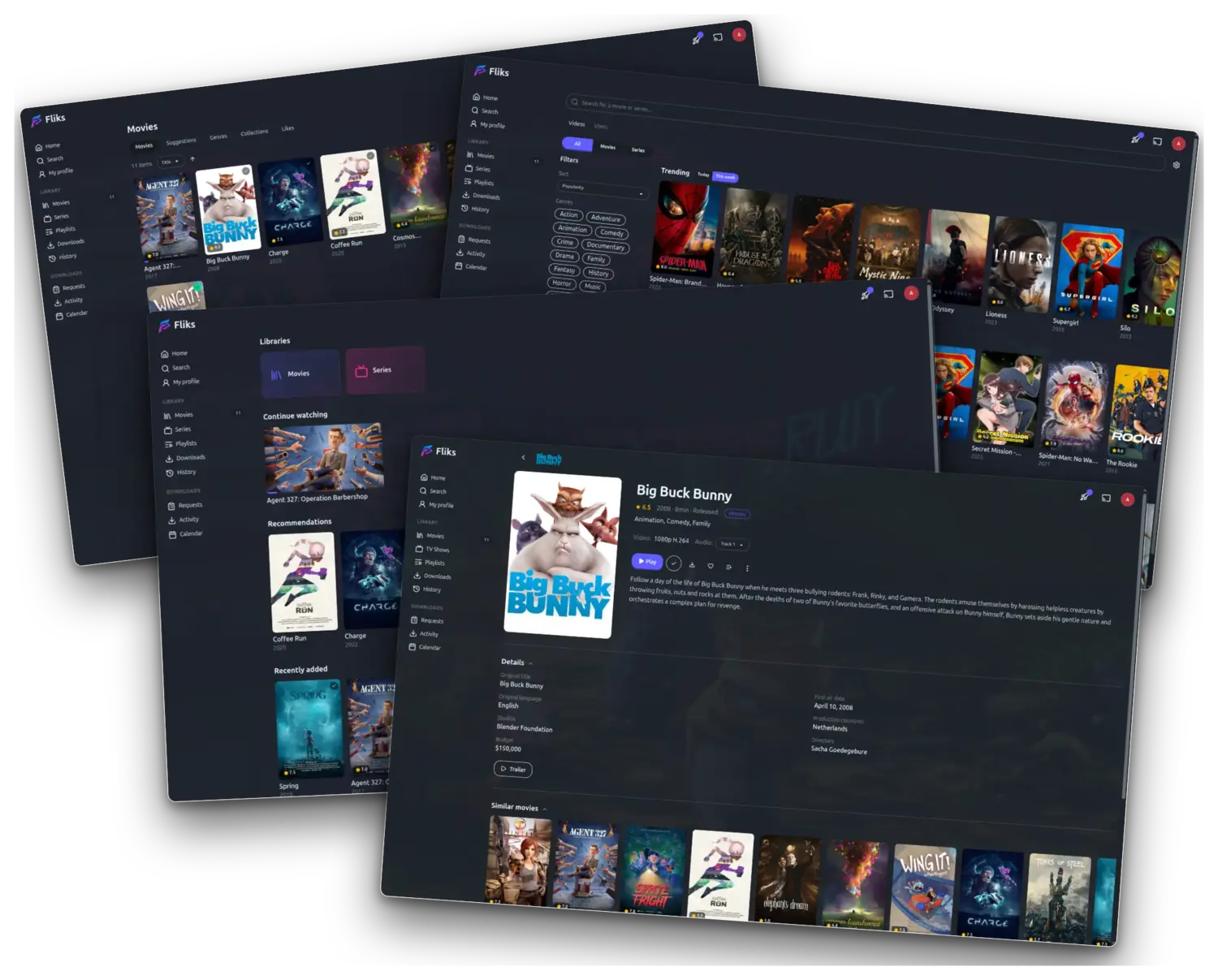
Your personal video collection, on every screen in the house.
Point Fliks at the folders where your videos live and it does the rest: covers, descriptions, cast, seasons and episodes, laid out like the streaming apps you already use — except the library is yours.
It turns a folder of video files into a proper streaming service for the household. Everyone gets their own profile and their own place in every episode; start something on your phone, sit down, and the TV picks it up where you left off. It plays on whatever screen is in front of you, and converts the video on the fly when that screen can't handle the original file.
Self-hosted: the server runs on your machine, there is no account to create, no subscription, and nothing leaves the house.
- Server — Docker, a Windows tray app or a macOS menu-bar app
- Clients — web, iOS, Android, Android TV, Apple TV, Samsung, LG, desktop, Chromecast
- License — AGPL-3.0-or-later
What you get
Watching
- Adaptive streaming — quality follows the bandwidth without a hiccup, or lock a bitrate by hand when you'd rather decide.
- Resume anywhere — start on the phone, finish on the TV; the position syncs live.
- Every track, switchable mid-playback — all embedded audio
renditions, all embedded and external subtitles (
.srt,.ass), with your choice remembered per show. - Subtitles found for you — a video that came without any? Fliks goes looking on the usual subtitle sites and picks the one that actually matches your copy, in the languages you asked for.
- Out of sync, fixed in one click — Fliks listens to the dialogue and slides the subtitles back onto it. No hunting for the right offset, no re-downloading three files hoping one lands.
- Translated on demand — nothing available in your language? Take a track you do have and have it translated into one you can read. You bring the translation service; the result is saved next to the video so it's only done once.
- Subtitle appearance per user: size, colour, shadow, background opacity, margins.
- Skip intro, next episode, chapter markers and thumbnail previews when you scrub.
- Commercials skipped, cuts and mutes honoured — drop an
.edlfile next to a video (the Kodi format Comskip and MCEBuddy write) and every client skips the ads, jumps the cuts and silences the muted stretches on its own. Each user can turn it off. - Live TV, from your own IPTV subscription — add an M3U playlist or an Xtream account and channels line up next to your library, with a program guide and a rewind buffer to pause live and jump back a few minutes. Setting one up: docs/livetv.md.
Browsing
- Several libraries side by side — movies, shows, home videos, kids — each pointed at its own folder.
- Search across all of them, filter and sort by status, date added, rating, runtime.
- Metadata from TMDB / TVDB: posters, fanart, genres, cast and crew. Every person is a page listing everything they worked on in your libraries; every genre is a filter.
- Home rows — Continue Watching, Recently Added, and recommendations weighted by what you've actually watched.
- Calendar of upcoming episodes for the series you follow.
- Spoiler protection — an account-wide switch that blurs the synopsis of a film, a season or an episode you haven't watched, along with an unwatched episode's thumbnail and backdrop, and shows Episode 3 in place of a title that gives the plot away. Click a masked item to reveal it, or mark it as watched and it unmasks for good. Each of the three is its own toggle, and the setting follows your account onto every device.
Sharing with the household
- Watch parties: watch the same film together, each on your own screen, with playback kept in sync, a chat and press-to-talk voice. Plan one ahead, let guests propose and vote for what to watch, and build the evening's programme on the party page.
- Recommend something to someone — pick a film or a season and send it to another user. It shows up on their home page under Recommended for you, with your name on it.
- Playlists — your own running order, drag to reorder, autoplay from one item to the next, and watched items drop off on their own if you want them to.
- Shared playlists — invite other users as viewer, editor or admin and build one together, or save someone else's public playlist to your own list.
- Downloads that keep themselves current — turn a playlist to automatic on your phone, tablet or the desktop app: what you haven't watched is downloaded to the device, and what you have watched is removed to give the space back. Nothing to think about before a flight. A whole season or show downloads in one go, or keeps the next episodes on the device, over wifi only if you prefer.
- Everyone stays in control — each user decides whether their profile is public and what appears on it: tastes, recent activity, favourites, statistics — or nothing at all.
Running it
- Multi-user, each with their own history, progress and preferences.
- Quick Connect for TVs: pick your account on the screen, then approve the request from the Login requests page on your phone.
- Live transcode dashboard for admins: who's watching what, at which quality, on which hardware path, and why a transcode was needed.
- Why is it stuttering? Every client reports how its playback is going, and each session gets a verdict: the network, a device too weak for the stream, a transcode that can't keep up, or a playback error. See it live next to each stream, or look back over the last weeks per device to spot the TV that struggles with HEVC. The numbers stay on your server, and an admin can switch the collection off.
- Library cleanup rules: titles nobody watches go to a Leaving soon list, with reminders before they're removed after a grace period. Or browse the suggestions (never played, ended series) and decide title by title.
- Images cached locally — no hotlinking to external services while you browse.
Plugins
Fliks ships with no way to acquire media. You install what you want from
Settings > Plugins: the official catalog is configured out of the
box, and you can add other sources or import a .fkplugin archive by
hand.
- The Download plugin brings torrent indexer search, download-client management and the grab pipeline. Install it and the search, the clients and their settings pages appear in the interface.
- Archives are signed, and the signature is checked before anything is written to disk.
- A plugin that runs code runs apart. A
dataplugin ships JSON and executes nothing at all; aprocessplugin is a WebAssembly component sandboxed by the server, with capped memory and run time, one private folder, and its own PostgreSQL role and schema. It cannot reach another plugin's tables, or yours. - Plugins extend the interface, not just the backend. Their pages, menu entries and settings appear where they belong and follow your permissions like everything else.
- Updates are checked daily, and you can turn that off.
Writing one: docs/plugins.md.
Client compatibility
Fliks runs on plenty of devices. Start a film on your phone and finish it on the TV: your place follows you from one to the other. Here is the full list of what it runs on.
| Client | Where to get it | Minimum | Notes |
|---|---|---|---|
| Web / PWA | your browser, at the server URL | any current browser | installable to the home screen |
| iOS · iPadOS | App Store | iOS 16.6 | |
| Android | Play Store | Android 6 (API 23) | phone + tablet |
| Android TV | Play Store | Android 6 | |
| Samsung TV (Tizen) | sideload for now | Tizen 5.5 | works fully, not yet on Samsung Apps |
| LG TV (webOS) | LG Content Store | webOS 7.0 | approved, on the store |
| Desktop | release assets, APT or Snap Store on Linux | macOS: Apple Silicon | Windows .exe, macOS .dmg, Linux .deb / AppImage |
| Chromecast | built in, cast from any client | any | custom receiver, same player engine |
| Apple TV | App Store | tvOS 17 | native SwiftUI app |
| Nintendo Switch | build the .nro from switchfliks |
homebrew-enabled console | beta, native client with hardware decode |
The Linux desktop client through APT (Ubuntu 24.04, Debian 13 and later):
sudo curl -fsSLo /etc/apt/sources.list.d/fliks.sources https://github.com/fliks-app/fliks/releases/download/apt/fliks.sources
sudo apt update && sudo apt install fliks-desktop
The first command adds the Fliks repository and its signing key to APT. A .deb installed from the
release assets adds the same source, so apt upgrade keeps it up to date.
Or from the Snap Store: sudo snap install fliks.
Server compatibility
| How you run it | Platforms | Hardware transcoding | Ships with |
|---|---|---|---|
| Docker (recommended) | linux/amd64, linux/arm64 |
Intel QSV · VAAPI · NVIDIA NVENC · AMD | server, web client, FFmpeg |
| Windows — tray app, NSIS installer | Windows x64 | Intel QSV · AMD AMF · NVIDIA NVENC, auto-detected | everything, no dependencies |
macOS — menu-bar app, .dmg |
macOS 13 Ventura+, Apple Silicon | VideoToolbox | everything, no dependencies |
| From source | anywhere Rust and Node (client build) run | whatever your FFmpeg exposes | — |
The image is a single container: the Rust server (fliks-server, behind the
fliks-engine streaming engine), the built Angular client served as static assets, and a self-contained
jellyfin-ffmpeg build. A
PostgreSQL container sits beside it (the example Compose pins 18.3).
Encoders
Which hardware path is available depends on the machine, not on Fliks — it probes at startup and falls back to CPU when nothing else answers.
| Codec | CPU | Intel QSV | VAAPI | NVIDIA NVENC | AMD AMF | VideoToolbox |
|---|---|---|---|---|---|---|
| H.264 | ✅ | ✅ | ✅ | ✅ | ✅ | ✅ |
| HEVC | ✅ | ✅ | ✅ | ✅ | ✅ | ✅ |
| AV1 | ✅ | ✅ | ✅ | ✅ | ✅ | — |
HDR10, HLG and Dolby Vision are tone-mapped to SDR when the receiving device can't render them.
Get started
The server runs on one machine in the house — the one holding your video files. Everything else connects to it. Three ways to install it; they give you the same Fliks, so pick whichever suits the machine. All you need is a folder with your videos and about two minutes.
Windows
Download the installer from the
latest release and run it.
Fliks sits in the system tray and starts with the machine. Nothing else
to install. Details in windows/.
macOS
Download the .dmg from the
latest release and drag it
to Applications. Fliks sits in the menu bar. Apple Silicon, macOS 13
Ventura or newer. Details in macos/.
Docker — Linux, NAS, or a home server
curl -LO https://raw.githubusercontent.com/fliks-app/fliks/main/docker-compose.example.yml
mv docker-compose.example.yml docker-compose.yml
Open the file and set three things:
POSTGRES_PASSWORDandDB_PASSWORD— the same real password- the
/path/to/your/media:/mediasmount: where your files are PORT— only if4848is taken on the host
docker compose up -d
First run
Whichever you picked, open http://<host>:4848 in a browser — on the
machine itself that's http://localhost:4848. A fresh install has no
account: Fliks shows a setup page where you pick the administrator's username
and password (at least 8 characters). Then add a library pointing at your
video folder (/medias under Docker), and Fliks scans it and goes looking for
the covers.
Then install the app on your phone or TV, point it at the same address, and you're done.
License
AGPL-3.0-or-later — run a modified version on a network and you owe its users the modified source.