
flightdeckhq/flightdeck
flightdeckhq/flightdeck has 30 GitHub stars and 2 forks. GitHot measured 0 stars in 24 hours. Last checked 2026-11-18 01:59 UTC. Last push 2026-11-14.
Measured star growth
- in 24h
- 0
- in 7 days
- Collecting history
- in 15 days
- Collecting history
- in 1 month
- Collecting history
Net star changes over overlapping periods, not daily totals. Missing measurements are left blank. Stars measure attention, not software quality.
About
Observability and control plane for AI agents.
AIREADME.md
Original
See and control every AI agent you run, from one self-hosted binary.
An observability and control plane for AI agents: every LLM, tool and MCP call as it happens, with token budgets, MCP policy and a kill switch.
What it is · Quickstart · Coverage · Self-hosting · Roadmap



Install
Installing Flightdeck is one command.
Linux and macOS
curl -fsSL https://flightdeck-hq.com/install.sh | sh
Windows (PowerShell)
irm https://flightdeck-hq.com/install.ps1 | iex
Then start it:
flightdeck
The dashboard is at http://localhost:4000, and nothing needs configuring: agents on the same machine find it without a server address or a token; flightdeck --help lists the flags. The binary goes to /usr/local/bin or ~/.local/bin and the data, a SQLite file, to ~/.flightdeck; on Windows, to %LOCALAPPDATA%\Programs\flightdeck and %LOCALAPPDATA%\flightdeck. If flightdeck is not found, run the PATH line the installer printed, or on Windows open a new PowerShell window. guides/windows.md has the rest for Windows.
Other ways to install
Every channel installs the same binary, built for Linux, macOS and Windows on amd64 and arm64.
Homebrew
brew install flightdeckhq/tap/flightdeck
PyPI, as the flightdeck command:
pip install flightdeck-cli
Or run it from PyPI without installing:
uvx flightdeck-cli
Docker: the image creates an access token on its first start and prints it; agents need it as FLIGHTDECK_TOKEN.
docker run -p 127.0.0.1:4000:4000 -v flightdeck:/data flightdeckhq/flightdeck
Release page: the archives for every platform are on the release page. The installers above download from that release and verify the archive's checksum (and the release's signature when cosign is installed).
Connect your agents
Claude Code
The installer offers this when it finds Claude Code; otherwise:
flightdeck connect claude-code
It installs the Flightdeck plugin for your user, and the sessions you start from then on appear in the fleet view within seconds. flightdeck connect shows whether Claude Code is connected and to which server. Or install the plugin from inside Claude Code:
/plugin marketplace add flightdeckhq/flightdeck
/plugin install flightdeck@flightdeck-plugins
/reload-plugins
The plugin captures prompts and sanitised tool inputs by default, since you are watching your own session. plugin/README.md covers its options, claude -p and CI runs, enforcement and privacy.
Python agents
pip install flightdeck-sensor
import flightdeck_sensor

flightdeck_sensor.init()
flightdeck_sensor.patch()
Those two lines go at the top of your entrypoint; nothing else in your code changes. Every call your agent makes through the Anthropic or OpenAI SDK or litellm, directly or inside a framework, is reported, with prompt capture off until you turn it on. sensor/README.md has the agent identity model, the environment variables and the known limitations.
For a Flightdeck on another machine, set FLIGHTDECK_SERVER to its address (https://flightdeck.example.com; the ingestion URL its start-up block prints works too) and FLIGHTDECK_TOKEN to a token minted under Settings → Access tokens: the plugin and the sensor take the same two values. For Claude Code, flightdeck connect claude-code --server <address> --token-file <file> saves both in the plugin's options instead. Runs that neither reaches (claude --bare, CI without the plugin, agents in other languages) can report over OpenTelemetry.
What you get
Flightdeck is an observability and control plane for AI agents that you host yourself. Every LLM call, tool call and MCP call your coding agents and production agents make streams to one dashboard as it happens, and from that dashboard you set token budgets, allow or block MCP servers, and stop an agent.
 A live fleet timeline |
 Cost and tokens per agent |
 A blocked MCP call and the kill switch |
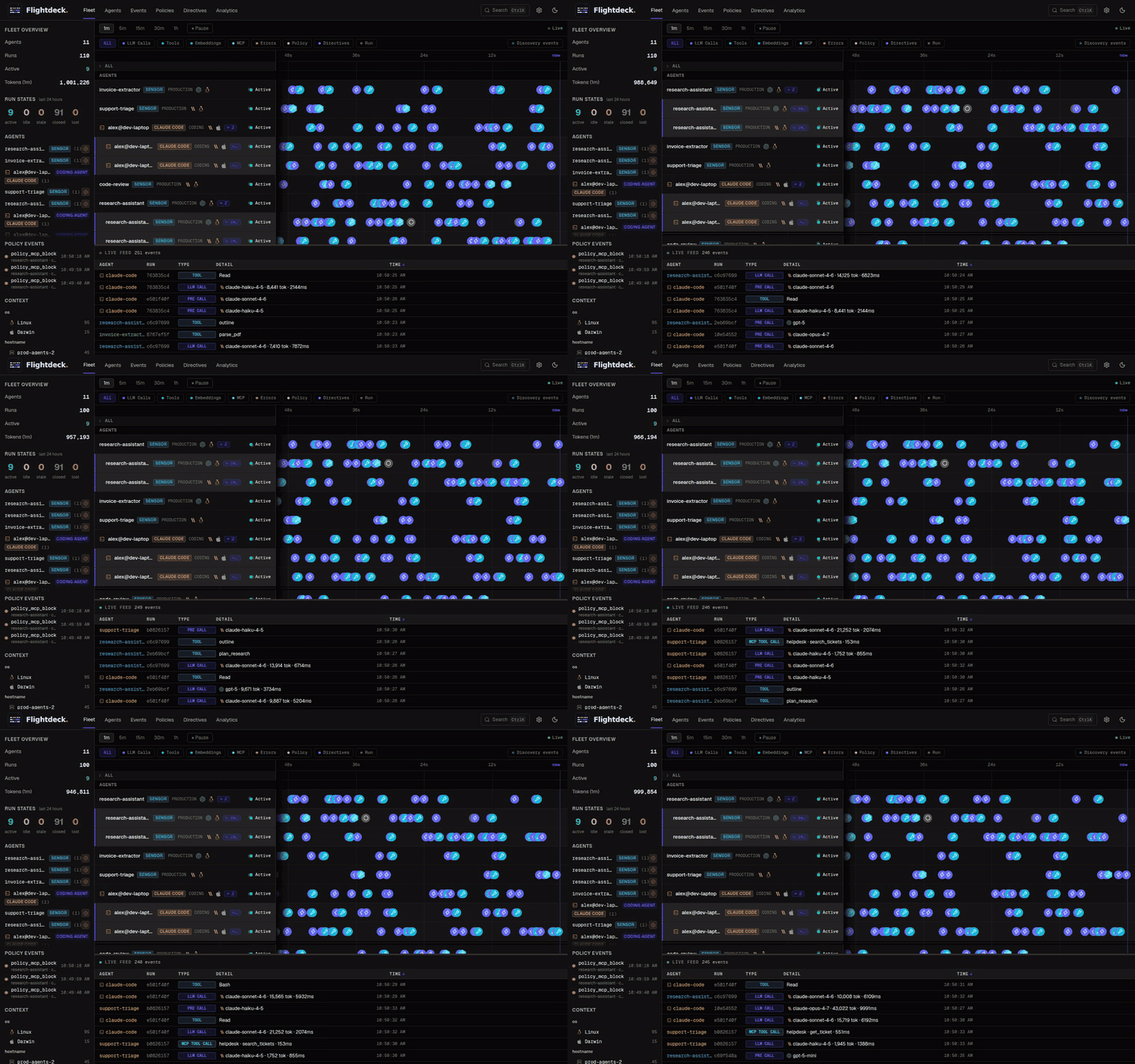
- Live fleet view. Every agent on a shared timeline, sub-agents under their parent, with LLM calls, tool and MCP calls, policy events and errors plotted as they arrive.
- Agents and events. A table of every agent with seven-day token, latency, error, session and cost trends, and a search over every event by agent, type, model, framework or MCP server.
- Run inspection. A run's events in order, its token usage, its runtime context and the sub-agents it spawned; with capture on, each call's prompt, tools and response in the provider's own shape.
- Token budgets. A budget per agent flavor, enforced inside the agent: warn at a threshold, degrade to a cheaper model, block.
- MCP server policy. Allow or block MCP servers for the whole fleet or per agent flavor; the sensor and the Claude Code plugin enforce it at every MCP call.
- Kill switch and directives. Stop one agent, or every agent of a flavor, from the dashboard; register your own functions as directives and invoke them the same way.
- Analytics and estimated cost. Tokens, runs, latency, policy events and cost from public list prices, grouped by agent flavor, model, framework, host, team and more.
guides/features.md describes each in full, and guides/mcp-protection-policy.md the MCP policy. Events arriving on the fleet view:
Coverage
| Covered | |
|---|---|
| LLM SDKs | Anthropic (messages.create, .stream, .parse, on every client class: first-party, Bedrock, Vertex, Foundry), OpenAI (Chat Completions, Responses, embeddings) and litellm, sync, async and streaming. Not yet: Gemini through google-genai (#276), boto3 Bedrock Converse (#277). |
| Coding agents | Claude Code, through the plugin or its own OpenTelemetry export. |
| Sub-agents | A child session per sub-agent, linked to its parent: Claude Code sub-agents, CrewAI agents, LangGraph nodes, LlamaIndex agent workflows, OpenAI Agents SDK agents. |
| MCP | Tool calls, resource reads and prompt fetches through the official mcp SDK (1.28 and later, and 2.x), whichever framework drives it; tool calls for Claude Code. |
The sensor meters every LLM call a framework makes through the Anthropic or OpenAI SDK or litellm, live, and can stop or budget the run. For some frameworks it also opens a session per sub-agent, and some export OpenTelemetry spans that Flightdeck maps after the run, observe-only. Report a run one way: both paths together count it twice.
| Framework | LLM calls | Sub-agents | OpenTelemetry |
|---|---|---|---|
| LangChain | yes | no | no |
| LangGraph | yes | yes | no |
| CrewAI 1.14+ | OpenAI, Anthropic, litellm | yes | no |
| LlamaIndex | yes | yes | no |
| OpenAI Agents SDK 0.6+ | yes | yes | yes |
| Claude Agent SDK (Python) | yes | a session per run | no |
| Google ADK | not on Gemini | planned | yes |
| Pydantic AI | Anthropic and OpenAI models | through OpenTelemetry | yes |
| Strands Agents | not on Bedrock | through OpenTelemetry | yes |
| Microsoft Agent Framework | not on AzureAIAgentClient |
planned | no |
| Deep Agents | yes | planned | no |
| Agno, Haystack, smolagents | yes | on the roadmap | no |
| AutoGen, AG2, Semantic Kernel | yes | no | no |
| DSPy | on its litellm engine | n/a | no |
guides/coverage.md has the full matrices: every intercepted method, which providers of each framework are metered, how streams and errors are reported, the client types, and what is not planned.
Self-hosting
The same binary serves a team. Started with --domain, or listening on any address but your own machine's, it refuses the development token, creates an access token on its first start and prints it once; make more under Settings → Access tokens and give them to your agents (Connect your agents).
flightdeck --domain flightdeck.example.com
HTTPS on port 443 with a Let's Encrypt certificate, port 80 redirecting to it. The host needs a DNS record and both ports reachable.
flightdeck --database-url 'postgres://flightdeck:[email protected]:5432/flightdeck'
Postgres instead of the SQLite file, for a larger fleet; the schema is created on the first start.
docker run -d --name flightdeck -p 127.0.0.1:4000:4000 -v flightdeck:/data flightdeckhq/flightdeck
The image is the binary with its data on the flightdeck volume; docker logs flightdeck shows the token. The port is published on 127.0.0.1 because whoever can reach it can read that token: publish it wider only behind a firewall or a proxy that authenticates.
git clone https://github.com/flightdeckhq/flightdeck
docker compose -f flightdeck/docker/docker-compose.yml up -d
helm install flightdeck flightdeck/helm/ --namespace flightdeck --create-namespace
Compose runs that image as one container on SQLite, and with docker-compose.postgres.yml layered on it, beside a Postgres. The Helm chart runs it as a StatefulSet: by default one pod on SQLite with the embedded bus, with nothing to set. More than one pod needs a Postgres (postgres.enabled=true with postgres.password, or postgres.externalUrl) and a NATS they share (the chart's, with nats.auth.token, or nats.externalUrl). The notes helm install prints say how to open the dashboard and read the token; flightdeck.dashboardTokenSecret names a Secret holding a token you supply, and a host name beyond the chart's Service and Ingress names goes in flightdeck.extraAllowedHosts. Both read their files from a clone of this repository. guides/self-hosting.md has their settings, the chart's values and the upgrade notes.
Data and backups. Everything is in the data dir (--data-dir, default ~/.flightdeck): the SQLite database, the message-bus store and the secrets file. guides/self-hosting.md has the command that backs up a running instance.
Upgrading. Install the new release and start it; the binary migrates its database at start. On Windows, stop it first: guides/windows.md covers upgrading, the firewall and removing it. ARCHITECTURE.md ("Deployment") lists every flag and environment variable.
What Flightdeck is not
- Not a proxy. The sensor wraps SDK client classes inside the agent's own process; calls go directly to the provider. Nothing routes through Flightdeck.
- Not a content inspector by default for production agents. The Python sensor defaults to
capture_prompts=False; with capture off, event payloads carry token counts, model names, latency, framework, and tool names only. The Claude Code plugin is the one exception: it captures prompts and sanitised tool inputs by default because you are observing your own session on your own machine, andFLIGHTDECK_CAPTURE_PROMPTS=falseturns that off. - Not an orchestrator. Flightdeck observes; it does not decide what an agent should do next. Directives (kill switch, model swap, custom handlers) are explicit operator actions.
- Not a billing system.
estimated_costis an approximation from public list prices. Treat as a sanity check. - Not a notification platform. No Slack, email, or PagerDuty integrations.
- Not multi-tenant SaaS. Self-hosted only. One deployment, one tenant.
- Not an evaluation or prompt-management tool. No LLM-as-judge scoring, eval datasets or prompt versioning.
- Not an LLM gateway. No model substitution, no caching layer, no retries injected by Flightdeck. The sensor enforces budgets your agents already know about.
Roadmap
Planned work is tracked as GitHub issues labelled roadmap, grouped by release milestone. React with :+1: on the ones you need; that is how they get prioritised.
Contributing
Bug reports, provider requests, and pull requests are welcome. See CONTRIBUTING.md for the dev stack, lint, test instructions, the playground, and the process for adding a new LLM provider.
License
Apache 2.0. See LICENSE.
Acknowledgements
Built and maintained by Omri Arnon (LinkedIn). The fleet timeline UI was inspired by agent-observe by @simple10, a great tool for observing individual Claude Code sessions. The sensor builds on the foundation of tokencap, the author's own open source token budget enforcement library.