
flagdizero/jenny-android-ai-agent
flagdizero/jenny-android-ai-agent has 128 GitHub stars and 27 forks. GitHot measured 0 stars in 24 hours, +3 in 7 days, and +10 in 15 days. Last checked 2026-11-17 02:12 UTC. Last push 2026-11-15.
Measured star growth
- in 24h
- 0
- in 7 days
- +3
- in 15 days
- +10
- in 1 month
- Collecting history
Net star changes over overlapping periods, not daily totals. Missing measurements are left blank. Stars measure attention, not software quality.
About
A local-first personal AI agent that lives on your Android phone. Permanent memory, scheduled autonomous work, self-written mini-apps, and an optional home-screen launcher. Your data stays on the device — bring your own API key, or run a local model and keep the whole loop offline.
AIREADME.md
Original
A local-first personal AI agent that lives on your Android phone
It remembers you permanently, acts on a schedule without being asked, writes its own mini-apps on request, and can be your phone's home screen. Your memory, files and conversations stay on the device. Bring your own API key — or run a model on your own hardware and keep the whole loop offline.



Documentation · Quick start · Features · Privacy & security · Limitations · FAQ
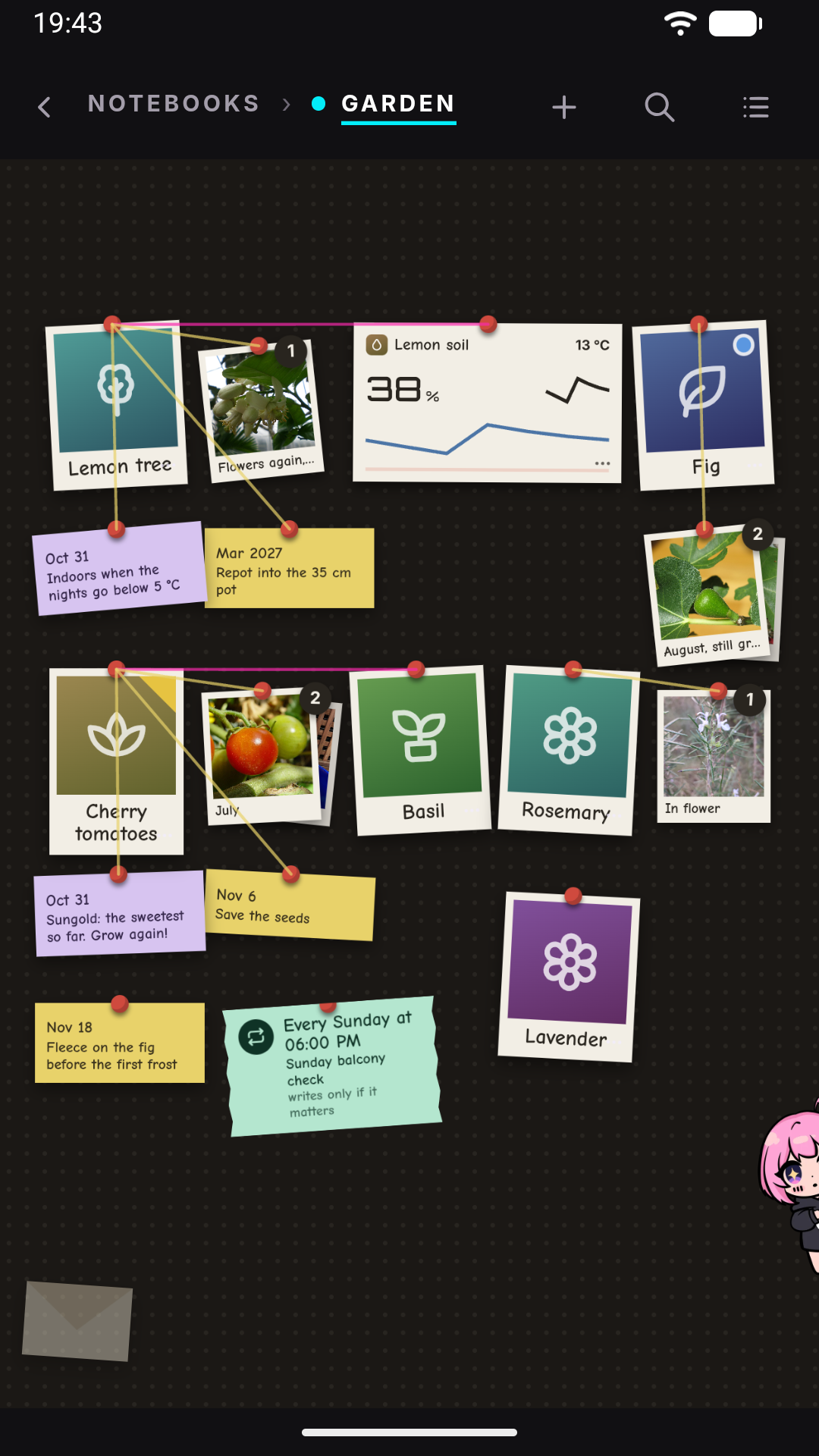
An AI agent that runs on your phone, not in someone's cloud
Jenny is an Android app with an embedded Python runtime. It registers as a HOME activity, so if you want, pressing Home lands you in a conversation instead of a grid of icons. A foreground service keeps the agent alive with the screen off — which is what makes scheduled work and proactive messages possible at all.
If you have ever self-hosted an AI agent on a server, this is that: except the host is a phone you already own, it has a screen, and its battery is the UPS.
It is built by one person, not a polished consumer product. Sideloaded, no store and no silent auto-updates (Jenny tells you when a release exists and installs it only when you confirm), and the known limitations are listed in full rather than discovered later.
Is it actually free software?
The question worth answering first, because "AI agent" plus "API key" usually means a proprietary service with an open-source shell.
- The app is AGPL-3.0, all of it, and it builds from this repository with no extra steps.
- There is no service of mine anywhere. No account, no sign-up, no telemetry, no analytics, no crash reporter, no server of mine in the loop. Not a policy — there is nowhere for me to look from.
- The model provider is your choice, and it is optional. Point Jenny at Ollama or LM Studio on your own hardware and the loop is fully offline: no traffic leaves your network. See local models.
If you use a hosted provider, then yes — your prompts go to that provider under your own key, and Jenny depends on a non-free network service for as long as you choose one. That is your decision per install, not a property of the app.
What it can do
🧠 Permanent on-device memory. Every couple of hours a background pass replays the recent conversation and distils it into structured Markdown on disk: who you are, the agent's own behavioural notes, an index of durable context, and any procedure it saw you repeat, written down as a reusable skill. Noise is pruned, signal accumulates. It's plain Markdown on the device, so switching provider doesn't cost you your memory. → Memory
📚 It builds you a wiki. Feed it articles, notes, PDFs or web pages and ask it to compile
them: you get cross-linked Markdown pages — concepts and entities, joined by [[wikilinks]] —
behind the notebook they belong to. The notebook opens on its board: one card per subject,
each with a drawer summarising the pages it comes from, plus the reminders and threads that
matter now (that's the fourth screenshot above). Driven entirely from chat through a built-in llm-wiki skill: create one, ingest a
source, compile, ask it questions, run a lint pass for dead links and orphan pages. It does
not update itself — every step is a request you make, or a job you schedule. Multiple wikis
live side by side as plain files in the workspace, so they're editable and backed up like
everything else. → Wiki
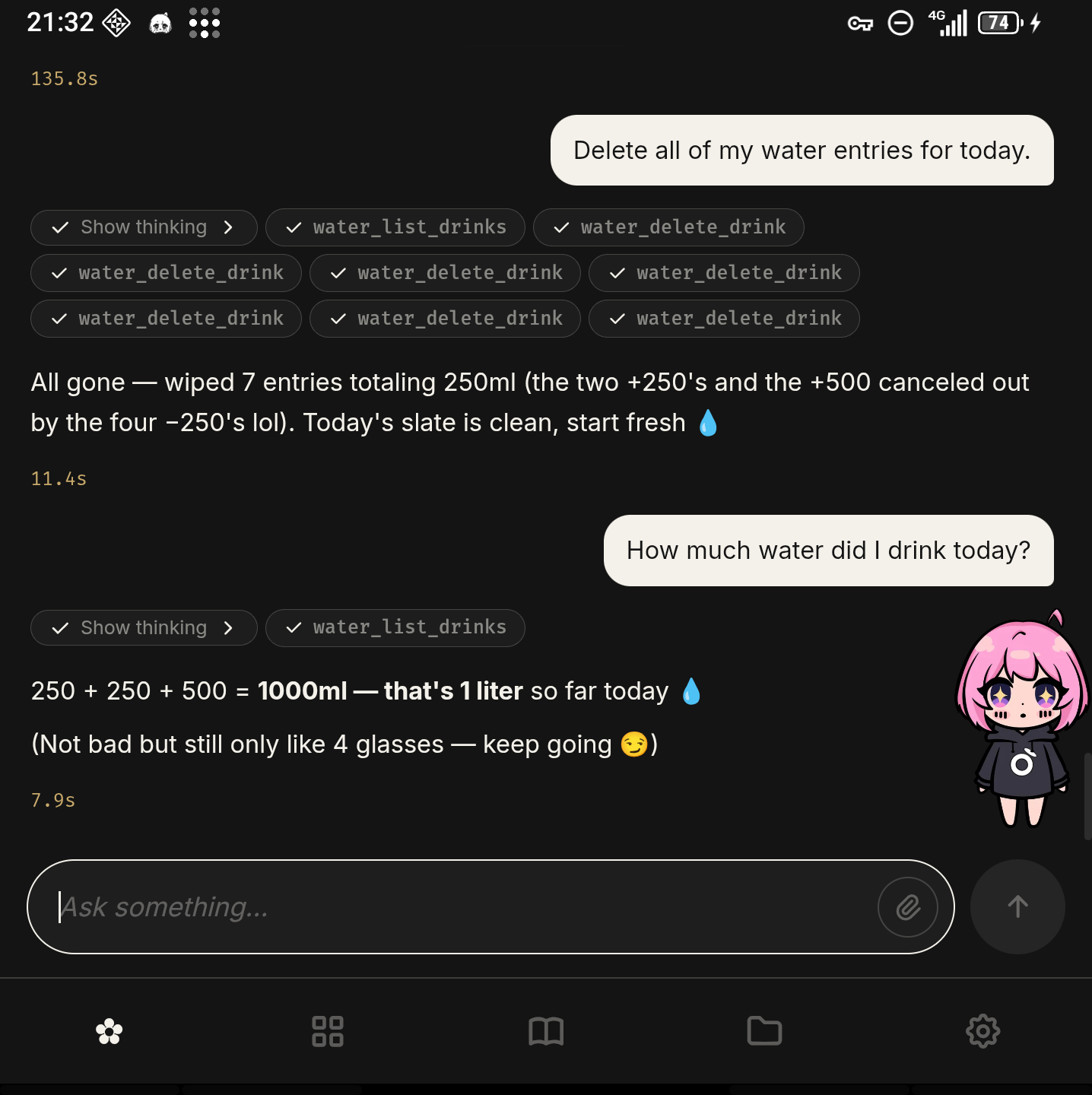
⚡ It acts on its own. Reminders, one-shot actions and recurring jobs ("every Monday, summarise my week"). When one fires, it messages you first, screen off. It reads and writes files, executes Python, and searches the web through a real hidden Chrome WebView rather than a plain fetch, so JavaScript-rendered pages work. → Scheduling · Tools
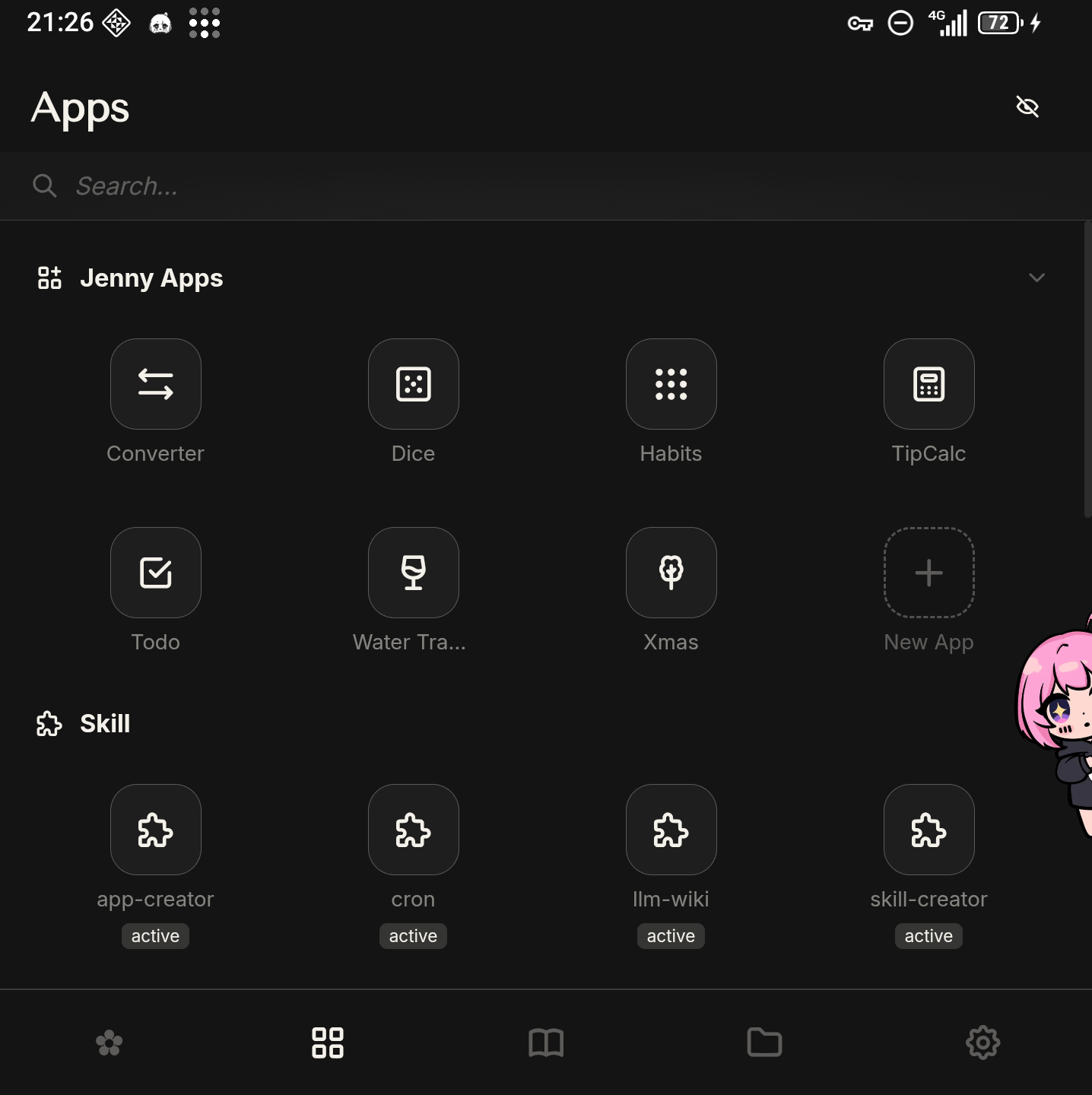
🛠️ It writes its own Android mini-apps. Describe one in chat — "something to track my plants" — and the agent builds it: UI, typed actions, persistent storage, installed into its own app grid. Each action becomes a callable tool, so the same app is usable by you, by the agent in conversation, and by anything that triggers a turn, including cron. That last one is what makes "alert me if the basil needs water" work end to end. → Mini-apps
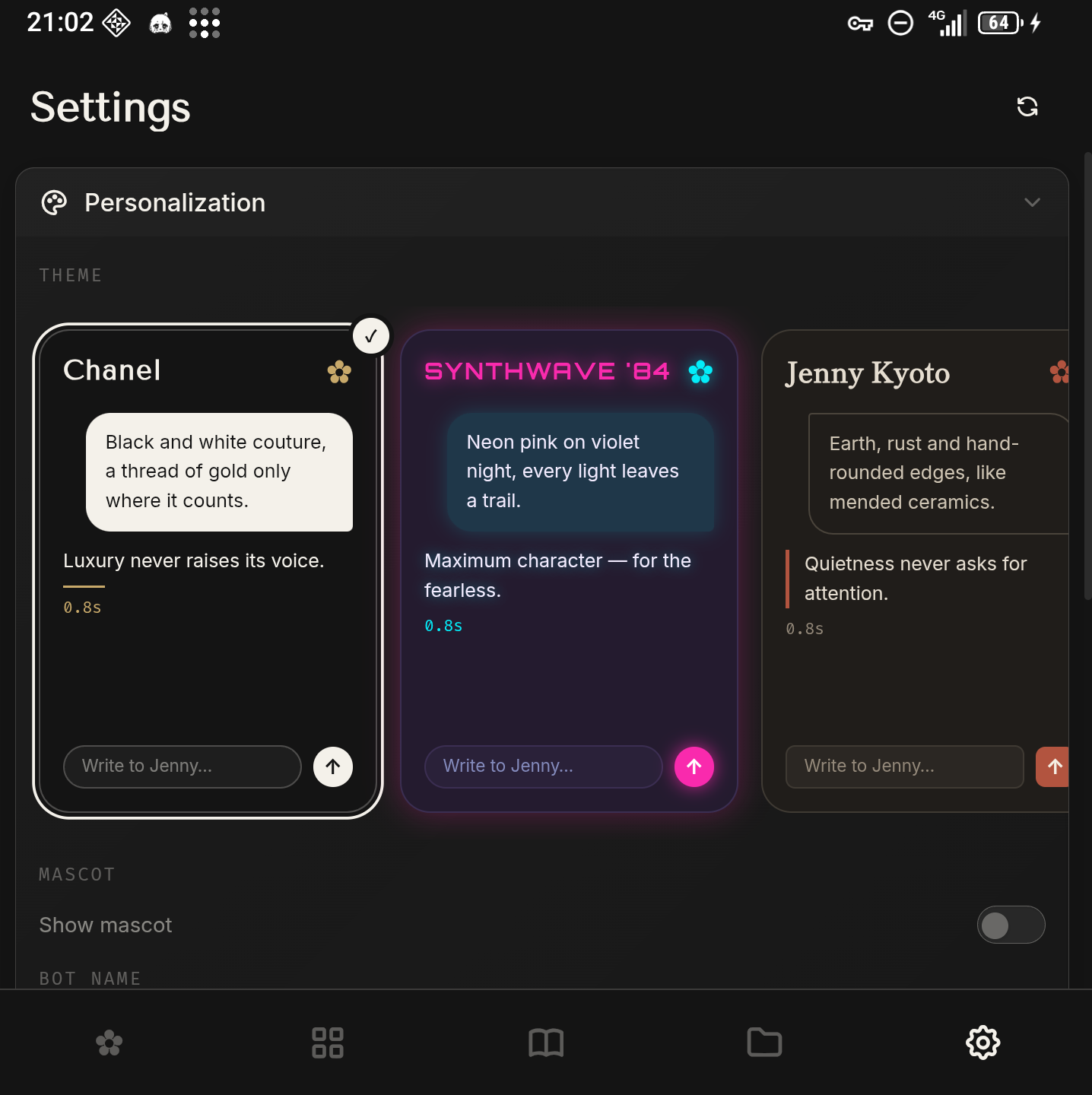
📱 It can be your Android launcher. It declares HOME + DEFAULT + LAUNCHER and handles
the Home gesture, listing and launching your installed apps from a panel inside the UI. Seven
visual themes and a draggable mascot that is the door to the chat: tap her anywhere and the
conversation comes up over what you are looking at. Judged purely as a launcher it would
be a bad one — no widgets, folders or icon packs. The launcher part is the how, not the
what. → Launcher setup
💬 Optional Telegram bridge for reaching the agent from anywhere — outbound-only, your own bot token, so nothing on your network becomes reachable from the internet. Messages through it pass through Telegram's servers; your memory and files never do. Off by default.
Quick start
Download the APK from Releases — Android 8.0 or newer, ~72 MB, most of which is the embedded CPython runtime. Verify it against the hash published on the release page:
shasum -a 256 jenny-2.0.0.apk
Android will ask you to allow installing from outside the Play Store. The APK is signed with my own key (RSA 4096, schemes v2 and v3) — no store vouches for it, which is the deal with sideloading, and checking the hash is how you confirm you got the file I built. Then launch it, follow onboarding, paste your API key. No account to create, at any point.
Or build it yourself — the whole thing builds from this repository, which is rather the point of not having a store in the middle.
Installing · first run · build from source · is it for you?
Privacy and security
Memory, conversations, files and generated apps live in the app's private storage. The web UI
is served on loopback by default (127.0.0.1) — no port exposed to your network, nothing
to reverse-proxy, no inbound attack surface unless you deliberately rebind it. The API is
token-gated even on loopback, because Android does not isolate loopback TCP between apps.
Jenny makes six kinds of outbound connection — your provider, Bing when it searches,
api.telegram.org if you enabled the bridge, any URL you or the agent explicitly fetch,
OpenRouter's attribution headers when that's your provider, and a daily check for a new
release. None of them carries anything about you. (Beyond these, there are only the
connections you set up yourself: SSH to hosts you register, and the HTTP actions of mini-apps you
install.) The update check is a plain GET of the
latest.json published with the release: no identifier, no version, no headers of ours, no
query string — a public file fetched and compared on the device. It is the only one that goes
to a server this project controls, and the only one you did not switch on: it runs every 24h,
and updates.enabled: false stops it. Jenny declares 16 permissions and asks for no
camera, microphone, contacts, SMS, call log, background location or storage.
→ Every connection and permission
Two disclosures I would rather you hear from me than discover:
- Your prompts go to whichever provider you chose. On-device storage is not on-device inference. If a location fix ends up in the agent's reasoning, it ends up in that prompt.
- The copy on Google Drive (Play Store build) is only as strong as the password you choose for it. It is encrypted and opt-in, and it opens with that password alone — Google holds the copy, not a way to read it. Forget the password and lose the phone, and the copy is gone too: nobody can recover it. Someone who gets into your Google account can try passwords against it, so pick a long one. (Android's own backup takes nothing from Jenny.) → Privacy in detail
Security, short version: python_exec is not a sandbox — arbitrary Python, in-process; the
module lists are a usability guardrail, not containment. Provider keys are plain text,
protected by the app sandbox and readable by the agent's own file tools. Prompt injection is
not solved — nobody's is; asking Jenny to "read this URL and do what it says" is handing a
stranger your tools. SECURITY.md is the long version, written to be useful
rather than reassuring — read it before you point this at anything you care about.
→ Security model
Known limitations
Collected in one place rather than scattered, so you can judge before installing.
- Sideload only. A signed APK on Releases, and the source. No Play Store, no F-Droid listing. Jenny does check daily whether a newer release exists and can install it when you say so, but nothing updates itself behind you: Android still shows its own install prompt.
- Not a full launcher. No widgets, folders, icon packs or wallpaper management.
- Web search is Bing-only. A real CAPTCHA page fails rather than being solved.
- Subagents are a tool, not an orchestrator. The agent can delegate to background subagents, but nothing decomposes a request and drives it to completion on its own — delegation is a per-turn decision by the model. A big job in a notebook can become a step-by-step plan, which the code drives one step at a time.
- Mini-apps can't reach authenticated servers. Declaring
authin a manifest is refused outright until there's a credential store. - Small models struggle. The agent loop leans hard on instruction-following and tool-calling; quality tracks the model, and below the frontier tier it varies a lot.
- Battery is unmeasured. It idles cheaply and asks for battery-optimisation exemption, but I haven't published numbers and won't invent them.
- Android only. Not a temporary gap — the whole design assumes a device you own that stays on.
Status and roadmap
2.0. It has been my daily driver for months, and since 1.0 a change that breaks something you rely on gets a new major number — see the changelog. It is still one person's project with rough edges, onboarding most of all, which is exactly where feedback is worth most.
Not promised, roughly in order: measured battery numbers · voice in and out · a credential store so mini-apps can reach authenticated servers · the agent operating other apps on the phone · richer system surfaces.
Contributing
Issues and PRs welcome — see CONTRIBUTING.md and
CODE_OF_CONDUCT.md. Contributions need a
DCO sign-off (git commit -s).
The most useful contribution right now isn't code: install it, try to set it up without reading anything, and tell me exactly where you got stuck.
If the idea seems worth existing, a star is what makes it findable by the next person who would want it — GitHub's search ranks on them, and this project has no marketing budget.
Architecture
A native Android app with an embedded CPython 3.11 (Chaquopy 17), minSdk 26 /
targetSdk 34. The agent runs as a persistent foreground service and serves a mobile-first
SPA over loopback. Messages flow through an async bus that decouples the channel from the
core. Over 15,000 tests; CI runs ruff, pytest on 3.11 and 3.12, and pyright — blocking on the
subsystems that are already type-clean, advisory on the rest, which is the honest state of a
codebase being tightened rather than one pretending to be finished.
→ Architecture · Concepts · The agent turn
License, trademark, and upstream
Code is AGPL-3.0. Jenny is a fork of nanobot (MIT, by Xubin Ren) — what this fork keeps, removes and rewrites is documented in FORK_BOUNDARY.md, and upstream's license is reproduced verbatim in THIRD_PARTY_NOTICES.md along with every bundled library and font.
The Jenny name, logo and mascot artwork are not under the AGPL grant — see TRADEMARK.md. Fork the code freely; ship it under your own name.
Developed by flagDiZero. Copyright © 2026 Ludovico Ragno.
FAQ
Is this a launcher like Nova or Niagara? No — the launcher is the how, not the what. Jenny is a personal AI agent; being the home screen is what makes it present instead of an app you remember to open.
Does it really work offline, with local models? Yes — Ollama and LM Studio through the OpenAI-compatible engine. With the model on your LAN and the Telegram bridge off, no traffic leaves your network at all. Expect quality to track the model.
What does it cost? The app is free and open source. You pay your provider directly, or nothing with a local model. My marginal AI cost is zero, so there is no incentive to ration your usage — an architectural fact, not a pricing promise.
Why AGPL, if it never touches a server? So a hosted fork can't take the work closed. Personal use is unaffected.
On the record
So they can be held against me: BYOK is free, forever — using Jenny with your own key will never require a subscription, an account, or a payment to me. And local-first is the architecture, not a launch feature. Don't trust that sentence; check the permissions and the source. That's why they're public.
Support the project
No subscription to sell you and BYOK stays free, so donations are the only thing funding the work.


Local-first personal AI agent for Android · on-device memory · BYOK · offline-capable · AGPL-3.0