
fiddyschmitt/File-Tunnel
fiddyschmitt/File-Tunnel has 1,126 GitHub stars and 105 forks. GitHot measured 0 stars in 24 hours. Last checked 2026-11-09 09:37 UTC. Last push 2026-10-30.
Tunnel TCP connections through a file
What you can do
- -L can be used multiple times, to forward numerous ports through the one tunnel.
- To enable other computers to use the tunnel, specify a binding address of 0.0.0.0. For example: -L 0.0.0.0:5000:192.168.1.50:3389 allows any computer on the network to connect to the tunnel and onto 192.168.1.50:3389
- Use -R for remote forwarding. For example: -R 5000:10.0.0.50:6000 instructs the remote side to listen on port 5000, and when a connection is received forward it through the tunnel and onto 10.0.0.50:6000 via the local machine. This allows you to share a server running on your local machine, with other computers.
- You can use another computer's internet connection by following these instructions.
Measured star growth
- in 24h
- 0
- in 7 days
- Update delayed
- in 15 days
- Update delayed
- in 1 month
- Update delayed
Net star changes over overlapping periods, not daily totals. Missing measurements are left blank. Stars measure attention, not software quality.
README.md
OriginalFile Tunnel
Tunnel TCP connections through a file server.
A full list of supported file systems can be found here.
Download
Portable executables for Windows, Linux and Mac can be found over in the releases section.
Example 1 - Bypassing a firewall
You'd like to connect from Host A to Host B, but a firewall is in the way. But both hosts have access to a shared folder.
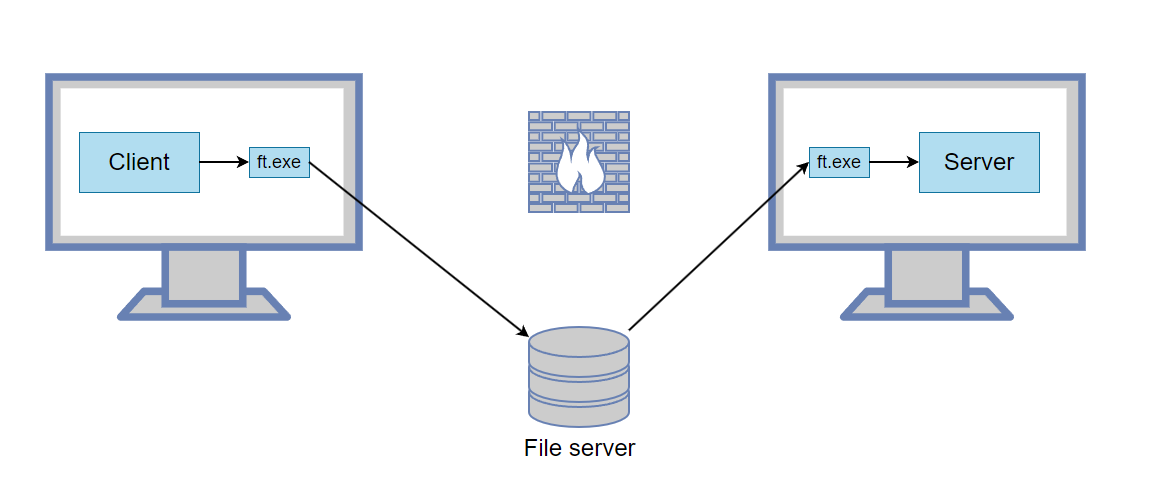
Host A
ft.exe -L 5000:127.0.0.1:3389 --write "\\server\share\1.dat" --read "\\server\share\2.dat"
This command listens for connections on port 5000. When one is received, it is forwarded through the file tunnel and then onto 127.0.0.1:3389.
Host B
ft.exe --read "\\server\share\1.dat" --write "\\server\share\2.dat"
Now on Host A, connect the client to 127.0.0.1:5000 and it will be forwarded to the remote server.
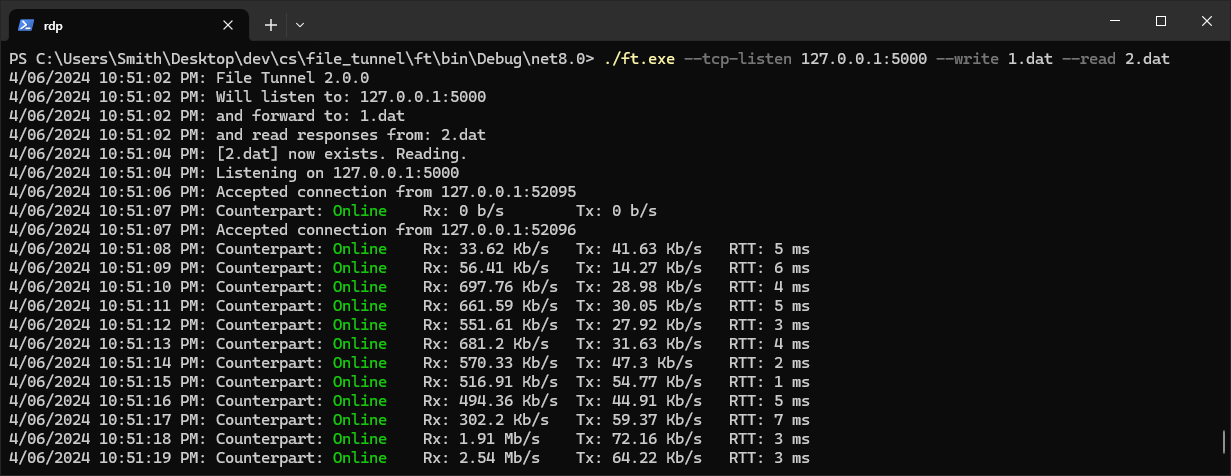
This is what the File Tunnel looks like when operating:
Example 2 - Tunnel TCP through RDP (similar to SSH tunnel)
You'd like to connect to a remote service (eg. 192.168.1.50:8888), but only have access to Host B using RDP.
Host A
ft.exe -L 5000:192.168.1.50:8888 --write "C:\Temp\1.dat" --read "C:\Temp\2.dat"
Run an RDP client and ensure local drives are shared as shown here.
RDP to Host B.
Host B
ft.exe --read "\\tsclient\c\Temp\1.dat" --write "\\tsclient\c\Temp\2.dat"
Now on Host A, you can connect to 127.0.0.1:5000 and it will be forwarded to 192.168.1.50:8888
Other interesting features
-Lcan be used multiple times, to forward numerous ports through the one tunnel.To enable other computers to use the tunnel, specify a binding address of
0.0.0.0. For example:-L 0.0.0.0:5000:192.168.1.50:3389allows any computer on the network to connect to the tunnel and onto 192.168.1.50:3389Use
-Rfor remote forwarding. For example:-R 5000:10.0.0.50:6000instructs the remote side to listen on port 5000, and when a connection is received forward it through the tunnel and onto 10.0.0.50:6000 via the local machine. This allows you to share a server running on your local machine, with other computers.Use
-Dfor dynamic (SOCKS) forwarding, just like SSH. For example:-D 1080starts a SOCKS4/4a/5 proxy on port 1080; each connection is dialed from the remote side, so applications can reach whatever the remote machine can. A bare-R 1080(no destination) is the reverse: it hosts the SOCKS proxy on the remote side, dialing out via your local machine. Handles both TCP (CONNECT) and SOCKS5 UDP (ASSOCIATE); no authentication.Use
--http-proxyfor an HTTP proxy. For example:--http-proxy 8080starts an HTTP CONNECT proxy on port 8080, dialed from the remote side (point a browser orcurl -x http://127.0.0.1:8080 https://example.comat it). Use--remote-http-proxy 8080to instead host the proxy on the remote side, dialing out via your local machine. CONNECT method only (HTTPS and any TCP tunnel); no authentication.You can use another computer's internet connection by following these instructions.
How does it work?
The program starts a TCP listener, and when a connection is received it writes the TCP data into a file. This same file is read by the counterpart program, which establishes a TCP connection and onforwards the TCP data. To avoid the shared file growing indefinitely it is purged whenever it gets larger than 10 MB.
Explore related projects
codecrafters-io/build-your-own-x
Master programming by recreating your favorite technologies from scratch.
561,366 starspublic-apis/public-apis
A collective list of free APIs
497,639 starsmorluto/rea
Reverse engineer anything with agents, from app behavior down to native binaries.
447,132 starsopenclaw/openclaw
The AI that really does things. Any OS. Any Platform. The lobster way. 🦞
394,258 stars